


Discover the top Power Automate alternatives to streamline tasks and boost productivity. Pick the best competitor to Power Automate and minimize the risk factors in your business:
Microsoft Power Automate is a comprehensive process automation platform. Low code and AI power this end-to-end cloud-based platform and help streamline the processes across the organization. According to Microsoft, it helps decrease app development costs by 45%. Also, it is one of the popular tools and 93% of Fortune 500 companies use Power Automate.
This end-to-end solution can be used for various use cases, such as making powerful governance, streamlining approval processes, document automation, etc.
Table of Contents:
Replacements for Microsoft Power Automate

Integrating this solution with other applications is easy. It has various built-in connectors to help you integrate workflows into multiple apps. It will let you create customized connectors.
Who is this article for?
This article is for those looking for alternatives to Microsoft Power Automate.
It is helpful for all industries like BFSI, Manufacturing, Education, Retail and Consumer Goods, Travel and Hospitality, Education, Media and Entertainment, Healthcare, and Lifesciences where there is a bulk amount of work and data, alternatives of Microsoft Power Automate tools can be used. It releases the burden of work with minimum risk factors and errors.
How did we select these tools?
Reusability, ease of maintenance, reporting mechanism, collaboration, support services, budget, and data-driven test capabilities are some factors that one should consider before going ahead with any alternative of Microsoft Power Automate tools.
Pricing, transparency in services, capability of integrating with other applications, and ease of use user interface are also a few necessary things to consider while buying an alternative to Microsoft Power Automate.
Why look for power-automated alternatives?
Microsoft Power Automate is an all-in-one SaaS platform. It is a feature-rich solution for optimizing and automating workflows and business processes. Though it is a comprehensive solution, it has some limitations, such as a few actions in a single workflow, support for sequential workflow only, workflow instances can be saved for a limited period, etc.
As per the customer reviews, Power Automate is an ideal solution for simple tasks. Complex workflows may affect the program’s performance.
List of the Best Microsoft Power Automate Alternatives
Decide among these outstanding competitors:
- Cflow
- SS&C Blue Prism Intelligent Automation Platform
- Appian
- Nintex Process Platform
- Jotform Tables
- UiPath Robots
- Zapier
- Automation Anywhere
- IFTTT
- ActiveBatch
- RunMyJobs by Redwood
- Tidal
Comparing the Top Power Automate Competitors
| Tool Name | Best For | Features | Deployment | Price |
|---|---|---|---|---|
| Cflow | For small, medium and large-scale enterprises | Easy API Integration, Flexible Approvals, Workflow Templates, Security and Backups | Cloud-based SaaS platform | Free trial for 14 days |
| SS&C Blue Prism Intelligent Automation Platform | For highly regulated industries | Intelligent Automation, Robotic Process Automation & Business Process Management | Cloud-based SaaS platform, Windows, Mainframe and Web | Free trial for 30 days |
| ActiveBatch | Small, medium and large-scale enterprises | Super REST API adapter, Pre-built connectors and templates, Role-specific views, Self-service portals, Workflow optimizer, Low code, drag-and-drop GUI, IT process automation | On-premises,Hybrid & Cloud-based | Free trial for 30 days |
| RunMyJobs by Redwood | Medium and large-scale enterprises | Self-updating lightweight agents, Single-tenant architecture, System updates in minutes, Pre-built SAP S/4HANA, BTP, ECC integrations, Self Service automation, Hybrid Cloud Automation, ERP Automation, Managed File Transfer Automation, IT process SLA monitoring | SaaS, On-premises, Hybrid & Cloud-based | Free trial for 30 days |
| Tidal | Best for IT companies | Event-Based Scheduling, Monitoring & Recovery and calendar notifications | On-premises, cloud or hybrid environment | Free trial for 30 days |
Detailed reviews:
#1) Cflow
Best for leveraging the transition from spreadsheets to automated business processes can be done simply. It helps accelerate the day-to-day workflow process.
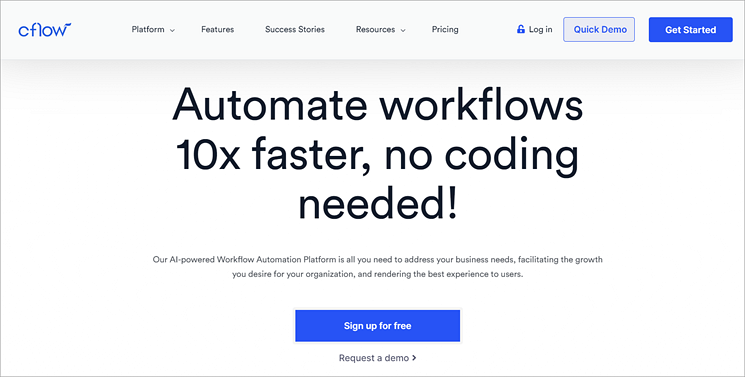
With Cflow, end-to-end processes can be tracked and reviewed from anywhere and at any time. All the day-to-day processes can be accelerated. It saves time and increases productivity. It is a cloud-based platform. Cflow provides a zero-coding platform for automating workflows. Hence, it is easy for businesses to set the entire workflow.
Leveraging a no-code application builder, Cflow offers a wide range of spectrum features for meeting the needs of IT, HR, sales, finance, and marketing departments.
For navigating digital transformation and specializing in planning, Cflow is one of the most loved workflow automation tools by small, medium, and large-scale enterprises. With the help of Cflow, the day-to-day workflow process can be accelerated.
Features:
- Easy API Integration: Integration with third-party tools such as Office 365, G-suite, and other applications can be easily done. With external systems such as webhooks, web services, and custom connectors, the APIs can be easily integrated.
- Flexible Approvals: With the flexible approach of approving Cflow requests to a non-user license, it provides advanced functionality.
- Workflow Templates: Leveraging drag-and-drop forms designer, customized workflow templates can be created. No code is required for designing the templates.
- Security and Backups: With the help of automated backups, the data in cloud storage can be secured. Leveraging automated backups, the backup policies can be configured.
Pros:
- Flexible and convenient to use. Easy to learn and understand the workflow
- Effective and robust track work for avoiding time delay
- User-friendly UI that saves time and energy
- Enhanced performance due to fine automation
Cons:
- Lag issues when uploading bulk amounts of data
- Some logical functions are difficult to understand
Why choose Cflow?
With the ease of API integration, security, backups, flexible approvals, and customized workflow templates, Cflow automation software tool is most preferred by small, medium, and large-scale enterprises.
Without doing any coding, the workflows can be automated, transformed, or streamlined. Reviewing end-to-end processes can be done anytime and from anywhere for productive and organized growth.
Website: https://www.cflowapps.com/
#2) SS&C Blue Prism Intelligent Automation Platform
Best for an enterprise automation solution, it helps to ease manual processes and repetitive tasks through a robust digital workforce. It helps reduce business risks and costs.
SS&C Blue Prism helps in assigning the right task to the digital workers and people. All the areas such as finance, accounting, human resources, logistics management, employee onboarding, and communications can be optimized and automated through Blue Prism. Leveraging an intelligent automation platform (IAP), the customer experience can be increased.
By orchestrating work between digital workers and people, resources and time can be saved. It helps in getting more time to interact with customers. Businesses can handle the entire operations for management and automation by using only a single platform of SS&C.
Features:
- Intelligent Automation: With the help of an Intelligent Automation Platform (IAP), businesses can work smarter. With the hassle-freeness of work, the workforce can entirely focus on tasks and make it grow faster.
- Robotic Process Automation: Leveraging RPA, the strategic ideas can be implemented with a long-term vision and deeper insight. To speed up with the latest trends, it is one of the best processes.
- Business Process Management: For increasing the satisfaction level of jobs, empowering people, saving costs, and revolutionizing the business, through automation of business process management, the focus can be made on strategic tasks.
Pros:
- Simple and easy-to-understand architecture diagram
- Top-notch and reliable security
- Good for window-based applications
Cons:
- Lack of training resources
- Outdated user interface
- Difficulty in learning the software
Why SS&C Blue Prism Intelligent Automation Platform?
By leveraging SS&C Blue Prism, we can quickly scale up the operations. Powered by AI and machine learning, business goals can be delivered with speed. By using a single platform, automation, and business management can be viewed from a single place. Through it, the operational risks can be mitigated while saving time and resources.
Website: https://www.blueprism.com/
#3) Appian
Best for designing, automating, and optimizing complex processes from start to end, the Appian platform automates business processes. Through Appian, operational agility and productivity can be enhanced.
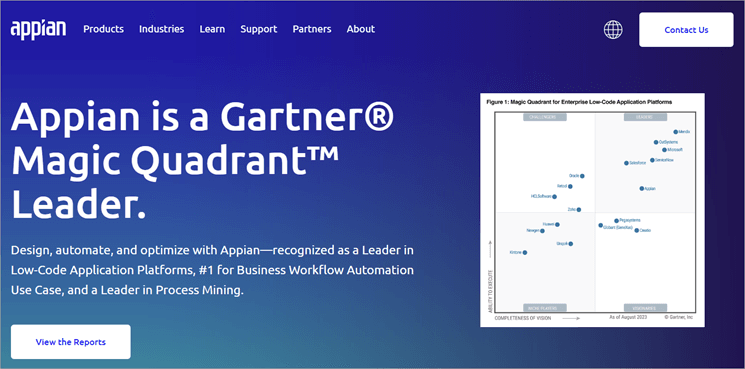
For designing, automating, and optimizing the complex process from start to end, Appian automates the business processes. For enhancing the customer experience and for better growth, through Appian software, the operations can be optimized and workflow can be improvised.
Features:
- Data Fabric: With the help of Appian data fabric, the entire organization can be unified. Leveraging an integrated data layer, the entire data across the enterprise can be easily connected.
- Process Automation: Leveraging API integrations, IDP, AI, and RPA anything can be automated using a unified workflow.
- Mining Process: For optimizing the business outcomes, the processes that are inefficient and take too much time to respond are discovered.
Pros:
- Appian community of developers for finding solutions to every problem
- Number of features released and enhanced in every release
- Low code development
Cons:
- Not able to handle big data
- The support services are not proactive
Why choose Appian Software?
In every sector of life, the Appian software can be used. For example, in the public sector, procurement decisions can be taken with better clarity and with more confidence. Likewise, in financial services, the risks, compliance processes, and governance can be orchestrated.
In life sciences too, through Appian software efficiency can be boosted and several cycle times can be reduced.
Website: https://appian.com/
#4) Nintex Process Platform
Best for expediting the digital transition journey, Nintex provides a robust solution for managing, automating, and optimizing business processes.

For process automation and intelligence, Nintex provides the most convenient, connected, and complete platform. For tackling any process challenge, Nintex provides an end-to-end platform. Leveraging AI and process intelligence, unmanaged or manual business processes can be made efficient, and error-free with a minimum amount of risk factor.
Features:
- Automating the Workflow: To lower the cost, fasten the operations work and for overall easing the entire workflow, Nintex provides an advanced workflow that processes the tasks within clicks.
- Document Generation: Leveraging pre-approved templates and improved compliance, any combination can be created using PDF documents, PowerPoint presentations, Excel or Word. With the help of it, there is no need to create any customized documents.
- Application Development: Leveraging Nintex K2 Cloud and Nintex K2 Five, the entire organization processes can be automated by using a low-code process automation.
Pros:
- Automated repetitive business processes
- Ease of integration with Microsoft Teams and SharePoint
- Easy to create online forms
Cons:
- The speed is low and efficiency gets decreased
- Doing customization is highly difficult without any flexibility in doing configuration
- A limited number of options for dashboarding and reporting
Why choose the Nintex Process Platform?
Using a centralized view, of the assigned tasks, work can be immediately done. Integration with the workflow of any business line using powerful business logic rules can be easily done. To make better decisions, Nintex provides powerful automation, built-in reporting, easy integrations, and intuitive form facilities to the users.
Website: https://www.nintex.com/process-platform/
#5) Jotform Tables
Best for getting away from the hassles of downloading and installing software, Jotform Tables provides a website and application tool for creating forms online without doing any coding.
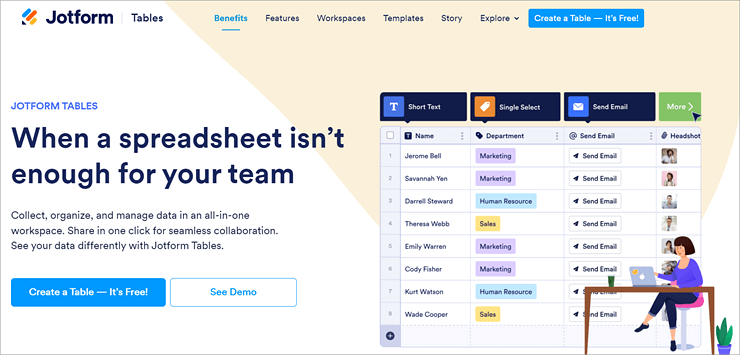
Through a single all-in-one workspace, the data can be easily collected, organized, and managed. Seamless collaboration can be done through a single click.
Right from importing the data, searching, filtering, adding formulas, doing calculations, requesting edits, sharing data on other platforms, or for automatic creation of PDF files, Jotform provides a very strong and powerful workspace.
Features:
- Managing Calendar: With the help of Jotform, planning and scheduling the calendar is very easy and hassle-free. Leveraging Jotform’s ready-made templates, the data can be managed without taking much effort and time.
- Generating Reports: Leveraging ready-made column types, the data can be organized in any way as per the requirement. There is no need to do any type of coding. Creating the pdf files, and sending emails or data to other software can be easily done.
- Online Form Creation: Through online form, the data can be gathered. In the form of Jotform tables, the received responses will be automatically saved. These forms are easy to create and can be shared through any platform, i.e. through social media, by embedding the link in the website.
Pros:
- Good user interface and a good experience
- Integration with forms can be easily done
Cons:
- Experience on mobile devices is bad
- Navigation of the website is too poor and takes a lot of time to understand
Why to choose Jotform Tables?
For tracking the progress on every task and for assigning new tasks to the team members, Jotform Tables provides an ideal platform.
For organizing, managing, and collecting all the databases in one workspace, Jotform provides the functionality features of processing online form responses, importing existing data, or automating the data entry work.
Website: https://www.jotform.com/products/tables/
#6) UiPath Robots
Best for transforming tedious tasks into automated processes, UiPath Robots offer robotic end-to-end automation. UiPath Robots support automation activities like data extraction, validation, website testing, and screen scraping.

UiPaths offers a wide range of solutions for handling several tedious tasks. UiPath software robots are flexible, reliable, and intelligent. With the ease of managing and building, the entire robot workforce delivers higher performance, high ROI, and quick delivery.
With the help of API integration and excellent UI automation, UiPath robots can interact with people, screens, data, and systems.
Features:
- Managing Robots from Anywhere: With the help of the UiPath automation suite, a proper track of software robots can be done. It helps in scaling and managing performance. Apart from that, alerts on mobile can also be orchestrated.
- Adding AI skills for Automating Processes: Leveraging pre-built AI models, recognizing dynamic interfaces, understanding the conversations, and reading documents can be made easy. It also helps in making breaking complex problems into easy and understandable language.
- Available on Multiple Platforms: For all the enterprise applications like ServiceNow, Microsoft, Google, Oracle, SAP, and Salesforce the UiPath robots have a very good relationship.
Pros:
- User-friendly and easy to understand
- Having several pre-built options, UiPath takes less time for implementation
Cons:
- Pricing for the enterprise edition is a little bit high
- Documentation is not complete. Therefore, resolving the bug is a tedious task
Why to choose UiPath Robots?
For automating the heavy and long-running workflow, UiPath robots offer distinct types of solutions such as Unattended Robots, Attended Robots, Test Robots, and Automated Cloud Robots. All of these robots can be self-hosted on both public or private cloud premises. All these UiPath robots are reliable and highly efficient in delivering performance.
Website: https://www.uipath.com/product/robots
#7) Zapier
Best for building secured automated systems across business-critical workflows, Zapier offers integration across distinct applications. Through Zapier, work from the work-from-here facility can be availed, and it automatically saves time.
Using a combination of data tables, user interfaces, and more than 600 logic apps, automation can be done for anything. With the help of interfaces, tables, and Zaps complete and customized solutions can be created. For capturing leads from multiple sources, tracking job applications, or creating an expense hub, Zapier provides automation that perfectly customizes the needs.
Features:
- Customized Solutions: The entire business workflow processes can be customized. Without taking the help of any code steps, webhooks, or data formatting, the workflow can be automated.
- Secure and Reliable Platform: Zapier offers 256-bit AES encryption with custom data retention policies. It is a SOC 2 and SOC 3 complaint. With the help of granular admin controls, every workflow, team, and app can be securely managed.
- Turning Integration into Automation: With the help of custom logic, filters, and conditions, the level of zap can be raised. Automated control of the workflow without any help from the developer can be given.
Pros:
- A large amount of integrations can be done with Zapier
- Easy to set and implement with super-rich features
Cons:
- As compared to other competitors, it is highly priced
- No support services are provided by the Zapier team
Why to choose Zapier?
Zapier is one of the best Power Automate alternatives and most modernized automation tools. For scaling across distinct teams, processes, and tools it is a fully safe, secured, and compliant platform. It provides a 256-bit AES for data storage. With the help of Zapier interfaces, chatbots, tables, and the entire workflow can be made automated across 6000 + applications.
Website: https://zapier.com/
#8) Automation Anywhere
Best for automating tasks without using any scripted form of technology. Without doing any coding, through automation anywhere, the robots can be created and deployed for any business needs.

Discovering, engaging, automating, and scaling automation anywhere provides an AI-powered intelligent automation platform. Leveraging automated tools and applications, automation anywhere can be deployed on the cloud.
With zero infrastructure costs to maintain, always up-to-date, and completely secured, the cloud-native intelligent automation platform supports flexibility, and innovation and empowers speed.
Features:
- Easily Embedded with any Technology: Leveraging connectors for applications and core systems, the automation can be easily embedded where the team is working.
- Fast Scaling: With a cloud-native architecture, innovation can be done and scaling can be easily fastened.
- Secure and Reliable Automation: Using in-depth security standards such as Soc1, Soc2, and HITRUST all the data can be secured.
Pros:
- With an intuitive drag-and-drop interface, powerful custom bots can be created
- Across multiple systems, manual tasks can be automated
Cons:
- Need to improvise queue management and functionalities
- The scalability and functionality of the current bot can be upgraded
Why to choose Automation Anywhere?
Leveraging the brainpower of automation and artificial intelligence, the complex tasks that need brain work can be handled. Using technologies like machine learning, cognitive computing, and natural language processing machines can learn, adapt, and work smarter than humans.
Things like data entry, replying to emails, customer service operations, and supply chain management can be automatically managed in a sequential order.
Website: https://www.automationanywhere.com/
#9) IFTTT
Best for automating tasks and creating new functionalities, IFTTT offers a web-based automation platform. It assists in connecting distinct applications and services. With the features of tracking working hours, automated reminders, and alerts, through IFTTT, the efficiency of an entire system can be automated.
IFTTT is available on both Android and iOS devices. You can automate workflow from anywhere and at any time. Leveraging filter code, multiple actions, and queries customization of integrations can be done. IFTTT allows you to connect multiple accounts per service.
Features:
- Notifications: Every lead can be tracked, organized, and automated. With the help of notification, every lead can be tracked at any point in time.
- Content Creator: Blogs and social media posts can be generated by integrating IFTTT AI content creators. It saves time in compelling content.
- Cross Post Across Distinct Platforms: Only by writing once, the post can be shared on multiple platforms automatically. Overall, it saves time.
Pros:
- Integration between top-class products can be done very easily
- With the help of tutorials, how can the services be utilized up to maximum value
Cons :
- Lack of support per integrated service.
- Sometimes, IFTTT does not work at all. Therefore, it makes the user helpless.
Why choose IFTTT?
For automating business and saving time, over 900 brands are already using IFTTT. IFTTT has a strong community of over 27 million users. With the help of IFTTT, lead management, social media, smart home, customer communications, and overall productivity can be increased.
Website: https://ifttt.com/
#10) ActiveBatch
Best for being the centralized automated hub, businesses can seamlessly integrate and automate ETL, work order management, project management, supply order management, and other critical processes across the entire organization, on-prem, in the cloud, or hybrid environments.
ActiveBatch enables users to build, centralize, and manage comprehensive workflows within a single unified interface with minimal human intervention. Thanks to its comprehensive library of extensions and libraries, there is no need for scripting.
By leveraging pre-built job steps for different applications and servers, users can easily and quickly create cross-platform workflows. ActiveBatch is available on all platforms, including cloud, hybrid, and on-premises environments.
ActiveBatch is a feature-rich platform for executing dynamic workload activities, offering role-specific views, dynamic resource allocation, change management tools, self-service portals, a workflow optimizer, event and schedule-driven triggers, a low-code GUI, an extensive job step library, security and compliance features, monitoring, and high availability with non-cluster failover.
Features:
- Super REST Adapter: Any new applications, systems, and platforms can be easily integrated with a low-code Super REST API adapter.
- Job Library and Templates: Leveraging drag-and-drop production-ready jobs, the workflows can be built in less time. With the help of an integrated content library, users can connect the SAP ERP to non-SAP systems.
- Effortless Implementation: Using an extensive library of pre-built job steps and variables, workflows can be accelerated and deployed at a faster rate.
- Complete Visibility: ActiveBatch provides comprehensive visibility for efficient control. With proactive notifications and support, you can confidently execute your processes, ensuring minimal job failures or delays.
The architecture of ActiveBatch:
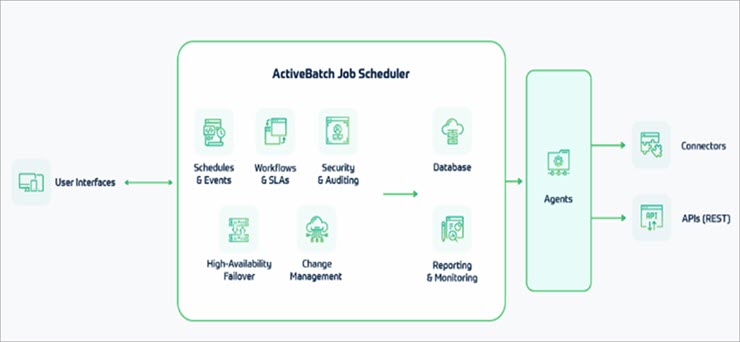
- User-Interface: With customizable features and out-of-the-box functionality, ActiveBatch offers a flexible and user-friendly user interface.
- Job Scheduler: ActiveBatch manages scheduling, load balancing, reporting, notifications, and dependency checks seamlessly. This enables the creation and orchestration of cross-functional workflows effectively.
- Execution Endpoints: Connect critical systems and applications using ActiveBatch’s robust library of connectors from Oracle, SAP, Informatica, and more or Super REST API adapter for other third-party services.
Steps for migrating to ActiveBatch:
- Configuration: Before developing a transition strategy, all ongoing procedures are mapped and analyzed thoroughly. Starting with less risky migration tasks, a dedicated team is assigned to collaborate with you for a seamless transition process.
- Data Import: Data and workload automation are efficiently transferred using our proprietary in-house migration tools, speeding up the import process. By utilizing a secure non-production environment, data can be safely imported, and current workload automation can be thoroughly tested.
- Testing and Go Live: ActiveBatch conducted thorough acceptance testing and quality assurance to validate all processes. After receiving approval, the team deploys automation to production.
Pros:
- Easy to use
- Cost-effective
- Extensive pre-built connectors and templates
- The enterprise-level features a highly flexible environment
Cons:
- Training needs to be provided for installation and how to leverage the tool
Why ActiveBatch?
With a centralized system like ActiveBatch, automating, monitoring, and managing jobs becomes effortless. Leveraging pre-built job step templates and seamless integration, a drag-and-drop workflow designer facilitates the straightforward creation and deployment of end-to-end workflows. This approach eliminates manual tasks, minimizes delays, and enhances service levels.
#11) RunMyJobs by Redwood
Best for enterprise-graded workload automation software that offers a seamless experience for migrating from Control M, Autosys, Stonebranch, Automic, JAMS, and more.
RunMyJobs streamlines end-to-end process orchestration for enterprises with complex IT environments. It offers unified management and monitoring of applications and servers through a single, intuitive interface. RunMyJobs by Redwood is now a Premium certified SAP Endorsed App.
“With 30 years of expertise in automation, Redwood has acquired Leader position in the 2025 Gartner® Magic Quadrant™ for SOAPs report”. They have always exceeded expectations and this keeps them to stay ahead of industry trends consistently.
Its low-code approach enables scalable automation across IT teams and business units, delivering high performance and usability. Leveraging enterprise-grade cloud infrastructure ensures secure data management without additional maintenance costs.
RunMyJobs features a high-availability architecture capable of automating millions of transactions daily, ensuring a guaranteed 99.95% SaaS uptime. The agentless architecture makes it easier to add new connections and integrations without software updates.
With one-click installation and updates, RunMyJobs operates without system downtime. Integration with the latest modules and features is instant using the RunMyJobs automation catalog.
With advanced error-handling capabilities, AI-driven automation, seamless integration across multiple systems and operations, and robust job-building capabilities, RunMyJobs excels beyond other Microsoft Power Automate tools.
Features:
- Extensive Scripting: Provides support for over 25 scripting languages, including Python, R, and Powershell.
- Predictive SLA Monitoring: Predictive SLA monitoring ensures the guaranteed performance of critical business processes.
- Low Code UI: Processes can be built within minutes with a low-code, drag-and-drop graphical editor.
- Event-Driven Triggers: Automate processes based on real-time events, files, data, or messages for time-critical applications. Customize preconditions and branching paths based on status to incorporate exception handling into your workflows.
- AI Capabilities: RunMyJobs has AI built into each stage of the automation lifecycle. As such, users can rely on AI agents for everything from troubleshooting tips to integrations and even SLA monitoring.
Architecture of RunMyJobs:
The architecture diagram of RunMyJobs is shown below. It comprises a browser, cloud components, as well as a customer network.
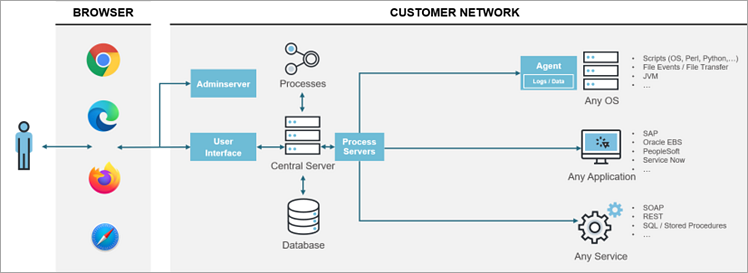
- Browser: It gives secure access to all users.
- Cloud Components: An administration dashboard provides secured access within the environment, allowing users to track all their activities. Leveraging integrations, processes, and tasks across the application landscape can be automated efficiently.
- Customer Network: Automation of any type of service is facilitated using technologies like SOAP, REST, and JDBC. Integration is securely managed through a secured gateway to ensure maximum security.
Pros:
- Easy to use
- Extensive library with pre-built processes and ready-to-use integrations
- Easy to connect with any application, server, or services
- Migration and onboarding services
- Consulting and services for understanding package, plan, terms, and conditions
- 24*7 support from the technical team
- Flexible and transparent
- Agentless architecture
- AI capabilities.
- Comprehensive SAP connectivity.
Cons:
- More detailed documentation is needed
Why RunMyJobs?
RunMyJobs is an exceptional job scheduling platform for scheduling and executing event-triggered workloads. It efficiently manages file transfers and works seamlessly across multiple applications. By simplifying complex workflows and reducing the need for manual interventions, RunMyJobs stands out as one of the best automation tools available.
#12) Tidal
Best for centralized management of systems and control of scheduled jobs, tidal software is easy and handy to use. Scheduling of event-driven jobs can also be handled through a centralized management system.
With the help of 60-plus no-code and pre-built integrations, Tidal offers easy automation for any kind of business, whether on the cloud or premises. Leveraging a unified automation platform, end-to-end business processes can be easily managed and executed.
Tidal software is presently operating in many companies all across the world. Having a centralized management system, Tidal automation offers scheduling of event-driven or dependent jobs.
With the enhanced features of reporting & analytics, security and control, developer-friendly automation, integrated resource management, monitoring, alerts, recovery, time and event-based scheduling of calendars and jobs, it is a fully packaged solution for automating the workload.
Features:
- Event-Based Scheduling: Through event-action architecture, an event can have multiple effects and it may result in many actions. The events can change a database, SLA activity, or any file arrival. The actions taken for events can trigger a job, send an email, or notification.
- Monitoring, Alerts, and Recovery: Leveraging Tidal monitoring, all the scheduled activities can be tracked and proper action can be taken. The system can deliver alerts anywhere and anytime through browser-enabled devices.
- Time-based Scheduling and Calendars: An unlimited number of customized calendars can be created. Tidal easily manages all the complexities related to distinct time zones.
Architecture Diagram of Tidal Software:
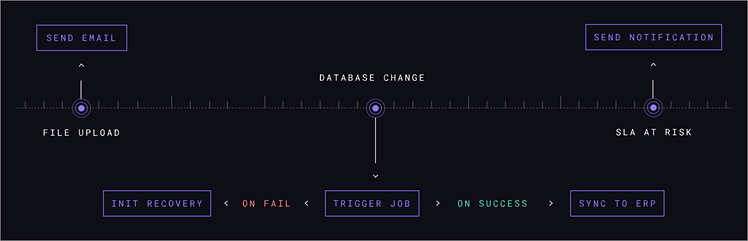
With the help of the architecture diagram shared above, we can analyze how the workflow of Tidal software occurs. Starting with uploading a file, sending an email, making changes in the database, performing SLA activities, and sending notifications.
Pros:
- The data is completely secured in an operational and reliable environment
- Automatic notification alerts for tracking task status proactively
- Automation of complex workflow leads to resource optimization and increased productivity
- Straightforward issue resolution mechanism upon issue detection
Cons:
- It is a little bit difficult to learn the initial setup process
- With the change in technology and new requirements, the pricing model is too high
- Integration with distinct types of user cases is not possible
Why Tidal Software?
With a focus on workload automation and a custom-centric approach, Tidal software offers exceptional support, ongoing product development, flexible pricing, and an active user community to the users.
Frequently Asked Questions
1. What are some applications of intelligent automation?
For automating order processes, managing administrative tasks, improving the accuracy of forecasts, analyzing financial data, or handling routine customer queries, intelligent automation allows businesses to enhance efficiency, accuracy, and decision-making capabilities by streamlining complex tasks.
2. What is the meaning of power automation?
The term “Power Automation” refers to a cloud-based service that allows
businesses to create a workflow that is simple and easy to use. It overall saves time and brings efficiency to the system. Across multiple applications and services, businesses can make it operational.
3. What are the limitations of Zapier?
There are limitations concerning the size of files. For example, the maximum limit for downloading files is 120 MB. For webhooks, the payload size cannot be over 10 MB. For HTTP response, the payload can be up to 6MB. There can be a maximum of 1000 fields that can be customized.
4. Why do we use job schedulers?
The job scheduler process enables the execution of different tasks at a pre-determined time. The job scheduler can be integrated with other software systems to notify when an event is going to occur. Leveraging a job-scheduler the execution of distinct background processes and jobs can be done easily without any hassle.
5. What are the capabilities of ActiveBatch?
Leveraging user-friendly interfaces, event-based scheduling, and job step libraries, organizations can spend time on innovation and outcome-based initiatives. Organizations can easily connect ActiveBatch, an enterprise job scheduling and workload automation solution tool, to any application, service, or server.
Conclusion
For streamlining tasks, increasing workforce productivity, reducing human error, and saving time Mircosoft Power Automate alternatives are highly beneficial. With the help of these alternative Microsoft Power automated tools, document management, creating invoices, employee onboarding, and contract management can be easily handled.
By automating repetitive tasks, the overall performance of businesses can be increased. It assists the employees in doing the work smartly with greater efficiency and productivity.
Therefore, we can conclude that by leveraging these alternative Microsoft Power automated tools labor costs can be reduced, operational expenses can be minimized and, overall, it saves time and resources.
Was this helpful?
Recommended Reading
-

Are you looking for a Workflow Automation Tool for your business? Read through this article to learn about the top and Best Workflow Automation Software: Workflow Automation Workflow automation is the technology through which you can create and design the flow of operations as per your business rules. Some examples…
-

This article reviews and compares the top Accounts Payable AP Automation Software to help you choose the best AP Automation tool: Accounts Payable is the amount an organization owes to its vendors or suppliers for the goods and services it receives from them. Thus, it is vital for the smooth…
-
Comparison of the top ETL automation testing tools to provide your enterprise with accurate verification and data transformation acceleration: ETL, which stands for Extract, Transform, and Load, is an integral data warehousing process that allows businesses to aggregate data from multiple sources to be stored in a central repository. The…
-
IT Automation Software is an application that has functionalities to develop, manage, and monitor automated processes for IT enterprises. Because IT processes are scattered across multiple environments, tools, and technologies, this is a difficult task to manage. IT Automation Tools will help you manage them easily. Process automation software is…
-
Select the best AP & Invoice Automation software by reviewing and comparing the top tools for AP & Invoice Automation for Dynamics: AP or Accounts Payable is the money that a business enterprise owes to its suppliers. Most businesses appoint a team of professionals to look after the accounts payable…
-
Comparison of the Best RPA (Robotic Process Automation) Tools in the market: In any organization, there are a lot of tasks that are repetitive and time-consuming in nature. While doing these types of tasks, there is always a huge possibility for error occurrence because of repetition. Hence, in order to…
-
List of the Best Android Application Testing Tools for your reference: Nowadays, automated tests are used during almost every testing process. This is not surprising, as properly organized automated testing reduces the time needed for a testing process, and excludes errors and omissions in test execution caused by a human…
-
Evaluate, Compare, and Choose from the list of the best SAP Automation tools based on their functionality, and usability. Pick the right SAP Process Automation tool of your choice from here: As far as ERP solutions are concerned, SAP stands out. Ever since SAP’s inception, it has played an instrumental…


