Are you looking for a perfect substitute for Apple Pencil without compromising quality? Read our in-depth tested review of the top Apple Pencil Alternatives for iPad to make a wise choice:
The Apple Pencil is now a symbol of creativity in the digital age, offering users unmatched precision and full integration with iPads. This indicates its significant demand as a premium pencil.
However, its high-cost branding of over $120 is a hindrance for many consumers. For expertise applications, that may not be debatable given its competitive edge.
But if you are a professional, a hobbyist, or a student, you would seek alternatives to Apple pencils that can provide the same functionality but not at such a high price as the Apple Pencil.
Top Replacements for Apple Pencil: Exclusive List
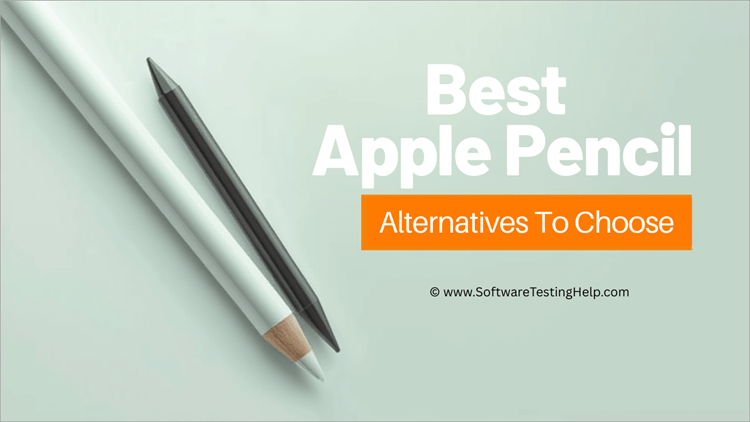
I will get straight to the point: by 2026, the market will be crowded with affordable Apple Pencil copies and alternatives that offer a combination of low prices and impressive performance. As a result, they are an interesting option for individuals aiming for maximum productivity and creativity on a budget.
These iPad alternatives to the Apple Pencil are not mere budget replacements, but actually compete with each other and may have their own advantage like longer battery life, being thinner, or having more compatibility.
Working on a PDF, making notes in class, sketching in Procreate: the best Apple Pencil alternatives can be as enjoyable as creativity and productivity. Indeed, numerous critics and customers believe that some of the most promising stylus replacements for the Apple Pencil are superior in terms of durability, ergonomics, and cost compared to the Apple product.
Discover the best Apple Pencil alternatives in this tutorial, which showcases five leading options with in-depth reviews and their unique selling points.
Get to know the three best ways to use your Apple Pencil through this video guide.
How to Select the Best Alternative to Apple Pencil
Making the correct decision on the stylus is a matter of consideration.
Here are five tips with more detail to guide you:
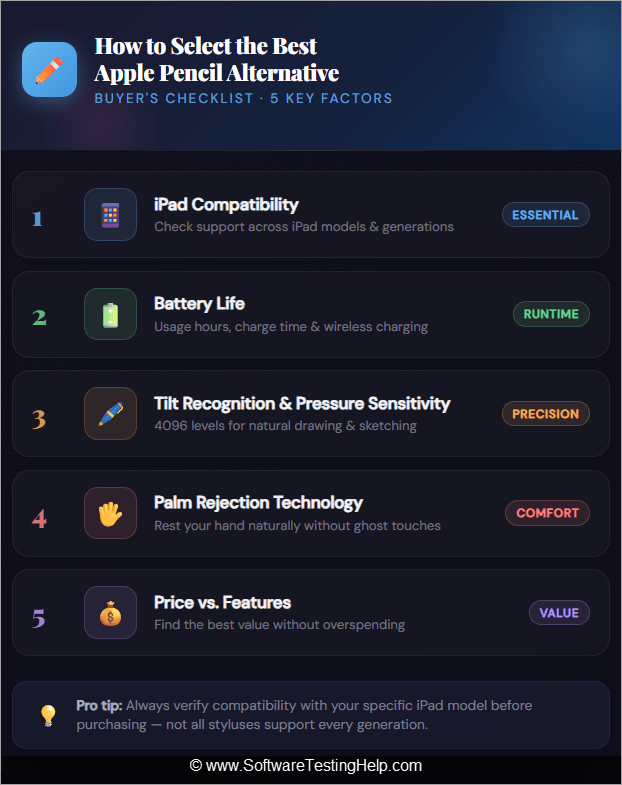
1. iPad compatibility with iPad Models: Compatibility is key when choosing iPad alternatives to the Apple Pencil. Not every iPad is compatible with the stylus. To illustrate, the Logitech Crayon is compatible with iPads that were launched since 2018, whereas the JAMJAKE Stylus/K10 is compatible with a large number of iPads up to 2025.
Provided that your stylus is not compatible, such features as palm rejection or tilt recognition might not work well. Before buying an iPad, always ensure you check the generation and the operating system.
2. Battery Life: Battery life is essential in a continuous manner. Although the Apple Pencil provides an approximate duration of 12 hours, there are relatively inexpensive alternatives of Apple Pencil, such as JAMJAKE Stylus/K10 that are equal to or even greater.
ZAGG Pro Stylus has fast USB-C charging, whereas the Logitech Crayon is dependable all day. An increased battery life will result in fewer disruptions of meetings or creative sessions, and one will always be able to charge the computer quickly without being left behind.
3. Tilt Recognition & Pressure Sensitivity: Pressure sensitivity to enable fine strokes and shading should be placed as a priority by the artists and designers. This feature, though usually missing in cheaper styluses, is present in premium alternatives like Adonit Note+ and Metapen A8, making them perfect for digital art.
Tilt recognition also makes it more realistic as it emulates the pencil angles of traditional pencils. The features are necessary when you have to sketch, illustrate, or do calligraphy at work.
4. Palm Rejection Technology: The Palm rejection will ensure you do not leave any marks on the screen when you place your hand on it. This is very critical in note-taking and drawing. The quality of palm rejection varies in most of the modern iPad Apple pencil alternatives.
Logitech Crayon and ZAGG Pro Stylus have been applauded for having impeccable palm rejection, whereas inexpensive ones can sometimes interpret an input incorrectly. User reviews should always be checked to verify actual in-world performance.
5. Price vs. Features: Lastly, strike a balance between your budget and the features required. Apple Pencil is very costly; however, other products, such as JAMJAKE Stylus/K10, are less than 40 dollars and still have palm rejection and precision.
Mid-range products such as ZAGG Pro Stylus are good quality, premium products that do not cost the earth. Note+ and Metapen A8 are also pressure-sensitive and could be worth investing in if you are an artist. Due to their low cost, models are great in the hands of casual users.
How We Chose These Substitutes for Apple Pencil
We have a thorough, user-friendly testing process of the Apple Pencil alternatives. We begin with performance testing, utilizing apps like Procreate, Notes, and GoodNotes, assessing their accuracy, latency, and responsiveness. Then we do battery endurance tests, which involve endless writing and drawing, to confirm the claims of manufacturers.
We also examine user reviews via Amazon reviews, Reddit posts, and YouTube hands-on videos to obtain realistic world experiences. The durability is checked by drop simulation and portability checks so that the stylus should be able to withstand daily use.
Lastly, we carry out the comparative analysis with the Apple Pencil, benchmarking its responsiveness, comfort, and usability. This integrated strategy means that our suggestions will be based on technical performance and practicality.
List of the Best Apple Pencil Alternatives
Given below is the list of the Top alternatives to Apple Pencil:
Comparing the Top Apple Pencil Competitors
| Stylus | Battery Life | Pressure Sensitivity | Compatibility | Weight | Dimensions | Connectivity | Price |
|---|---|---|---|---|---|---|---|
| Logitech Crayon | 7 hrs | No | iPad 2018+ | 20g | 163mm | Lightning | $52.99 |
| JAMJAKE Stylus/K10 | 12 hrs | No | iPad 2018-25 | 15g | 165mm | USB-C | $19.99 |
| ZAGG Pro Stylus | 8 hrs | No | iPad 2018+ | 16g | 160mm | USB-C | $55.99 |
| Metapen Pencil A8 | 10 hrs | Yes | iPad 2018-25 | 14g | 162mm | USB-C | $16.99 |
| Adonit Note+ | 10 hrs | Yes | iPad 2018+ | 15g | 165mm | Bluetooth | $19.99 |
Detailed Reviews of Apple Pencil Alternatives
#1) Logitech Crayon
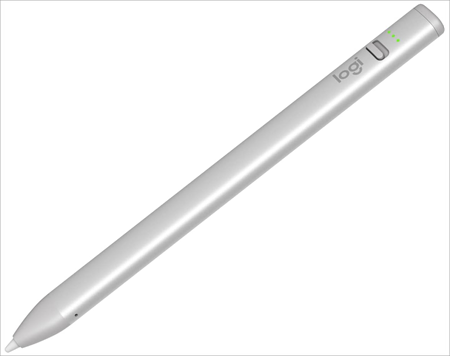
One of the best Apple Pencil alternatives that is the most reliable is the Logitech Crayon. It is made with Apple technology, which gives it pixel-accurate input and instant connectivity without the need to use complicated pairing.
Its rough design is always applauded by the reviewers, which makes its design suitable for the classroom and for all those who require durability.
The Crayon is also drop-resistant and can be used heavily, unlike the Apple Pencil, which is sleek but very fragile. It is the favorite of educators and students due to its low cost, which is usually half the cost of the Apple Pencil.
Another thing that students and educators will love about it is that it is very easily handled; it does not need any Bluetooth connection, as the user simply has to turn it on and proceed writing with it.
Although it does not have a pressure sensor, it has a tilt feature and impeccable palm rejection, which makes it a trustworthy device to use in taking notes and sketching.
When it comes to charging devices, the Logitech Crayon can be charged fast through the Lightning and can last one full day of school or work. Comparatively, the Apple Pencil has an unpredictable battery life.
Due to its ergonomic design, the pencil is unlikely to roll off desks, unlike the round Apple Pencil. The design also makes the Logitech Crayon more comfortable to hold.
Quick Specifications:
| Feature | Details |
| Battery life | 7 hrs |
| Pressure sensitivity | No |
| Compatibility | iPad 2018+ |
| Weight | 20g |
| Dimensions | 163mm |
| Connectivity | Lightning |
Price: $52.69
#2) JAMJAKE Stylus/K10
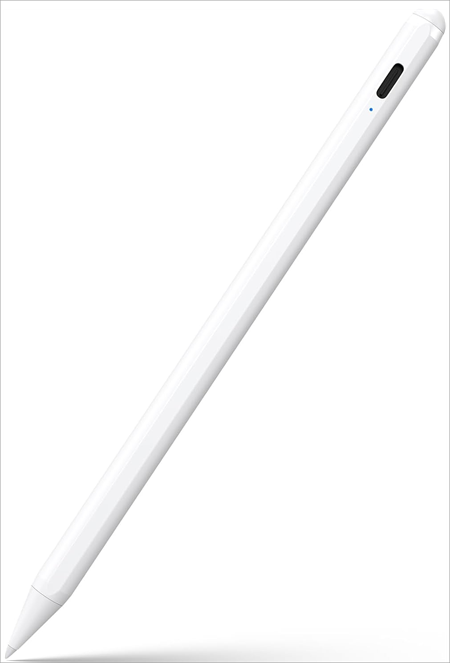
The JAMJAKE Stylus is a stylus popular in the budget segment of the fanbase. It is regarded as one of the affordable alternatives to the Apple Pencil, which has palm rejection and control over the tip.
Although it is not pressure sensitive, it is smooth and unbeatable in the eyes of the reviewers. JAMJAKE is also lighter than the Apple Pencil, so it can be used without hand fatigue in long sketches, unlike the Lightning charging of the 1st generation of Apple Pencil.
It also charges via USB elsewhere, which makes it convenient, in contrast to the Lightning charging (1st generation) of the Apple Pencil.
JAMJAKE does not need a Bluetooth connection like the Apple Pencil. It is easy to use since all one has to do is tap the power button and begin writing, which is quite convenient for less serious users. JAMJAKE, with its under 40 dollars features, can compete with Apple Pencil and is one of the best iPad Apple Pencil substitutes in 2026.
Quick Specifications:
| Feature | Details |
| Battery life | 12 hrs |
| Pressure sensitivity | No |
| Compatibility | iPad 2018-25 |
| Weight | 15g |
| Dimensions | 165mm |
| Connectivity | USB-C |
Price: $19.99
#3) ZAGG Pro Stylus
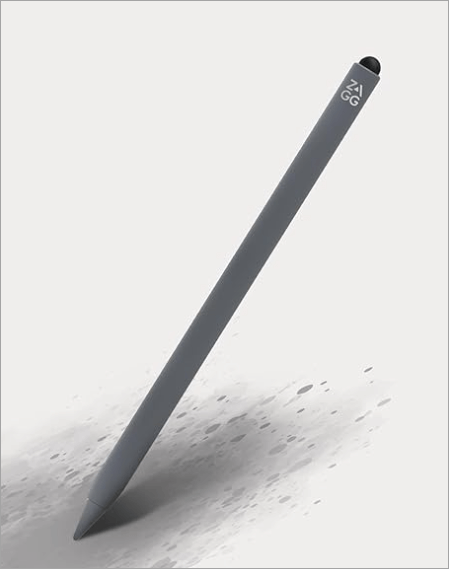
ZAGG Pro Stylus is smooth and responsive to write and sketch on, and has minimal lag. This product features a cleverly designed dual-tip component, and its stylus attaches to compatible iPads using magnets. The ZAGG Pro Stylus offers a smooth, versatile experience with tilt recognition and magnetic charging.
It is usually rated to be among the top stylus alternatives of the Apple Pencil for middle-range consumers like students, professionals, and casual users. Its comfort and responsiveness will be appreciated by the users, but it is not pressure-sensitive.
Absence of pressure sensitivity implies that it is not the most suitable one to use by professional artists who use finer strokes in applications such as Procreate.
It will also be a formidable competitor to Apple because of its high-quality build and its USB-C charging option, which will be especially valued by professionals who do not want to pay so much but who demand reliability.
The metal casing of ZAGG is harder and more durable to everyday use compared to the plastic cover on the Apple Pencil. Moreover, the finishes are lightweight and comfortable, but ZAGG is grippier with a matte finish, whereas Apple Pencil is slippery with its plastic.
Quick Specifications:
| Feature | Details |
| Battery life | 8 hrs |
| Pressure sensitivity | No |
| Compatibility | iPad 2018+ |
| Weight | 16g |
| Dimensions | 160mm |
| Connectivity | USB-C |
Price: $55.99
#4) Metapen Pencil A8
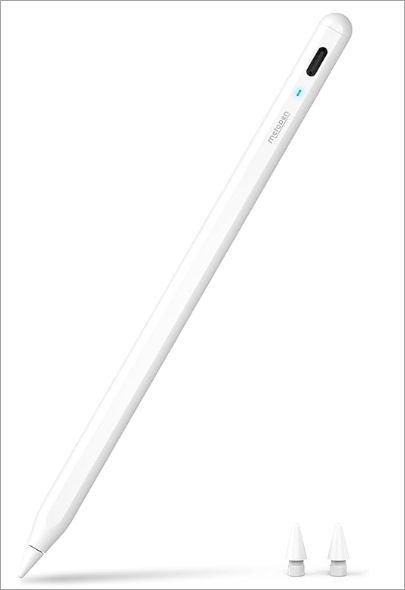
Metapen Pencil A8 is a cheap stylus that can take the place of the Apple Pencil because it has high-quality features at a lower price. It retails at a low of less than fifty dollars, which is cheaper than Apple’s 120-150 dollars, and it means that it is affordable in terms of price to students, hobbyists, and professionals alike.
It has the most unexpected feature, which is the ability to sense pressure, an uncommon feature among low-cost styluses. Reviewers have noted its excellent performance in creative applications like Procreate, highlighting its ability to handle expressive strokes and shading, which allows it to compete with the precise control offered by the Apple Pencil.
USB-C charging is also a feature of the A8 that is lauded to be fast and universal as opposed to the proprietary Lightning port or the magnetic charge of the Apple Pencil.
It is lightweight (around 14g), and thus the hand does not get fatigued because of long working hours, and palm rejection is such that it allows the person to write and sketch naturally without leaving extra marks.
Another advantage is ease; A8 does not need any Bluetooth connection to work; it comes on automatically after a double-tap, and Apple Pencil needs to be connected and reconnected periodically.
Quick Specifications:
| Feature | Details |
| Battery life | 10 hrs |
| Pressure sensitivity | Yes |
| Compatibility | iPad 2018-25 |
| Weight | 14g |
| Dimensions | 162mm |
| Connectivity | USB-C |
Price: $16.99
#5) Adonit Note+
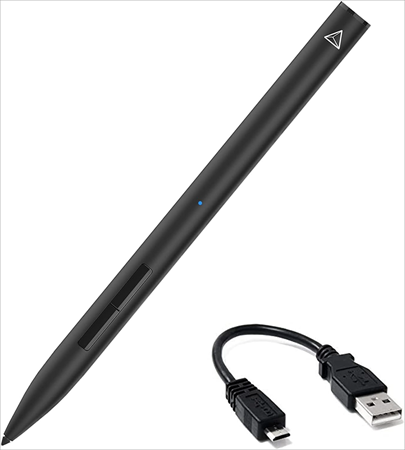
A high-end competitor of the Apple Pencil for iPad is the Adonit Note+. It provides Bluetooth connectivity, pressure sensitivity, and shortcut buttons for creative work.
Reviewers emphasize its use by professional artists and those who take notes and remark on its flexibility, particularly professionals who need to use such advanced functions as tilt recognition and customizable shortcuts.
The Note+ is not a cheap imitation of Apple Pencil like many others, but a stylus that professionals would enjoy using like a creative instrument. It is made of a smooth and contemporary build, and its performance in apps such as Photoshop and Procreate competes with Apple Pencil.
Besides these innovative characteristics, critical reviewers also highlight various practical advantages that make the Adonit Note+ a real competitor to the Apple Pencil. Its accurate palm rejection provides efficient taking of notes without erroneous marks, and a variety of interchangeable tips prolongs the lifetime of the stylus and offers flexibility.
The Note+ is celebrated for being very iPad compatible, as it supports a variety of models and does not require the latest devices. Another advantage is battery performance, giving up to eight hours of power on a one-hour charge. Together with its low price and durability, the above-stated features make the Note+ a versatile and cost-effective product.
Quick Specifications:
| Feature | Details |
| Battery life | 10 hrs |
| Pressure sensitivity | Yes |
| Compatibility | iPad 2018+ |
| Weight | 15g |
| Dimensions | 165mm |
| Connectivity | Bluetooth |
Price: $19.99
Examining the Strengths of Apple Pencil
Compared to the devices mentioned, the Apple Pencil Pro and USB-C types offer these competitive advantages.
Apple Pencil Pro
- Haptic Feedback: The Pro will bring on board the small vibrations that will make it feel like bending a real pen on paper. This visual effect allows the artist to create a more lifelike feel and provides a more organic experience to the note taker. It helps to close the divide between digital and traditional tools to make creative work more straightforward and fulfilling.
- Gesture Controls: Exclusive squeeze and barrel roll gestures enable the user to change tools, customize brushes, or activate shortcuts in close time. This minimizes disruption of creative meetings, simplifying the workflow. The Pro allows professionals to work more than ever, faster and fluidly, by incorporating physical gestures into digital art.
- Find My Integration: An integrated Find My network of Apple devices should make the stylus trackable in case it is lost. This is added value, particularly to the people who use Pencil in their daily lives. It also minimizes replacement and frustration costs, and hence, the Pro is more practical than the previous generations.
- Accuracy and Responsiveness: There is no lag in the strokes, and with ultra-low latency and pixel-perfect accuracy, the Pro produces strokes that are both immediate and natural at the same time. Artists enjoy the advantages of smooth shading, fine details, and cross-app consistent performance. This accuracy is perfect in professional illustration, design, and taking notes, preserving the reputation of Apple as the best in stylus technology in existence.
- Tilt Support and Palm Rejection: The Pro can acknowledge the change in angle to create shading effects and overlooks the unintentional contact with the resting hand. This feature enables one to do natural sketching and writing without any interference. It simulates the feel of conventional drawing instruments, and both the amateur of the underline and the professional artist will feel comfortable and precise.
- Magnetic Wireless Charging: The Pro will magnetically attach to the side of the iPad, wirelessly charge it, and automatically pair. This does away with cables and ports, providing convenient access seamlessly. People can easily determine the battery level, and the Pencil is ready at all times. Compared to the old system of charging, it is a contemporary and classy solution.
Apple Pencil USB‑C
- USB Charging in Modern Times: The USB+ model will follow the universal charging standard, meaning the user can recharge using the same cables as with laptops and phones. This avoids the use of proprietary connectors, which make charging easier and more available. It signifies Apple’s change to modern technologies that are highly compatible with its ecosystem.
- Lower Cost: As a low-end product, the USB Lightning Pencil offers the necessary functions of the Apple stylus at a much lower price. It is easy to reach students, teachers, and even non-professional people who value quality performance but are not willing to pay higher prices. It expands the scope of Apple since it provides professional-grade features at entry-level prices.
- Tilt Support and Palm Rejection: The USB-Tilt support and palm rejection. The USB-C Tilt supports palm rejection. These features ensure that one can sketch and take notes easily, and it is practical to use daily. It gives it the basic usability of higher-end models without being compromised.
- Low-latency Performance: The USB-C Pencil has the same hallmark responsiveness as Apple, and the strokes are reflected on the screen immediately. This immediacy resembles traditional pen and paper writing, which makes it more comforting and correct. The low-latency performance makes it reliable and consistent in every application, even at the lower end of its price range.
- Main Experience with Apple Pencil: The USB-C Pencil does not have any Pro features, but still provides precision, tilt, and palm rejection. It is the necessary Apple Pencil experience and thus most reliable for the users. This affordability and functionality make it a good and viable choice for daily iPad activities.
Frequently Asked Questions
1. Do the cheaper alternatives to Apple Pencil make sense?
Another example of a good substitute for Apple Pencil is JAMJAKE Stylus/K10 and Metapen A8, which are quite good at performing daily functions such as taking notes, writing on documents, and drawing casual sketches.
Although they might not be advanced with sensitive functions such as pressure sensitivity, they offer smooth input, palm rejection, and long battery life. These options are amazing for students or other professionals with limited financial means.
Rather than investing over 120 dollars in an Apple Pencil, one can gain the same functionality at less than 40 dollars, which makes it a wise investment that is balanced in terms of price and functionality.
2. Are there iPad alternatives to Apple Pencils that have palm rejection?
The majority of the current equivalents of the iPad Apple Pencil have palm rejection technology, and you can use your hand to rest on the screen and write or draw with the device.
Crayon Logitech, and ZAGG Pro Stylus are highly rated, as far as the palm rejection is flawless, and JAMJAKE Stylus/K10 is also a good choice, considering the price. Palm rejection is vital to comfort and accuracy, and it is one property that makes them compete with the Apple stylus.
3. What are the most effective alternatives to the Apple Pencil or stylus among artists?
On the part of artists, the optimal substitutes for the Apple Pencil stylus are those with pressure sensitivity and tilt recognition. The difference between Adonit Note+ and Metapen A8 is that it is possible to make subtle lines and shades, as well as expressiveness.
The apps that they are best suited to include Procreate, Photoshop, and Illustrator. Although the features of the Logitech Crayon and JAMJAKE would be highly suitable for note-taking, the more advanced features of Adonit and Metapen will be more reminiscent of the Apple Pencil.
4. Are alternatives to the Apple Pencil connected to Bluetooth?
Other iPad-compatible Apple Pencils, like the Adonit Note+, are connected via Bluetooth. Bluetooth connectivity enables advanced features such as shortcut buttons and app integration.
JAMJAKE and Logitech Crayon are also other styluses that can be used without Bluetooth, and thus they are easier to set up, but offer little advanced functionality. A decision about Bluetooth and non-wireless is based on the need for professional abilities or only the ability to write and draw.
5. Do the best Apple Pencil alternatives last long?
The durability is subject to change, however, most of the alternatives to Apple Pencil targeted at being the best are made with tough usage in mind. An example is Logitech Crayon, which is used in classrooms and can be dropped without breaking, thus more durable in comparison to the Apple Pencil.
JAMJAKE and Metapen are not heavy but strong enough to be used on a daily basis. Adonit Note+ has a high-quality build and attracts professionals interested in having a stylus that is well-built and strong. Durability is a crucial factor, particularly when the user is a student or professional and will carry the stylus daily.
6. Is it possible to use cheap Apple Pencil alternatives in all applications?
The majority of inexpensive Apple Pencil imitations are compatible with such popular apps as Notes, GoodNotes, and Procreate. Nevertheless, not all apps will support such advanced features as pressure sensitivity, and JAMJAKE and Logitech Crayon are well suited to general-use apps, whereas Adonit Note+ and Metapen A8 are best at creative apps.
Never miss the compatibility lists offered by manufacturers to make sure that your stylus is compatible with the apps that you use most of the time.
7. What is the overall best alternative to the Apple Pencil stylus?
The most suitable replacements for Apple Pencil are stylus that depend on your requirements. JAMJAKE Stylus/K10 is a value seller to the budget users. Logitech Crayon should be the best choice in terms of durability and classroom use.
In the case of artists, Adonit Note+ and Metapen A8 are equipped with such an option as pressure sensitivity and tilt recognition. The best bet among Logitech Crayon and JAMJAKE is for normal users, whereas the highest quality among the Adonit Note+ is for professionals.
Conclusion
The Apple Pencil substitute market is more vigorous than ever, and with low-priced, long-lasting, and feature-enriched alternatives to all types of users, the market will be attractive. The best alternatives to the Apple Pencil for iPad are Logitech Crayon and JAMJAKE Stylus/K10 because of their cost, quality, and compatibility.
To artists and professionals, Adonit Note+ and Metapen A8 offer more advanced features equal to those of Apple Pencil, and hence are the most preferred options as stylus to the use of Apple Pencil in artwork.
Most users would find the products of Logitech Crayon and JAMJAKE to be the best option, as recommended by us. Logitech Crayon performs well in the areas of durability and use in the classroom, whereas JAMJAKE has an unchallenged value regarding daily use in taking notes and productivity.
They are the ultimate combination of low price, performance, and functionality – all of which demonstrate that you do not have to spend a lot of money to experience the perks of digital creativity.
However, the Metapen Pencil A8 is the cheapest in the category of reviewed devices for overly price-sensitive customers, at just $16.99, while the JAMJAKE Stylus/K10 and Adonit Note+ go for $19.99.
Research Process: The total time involved to complete and publish this article is approximately 40 hours. This content was created through a structured research approach to ensure accuracy and reliability.
For more-related guides, you can explore our range of tutorials below:
- iPad Air vs iPad Pro: Difference Between iPad Air and iPad Pro
- Why is my Face ID not working on iPhone or iPad
- Top 11 Tablets for Note Taking (Affordable List)
- Top 11 Tablets for Kids (Bestsellers Only)
- Granola AI Review: AI Note Taker for Meetings
- How to Ping iPhone from Apple Watch and Vice Versa
- How to Use Apple AirTag for Android Devices
- How to Fix If Your Apple CarPlay Not Working
Was this helpful?
Recommended Reading
-

Get to understand How do Apple AirTags Work along with its advanced technology, activation process, cost, security features, etc in simple terms with examples: AirTags are the latest smart device from Apple. These are little trackers shaped like pucks that you can use to locate something stolen or misplaced in…
-
Is your Apple Watch not counting steps accurately? Unveil the expert solutions from our step-by-step guide to fix Apple Watch not tracking steps and restore accuracy to achieve your fitness goals: Apple launched the first Apple Watch in 2015, which had fitness monitoring, wireless communication, and many other useful features.…
-
Are you an Apple CarPlay user who often asks "Why is my Apple Carplay not working". Here is a guide that revolves around the carplay not working issue along with the possible solutions to fix it: Before CarPlay, Apple had developed its smaller version, ‘iOS in car’, in June 2013.…
-
Do AirTags work with Android? Explore this exclusive setup guide to discover the step-by-step ways to effectively use Apple AirTag for Android devices: AirTags are a phenomenal piece of tech. I would even consider them a godsend, especially for folks who forget where they keep their belongings. Attach these tags…