


List of the most popular MySQL interview questions with example queries (Latest MySQL questions of 2025):
MySQL is an essential part of the modern web application, and knowledge of MySQL is a common requirement for any web developer’s job.
A list of basic, as well as advanced-level MySQL questions for freshers and experienced professionals, is explained in this article with necessary examples.
These questions will help any job seeker increase their confidence level and face the interview successfully.
=> Click here for the complete MySQL tutorial series
Quiz on MySQL Interview Questions
Ace your next MySQL interview with this perfect compilation. This quiz on MySQL interview questions covers right from fundamental core concepts to advanced concepts to help you find your dream job.

Essential Interview Questions on MySQL
Enlisted below are the most popular MySQL interview questions that are commonly asked in interviews by experts.
Suggested reading =>> Comprehensive MySQL Commands Cheat Sheet
Q #1) What is MySQL?
Answer: MySQL is an open-source DBMS that is developed and distributed by Oracle Corporation.
It is supported by most of the popular operating systems, such as Windows, Linux, etc. It can develop different types of applications, but it is mainly used for developing web applications.
Also read =>> Web Developer Interview Questions
MySQL uses the GPL (GNU General Public License) so that anyone can download and install it for developing applications that will be published or distributed freely. But if a user wants to develop any commercial application using MySQL, then he/she will need to buy the commercial version of MySQL.
Q #2) What are the features of MySQL?
Answer: MySQL has several useful features that make it a popular database management software.
Some important features of MySQL are mentioned below:
- It is reliable and easy to use too.
- It is a suitable database software for both large and small applications.
- Anyone can install and use it at no cost.
- It is supported by many well-known programming languages, such as PHP, Java, C++, PERL, etc.
- It supports standard SQL (Structured Query Language).
- The open-source license of MySQL is customizable. Hence, a developer can modify it according to the requirements of the application.
Q #3) What is the default port number of MySQL?
Answer: The default port number of MySQL is 3306.
Q #4) How can you find out the version of the installed MySQL?
Answer: The version of the installed MySQL server can be found out easily by running the following command from the MySQL prompt.
mysql> SHOW VARIABLES LIKE “%version%”;
Q #5) What are the advantages and disadvantages of using MySQL?
Answer: There are several advantages of MySQL, which make it a more popular database system now.
Some significant advantages and disadvantages of MySQL are listed below.
Advantages:
- It is well-known for its reliable and secure database management system. By using this software, users can perform transactional tasks on the website more securely.
- It supports different types of storage engines to store the data, and it works faster with this feature.
- It can handle millions of queries with a high-speed transactional process.
- It supports many advanced-level database features, such as multi-level transactions, data integrity, deadlock identification, etc.
- Maintenance and debugging processes are easier with this software.
Disadvantages:
- It is hard to make MySQL scalable.
- It is not suitable for a very large type of database.
- The uses of stored routines and triggers are limited to MySQL.
Q #6) What is the function of myisamchk?
Answer: myisamchk is a useful database utility tool that is used to get information about MyISAM database tables.
It is also used for checking, debugging, repairing, and optimizing database tables. It is better to use this command when the server is down or when the required tables are not in use by the server.
Syntax:
myisamchk [OPTION] table_name…
The available options of this tool can be retrieved by using the following command.
myisamchk –help
To check or repair all MyISAM tables, the following command will be required for executing from the database directory location.
myisamchk *.MYI
Q #7) What are the purposes of using ENUM and SET data types?
Answer: The ENUM data type is used in the MySQL database table to select any one value from the predefined list.
The value of a particular field can be restricted by defining a predefined list, as the field that is declared as ENUM will not accept any value outside the list.
The SET data type is used to select one or more or all values from the predefined list. This data type can also restrict the field for inserting only the predefined list of values, like ENUM.
Example:
Run the MySQL server from the command prompt and execute the following SQL commands to know the use of the ENUM and SET data types.
The following SQL commands create a new database named ‘newdb’ and select the database for use.
CREATE DATABASE newdb;
USE newdb;

The following SQL command will create a table named clients with the fields ENUM and SET data type.
CREATE TABLE clients (
   id INT AUTO_INCREMENT PRIMARY KEY,
   name VARCHAR(50),
   membership ENUM('Silver', 'Gold', 'Diamond'),
   interest SET('Movie', 'Music', 'Concert'));
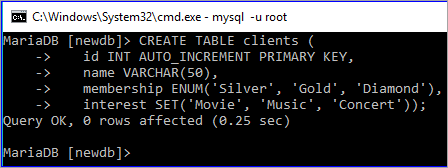
INSERT queries will create two records in the table. The ENUM field only accepts data from the defined list.
‘Premium’ value does not exist on the ENUM list. Hence, the value of the ENUM field will be empty for the second record. SET can accept multiple values, and both pieces of data will be inserted in the second record.
INSERT INTO clients (name, membership,interest)
VALUES ('Sehnaz','Gold', 'Music'),
                 ('Sourav','Premium', 'Movie,Concert');
SELECT * FROM clients;

Q #8) What are the differences between a primary key and a foreign key?
Answer: The database table uses a primary key to identify each row uniquely. It is necessary to declare the primary key on those tables that require creating a relationship among them. You can declare one or more fields of a table as the primary key.
When the primary key of any table is used in another table as the primary key or another field for making a database relation, then it is called a foreign key.
The difference between these two keys is mentioned below:
- The primary key uniquely identifies a record, whereas a foreign key refers to the primary key of another table.
- The primary key can never accept a NULL value, but a foreign key accepts a NULL value.
- When a record is inserted in a table that contains the primary key, then it is not necessary to insert the value in the table that contains this primary key field as the foreign key.
- When a record is deleted from the table that contains the primary key, then the corresponding record must be deleted from the table containing the foreign key for data consistency. But any record can be deleted from the table that contains a foreign key without deleting a related record in another table.
Example:
Two tables named manufacturers and items will be created after executing the following two SQL commands.
Here, the primary key of the manufacturer’s table is used as a foreign key in the items table with the field name manufacturer_id. Hence, the manufacturer_id field will contain only those values that exist in the manufacturer’s table.
CREATE TABLE manufacturers (
   id INT AUTO_INCREMENT PRIMARY KEY,
   name VARCHAR(50));
CREATE TABLE items (
   id INT AUTO_INCREMENT PRIMARY KEY,
   name VARCHAR(50),
   type VARCHAR(50),
   brand VARCHAR(50),
   manufacturer_id INT,
   FOREIGN KEY (manufacturer_id) REFERENCES manufacturers(id));

Q #9) What are the differences between CHAR and VARCHAR data types?
Answer: Both the CHAR and VARCHAR data types are used to store string data in the fields of the table.
The differences between these data types are mentioned below:
- CHAR data type is used to store fixed-length string data, and the VARCHAR data type is used to store variable-length string data.
- The storage size of the CHAR data type will always be the maximum length of this data type, and the storage size of VARCHAR will be the length of the inserted string data. Hence, it is better to use the CHAR data type when the length of the string will be the same length for all the records.
- CHAR is used to store small data, whereas VARCHAR is used to store large data.
- CHAR works faster, and VARCHAR works slower.
Further Reading =>> MySQL Data Types
Example:
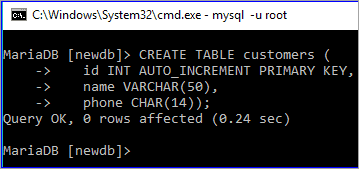
The following SQL statement will create a table named Customers. In this table, the data type of the name field is VARCHAR and the data type of the phone field is CHAR.
The size of the name field will depend on the length of the inserted value. The size of the phone field will always be 14 characters, even if the length of the inserted value is less than 14 characters.
CREATE TABLE customers (
   id INT AUTO_INCREMENT PRIMARY KEY,
   name VARCHAR(50),
   phone CHAR(14))
Q #10) What is the purpose of using the TIMESTAMP data type?
Answer: A TIMESTAMP data type is used to store the combination of date and time value, which is 19 characters long.
The format of TIMESTAMP is YYYY-MM-DD HH:MM: SS. It can store data from ‘1970-01-01 00:00:01’ UTC to ‘2038-01-19 03:14:07’ UTC. By default, the current date and time of the server get inserted in this data type when a new record is inserted or updated.
Q #11) What is the difference between mysql_fetch_array() and ysql_fetch_object()?
Answer: Both mysql_fetch_array() and mysql_fetch_object() are built-in methods of PHP to retrieve records from a MySQL database table.
The difference between these methods is that mysql_fetch_array() returns the result set as an array and mysql_fetch_object() returns the result set as an object.
Example:
$result = mysql_query("SELECT id, name FROM clients");

//using mysql_fetch_array()
while ($row = mysql_fetch_array($result, MYSQL_NUM)) {
    printf("ID: %s  Name: %s", $row[0], $row[1]);
}

//using mysql_fetch_object()
while ($row = mysql_fetch_object($result)) {
    printf("ID: %s  Name: %s", $row->id, $row->name);
}
Q #12) How can you filter the duplicate data while retrieving records from the table?
Answer: A DISTINCT keyword is used to filter duplicate data from the table while retrieving the records from a table.
Example:
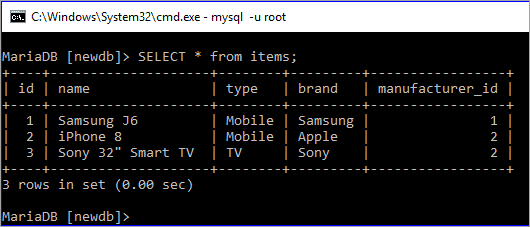
The following SQL command shows all the records of the items table. The output shows that the table contains duplicate values in the Type field.
SELECT * from items;
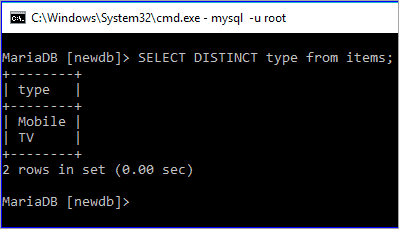
The following SQL command will display the values of the type field by removing duplicate values.
SELECT DISTINCT type from items;
Intermediate Level MySQL Interview Questions
Q #13) What is the difference between NOW() and CURRENT_DATE()?
Answer: Both NOW() and CURRENT_DATE() are built-in MySQL methods. NOW() is used to show the current date and time of the server, and CURRENT_DATE() is used to show only the date of the server.
SELECT current_date();
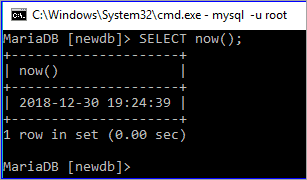
SELECT current_date();

Q #14) Which statement is used in a select query for partial matching?
Answer: REGEXP and LIKE statements can be used in a SELECT query for partial matching. REGEXP is used to search records based on a pattern, and LIKE is used to search any record by matching any string at the beginning, end, or middle of a particular field value.
Example:
First, check the existing records of the ‘clients’ table by executing the SELECT query.
SELECT * FROM clients;
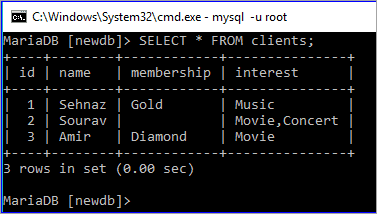
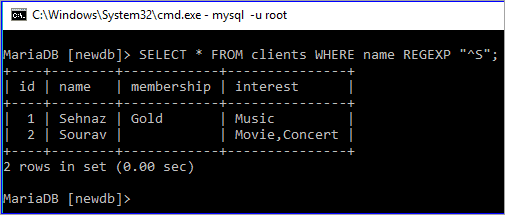
Run a SELECT query with a REGEXP clause to search those records from the clients where the client name starts with ‘S’
SELECT * FROM clients WHERE name REGEXP "^S";
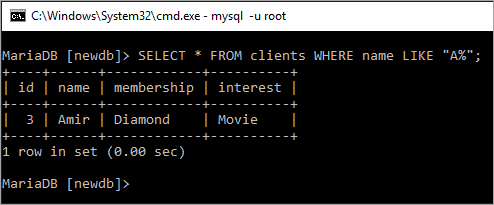
Run a SELECT query with a LIKE clause to search those records from the clients where the client name starts with ‘A’
SELECT * FROM clients WHERE name LIKE "A%";
Q #15) Which MySQL function is used to concatenate strings?
Answer: The CONCAT() function is used to combine two or more string data. The use of this function is shown here with an example.
Example:
The following SELECT query with CONCAT() function will combine five words: ‘Welcome ‘, ‘to’, ‘SoftwareTestingHelp’,’.’, and ‘com’.
SELECT CONCAT('Welcome ',to ','SoftwareTestingHelp','.',com');

CONCAT() function can be used on any table as well. The following SELECT query will show the output by combining two fields, brand and type from the items table.
SELECT CONCAT(brand,'=>',type) from items;

Q #16) How can you change the name of any existing table by using the SQL statement?
Answer: The following SQL command is used to rename an existing table in the database.
RENAME TABLE table_name TO new_name
Example:
The following command will show the table list of the newdb database.
SHOW TABLES;
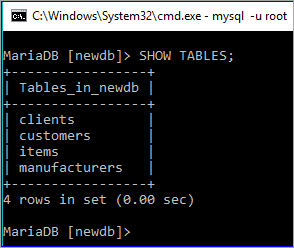
The following rename command will rename the table items to new name products.
RENAME TABLE items TO products;
SHOW TABLES;

Q #17) How can you retrieve a portion of any column value by using a SELECT query?
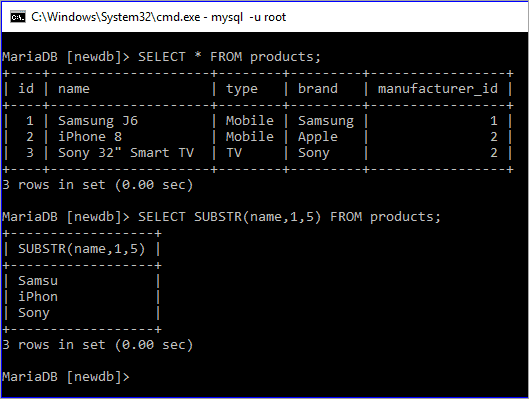
Answer: SUBSTR() function is used to retrieve a portion of any column. The use of this function is explained here with an example.
Example:
Here, the first SELECT command is used to show all the records of the Products table, and the second SELECT command is executed using the SUBSTR function, which prints only the first five characters of the name field.
SELECT * FROM products;
SELECT SUBSTR(name,1,5) FROM products;
Q #18) What is the purpose of using a HEAP table?
Answer: The table that uses a hashed index and stores in memory is called the HEAP table. It works as a temporary table, and it uses the indexes that make it faster than other table types.
When MySQL crashes for any reason, all the data stored in this table can be lost. It uses fixed-length data types. Hence, BLOB and TEXT data types are not supported by this table. It is a useful table for those MySQL tasks where speed is the most important factor and temporary data is used.
Q #19) How can you add and remove any column of a table?
Answer: The syntax for adding any column to an existing table is shown below.
ALTER TABLE table_name ADD COLUMN column_name column_definition [FIRST|AFTER existing_column]
Example:
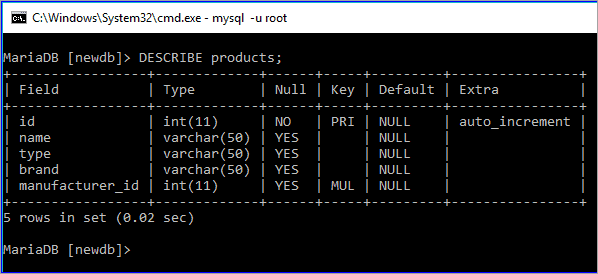
The DESCRIBE command is used to show the structure of the products table.
DESCRIBE products;
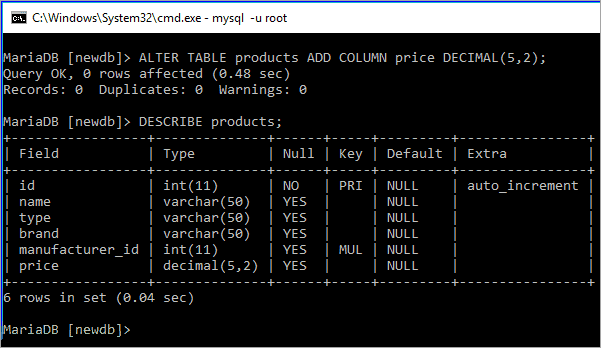
The following ALTER command with the ADD COLUMN clause will add a new field named ‘price’ in the table products.
ALTER TABLE products ADD COLUMN price DECIMAL(5,2);
DESCRIBE products;
The syntax for removing any column from an existing table is shown below.
ALTER TABLE table_name DROP COLUMN column_name;
Example:
The following ALTER command with a DROP COLUMN clause will remove the field named ‘brand’ in the table ‘products’.
ALTER TABLE products DROP COLUMN brand;
DESCRIBE products;

Q #20) What is an index? How can an index be declared in MySQL?
Answer: An index is a data structure of a MySQL table that is used to speed up the queries.
It is used by the database search engine to find the records faster. One or more fields of a table can be used as an index key. Index key can be assigned at the time of table declaration or can be assigned after creating the table.
Example:
username and email fields are set as the index in the following create table statement.
CREATE TABLE users(
        username VARCHAR(50) PRIMARY KEY,
        email VARCHAR(50) NOT NULL,
        password VARCHAR(50) NOT NULL,
        INDEX (username, email));

The following command will show the index key information of the ‘users’ table.
SHOW INDEXES FROM users;

Scenario-Based MySQL Interview Questions
Q #21) What is meant by a decimal (5,2)?
Answer: A decimal data type is used in MySQL to store fractional data.
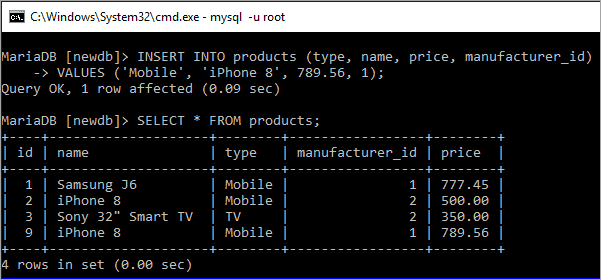
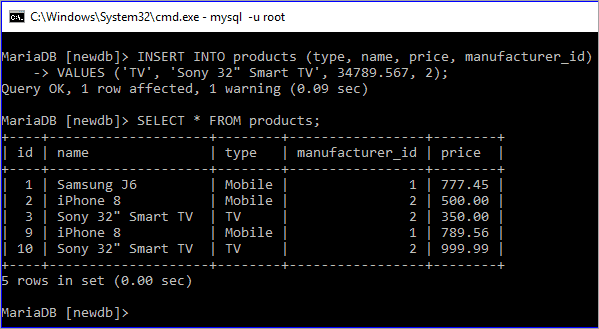
The meaning of decimal (5,2) means that the total length of the fractional value is 5. The field can contain 3 digits before the decimal point and 2 digits after the decimal point. If a user adds any value larger than the defined length, then it will insert 999.99 in the field.
The use of this data type is explained in the following example.
Example:
In the following insert query, 789.56 is inserted in the price field. This value is less than 1000 and the total digits with the fractional part are 5. So, this value is valid for this field.
INSERT INTO products (type, name, price, manufacturer_id)
VALUES ('Mobile', 'iPhone 8', 789.56, 1);
SELECT * FROM products;
In the following insert query, 34789.567 is set for the price field. Then this value is greater than 1000 and the total digits with fractional parts are 8. So, the default value 999.99 is inserted in the place of 34789.567.
INSERT INTO products (type, name, price, manufacturer_id)
VALUES('TV','Sony 32" Smart TV',34789.567, 2);
SELECT * FROM products;
Q #22) What is the view? How can you create and drop view in MySQL?
Answer: A view works as a virtual table that is used to store query and returns a result set when it is called. An updatable view is also supported by MySQL.
How a view can be created or deleted in MySQL are shown in the following examples.
Create View Example:
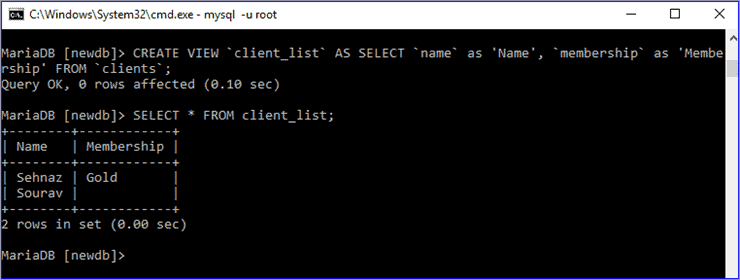
The following statement will create a view file named ‘client_list’ based on the table clients.
CREATE VIEW `client_list` AS SELECT `name` as 'Name', `membership` as 'Membership' FROM `clients`;
The SELECT statement will display the records of client_list value.
SELECT * FROM client_list;
DROP View Example:
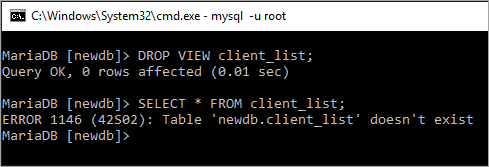
The drop view statement will delete the view file. The SELECT query will show an error after deleting the view.
DROP VIEW client_list;
SELECT * FROM client_list;
Q #23) What is the function of mysqldump?
Answer: mysqldump is a useful utility tool of MySQL that is used to dump one or more or all databases from the server for backup or transfer to another database server.
Syntax:
For a single database,
mysqldump [OPTIONS] db_name [TABLES]
For multiple databases,
mysqldump [OPTIONS] –databases DB1 [DB2 DB3…]
For all databases,
mysqldump [OPTIONS] –all-databases
Example:
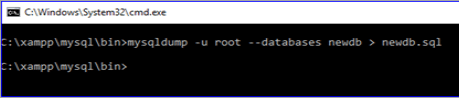
The following command will create a dump of the ‘newdb’ database and export the content of the database in the file, newdb.sql.
mysqldump --databases newdb > newdb.sql
Q #24) How can you change the password of a MySQL user?
Answer: SET PASSWORD statement is used to change the password of a MySQL user.
Syntax:
SET PASSWORD FOR ‘username’@’hostname’ = PASSWORD(‘password’);
Example:
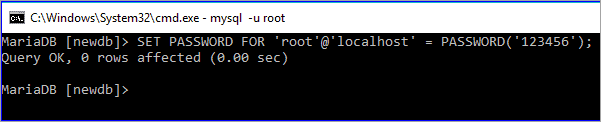
The following statement will set or change the root password.
SET PASSWORD FOR 'root'@'localhost' = PASSWORD('123456');
Q #25) What is the difference between UNIX TIMESTAMP and MySQL TIMESTAMP?
Answer: Both UNIX TIMESTAMP and MySQL TIMESTAMP are used to represent the date and time value. The main difference between these values is that UNIX TIMESTAMP represents the value by using 32-bit integers, and MySQL TIMESTAMP represents the value in a human-readable format.
Example:
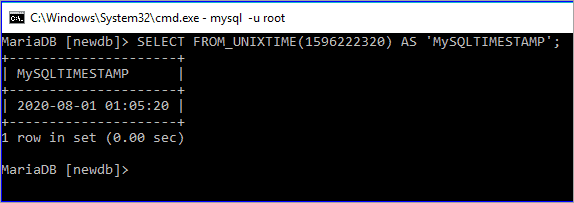
A UNIX time value is used by FROM_UNIXTIME function in the SELECT query to get the date and time value in the human-readable format.
SELECT FROM_UNIXTIME (1596222320) AS 'MySQLTIMESTAMP';
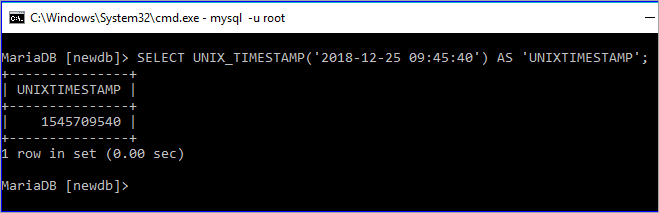
Date and time value is used by UNIX_TIMESTAMP function in the SELECT query to get the date and time value in the UNIX format.
SELECT UNIX_TIMESTAMP ('2018-12-25 09:45:40') AS 'UNIXTIMESTAMP';
Q #26) How can you import tables from a SQL file into a database by using the MySQL client?
Answer: Database tables can be imported into a database from a SQL file by using the following MySQL statement.
mysql -u username -p database_name < sql_filename
Example:
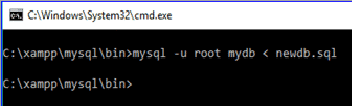
If the root user’s password is empty, then the following command will import tables from ‘newdb.sql’ file into the database `mydb`.
mysql -u root mydb < newdb.sql

Q #27) What is the difference between the Primary key and the Unique key?
Answer: Unique data is stored in the primary key and unique key fields. The primary key field never accepts a NULL value, but the unique key field accepts a NULL value.
Example:
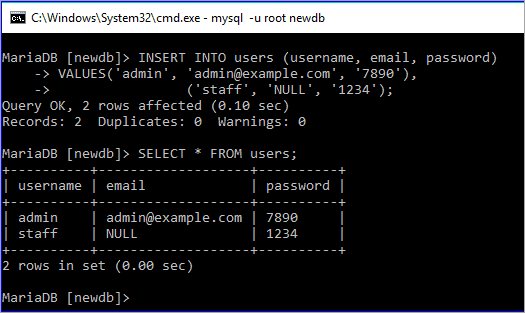
In the users’ table, the id field is the primary key, and the email field is a unique key. Two records are inserted in the table where the email field is NULL for the 2nd record. The records are inserted properly as the unique field supports a NULL value.
INSERT INTO users (username, email, password)
VALUES('admin', 'admin@example.com', '7890'),
                ('staff', 'NULL', '1234');
SELECT * FROM users;
Q #28) What is the purpose of using the IFNULL() function?
Answer: IFNULL() function takes two arguments. It returns the first argument value if the value of the first argument is not NULL, and it returns the second argument if the value of the first argument is NULL.
Example:
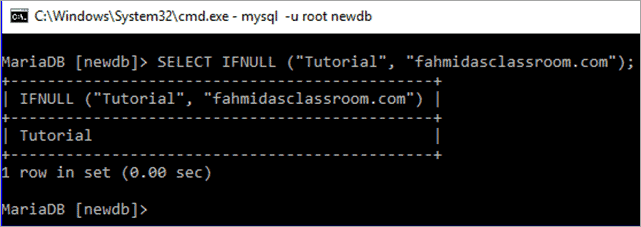
Here, the first argument of the IFNULL function is not NULL. So, the output is the first argument value.
SELECT IFNULL ("Tutorial", "fahmidasclassroom.com");
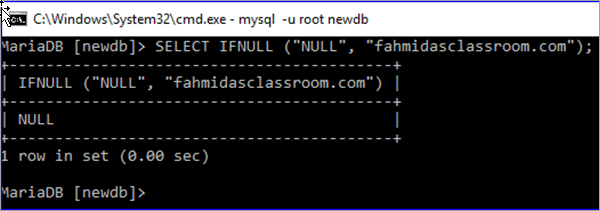
Here, the first argument of the IFNULL function is NULL. So, the output is NULL.
SELECT IFNULL ("NULL", "fahmidasclassroom.com");
Q #29) What is a join? Explain the different types of MySQL joins.
Answer: The SQL statement that is used to make a connection between two or more tables based on the matching columns is called a join. It is mainly used for complex queries.
Different types of SQL joins are mentioned below:
- Inner Join: It is a default join. It returns records when the values match in the joining tables.
- Left Outer Join: It returns all the records from the left table based on the matched records from the right table.
- Right Outer Join: It returns all the records from the right table based on the matched records from the left table.
- Full Outer Join: It returns all the records that match from the left or right table.
Example:
Two tables, manufacturers and products are used in this example to show the use of INNER JOIN. Here, SELECT queries are used to show the current records of these two tables.
SELECT * FROM manufacturers;
SELECT * FROM products;

INNER JOIN is used in the following SELECT query where all the IDs and names of the products table will be displayed based on the matching manufacturer_id of the products with an id of the manufacturer’s table.
SELECT products.id, products.name
FROM products
INNER JOIN manufacturers ON manufacturers.id= products.manufacturer_id;

Q #30) How can you retrieve a particular number of records from a table?
Answer: LIMIT clause is used with the SQL statement to retrieve a particular number of records from a table. The LIMIT clause defines from which record and how many records will be retrieved.
Syntax:
LIMIT starting_number, number_of_rows
Example:
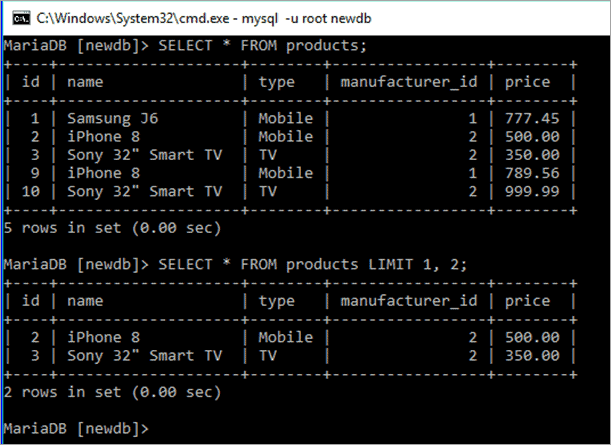
Products table has 5 records, which are displayed by the first SELECT query, and the second SELECT query is used to display the records from the 2nd to the 3rd by using LIMIT 1, 2.
SELECT * FROM products;
SELECT * FROM products LIMIT 1, 2;
Experienced Level Questions for MySQL Interview
Q #31) How can you export the table as an XML file in MySQL?
Answer: ‘-X’ option is used with the `mysql` command for exporting the file as XML. The following statement will export any table from a database as an XML file.
mysql -u username -X -e “SELECT query” database_name
Example:
The following command will export the data of the items table into an xmlData.xml file.
mysql -u root -X -e "SELECT * from products" newdb > xmlData.xml

Q #32) What is a CSV table?
Answer: MySQL table that uses the CSV storage engine is called a CSV table. Data are stored as comma-separated values in the CSV table. MySQL server creates a data file with an extension ‘.csv’ to store the content of the CSV table.
Example:
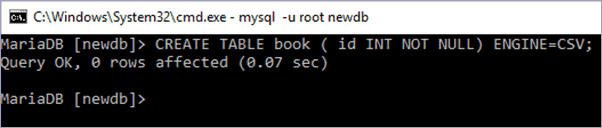
The following create statement will create a CSV file named book.
CREATE TABLE book ( id INT NOT NULL) ENGINE=CSV;
Q #33) How can you calculate the sum of any column of a table?
Answer: SUM() function is used to calculate the sum of any column.
Syntax:
SUM(DISTINCT expression)
Example:
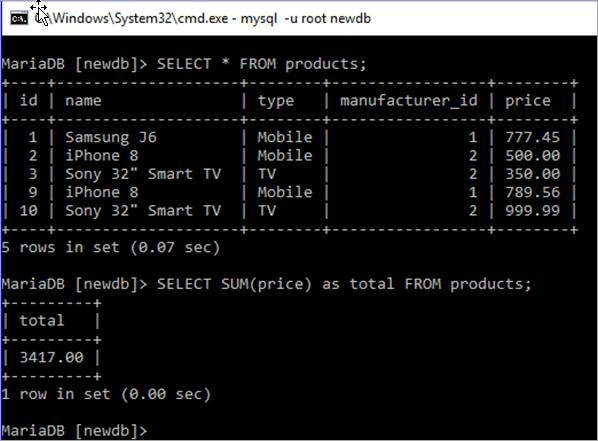
Products table has a numeric field named price. In this example, the SUM() function is used to calculate the total value of the price field.
SELECT * FROM products;
SELECT SUM(price) as total FROM products;
Q #34) How can you count the total number of records of any table?
Answer: COUNT() function is used to count the total number of records in any table.
Syntax:
COUNT(expression)
Example:
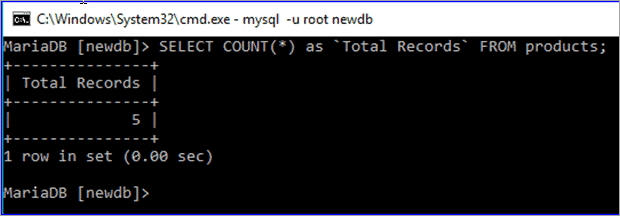
The following SELECT query is used to count the total number of records in the products table.
SELECT COUNT(*) as `Total Records` FROM products;
Q #35) Explain the difference between DELETE and TRUNCATE.
Answer: Both DELETE and TRUNCATE commands are used to delete the records from any database table. However, there are some significant differences between these commands. If the table contains the AUTO_INCREMENT PRIMARY KEY field, then the effect of these commands can be shown properly.
Two differences between these commands are mentioned below.
- DELETE command is used to delete a single or, multiple records, or all the records from the table. The TRUNCATE command is used to delete all the records from the table or make the table empty.
- When DELETE command is used to delete all the records from the table, then it doesn’t re-initialize the table. So, the AUTO_INCREMENT field does not count from one when the user inserts any record.
But when all the records of any table are deleted by using TRUNCATE command, then it re-initializes the table and a new record will start from one for the AUTO_INCREMENT field.
Example:
The previously created user table is used in this example.
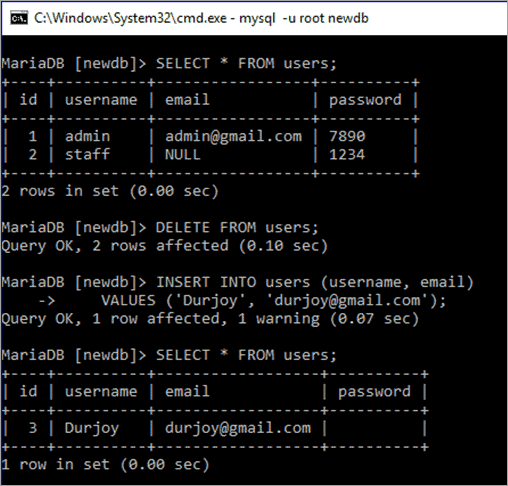
First, the SELECT query will show all the records of the user’s table. The DELETE query will delete all the records from the user’s table. INSERT query will insert a new record into the user’s table. After the insert, if the SELECT query executes again, then it will be shown that a new id is calculated after the deleted id.
SELECT * FROM users;
DELETE FROM users;
INSERT INTO users (username, email)
VALUES ('Durjoy', 'durjoy@gmail.com');
SELECT * FROM users;
Currently, there are two records in the user’s table, and when a new record is inserted after deleting all the records, then the new ID is 3, and not 1.
The same queries are executed in this part, just used the TRUNCATE statement in place of DELETE. It is shown that the ID value of the new record is 1.
TRUNCATE table users;
INSERT INTO users (username, email)
VALUES ('Farheen', 'farheen@gmail.com');
SELECT * FROM users;

Q #36) What is a storage engine? What are the differences between InnoDB and MyISAM engines?
Answer: One of the major components of the MySQL server is the storage engine for doing different types of database operations. Each database table created is based on the specific storage engine.
MySQL supports two types of storage engines, i.e, transactional and non-transactional. InnoDB is the default storage engine of MySQL, which is transactional. MyISAM storage engine is a non-transactional storage engine.
The differences between InnoDB and MyISAM storage engines are discussed below:
- MyISAM supports the FULLTEXT index, but InnoDB doesn’t support the FULLTEXT index.
- MyISAM is faster, and InnoDB is slower.
- InnoDB supports ACID (Atomicity, Consistency, Isolation, and Durability) property but MyISAM doesn’t.
- InnoDB supports row-level locking and MyISAM supports table-level locking.
- InnoDB is suitable for a large database, and MyISAM is suitable for a small database.
Q #37) What is a transaction? Describe MySQL transaction properties.
Answer: When a group of database operations is done as a single unit, then it is called a transaction. If any task of the transactional tasks remains incomplete, then the transaction will not succeed. Hence, it is mandatory to complete all the tasks of a transaction to make the transaction successful.
A transaction has four properties, which are known as the ACID property. These properties are described below.
- Atomicity: It ensures that all the tasks of a transaction will be completed successfully; otherwise all the completed tasks will be rolled back to the previous state for any failure.
- Consistency: It ensures that the database state is changed accurately for the committed transaction.
- Isolation: It ensures that all the tasks of a transaction will be done independently and transparently.
- Durability: It ensures that all committed transactions is consistent for any type of system failure.
Q #38) What are the functions of commit and rollback statements?
Answer: Commit is a transaction command that executes when all the tasks of a transaction are completed successfully. It will modify the database permanently to confirm the transaction.
Syntax:
COMMIT;
Rollback is another transactional command that executes when any of the transactional tasks become unsuccessful and undoes all the changes that are made by any transactional task to make the transaction unsuccessful.
Syntax:
ROLLBACK;
Q #39) What is the difference between MyISAM Static and MyISAM Dynamic?
Answer: MyISAM Static and MyISAM Dynamic are the variations of the MyISAM storage engine. The differences between these tables are mentioned below.
- All the fields of MyISAM static table are of a fixed length, and the MyISAM dynamic table accepts variable-length fields such as BLOB, TEXT, etc.
- After data corruption, it is easier to restore the MyISAM static table than the MyISAM dynamic table.
Q #40) What is a trigger? How you can create a trigger in MySQL?
Answer: One of the important features of the MySQL database is a trigger that executes automatically when a particular database event occurs.
It fires after or before the execution of an insert or update or delete statement. It is a very useful option when a database user wants to do some database operations automatically.
Trigger Example:
If you want to delete the items of a supplier from the items table automatically after deleting the entry of the particular supplier from the ‘suppliers’ table then write the trigger in the following way.
Example:
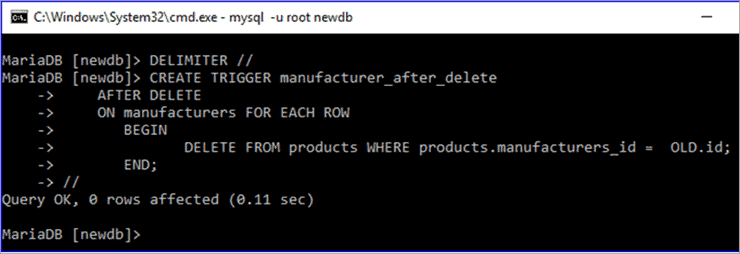
This is an example of after delete trigger that will fire automatically when any record is removed from the manufacturer table and deletes all the records from the products table where the deleted id of the manufacturer table matches the manufacturer_id field of the products table.
DELIMITER //
CREATE TRIGGER manufacturer_after_delete
AFTER DELETE
ON manufacturers FOR EACH ROW
BEGIN
DELETE FROM products WHERE products.manufacturers_id = OLD.id;
END;
//
Conclusion
MySQL server has several built-in functions and clauses to perform different types of actions on the table data. The most commonly used SQL functions and clauses of the MySQL server are explained in this article with different examples.
Also read =>> MongoDB Interview Questions
I hope this article on the best MySQL interview questions will help you to understand the basic as well as advanced level concepts of the MySQL server for fresher as well as experienced professionals.
Further reading =>> MySQL SHOW DATABASES Tutorial
We wish you all the best!!
Was this helpful?
Recommended Reading
-

List of the most popular MySQL interview questions with example queries (Latest MySQL questions of 2025): MySQL is an essential part of the modern web application, and knowledge of MySQL is a common requirement for any web developer's job. A list of basic, as well as advanced-level MySQL questions for…
-
Get Ready to Learn the Differences Between SQL Vs MySQL Vs SQL Server: In this article, we will discuss the differences between SQL and MySQL. Most of us will have a basic idea of SQL and MySQL, but in order to bring everyone on the same page, let us first…
-
Lists popular Software Testing and related Technical Interview Questions and answers on the most common software testing & technical topics: Let us see some of the most frequently asked interview questions and answers on Software Testing and other related technical topics in the tutorials listed below. Select the link you…
-
Learn about MySQL ALTER Table command to add/drop a column, index, constraint, change table name, etc. with examples: MySQL ALTER command is used to modify an existing table by adding a new column or removing an existing column or changing the data type of column. Simply speaking, the ALTER command…


