


This tutorial provides frequently asked MongoDB interview questions and answers with explanations to help you prepare for the MongoDB interview.
The invention of various technologies like Java and ASP.NET enabled the development of web-based applications for e-commerce, healthcare, online purchases, research, and innovations. It was difficult to store unstructured data – like content in emails and SMS, chat, media files, posts, and blogs in relational databases.
MongoDB is a NoSQL database used for accessing and storing unstructured data in documents.
Documents are JSON objects that store data in key-value pairs instead of tables as in relational databases. The collection contains one or multiple such documents.
Table of Contents:
Quiz on MongoDB Interview Questions
Ace your upcoming interview with our comprehensive quiz on MongoDB interview questions. Gain expert insights and valuable knowledge on MongoDB concepts to showcase your expertise and land your dream job.

Understanding MongoDB
MongoDB is a NoSQL database similar to CouchDB, Cassandra and offers advantages over relational databases in processing and managing unstructured data. Such data is essential in Search Engine Optimization, Internet of Things, AI, and healthcare.
MongoDB is used by various organizations like Barclays, Verizon, Royal Bank of Scotland, KPMG, Vivint, ThermoFisher Scientific, SAP, Cisco, Adobe, and AstraZeneca.
Top Interview Questions on MongoDB
Q #1) Explain the importance and benefits of using a document-based database.
Answer: A document database, such as MongoDB, is collection oriented, schema-free, open-source distributed database. Documents are in binary JSON format that store data internally as key-value pairs.
Here are the advantages of using a document database:
- Stores dynamic data in unstructured, semi-structured, and structured formats.
- Creates and stores for analysis a persisted view from the base document.
- Able to process and store large datasets.
- No restriction on structure or format for storing data.
- Objects can be stored in documents and serialized without enforcing any relational integrity.
- No foreign-key relationship.
- Supports JSON and XML for documents.
Q #2) Describe some real-world examples of using unstructured data.
Answer: Examples include:
- Image recognition software can be utilized in classifying mammograms as potentially cancerous glands, genomics – field of biology focusing on the structure, function, and evolution of genomes (DNA) to understand disease markers.
- Text analytics using NLP (Natural Language Processing) or machine learning to extract people, places, or things, themes, or sentiment from chat, social media posts, comments, and online surveys for building predictive analysis.
- Analysis of medical case studies and expert opinions on a variety of diseases and treatments can help build healthcare applications using data from medical reports and lines of treatment as reference data.
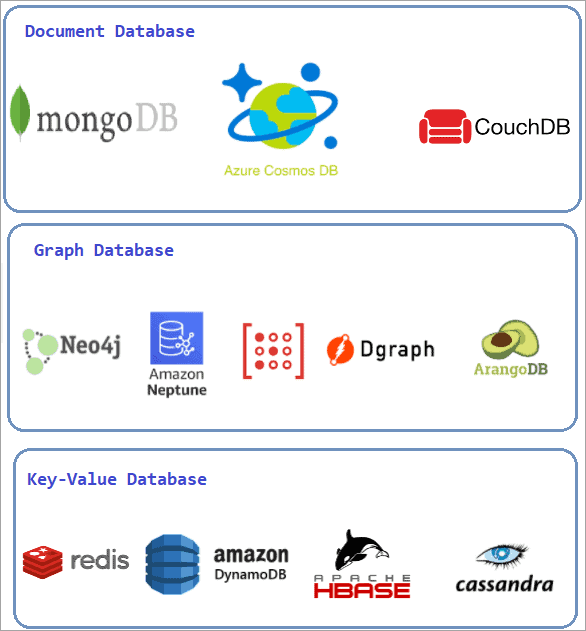
Q #3) List the non-tabular databases.
Answer: Non-tabular databases fall into the following three categories:
- Document databases: MongoDB, Azure CosmosDB, Apache CouchDB.
- Graph databases: Neo4j, Amazon Neptune, RedisGraph, ArangoDB, DGraph.
- Key-value databases: Redis, Amazon DynamoDB (key-value), Apache HBase, Cassandra (wide-column).
Q #4) List MongoDB cloud products.
Answer: Cloud-based MongoDB products are:
- MongoDB Realm
- MongoDB Atlas
- MongoDB Atlas Search
- MongoDB Atlas Data Lake
- MongoDB Charts
- MongoDB Cloud Manager
- MongoDB Ops Manager
Q #5) List the advantages of MongoDB.
Answer: MongoDB offers the following advantages over other database systems:
- Stores data records in documents grouped in collections.
- MongoDB 3.4 supports read-only views, whereas MongoDB 4.2 supports on-demand materialized views.
- MongoDB offers an expressive query language, aggregation, and indexing to find, filter, and access data as per business needs in very little time.
- MongoDB uses shard keys to partition data into chunks and distributes evenly across shards, and scales the data
- MongoDB keeps multiple copies of data, thereby offering high availability
- MongoDB supports programming languages like Erlang, Go, Scala, Java, Node.js, PHP, Python, Ruby, Perl, C, C++, and C#.
Q #6) List the scenarios where MongoDB can be used for storage.
Answer: MongoDB database is suitable for applications that require low latency, high availability, unstructured, semi-structured, and polymorphic data storage, and in applications where large scalability and multi-data center deployment are needed.
MongoDB use-cases include content management, real-time personalization, and applications that have a single view across multiple systems. MongoDB is not suitable for complex transactions like double-entry bookkeeping and scan-based applications accessing large data subsets.
Q #7) What is sharding in MongoDB?
Answer: A procedure to store data records across multiple server machines, in order to meet data growth, is known as sharding in MongoDB. It creates a horizontal partition referred to as a shard or a database shard of data in a database or search engine.
Q #8) List the advantages of MongoDB over RDBMS.
Answer: The comparison between RDBMS and the advantages of using MongoDB over RDBMS is explained in the table below:
| Relational Database Systems | MongoDB |
|---|---|
| Database Schema is logical representation of integrity constraints that governs and shows how entities such as tables, views, stored procedure etc. are related to each other. There is logical and physical database schema | It is document database where collection holds multiple documents where number of field, size and content can differ from one document to another. By default it does not have schema, but dynamic schema can be created |
| There are 5 types of Joins used in RDBMS – Self join, Inner Join, Left join, Right Join, Full Join | No complex joins used in MongoDB |
| Performance tuning is complex and need skilled admin person | Performance tuning is very easy compared to RDBMS |
| Large data are stored in files which are converted into blob data type to store in RDBMS | Supports storage of large files, horizontal and hierarchical storage |
| RDBMS are RAM driven, its performance of finding / retrieving results will be greatly affected with large data storage | It allows third party pluggable storage engine API |
| RDBMS is not suitable for big data that are not horizontally scalable | MongoDB offers scalability using horizontal Sharding – data partition across various servers |
Q #9) Describe the Mongo shell.
Answer: The Mongo shell is the JavaScript shell that helps to configure, query, connect, and work with the MongoDB database from the command line. It is an open-source, standalone utility under the Apache 2 license.
=>> Click here to download.
Q #10) Describe documents in MongoDB.
Answer: MongoDB stores data records as documents as field-value pairs similar to JSON objects.
Structure of JSON-like documents:
{
consumer_id:”A9871201″,
consumer_name:”emily”,
mobile_no:”(905)789-9870″,
emai_address:”emily1987@gmail.com”
consumer_since:”01-12-2010″
loyalty_point:8000
}
- Documents correspond to native data types such as Integer, floating-point, Boolean, characters & strings, etc., in many programming languages.
- Dynamic Schema offers support for polymorphism.
- Developers use embedded documents and arrays instead of Joins.
Scenario-Based MongoDB Interview Questions
Q #11) List the checkpoints while creating a dynamic schema in MongoDB.
Answer: The checkpoints or considerations while creating a dynamic schema are:
- End-users should base the schema on their needs.
- Multiple objects can be combined into a single document.
- Joins should be done while writing and not while reading.
- The schema should be optimized for common use cases.
- Complex aggregation can be performed in the schema.
Q #12) Describe collections in MongoDB.
Answer: MongoDB stores documents (data records) in Collections similar to tables in relational databases. Initially, when a collection does not exist, MongoDB will create the collection when the first data record is stored in the collection.
The commands used are:
db.newCollection1.insertOne ( { x: 1 } )
db.newCollection2.createIndex ( { y: 1 })
Both above operations create respective Collections if they do not exist.
Q #13) What is the namespace in MongoDB?
Answer: It is a combination of the database name and collection name, i.e., concatenation of database name and collection name, like [database-name].[collection or index name].
MongoDB stores Binary JSON (BSON) objects.
Q #14) How data is added in MongoDB?
Answer: insertOne() method is used to insert a document (data record) into a collection. In case the collection does not exist, insertOne() method creates the collection.
Syntax for adding a data record in collection is as follows:
db.collection.insertOne (
<document>,
{ writeConcern: <document> })
Where the document is a data record inserted into a collection, writeConcern is optional.
The above command will return a Boolean acknowledged as true if the system runs it with write concern or false if the system disables write concern.
Q #15) Explain how information gets updated in MongoDB?
Answer: Document in MongoDB get updated using the update command.
db.Customer.update (
{“Customerid” : 201 },
{$set: { “CustomerName” : “ANZ Grindlays Bank” }} );
Q #16) Explain how document is deleted in MongoDB?
Answer: Documents can be removed from a MongoDB collection using db.collection.remove() method.
Syntax:
db.Orders.remove ( { order_id : 30211 } )
If deletion operation is successful, the output will show that 1 document was removed.
writeResult ({ “nRemoved” : 1})
Q #17) List the queries performed in MongoDB.
Answer: The table below will explain the queries, syntax, and description of the queries used in managing data in MongoDB.
| Query | Syntax | Description |
|---|---|---|
| find() method | db.mycollection.find({birth_date: { $gt: new Date(‘1985-07-15’) | Returns the documents where birth_date is greater than new Date(‘1985-01-15’) |
| find() , AND condition | db.mycollection.find({name : {first: “John”, last:”Cena”}}) | Returns documents where embedded document name {first: “John”, last:”Cena”} |
| Find(), OR condition | db.musicians.find( {$or : [ {instrument : “piano” }, { born : 1940 }] }) | Returns documents where musicians playing instrument as piano or were born in the year 1940 |
| $in operator | db.skillset.find ( {“skill_set”: { $in : [ “Java”, “REST”] } } ) | $in operator returns list of values in the query, in this example skill_set are Java and REST |
Q #18) List the differences between the save and insert commands in MongoDB.
Answer: The following is the difference between the save and insert commands:
| Scenario | Description |
|---|---|
| Save command used with _id | The document found with matching _id is replaced with new document |
| Save command without _id | Inserts new document created |
| insert command with _id | Gives E11000 duplicate key error that lists collection, index and duplicate key |
| insert command without _id | Inserts new document created |
Without _id insert and save commands act similarly.
db.collection_name.save({ it_asset:”Quick Heal AntiVirus Pro”, product_key: “F58012W076186540F0” })
db.collection_name.insert({ it_asset:”Quick Heal AntiVirus Pro”, product_key: “F58012W076186540F0” })
Q #19) Explain various data types in MongoDB.
Answer: The data types used in MongoDB are listed below:
- String: UTF-8 compliant string values can be stored in the MongoDB database.
- Integer: Saves numerical values of 32 or 64 bits based on the server.
- Double: Floating point values.
- Boolean: Stores Boolean values such as True/False.
- Null: Null value can be stored.
- Array: Multiple values in one key can be stored.
- Object: Embedded documents are stored as an Object.
- Object ID: Document ID can be stored in object Id data type.
- Binary Data: Data stored in 0s and 1s format, e.g. byte (unit for storing electronic memory).
Date, regular expression, symbol, code, and timestamp are a few additional data types MongoDB supports.
Q #20) Describe Object Id in MongoDB?
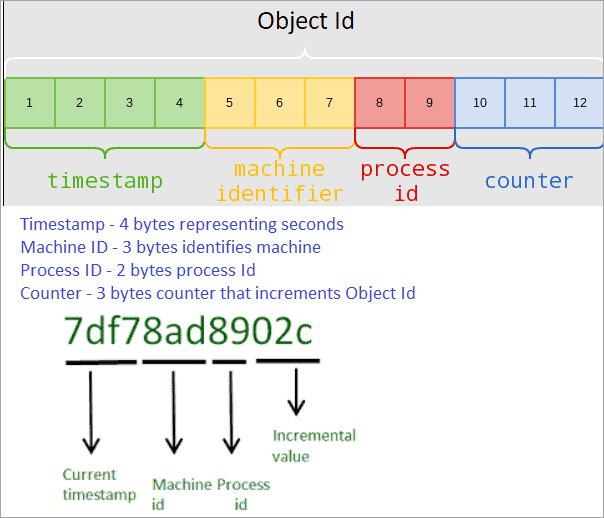
Answer: Every document in a MongoDB collection has a “_id” field acting as the primary key that uniquely identifies the document, known as the Object ID.
Object ID is a BSON (binary JSON) data type field of 12 bytes, starting with 4 bytes that represent a UNIX timestamp of the document, followed by 3 bytes of the machine id MongoDB server running on.
Next 2 bytes are of process id, and finally the last 3 bytes are a counter used for incrementing Object Id.
Structure of Object ID:
MongoDB Interview Questions for Experienced
Q #21) Describe a replica set in MongoDB.
Answer: A group of MongoDB instances hosting the same data set is known as a replica. The set of replicas comprises one primary node and another secondary node.
The primary node accepts writers and is known as the master node. Secondary nodes are read-only nodes replicating from the primary, known as slave nodes.
Q #22) Describe storage engines in MongoDB.
Answer: Storage engine is a database component that manages how data is stored, both in memory and on disk. In order to perform better for specific workloads, MongoDB supports multiple storage engines. In-Memory Storage Engine and WiredTiger are two storage engines used by MongoDB.
- WiredTiger storage engine provides features such as a document-level concurrency model, checkpoints, and compression.
- In-memory storage retains documents in memory instead of on disk, for more predictable data latencies.
Q #23) Explain the function of an index in MongoDB.
Answer: Indexes store a small portion of the data set in an easy-to-traverse (move back and forth) form. The value of a specific field or set of fields is stored by index in the order of the value of the field specified by index.
In the absence of an index, MongoDB has to scan each document in the collection to fetch those documents that match the query statement. _id, also known as object Id is the default index MongoDB creates for every collection.
The syntax to create an index in MongoDB is:
db.collection_name.createIndex({ Key : 1}), where Key is the field name on which the index is created and 1 is for ascending order. For descending order -1 is used.
Q #24) List the differences between MongoDB and CouchDB.
Answer: Both MongoDB and CouchDB are document-based databases. The differences between them are listed below:
| MongoDB | CouchDB |
|---|---|
| MongoDB follows document based data model and data is stored in BSON (binary JSON) format | CouchDB also follows document based data model but stores data in JSON format |
| MongoDB uses simple socket based, request-response style protocol based on TCP as its transport layer protocol | It uses HTTP/REST based protocol |
| Database contains collections that contains documents (data records) | Data is stored in documents in database |
| It follows object based query language and Map/Reduce Java script | It follows Map/Reduce query methods |
| It supports Master-slave replication | It supports master-master replication with built- in custom conflict resolution feature. |
| It is written in C++ language. | It is written in Erlang language |
| It is highly available and strongly consistent | It favours consistency |
Q #25) List the differences between MongoDB and Cassandra.
Answer: MongoDB is document-based, whereas Cassandra is a wide column-based database. The difference between them is:
| MongoDB | Cassandra |
|---|---|
| It is cross platform document based database | It is distributed high performance database |
| It is written in C++ | It is written in Java |
| It stores data in BSON format in document | It stores data in sql tabular format |
| MongoDB has its drivers from Apache and license from AGPL | Cassandra has its license from Apache |
| It is designed to deal with JSON like documents and access application faster | Designed to handle large data across many servers |
Q #26) How can data integrity be maintained in MongoDB?
Answer: There are a couple of ways data integrity can be achieved in MongoDB
- The value of the single field can be set using $set.
- By setting the value of the field to a specific value only when it is a new document, i.e. $setOnInsert.
- The item can be pushed into a property of type array using $push.
- By pulling an item that matches the condition from an array.
- Changing the value of the numeric field by a specified amount with $inc.
Q #27) Describe MongoDB replica Set Master vs Slave.
Answer: Master-slave replication is used for MongoDB methods such as backup, failover, and read scaling. The setup of this replication mode has 2 steps: start a master node and one or more slave nodes with the master address.
Use the Mongo shell at the command line, type to start master runmongod –master.
Type at the command line to start the slave runmongod –slave –source master_address, where master_address is the location of the master node.
Q #28) Explain why the 32-bit MongoDB version is not suitable for production.
Answer: Total storage size for the MongoDB server, including data and indexes for a 32-bit build of MongoDB, is 2 GB, which is insufficient for large unstructured data like logs, social media posts, email, images, videos, etc.
Hence, MongoDB is not deployed on 32-bit machines for production. Instead, the 64-bit build of MongoDB does not have any limitation on storage size.
Q #29) List CRUD operations in MongoDB.
Answer: CRUD is the abbreviation as explained C- Create, R – Read, U – Update, and D – Delete.
The commands for each of these operations are as follows:
C – Create – db.collection_name.insert();
R – Read – db.collection_name.find();
U – Update – db.collection_name.update();
D – Delete – db.collection_name.remove({“field-name” : “value” });
Q #30) How does MongoDB store images, videos, and other large files?
Answer: Images, videos, and other large-sized files are stored in the GridFS specification. GridFS divides large files into chunks or parts. These chunks are stored as separate documents.
The default chunk size of GridFS is 255 kb. GridFS organizes data into 2 collections. In the first collection file, chunks and stored, and in another file metadata about the collection is stored.
Q #31) What is the difference between $all and $in operators in MongoDB?
Answer: Both $all and $in operators are used to filter documents in sub array based on a condition.
[{“make”:”Hyundai”, “model” : [“SUV”,”Hatchback”,”Sedan”]},
{“make”: “Skoda”, “model” : [“SUV”,”Sedan”] },
{“make”: “Mahindra”,”model” : [“SUV”,”Hatchback”] } ]
Using $all returns only the first two documents
db.vehicles.find ({ model : { $all : [“SUV”,”Sedan”] } } ]
Using $in will return all three documents
db.vehicles.find ({ model : { $in : [“SUV”,”Sedan”] } } ]
$all operator is comparable to AND condition, returns documents that satisfy all conditions, whereas $in resembles OR condition, returns documents that make any condition in the query array.
Q #32) Describe Geospatial Indexes in MongoDB.
Answer: MongoDB geospatial queries interpret geometry on a flat surface or a sphere. Geospatial indexes are of two types – 2dsphere indexes that support only spherical queries (queries that interpret geometries on a spherical surface). 2D indexes support flat queries (i.e., queries that interpret flat surface geometries and some spherical queries).
Q #33) List utilities for backup and restore operations in MongoDB.
Answer: MongoDB shell does not have functions for exporting, importing, backing up, or restoring, but there are methods created in MongoDB to accomplish these features. The utility scripts provided to get data in or out of the database in bulk are as below:
- mongoimport
- mongoexport
- mongodump
- mongorestore
Q #34) Describe the Aggregation framework in MongoDB.
Answer: Set of analytical tools within MongoDB for analytics on documents in one or more collections is known as the aggregation framework.
The input from MongoDB collection and pass documents from the collection through one or multiple stages, each of them performing different operations on its inputs. The inputs and outputs for all the stages are documents, basically a stream of documents.
Q #35) What is a transaction in MongoDB?
Answer: Transaction is the logical processing unit in a database that includes various database operations, such as read or write.
MongoDB uses two APIs for transactions:
- Core API – start_transaction and commit_transaction are commands used by core API.
- Call-back API – In addition to transaction operation, callback API includes logic for TrasientTransactionError and UnknownTransactionCommitResult commit errors.
Conclusion
MongoDB is a document-based NoSQL database with features like sharding, partitioning, indexing, hierarchical data storage, and scalability with ease of performance tuning for large unstructured data storage in a format similar to JSON.
Written in C++, MongoDB runs on free RAM space and does not support primary – foreign key relationships. It is highly available, document-oriented, easily scalable, and offers high performance for unstructured, complex, and large datasets such as logs or social media posts, chats, images, and videos.
All the commonly asked questions related to MongoDB have been covered with real-time examples and scenarios in this tutorial.
For more MongoDB-related guides, you can explore our range of MongoDB tutorials below:
- 20+ MongoDB Tutorial for Beginners: Free MongoDB Course
- MongoDB Database Profiler for Monitoring Queries and Performance
- Install MongoDB on Windows: A Step-By-Step Guide
- Deployment in MongoDB: Step-By-Step Tutorial
- MongoDB Create Database Tutorial – Software Testing Help
Was this helpful?
Recommended Reading
-

Understand the main differences between MySQL and MongoDB through this in-depth review and comparison of MongoDB vs MySQL databases: In today’s world, both relational and nonrelational databases are being used depending upon the type of applications. Relational databases provide high levels of consistency and transaction guarantees while Document-based (or Nonrelational…
-
An Exclusive range of 20+ in-depth MongoDB Tutorial for beginners to learn MongoDB from scratch: MongoDB is an open source cross-platform and document-oriented NoSQL database program for modern apps. MongoDB allows to organize and use data in real time anywhere. In this tutorial series, you will learn about MongoDB and…
-
A Step by Step MongoDB Installation on Windows: In this informative MongoDB Training Series, we discussed in detail about the Introduction to MongoDB, its common whereabouts and its history too in our previous tutorial. In this tutorial, we will see the installation and configuration setup of MongoDB, how it does…
-
A Complete Guide to Create and Insert Database in MongoDB: Our previous tutorial in this Free MongoDB training series explained to us all about the Installation of MongoDB on Windows. In this tutorial, we will see how to Create & Insert Database in MongoDB. The most basic step in MongoDB…


