


Are you planning to install Malwarebytes? Read our in-depth, unbiased review before you download, to get a clear answer to the question “Is Malwarebytes Safe and Worth it”?
Malwarebytes is a cybersecurity firm and software package whose vision is to detect, prevent, and eliminate malicious programs and other threats associated with them.
On January 21, 2008, Marcin Kleczynski and Bruce Harrison formally incorporated the company. However, the origins of the company can be traced back to earlier community initiatives and a freeware program known as RogueRemover.
Its CEO is Marcin Kleczynski. With hundreds of employees under his leadership, the company has expanded both to the U.S.in Santa Clara, California, and internationally to its EMEA operations, e.g., in Cork, Ireland.
Is Malwarebytes Good: In-Depth Malwarebytes Review
Malwarebytes also sells both consumer and business products and features malware scanning and removal, real-time protection, exploit protection, ransomware protection, web protection/blocking, and browser guard extensions, along with a VPN or privacy module in its newer offerings.
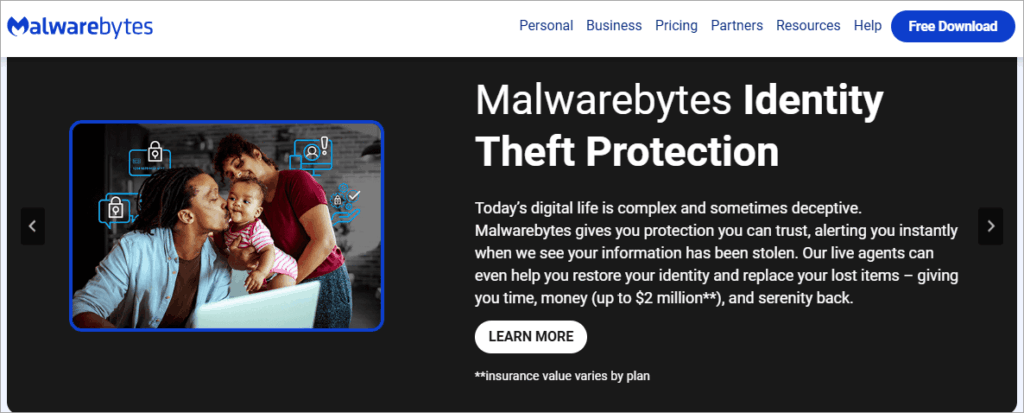
[Via Malwarebytes.com]
At various times, the scope of Malwarebytes has changed to include more of a full endpoint protection package, particularly with consumers and small businesses, where it is more of a clean-up after-the-fact tool.
Is Malwarebytes a safe product to use, given its reputation and position? The rest of this tutorial will explore possible risks, advantages, limitations, and advice.
Quick Summary of “Is Malwarebytes Safe”:
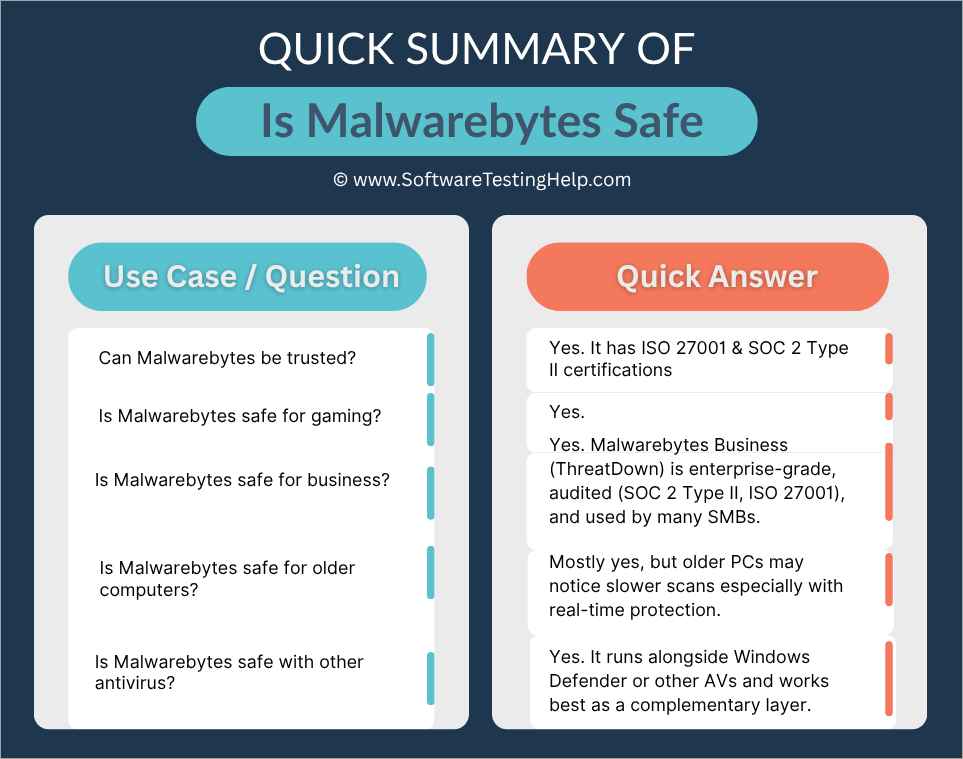
Assessing Malwarebytes: Is Malwarebytes Safe?
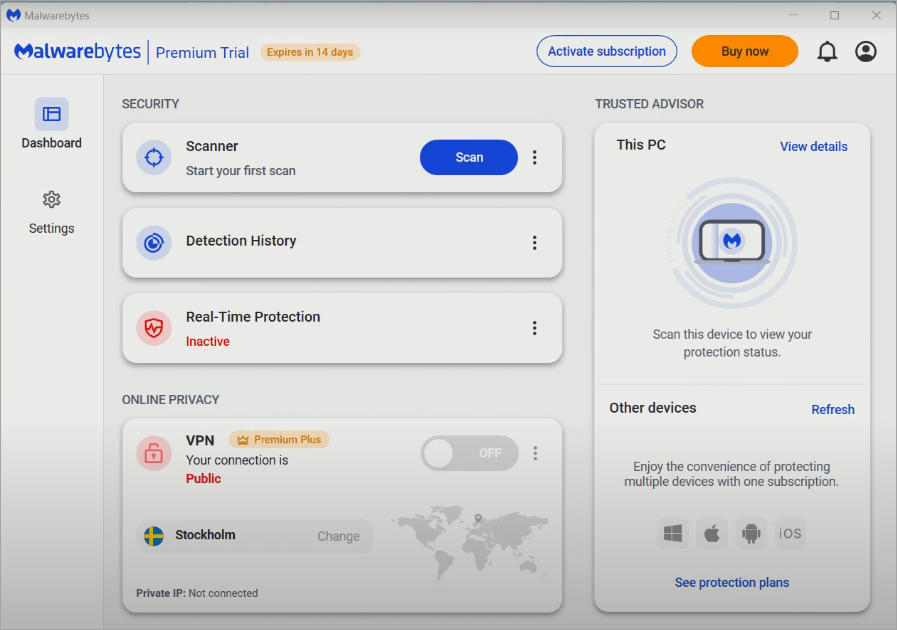
This part is an analysis of (a) what Malwarebytes is doing, (b) in practice, whether it is doing it (user complaints and professional reviews), and (c) a list of its advantages (i.e., what makes it good) in a list of reasons.
Features of Malwarebytes
Here’s a breakdown of key features across its typical consumer/premium offerings:
| Feature | What It Is / Does | Notes / Caveats |
| Malware/Virus Scanning & Removal | Detects and cleans known malware, adware, spyware, trojans, PUPs (potentially unwanted programs) | In its free version, scanning is manual only; in premium, automatic / scheduled scans are available. |
| Real-Time Protection | Monitors the system live to block threats before they execute | This is part of the paid tier; the free version lacks real-time protection. |
| Exploit/Ransomware Protection | Monitors behavior-based attacks, suspicious operations, exploit chains, unauthorized encryption of files | Many modern threats rely less on signatures and more on behaviors, so this is a critical layer. |
| Web/Browser Protection/Blocking | Blocks malicious URLs, phishing sites, drive-by downloads; browser guard extensions to intercept bad scripts | Helps prevent threats before they reach the system. |
| VPN/Privacy Module | Optional extras are often region-limited. | This is available in bundled / higher tiers. |
| Identity/Data Removal Tools | Some packages include features to remove or scrub personal data from public sources or monitor for identity theft | Monitors behavior-based attacks, suspicious operations, exploit chains, and unauthorized encryption of files |
| Quarantine, Exclusion/ Whitelist, Logs & Reporting | The standard set of controls: you can exclude files, view logs, and restore quarantined items | Important for false positive mitigation |
These are quite normal characteristics of current endpoint protection suites. The question is, therefore, how well Malwarebytes performs them.
Here is the video guide on how to download and install Malwarebytes:
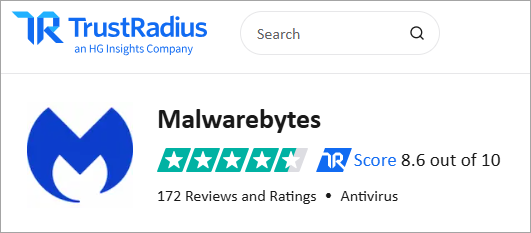
Does Malwarebytes Really Work?
[via Trustradius.com]
Like many other normal software, Malwarebytes does not lack its disadvantages and problems while on a machine. In brief, it will work as expected, rather very well, in most situations, but not in all.
[via Reddit]
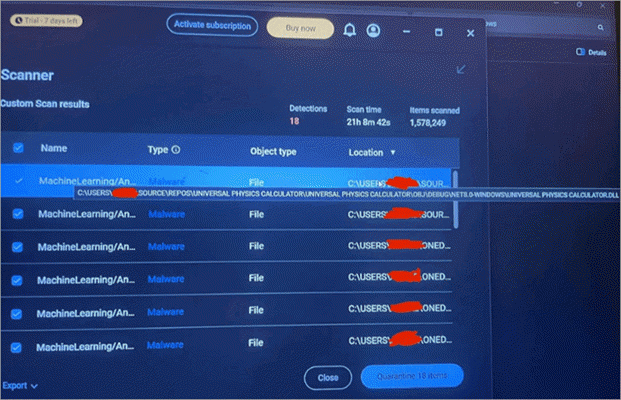
Users and experts have some criticisms and some praise for Malwarebytes, especially regarding its compromised efficacy of detection, though to a very small magnitude.
The fact that it gives false positives only sometimes, its higher consumption of resources, especially when called to do scanning and monitoring in real time on older devices, and the few hiccups reported on user privacy.
These are major areas of concern, and there is available evidence provided by users and expert reviewers. We also assessed user complaints, expert assessment, privacy & security concerns when writing this guide.
Malwarebytes Use Cases & Problems Encountered
This section covers some of the use cases of Malwarebytes, along with the various problems encountered.
#1) False Positives/Extraneous Detection
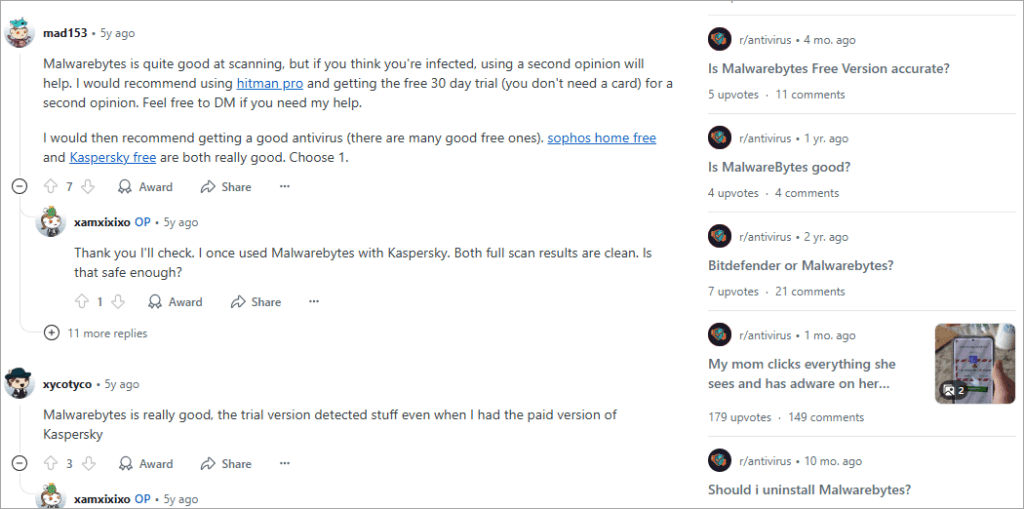
Malwarebytes occasionally flags safe software as malicious.
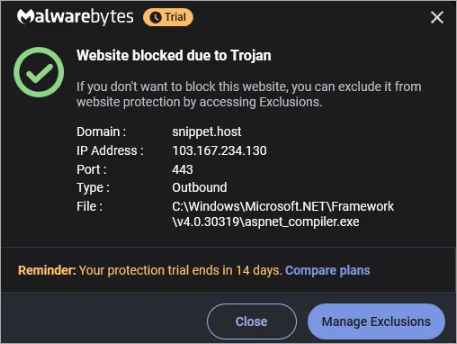
The fact that it flags genuine software, which is known and tested to have no malware, is also reported by expert Malwarebytes reviewers and past users online, although it does not appear to be a frequent or prolonged problem.
Although no users reported problems with Malwarebytes, flagging it could contribute to unsafe situations if it blocks security software.
Users have reported in discussion forums that legit files or update bits are, at times, quarantined, resulting in a breakage of the application. This is a repeated user frustration because false positives can prompt users to disable protection or accidentally delete important files.
Performance is not as expected in very few instances, and its usage of resources on low-end and old machines is high.
This behavior may be expected if your machine is low-end, has low memory or speed, and is old without modern and up-to-date operating systems that may offer higher performance on tasks and have fewer vulnerabilities. Some users say that system performance might decrease if scans or monitoring are disabled, like when CPU or disk I/O is high.
Background monitoring can be a visible part of an older system, or a less high-end system, though a fair few reviewers have found Malwarebytes to be fairly lightweight.
#2) Lapses in Detection/Gaps in Threat
According to some users and Malwarebytes reviewers, Malwarebytes can either fail to detect or not detect some more advanced threats or new malware, such as those that use stealth or more complex methods.
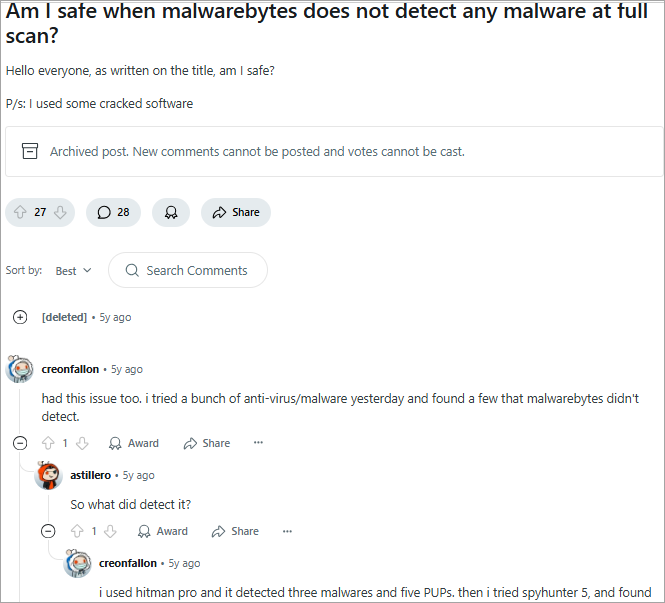
On Reddit forums, consumers have raised issues concerning the software not being entirely efficient in terms of its behavioral aspects.
3. Issues relating to Privacy/Data Collection
Some Reddit users claim Malwarebytes’ privacy policy has unclear wording concerning collected data, like device info, telemetry, and location. However, users can spoof locations with a VPN.
- There are complaints of privacy violations, although there is no concrete evidence to prove this.
- As far as the VPN/Privacy module is concerned, it is mentioned that it is U.S.-based, which can be considered a jurisdictional issue because it may be subject to legal requirements if applied in other jurisdictions.
- Certain reviews state that, though Malwarebytes reports no logs, their policy does show that they store license data, software version, public key, etc.

4. Some features are restricted or Dissimilar across Platforms
- One can better enhance certain features, such as VPN, exploit protection, or kill switches, while using Malwarebytes on Windows compared to when using macOS or mobile.
- The mobile / iOS versions are lower in capabilities due to OS limitations.
5. Security Weaknesses in the past
In 2016, Project Zero, a Google security research team, found several bugs in earlier versions of Malwarebytes. These consisted of weak or absent encryption/signing of update payloads, and could have been used to reconstruct malicious payloads.
Malwarebytes was quick to react and came up with patches, and thereafter, Malwarebytes started a bug bounty program on responsible disclosures.
6. Support Challenges
- Some users have complained that they could not get timely and comprehensive technical support on complex problems.
- With the VPN module, it has been indicated in some reviews that mobile applications are relatively barebones and do not have features such as a kill switch on Android.
7. Experts/Reviewer Studies/Privacy Tests
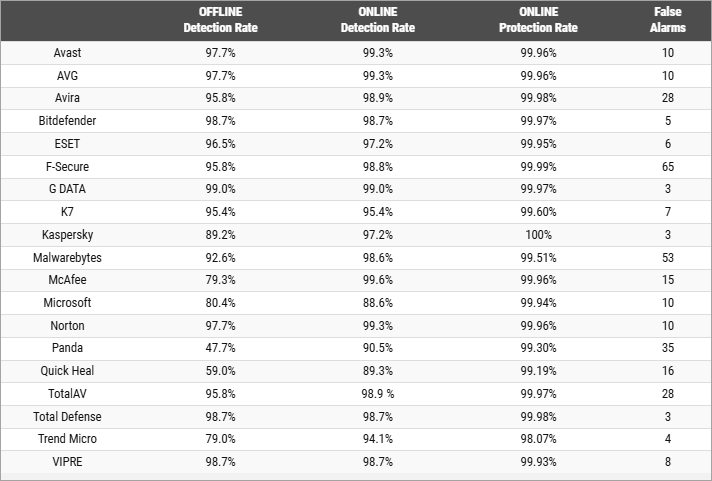
[Via comparatives]
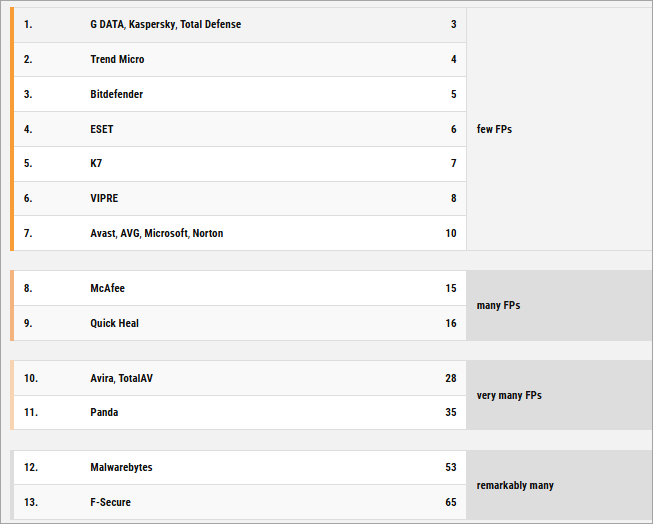
Malwarebytes Premium will block 99% of web-based threats based on protection tests, but not based on malware tests. False positives compromise the performance in these tests.
- Malwarebytes is good and very fast, yet it does not have some additional functions like Wi-Fi protection or a firewall when compared to more comprehensive suites.
- Based on a one-year testing of Malwarebytes Premium conducted by SafeWise, Malwarebytes is found to be trustworthy, convenient, quick, and of moderately mild system influence. They give a high detection rate of AV-Comparatives and praise its usability.
- Malwarebytes is rated 7.9/10 on the Security.org website, with upsides such as flawless AV test detection and default opt-out of data collection, and downsides such as absence of always-on on-access scanning and failure in certain tests to detect viruses. The VPN uses AES-256 encryption, and they claim it lacks a no-logs policy. However, some notable red flags regarding the VPN are its possible privacy vulnerabilities since the VPN is hosted/located in the U.S. and has a smaller server network.
- Malwarebytes VPN is linked to the server network of Mullvad, which is slower, less feature-packed, and has a cloudy privacy policy.
- The Malwarebytes VPN scores a 4.1/5 at the AllAboutCookies website because it is easy to use, based on strong encryption, but there are no third-party audits on it, and it does not offer many features. Lack of third-party audit of the VPN is indicated as a disadvantage elsewhere on the Internet because it restricts the provision of guarantees of no-logs claims.
Based on this information and reports from users, Malwarebytes is generally well-rounded and can be trusted to work normally well, though there are occasional discrepancies or trade-offs, particularly in edge cases or during a high-threat environment.
Summary of Problems to Be Aware of
In a nutshell, the key criticisms/risks (particularly, those of safety, privacy, and security) are:
- Valid files may fall prey to the software as it can record them as false positives, which means they occasionally will get quarantined.
- There may be loopholes in identification, and the absence of sophisticated or new threats.
- There may be a performance impact at times.
- There may be some confusion in regard to data/telemetry collection and privacy policy.
- Jurisdiction and legal exposure concerning user data, specifically the VPN module.
- The software shows some lopsidedness or is less robust on non-Windows platforms.
- There are historical (now immutable) vulnerabilities and the requirement to be patched in time.
- There have been reported periodic user support restrictions.
With that said, most of them are not unique to endpoint protection tools in general. It all depends on whether the risk is sufficiently low and manageable.
Advantages and Strengths
The following are the main benefits and strengths of Malwarebytes that are confirmed by customer reviews and professional reviews:
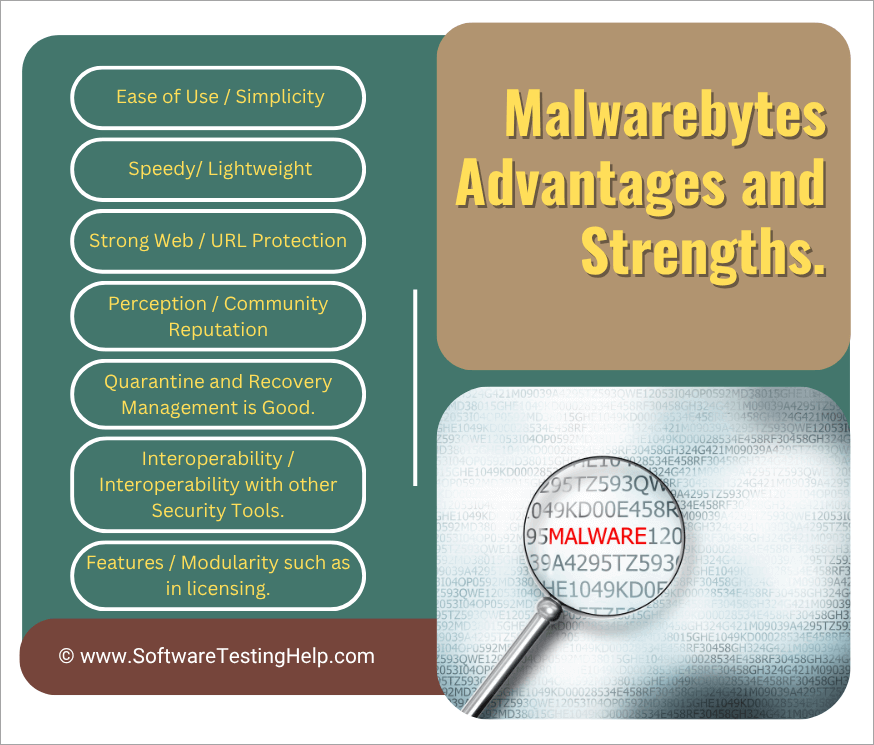
1. Ease of Use/Simplicity
Several reviewers widely acclaimed the user interface as being simple and clean. One of the key design objectives appears to be a non-expert user setting it and forgetting about it.
Ready-made defaults are usually hard; numerous users do not have to make a lot of adjustments.
2. Speedy/Lightweight
According to some of these independent tests, full scans can be done quite fast, and real-time protection does not strangle system resources on most modern machines.
Since Malwarebytes relies on high-risk components and behaviors, it does not have to scan all the files exhaustively to do so, a factor that helps in speed.
3. Strong Web/URL Protection
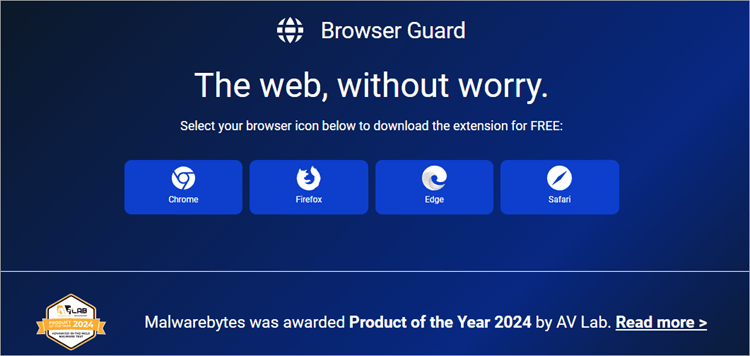
Threats do not get to the system because of the web-blocking / phishing protection layers. It is a useful complementary model to signature-based scanning, which is known as this prevention before infection.
Browser guard modules prevent malicious scripts and trackers on the browser level
4. Quarantine and Recovery Management is Good
Log viewing capability, restoration of quarantined files that are false positives, and exclusion are highly accommodated. This flexibility is admired as a great feature by many users.
5. Perception/Community Reputation
Where it is required, Malwarebytes also has a vulnerability disclosure program and bug bounty program that are publicly facing and promote vulnerabilities and bugs to be reported and fixed.
The company has forums where a user can report false positives, submit (new malware) samples, etc.
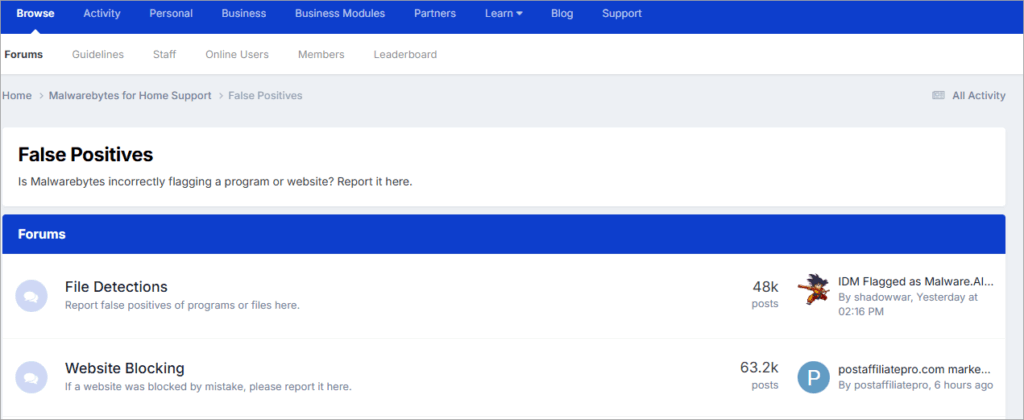
Historically, patching and vulnerability fixes have been fairly timely.
6. Interoperability/Interoperability with other Security Tools
Malwarebytes can be configured to work more as a complement rather than a replacement, as it is commonly configured to be used together with other antivirus or endpoint protections, i.e., in layered defenses.
7. Features/Modularity, such as in licensing
The image below shows the various Pricing packages of Malwarebytes:
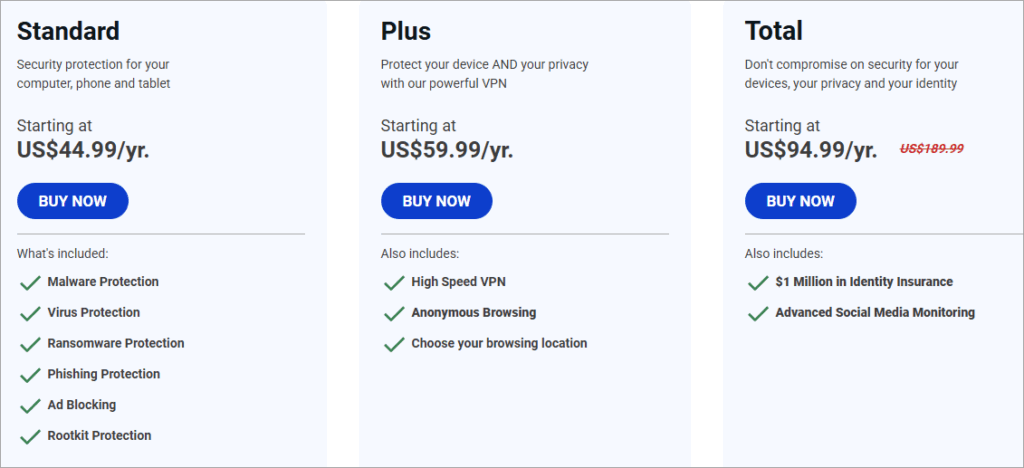
Alternatives: The users have alternatives when using the product, e.g. free, basic version of the scanner, or they can purchase additional features, which gives them flexibility.
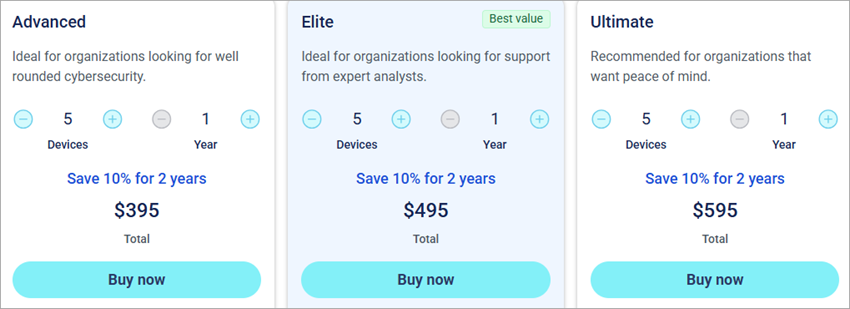
[Via threatdown.com]
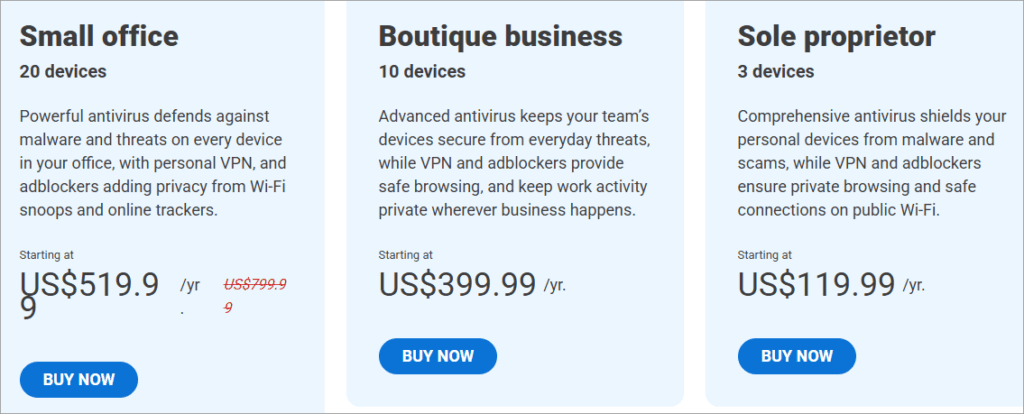
Single vendor option (with caveats) can enable a certain level of consolidation, e.g., bundles including VPN, identity tools, etc. Malwarebytes+1
These strengths taken as a whole indicate Malwarebytes has a viable and working compromise in a great number of uses, though not all.
All Problems/Difficulties and Workarounds
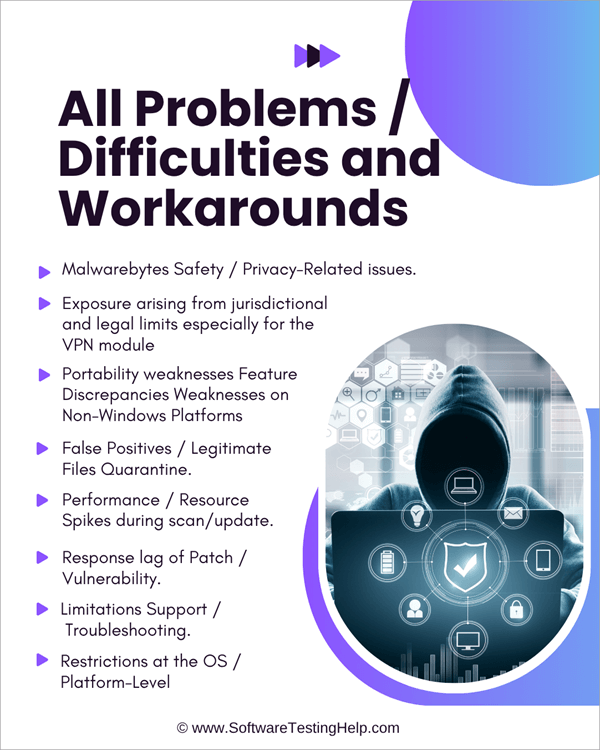
Even the most ideal software comes with its downsides, conflicts, and issues that are annoying. Below is a list of all the problems users experience with Malwarebytes, particularly those related to Malwarebytes’ safety, privacy, or stability, and recommended mitigation and workaround measures.
1. Malwarebytes Safety/ Privacy-Related issues
Unclear Telemetry / Data Collection.
Issue: Sometimes, users fear that Malwarebytes gathers too much information or device identifiers.
Workaround:
- Where possible, do not subscribe to a Telemetry/analytics application.
- Use a firewall or host-level controls to limit any outgoing information of Malwarebytes components where possible.
- Check the connections that Malwarebytes makes through network logging tools (e.g., Wireshark, netstat) in case one is privacy-sensitive.
2. Exposure arising from jurisdictional and legal limits, especially for the VPN module
Issue: Malwarebytes is a company registered in the United States, hence it might be subject to inquiries (e.g., subpoenas) into data.
Workaround:
- Additional privacy controls (e.g., third-party, audited VPN that is not in the U.S.).
- Enabling the VPN module should only be done as the need arises; otherwise, it should be disabled.
- In case privacy is your utmost consideration, consider the usage of a specific privacy-oriented VPN instead of only using the integrated module.
3. Portability weaknesses Feature Discrepancies Weaknesses on Non-Windows Platforms
Issue: MacOS, iOS, or Android may not support all the security or protection features.
Workaround:
- Check the version of your OS before deploying Malwarebytes.
- Use native safeguards for your OS or use additional software, such as built-in macOS safeguards, or mobile OS sandboxing.
- The software should be kept updated because the vendor can increase support over time.
4. False Positives/Legitimate Files Quarantine
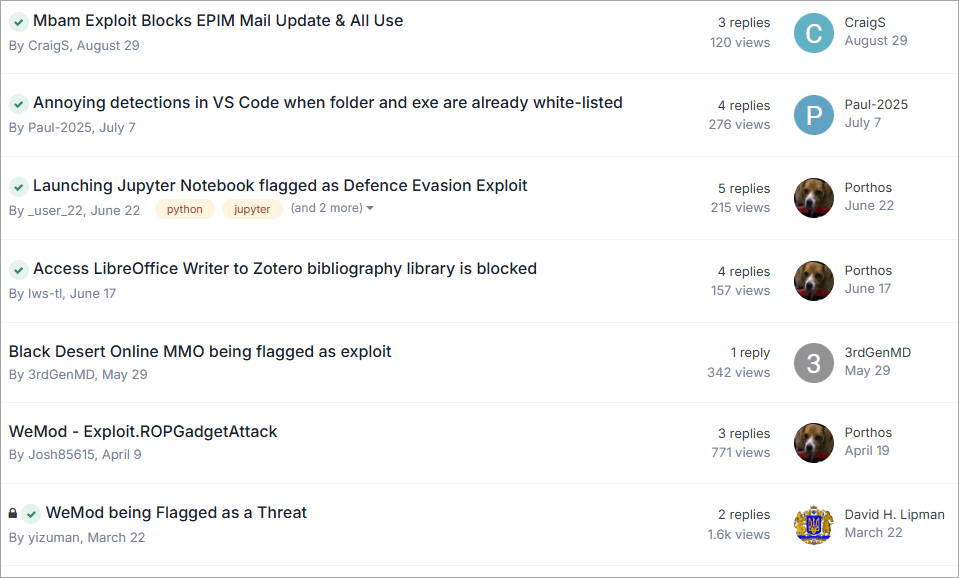
[Via Forums]
Problem: A convenient application or important library could be marked and quarantined, and this disrupts the software it relied upon.
Workaround:
- Logs/quarantine list should be verified before allowing deletion.
- If a certain software is safe, whitelist it or use exclusion settings.
- In case of uncertainty, repair and forward to the vendor to be analyzed to allow future updates to be made.
- Run scans with a test/warning run mode first, which can help to detect and handle borderline cases.
5. Performance/Resource Spikes during scan/update
Issue: Real-time monitoring or scanning can reduce the usage of the system temporarily when done on older systems.
Workaround:
- Full scans should be performed during off-hours (e.g., when the user is not working or when the user is asleep).
- Where possible, add the options to throttle scans, e.g, throttle CPU use.
- It is safe to exclude big data volumes or backup directories during the scanning process.
- Check the system against the hardware minimum requirements to operate.
6. Response lag of Patch/Vulnerability
Issue: In case there is a zero-day or flaw, there can be an interim before a patch can be secured.
Workaround:
- Apply defense in depth: add more protection of the system, for instance, using firewalls, behavior-based detection, and network ISD.
- Implement automatic updates and restart shortly after installation of patches.
- Track notices and mailings about security from the vendor.
7. Limitations Support/Troubleshooting
Issue: Advanced or bizarre problems might not be immediately addressed with assistance.
Workaround:
- First-line consideration would be to check community forums and knowledge base articles.
- Gather logs, version data, and environment data before reporting them to support hastening the diagnosis process.
- Hire outside security experts when going big.
8. Restrictions at the OS/Platform-Level
Challenge: Certain operating systems (particularly newer versions of macOS) can limit the access of third-party security applications (e.g., access to the entire disk).
Workaround:
- The necessary permissions (e.g., full disk access) in system settings should always be reauthorized by Malwarebytes after the upgrade of the OS.
- Watch the announcements of vendors with incompatibility problems and hold major OS upgrades until they are compatible.
- An example: in macOS Ventura, certain third-party security software hit roadblocks because of increased system protection.
- With a foresight of such problems and mitigation measures, users will minimize friction or danger in using Malwarebytes in the real world.
What to Look for (Red Flags) to show that Malwarebytes is causing malfunctions on your computer.
Individually, the security tool may become an issue. It is nice to be aware of the red flags and methods/technologies that can help figure out such complications.
Signs/Symptoms
- Another sign is your OS and/or other applications crashing in an unexplained version after installation or updating of Malwarebytes.
- Municipal software is unable to operate and is abruptly flagged or quarantined.
- Poor system performance, particularly when scanning or in real-time.
- WebEx frequently alerts/warns that appear spurious or safe files.
- Connection or network problems (when the VPN or web protection module is turned on)
- You cannot recover quarantined files or undo actions on the system.
- Unintended outbound network traffic of Malwarebytes (a sign of a bug or misconfiguration)
- Malwarebytes may report a mismatch or contradiction with other security tools.
Diagnostic Methods and Instruments
1. Check the logs/history
- Malwarebytes tends to log off detections, quarantines, and actions, in which you should check the logs, determine those logs that were flagged, when, and why.
- Comparing timestamps generated by the software with those of system crashes and other events can help determine causality.
2. Safe/Test Mode/Exclusion Mode
- Turn it off or stop real-time protection temporarily to determine whether the problem has disappeared (if it is safe to do so).
- Turn the Safe Mode on, depending on your specific OS, and check whether the software is causing any conflicts with other drivers or startup components.
- To check whether the suspect files or directories had been accidentally flagged, exclude them.
3. Network/Traffic Monitoring Tools
- Check outgoing connections of Malwarebytes using netstat, Wireshark, or firewall logging (leakage of privacy or anomaly).
- On Windows, the built-in resource monitor/Task Manager has a tab that is called Network, where one can see the services that are consuming traffic.
4. Resource Monitoring/Performance Profiling
- Monitor the usage of CPU, memory, disk I/O by Malwarebytes components during scan or normal operation using Task Manager/Activity Monitor/top/htop/ etc.
- Determine the excessive resource spikes that can represent conflicts, leakages, or bad behavior modules.
5. File Integrity/System Restoring Tools
- Use checksum or hash verification to determine whether key system files were modified or deleted.
- In case you have them, make use of backups or the built-in operating system restore points.
- Use the built-in operating system diagnostics to confirm the file system integrity (chkdsk, fsck, etc.).
- Inspecting conflicts related to the version and plugin.
- Make sure that Malwarebytes and its modules are completely up to date; the problem is incompatibility, sometimes caused by out-of-date components.
- Check compatibility with other antivirus, security, or behavioral monitoring software installed (there may be some compatibility issues).
6. Vendor/Community Diagnostics Tools
- Malwarebytes can also include diagnostic tools (e.g., log collectors or repair tools).
- People share on the community forums the relevant scripts and procedures you can use to resolve almost all common misconfigurations.
- You might sweep changes that may not be supported or escalated in the future, and keep a record of what you found (logs, error messages, steps).
Best Use of Malwarebytes: How and Where It Does Not Work
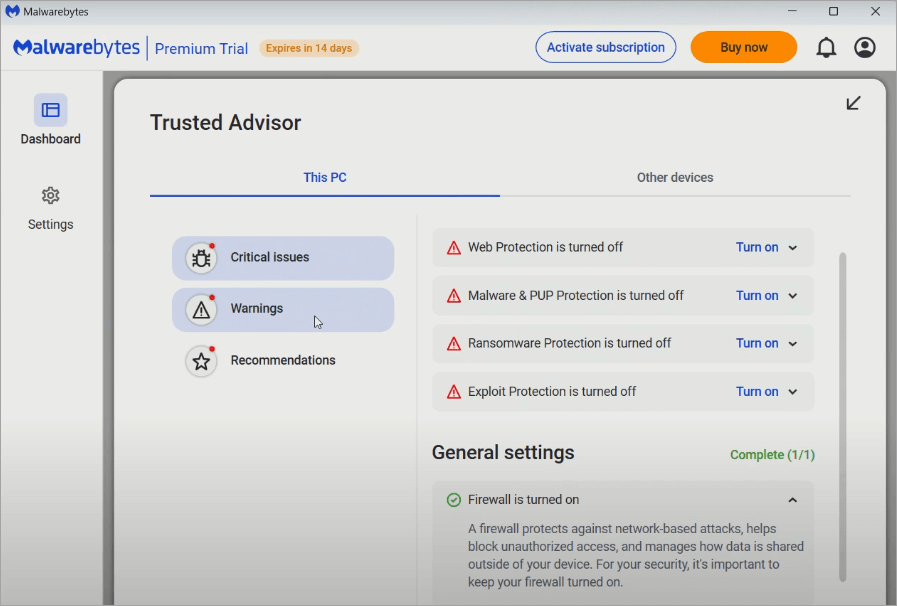
It is vital to know optimally how to implement Malwarebytes and the environments/devices it would be more or less suitable for achieving the greatest safety at minimum risk.
Best Practices & Recommended Usage
1. Multi-layered/Defense-in-Depth Approach
- It is recommended to use Malwarebytes as part of a multi-layered security stack along with a firewall, network monitoring, behavior analytics, and user awareness.
- Should not be trusted to work solely, particularly in high-risk settings.
- Make it up with good password practice, recovery plans, least-privilege access, etc.
2. Sandbox Practices/Least Privilege
- Run Malwarebytes only with the necessary permissions; do not allow it to get more access than is necessary.
- If applicable, scan your system user data, system binaries, and areas of known risk only instead of scanning raw data volumes or archived backups.
3. Scheduling/Off-Hours Scanning
- Set full scans when the performance impact is minimized by configuring scans when the server is not busy.
- Always keep on auto updates, and restart always when it is required to run updates.
4. Module Enablement Selectivity
- Unless you specifically need to work with the VPN / privacy module all the time, you should also activate it only at the point of necessity.
- Turn off modules that are incompatible or redundant with other products (e.g. do not have a strong firewall or web-filtering product).
5. Pilot Before General Rollout
- If Malwarebytes is being applied in business/enterprise contexts, first pilot it to identify compatibility problems before rolling it out massively.
- Provide test scans and lists of exclusions to avoid mass false-positive incidents.
6. Monitoring, Logging, and Audit Trails
- Allow detailed logging and notifications to enable tracking and audit anomalies.
- From time to time, examine the logs and single out false positives, misses on detection, or abnormal behavior.
7. Keep Software Up to Date
- Always install the latest version of the software and make sure the systems used to update are safe.
- Patches or mitigations: Watch Vendor security advisories.
8. User Education Process & Exceptions Process
- Train users on how to act in case of alerts (do not simply press the ignore button without understanding why it is done).
- Have an exception/review procedure where false positives can be handled at the center instead of being sidelined.
Where Malwarebytes Can Be Less Than Ideal/Not So Recommended
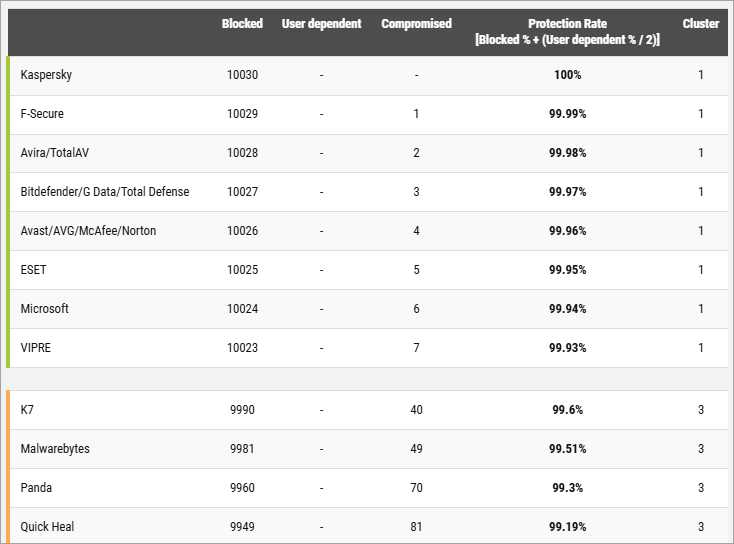
[Via Av-comparatives.org]
1. Enterprise environments of high security and high risk
In particular, high-security need environments (e.g., zero-day exploit hunting, custom APT defense) or those that demand full integration of EDR (endpoint detection and response), narrowly-focused enterprise-level solutions can be superior to the consumer / SME offerings of Malwarebytes.
2. Non-Windows or limited system operating systems
Some platforms of macOS, iOS, or Linux can have limited functionality (e.g., real-time protection, complete exploit prevention). Always verify compatibility with the version of the OS.
3. Hardware with resource limitations or legacy
In extremely old systems, the overhead of protection in place or scanning itself may render the system unusable.
4. Environmental/Strict privacy environments that have no telemetry whatsoever
Where no communication to the outside world (not even telemetry) is permitted.
5. In cases where a more advanced security package exists
Provided that another efficient endpoint protection solution (complete-fledged firewall, sandboxing, zero-trust, etc.) is already deployed and covers the threat surface fully, the addition of Malwarebytes may cause conflicts or overlaps. Always test for coexistence.
You should not install Malwarebytes as an isolated fortification security software in ultra-high-risk settings. It is recommended to install it as a secondary measure in consumer, small business, or layered-defense settings.
The best place to seek assistance when there are issues of threat to privacy or the safety of information
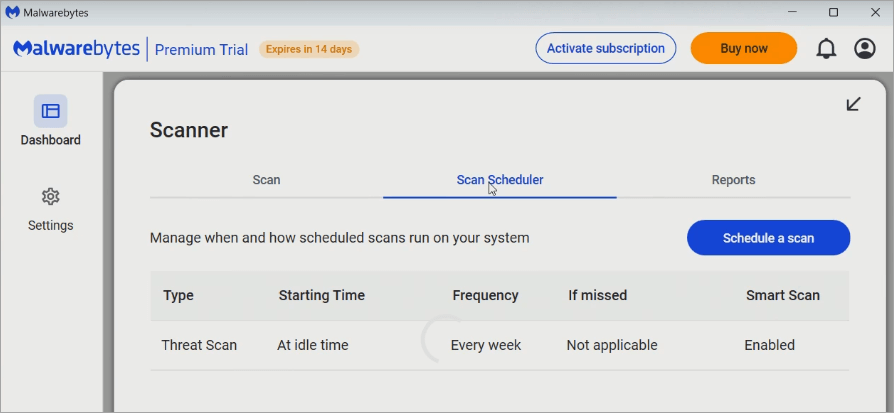
Should you or your organization get into trouble, such as being suspected of data leakage, a hacked system, or destruction upon false detection, this is where to start.
1. Malwarebytes Support Center Knowledge Base
The Malwarebytes official site offers a support center, frequently asked questions, guides, forums, and diagnostic tools.
2. Contact Live Chat or send a Support Ticket
Premium/enterprise users (and, in particular, paid customers) are usually allowed to submit a ticket, chat in real time, or escalate a problem. There might be a few levels of non-paid positions with limited support.
3. Diagnostic Log Gathering/Vendor Tools
Malwarebytes could provide modules or utility tools to support requests. Apply them when requested by support.
4. Vulnerability Disclosure Program/Bug Bounty program
In case of suspicion of a security bug or leakage of data, Malwarebytes has a disclosure and bounty program where it is possible to report and fix vulnerabilities responsibly.
5. Update/Patch Releases
Monitor announcements about security and patches released by vendors; in many cases, newer updates released by a vendor will fix known problems discovered in the previous versions.
6. External/ Expert Helo or Third-Party Security Consultants/Incident Response Companies
In the case of a significant privacy or data breach, they should engage external skills to audit the system, forensically analyze logs, and eliminate the impact of breaches.
7. Peer Support/Community Forums
Security communities, forums, and sometimes similar ones, have users that had to encounter the same problem; relying on quicker workaround knowledge is sometimes available there. Last, user suggestions should be handled with care (but never disregarded).
8. Device/OS Vendor Support
When the problem is related to the macOS, Windows, Android, or iOS behavior (e.g. permission problems or conflict at the OS level), refer to the resources of the OS vendors.
9. Law/Compliance Units (in case of data breach/privacy regulating events)
In difficult situations (assuming that user data has been disclosed), coordinate with legal, compliance, or data privacy experts.
In reaching out to support or external assistance, add context, including software version, OS version, logs of actions in the environment, what you had been doing when the issue arose, steps to make the issue happen, etc.
Software Incompatible With Malwarebytes (Safety Risk)
Even well-designed security software may conflict with other tools. Some users report on user and support forums run by the company and third parties that the software experiences incompatibilities or friction with other software, which may cause safety or stability problems:
1. Additional Antivirus/Endpoint Protection Packages (e.g., Kaspersky, Norton, Avast, etc.)
Other users complain that Kaspersky identifies Malwarebytes as incompatible and asks it to be removed.
- Norton 360 has been mentioned to interfere with the installation of Malwarebytes or issue its own warnings that it will be in conflict.
- Norton + malware bytes can collaborate, but only reliably when mutual exclusion is enabled or when either of the programs is disabled against overlapping modules (e.g., real-time web protection) in order to prevent collision.
- Windows filtering platform (WFP) that web protection modules use can only be applied by one product at a time; when both Malwarebytes and an additional AV attempt to use it, the user might experience a loss of network connectivity, crashes, or the blue-screen error.
2. Deep System-hooked Software or Drivers
- Malwarebytes’ real-time protection layers may also block or cripple some legitimate software (e.g., backup tools, virtualization tools, disk management utilities, etc.). As an example, the Malwarebytes Desktop Security can deny the startup of other applications before they can be whitelisted.
- Turning off Malwarebytes temporarily allows the other conflicting software to run without any problems or blockage, which confirms that the two may be conflicting. Otherwise, Malwarebytes may block it if they both run at the same time.
3. Windows Fast Startup/Hybrid Boot Configurations
- There are conflicts when there is Windows fast startup; when this feature is disabled, the strange behavior of Malwarebytes and other programs is resolved.
- Such incompatibilities may become sources of safety issues: network failures, threat information cannot be updated, one or both security tools are nonfunctional, or false alarms. To resolve this issue, try out cautious configurations, including exclusions and turning off overlapping modules, as well as carrying out pilot testing in a controlled environment, and monitoring for unintended interference.
Malwarebytes Vs Alternatives
| Ease of Use / User Interface | Cost / Licensing / Value | Conflicts / Compatibility / Integration | Special Risks / Considerations | |
| Malwarebytes | Simple UI; often used for “on-demand” scans or as a supplemental tool, so UI is less complex. | Simple UI; often used for “on-demand” scans or as a supplemental tool, so the UI is less complex. | Best used “alongside” an AV (with proper settings) rather than as sole protection in many scenarios | Because Malwarebytes is not a full-blown AV in all tiers, relying on it alone might leave gaps. |
| Windows Defender | Seamless: minimal user intervention, integrated into Windows settings. | Free (built into Windows) | Very high compatibility (because it’s native) | Freemium / paid tiers; often used as a supplement rather than a full AV |
| Norton (e.g. Norton 360) | Polished UI, many features accessible, though sometimes many pop-ups or multiple windows for tools | Subscription/licensed; higher-priced for full suites, but many bundled features add value | Good compatibility; works standalone | Some features (e.g. identity protection) are region-dependent; subscription renewal costs. |
| Bitdefender | Being part of Windows, if a major exploit hits the OS, Defender may have exposure; it relies on Microsoft updates. | Modern, clean interfaces and many settings are automatic. | Good compatibility; generally coexists well when properly configured | In some jurisdictions, Kaspersky is restricted (e.g., U.S. government usage) |
| Kaspersky | Also quite usable; good UI, though power users may tweak many settings. | Subscription/licensed; in some regions pricing is very competitive | Good compatibility; in some regions, regulatory or geopolitical issues may affect use | Subscription/licensed; in some regions, pricing is very competitive |
Malwarebytes
Protection/Detection (Real-world / Zero-day / Malware tests): More specialized: very strong for malware/ PUP / malicious behavior cleanup, but not always as strong in full AV-style protection; tends to lag the major AV suites in overall detection scores.
False Positives/Usability: Because it is more focused and often runs in “on-demand/complementary” mode, false positives tend to be manageable.
Performance/Impact (CPU/Memory/System slowdowns): Generally light when idle; scans or behavior detection can temporarily use more resources.
Features/Additional Tools: Strong in malware cleanup, anti-exploit, anti-ransomware, and behavior blocking. Often used in combination with full AV engines.
#1) Windows Defender
Protection/Detection (Real-world/Zero-day/Malware tests): Very good baseline protection; often scores near the top in tests for core malware protection
False Positives/Usability: Generally good, minimal false alarms in many tests; built-in and tightly integrated, so it avoids many conflicts.
Performance/Impact (CPU/Memory/System slowdowns): Very efficient for a full AV; because it’s built into Windows, its overhead is optimized and often lower in many use cases.
Features/Additional Tools: Basic firewall (via Windows Firewall), built-in integration with OS (e.g. SmartScreen, exploit mitigation), good baseline.
#2) Norton (Norton 360)
Protection/Detection (Real-world / Zero-day / Malware tests): Among top performers in tests; very solid detection and protection rates.
False Positives/Usability: Very good usability; occasional false positives depending on sensitivity and heuristics.
Performance/Impact (CPU / Memory / System slowdowns): Good performance balance; usually doesn’t slow the system drastically in normal use.
Features/Additional Tools: Full suite: firewall, secure VPN, identity theft protection, backup, parental controls, password manager, etc.
#3) Bitdefender
Protection / Detection (Real-world / Zero-day / Malware tests): Consistently excellent in independent lab tests in both detection and protection.
False Positives/Usability: Excellent balance: high detection, low false positives in many lab results
Performance / Impact (CPU / Memory / System slowdowns): Among the best in performance tests; minimal overhead observed in many independent reviews.
Features / Additional Tools: Very feature-rich: firewall, anti-phishing, anti-ransomware layers, VPN (in higher tiers), secure banking tools, password tools, etc.
#4) Kaspersky
Protection/Detection (Real-world / Zero-day / Malware tests): Very strong in tests, often near the top. In some tests gets slightly lower “offline detection” scores than peers
False Positives/Usability: Good – Kaspersky in tests often shows low false alarm counts.
Performance/Impact (CPU / Memory / System slowdowns): Also relatively efficient; Kaspersky’s engine is not “heavy,” though in some cases scanning or certain features can add overhead.
Features/Additional Tools: Full features: parental controls, firewall, privacy tools, encryption, secure banking, anti-phishing, etc
Malwarebytes Industry Certifications, Security Audits & Company Transparency Reports
Here, in this section, we will analyse more about the Malwarebytes Industry Certifications, the Security audits that passed/failed, and the company transparency reports.
Malwarebytes Mobile Security has the MRG Effitas Android 360° Certificate for high detection of mobile threats (99%+ effectiveness), including phishing, spyware, trojans, etc., which was garnered in August 2025.
Malwarebytes Endpoint Protection won all MRG Effitas certifications in various categories, which were awarded in 2022 and 2023. The security software has passed many security audits of the software.
The Malwarebytes Premium Security received a Certificate of Excellence and Top Remediation Time after blocking 100% of malware samples during an AVLab’s “Advanced In-the-Wild Malware Test. Trust and compliance certifications include the SOC 2 Type II, ISO 27001, and PCI DSS.
The SOC-2 Type II report is one of the Malwarebytes transparency reports and is available under a Non-Disclosure Agreement. The company also runs a Trust & Compliance page that displays the certifications or audits of Malwarebytes. Therefore, it is a very credible security software with formal certifications from ISO 27001, SOC 2 Type II, and PCI DSS.
Frequently Asked Questions
1. Can I trust Malwarebytes to install on my computer?
Malwarebytes downloaded through the official site is usually regarded as safe, although the process can be influenced by other currently used software.
In other systems where there is a conflict in the protection tools installed, the system raises installation warnings or has disabled modules in case of overlap. Always check digital signatures, save data prior to installation, and always test on a non-critical system.
2. Is Malwarebytes slowing down your computer?
Decreases in performance may be experienced during scanning or live monitoring on your device, according to complaints from some users, particularly those using older or resource-limited machines.
Some reviews, however, report Malwarebytes as being relatively lightweight, as it prioritizes scans on areas that are considered a threat and does not need to scan all files. The extent of the slowdown is usually dependent on hardware, active modules, and background load.
3. Will Malwarebytes substitute antivirus software?
The positive aspects of Malwarebytes are malware removal, malware exploit protection, and web filtering, instead of widespread coverage (e.g., full system scanning, rootkit detection, firewall integration).
Most advisers do not suggest replacing the entire antivirus suite with Malwarebytes, but instead recommend using it with it.
4. Is Malwarebytes safe for Mac?
Malwarebytes is not heavily tested separately on the Mac as it is on the Windows platform, which makes it difficult to determine the extent to which it has been proven to be completely effective on the macOS platform.
Other reviewers warn users to use it with the built-in protections of macOS and also to keep track of updates.
5. Does Malwarebytes work with Windows Defender?
Since Windows Defender also has real-time protection layers, it has a chance of overlapping.
The configuration of the setups in most cases is that both web protection and network filtering by a number of tools can be enabled, and therefore it would result in conflict, and as such a user may have to turn off overlapping modules or make one the primary.
The forums of Microsoft themselves recommend the usage of Malwarebytes as an additional scanner, but not as an alternative.
6. Does Malwarebytes defend against ransomware?
Malwarebytes also has anti-ransomware / exploit protection modules, which are expected to detect malicious activities or file encryption. Practically, it can be used on well-known ransomware versions; however, against new or very advanced ones, there is no guarantee of any answer. The users should also use backup and layered defenses.
7. Does Malwarebytes secure my Internet privacy (through VPN)?
The balanced VPN (or privacy module) is intended to encrypt data and offer a no-logs policy, potentially useful in the case of anonymity on the web.
But the legal jurisdiction of the VPN (U.S.) and the absence of third-party auditing to the general public cast doubt on those with serious privacy concerns. Other critics warn that it might not be as good as dedicated, privacy-oriented VPNs.
8. What is the frequency of running a scan with Malwarebytes?
On-demand (free) users can normally be encouraged to run a full scan at least once a week. In premium / real-time protection has been turned on, the number of scans that should be done manually could be reduced, but it is still good practice to have a regular scan/deep/full scan at least once every time you install new software or visit a new site.
9. Is Malwarebytes beneficial in getting rid of malware that other tools fail to do?
Malwarebytes is frequently used by many users and security experts as a restoration tool when the current antivirus software cannot detect threats. This software will detect hidden malware, leftover PUPs, and residual adware that other signature-based detection fails to detect.
Malwarebytes does so by leveraging its more powerful heuristics, software behavior analysis, and targeted cleanup features built into it.
10. What information is collected by Malwarebytes, and is it secure?
Malwarebytes will collect telemetry, device identifiers, statistics on software usage by clients, and data on software licensed (alleged by the company to be anonymized where feasible) to respond to its own privacy policy and user reports.
Other users indicate that the phrasing of the policy is not clear enough and should be considered an issue.
Although the obtained information is claimed to help enhance performance and detection, users who care about their privacy can choose to restrict or turn off telemetry options and view outgoing data.
11. Does Malwarebytes steal data?
Malware does not sell customer data to third parties and does not collect any information beyond what is declared in its privacy policy and other user agreements. The fact that it is SOC 2 Type II and ISO 27001 certified means it does not steal and sell data and information.
12. Is Malwarebytes a virus itself?
Malwarebytes is a legitimate, industry-recognized anti-malware and cybersecurity product with several independent lab verifications, such as by MRG Effitas, AV-Lab, etc.
Conclusion
Malwarebytes is a well-established and popular endpoint security software that is also quite strong and has an overall favorable reputation. It is also a useful part of the security stack of many users due to its simplicity, speed, web protection layers, and flexibility. It is rated by experts to be highly favorable (although not on top in all metrics).
However, “safe” is not absolute. Among the major issues are false positives, a gap in detection (at least regarding advanced or stealth threats), ambiguity in privacy/telemetry, exposure under jurisdiction (especially when using the VPN module), feature constraints by platform, and friction during support or compatibility.
In order to optimize safety and limit risk when using Malwarebytes, do not use it as the only tool to shield. Additionally, make sure to tune settings such as telemetry, scan timing, and exclusions wisely. Also, ensure to track logs and resource utilization as well as keep abreast of patches and vendor notices regarding updates.
If privacy is paramount, another option is to supplement or replace the VPN/privacy module with a provider with a strong vetting record and an audit.
In conclusion, Malwarebytes can be safe, but only if the user understands its trade-offs and uses it wisely.
Research Process: The total time involved to complete and publish this article is approximately 34 hours. This content was created through a structured research approach to ensure accuracy and reliability.
For more malware-related guides, you can explore our range of tutorials below:
- How To Remove Malware From Android Phone [7 Easy Methods]
- Top 10 Free Malware Removal Software
- Top Identity Guard Alternatives to Look For
- How To Remove Malware From iPhone – 9 Effective Methods
- Top Phishing Protection Solutions [Top RANKINGS]
- Most Popular Website Malware Scanner Tools
Was this helpful?
Recommended Reading
-

A complete list of the Best Data at Rest Protection Solutions with features. Review to learn more about Data at Rest encryption solutions in detail: What is Data at Rest? Data at Rest basically refers to the data that is stored on your device and is not in use. Your…
-
List of the Most Popular Endpoint Detection and Response EDR Security Service Provider Companies and Vendors in 2026: EDR security service is a tool for continuous monitoring and response to internet threats. Agents are installed on the endpoints for collecting and sending the behavioral data to the central database for…
-
Here you will understand the need for phishing prevention solutions. Review, compare and select among the list of the BEST Phishing Protection Solutions: Phishing refers to cyber activity where the attacker contacts individuals for their sensitive information to access accounts, steal data and identities, and download malware onto the user’s…
-
Review and comparison of the top Ransomware Protection Solutions with features to select the best Ransomware Protection Software Tools as per your requirement: Cybersecurity risks are at an all-time high and Ransomware attacks have only become more audacious in recent years. Ransomware is a kind of malware that denies users…


