


Learn what Adobe GC Invoker Utility does, whether it’s safe, its purpose and how to disable or remove AGCInvokerUtility.exe.
Many Adobe users notice AGCInvokerUtility.exe running in Task Manager or appearing in the Startup tab and immediately wonder whether it is safe.
In this article, we will talk about one such utility known as Adobe GC Invoker Utility, which helps users manage Adobe software. Also, we will discuss what is the purpose of GC Invoker Utility and what are the best ways to disable it.
You will also learn exactly what Adobe GC Invoker Utility does, whether it is safe to keep and how it affects startup performance.
What Is Adobe GC Invoker Utility

Adobe GC Invoker Utility or AGCinvokerutility.exe is a genuine Adobe background process used to run Adobe Genuine Software Integrity Service. The process mainly serves to verify the genuineness of Adobe software and license errors or tampering.
Adobe GC Invoker Utility normally launches automatically at Windows startup together with other processes including AdobeGCClient.exe and Adobe Genuine Service. It is normally a safe program that utilizes little computer resource, but some people decide to remove it from their systems if they do not use Adobe products anymore.
However, if the AGCinvokerutility.exe file resides in Adobe installation directory, it is most likely a safe application, but if it runs from an uncommon location or uses too much CPU or RAM, it would be reasonable to check its authenticity using a reputable antivirus.
What Does Adobe GC Invoker Utility Do?
The Adobe GC Invoker Utility (AGCInvokerUtility.exe) is a background application bundled with Adobe products, such as the Adobe Creative Cloud, Adobe Photoshop, Adobe Acrobat, and Adobe Premiere Pro. The program assists with the licensing process and verification of the software by allowing the services to function and authenticate during startup of the computer. It appears in the Task Manager or the list of Startup Applications, although it is not a primary application.
- Software Verification & Anti-Piracy: It initiates background integrity checks to ensure your Adobe software is authentic, untampered and without any unauthorized changes.
- Licensing Validation: This service validates your Adobe Creative Cloud subscription at startup and ensures that your activation and licensing status is correct.
- Automatic System Start-Up: Adobe GC Invoker Utility runs automatically during system start-up and loads necessary services in the background for your Adobe applications to open faster.
This is a non-critical background process. If this is causing system issues, you can turn off this process from Startup Apps without uninstalling your Adobe applications.
Adobe GC Invoker Utility vs AdobeGCClient.exe
Many individuals tend to confuse the Adobe GC Invoker Utility with other Adobe background utilities since they seem to be alike. However, there is always an objective for each of these utilities.
- AGCInvokerUtility.exe : This startup program loads the Adobe Genuine Service components when your PC is booted. Disabling it will not cause issues for Adobe programs, since only certain Adobe background processes will not run.
- AdobeGCClient.exe: This program checks for licenses and genuineness of the Adobe products. This program performs the task itself and is more important than AGCInvokerUtility.exe.
- AGSService.exe: Adobe Genuine Services which keeps an eye on the software’s authenticity and integrity. Disabling this service may cause license or genuineness notifications.
Which Process Is Necessary?
AdobeGCClient.exe and AGSService.exe, these two files play an important role since they take care of licensing and authentication. However, AGCInvokerUtility.exe is just a startup utility; thus, it is safer to disable in case the intention is to remove some startup programs.
Is Adobe GC Invoker Utility Safe?
Absolutely, the program is safe. It is an official Adobe program, which helps with software licensing and verification.
Is AGCInvokerUtility.exe a Virus?
The genuine AGCInvokerUtility.exe is not a virus. However, some viruses may have similar filenames to disguise themselves. Thus, if you notice abnormal CPU usage or the process running outside Adobe folders, check the matter more thoroughly.
How To Check the Validity of the File
- Check Digital Signature
- Double click on AGCInvokerUtility.exe and choose Properties.
- Go to the Digital Signatures tab.
- Make sure that Adobe Inc. or Adobe Systems Incorporated is a signer of the file.
Should You Disable Adobe GC Invoker Utility?
Reasons to Keep agcinvokerutility Enabled
- Ensures Adobe Genuine Service launches properly when Windows is booted.
- Supports Adobe applications in carrying out licensing and genuineness verification tests.
- Avoids any possible Adobe warnings regarding software verification.
Reasons for Turning agcinvokerutility Off
- Lessens the number of startup processes.
- Could help speed up booting process on some computers.
- Convenient if you do not use many Adobe applications.
What Happens If You Disable Adobe GC Invoker Utility?
Turning off the Adobe GC Invoker utility does not stop any Adobe apps from functioning. It normally just prevents the launcher from automatically launching itself during the booting of your computer. However, it would mean that some of the Adobe verification services would start after an Adobe application is started.
Methods to Disable/Remove Adobe GC Invoker Utility
There are numerous ways to fix this error, and some of them are mentioned below:
#1) Restart Your Computer In Safe Mode
Restarting your computer in Safe Mode is one of the options to disable/remove Adobe GC Invoker Utility. In safe mode, the Windows boot files load in the system with minimum configurations, and hence it does not attract any error.
Follow the steps mentioned here to boot the system in safe mode.
#2) Uninstall AGCInvokerUtility.exe From Task Manager
The user can easily disable this utility from the task manager, which will help him to turn off this feature.
Follow the steps mentioned below to disable this utility from the task manager:
#1) Right-click on the taskbar and click on the “Task Manager” from the list of options available.

#2) Now, click on the “Startup” option from the list of options available below.

#3) In the next step, right-click on the “AGCInvokerUtility” option and then click on “Disable” from the list of options available as shown in the image below.

This will help the users to disable the utility but even if after following the above steps the utility is not disabled then it is suitable for the users to uninstall the software and follow the methods mentioned below for the same.
#3) Uninstall AGCInvokerUtility.exe Through Control Panel
#1) Open the Control Panel and click on “Uninstall a program” as shown in the image below.
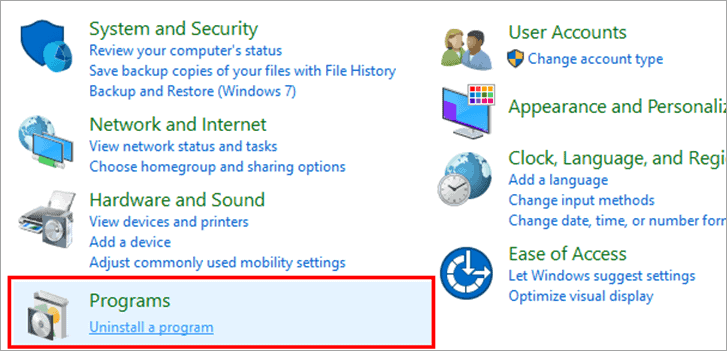
#2) Locate Adobe software and right-click on it. From the list of options, click on “Uninstall” as shown below.
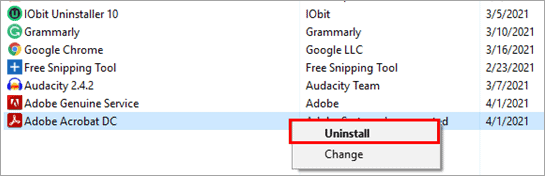
The software will be uninstalled, and the Utility will also be removed from the system.
#4) Delete All Files Created By Agcinvokerutility.Exe From Registry
The user can also remove the AGCInvoker Utility by deleting the files from the Windows Registry.
Follow the steps mentioned below to remove the files from the registry:
#1) Press Windows+R from the keyboard and search for “Regedit” . Click on “OK” as shown in the image below.

#2) Now, press Ctrl+F from the keyboard and search for “AGCInvokerUtility.exe” and click on “Find Next”.
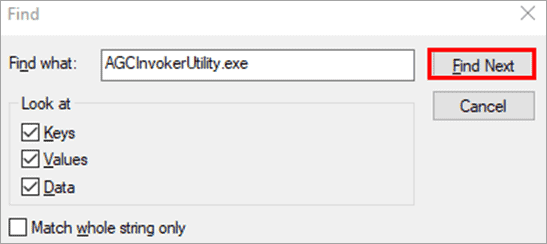
#3) The Adobe genuine Invoker files will be visible as shown in the image below. Delete and the Invoker Utility will be removed.

Frequently Asked Questions
1. Do I Need Adobe GC Invoker Utility on Startup?
No, not always. The utility is mostly needed for running Adobe licensing and genuine software services at startup. You can easily turn off this program if you do not work with Adobe software much.
Suggested Read =>> How To Fix Discord Not Opening Error
2. What is Adobe GC client.exe?
Adobe GC stands for Adobe Genuine Copy Validation Client Application and this executable file takes care that no tampering is made to the software and even checks for pirated Adobe files.
3. Can I Disable Adobe GC Invoker Utility?
Yes, it is possible to Disable Adobe GC Invoker Utility in the Startup Apps in Windows. It will prevent the utility from starting automatically and will not remove Adobe programs.
4. Is a collaboration synchronizer necessary?
Yes, a collaboration synchronizer is very important because it helps in keeping in touch and maintaining track of the documents processed by the Adobe software.
5. What is Updater Startup Utility.exe?
The Updater Startup Utility is an executable file that is part of the graphic features of the Adobe software and can be disabled and removed if it causes any problem in the working of the system.
What Is Adobe Updater Startup Utility?
Adobe Updater Startup Utility is an element that runs in the background and checks whether there are updates for Adobe software.
Does Adobe GC Invoker Utility Need to Run at Startup?
Not necessarily. Adobe products usually work fine without it, but it might be used later by some licensing or authentication processes of Adobe products when the latter are launched.
Can I Delete AGCInvokerUtility.exe?
You are not supposed to remove the file since it is included in Adobe package. Instead, if you don’t need this utility anymore, either disable it from startup or uninstall Adobe products completely.
Is Adobe GC Invoker Utility Necessary for Adobe Creative Cloud?
This utility is not required for normal functioning of Windows OS, yet it is quite useful when it comes to the licensing and authentication features offered by Adobe Creative Cloud.
Can Adobe Products Work Without AGCInvokerUtility?
Yes, yet there are some exceptions. Almost all Adobe products can work properly without AGCInvokerUtility being turned off, yet some actions should be performed manually.
Conclusion
Many people rarely keep an eye on the utilities and the executable files attached to the software, but these files can have a harmful effect on the user’s system.
In this article, we discussed one such utility which is called Adobe GC Invoker Utility. In the later part of the article, we also discussed various ways that can be used to fix this error.
Was this helpful?
Recommended Reading
-

Review & Comparison of Top PC Cleaner Tools with Features and Pricing. Select the Best PC Optimizer from this list to TuneUp your PC for Improved Performance: PC Cleaner is an application that will improve your system’s performance by optimizing it. It performs multiple tasks like clearing the cache for…
-
Read this Comprehensive Review & Comparison of the Top Windows Repair Tools With Features & Pricing to Select the Best PC Repair Tool: It is frustrating when you experience that your powerful PC, which you bought for a hefty sum that possesses all the necessary specs you desired, starts underperforming…
-
The list and comparison of the top free Registry Cleaner for Windows Systems: Best Windows 10 Registry Cleaner tools to clean, repair and optimize your PC Registry. Several myths we have heard about, why a computer slows down. One common myth is that the hardware slows down itself, which affects…
-
Read this CCleaner review and compare with top CCleaner Alternatives to select the best alternative to CCleaner: CCleaner software is a utility app that is used to optimize Windows registry entries, erase cookie data, cache, and browser history. You can also use the app to clean temporary, unwanted, and potentially…
-
This is a step-by-step guide for understanding the possible causes and solutions to fix the Stop Code Critical Process Died error in Windows 10: If we talk about various errors that a system can get, then there is a huge list ahead, but the BSoD (Blue Screen of Death) error…
-
Here we explore and understand VCRUNTIME140.dll missing error and the multiple ways to solve VCRUNTIME140.dll Not Found Error: Microsoft has provided various applications to its users that ultimately made their life easier, but what happens when you open up an application and it doesn’t open, rather displays an error stating:…
-
How to Fix "Default Gateway Is Not Available" Error Message: In this Hands-on Networking Training Series, we learned all about Network Address Translation in detail along with examples in our previous tutorial. In this tutorial, we will discuss the concept of the default gateway and its role in the computer…
-
This tutorial will explain the reasons for the USB Drive not showing up and various ways to fix the USB Device Not Recognized Error: Sharing information and storing them in handy storage devices has become quite common these days. Flash drives have turned up to become more common storage devices,…


