Are you looking for the best AI notetaker or transcription tool in 2026? This detailed review of Otter AI will help you to fulfil all your transcription needs and capture every word in a live meeting in real time.
Otter.AI is an AI-based transcription software that has developed into more than just a tool, but a complete assistant to meetings. But, with the rise of new competing platforms, should you continue using Otter.AI? Let’s understand precisely how Otter.AI functions, its security measures, and if the Pro version is worth the money
In this guide, you’ll learn Otter.AI Features, pros and cons, its pricing, how to use it, real-world use cases and its alternatives, so you can decide if Otter AI is worth using.
Otter AI Review: Your One-Stop Transcription Solution
What is Otter AI and how it Works ?
Otter.ai is an AI-powered transcription and meetings assistant platform that utilizes speech-to-text conversion through its proprietary technology to transform spoken dialogue into written content. One of the most prominent features provided by this company is the OtterPilot service that automatically participates in virtual meetings (Zoom, Meet, Teams) to record, transcribe, and summarize action items without human intervention.
My prayers were finally answered because AI-driven transcription platforms started flooding the market. So, of course, I had to be the first in line.
This is when I first heard of Otter AI. I knew what it could do and was a kind of intrigued by the positive reception it had so far enjoyed.
This video tutorial is available for your reference to help you understand the process.
Having finally tried the platform myself, I have thoughts. As usual, I would like to share them with you here.
So, without much further ado, let’s dive in.
What is Otter AI and How Does it Work?
Otter AI is an AI-driven platform meant for transcription and collaboration. In essence, it’s a tool for automatically transcribing speech into writing. To give an example, meetings invariably include a person designated to keep minutes, essentially a record of the meeting’s proceedings. Otter AI essentially automates this task.
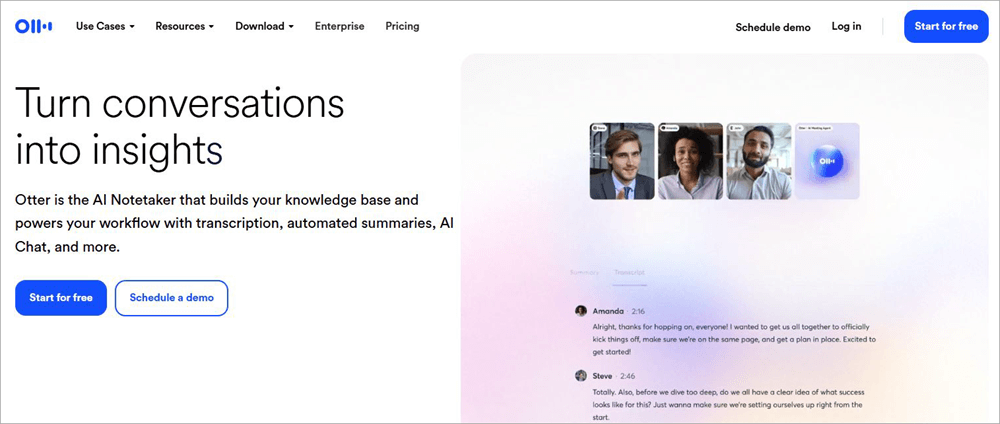
The platform integrates with popular meeting platforms like Zoom and Google Meet. As such, you can have OtterPilot record these meetings live and transcribe each word spoken throughout their duration in real-time. You can have the AI create searchable notes and present the information shared during those meetings in a summarized fashion.
Otter first made its presence felt in 2016. So, it has been around for almost a decade now and has only grown in popularity. If Otter AI’s own claims are to be believed, then the platform has transcribed over 1 billion meetings since its inception, which is an impressive feat.
The platform is available on the web, as a mobile app for Android and iOS phones, and as a Chrome extension.
Its flexibility aside, Otter AI comes loaded with advanced features, which convinced me that it was perhaps one of the finest transcription tools we have today.
Key Features of Otter AI
A platform is only as good as its features. Otter AI’s features are the main reason I even thought of writing this elaborate article. That’s how impressed I was.
Here’s a list of some of its prominent features:
#1) AI-Backed Real-Time Transcription
Otter AI is first and foremost a transcription tool that uses its artificial intelligence well. It can transcribe every spoken word in a meeting while it is transpiring, provided the audio is crystal clear. As a user, you can see the transcription unfold live through the main dashboard as the meeting carries on.
OtterPilot is quite accurate in capturing and transcribing each word and phrase delivered in the meeting. That said, it can stumble if multiple people speak at the same time. This is where you’ll see spelling mistakes or the AI simply struggling to keep up with the conversation.
Although I didn’t experience this problem, many other users have reported the AI struggling to transcribe conversations when the speakers involved have strong accents.
I believe these are minor issues and ones you can fix with clear audio and instructing speakers in a meeting to refrain from speaking over each other.
Having tried Otter AI to transcribe two meetings, I thought the platform did a great job of accurately transcribing the conversation in real-time.
#2) Meeting Assistant
As I’ve mentioned before, Otter AI integrates seamlessly with various popular virtual meeting platforms like Google Meet and Zoom. You can have the platform automatically join any virtual meeting you are hosting on such platforms by simply copying and pasting its link onto your Otter account’s dashboard.
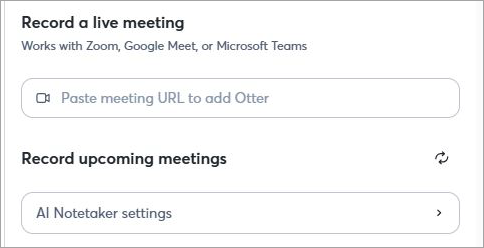
Once it has access to its meeting, OtterPilot will start transcribing those meetings. It will even present a concise summary of the meeting to you, covering only key details and action items.
After years of meetings, I’m familiar with how tedious it can be to extract key information from meeting notes, bypassing unnecessary details.
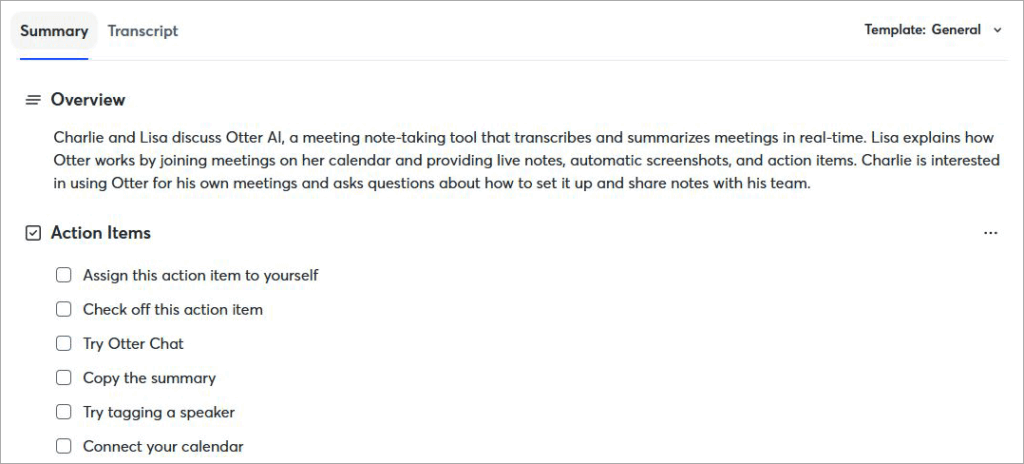
This isn’t a headache I had to contend with, thanks to Otter AI’s ability to summarize lengthy meetings. This can save you a lot of time. You can ignore the tedium of going through pages of notes just to find a few takeaways worth your attention.
#3) Searchable Transcripts
Once a meeting is transcribed, you have the entire text of each spoken word right in front of your eyes on the dashboard. Roughly a thousand words make up an average meeting transcript. Searching for a specific keyword or point in those transcripts is like finding a needle in a haystack.
Luckily, you don’t have to worry about this with OtterPilot, which transcribes your meetings. All you have to do is type in a keyword relevant to the information you seek in the transcript, and it will pop up on your screen in an instant. You’ll know exactly where this information appears in the transcript.

No need to move your eyes across the entire transcript just to find a few critical takeaways or action items. A quick search is all that’s required of you to find any information featured within the text transcribed by Otter AI.
#4) Speaker Identification
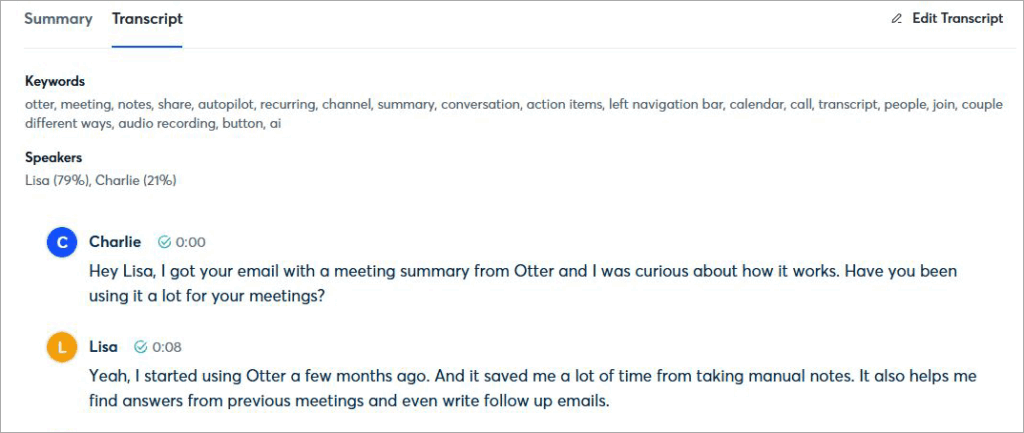
This is another great feature that Otter AI is known for. Besides simply transcribing a meeting, Otter AI can even label a speaker’s contribution within the transcript. A meeting usually involves multiple people discussing a topic.
When taking notes, it is also important to note down who said what. This can become difficult when you have a machine taking notes instead of a real-person that is present at this meeting.
OtterPilot, however, does a pretty decent job of identifying speakers in a meeting audio it is recording. It will label each speaker in the transcript so you know who said exactly what.
That said, this feature isn’t perfect. Otter AI can end up misidentifying a speaker. I believe the platform will get better at this with more updates in the near future.
#5) Customizable Vocabulary
It is common for professionals in a meeting to employ industry-specific terms or jargon when discussing topics. A typical AI might not get them and thus find it challenging to transcribe them.
This is not something you need to worry about when using Otter AI. You can train OtterPilot to understand technical terms and jargon that’s exclusively used by your industry.
Simply put, you can customize and expand Otter AI’s existing vocabulary by adding new terms or words. This customization will appear when the platform transcribes for you during the next meeting.
Again, this is yet another incredible feature that ensures OtterPilot can accurately transcribe your conversations, regardless of how jargon-heavy the discussion may be.
#6) Collaboration
Otter AI doesn’t simply position itself as a transcription tool but also as a platform for collaboration. Your team can collaborate on the transcript being produced by the platform in real-time. What I mean by this is that you or anyone on your team with access to Otter AI’s dashboard can perform edits to a transcript.
You and your team can annotate the text as the platform continues to transcribe a meeting. The transcripts themselves can be organized in folders and shared via private channels and public links. Team members can share these transcripts among each other via the platform’s general channel as well.
The text, audio, or captions produced by Otter AI can easily be exported in multiple formats (mp3, txt, pdf, docx, srt, bulk export).
#7) AI Chat
Another fascinating feature that the platform stands out for is its interactive AI chat. You or anyone on your team can have a chat with Otter AI’s intelligent chatbot. You can ask questions, request actions, or simply discuss anything related to the transcripts the platform has produced for you. The AI will respond to you accordingly.

Let’s say someone missed an important meeting. Instead of sifting through a lengthy transcript of the meeting, they can just ask Otter’s AI to summarize it for them or share key details discussed during the meeting. This way that person is immediately on the same page as his team members who did attend the meeting.
Integrations Supported by Otter AI
Its features aside, Otter AI also offers seamless integration with several third-party applications. This means you could easily connect the platform and use it alongside an app or solution your organization is already employing.
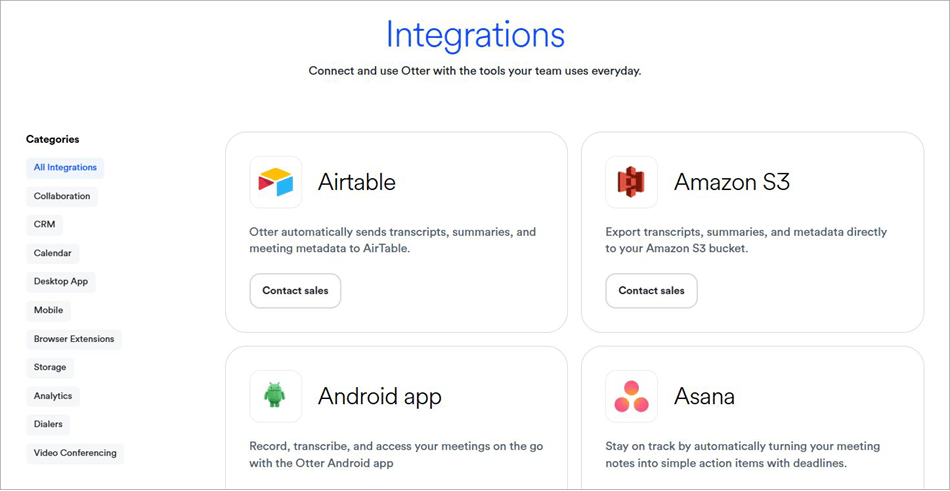
I’ve already mentioned how Otter AI works with popular virtual meeting apps like Zoom, Google Meet, and Teams. Besides them, Otter AI also integrates seamlessly with CRM tools like HubSpot and monday.com, collaboration tools like Airtable and ClickUp, and analytics tools like Snowflake.
Your team will likely find Otter AI easy to integrate with our current technology.
Who Should Use Otter AI?
While Otter.ai is a general-purpose transcription tool, its specialized 2026 features like OtterPilot and AI Chat offer unique advantages across different roles.
Business Professionals: Otter.ai acts as a smart meeting assistant by automatically transcribing discussions and eliminating manual note-taking.
- Key Benefit: Creates a searchable record of meetings across Zoom, Teams, and Google Meet.
- Efficiency: AI Chat helps extract action items instantly without reviewing full recordings.
Students: Otter.ai enables students to record lectures in real time, thereby becoming more efficient in their studies.
- Benefit: Automatically transcribes classes to allow students to concentrate on comprehending lectures rather than taking notes. Highlighting and transcripts aid in revision and exam preparation.
Journalists: Otter.ai offers journalists an easy way to transcribe interviews with high levels of accuracy.
- Benefit: Automatically generates searchable content from the interview, even differentiating between speakers.
Content Creators: Otter.ai allows creators to turn audio files into SEO-friendly content.
- Benefit: Automatic generation of subtitles and captions for higher accessibility. Enables the summarization and search for quotes using keywords.
- Repurposing: Easily creates blogs and other content from podcasts or video recordings
Otter.ai Pricing & Plans: Which is Best for You?
Otter AI adheres to a flexible pricing structure. It probably has one of the best free-forever plans I’ve had the pleasure of trying out.
Its free plan does almost everything you’d need to decide on whether to purchase the premium subscription. From live transcription to audio-recording playback, you don’t need to pay a dime to access these features.
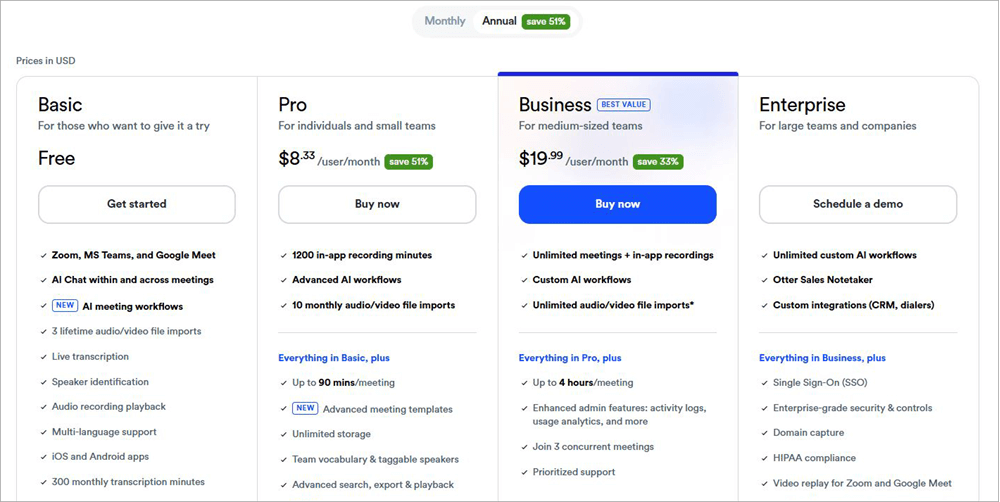
That said, this is still a free plan, so there are limitations in place. For instance, you are only afforded a transcription time of 30 minutes per conversation. You can only import file transcriptions that are no longer than 300 minutes per user each month. Furthermore, you can only export files in MP3 and TXT format.
To use Otter AI at its maximum potential, I suggest subscribing to its premium plans, which are as follows:
Monthly
- Pro: $16.99/month
- Business: $30/user/month
Annual
- Pro: $8.33/user/month
- Business: $19.99/user/month
A custom enterprise plan is also offered upon request. Both the premium plans have 7 day-free trial, which means you can try them out without risk.
How to Get Started With Otter AI?
Deploying Otter AI is quite simple. Here’s all you need to do:
1. Sign up to create an account. You could use your existing Google or Microsoft account to sign up immediately.
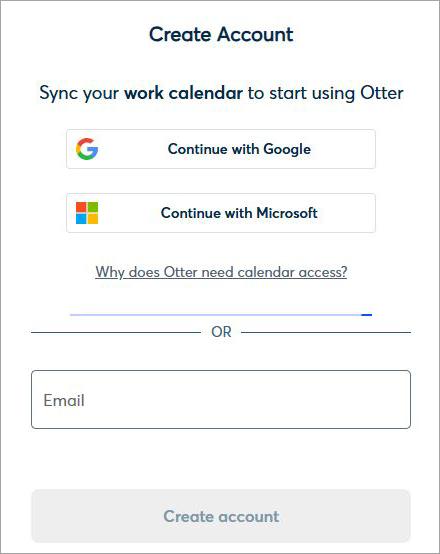
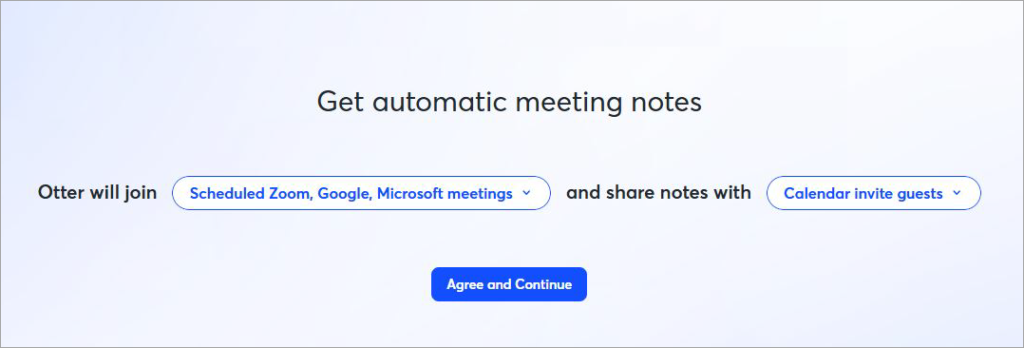
2. Specify which meetings Otter is allowed to join and who it can share notes with.
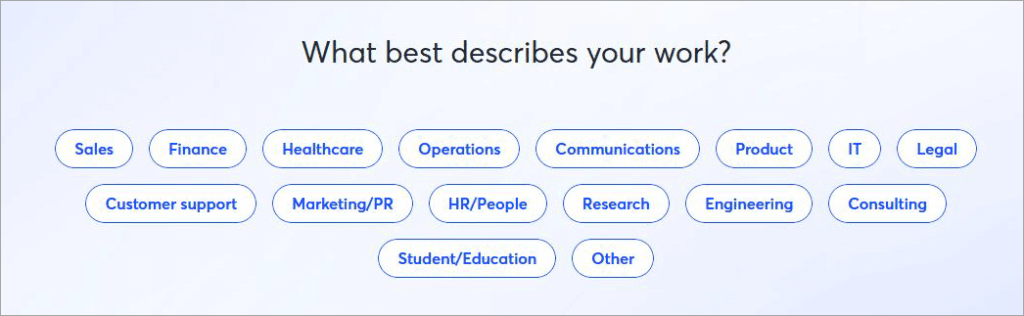
3. You can choose to personalize your experience by describing your work.
4. You’ll now find yourself on the main dashboard.
Real-world Transcription Example by Otter AI
Below is a Real-world Transcription & Summary created by Otter AI based on a standard 2026 business meeting.
Real Otter.ai Transcript Example: This demonstrates how Otter handles multiple speakers and “filler” words (like ‘um’ or ‘uh’), which it usually cleans up automatically.
Speaker 1 (Sarah – Marketing): 0:00 “Okay everyone, let’s look at the Q3 campaign results. Overall, the click-through rate was up by 15%, but our conversion on the landing page is still a bit sluggish. Bob, did you see the heatmaps?”
Speaker 2 (Bob – Design): 0:12 “Yeah, Sarah. It looks like users are dropping off right before the pricing table. I think the ‘Start Free Trial’ button is getting lost in the footer. We should move it above the fold.”
Speaker 1 (Sarah): 0:25 “That makes sense. Can you have a mockup for that by Thursday? We need to push the update before the weekend.”
Otter AI “Automated Summary” Example: This is what Otter generates in the “Summary” tab. Including this in your article helps users understand the “Generative AI” aspect.
Meeting Keywords: Click-through rate, Landing page, Q3 Campaign, Heatmaps.
Executive Summary: The team reviewed Q3 marketing performance. While CTR is improving, conversion remains a concern. The design team identified a UI bottleneck regarding the primary CTA placement.
Action Items:
- @Bob: Create a new high-fidelity mockup for the landing page with the CTA above the fold. (Due: Thursday)
- @Sarah: Schedule a follow-up meeting for Friday to approve the final design.
First Impressions of Otter AI’s UI
I prefer a minimal, neat, organized interface from all the applications I use. So, I was glad that Otter AI didn’t disappoint in this department. I appreciated my dashboard’s clean look with clearly laid-out controls and features.
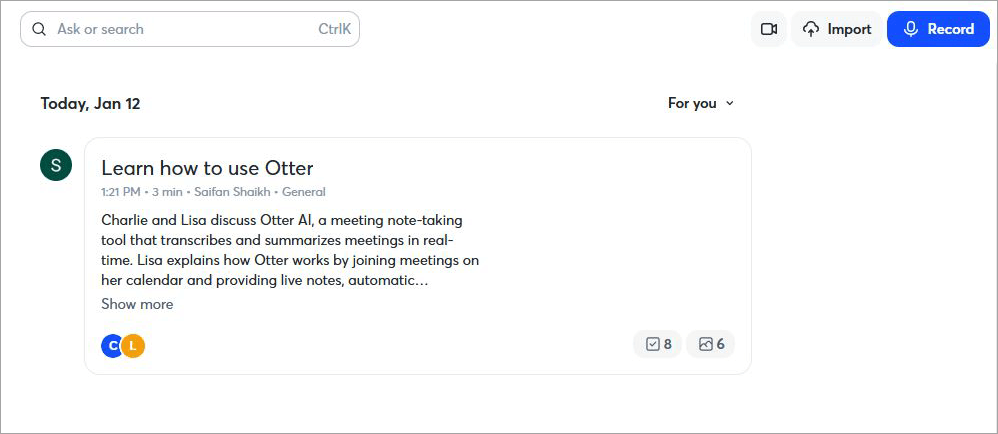
You have the chat window in the center. This is where you’ll talk with OtterPilot. On the left, you have access to folders, direct messages, and communication channels. On the right, you have the option to record live meetings via Zoom, Teams, etc., or have the app integrated with tools like Outlook or Google Calendar.
Paste a meeting URL linked to your Zoom, Google Meet, or Teams account in the designated box, and Otter AI will automatically start transcribing the conversation. You’ll see the transcript unfold in real time on this same dashboard.
At the very top, you also have the search bar, which will come in handy when you want to look for certain keywords within the transcript. Overall, I have no complaints with Otter AI’s interface. It is exactly how I expected it to be and what I wanted from it.
The simplicity that Otter AI adheres to here makes it a platform that anyone can use, regardless of their technical proficiency.
Accuracy Test for Otter AI
We have tested the Otter AI system in our technical testing facility to determine how accurately it performs transcription tasks under various situations.
Otter AI has shown good levels of accuracy in general, though this depends greatly on the level of noise and quality of audio.
- Quiet Environment: Under quiet and clear audio, Otter AI can produce transcription results with an accuracy level of 85%-95%.
- Noisy Environment: If there is any background noise or overlapping of voices, then the accuracy rate drops to 70%-85%.
- Accent Detection: Otter AI is proficient in detecting standard accents but faces problems in detecting accents with regional variations, speed, or technical terms.
Pros and Cons of Otter AI
| Pros | Cons |
| Simple, neatly organized, easy-to-use interface. | The results can sometimes be inaccurate, especially if there is overlapping speech, unclear audio, or strong accents involved. |
| Real-time, superfast, accurate voice-to-text transcription | |
| Integration with various third-party collaboration, virtual meeting, and CRM platforms. | |
| Intuitive conversational AI chatbot | |
| Chrome Extension. | |
| Flexible pricing |
Otter.ai Alternatives: Comparing the Top 3 alternatives in 2026
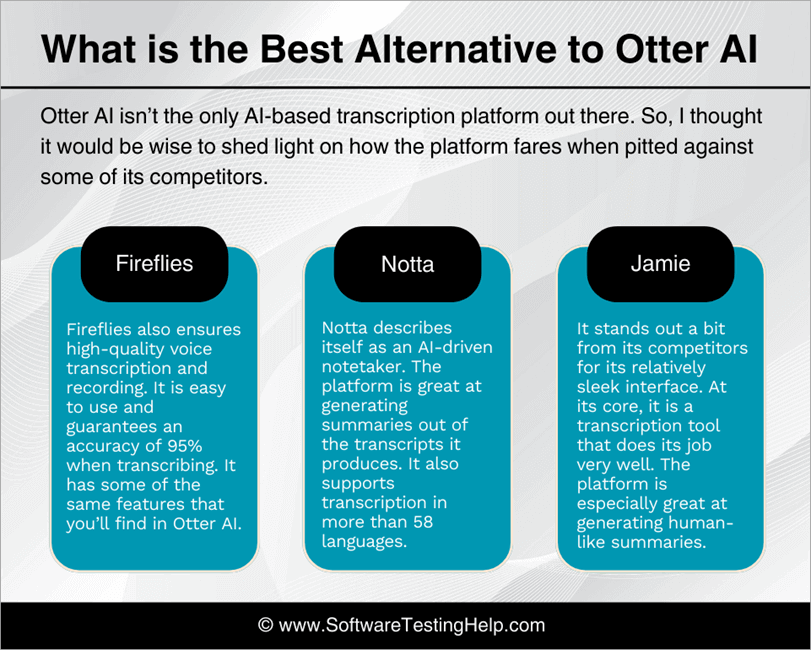
Otter AI isn’t the only AI-based transcription platform out there. So, I thought it would be wise to shed light on how the platform fares when pitted against some of its competitors.
- Fireflies.ai – Best for CRM Integrations & Search
- Notta – Best for Multilingual Support (58+ Languages)
- Fathom – Best Free Unlimited Recording for Individuals
#1) Fireflies
Like Otter AI, Fireflies also ensures high-quality voice transcription and recording. It is easy to use and guarantees an accuracy of 95% when transcribing. It has some of the same features that you’ll find in Otter AI.
That said, Fireflies can transcribe in over 100 languages, while Otter can only transcribe in 4 major languages as of today.
Website: https://fireflies.ai/
#2) Notta
Notta describes itself as an AI-driven notetaker. You can rely on it to transcribe your virtual meeting or transcribe pre-recorded audio in no time.
The platform is great at generating summaries out of the transcripts it produces. It also supports transcription in more than 58 languages.
Check our Detailed Notta AI Review Here
#3) Jamie
Jamie is another Otter AI alternative that can generate accurate notes and transcripts from any meeting or conversation. It stands out a bit from its competitors for its relatively sleek interface.
At its core, it is a transcription tool that does its job very well. The platform is especially great at generating human-like summaries.
Website: https://www.meetjamie.ai/en
Comparing Otter AI with its Alternatives
| Name | Best for | Languages | Deployment | Price |
| Otter AI | Live Transcription and AI chat. | English, French, Spanish, and Japanese. | Chrome Extension, iOS, Android, Web. | Free forever plan, Premium plans start at $16.99/user/month |
| Fireflies AI | Auto language detection | 100+ | Mac, Windows, iOS, Android, Web. | Free forever plan, Premium plans start at $10/user/month |
| Notta | Super-fast transcription | 58 | Web, Chrome Extension, iOS, Android. | Free forever plan, Premium plans start at $13.49/month |
| Jamie | Human-like summary generation | 99+ | Windows, Mac, iOS. | Free forever plan, Premium plans start at € 25/month |
Is Otter.ai Safe? Privacy and Security Analysis
One of the frequent concerns raised by people in 2026 is “Is Otter.ai listening to my meetings?” Even though the tool is a productive one, the fact that it operates all the time necessitates looking at its security and data protection policy.
Data Protection and GDPR Compliance: The company has a robust data protection policy in place for your data. Transcripts are AES-256 (at rest) and TLS encrypted (in transit). Additionally, it is SOC 2 Type 2 certified and complies with GDPR and CCPA, giving users full control, including data deletion rights.
Data used by Otter for AI Training: By default, Otter employs de-identified data to enhance the accuracy of its AI systems. Data training opt-out is usually allowed for Businesses and Enterprise subscribers. In the case of the AI Chat, although it might involve processing queries using third-party AI platforms, no training on your data can occur.
Frequently Asked Questions
1. What is Otter AI used for?
Otter AI is mainly used for transcribing audio or voice recordings in real-time. The tool is excellent at transcribing pre-recorded audio and live meetings happening. It can also summarize a transcript and ferret out action items from it.
2. Is Otter AI completely free?
No, Otter AI isn’t completely free. However, it does feature one of the best free-forever plans I’ve used. You’ll still be able to use the tool for recording and live transcription. That said, there are limitations imposed on these features. If you want to use Otter AI to transcribe very long meetings regularly, it would be best to subscribe to one of its subscription plans.
3. Can Otter AI transcribe a recording?
Yes, Otter AI is quick when it comes to transcribing pre-recorded files. The platform will automatically start transcribing the audio once you’ve uploaded it or once it has stopped recording. The transcripts themselves are highly accurate, provided the audio quality is clear.
4. What are the risks of using Otter AI?
Although I like Otter AI, it isn’t without its flaws. The platform can misunderstand an audio if its quality is subpar, there are strong accents involved, or if people in the recording are speaking over each other. It can also wrongly identify a speaker.
There is a likelihood of Otter AI not understanding the context of the clip it is transcribing, which can become an issue when generating a summary. Unlike many of its contemporaries, Otter AI only supports transcription in 4 languages.
5. Is Otter AI better than ChatGPT?
Well, it depends on what exactly you need. OtterPilot is great for transcribing and summarizing audio or meeting conversations in real-time. ChatGPT can generate content. If content generation is your goal, then go with ChatGPT. If an accurate live transcription service is what you seek, then Otter AI will more than meet your expectations.
Conclusions
In hindsight, I would describe Otter AI as an intelligent, feature-packed, and advanced transcription tool that does its job very well. I was impressed with its core capabilities and its many other functions. The results it produces can be inaccurate at times, but it is something that can be resolved with some vigilance on your part.
I like how easy it was to sign up and get started with the platform. A clean, user-friendly interface also floored me. The fact that it can integrate well with platforms like Zoom, Google Meet, and Teams makes it a great solution for businesses that like to host their meetings virtually.
I suggest you first give the tool’s free forever plan a try. You can perform and test all of Otter AI’s basic functions without paying a dime. If you like the experience, then by all means, pay for its subscription. I don’t think you’ll regret it.
Research Process: The total time involved to complete and publish this article is approximately 40 hours. This content was created through a structured research approach to ensure accuracy and reliability.
For more quick transcription-related guides, you can explore our range of tutorials below:
- The 14 Best Transcription Services (TOP SELECTIVE ONLY)
- Top 15 Best Transcription Software (Audio/Video to Text)
- Top 10 Voice Recognition Software (Speech Recognition)
- The 15 Best Dictation Software
- How to Get Transcript From MP4: Best Converters
- Real-time Speech Emotion Recognition (SER)
- Is Joyland AI Companion Safe? Review and Alternatives
- Granola AI Review – AI Note Taker For Meetings Tutorial
Was this helpful?
Recommended Reading
-

Here you will find the list of popular Webcams for streaming and zoom meetings. Compare and select the best webcam as per your requirement: Are you attending video meetings or webinars regularly? The work-from-home culture has forced professionals to attend more video meeting sessions. If you have a desktop without…
-
List of the best Online/Virtual Meeting Platforms, along with their comparison and detailed reviews to choose the best one for your business. Collaboration is an integral part of a business. But now that businesses have become multinationals, there is a dire need for ways to collaborate with the teams in…
-
Excellent compilation of the Top Board Meeting Software to work smarter & grow bigger. Pick the best software for board meetings to manage company meetings efficiently: Board meeting software or board portals streamline corporate governance processes and help directors, corporate secretaries, committees, corporate secretaries, groups, and leadership teams to prepare…
-

Waveroom Review - A Perfect Next-generation Virtual Recording Studio to quickly record high-quality Podcast, Interviews & Meetings: Starting a podcast today has never been easier. With the right kind of tools, anyone can launch a podcast and find an audience that’ll listen to them discuss a variety of topics. Not…