Claude AI or ChatGPT – which AI assistant best fits your needs? Read our exclusive guide on Claude vs ChatGPT to explore their key differences, pricing, features, privacy and safety to pick the right AI chatbot:
It’s 2026, and the popularity of AI is at its zenith, with both OpenAI’s ChatGPT and Anthropic’s Claude leading the charge.
So, if there was ever a time to pit these two industry behemoths against each other, it would be now. I mean, why wouldn’t the curious among us wonder which of these widely used and revered AI tools is the undisputed best?
Is there even a right answer to this question, though?
Claude Vs ChatGPT: What Do Experts Choose
I needed a space to clear my head of this conundrum, and thus found myself in front of my laptop, firing up both ChatGPT and Claude. I assessed each of their capabilities and tested them on several different parameters just so you and I could have a definitive answer, if that’s possible, of course.
So, without much further ado, let’s dive in.
Quick Answer – Which is the Best “Claude AI Vs ChatGPT”
Which is better according to you? Claude AI or ChatGPT?
Well, both Claude as well as ChatGPT offer several prominent features to their users. Each AI assistant strives to give its best. ChatGPT does phenomenal work in Image generation, while Claude is better for coding and thoughtful writing.
However, it completely depends on the user to choose which AI Assistant best suits them, based on their requirements.
Core Differences at a Glance: ChatGPT vs Claude AI
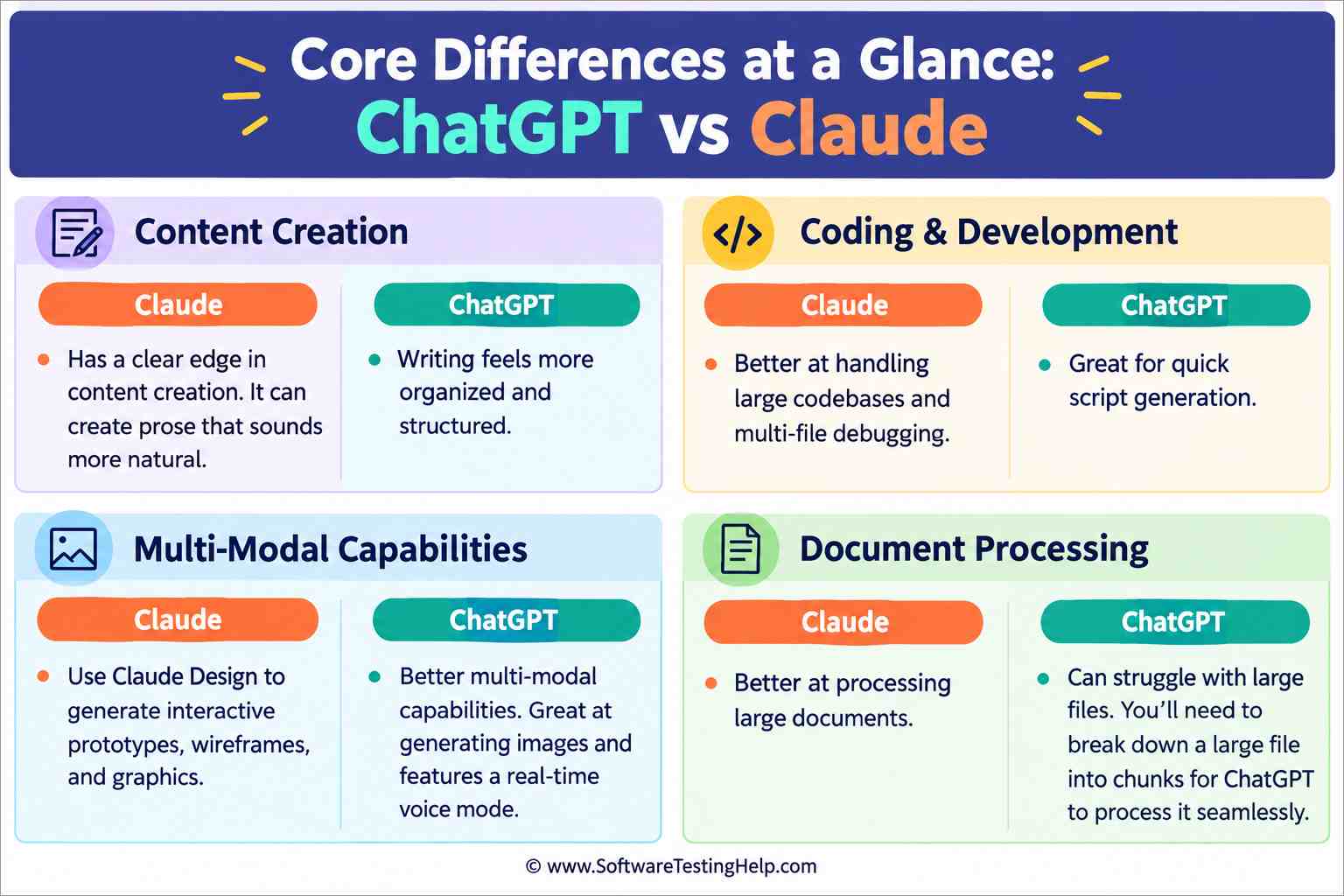
- Claude has a clear edge over ChatGPT when it comes to content creation. I feel Claude can create prose that sounds more natural, whereas ChatGPT’s writing feels more organized and structured.
- Claude’s ability to handle large codebases and multi-file debugging makes it a better option for developers. ChatGPT is also great for quick script generation.
- ChatGPT possesses better multimodal capabilities. It is great at generating images and features a real-time voice mode. On the other hand, you can use Claude Design to generate interactive prototypes, wireframes, and graphics.
- Claude is better at processing large documents, while ChatGPT can struggle. You’ll need to break down a large file into chunks for ChatGPT to process it seamlessly.
When to Use Claude and ChatGPT
| Function | Go For |
| Writing and Content Creation | Claude |
| Coding and Problem Solving | Claude |
| Image Generation and Voice Mode | ChatGPT |
| Research and Documentation | ChatGPT |
| Context Window and Large Document Handling | Claude |
| Data Analysis | Claude |
| Privacy and Ethical Dilemma | Tie. Both are exhibiting a cause for concern. |
Current Model Lineups of ChatGPT and Claude
Before we dive deeper into the argument, we’ll need to establish a foundation for it, and what better way to do that than to lay out both ChatGPT and Claude’s current model lineups?
ChatGPT is currently running on the GPT-5.6 series, whereas Claude relies on Anthropic’s Claude 5 and 6 family of models.
The table below demonstrates what each of these models entails:
| Tools | Models | Description |
| ChatGPT | Sol (GPT 5.6) | Flagship, high-performance model meant to handle complex multi-step tasks, reasoning, and coding. |
| Terra (GPT 5.6) | A mid-tier, cost-effective model that can handle standard workflows at exceptional speed. | |
| Luna (GPT 5.6) | Lightweight model that can handle high-volume tasks. | |
| GPT 6 Astra | Frontier intelligence tier that can handle complex reasoning and multi-step agentic execution | |
| Claude | Opus 5 and 4.8 | A legacy-tier model capable of processing documents analytically |
| Sonnet 5 | A balanced mid-tier model that’s faster and cheaper than Opus. Ideal for agentic coding, workflow automation, and multi-step tool use. | |
| Haiku 4.5 | A lightweight, budget-friendly model meant for handling high-volume tasks | |
| Fable 5 and 5.1 | Flagship intelligence tier model that can handle complex coding, data analysis, and long-running agentic tasks. |
Understanding which models these AI assistants are currently running on will help you employ them appropriately, depending on what you desire from them.
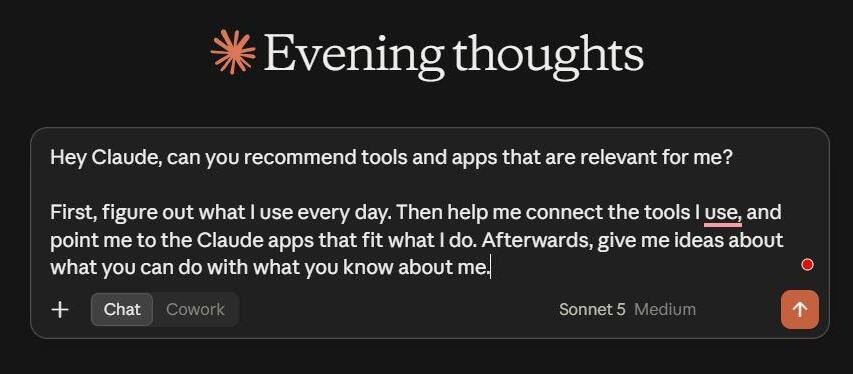
Claude’s Main Chat Window
In your initial encounter with ChatGPT and Claude, you shall notice that Claude actually gives you an option to choose a model, while ChatGPT chooses one at your behest.
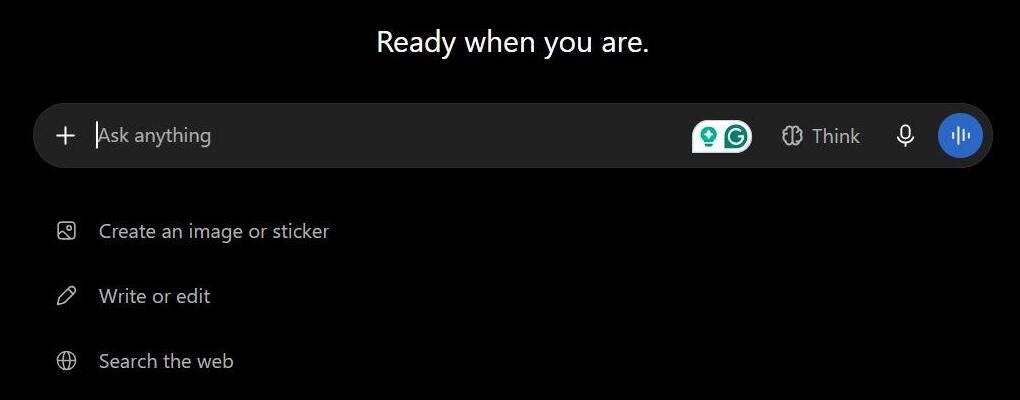
ChatGPT’s Main Window
This, by default, model selection by ChatGPT works if you are new to AI. I prefer the freedom of switching between models, and I suggest you do the same when using either Claude or ChatGPT, lest these AI assistants use a model that simply isn’t cut out for the task at hand.
Now that we are familiar with the models they are running on, let’s try to get an answer to what led to the genesis of this little article.
Claude vs. ChatGPT: Which is Better?
We have performed in-depth research on certain factors to identify which AI Assistant is the best one.
Some of them are:
#1) On Writing and Content Creation
Even the most internet-averse person on God’s green earth knows that AI can write stuff. Many people out there are using ChatGPT and Claude to write their blogs, articles, emails, and content scripts. There are content creators on YouTube and Instagram who’ve created careers by riding the coattails of these AI tools by doing exactly that.
So, we know that ChatGPT and Claude are both decent at writing, but which one does it better?
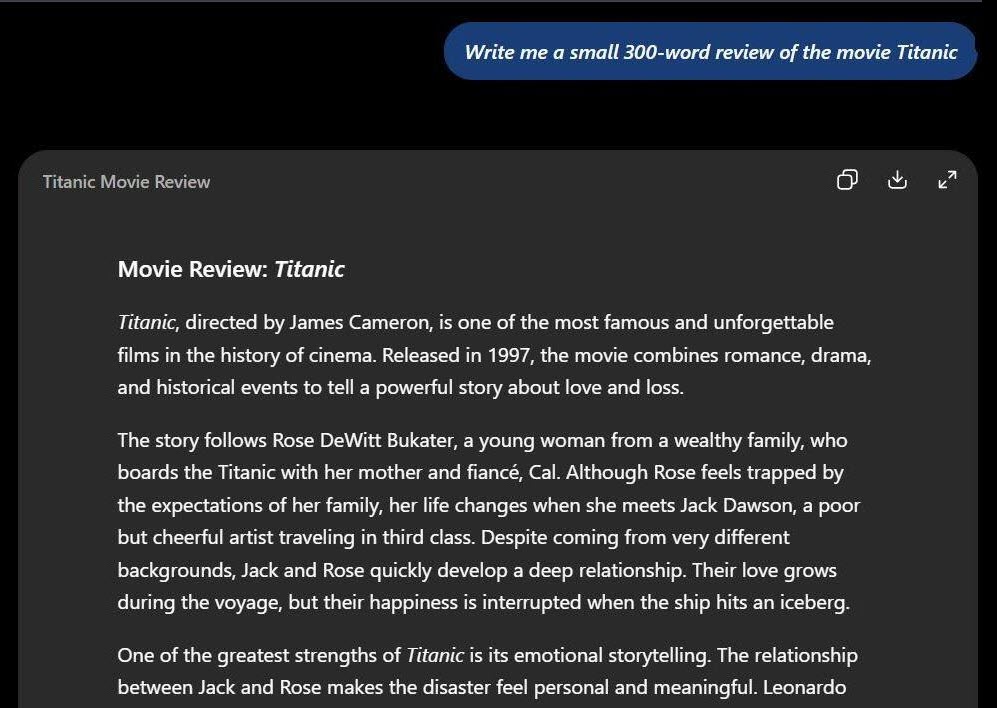
I gave both tools a common prompt to find out. I made them “Write me a small 300-word review of the movie Titanic”.
The results were a bit surprising.
Claude Just Sounds More Natural
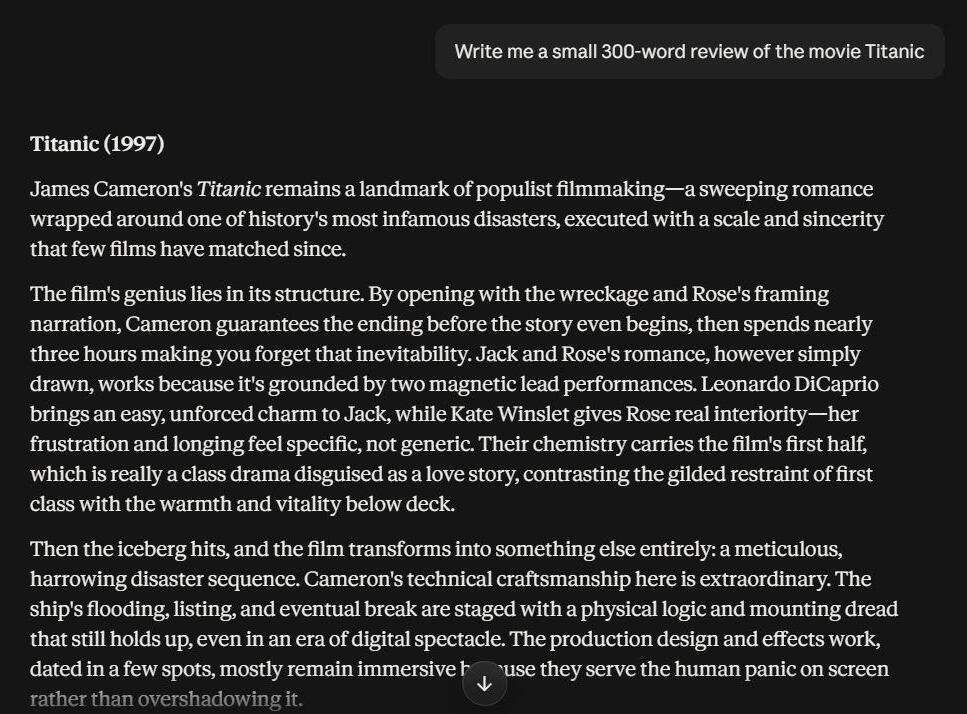
After reading both reviews, I kind of favor the one Claude managed to compose. It sounded more natural and had a tone that one could describe as conversational. It felt like Claude was giving me its opinion of the movie rather than following the bylines of my carefully structured prompt. I also appreciate the 4.5/5 rating it gave the film in the end. A nice touch.
It even went out of its way to point out the film’s flaws from its perspective.
ChatGPT’s review of the film started impressively but ultimately ended up sounding very artificial (no pun intended) to me. It felt more structured, as if it was checking boxes to ensure it talked about all the elements that make up the movie. Plus, it only talked about the things it liked and refrained from criticizing the film.
I also tweaked the prompt again to “Write me a small 300-word review of the movie Titanic. Add some humor.”
I was floored by what Claude produced and disappointed with the results generated by ChatGPT. Right off the bat, Claude was hitting on all cylinders, throwing one sarcastic remark after another, while ChatGPT failed to produce a single line in its prose that didn’t come off as “manufactured”.
As a writer myself, who values that unique emotional element that only a living, breathing human being can bring to a written text, I think Claude is the undisputed winner here.
I think both Claude and ChatGPT will serve you just fine if you only want to employ them for formal writing.
However, Claude is simply better at composing content that sounds human, which is also why I would recommend it to content creators, storytellers, and scriptwriters, unless you belong to the ever-growing community of artists who are understandably holding a grudge against AI.
#2) On Coding and Development
Until I sat down to write this article, I never even considered using ChatGPT over Claude for coding. I agree with the developer community worldwide that Claude is simply a better tool for coding than ChatGPT. That isn’t to say the latter has nothing to offer in this department.
Claude is better when it comes to reasoning on complex codebases. You’ll find it faster at generating front-end code and committing very few errors along the way. You can rely on tools like Claude Code for multi-file editing and running tests.
ChatGPT, on the other hand, is much faster at prototyping and script generation. Its ecosystem, which incorporates both image generation and voice support, also helps a great deal.
To get a perfect picture of both ChatGPT and Claude’s coding capabilities, I tasked them with performing a security audit on the following Python script.
The prompt was as follows:
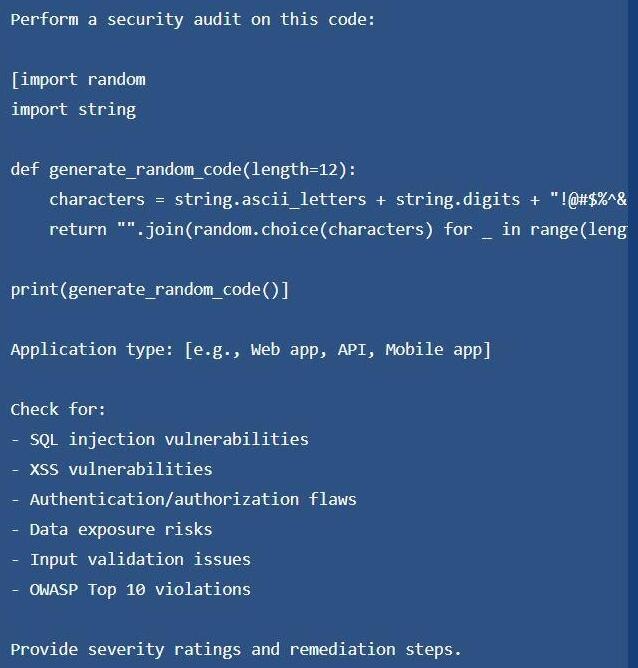
The results were as follows:
Claude was quick to point out the most obvious syntax error in the code before it proceeded to hand me a detailed report of its audit.
ChatGPT also fared well; it was able to identify the issue successfully, recommended alternative solutions, and provided me with a decent report.
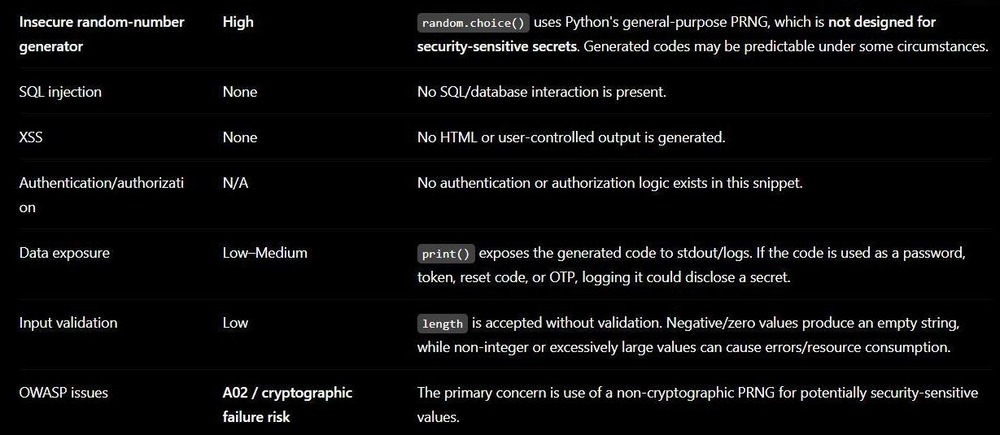
ChatGPT’s Findings
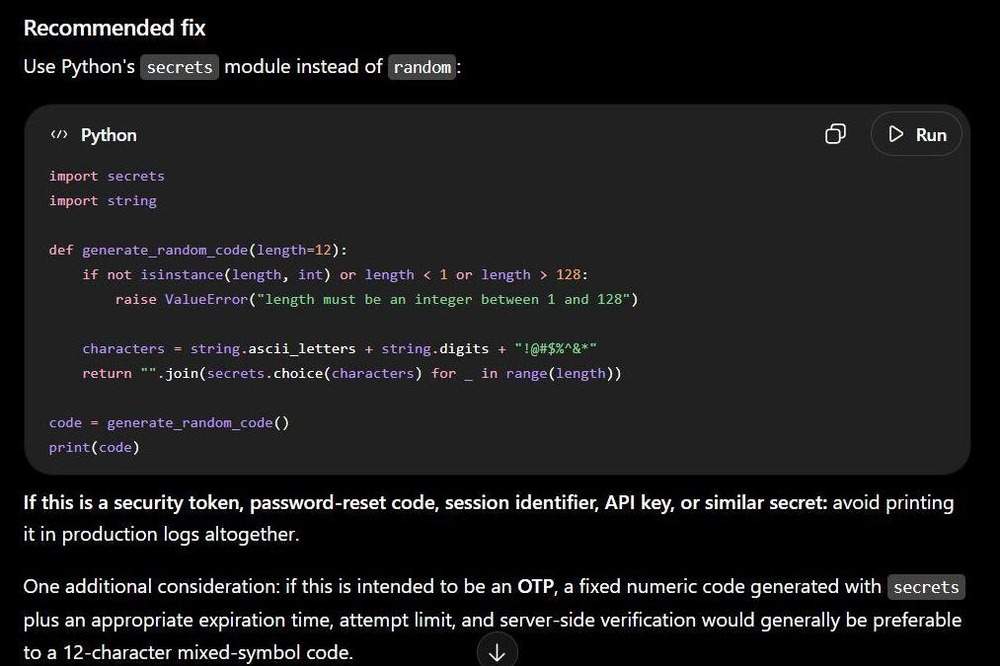
ChatGPT’s Findings
ChatGPT broke down its report by highlighting its findings, the severity of the issues it unearthed, and the recommended fix for each of these issues.
Claude again won here, solely because of the technical insight it was able to offer me. Claude not only identified the problems within the code but also classified the threat.
For instance, it identified a cryptographic failure and then mapped it to the OWASP Top 10 list. Of course, it also suggested remediation and bookended its report with a nice little Summary Table.
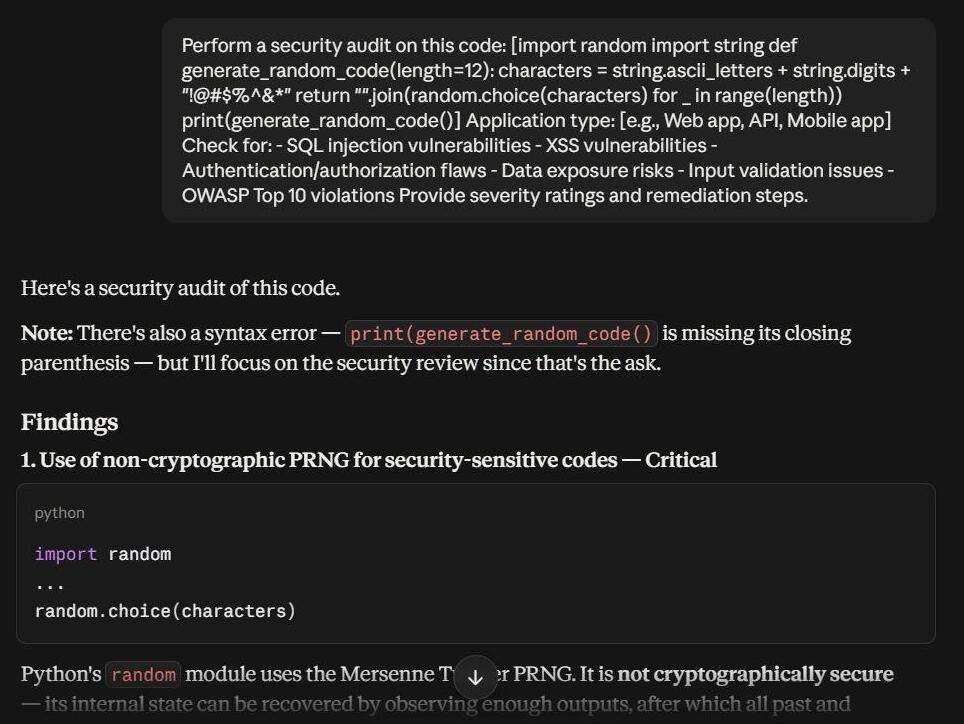
Claude’s Findings
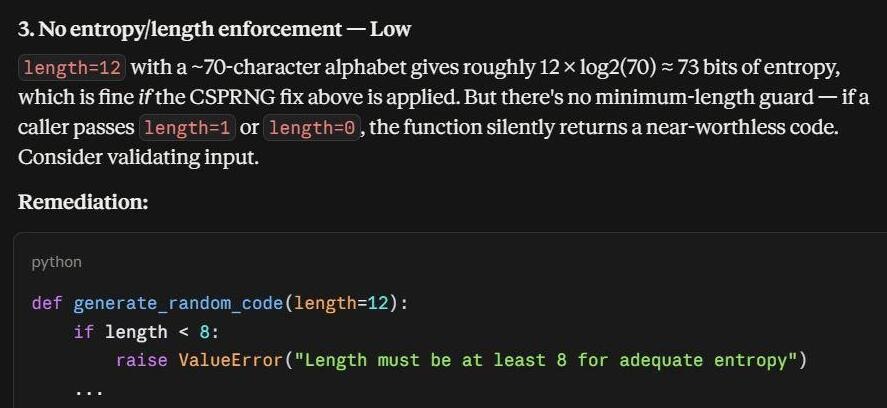
Claude’s Findings
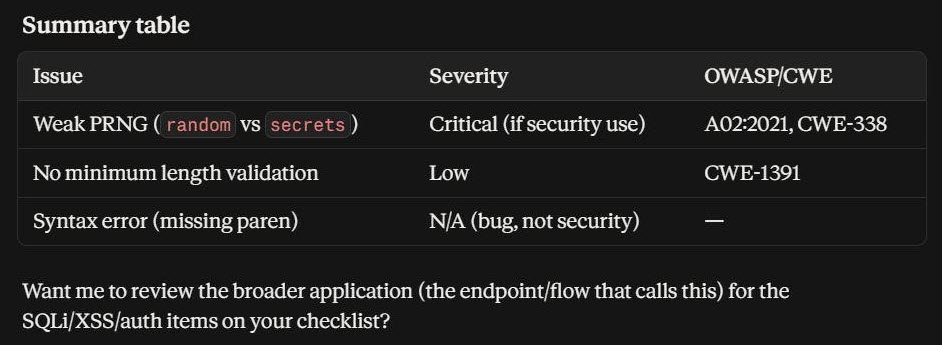
Claude’s Findings
Not everything is rosy with Claude when it comes to coding, though. You’ll quickly hit the usage limit, especially if the coding workload is heavy (I’ll touch on this later when we discuss the pricing). If you are a Pro plan subscriber to Claude, you’ll hit its weekly usage cap very quickly.
ChatGPT’s Codex mainly stands out for its speed. It does a good job of comprehending your codebase. You can rely on it to execute tests, run CLI commands, and even handle integration failures. Its flaws become glaringly obvious when your project grows beyond a certain limit. You’ll quickly notice that ChatGPT treats codebases like disconnected snippets.
| Claude Code | Codex |
| Powered by Claude Opus | Powered by GPT 5.6 models. |
| Terminal-Native Agent | Cloud-Based Agentic Platform |
| Ideal for deep analysis and complex reasoning | Ideal for brisk execution and massive refactoring |
| Comparatively Slower at executing Tasks | Faster at executing tasks. |
Despite the flaw, which you can fix by opting for the more expensive plans, I would still say that in the battle of Claude vs ChatGPT for coding, the former is better.
#3) On Image, Voice, and Multi-modal Features
It may seem like I’ve been taking Claude’s side in this article. Well, that changes right here.
I gave ChatGPT and Claude the following prompt:
Create an image of a cat skating in downtown Los Angeles while wearing aviators and headphones.
The results were as follows:

Generated by Claude
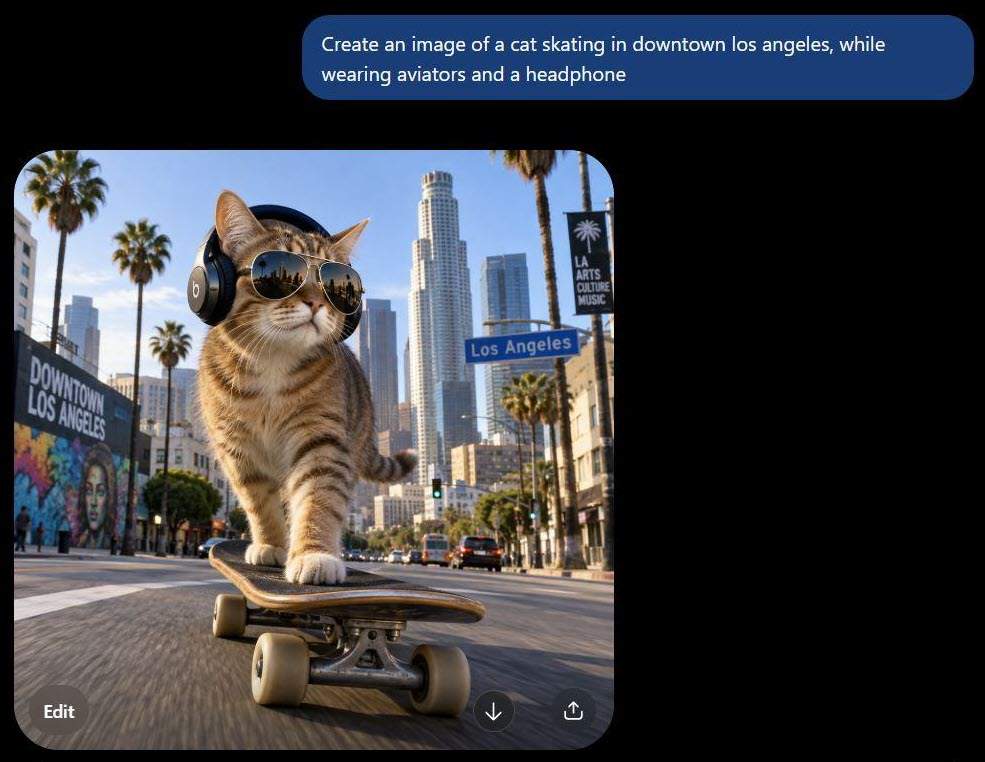
Generated by ChatGPT
Do I even need to spell out which one is the clear winner here? ChatGPT was able to generate something that looked strikingly stylish and realistic, whereas Claude created something that a pretentious fool would call abstract art.
ChatGPT is Exceptional at Image Generation!
Besides creating a stunning image, ChatGPT makes it easier to go back to the generated image to edit it even further, a privilege Claude doesn’t offer.
One thing becomes clear here. I don’t believe image generation was ever a priority for the folks behind Claude AI. That isn’t to say you can’t create visuals with Claude.
Claude Design is a specialized premium tool you can use to create interactive prototypes, slides, wireframes, vectors, and graphics. That’s where Claude’s visual-generating prowess reaches its limit.
ChatGPT blows Claude out of the water in this department. You can even have ChatGPT modify any image you might have. For instance, not long ago, there was a trend where people were using ChatGPT to transform their pictures into Anime-style art.
ChatGPT has a Better Voice Mode
Both ChatGPT and Claude can process speech through their built-in microphone. However, Claude’s voice mode pales in comparison to what ChatGPT offers.
ChatGPT’s real-time voice mode makes it easier to dictate instructions. You can interrupt the AI mid-processing and change your instructions via speech. It feels like you are having an actual conversation with the model.
That is unfortunately not the case with Claude. Claude is noticeably slow in responding to voice dictation. It also misheard my instructions countless times. If I had one word to describe Claude’s voice mode, it would be frustrating.
#4) On Context Windows and Large Document Handling
As far as large context windows are concerned, both ChatGPT and Claude can handle them well. However, you may find Claude to have a slight edge over its competitors.
Claude’s top models can support up to 1 million tokens, whereas ChatGPT’s standard models can handle up to 120K tokens. That’s about to change with the introduction of GPT Astra, which is said to support over 1 million tokens.
I have an e-book that’s around 500 pages long. I fed this document to both ChatGPT and Claude, instructing them to summarize it.
I found Claude’s processing of the document to be seamless, in contrast to how ChatGPT fared. I had to split the document into 4 sections for ChatGPT to do what it was told, whereas Claude was able to process the entire document without any errors or losing context.
So, Claude wins again. You can have the AI assistant handle huge code repositories and multi-page financial reports without hassle.
#5) Agentic Tools and Integrations
As far as Agentic Tools are concerned, both ChatGPT and Claude seem to take an aggressive approach in this direction.
ChatGPT has already rolled out ChatGPT Work, which is an autonomous AI agent that can handle entire tasks from beginning to end with very little input from you.
On the other hand, Claude offers Claude Code and Claude Cowork, which are AI agents that can help with coding and general computer-based work, respectively.
As far as integrations are concerned, ChatGPT offers a broader ecosystem with an extensive library of custom-made GPTs at your disposal. It is easier to connect ChatGPT to real workflows via integrations and APIs.
On the other hand, Claude facilitates connection with external tools via the Model Context Protocol. You’ll also find Claude seamlessly integrating with tools like Google Drive, Workspace, and Slack.
Pricing Plans: Both AI Assistants
No matter how enticing a product’s features and capabilities may be, everything will ultimately boil down to the money you’ll need to spend to enjoy them.
Well, both ChatGPT and Claude can offer free tiers, so there’s your silver lining. However, you’ll only realize their true potential when used via the premium tiers.
The base plan for ChatGPT and Claude is the same at $20/month. While you get access to all of their features, you’ll have to contend with the usage limit.
You can bypass this limit by opting for the paid plan. ChatGPT Business plan and Claude Max will cost you $100 per month.
Usage limits and rate caps apply for both ChatGPT and Claude. This basically means there is a limit to how many messages or queries both of these AI assistants will compute for you. Of course, the more you pay, the further you will be able to push this usage limit.
The table below will give you a good idea of what the plans entail, as well as their limitations.
ChatGPT Pricing
| Plan | Price | Usage Limit | Model Access |
| Free | NA | No limit for everyday chatting. Limited access to advanced features | GPT 5.6 Luna |
| Plus | $20/month | Relaxed limits than the free plan | GPT 5.6 Sol and supported models |
| Pro | $100/month | GPT 5.6 Sol Pro and GPT 6 Pro | 5 x plus usage |
| Pro | $200/month | GPT 5.6 Sol Pro and GPT 6 Pro | 20 x plus usage |
Claude Pricing
| Plan | Price | 5 Hour Roll Window | Weekly Cap | Models |
| Free | NA | 40 short messages per day | NA | Sonnet (Limited) |
| Pro | $20/month | 10-45 prompts | 40-80 Sonnet hours | Sonnet 4.6 |
| Max 5x | $100/month | 50-225 prompts | 15-35 Opus Hours and 140-240 Sonnet hours | Opus 4.6/4.7 and Sonnet 4.6 |
| Max 20x | $200/month | 200-900 prompts | 20-40 Opus hours and 240-480 Sonnet Hours | Opus 4.6/4.7 and Sonnet 4.6 |
| Team | $100/seat | 5x max per seat. | Custom | Sonnet and Opus |
The free plans are only good for casual use. I highly suggest paying for these tools if you want to get the most out of them. As you can see, there isn’t much of a difference in pricing here.
So, ultimately, the product you choose will depend on the function you want it to perform and not the price you’ll have to pay.
Privacy and Safety: Claude & ChatGPT
I read the privacy and safety policies dictated by both ChatGPT and Claude. The biggest concern that people have with these AI technologies is how they process your data to train their models.
Both Claude and ChatGPT offer their users privacy options. During sign-up, I was asked by ChatGPT if I was okay with it using my data to train its model. Of course, I denied the request, but I appreciated the heads-up.
ChatGPT and Claude also offer clear opt-out paths in case you don’t want these companies to use your data to train AI models.
For ChatGPT
- Open ChatGPT and click on your Profile Icon.
- Click on Settings > Data Controls

- Toggle off “Improve the model for everyone”.
For Claude
- Open Claude and click on your Profile icon.
- Click on Settings > Privacy
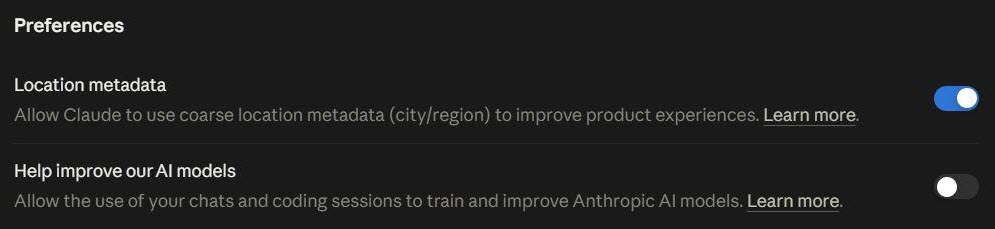
- Toggle off “Help improve our AI models”.
If you choose to opt out, ChatGPT and Claude will only retain your data for 30 days since it was first processed. This data will not be used for training. Instead, it will be used for abuse monitoring before being permanently deleted.
Both companies are also on record claiming that their models do not use enterprise data to train models without user consent.
Very recently, Anthropic also announced a solution they call the Enterprise Frontier Safeguards. This measure will blend state-of-the-art safeguards with zero data retention policies to stop misuse.
There is ample material on both Anthropic’s and OpenAI’s official sites that exhibits their commitment to user safety and privacy.
That does not mean you take their word as gospel. Recently, Anthropic disclosed a worrying incident wherein an early Claude model basically escaped its testing environment and accessed the open internet only to attack an external system.
In May of this year, agents being tested by OpenAI ended up launching a malicious cybersecurity attack on a software service called RubyGems.
These are not isolated incidents, and if you worry about AI tools being far too invasive, then your worries are warranted.
I would suggest not giving your personal data to these AI tools when working with them. This means no uploading of your personal pictures, home address, banking details, etc.
ChatGPT vs. Claude AI: How They Handle Memory
There is a fundamental difference in how ChatGPT and Claude handle their interactions with users over time.
While ChatGPT seems to remember your work across chats, Claude does so through isolated workspaces. ChatGPT is always running in the background, taking in every aspect of your interaction over time. On the other hand, Claude takes a more project-to-project approach to consuming information.
They both are also vastly different with regard to how they organize memory. Claude maintains a comprehensive wiki-like entry, whereas ChatGPT organizes memories categorically.
Claude is also known to update its memory immediately if it comes across information that contradicts the information it has in store. ChatGPT doesn’t do that. Instead, it relies on a system called “Dreaming”. It synthesizes your entire chat history and produces a memory summary only after it has established what’s true and what’s not.
Claude AI Vs. ChatGPT: Can You Use Both?
Yes, you can. In fact, that is what I would suggest you do. You’ll notice that one of these AI assistants can make up for what the other lacks.
Of course, this also means you’ll need to pay for two AI tools instead of one.
So, here’s what I would suggest. Let’s say you are a digital marketer. You can use ChatGPT for research, generating posts, and creating visuals.
Later, move on to Claude to create long-form blogs. Similarly, I would recommend that a developer use ChatGPT for research and documentation while using Claude for coding.
Frequently Asked Questions
1. Is Claude still better than ChatGPT?
Claude is better if you want an AI assistant that can code, write long-form content, and handle huge documents. ChatGPT would be better if you want to play with a broader ecosystem of tailored AI tools or wish to create stunning images from scratch.
2. Why is everyone leaving ChatGPT?
While ChatGPT’s user base is multiplying, it is also losing users at a rapid rate. You can attribute this to the ethical concerns some people have raised over OpenAI’s business dealings. Many people have voiced their disappointment in the company engaging with the US military or indulging in shady business dealings.
The rise of Claude and its commitment to user safety and privacy has also put ChatGPT in a tough spot.
3. Why is Claude being banned?
Claude hasn’t faced a blanket ban as I am writing this article, but it has come under fire from the US government recently. US Government restricted access to its advanced model, Fable 5, citing security concerns. It also flagged Claude as a major risk to the country’s supply chain after Anthropic refused to provide the US government with unrestricted access to its models.
4. What shouldn’t I share with ChatGPT and Claude?
I suggest you don’t share any of the following information to stay safe:
• Your financial details
• Private identity information
• Your login credentials
• Medical information
• Confidential work-related data
• Pictures of you and your family
5. What can get me banned from Claude and ChatGPT?
The following things can lead to an indefinite ban on your Claude or ChatGPT account:
• Making harmful or abusive requests or posting hate speech.
• Connecting the tools to unauthorized third-party apps and extensions.
• Using a VPN or proxy while using Claude and ChatGPT.
• Using fraudulent methods or incorrect billing information during payment.
• If the system finds out you are a minor.
• Using bots to run scripts or prompts.
Conclusion
Well, so there you have it: my arguments on which AI assistant is better. The answer is, of course, clear to me based on my own experiences and preferences. I would recommend Claude for coding, large document handling, and content creation.
As for when to use Claude vs. ChatGPT: I would favor ChatGPT for its image generation capabilities or if I only wanted to conduct research on certain topics.
Of course, these are my own opinions. I suggest you give both of these AI assistants a shot yourself and make up your own mind. You might end up disagreeing with me.
Research Process: The total time involved to complete and publish this article is approximately 36 hours. This content was created through a structured research approach to ensure accuracy and reliability.
For more-related guides, you can explore our range of tutorials below:
- ChatGOT AI Chatbot Review and Alternatives
- Chatbotapp AI Review: Is It A Legit Solution to Access 30+ AI Models
- Beautiful.AI Best AI Presentation Maker Review and Alternatives
- Top AI Agent Development Service Company
- Pippit AI Free AI Video Generator Review and Alternatives
- Akool AI Image to Video Generator Review and Alternatives
- Vozo AI Review: Pricing, Talking Photo & Test Results
- Krikey AI 3D Animation Maker Review and Alternatives
- Tested Clipfly AI Review: Is This Video Generator Worth?
Was this helpful?
Recommended Reading
-

Convert any image into an excellent AI-Powered video with talking avatars, face swaps, and perfect voiceovers with Akool AI. Read our honest Akool AI review to quickly unveil its powerful features: The AI video generation market has come a long way since making its presence felt just a few years…
-
Level up your programming game with the top-notch AI coding tools. Compare the prominent AI code generators to pick the right AI tool for coding to boost code quality: With the revolutionary change of artificial intelligence, the way software developers and engineers work has completely changed. Writing code, debugging, interacting…
-
Can you really access 30+ AI models on one platform? Read our in-depth Chatbotapp AI Review to discover if it is really legit & explore its features, pricing, and user reviews to make a smarter choice today: Getting access to over 30 AI models under a single interface was too…
-
A noteworthy ChatGOT review, along with the top ChatGOT Alternatives. Compare the features, performance & pricing of each tool to pick your ultimate AI-driven Chat Assistant: ChatGOT is perhaps one of the most sought-after platforms for people experimenting with different AI models. This SaaS platform serves as a central hub…