Cancel ChatGPT Plus Subscription in minutes with our step-by-step guide. Quickly learn how to cancel ChatGPT Plus subscription anytime on any device for a hassle-free experience and avoid unwanted renewals:
At just $20 a month, ChatGPT charges a subscription fee that I feel is competitive for the features you get. I also understand that many don’t feel the same way I do and would like to cancel their subscription as soon as possible.
Now, you could have many reasons to do so, all of them valid. Perhaps you aren’t satisfied with the way this AI assistant works. Maybe you want to jump ship to other platforms like Microsoft’s Copilot or Google’s Gemini.
Steps to Cancel Your ChatGPT Subscription: Quick Guide
Whatever your reasons may be, know that cancelling a ChatGPT subscription is straightforward.
Here is the video guide on how to cancel ChatGPT Plus Subscription on iPhone and Android:
In this article, I’ll show you how to cancel a ChatGPT Plus subscription while also sharing some tips for verifying your cancellation and avoiding any surprise charges along the way.
So, without much further ado, let’s dive in.
Things to Know Before Cancelling Your ChatGPT Subscription
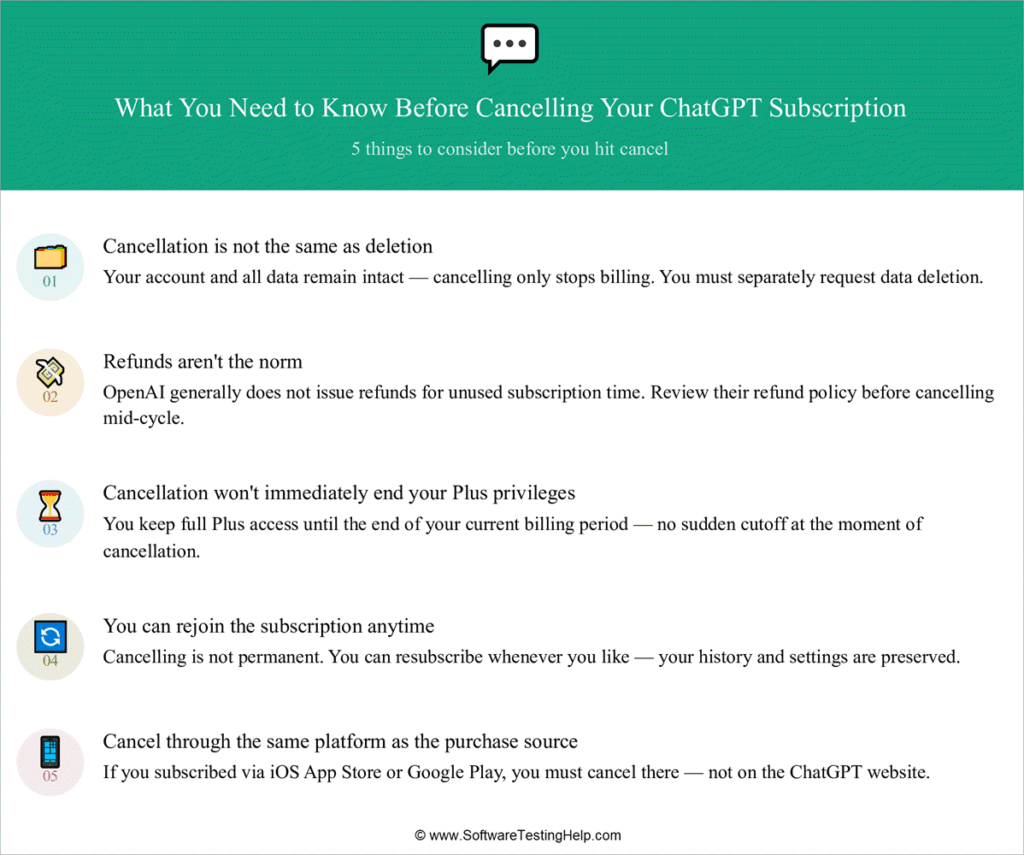
#1) Cancellation is Not Same as Deletion
When cancelling your account, you should know that this action won’t delete your existence on the platform. So, if your goal is to delete your account permanently, cancelling your subscription isn’t the way to achieve it.
ChatGPT gives you the option to delete an account. Doing so will result in all of your data being irreversibly erased from the platform. Deleting your ChatGPT account will not cancel your subscription.
#2) Refunds aren’t the Norm
It isn’t the policy of ChatGPT to refund its users for the unused subscription period. Even if you cancel a subscription, you’ll still be entitled to all the privileges of a Plus account until the subscription period expires. That said, you can still submit a request for a refund via OpenAI’s Help Center if you believe you are eligible for one.
Whether you get the refund will depend on OpenAI. It is also important to note that only users in the EU, UK, and Turkey can request a refund. So, tough luck if you are a ChatGPT user in the USA. I would recommend visiting the OpenAI official site to read the official ChatGPT Plus cancel subscription refund policy for yourself.
#3) Cancellation Won’t End Plus Privileges Immediately
You can cancel your ChatGPT subscription at any time. This means you can just end your subscription with many days left until it expires. The cancellation won’t terminate your access to the Plus plan immediately. You’ll still get to enjoy all of its features until your subscription period comes to a close.
#4) Rejoin Subscription Anytime
ChatGPT will welcome your patronage and money if you wish to rejoin the subscription after having canceled it previously. You can restart from where you left off anytime without any hassle.
#5) Cancel Through Same Platform as Purchase Source
ChatGPT makes it mandatory to cancel your subscription from the source where you made the original purchase. You must cancel your subscription on the ChatGPT official website if you created it there.
Similarly, if you purchased your subscription through the Google Play Store, then you’ll have to cancel your subscription through the Google Play Store. Make sure you are signed in with the same Google account you used to purchase the subscription in the first place.
ChatGPT Subscription Plans
I believe it makes sense to first know what the ChatGPT subscription plans would cost you before we learn how to unsubscribe.
ChatGPT is free to use, and free users get unrestricted access to the basic AI model. Introduced in early 2026, we now have ChatGPT Go, which costs $8/month.
ChatGPT Plus is the most popular plan, which costs $20/month. It grants you access to newer models like GPT 5.2 and GPT4o.
ChatGPT Group is the most expensive plan, costing around $200/month. Unlike the above plans, this one is more suited for researchers and developers instead of casual users.
Finally, we have ChatGPT Team, costing in the range of $25-$30/user/month. This one is perfect for organizations with remote teams.
A custom enterprise plan is also offered.
How to Cancel ChatGPT Plus Subscription
You can use ChatGPT on your desktop or your mobile phone. The device you use to access ChatGPT will influence how you cancel your subscription.
#1) On Web/Desktop
It is quite simple to undertake a ChatGPT Cancel Subscription process on your desktop’s web browser.
Perform the following actions:
1. Log in to your ChatGPT Account
2. Immediately navigate to the profile icon and click on it.
3. Access “Settings” > My Plan
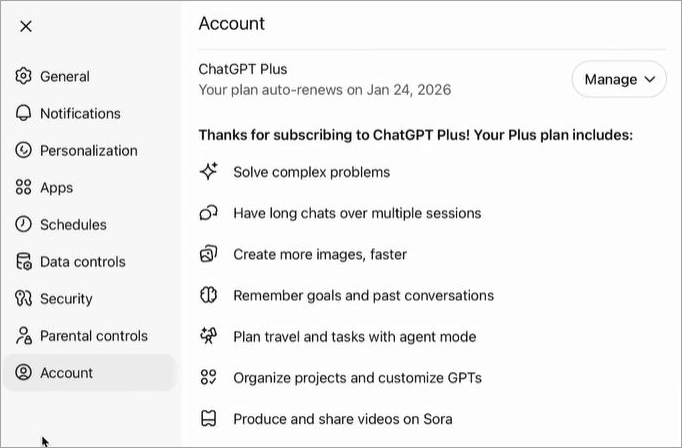
4. Click on Cancel Subscription
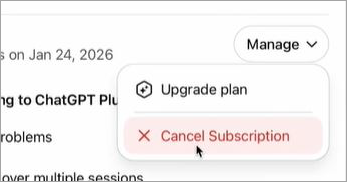
5. Hit “Confirm” to end your subscription.
#2) On Mobile
Cancelling your ChatGPT subscription is just as simple on your iOS and Android devices. The process itself will depend on whether you joined the subscription via the OpenAI website or directly from the mobile app.
Here’s how to cancel the ChatGPT Plus subscription of OpenAI on your iOS/Android devices:
i) On Android
1. Launch the Google Play Store on your phone.
2. Access the Google account connected to your ChatGPT account.
3. Tap the three dots displayed at the top of your Play Store app to open its menu.
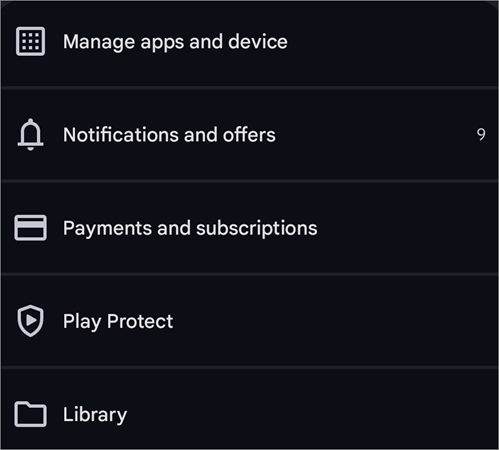
4. From the menu, select “Subscription” > ChatGPT.
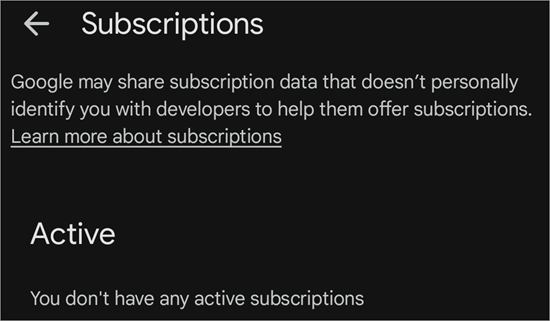
5. Tap on Cancel Subscription and simply adhere to the prompts appearing on your screen to confirm the cancellation.
ii) On iOS
1. Open Settings
2. Enter your Apple ID settings.
3. Select “Subscriptions”.
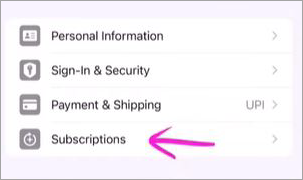
4. Select “ChatGPT” from the list of all subscriptions being displayed.
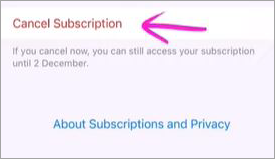
5. Tap on “Cancel Subscriptions” and hit “Confirm”.
iii) From Within the App (Android/iOS)
- Open the ChatGPT app on your phone
- Click on your profile icon
- Navigate to Account > Subscriptions
- Tap on Manage Subscription
- You’ll be redirected to your ChatGPT subscription on either the Play Store or Apple Store.
- Select Cancel Subscription.
Congratulations, you’ve successfully cancelled your subscription. Just a reminder that although you’ve cancelled the subscription, you can still use the service until your current billing cycle expires.
#3) If Using the Enterprise Subscription
The ChatGPT cancel subscription process is a little different if you are using a business subscription. That said, it is still very simple.
- Log in to your ChatGPT account.
- Click on your profile account
- Select your workspace settings.
- Click on the Billing tab, this will open a drop-down menu.
- Select Manage Plan from the menu
- Select Cancel Subscription.
Just like that, you’ve successfully cancelled your enterprise/business subscription.
The above methods work whether you are attempting a ChatGPT Pro Plan cancellation or a ChatGPT Team Plan cancellation.
How to Verify Your ChatGPT Cancellation
Don’t rest just yet. To make sure everything went as planned, I advise you to verify your cancellation. You don’t want to be surprised by another charge on your card from ChatGPT.
Here’s what you need to do:
- Log in to your ChatGPT account
- Go to Settings > Subscription > Manage
You’ll be able to review your subscription status on this page. Verify if the cancellation took place successfully before you log out.
What Happens After ChatGPT Cancellation
Your cancellation of ChatGPT isn’t immediate. If there’s still time left in your billing cycle, you’ll have access to your Plus subscription and all of its privileges. My advice would be to cancel your subscription at least a day before your billing cycle expires to avoid any unnecessary charges.
By cancelling the subscription, you are downgrading to the platform’s free plan. As such, you can still use ChatGPT for content generation without charge. You’ll also have complete access to all of your chat history on the platform.
It would be wise not to expect a refund, as OpenAI has a clear policy that refrains users from seeking compensation, especially if you are a user residing in the USA. The story is different if you happen to be a user in the EU, UK, or Turkey. Users from these regions can request a refund. However, getting one is highly unlikely.
Cancellation also doesn’t mean you are permanently barred from subscribing to ChatGPT Plus again. You can reactivate your subscription anytime without any issues whatsoever. Simply log into your ChatGPT account, hit the “Upgrade to Plus” button, and follow the instructions to restart your subscription.
What to Do If You Can’t Cancel ChatGPT’s Subscription
So, you tried to cancel your ChatGPT Plus subscription step-by-step but hit a wall while doing so. Don’t worry, this is a common problem that can be easily fixed using the methods I’ll explain.
#1) Cancel Subscription Button Can’t be Found
You might come across a rather bizarre situation where the “cancel subscription” option suddenly disappears. This could happen because of a glitch, login issues, or perhaps because you are trying to access your device on the phone while you had purchased the subscription through the web-based version of the platform.
First, check where you purchased the subscription: was it on the smartphone app or the browser-based version? Also, make sure you have entered the correct login credentials to access your account.
Finally, try to clear the cache in your browser or mobile app. You could also try switching to another device when accessing your account to resolve the issue once and for all.
#2) Tackling “Something Went Wrong” Error Message
This is yet another not-so-serious issue that you might encounter while trying to cancel the ChatGPT subscription. Instead of losing your cool, wait a bit and make another attempt after a while.
Also, make sure your browser is clean of cache and cookies. Logging into your ChatGPT account from an incognito window can also fix this issue.
#3) Encountering a Black Page
If the page goes blank whenever you try to access ChatGPT’s subscription window, the problem could be because of active pop-up blockers or some other issue with your browser. Turn off the Ad-blocker or pop-up blocker you are using on your phone or browser and try again.
Alternatively, try to switch to a different browser or device and see if that resolves the issues.
#4) Contact Support if Nothing Works
If the issue persists even after you’ve exhausted all the above-mentioned troubleshooting tips, it is time to contact OpenAI’s support.
The best way to reach out to support is via email. Write an email describing your issue, preferably with screenshots, to support@openai.com.
You could also try to seek help via social media or through community forums spread online. OpenAI also provides sufficient resources, such as tutorials, guides, and FAQs, which you can refer to by visiting the OpenAI Help Center. You’ll find tips there on how to fix the issue yourself.
Alternatives to OpenAI ChatGPT
When it comes to AI assistants, it is important to note that ChatGPT isn’t the only fish in the sea. If you wish to cancel ChatGPT’s subscription and switch to another platform, I believe the following options would serve you well:
- Microsoft CoPilot Plus
- Claude Plus
- Google Gemini
Detailed Review:
#1) Microsoft CoPilot Plus
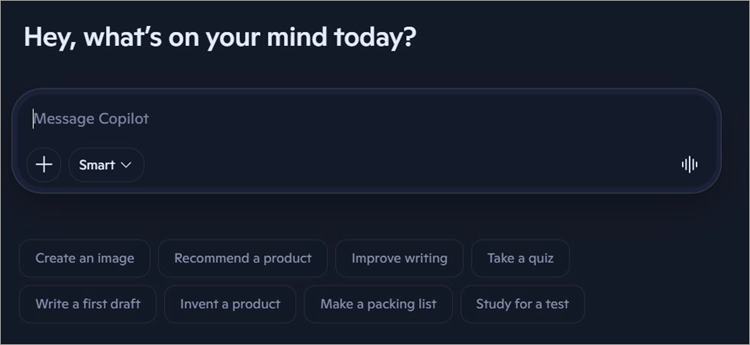
Launched in 2023, CoPilot Plus is a strong competitor to ChatGPT. It uses OpenAI GPT-4 and GPT-5 models to do its job.
You can use it in the same way you’ve been using ChatGPT to generate content and visuals via plain-language text prompts. With its Plus version, you get the ability to customize GPT’s, making it worth the price you pay.
Website: https://copilot.microsoft.com/
#2) Claude Plus

At $20/month, Claude Plus costs you the same as a subscription to ChatGPT Plus. However, both are quite different in some very important ways.
For instance, Claude Plus features better safety mechanisms and comes in handy for mathematical computations. That said, it supports fewer languages than ChatGPT.
Website: https://claude.ai/login
#3) Google Gemini
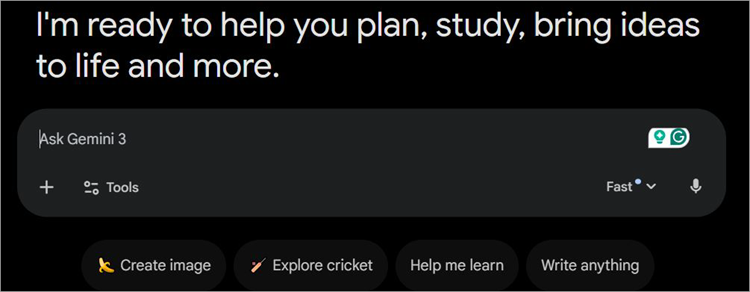
Google Gemini is another great AI assistant that is easy to get the hang of. While ChatGPT is good for content generation, Gemini’s strength lies in handling real-time, multi-modal tasks. It is a great platform for researchers and analysts. It also serves as a good companion tool to Google Workspace.
Website: https://gemini.google.com/
Check the video below to learn how to reactivate your ChatGPT account.
Frequently Asked Questions
1. Can I cancel my ChatGPT subscription anytime?
Yes, you can cancel your ChatGPT subscription anytime, regardless of whether you’ve reached the end of your billing cycle. The cancellation won’t be immediate, and you’ll access to the Plus-version privileges until your subscription period expires.
2. Will I lose everything if I cancel my ChatGPT subscription?
No, not at all. Cancelling your subscription isn’t the same as permanently deleting your account. Cancelling will result in your account being downgraded to the tool’s free version. You can still access your account with your entire chat history and data intact.
3. How do I cancel ChatGPT and get a refund?
ChatGPT subscription fee is generally unrefundable. However, if you are a user living in the EU, UK, or Turkey region, you can place a request for a refund via the OpenAI Help Centre.
4. Is it easy to cancel a ChatGPT subscription?
Yes, it is quick and simple to cancel a ChatGPT subscription. Depending on the device you are using the platform on, you’ll need to follow a simple step-by-step process. I’ve shared the process for various devices above. Follow them, and you’ll have no issues cancelling your ChatGPT subscription in no time.
5. Can you turn off auto-renewal on ChatGPT?
The only way to cancel auto-renewal on ChatGPT is to cancel your subscription. If you wish to cancel your subscription and reactivate sometime later, I suggest cancelling at least 24 hours before your current billing cycle ends.
Conclusion
ChatGPT is one of the best and undoubtedly the most popular AI assistants in the world today. That said, it will not be everybody’s cup of tea. If you wish to hop off the OpenAI train for whatever reason, know that it is very simple to cancel your Plus subscription. Adhering to the instructions above will allow you to leave the Plus version smoothly.
You can always use ChatGPT for free to get content or an image generated. Plus, you can reactivate your subscription anytime. Just make sure you cancel the subscription at least a day before your current billing cycle ends. This way, you’ll avoid charges due to auto-renewal and save yourself money that is now better spent elsewhere.
Research Process: The total time involved to complete and publish this article is approximately 41 hours. This content was created through a structured research approach to ensure accuracy and reliability.
For more related guides, you can check our range of tutorials below:
- How to Access ChatGPT in Hong Kong (Complete Guide)
- ChatGOT AI Chatbot Review and Alternatives
- The Top 10 Artificial Intelligence Software
- Top 7 Best Generative AI (GenAI) Security Solutions & Platforms
- Best AI Coding Tools for Developers (AI-Powered Code Generators)
Was this helpful?
Recommended Reading
-

Have you started using AI Agents for Software Testing? Our step-by-step guide unveils how utility, learning, and goal-based Agents transform QA processes to reduce bugs and deliver flawless software like never before: The increasing usage of AI in every field is making development faster than ever before. This includes automating…
-
A noteworthy ChatGOT review, along with the top ChatGOT Alternatives. Compare the features, performance & pricing of each tool to pick your ultimate AI-driven Chat Assistant: ChatGOT is perhaps one of the most sought-after platforms for people experimenting with different AI models. This SaaS platform serves as a central hub…
-
Is Nomi AI Companion really safe to use? Our in-depth Nomi AI review reveals its interface, features, pros & cons, along with the top Nomi AI alternatives to help you make an informed decision. While most AI companions are built to offer meaningful conversations, they do not offer realistic experiences.…
-
Select the best AI Voice Generator from the list of many computer voice generators available in the market today for amazing results: Voice cloning technology has been around for a while now and has undergone several impressive changes since its initial years. It was once a tool used vehemently for…