Did Someone Block You on iMessage? Read our step-by-step guide to understand hidden signs to know if someone blocked you on iMessage.
When your iMessage stops showing “Delivered” and changes its color, you might wonder—did they block you?
Actually, while Apple will not give you any notification about being blocked, there are 7 clear signs for you to understand that you’ve been blocked on iMessage.
In this guide, you’ll learn exactly how to confirm if someone blocked you on iMessage, including message behavior, call results, and common false alarms.
Follow our 2026 step-by-step guide to confirm if someone blocked you on iMessage
How to Tell if Someone Blocked Your Number on iPhone iMessage
You can even block messages from all unknown numbers on your iPhone by following these steps: Open the Messages app, tap on the Menu icon (with 3 lines), select Manage Filtering, then turn on Screen Unknown Senders. (These steps are for iOS 26. For iOS 18 and previous versions, find the steps here.)
The other person does not get notified when he is blocked. It’s just that his message does not get a ‘Delivered’ notification when he is blocked.
Go through this article to learn how to know if someone blocked you on iMessage, and what to do when you are blocked, but you need to contact them urgently.
How to Know if Someone Blocked You on iMessage: The most reliable sign you are blocked on iMessage is if your message never shows a “Delivered” status and remains a blue bubble. However, this can also happen if the recipient’s phone is off. To confirm, try placing a FaceTime call; if it ends immediately after half a ring, you are likely blocked.
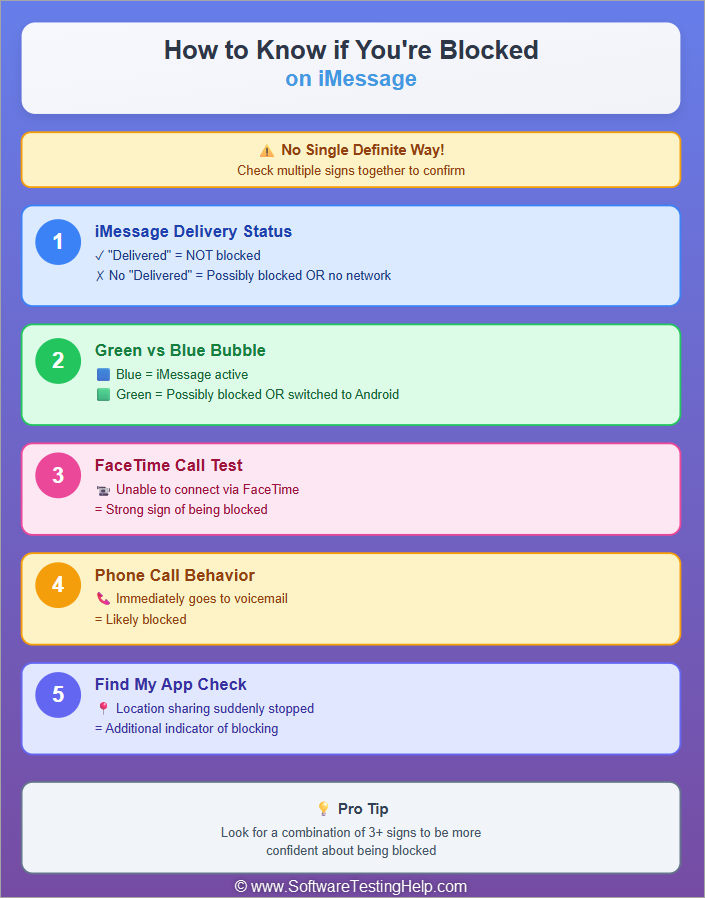
Quick Summary of how to find if someone blocked you on iMessage
Here is the video guide on how to know if someone blocked you on iMessage
How to Know if Someone Blocked You on iMessage (6 Signs You’ve Been Blocked )
If one of your contacts blocks you on iMessage, you will see these signs:
#1) iMessage Delivery Status
When someone blocks you on iMessage, you won’t get the ‘Delivered’ or ‘Read’ delivery status under your text message.
The image below depicts how iMessage appears:
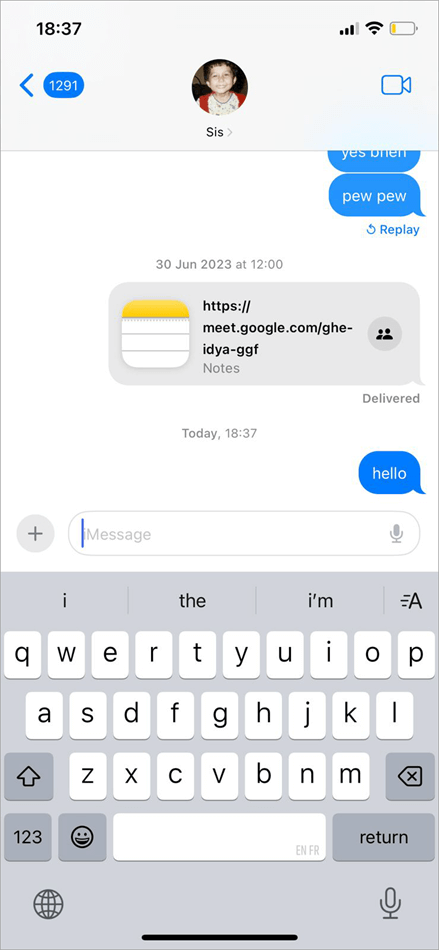
But, not getting a Delivered status does not 100% guarantee that you are blocked. The other person might be in a place without internet or a network connection, or they may have turned off their phone, preventing them from receiving texts or calls.
If the person is not replying to your texts, but you see a ‘Delivered’ status under the text you sent them, then it is 100% sure that they have not blocked you. They would be busy with some other stuff.
#2) Green vs Blue Bubbles
If you are sending an iMessage to a contact who is an iPhone user, and instead of blue bubbles, you see your text in green bubbles, then chances are that they may have blocked you on iMessage.
Green Bubbles and Blue Bubbles in iMessages are shown below:
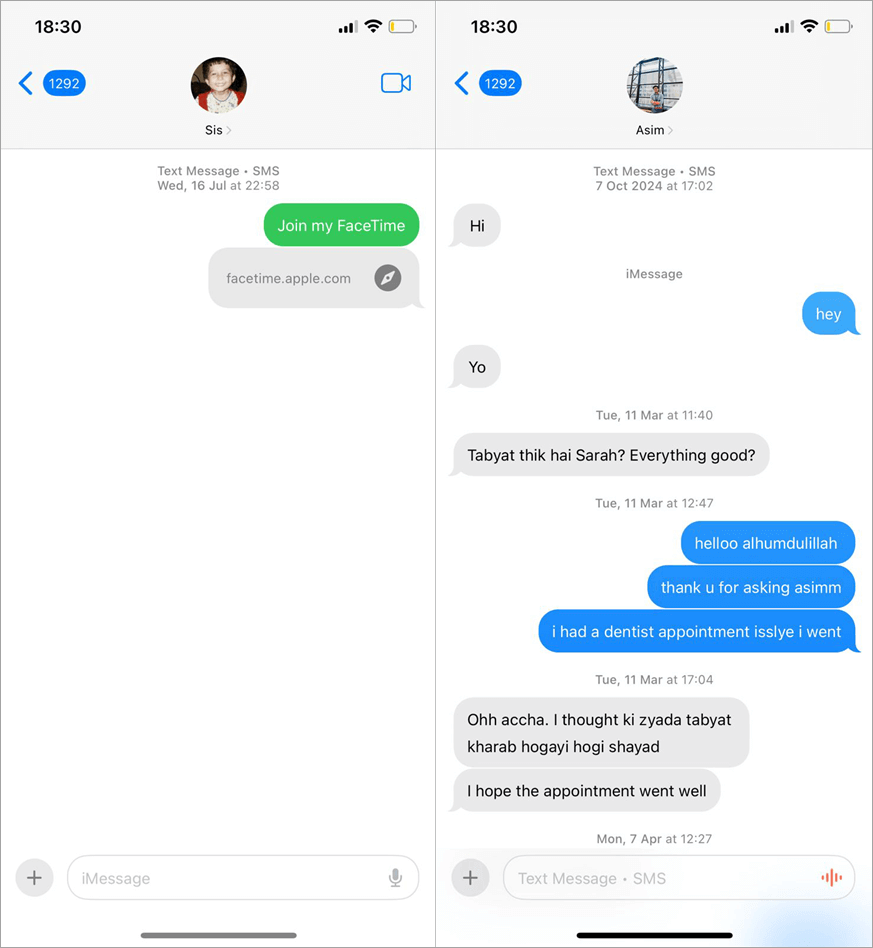
But again, it does not 100% mean that they have blocked you on iMessage. This can also happen if that contact has switched to a non-Apple phone.
#3) FaceTime Blocked
When someone blocks you on iMessage, you won’t be able to make a FaceTime call to them either.
So when you FaceTime them and you see an error message stating that the recipient does not accept your invitation, then most probably you are blocked. Check our detailed guide on how to mute someone on FaceTime on iPhone or iPad.
#4) Try Contacting them via Facebook, WhatsApp, etc.
If a person has blocked you on iMessage, chances are that they have blocked you on other platforms as well. If you cannot find their profile on the social media platforms, then they have blocked you everywhere.
#5) Try Calling that Person
First, if you feel like someone has blocked you, it is better to give them some space and wait until they unblock you. But if it’s really important, then try calling them.
If they have blocked your number, then after a tiny ring, your call will be forwarded to voicemail every time you call.
#6) Try sending an iMessage from another iPhone: If your iMessages don’t get delivered to the contact you want to talk to, but a text message from another number gets delivered, then yes, it’s evident that your number is being blocked.
#7) When Someone Blocks you on iPhone, location sharing automatically stops: This can be a major sign of being blocked.
If someone has shared their location with you or you have shared your location with someone through the FindMy app, then it will get stopped on its own if you are blocked. Many times, people block and unblock people to stop sharing their location.
You will have to go to the app where you were sharing the location and check if it’s updated or not.
False Signs That Look Like Blocking
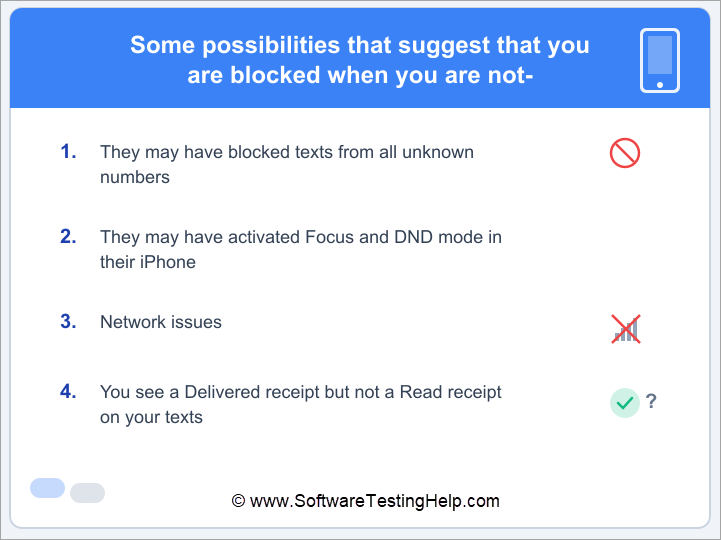
#1) Texts Blocked From all Unknown Numbers
iPhones allow their users to block text messages from all unknown numbers or from a specific person.
So if they have blocked texts from all unknown numbers and they don’t have your number saved in their phone, then also, your messages won’t get delivered to them.
#2) Activating Focus and DND Mode on iPhone
Using Focus and Do Not Disturb mode, iPhone users can silence notifications for incoming calls and messages, either for a specific contact or for everyone.
So, if that person is not responding, they might have just silenced notifications. In that case, you will see a moon-shaped icon next to their name (if they choose to share their Focus status) that lets you know that they have activated Focus and DND on their iPhone.
iPhone users often misunderstand the crescent moon icon to be a sign of being blocked, which is not the case.
Or, they can choose not to let others know they are using the iPhone in silent mode. That way, you won’t know they have activated the DND mode. There will be no crescent moon icon next to their name, and the messages will get delivered.
#3) Network Issues
Since iMessage requires an internet connection to work, if either the sender or receiver does not have a good internet connection, the messages will not get delivered until both of them connect to the internet.
#4) You see a Delivered receipt but not a Read receipt on your texts: If this happens, then know that you are not blocked; they may have switched off read receipts for everyone, or for select contacts.
Can a person who has blocked you still send you a message?
The person who has blocked you can send a message to you, and you may see the typing bubble.
Call Behavior If Someone Blocked You on iPhone
Whereas iMessage is a digital form of communication, your phone calls will be the clearest evidence that you have been blocked. In case you are blocked, your calls will be diverted through your carrier before the recipient gets a chance to receive the call on their phone.
The “Single Ring” and Voicemail Divert – The most widely used indication of a block occurs when you receive only one ring (at times, a half-ring) before being redirected to their voicemail box.
Goes Directly to Voicemail – If your call goes straight to voicemail without ringing, it doesn’t always mean you’re blocked—it can also happen with Do Not Disturb or Silence Unknown Callers.
Quick check:
- Call again within 3 minutes → if it rings, it’s likely a Focus mode
- Multiple calls over 1–2 days always go to voicemail → high chance you’re blocked
How to Confirm If Someone Blocked You (Step-by-Step)
If you’ve noticed any of the above signs, use these four methods in sequence to confirm your blocked status.
Method 1 – The iMessage “Delivered” Test
This is the baseline check using iMessage:
- Open the chat and send a simple message (e.g., “Hi” or an emoji).
- Check the status under the bubble.
Result: If “Delivered” or “Read” never appears after 24 hours → possible block
But note: If the message turns green, it may just mean the phone is off or has no internet—not necessarily a block.
Method 2 – Call and Check Ring Behavior
Place a standard voice call to the contact.
Count the rings: * One ring then voicemail: High probability of a block.
- Multiple rings then voicemail: You are not blocked; they are simply not answering.
- Straight to voicemail: Likely “Do Not Disturb” or a dead battery.
The “Hide ID” Trick: Go to Settings > Phone > Show My Caller ID and toggle it OFF. Try calling again. If it rings normally now, your specific number is definitely blocked.
Method 3 – The Cross-Device Sync Check
iMessage is an ecosystem. Sometimes a local device glitch makes it look like you are blocked when you aren’t.
- Open iMessage on a Mac or iPad signed into the same Apple ID.
- Send a message to the contact from that secondary device.
- Check for sync: If the Mac says “Delivered” but your iPhone does not, your iPhone is experiencing a sync error. If none of your Apple devices show a “Delivered” status, the block is likely tied to your Apple ID/Number.
Method 4 – The “Timing & Focus” Method
Apple’s Focus Mode (formerly Do Not Disturb) is the #1 cause of “False Block” reports. This method helps you rule it out.
- Check the Chat Window: Look for a small banner at the bottom of the thread that says “[Contact] has notifications silenced.” If you see this, you are not blocked.
- The 24-Hour Rule: Wait exactly 24 hours and send a follow-up. Most people disable Focus Modes or recharge dead phones within a day.
- Observe the Bubble Color: If the bubble was Green yesterday but is Blue today (even without a “Delivered” status), the contact’s phone is active, and they are likely just ignoring the message or have blocked you recently.
What to Do If You’re Blocked but Need to Contact Someone Urgently
Contact them if they blocked you by accident or if a child did it.
- If the person has blocked you from calling and texting, then try calling them on social media platforms like Facebook and Instagram.
- If you are blocked from the social media platforms as well, then you can try emailing instead.
- You can try adding *67 before the phone number while calling. This hides your identity. So if you are blocked, you would most probably be able to call them by adding *67. But it does not work many times when your number is specifically blocked. If they have blocked all unknown callers, then your call will be moved to voicemail instead.
- For urgent communication in an emergency, you can call from another number.
- If the person has put their phone on silent, using Focus and Do Not Disturb mode, and they have not allowed your contact to bypass DND, then there is no way to ring their phone. You can try calling their family members, close friends, etc., or try meeting them personally.
Points to be remembered-
iOS Version Differences
Different iOS models have slightly different features or methods of doing a task, for example,
To block text messages from unknown numbers on iOS 26, do as stated under:
- Go to the Messages app
- Tap the 3-line menu icon located in the top right corner of your screen
- Select Manage Filtering
- Now turn on Screen Unknown Senders.
Here are the steps to filter texts from unknown numbers on iOS 18 and earlier:
- Go to Settings
- Select Apps
- Choose Messages
- Select Message Filtering
- Turn on Filter Unknown Senders
- iOS 26 (the latest version) collects a caller’s information before you decide to pick up or decline a call, or choose to ask for more information.
- In iOS 26, you can personalize the backgrounds of specific conversations in the Messages app.
- In iOS 26, the system automatically filters messages from unknown numbers into a separate folder, allowing you to review and approve them.
SMS Vs iMessage
Here are the basic differences between SMS and iMessage:
- The text messages you send through the Message app on your iPhone are sent either as an iMessage or an SMS/MMS.
- Have a look at this comparison table to learn about the difference between the two of them
| Basis | iMessage | SMS/MMS |
| Security | Provides end-to-end encryption, this ensuring that the third-party apps can not read your iMessages | No end-to-end encryption. Third-party apps can access your SMS/MMS. |
| Allows Communication with | iOS users only | iOS and non-Apple users |
| Requirements | Requires an Internet connection | Requires a network service plan for messaging |
| How to identify an iMessage and an SMS/MMS | Shown as blue bubbles in the chats | Shown as green bubbles in the chats |
| Allows you to send | Texts, photos, videos, documents, links, Tapbacks, text effects, Live Stickers, message effects, and more | Texts, photos, videos, links, and more. |
Frequently Asked Questions
1. Will iMessage still deliver if blocked?
No, if you are blocked by the other person on iMessage, then your sent messages won’t get delivered to them. You can try calling them instead. If you are blocked from calling, then their phone won’t ring when you call, but they will see a missed call from you in their recent calls list.
2. What does a blocked person see on iMessage?
A blocked person never gets a notification about being blocked on iMessage. It’s just that he won’t get a ‘Delivered’ status on his texts. And he won’t be able to make calls or FaceTime with that person. His calls will automatically be moved to voicemail.
3. How to unblock yourself if someone has blocked you?
You can not unblock yourself on your own if someone blocks you from calling or texting them. You can only wait until they decide to finally unblock you.
4. How can I communicate with someone who has blocked me?
If someone has blocked you but you need to communicate with them urgently, then you can try these methods:
• Try inserting *67 before their number while calling. This hides your caller ID, and you may contact them.
• Try contacting them through social media platforms like WhatsApp, Facebook, etc.
• You can try calling them from another number if they have accidentally blocked your number.
5. Is it bad to reach out to someone who blocked you?
If someone has blocked you, then you must refrain from calling them from other numbers in order to respect their privacy. Plus, unnecessarily bothering someone again and again, when they have blocked you, is harassment and can also lead to legal consequences.
6. Can you see if a blocked number has tried to text you?
No, if you have blocked someone, then their texts won’t get received in your phone. But you will still be able to see their missed call in the Recent call logs and their voicemail in the Spam folder.
Conclusion
There are several factors that suggest that the other person may have blocked your number. But none of them 100% guarantee that you are blocked, other than when you can’t call or text them from your number, but other people can call and text them.
Getting blocked by someone accidentally can be quite troublesome at times. Plus, they are elderly, and it is crucial to speak to them soon. However, if you’re blocked, it’s best to wait for them to unblock you before resolving problems.
Research Process: The total time involved to complete and publish this article is approximately 35 hours. This content was created through a structured research approach to ensure accuracy and reliability.
For more quick Blocker-related guides, you can explore our range of tutorials below:
- How to Know if Someone Blocked You on Snapchat
- How to See Who Blocked You On Instagram
- How to Block Apps Permanently on Android and iOS
- No Caller ID Number Calls: How to Find Out Who Called?
- How to Create and Send a Poll in iMessage on iPhone and iPad
- [Quick Ways] Find Out Who Called Me From This Phone Number
Was this helpful?
Recommended Reading
-

Are you receiving no caller ID calls? Want to know how to find out who called? Read this tutorial to see what does no caller ID mean and how to find out a no caller ID: It is rare to find someone who enjoys answering their phone when an unknown…
-

Looking for a solution to block unwanted and fraudulent calls? Review this list of the best Spam Call Blocker for Android to block spam calls: Spam call is defined as an unwanted call or communication that occurs without any prior request and sometimes poses a threat to the person to…
-
Are you worried about blocking spam messages on your Android phone? This tutorial explains methods for How to Block Text Messages: SMS is hardly ever used anymore for communication. Traditional text messages have been surpassed by instant messaging apps. SMS is still useful for receiving alerts and information, though. When…
-
Do you know how to see who blocked you on Instagram? Explore the proven tips & techniques in this simple guide to check out if someone blocked you on Instagram: Let’s say you have a friend on Instagram, and you engage with them almost every day in some form or…