Learn how to identify fake AirPods and prevent yourself from scams through the use of tips on how to distinguish real from fake AirPods.
Counterfeit AirPods have gotten very hard to distinguish. Counterfeiters have resorted to replicating serial numbers, pairing animations, and even making fakes look like the real deal. This means that traditional ways of identifying AirPods won’t work anymore.
This guide will show you how to identify if AirPods are fake using expert detection techniques, signs of scams, iPhone detection tips, and AirPods Max detection tricks.
How do I tell if my AirPods are fake instantly?
Detecting fake AirPods or AirPods Max can be done through identifying the materials used for construction and integration into software. Genuine AirPods Max are built using cold-anodized aluminum ear cups, while counterfeit AirPods have plastic ear cups coated with metallic paint (sometimes with glued weights inside to create a sense of weight).
For regular AirPods, you should go to Settings > General > About. If there is no dedicated menu for your AirPods under your storage option, then it is a fake one.
Difference between Fake Vs Real Airpods with Expert tips
Simply walk to a nearby electronics store or have the earbuds delivered straight to your home from sites like Amazon. I would advise caution when purchasing AirPods online, though, as the internet is littered with endless listings of the product’s counterfeit versions.
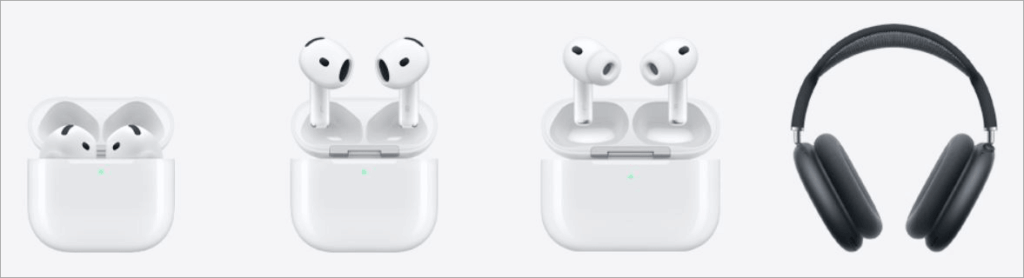
[Via Apple]
AirPods aren’t exactly cheap. So, the last thing you want is to get duped into buying a cheap knock-off. This is where I believe my expertise is very much needed, and one that I am happy to share here, regardless of whether you asked for it.
Check the video tutorial below to analyse the comparison of AirPods:
I’ll share some really helpful tips on how to tell if AirPods are fake.
So, without much further ado, let’s dive in.
How to Tell If Your AirPods Are Fake
This section includes the various checks to tell you if your AirPods are Fake or not.
#1) Initial Checks
Here are some quick checks that’ll probably let you spot a fake AirPod without close inspection or deliberation.
i) A Suspiciously Cheap Price Tag
As I previously mentioned, AirPods carry a significant price tag. The base variant itself can set you back by $125. Its most expensive model (AirPods Max) is priced at $549. There is a reason people treat these tiny earbuds like their prized possessions.
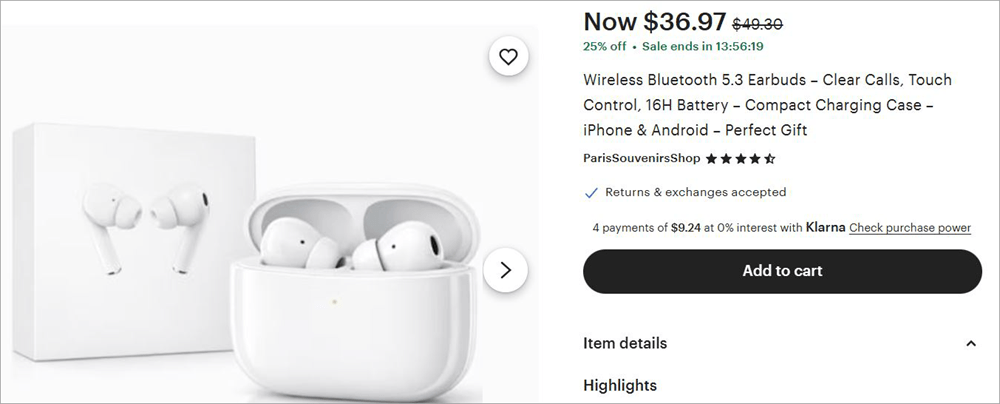
Fake products are being sold on Etsy.
So, if you come across an AirPod listing online with a price tag that’s anything less than the official amount, know that you are probably staring at a fake product. A cheap price tag is how fraudsters have lured their victims since the dawn of time, and that practice still holds in the case of fake AirPods today.
I would suggest reviewing the actual prices of each AirPod model on the official website first. Do not get tempted by the sight of low prices.
ii) Check the Reviews
If you find an AirPod on Amazon or eBay, don’t just click on the “buy now” button; check the rating instead. You know what? Don’t just check the ratings, scroll down to the bottom of the page and read a few reviews. Some of those past customers will disclose whether the product is fake.
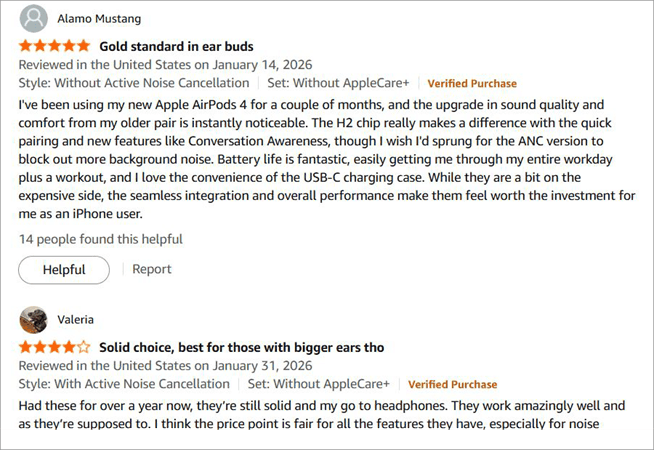
This way, you are essentially learning from others’ mistakes. Now, there is also a good chance that the reviews themselves are fake. There’ll be a pattern in the reviews, if you have a sharp eye for such things, that might help you spot the fake reviews from those that are authentic.
#2) Deeper Checks
The tips I am about to share with you below require a little more of your time and effort. That said, they are effective measures nonetheless.
i) Check Serial Number
Serial numbers are your product’s unique identity. Each product is bequeathed with this number before it is put out for sale. Your AirPod also have a serial number, and you’ll use it to find out whether it is fake.
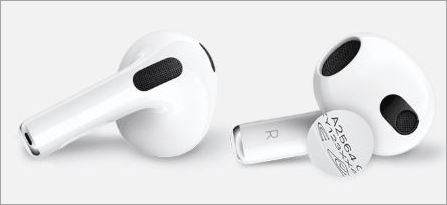
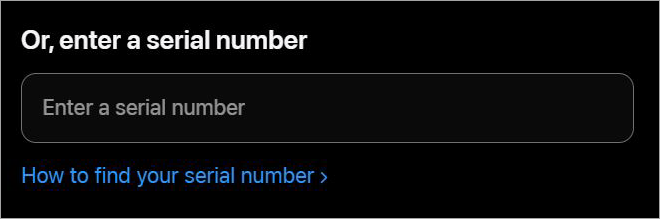
The serial number can be found on the box, on the underside of the case lid, and in the Bluetooth settings of your phone once the AirPods are paired. You’ll need to note this serial number down and enter it on https://checkcoverage.apple.com. If your serial number isn’t found on this site, it is 100% fake.
ii) Spec Mismatch
The fraudster lists fake AirPods online and makes a few mistakes. Therefore, I suggest you always refer to the product specs that are mentioned right below the listing on online stores. Make sure these specs match the specs mentioned on the official site for the specific model you seek.
For instance, let’s say you wish to buy AirPods Max. AirPods Max have some distinct features. If you see a random feature being mentioned on the site you wish to buy the product from, a feature that AirPods Max is known not to offer, know that the product is fake.
#3) Physical Checks
Until now, I’ve discussed how you can tell whether AirPods are fake when buying them online. Now, I want to divert my attention to situations where you wish to buy the product from a nearby store or buy second-hand AirPods.
You are obviously at an advantage when buying products from a physical store instead of an online one. You get to inspect the product closely before spending any money on it.
So, do not waste this privilege and simply follow the tips I am sharing below to stay vigilant during your purchase.
i) Check the Package
The package your AirPods come in can give you some telltale signs. So, how to tell if AirPods are fake by the box? Check this box very closely, especially the side where you’ll find the specs, compatibility, and UPC information.
For starters, Apple uses multiple stickers on the back of its packaging. If you have a package with only one sticker, that should ring an alarm bell.
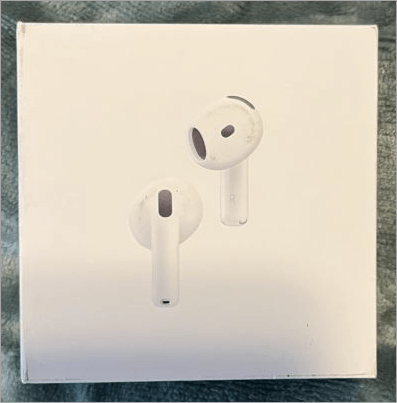
Additionally, be mindful of any punctuation or spelling mistakes. Fraudsters may be great at mimicking a product’s physique, but they are seldom good at imitating basic English grammar. Do not ignore the logo as well. An Apple logo always features a perfect semicircle. See if the logo feels off in any way.
Finally, open the package and check if it has a manual, a safety sheet, and a warranty card. If any of these items are missing, the product in front of you is fake.
ii) Check the Case
Discerning eyes will quickly spot any kind of manufacturing defect just by looking at the charging case. AirPods are known for their top-quality. They should be impervious to all types of defects. So, if you see scuffs, dents, seams, or loose hinges on an AirPods charging case, steer clear of them.
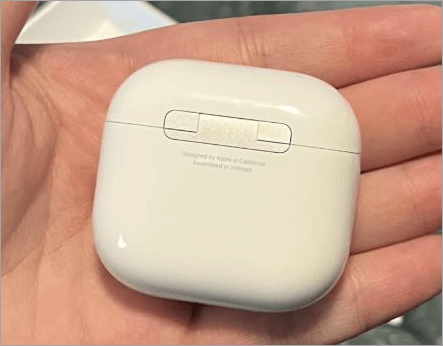
Also, check your case’s LED light. It should be green (when fully charged), flashing white (when pairing), and amber light when being charged. If you see the light in any other color, the product is fake.
iii) Check the Actual EarBuds
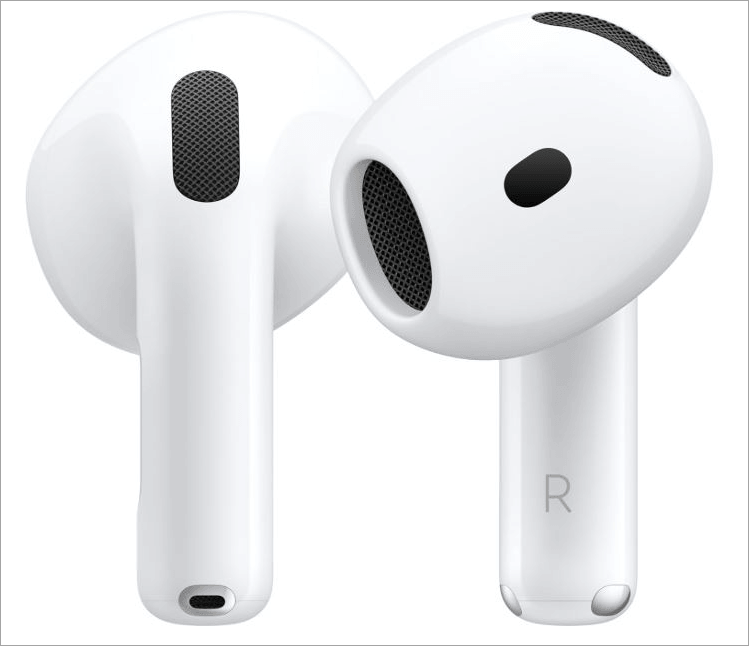
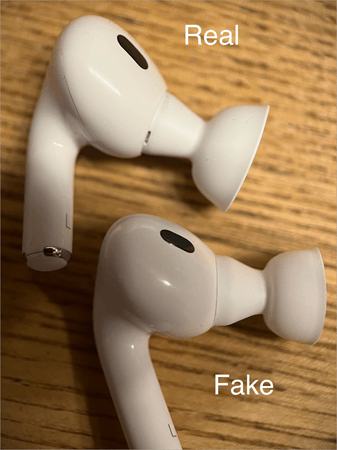
After closely inspecting the case, pull the EarBuds out for a quick check. Check how it feels in your hands. Look for loose grilles and any issues with the product’s shape. Look for signs of seams. Hold the product in your hand and compare it with the image of the same product on the official site. It should look the same in shape and size.
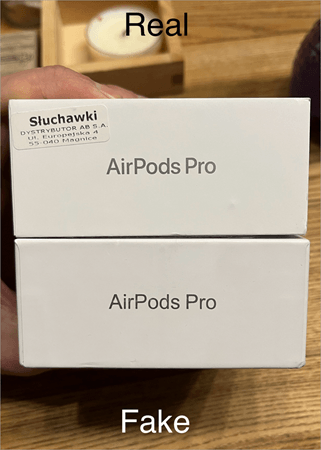
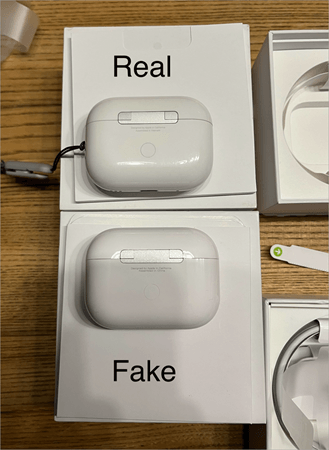
Below are a series of images that depict the subtle but obvious differences between real and fake AirPods Pro2 Gen. Perhaps these pictures can tell you what to look out for when inspecting your AirPods closely.
#4) iOS Connection and Software Tests
Perhaps the best way to tell if AirPods are fake or not is to actually use them. Most authentic and authorized retailers will give you a full demo of the device.
Here’s how you make the best use of that test:
i) Connect the AirPods to your iOS device.
AirPods were tailor-made for iPhones and other Apple devices. Once you pair the AirPods with your phone via Bluetooth, you’ll be greeted with an animation on your screen every time you pop up the AirPods case lid. You’ll see battery indicators depicting the power status of your AirPods and the case.
If this animation doesn’t appear anytime you open the AirPods case near your iPhone, it means the earbuds are probably fake.
With the latest update of iOS 16, iPhone users will also receive an alert that looks something like this:
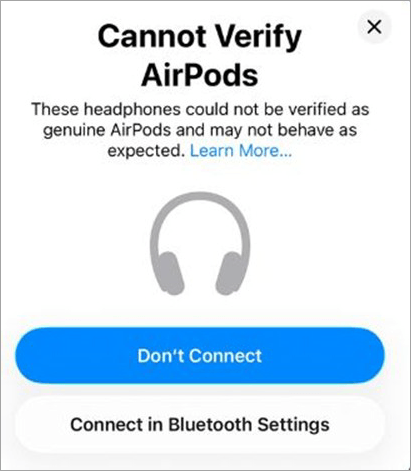
If you try to connect an AirPod to your iPhone and receive a message that says “cannot verify AirPods”, know that those earbuds may not be genuine.
ii) FindMyApp
All genuine AirPods can be tracked via the FindMy app on your iPhone. Once the AirPods are paired with your phone, I suggest casually checking whether your particular AirPods show up on the FindMy app. If it is absent from the app, you should get worried.
Check the video below to know how to find your lost AirPods:
iii) Test Out the Features
Apple AirPods are known for their remarkable sound quality, taken to the next level with deep bass and clear mids. Of course, the first thing you need to do is check whether you’re getting the sound quality I just described. For an effective test, I suggest listening to lo-fi synthwave music. That always works for me when testing earbuds.
After the sound check, move on to test and inspect the features unique to the model you wish to purchase. Let’s say you want to buy AirPods Max. So, how to tell if AirPods Max are fake? Well, AirPods Max offers features like personalized spatial audio, adaptive EQ, and active noise cancellation.
In fact, active noise cancellation is a prominent feature in AirPods Pro 3, AirPods 4, and AirPods Max. These earbuds are great at canceling out background noise. Adaptive Echo is yet another feature that’s common in all AirPods models, adjusting noise in real-time in accordance with the listener’s ear shape.
So, if you want to know how to tell if AirPods Pro 3 or AirPods Max is fake, check if the device you’ve just bought can cancel background noise. Check whether you are getting personalised spatial audio or other audio features that AirPods are known for.
If any of these features are missing from the AirPods you just tested, it would be wise to look elsewhere for a genuine product.
iv) Battery life
AirPods come with decent battery life. Your AirPods Pro 3 can last 8 hours on a single charge, whereas AirPods 4 guarantee 5 hours of listening with one charge. On the other hand, AirPods Max can last a whopping 20 hours with one charge.
Fake AirPods will always struggle to match their genuine counterparts in terms of quality. This fact becomes crystal clear when you look at an AirPod’s battery life.
So, go to the official website and check what the battery life of your AirPods model is. Then, use your fully charged device until it is completely drained of energy. If your AirPods don’t last as long as Apple’s official website claims they should, what you have is probably a fake.
v) Check the Firmware
Firmware refers to a unique number assigned to each AirPods model by Apple. These numbers seldom change. As such, verifying your AirPods firmware could be yet another effective way to confirm their authenticity.
Checking an AirPods firmware is simple, just do the following:
- On your iPhone, go to Settings.
- Select Bluetooth
- Tap on the info button right next to your AirPods.
- The firmware will be the number depicted next to “Version”.
According to Apple’s official website, the current firmware versions for AirPods are as follows:
- AirPods Pro 3: 8B34
- AirPods Pro 2 with MagSafe Charging Case (USB-C): 8B28
- AirPods Pro 2 with MagSafe Charging Case (Lightning): 8B28
- AirPods Pro 1: 6F21
- AirPods 4: 8B21
- AirPods 4 with Active Noise Cancellation: 8B21
- AirPods 3: 6F21
- AirPods 2: 6F21
- AirPods 1: 6.8.8
- AirPods(USB-C) : 7E108
- AirPods Max (Lightning) 6F25
Comparison between Fake Vs Real Airpods
While comparing fake airpods with the genuine ones, the major points of difference are the quality of internal audio technology used, materials used for components, and microchip implementation.
The below comparison will help you differentiate between fake and real Airpods .
| Performance Vector | Genuine Apple AirPods / AirPods Max | Counterfeit Clones (Super-Clones) | Diagnostic Tell (How to Verify) |
| Housing Materials | The real AirPods use high-quality polycarbonate, while the AirPods Max have acoustic-neutral anodized aluminum. | Fake AirPods use cheap injection-molded ABS plastic covered with metallic paint. | Tap the ear cups with a coin. If it is made of aluminum, it will make a cold sound. |
| Internal Processing Chip | Custom H1 or H2 Silicon chips designed by Apple. | Subpar or generic third-party chips (Bluetrum or Jerry chipsets). | Check if there is automatic audio switching between Apple iCloud devices. Counterfeits will need to be paired manually. |
| ANC Performance | Advanced hybrid Active Noise Cancellation up to 35dB–45dB attenuation. | Weak or entirely simulated/software-faked noise attenuation (often under 5dB). | Turn ANC on without music. Fakes produce a distinct white noise “hiss” without lowering background room ambiance. |
| Acoustic Driver Build | State-of-the-art hybrid Active Noise Cancellation with 35dB-45dB noise cancellation. | Low or simulated software noise cancellation (<5dB). | Turn ANC on without playing any music. Fakes will emit white noise “hiss” without reducing ambient room noise. |
| Charging Port Assembly | Perfectly flush metal lining CNC machined with an internal mesh filter. | Randomly placed metallic foil stickers or plastic mock inserts. | Swipe your fingernail along the edge of the charging port. Genuine units are perfectly smooth; fakes will have a clearly defined lip. |
| Sensor Architecture | Instantaneous auto-pause function thanks to infrared skin detection sensors. | Absence of sensors or basic optical light sensors that rely on timer algorithms. | Shield the sensor with a piece of dark paper. Genuine AirPods will not resume playing until they detect genuine skin contact. |
Where People Commonly Buy Fake AirPods
Fake AirPods are currently being sold on many online and offline platforms, and several fake versions appear almost exactly the same as real Apple products. Fraudsters tend to use cheap pricing, fake purchase receipts, sealed boxes, and duplicate serial numbers as some of the ways to convince the consumer that the earphones are real.
Facebook Marketplace Risks : Facebook Marketplace is among the most popular platforms for selling fake AirPods.
eBay & Craigslist Risks: Many eBay and Craigslist ads offer refurbished, replica, or fake AirPods in disguise as authentic products.
Unauthorized Electronics Dealers : Small electronics stores and third-party dealers may either accidentally or deliberately sell counterfeit AirPods Pro and AirPods Max.
Social Media Seller Scams: Fake AirPods are advertised extensively on sites such as:
Instagram
TikTok
Telegram
WhatsApp
What to Do If You’ve Bought Fake AirPods
If you find yourself with fake AirPods, I would suggest you immediately take action instead of sulking over what has already transpired.
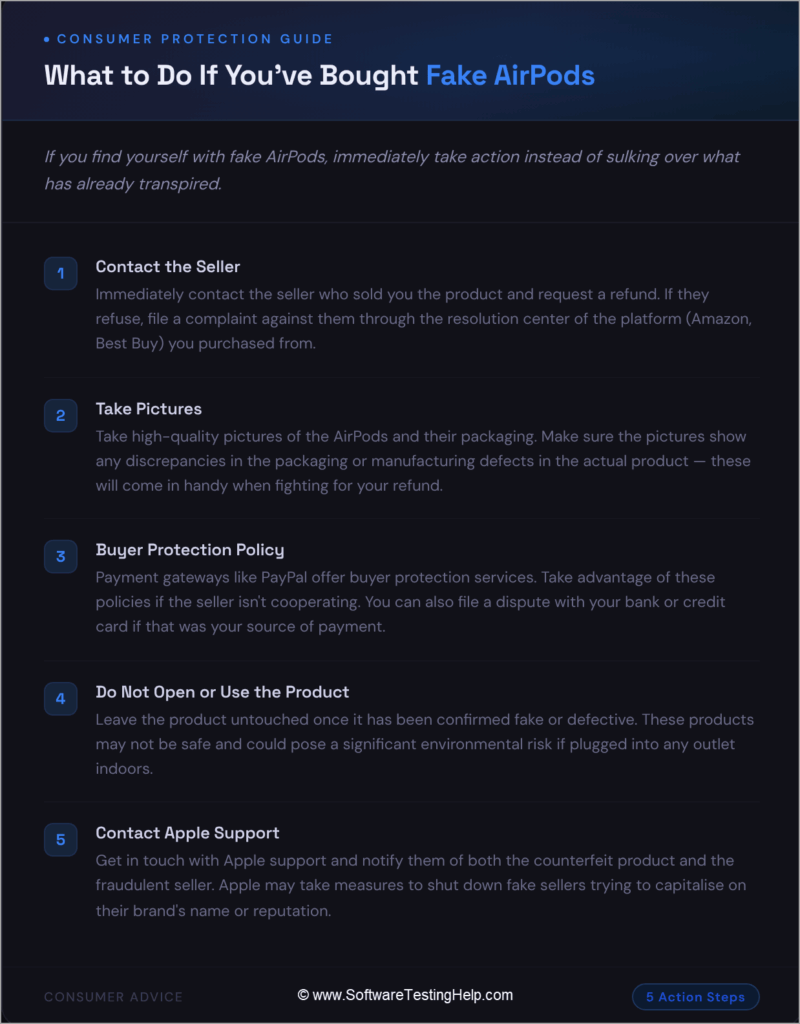
#1) Contact the Seller
Immediately contact the seller who sold you the product and request a refund. If they refuse to honour your request, you can file a complaint against them through the resolution centre of the platform (Amazon, Best Buy) you purchased the product from.
#2) Take Pictures
Take high-quality pictures of the AirPods and their packaging. Make sure the pictures show any discrepancies in the packaging or manufacturing defects in the actual product. These pictures will come in handy when fighting for your refund.
#3) Buyer Protection Policy
Payment gateways like PayPal offer buyer protection services to their users. I suggest taking advantage of these policies if the seller isn’t cooperating with you. You can also file a dispute with your bank or credit card company if that was your source of payment.
#4) Do Not Open or Use the Product
It is important to leave the product untouched once it has been confirmed to be fake or defective. There is a good chance that these products aren’t safe and pose a significant environmental risk if plugged into any outlet indoors.
#5) Contact Apple Support
Get in touch with Apple Support and notify them of both the counterfeit product and the fraudulent seller. Apple may take measures on its end to shut down a fake seller who tries to capitalize on its brand name or reputation.
Frequently Asked Questions
1. How do you check if AirPods are fake?
Well, you can perform several quick, deep, software, and physical checks to make sure your product is authentic.
Below are some signs that are apparent if AirPods are fake:
• Cheaper price
• Missing or wrong specifications
• Manufacturing defects
• Grammatical errors in the package
• Missing documentation in the package
• The serial number can’t be found.
• Bad reviews online
• Can’t be tracked by Find My app
• Pop-up animation doesn’t appear on iPhone when the case is nearby.
2. Can fake AirPods still have a serial number?
Yes, fake AirPods do possess a serial number. This number is usually imprinted on the device or box to trick customers into thinking the product is genuine. I always recommend checking the serial number’s authenticity by entering it on https://checkcoverage.apple.com. If the serial number doesn’t show up on that site, you can bet the earbuds are fake.
3. Can you locate fake AirPods?
iPhone uses its built-in Find My app to locate companion devices, which include AirPods. However, the Find My app won’t be able to find or track down fake AirPods. That said, advanced counterfeits are still being produced every day that may bypass the Find My app’s ability to identify fake AirPods.
4. Can iPhone recognise fake AirPods?
Yes, most iPhone devices can recognize fake AirPods. A smooth animation will pop up on your iPhone screen anytime you open a genuine AirPods case near it. Moreover, iPhone 17+ devices will also usually display a warning stating “These headphones could not be verified as genuine AirPods.”
5. What do fake AirPods Pro look like?
Fake AirPods Pro can look eerily similar to the real product. However, on close inspection, its many flaws will become apparent. Look for signs of incorrect logos, fonts, or grammatical errors on the packaging. Look for loose hinges and visible seams on the case.
A genuine AirPods Pro will feature smooth plastic hardware with high-quality noise cancellation. These features are hard to replicate, so any product without them can be deemed inauthentic.
Conclusion
So, that was my take on how to tell if AirPods are real or fake. When it comes to sound quality or durability, I don’t think there is any other brand of headphones out there that can even match Apple’s AirPods. So, it is not difficult to understand why they are so popular not only in the United States but around the world.
With popularity also comes cheap imitators who want to capitalize on the product’s hype. As a buyer, you must be vigilant, especially when purchasing AirPods online. Keep the above tips in mind and practice them when purchasing AirPods or any other Apple device, for that matter.
To be on the safer side, I recommend buying AirPods physically from a nearby authorized Apple store.
Research Process: The total time involved to complete and publish this article is approximately 43 hours. This content was created through a structured research approach to ensure accuracy and reliability.
For more related guides, you can explore our range of tutorials below:
- How to Connect AirPods to Windows 10
- Why Are My AirPods So Quiet on Full Volume
- The Top 13 Wireless Earbuds (Best Sellers List)
- The 14 Best Noise-Cancelling Earbuds (Bestsellers)
- The Top 10 Bluetooth Earphones In India (Best Sellers)
- Top 17 Best Over-Ear Headphones (TOP Cheap Headsets)
- The 12 Best Gaming Earbuds (Gaming Earphones Review)
Was this helpful?
Recommended Reading
-

Planning to upgrade your headphones to listen to the most premium music? Read this review of the top Bose QuietComfort Earbuds: Music without proper earbuds becomes very pale. This is why having the right pair of earbuds is very important! Switch over to Bose QuietComfort Earbuds. The best Bose QuietComfort…
-
This article reviews and compares the top Gaming Earbuds with technical specifications to guide you to select the best earbuds for gaming: Are you facing difficulties talking with your teammates while playing games? Is the background noise becoming too difficult to overcome? With the best Gaming Earbuds, you'll be able…
-
Getting too much background noise while attending calls or listening to your favorite music? Read this review to analyze and find the best Noise Cancelling Earbuds: It is important to have the right set of headphones for an amazing experience. It's time to switch over to the best Noise Cancelling…
-
Read this Wireless Earbuds review with tech specs and comparison among bestsellers to select the best Wireless Earbuds for maximum comfort: Are wired headphones making your daily life full of struggle? Wouldn't it be better if you could go wireless? With the best Wireless Earbuds available to you, you can…