


Review, compare, and select from the list of top JavaScript Frameworks and Libraries to develop your application with the best features:
Like salt is an essential ingredient in food, JavaScript has become a crucial ingredient in the digital world. You may be wondering, how?
Be it Facebook, Netflix, Uber, LinkedIn, Candy Crush, or any other popular app that you use in your day-to-day life, it is made from JavaScript.
Table of Contents:
JavaScript Frameworks Review
Most of the JavaScript frameworks are open source and free, so you can explore the features of multiple frameworks before deciding on the one you will use.
Due to the wide use of JavaScript, the need for JavaScript frameworks becomes imperative. These frameworks serve web developers as a structure or template with pre-written code for routine things. Within the contexts of these frameworks, you can efficiently design complex web applications, reuse a lot of feature sets, and avoid writing code from scratch.
Because JavaScript is used for both client-side and server-side code, there are a lot of front-end and back-end JavaScript frameworks available to work with.
For example, some popular front-end frameworks include React, Angular, and Vue; and some popular back-end frameworks include Express and Next.js.
This article gives you a list of the top JavaScript frameworks along with their features, use cases, pros, and cons. It will help you determine which framework to use in developing your next exciting application.
Frequently Asked Questions
Q #1) Which one is the best JavaScript framework?
Answer: There is no particular one that you can call the best JavaScript framework because which one is best depends a lot on what type of application you are building.
However, some of them are widely used in the industry. These are Ext JS, Angular, React, Vue.js, Ember.js, and some others. In this article, we give a review of the top JavaScript frameworks along with their reviews.
Q #2) Which JS framework is most popular?
Answer: This keeps on changing from time to time as the industry grows. The top five frameworks mentioned in this article are among the most popular JavaScript frameworks.
Q #3) Is React better than Angular?
Answer: If you want to create a highly active and interactive web application, Angular would be a better choice than React. But if you are aiming to develop an extensive web application with frequently variable data, then React would be a better choice than Angular.
Both React and Angular have their pros and cons. Angular is challenging to learn compared to React, but Angular is a full-fledged framework while React is a library. Performance-wise, both Angular and React are amazing.
Q #4) Which is better: React, Vue, or Angular?
Answer: Out of these three, Angular is the most mature framework and is a complete package in itself. But it has a steep learning curve. It could be a good choice for large teams who already use TypeScript.
React has also gained wide popularity over the last few years and is nearing its maturity stage. If you are a start-up or looking for a lot of flexibility to integrate with other frameworks, React would be an excellent choice.
Compared to Angular and React, Vue is the newest, but it has given tough competition to Angular and React. If you are looking for a very simple framework to learn and offer flexibility, you can go for Vue. However, debugging in Vue might not be as smooth as in Angular and React.
Q #5) Is jQuery a framework?
Answer: jQuery is a JavaScript library. It has an easy-to-use API that works across multiple browsers and supports DOM traversal, manipulation, event handling, and Ajax.
The main difference between a JavaScript framework and a JavaScript library is that, with libraries, developers call certain functions from the code. In contrast, with frameworks, the framework itself will call the code in a certain way.
A library is a single solution, whereas a framework is a complete template for development. So a framework is a more holistic approach.
Q #6) Is JavaScript Grid a framework or library?
Answer: Also known as DataGrid, JavaScript Grid is a feature-rich control for presenting data in a table. Some of the best JavaScript Grid libraries include W2Ui, jQuery Grid, jQWidgets, and SlickGrid.
List Of The Top JavaScript Frameworks
Here is the list of popular JavaScript Frameworks available:
- Ext JS
- Angular
- React
- Vue.js
- Ember.js
- Svelte
- Meteor
- Mithril
- Backbone.js
- Node.js
Comparing Best JavaScript Frameworks
| Framework | Developed by | Type | Price | Best Used As |
|---|---|---|---|---|
| Ext JS | Sencha | JavaScript library | Community edition: Free Pro: $1,300 Enterprise: $1,900 | Both as a single-component framework and a complete framework for building web apps |
| Angular | Web framework | Free and open source | Front end of the MEAN stack | |
| React | Facebook and community; Original author: Jordan Walke | JavaScript library | Free and open source | Base for creating single-page or mobile applications |
| Vue.js | Evan You | JavaScript framework | Free and open source | Framework for building user interfaces and SPAs |
| Ember.js | Ember Core Team; Original author: Yehuda Katz | JavaScript library | Free and open source | Framework for web as well as a desktop and mobile apps |
| Svelte | Svelte core team; Original author: Rich Harris | Web framework | Free and open source | Compiler for creating web UI components |
| Meteor | Meteor Software | JavaScript framework | Free and open source | Isomorphic framework for rapid prototyping and producing cross-platform code |
| Mithril | Open Source Initiative (OSI) | JavaScript MVC framework | Free and open source | Modern client-side JavaScript framework for creating SPAs |
| Backbone.js | Jeremy Ashkenas | JavaScript library | Free and open source | JavaScript library to give structure to web applications |
| Node.js | OpenJS Foundation; Original author: Ryan Dahi | Runtime environment | Free and open source | Back-end runtime environment that executes JS outside a web browser |
| Aurelia | Durandal Lightweight Structures | JavaScript client framework | Free and open source | Modern front-end framework for building cross-platform applications |
| Express | TJ Holowaychuk, StrongLoop, and others | Web framework | Free and open source | Back-end web application framework for Node.js |
| Next | Vercel and Open Source Community | Web application framework | Free and open source | Development framework for creating a server-rendered website with Node.js |
Let us take a deep dive into each of these frameworks.
#1) Ext JS (Recommended)
Ext JS is best for creating cross-platform applications for desktops, tablets, and smartphones.

We can employ it as a single-component framework (e.g., building dynamic grids on static pages) and a full framework (e.g., building single-page applications).

Use cases:
- Data and chart-intensive apps.
- Rich UI applications.
- Single-page applications.
Features:
- Rich set of GUI widgets: It contains 140+ pre-built components like HTML5 grids, date pop-ups, sliders, grid controls, lists, menu bar, tab, text fields, numeric fields, charts, region panels, D3 adapter, etc.
- In-build themes: There are various bundled EXT themes available, like Classic, Neptune, Graphite, etc. The look and feel of the components will change along with the theme. This will allow you to test the components for various types of devices. You can also have custom themes.
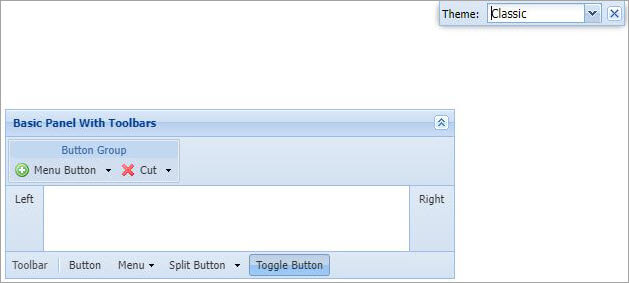
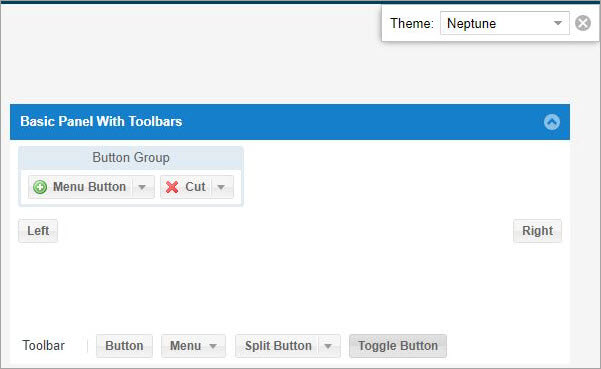
- Toolkits: Ext JS offers modern and classic toolkits that help you cover support for all browsers for all types of devices—desktops, phones, tablets, and touchscreen laptops.
- Core concepts:
- Classes: Ext JS ships with several classes. Using consistent naming conventions for classes, source files, methods, and variables helps keep the code organized and maintainable.
- Layouts and containers: One of the powerful parts of Ext JS is layouts and containers. It helps in the proper sizing and positioning of every component in an application.
- Data package: The data package does the loading and saving of all the data in applications.
- Gestures: Ext JS supports various gesture events like Tap, DoubleTap, Drag, Swipe, LongPress, Pinch, Rotate, etc.
- Drag API: Ext.drag API gives a cross-toolkit solution that enables the easy addition of simple to complex drag-and-drop functionality, including asynchronous data transfer.
- Events: Whenever any change occurs in and around your application, events are fired. Ext JS supports a wide range of events, which helps it react to changes.
Verdict: Ext JS empowers HTML5 features on modern browsers and remains fit for legacy browsers, retaining their features. It has a very rich UI framework with various widgets and lets you do a lot of customization. The only thing that may be of concern is the high price of this tool.
Pricing: Ext JS has the following four editions:
- Community: This edition is free. It supports up to five developers and comes with just basic features.
- Pro: It costs around $1,300 per developer. Comes with pro features. Suitable for teams who aim to build enterprise-grade apps quickly.
- Enterprise: It costs around $1,900 per developer. Comes with lots of advanced features, including 140+ pre-built components, ExtAngular, and ExtReact.
- Unlimited: The cost of this edition is available on request. It will give unlimited licenses to developers with premium features.
#2) Angular
Best for single-page application development for highly customized apps.

It can reuse the code for any deployment targets–web, mobile, or desktop.
Use cases:
- Video-streaming apps.
- E-commerce apps.
- Real-time data applications.
- User-generated content portals.
Features:
- Cross-platform: Allows you to develop across all platforms.

-
- Progressive web apps: Offers modern web platform capabilities to deliver high-performing apps.
- Native Develop native mobile apps through Cordova, Ionic, and NativeScript.
- Desktop: Develop desktop-installed applications around Mac, Windows, and Linux.
- Speed and performance: Angular helps you achieve the highest possible speed, which you can further enhance through web workers and server-side rendering. It is easy to scale with Angular. To meet essential data requirements, you can create RxJS, Immutable.js, or other push models.
- Automatic code splitting: Loads only code that is required to serve the rendering request.
- Optimized for SEO.
- Converts your templates into JVM code.
- Amazing tooling:
- Offers simple, declarative, and powerful templates to quickly create UI.
- Angular CLI through command-line tools to use various existing or your components.
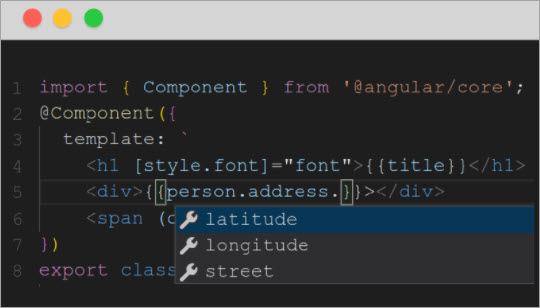
- Supports almost all IDEs and editors so that you get the advantage of intelligent code completion and immediate feedback.
- Another exciting feature is Angular’s intuitive API that you can use for complex animation.
- With Jasmine and Karma, you can write and execute a variety of tests.
Verdict: Angular is a type-script-based web application framework for modern web development. The best part is that it is platform-independent, accessible, and open-source. Also, it is a complete framework in itself, as you don’t have to rely on any external packages. The only shortcoming of Angular would be its steep learning curve.
Pricing: Free to use
Website: https://angular.io/
#3) React
Best for building user interfaces for single-page or mobile applications, mainly for large-scale and feature-rich apps.


Use cases:
- Creating interactive components for social media web apps.
- Building interactive, data-heavy dashboards.
- E-commerce web applications.
- Single Page Applications (SPAs).
Features:
- Declarative views: It makes the code more readable and easier to debug.
- Component-based: Encapsulated components manage their state; It can render components to specific elements in the DOM.
- Virtual DOM: It does only selective rendering, which in turn gives a performance boost.
- Learn once, write anywhere: No need to rewrite existing code to develop new features.
- Architecture beyond HTML: The architecture of React applies further than rendering HTML in the browser.
- Built–in hooks: For controlling React state and side effects.
Verdict: React is a front-end JavaScript library for creating interactive UI components. It is a plus point being free and open source. However, it is not a complete solution, as it requires additional libraries for routing and client-side functionalities.
Pricing: Free to use
Website: https://reactjs.org/
#4) Vue.js
Best for building user interfaces and SPAs.

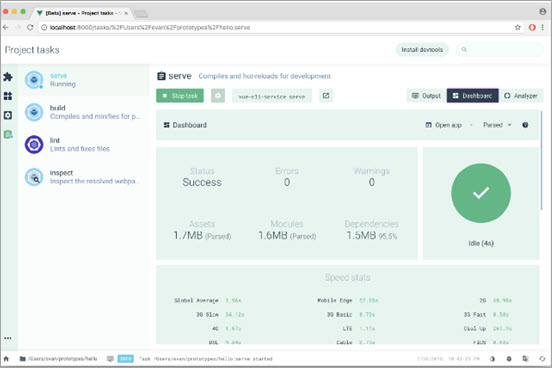
Use cases:
- Prototyping: animations, interactive elements, and graphics.
- Adding interactivity to existing applications.
- Built-in editor.
- Navigation menu.
- Switchable grid.
Features:
- Approachable: If you have prior experience with HTML, CSS, and JavaScript, then it will take you no time to learn Vue.js.
- Versatile: Progressive environment that ranges from a library to a fully equipped framework.
- Performant:
- 20 KB min+gzip execution time.
- Lightning-fast virtual DOM.
- Nominal optimization efforts.
- Components: Custom elements with pre-defined options. They encapsulate reusable code.
- Templates: It uses HTML-based template syntax. At the back end, it compiles these templates to virtual DOM render functions. When the app state changes, Vue intelligently figures out minimal re-rendering and DOM manipulations.
- Transitions and animations: Vue provides a variety of ways to implement transition effects and animations when items are modified from the DOM. This includes CSS as well as third-party transitions and animations.
- Routing: Vue has its official router, which is recommended for single-page applications. It can also easily be integrated with third-party routers.
Verdict: Vue is an open-source MVVM, a front-end progressive JavaScript framework used for creating UIs and SPAs. The best part is that it is very simple to learn and highly performant. It can be used for small to large applications.
One of the limitations is that you may not find many experienced developers for it as it is a relatively young technology. Vue could also have language barriers, as it is mostly used in Chinese markets, so most of the forums would be in the Chinese language.
Pricing: Free to use
Website: https://vuejs.org/
#5) Ember.js
Best for creating scalable single-page web applications. It is suitable for long-lived projects.


Use cases:
- Seamless integration of complex functionalities.
- Building SPAs.
Features:
- Build Pipeline: Built-in development environment enabling fast rebuilds, auto-reload, and a test runner.
- Routing: Ember has a built-in router that comprises asynchronous data loading with dynamic URL sections and query parameters. It supports nested URLs as well.
- Data layer: An included fully-loaded data access library, Ember Data, helps you access data through various sources and keeps models up to the minute throughout the application.
- Testing: A fully equipped modern test harness is built in every app by default.It supports unit tests, rendering tests, and application tests.
- Performance: Ember is based on one of the fastest rendering engines called Glimmer. It compiles templates into a highly performant virtual machine.
- Easy upgrades: A new version (minor) is released every six weeks. Upgrades are fast and straightforward. It also provides code mods to update your codebase automatically.
Verdict: Ember.js is an open-source JavaScript web framework based on a component service pattern. They call it rightly—it’s a framework for ambitious developers. Ember offers powerful add-ons and a great CLI.
It is highly consistent and easy to configure. Its significant community support is a plus point. Being a large library, Ember is a heavy framework. Also, you can’t reuse the components when working with Ember.
Pricing: Free to use
Website: https://www.emberjs.com/
#6) Svelte
Best for developing either small pieces of an interface or whole applications.


Use cases:
- Build fast and lean static web apps.
- Create single, reusable components for projects.
- Examples: Text editor, typing game, mood, and life tracker.
Features:
- Less code to write: You can create boilerplate-free components using the language you already know.
- No virtual DOM: Instead of creating a virtual DOM, Svelte compiles the code to small, framework-less Vanilla JavaScript. It aids your application to start fast and stay fast.
- Reactivity: Svelte executes at build time, transforming the components into highly efficient code. This, in turn, gives outstanding performance.
Verdict: Svelte is a free and open-source front-end compiler to create cybernetically enhanced web apps. The USP of Svelte is that it is a component-based framework and requires no extra plugins. It just needs a simple build script to get started.
Great performance, small bundles, accessibility, ease of use, and declarative transitions are some of its benefits. Svelte’s IDE support could be improved. Also, it has only a small open-source ecosystem as of now. There is an opportunity to add more dev tools.
Pricing: Free
Website: https://svelte.dev/
#7) Meteor
Best for rapid prototyping and building cross-platform code.


Use cases:
- Making JavaScript apps for PC or phone.
- Prototyping and proof-of-concept projects.
- Developing data-driven app websites.
- Creating forums, online magazines, or any app/website that relies on fresh content.
Features:
- Has its own CLI, allowing wide control over different fields of your application.
- Offers cross-platform support. The apps developed with Meteor can be easily compiled into Android, iOS, or web code.
- Latency compensation through optimistic UI updates. It responds to user input very quickly.
- Supports various templating engines.
- Iron router for extensive control over routes.
- Built-in “hot reload” feature for seamless upgrade to new versions.
- Web server debugging tool.
- Built-in security measures.
- Integrates with Mongo DB.
- Employs Distributed Data Protocol (DDP) and publish-subscribe messaging pattern, eliminating the need to rewrite synchronization code.
- Can be used with other popular JS frameworks.
Verdict: Meteor is an isomorphic JS framework that is open source, free, and written in Node.js. The biggest advantage of Meteor is that it will enable you to do super smooth integration of mobile and web applications.
Meteor has an impressive and supportive community of contributors. With Meteor, you can do a lot out of the box. Some limitations of Meteor are that it has no reactive joins and no native-server-side rendering.
Pricing: Free
Website: https://www.meteor.com/
#8) Mithril
Best for building single-page applications

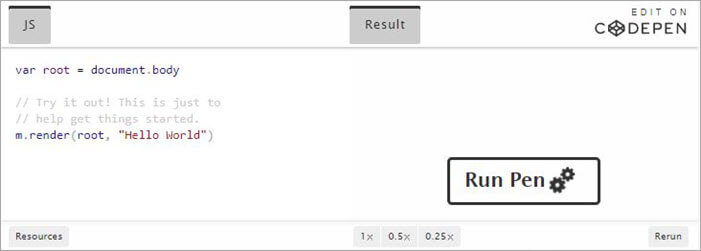
Use cases:
- MVPs and responsive front-end.
- Auto-create form.
- Admin dashboards.
- Consumer-facing pages.
- Forums, WebSockets, event bus.
- Educational tools.
- Collaboration tools.
Features:
- Simple and small API. It has a download size of just 9.5 Kb.
- Great out-of-the-box performance.
- Less code in the library and a fast initial load (around 6.4 ms).
- Doesn’t need a build step.
- Easily interacts with other libraries.
- Encourages Vanilla JS.
- Accompanied by simple utilities to create XHR requests, routing between pages, and store application state.
- Virtual DOM diffing and compilable templates.
Verdict: Overall, Mithril is fun to use. It is fast and lightweight, and it comes with a robust API. It can easily be integrated into an existing project. The only limitation you may face is that the Mithril community is short, and few big companies are using it.
Pricing: Free to use
Website: https://mithril.js.org/
#9) Backbone.js
Best for developing one-page applications.


Use cases:
- Designing a simple SPA that does not require many dependencies.
- Building e-commerce websites.
- When most of the heavy lifting is done at back-end development.
- If there is a requirement to reduce HTTP requests to the server.
- Simplify complex UI design.
- Avoiding spaghetti code.
Features:
- RESTful JSON interface.
- Based on MVC design paradigm.
- Models with key-value pairing and custom events.
- Collections with rich API of various functions.
- Views including indicative event handling.
Verdict: Backbone JS is lightweight, extensible, and based on MVP structure, and it can easily be learned. As compared to some other frameworks, it is slow, and debugging could be a pain with Backbone JS.
Pricing: Free to use
Website: http://backbonejs.org/
#10) Node.js
Best for building scalable network applications and working with microservices architecture.

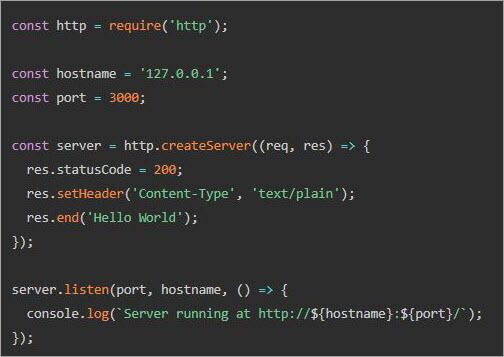
Use cases:
- Real-time communication programs.
- Browser games.
- Web apps with multiple I/O operations.
- Hybrid applications.
- REST APIs.
- Desktop programs.
- IoT solutions.
Features:
- Open-source.
- Cross-platform.
- Executes on Google Chrome’s V8 JS engine.
- Runs JS code outside the web browser.
- Represents a “JavaScript everywhere” concept.
- Event-driven architecture with competence for asynchronous I/O.
- Optimized for throughput and scalability.
Verdict: Node.js can be considered an independent technology that offers the benefits of JavaScript but on the back end. It is super-efficient due to a single language, and it provides high speed and performance.
Irrespective of the front-end technology, the server side can be handled with Node.js. Some of the shortcomings are lack of library support, reduced performance during complex computation tasks, and a shortage of developers.
Pricing: Free to use
Website: https://nodejs.org/en/
Other Notable Frameworks
#11) Aurelia
Aurelia is an open-source, modern, front-end client framework written in ES6 and ES7, used to create mobile, browser, and desktop apps.
Aurelia is composed of many feature-oriented modules and is built on open web standards. It is easy to understand and has the benefits of reactive binding and high performance. There could be better support documentation and community support.
Website: https://aurelia.io/
#12) Express.js
Express.js is a back-end web app framework written in JavaScript. It can create web applications and APIs. It is a minimal framework with many features available as plugins and is fast and customizable. There are issues with the callbacks.
Website: https://expressjs.com/
#13) Next.js
Next.js is the React framework for production. It offers hybrid static and server rendering, support for TypeScript, wise bundling, zero-config, and page-based routing.
Website: https://nextjs.org/
Conclusion
In this article, we have listed the best JavaScript frameworks and libraries. We went through the details of each of these frameworks and learned about their use cases, features, advantages, and shortcomings.
These frameworks are indeed the best ones available in the industry today. Some of these are holistic frameworks, while others are flexible to be integrated with external tools.
To decide which framework you should go for, first, figure out your use cases, type of application, and business requirements, and explore the features of these frameworks. Then see which framework fits best.
Research Process:
- Time is taken to research this article: 14 hours
- Top tools shortlisted: 13
Was this helpful?
Recommended Reading
-

Understand what Discord Fatal Javascript Error is and refer to this step-by-step guide explaining 7 methods to fix Discord Fatal Javascript Error: Discord is an instant messaging and digital distribution platform that has been specifically designed for creating communities. Discord users can communicate with each other using voice calls, video…
-
In this Java vs JavaScript tutorial let's discuss major differences between Java and an important scripting language JavaScript with simple examples: Java is an object-oriented programming language and runs on a Java Virtual Machine (JVM) that helps you to create programs that are platform-independent (Write once, Run anywhere –WORA). Java…
-
What is Javascript Injection? Javascript is one of the most popular technologies and is most widely used for web pages and web applications. It can be used for realizing different website functionalities. However, this technology can bring some security issues, which the developer and tester should be conscious about. Javascript…
-
In this tutorial, we will explore and compare Javascript Vs Python with important features, advantages, and uses of Python and Javascript: Though, both Python and Javascript are languages used for developing web applications, yet their scope of use is different. We shall look at their areas of use to understand…
-
In this Jest tutorial, we will learn about various Jest features, Jest Matchers, and how to use the Jest framework for JavaScript Unit Testing: Jest is a Javascript Testing framework built by Facebook. It is primarily designed for React (which is also built by Facebook) based apps but could be…
-
List of the most popular code coverage tools for Java, JavaScript, C, C++, C#, PHP, Eclipse, .Net and many other programming languages: There are several ways to measure the coverage of testing in software testing. The code coverage method is one of the most important techniques. Using the code coverage…
-

Most frequently asked basic and advanced JavaScript interview questions with detailed answers for every JavaScript Developer. If you are preparing for an interview, here are the most frequently asked JS interview questions and answers for your reference. We have designed the same to get you to the questions you may…
-
Learn about the key difference between TypeScript Vs JavaScript including feature comparison and code comparison with examples: We will be taking a look at the features of both languages and understand what we can do with each of these languages. The tutorial would also enlist the differences between Javascript and…


