Xfinity Router blinking orange light? Discover how to fix Xfinity Modem blinking orange along with quick troubleshooting steps and proven solutions to restore connectivity:
When you observe the orange blinking light on your Xfinity router or modem, it means that you cannot establish a connection with your Wi-Fi or Internet connection.
In this post, we will discuss the meaning of the orange blinking light on your Xfinity router, why it happens, and how you can troubleshoot and fix the problem.
Xfinity Modem Blinking Orange: Proven Fixes
Whether you are a beginner or a skilled user, this article offers useful insights accompanied by a step-by-step procedure to fix it and resolve the issue so that you can connect to your Wi-Fi network.
This article will ensure you gain enough knowledge to understand the causes of Xfinity router blinking orange and ways to fix it and get connected to the Internet.
Check the video below to explore the step-by-step instructions for installing an Xfinity Router:
Why is My Xfinity Router Blinking Orange
The blinking orange light on the Xfinity router or modem means that there is a connectivity or operational issue.
Based on Xfinity’s official support website, a blinking orange light generally means that the device is attempting to connect to the internet, the device might perform a firmware update, or simply that there is a service disruption (outage) in your area.
Suggested Read => Top Xfinity Compatible Modems
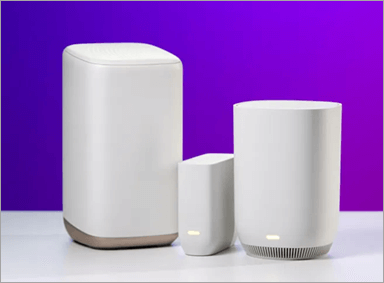
[Via CNET]
In contrast, a solid white or green light means it is in normal operation; blinking white indicates data transmission.
A blinking orange light on your Xfinity router indicates you are not yet connected to your Xfinity router or the external network is completely down at the moment. Due to this connectivity issue, your streaming, gaming, remote working, or other online activities are getting hampered.
So, understanding the causes of this orange blinking light is the first step to restoring the connectivity.
In the following subsections, we discuss the most frequent causes of the Xfinity router blinking orange, and we will also provide step-by-step troubleshooting steps to resolve it.
Recommended Reading => Difference Between a Modem and Router
Causes for Orange Blinking Light on Xfinity Router
Though there are several reasons for the blinking orange light on your Xfinity router or modem, understanding the root cause is the first step in troubleshooting and applying the right fix.
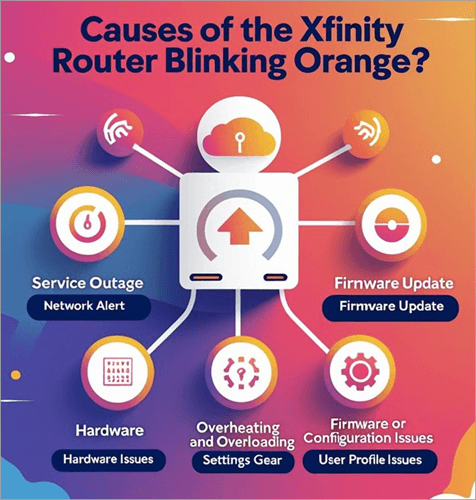
Below are the most frequent causes of the Xfinity router blinking orange light:
Further Reading => Top-Rated WiFi Companies
- Service Outage: Sometimes, the problem is not on your end. A likely scenario is that an internet outage or service disruption might have occurred at the Xfinity server or your ISP (internet service provider) locally, causing that orange light on your router. Even routine maintenance can be a possible cause; normally, the service comes online within a few hours. The outages are temporary and may be resolved once the technical issue is fixed, but knowing the cause will help you understand the reason the Xfinity router is blinking an orange light.
- Firmware Update: One of the primary reasons for the orange light to blink is due to the installation of a firmware update on your router. The Xfinity routers periodically update their software to improve their performance and security. This normally resolves itself once the update completes, which usually lasts for 30 minutes to 1 hour.
- Loose or Damaged Cables: Cables running through the Xfinity router or modem to the Xfinity primary network or wall jacks can also interrupt the connection, leading to the Xfinity router blinking an orange light. Even faulty splitters can also contribute to a blinking orange light on your Xfinity router.
- Overheating and Overloading: Generally, electronic devices get overheated if placed in an enclosed space or where there is no proper ventilation. So, ensure it is rightly installed and placed to overcome connectivity problems and make the orange light pop up on your router. Even the router or modem gets overheated due to the continuous use of numerous devices.
- Hardware Issues: There is also a possibility that your Xfinity router or modem has stopped working due to faulty hardware. This can also cause a router to blink the orange light.
- Firmware or Configuration Issues: Any firmware that is not up to date or any corrupted settings on your router can cause connectivity issues, resulting in this blinking orange light. This happens if the router’s been lying around for some time without any updates, or in some cases, settings may have been modified midway through setup.
- Account or Activation Issues: If your account is suspended or unpaid, or hasn’t been used for longer than this could also result in disconnection and an orange light blinking on your Xfinity router or modem.
Hope these common issues will help you identify the reason for your orange blinking on your router. In the next section, we will see how to troubleshoot and fix the Xfinity router blinking orange.
Troubleshooting Steps for Xfinity Router Blinking Orange
In the above section, we saw the primary reasons for the Xfinity router blinking orange. Now, in this section, we will look at troubleshooting steps that will help you fix your router’s blinking orange issue and restore your internet connection.
Also Read => Extensive Study of Network Troubleshooting
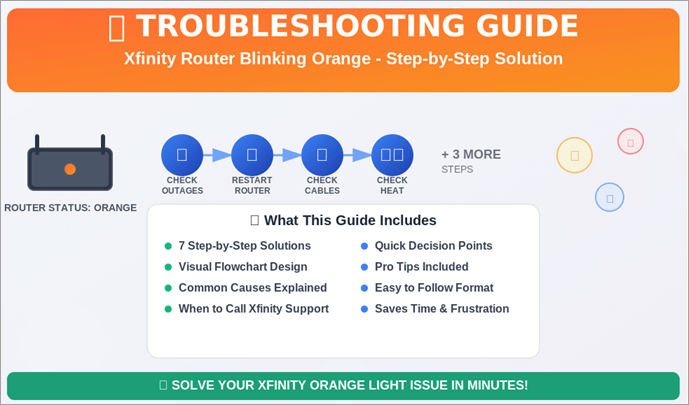
Step #1: Check for Service Outages
Before attempting any fixes, verify whether there is any outage in your area.
The simplest and best way to find out outage is to contact Xfinity Support at 1-800-XFINITY. You can also visit Xfinity’s Status Center and enter your address to see if there is a reported outage in your vicinity. You can also get this information through your Xfinity My Account app.
If an outage is reported in your area, then you need to wait till the services are restored. The orange light of XFINITY will stop blinking automatically once the connectivity comes alive in your area.
Step #2: Restart the Router
Sometimes, temporary glitches can make the Xfinity router blink orange, so you can try restarting the router. Disconnect the router and modem from their power outlets and wait for 3 to 5 minutes. Plug the devices back into the power outlets and wait for 3–5 minutes for them to restart.
You can also restart the router via the Xfinity app by navigating to Connection Trouble > Restart Gateway. Alternatively, you can get in touch with the XFINITY support team to get help with this process.
Suggested Reading => Comcast Xfinity Compatible Routers
Step #3: Inspect Cables and Connections
- Loose or damaged cables are also a common reason for the blinking orange light on your router:
- Ensure all Ethernet, coaxial, and power cables are securely plugged into the correct ports. If required, remove them and again plug them in.
- Inspect for frayed, cut, or bent cables. If you see any cuts, then you can replace the damaged cables.
- If you see any dust, then you can use a small brush to remove dust or debris from the cable ports.
- You can even check the router plugged into a different power outlet.
- If you are using a splitter, ensure it is functioning correctly, as faulty splitters can disrupt connectivity.
Step #4: Check for Overheating
Overheating can cause the router to malfunction.
- If your router is placed in an enclosed cabinet without any proper ventilation, then try placing it in an open, well-ventilated area.
- You can even try removing the dust from the router’s vents using a soft brush, which may block air circulation.
- You can touch the router and see if it is hot, allow it to cool down, and then check the status of the orange blinking.
Step #5: Check Firmware Update
Outdated or corrupt firmware software can also cause the Xfinity router or modem to blink orange.
- The firmware gets automatically updated through the Xfinity server without any user intervention, but if it gets stuck, then manual intervention is required.
- Visit the Xfinity website or the router’s admin panel (https://10.0.0.1/) to check for firmware updates.
- Follow the instructions to download and install the latest firmware for your router model.
- Wait for the update to complete, which may take a couple of minutes, and check if the orange light persists.
If you need to, you can contact Xfinity support or get involved with the team in a chat conversation.
Step #6: Reduce Router Load
It is often seen that an overloaded router can make the orange light blink.
- Try temporarily disconnecting the non-essential devices, such as smart TVs, gaming consoles, etc., to reduce the load on the router.
- You can even restrict certain bandwidth-heavy applications from connecting to the router through the Xfinity app or admin panel.
- If you are consistently using high bandwidth with many devices, then it is worth upgrading to higher plans and a more powerful router than your current one.
Step #7. Direct Modem Connection
To understand whether the problem lies with the router or the modem, follow the steps below:
- Connect a computer directly to the modem using an Ethernet cable.
- If you can browse the internet, then the internet is working fine, or else the problem lies with the router.
Step #8: Factory Reset
If you tried all the steps and still have no success, then one final step you can perform is a factory reset of your Xfinity router.
But you need to perform this task by contacting the Xfinity support team, and they will guide you step by step to accomplish this task.
Xfinity can also arrange for a technician to inspect the router, check the wiring, and replace faulty equipment.
Also Read => Factory Reset Windows 10 on your PC
Preventive Measures: Xfinity WiFi Router Blinking Orange
To overcome or avoid the Xfinity router or modem blinking orange recurring in the future, you can perform certain preventive steps as stated below:

- Use an authorized surge protector to maintain a stable power supply to your router.
- Ensure the router is regularly updating its firmware automatically through the Xfinity app
- Place the router in a well-ventilated area without any other nearby electronic devices interfering.
- Monitor network load through the Xfinity app and limit the high bandwidth-sensitive applications and devices. You can even try using Quality of Service (QoS) settings in the router’s admin panel to prioritize bandwidth for critical devices.
- Consumable wires are prone to wear and tear, so ensure you regularly inspect them and replace them whenever required.
When to Replace Your Xfinity Router
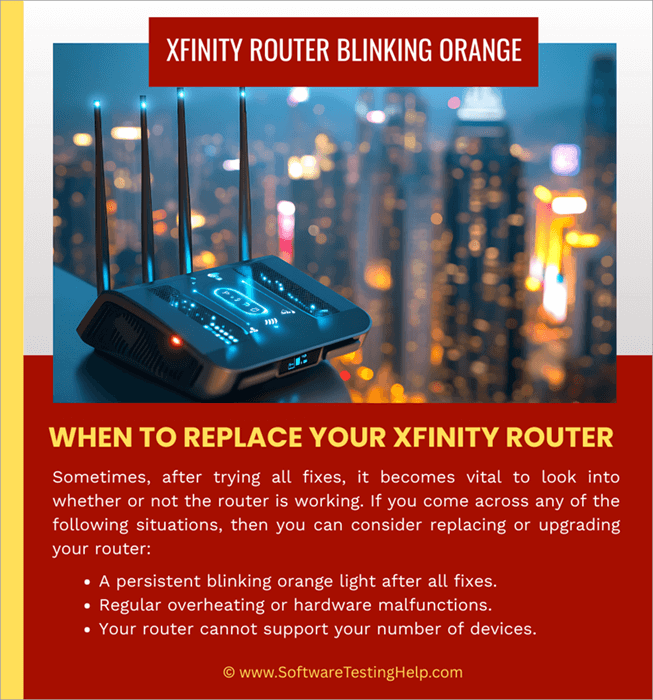
Sometimes, after trying all fixes, it becomes vital to look into whether or not the router is working. If you come across any of the following situations, then you can consider replacing or upgrading your router:
- A persistent blinking orange light after all fixes.
- Regular overheating or hardware malfunctions.
- Your router cannot support your number of devices.
FAQs on Xfinity Router Orange Light
1. Why is my Xfinity router blinking orange light?
The blinking orange light on your Xfinity router or modem is generally a problem with the internet connection. There could be a lot of issues involved in this, like an internet outage, the issue with your router, or loose connections.
2. What colour should my Xfinity modem be blinking?
Meaning of various color blinking on Xfinity modem:
• Solid White: The gateway is connected to the internet and working properly.
• Blinking White: The gateway is starting up, updating, or trying to establish a connection.
• Other Colours (such as green, blue, and amber): These may indicate specific statuses or issues, such as connection attempts, updates, errors, or hardware problems.
3. How long does an Xfinity router take to reset?
The Xfinity router takes 12 minutes to restart.
4. What does the Xfinity router’s white light indicate?
The Xfinity router’s white light indicates two states:
If a Xfinity router’s white light is steady, it means that the router is online and has an internet connection.
If the router continues to blink a white light, then it shows the router is waiting to be set up or is in the process of activating. Even after setup, if the white light still blinks, then it means there is an issue with internet connectivity, and the router is unable to establish a stable connection.
5. Why is my Xfinity Router blinking green?
If your Xfinity router is blinking green, it means the device is attempting to boot up or experiencing an issue with the internet connection.
6. Why is my Xfinity Router blinking blue?
A Xfinity router blinking blue shows that the device is in WPS (Wi-Fi Protected Setup) mode and is trying to establish a connection with another
WI-FI device in the network.
Further Reading => What is WPS Button on Router
Conclusion
A Xfinity router blinking orange light is a common issue that affects many people. By following a few simple steps (as discussed above), such as restarting the device, looking into the cables, or updating the firmware, you can solve your orange blinking light issue in no time.
However, by understanding the main causes like internet outages, router hardware issues, etc, you can fix it immediately either by yourself or by contacting the Xfinity support team.
To prevent such issues, you can ensure that the router is placed in a well-ventilated location and its firmware is updated at regular intervals. We hope this article will help you understand what a blinking orange light on the Xfinity router is and help you keep your Xfinity router connected all the time.
Was this helpful?
Recommended Reading
-

Role and Significance of Routers in Computer Networking System: Our previous tutorial in this Full Networking Training Series explained us about Layer 2 and Layer 3 switches in detail. In this tutorial, we will see about Routers in detail. Routers are widely used everywhere in our daily life as these…
-
Selecting a good travel router from the market can be a challenging task. Choose the ideal portable WiFi router from our top-rated options for premium services: Finding a safe and reliable WiFi network when traveling is undoubtedly quite challenging. Apart from other travel-related problems, some areas might even be out…
-
Have you subscribed to Spectrum Internet's high-speed plan but not experienced high-speed internet browsing? The top-rated list of routers for Spectrum gives you the option to select the one that fits your needs: Constant lags during the internet keep on getting a lot frustrating at times. It's time to switch…
-

Know What is the exact difference between a Modem and a Router: In our last tutorial, we explored all about Network Vulnerability Assessment in detail. In our other tutorials, we have already discussed in detail about the working, configuration, and set-up of routers with the help of different examples in…