


In this guide, you will find the need for IP addressing (IPV4 and IPV6) in a networking and our online free subnet mask calculator will help to calculate IPv4 subnets.
In this tutorial, I’ve explained the significance of IP addressing, how subnet masking works with examples, and how to calculate an IP subnet mask manually and using a calculator. With this tutorial, you should be able to calculate and design your subnets nicely in any given networking configuration.
Our free subnet calculator for IPv4 and IPv6 will help for quick calculation of subnet masks, network address, broadcast address, host range, and other subnet information.
In our previous tutorials in the Complete Networking Training Series, we discussed LAN, WAN, and MAN in detail as these lessons will help to build the networking foundation.
What is Subnet Mask
A subnet mask helps a computer or router understand which part of an IP address represents the network and which part represents the device (host).
Think of an IP address like a home address:
- The host part is like the house number.
- The network part is like the street name.
For example:
IP address: 192.168.1.25
Subnet mask: 255.255.255.0
The subnet mask tells us that the first 24 bits are used for the network, while the remaining 8 bits are available for hosts.
Example
For the network 192.168.1.0/24:
So, with an IP address such as 192.168.1.25/24:
- 192.168.1 → Network portion
- 25 → Host portion
The network is 192.168.1.0, and the usable host addresses are generally 192.168.1.1 to 192.168.1.254.
IP Address vs. Subnet Mask
| IP Address | Subnet Mask |
| Identifies a specific device or network interface | Defines the boundary between the network and host portions |
| Example: 192.168.1.25 | Example: 255.255.255.0 |
| Usually different for each device on the same subnet | Usually the same for devices on the same subnet |
| Helps identify where a device is located on the network | Helps determine which part of the IP address represents the network and host |
What Do 1s and 0s Mean in a Subnet Mask?
A subnet mask is made up of 32 binary bits, represented using 1s and 0s. These bits tell a computer or router which part of an IP address represents the network and which part represents the host (device).
- 1 = Network portion
- 0 = Host portion
Example: /24 Subnet Mask
Consider this subnet mask:
Dotted-decimal: 255.255.255.0
Binary: 11111111.11111111.11111111.00000000
CIDR: /24
Here is what the bits mean:
11111111.11111111.11111111.00000000
24 ones → Network bits
8 zeros → Host bits
So, if the IP address is:
192.168.1.25/24
the subnet mask tells the computer:
“The first 24 bits identify the network, and the last 8 bits identify the device.”
Another Simple Way to Understand It Think of the subnet mask as a boundary line:
11111111.11111111.11111111 | 00000000
Network portion | Host portion
For 192.168.1.25:
192.168.1 | 25
- 192.168.1 → Network
- 25 → Device/host
The 1s don’t mean “one device”, and the 0s don’t mean “zero devices.”
They simply indicate which bits belong to the network and which bits are available for identifying hosts.
How Does a Subnet Mask Work (IP Subnetting)
In our daily life, we human beings identify each other with our names; likewise, in computer networking, all network devices like routers, switches, etc., communicate with each other through an IP address and a subnet mask (Subnetting).
Subnetting is the backbone of efficient IP networking. In IPv4, we use subnet masks and network classes (A, B, C) to split big networks into smaller and manageable subnets. This helps in organizing devices, improving security, and making sure IP addresses are used wisely.
IPv6 takes a different approach — there are no classes or traditional subnet masks. Instead, subnetting is done using prefix lengths like /64 or /48, which makes the network more scalable and future-ready.
Whether you’re working with IPv4 or IPv6, understanding subnetting and using an IP subnet calculator can save you time and prevent errors when designing or troubleshooting a network.
The overall phenomenon of logical addressing works on the Layer-3 of the OSI reference model and the network components like routers and switches are the host devices that are most popularly used.
We will closely take a look at both IP versions in the following section:
Understanding Network Address and Host Address
An IPv4 Address is a 32-bit logical address that uniquely classifies a host on the network. The host can be a computer, a mobile handset or even a tablet. The 32-bit binary IP address is made up of two distinctive parts, i.e. The Network address and the Host address.
It also has 4 octets as each octet is having 8 bits. This octet is converted into decimal and is separated by a format i.e. dot. Thus it is represented in a dotted-decimal format. The range of an octet in binary is from 00000000 to 11111111 and in decimal from 0 to 255.
Example of an IPv4 Address format
192.168.1.64 (in decimal)
11000000.10101000.00000001.01000000 (in binary).
The binary one is difficult to memorize thus, in general, the dotted decimal format is used worldwide for representation of the logical addressing.
Let’s understand in detail how the binary octet values are converted into decimal values:
There are 8 bits and each bit has the value of 2 to the power n (2^n). The rightmost have the value 2^0 and left most have the value 2^7.
So the value of each bit is as follows:
2^7 2^6 2^5 2^4 2^3 2^2 2^1 2^0 (^ denotes the power)
Thus the result would be:
128+ 64+ 32+ 16+ 8+ 4+ 2+ 1
When all the bits are 1 then the values come out to be 255 (128+64+32+16+8+4+2+1= 255).
Suppose all the bits of an octet is not 1. Then see how we can calculate the IP address:
1 0 0 1 0 0 0 1, 128+0+0+16+0+0+0+1= 145.
By combining the bits of the octets in different combinations according to the need, we can derive the overall IP address of the desired network. As per the requirement, these are divided into various classes of a network called as class A, class B, class C, class D, and class E.
Most popularly class A, B and C are used for commercial purposes and class D and E have reserved rights.
IPv4 Subnet Mask Cheat Sheet (/8 to /32)
| CIDR | Subnet Mask | Total IPs | Usable IPs | Subnet Size |
| /8 | 255.0.0.0 | 16,777,216 | 16,777,214 | 16.7M |
| /9 | 255.128.0.0 | 8,388,608 | 8,388,606 | 8.4M |
| /10 | 255.192.0.0 | 4,194,304 | 4,194,302 | 4.2M |
| /11 | 255.224.0.0 | 2,097,152 | 2,097,150 | 2.1M |
| … | … | … | … | … |
| /23 | 255.255.254.0 | 512 | 510 | 512 |
| /24 | 255.255.255.0 | 256 | 254 | 256 |
| /25 | 255.255.255.128 | 128 | 126 | 128 |
| /26 | 255.255.255.192 | 64 | 62 | 64 |
| /27 | 255.255.255.224 | 32 | 30 | 32 |
| /28 | 255.255.255.240 | 16 | 14 | 16 |
| /29 | 255.255.255.248 | 8 | 6 | 8 |
| /30 | 255.255.255.252 | 4 | 2* | 4 |
| /31 | 255.255.255.254 | 2 | 2* | 2 |
| /32 | 255.255.255.255 | 1 | 1* | 1 |
Common Subnet Masks at a Glance
| CIDR | Subnet Mask | Usable Hosts |
| /24 | 255.255.255.0 | 254 |
| /25 | 255.255.255.128 | 126 |
| /26 | 255.255.255.192 | 62 |
| /27 | 255.255.255.224 | 30 |
| /28 | 255.255.255.240 | 14 |
| /29 | 255.255.255.248 | 6 |
| /30 | 255.255.255.252 | 2 |
Free IP Subnet Calculator for IPv4 and IPv6
An IP Subnet Calculator automatically calculates and provides quick and error-free values of the broadcast IP address, usable IP range of the host devices, subnet mask, IP class and the total number of hosts by entering the subnet mask and the IP address of the particular network as the input values.
It is especially useful for beginners, large networks, or when you need fast results without doing binary calculations.
However, understanding manual subnet mask calculation is equally important. Calculating subnet masks manually helps you grasp how IP addressing, network bits, and host bits work together. This knowledge is essential for network design, troubleshooting connectivity issues, and preparing for certifications like CCNA or Network+.
IPv4 Subnet Calculator
IPv6 Subnet Calculator
Why Do You Need an IP Calculator?
An IP calculator is beneficial in easily computing key parameters in the network, such as the network address, the first IP address available for use, the last IP address available for use, the broadcast address, number of subnets, and number of usable hosts.
The above computations may be done manually using the help of subnetting formulas and binary computation. But when dealing with large networks or several subnets, manual computation becomes difficult and increases chances of mistakes.
Let us see the importance of an IP calculator with a couple of examples.
Example 1: Calculating a /28 Subnet
Consider the following network:
- IP address: 190.164.24.0
- Subnet mask: 255.255.255.240
- CIDR notation: /28
The subnet mask in binary is:
11111111.11111111.11111111.11110000
Here, 4 bits are borrowed from the host portion for subnetting.
Number of subnets = 2⁴ = 16
Number of addresses per subnet = 2⁴ = 16
Usable host addresses per subnet = 2⁴ – 2 = 14
For the network 190.164.24.0/28, the first subnet has:
| Network IP | First Usable IP | Last Usable IP | Broadcast IP |
|---|---|---|---|
| 190.164.24.0 | 190.164.24.1 | 190.164.24.14 | 190.164.24.15 |
| 190.164.24.16 | 190.164.24.17 | 190.164.24.30 | 190.164.24.31 |
| 190.164.24.32 | 190.164.24.33 | 190.164.24.46 | 190.164.24.47 |
| 190.164.24.48 | 190.164.24.49 | 190.164.24.62 | 190.164.24.63 |
| 190.164.24.64 | 190.164.24.65 | 190.164.24.78 | 190.164.24.79 |
| 190.164.24.80 | 190.164.24.81 | 190.164.24.94 | 190.164.24.95 |
| 190.164.24.96 | 190.164.24.97 | 190.164.24.110 | 190.164.24.111 |
| 190.164.24.112 | 190.164.24.113 | 190.164.24.126 | 190.164.24.127 |
| 190.164.24.128 | 190.164.24.129 | 190.164.24.142 | 190.164.24.143 |
| 190.164.24.144 | 190.164.24.145 | 190.164.24.158 | 190.164.24.159 |
| 190.164.24.160 | 190.164.24.161 | 190.164.24.174 | 190.164.24.175 |
| 190.164.24.176 | 190.164.24.177 | 190.164.24.190 | 190.164.24.191 |
| 190.164.24.192 | 190.164.24.193 | 190.164.24.206 | 190.164.24.207 |
| 190.164.24.208 | 190.164.24.209 | 190.164.24.222 | 190.164.24.223 |
| 190.164.24.224 | 190.164.24.225 | 190.164.24.238 | 190.164.24.239 |
| 190.164.24.240 | 190.164.24.241 | 190.164.24.254 | 190.164.24.255 |
All these ranges share the same subnet mask: 255.255.255.240 (/28).
Doing all these network range calculations using manual methods involves doing some binary and mathematical calculations. But this process can be simplified by an IP calculator.
Example 2: Calculating a Large Network
Consider the following Class A private network:
- IP address: 10.0.0.0
- Subnet mask: 255.252.0.0
- CIDR notation: /14
With a /14 subnet mask:
- Total addresses per subnet: 2¹⁸ = 262,144
- Usable host addresses: 262,144 – 2 = 262,142
- Number of /14 networks within a /8: 2⁶ = 64
Network range and host address calculation can be quite complex for such a big network.
This is where a IP calculator or subnet calculator can be of great use. The calculator automatically calculates all the required parameters of the network using the IP address and subnet mask input by the user.
Such a IP subnet Calculator tool helps to determine:
- Network address
- Broadcast address
- First usable IP address
- Last usable IP address
- Number of subnets
- Number of usable hosts
- Host range
- CIDR notation
- Subnet mask
The results are generated quickly and reduce the possibility of calculation errors. This is particularly useful when designing or dividing large networks into smaller subnets.
Example 3: Calculating a /18 Subnet
Consider another network:
- IP address: 10.0.0.0
- Subnet mask: 255.255.192.0
- CIDR notation: /18
For a /18 network:
- Total addresses per subnet: 2¹⁴ = 16,384
- Usable host addresses: 16,384 – 2 = 16,382
- Number of /18 subnets within a /8: 2¹⁰ = 1,024
Performing calculations for the network address, broadcast address, host range, etc., can be quite time-consuming.
IP Calculator does this automatically and presents the output in an easy-to-understand manner.
For large networks, the program can save a lot of time and help network administrators and developers to do their work more effectively.
Thus with the help of the above examples, we can get the subnet details as per our requirements.
The below table demonstrates the various IPV4 subnet details:

What is IPv6, How it works and its Subnetting
While IPv4 uses network classes (A, B, C) and subnet masks to divide networks, IPv6 does not use classes at all. Instead, IPv6 uses a prefix length to define the network portion of an address because IPv6 addresses are 128 bits long rather than 32 bits like IPv4.
In IPv6:
- There is no Class A/B/C/D/E division of addresses like in IPv4.
- Subnetting is done using CIDR-style prefixes (e.g., /64, /56, /48).
- A standard IPv6 subnet uses a /64 prefix, meaning the first 64 bits are the network portion and the remaining 64 bits are for interface (host) IDs.
IPv6 Subnet Structure
An IPv6 address consists of:
- Global routing prefix – Assigned by an ISP
- Subnet ID – Used to create subnets within an organization
- Interface ID – Identifies individual hosts on the subnet
A typical IPv6 subnet looks like: 2001:db8:abcd:0012::/64
Here, /64 tells the router how many bits define the subnet.
Why /64 Is Common
Although IPv6 can use other prefix lengths, /64 is the recommended and most common subnet size because:
- It supports automatic address configuration (SLAAC) for devices.
- It gives every subnet a huge number of possible addresses (2^64).
IPv4 vs IPv6 Subnetting
| Feature | IPv4 | IPv6 |
| Address Length | 32 bits | 128 bits |
| Uses Classes? | Yes (A/B/C) | No |
| Subnet Mask | Dotted decimal | Only prefix length |
| Typical Subnet | /24 | /64 |
/29 Subnet Mask Explained
/29 subnet mask is among the widely adopted small subnets of network for IPv4 networking. This subnet offers a concise number of IP addresses that can be utilized to link a few devices without having to waste IP addresses. Networks with /29 subnet masks are normally deployed to connect WAN links, small offices, firewalls, routers, and cloud networking environments.
What Is a /29 Subnet?
CIDR notation with /29 indicates that 29 out of 32 bits are dedicated to the network part of the address. This leaves three bits that can be used by host addresses.
A /29 address provides a small-sized subnet with:
- 8 total IP addresses
- 6 host addresses
- 1 network address
- 1 broadcast address
Given there are just three host bits left, the /29 subnet will work well if only a few devices have to use IP addresses.
/29 Subnet Mask in Decimal
The decimal subnet mask for a /29 subnet is:
255.255.255.248
Binary representation:
11111111.11111111.11111111.11111000
The final octet contains 29 network bits and 3 host bits.
| CIDR Prefix | Subnet Mask | Total Addresses | Usable Hosts |
| /29 | 255.255.255.248 | 8 | 6 |
Number of Hosts in a /29 Network
To calculate usable hosts, use the standard subnetting formula:

| Address Type | Count |
| Total IP Addresses | 8 |
| Network Address | 1 |
| Broadcast Address | 1 |
| Usable Host Addresses | 6 |
It simply implies that the maximum number of devices like servers, routers, firewalls, switches, or even virtual machines supported by a /29 subnet is six.
/29 Example Calculation
Suppose the assigned subnet is:
192.168.10.0/29
| Item | Value |
| Network Address | 192.168.10.0 |
| First Usable Host | 192.168.10.1 |
| Last Usable Host | 192.168.10.6 |
| Broadcast Address | 192.168.10.7 |
| Usable Hosts | 6 |
Quick Answer: A /29 subnet (subnet mask = 255.255.255.248) contains a total of eight IP addresses but six usable ones, making it perfect for smaller networks, IP assignments, and point-to-point network infrastructures that need a few devices.
Understanding IP Network Classes and Subnet Masks (A, B, C, D, E)
The organization which governs the internet has divided the IP addresses into different classes of the network.
Each class is identified by its subnet mask. By the categorization of a default subnet mask, we can easily identify the class of an IP address of the network. The first octet of an IP address identifies the particular class of an IP address.
The classification is shown with the help of the below table and figure.
| Class | Ist octet Decimal Range | Network/Host ID | Default subnet mask |
|---|---|---|---|
| A | 1 to 126 | N.H.H.H | 255.0.0.0 |
| B | 128 to 191 | N.N.H.H | 255.255.0.0 |
| C | 192 to 223 | N.N.N.H | 255.255.255.0 |
| D | 224 to 239 | Reserved for Multicasting | |
| E | 240 to 254 | Experimental |
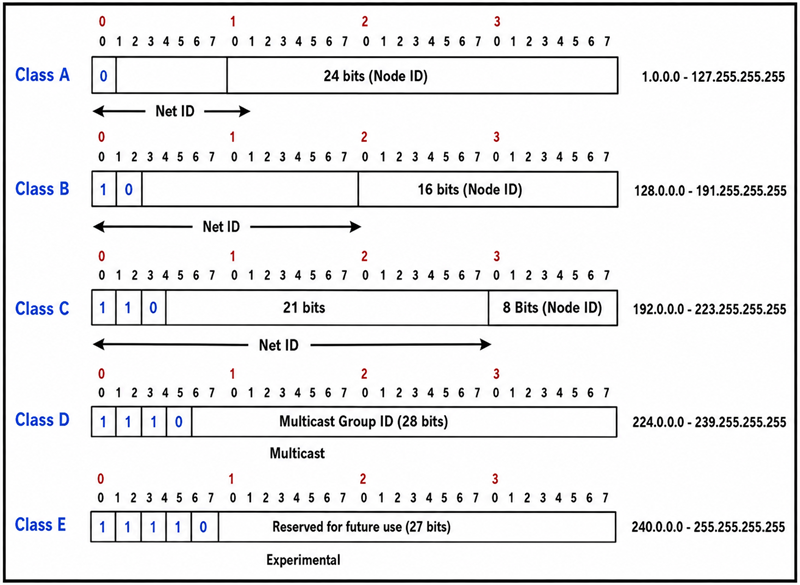
- The class ‘A’ Address ranging from 127.0.0.0 to 127.255.255.255 cannot be used and is reserved for loopback and diagnostic functions. The numbers of hosts which can be connected to this network are greater than 65536 hosts.
- The number of hosts connected within the class B networks is from 256 to 65534 hosts.
- The number of hosts connected within the class C network is less than 254 hosts. Therefore the class C network mask is perfect for the minor networks which are known as subnetworks. We utilize the bits from the last octet of class C for constructing mask. Thus we need to rearrange and optimize the subnet depending upon the availability of the bits.
Below table will show the masks that can be drawn on with Class C networks.
| Subnet Mask | Last octet binary Value | No. of hosts connected |
|---|---|---|
| 255.255.255.128 | 10000000 | 126 |
| 255.255.255.192 | 11000000 | 62 |
| 255.255.255.224 | 11100000 | 30 |
| 255.255.255.240 | 11110000 | 14 |
| 255.255.255.248 | 11111000 | 6 |
| 255.255.255.252 | 11111100 | 2 |
We have studied about the network class and subnet mask phenomenon of computer networking. Now let’s see how the mask will help us to classify the network ID and host ID part of an IP address.
Let us assume the case of a class A IP address:
For Example, take a pair of IP address and subnet mask 10.20.12.2 255.0.0.0
#1) Convert this Combination into a binary value:

#2) The bits corresponding to the subnet mask with all 1’s represent the network ID as it is a class A network and the first octet represents the network ID. The bits corresponding to all 0’s of the subnet mask is the host ID. Thus the network ID is 10 and the host ID is 20.12.2
#3) From the given subnet, we can also calculate the IP range of a particular network. If the IP is 10.68.37.128 (assuming class A case)
Subnet mask: 255.255.255.224
IP range =256-224= 32.
Out of 32 IP’s, ideally one is used for the gateway, second is for the network IP and the third is for broadcast IP.
Thus total usable IP’s are 32-3= 29 IP’s.
The IP range will be 10.68.27.129 to 10.68.27.158.
Subnet Mask Notation Explained: Decimal, Binary, and CIDR
Subnetting allows us to create various sub-networks or logical networks within one network of a particular class of the network. Without subnetting, it is almost unrealistic to create big networks.
For constructing a big networking system, every link must have a unique IP address with every device on that linked network which is being the participant of that network.
With the help of a subnetting technique, we can split the large networks of a particular class (A, B or C) into smaller subnetworks for inter-connection between each node which are situated at different locations.
Each node on the network would have a distinctive IP and subnet mask IP. Any switch, router or gateway that connects n networks has n unique Network ID and one subnet mask for each of the network it interconnects with.
The formulae of subnetting is as follows:
2^n >= requirement.
The formulae of a number of hosts per subnet is as follows:
2^n -2
Now let’s understand the overall process with the help of an Example:
We have taken an example of Class C network ID with a default subnet mask.
Suppose Network ID/IP address is: 192.168.1.0
Default Subnet mask: 255.255.255.0 (in decimal)
Default Subnet mask: 11111111.11111111.11111111.00000000 (in binary)
Thus the number of bits are 8+8+8+0= 24 bits. As mentioned earlier, for subnetting in class C network, we will borrow bits from the host portion of the subnet mask.
Therefore, to customize the subnet as per requirement:
We take a subnet mask of 255.255.255.248 (in decimal)
11111111.11111111.11111111.11111000 (in binary).
From the above binary notation, we can see that the last 3 bits of the last octet can be used for host ID addressing purpose.
Thus the number of subnets= 2^n = 2^3= 8 subnets (n=3).
Number of hosts per subnet= 2^n -2= 2^3 -2= 8-2= 6 Subnets i.e. usable Host IP.
Now the IP addressing scheme is as follows:
| Network IP | First Usable IP | Last Usable IP | Broadcast IP |
|---|---|---|---|
| 192.168.1.0 | 192.168.1.1 | 192.168.1.6 | 192.168.1.7 |
| 192.168.1.8 | 192.168.1.9 | 192.168.1.14 | 192.168.1.15 |
| 192.168.1.16 | 192.168.1.17 | 192.168.1.22 | 192.168.1.23 |
| 192.168.1.24 | 192.168.1.25 | 192.168.1.30 | 192.168.1.31 |
| 192.168.1.32 | 192.168.1.33 | 192.168.1.38 | 192.168.1.39 |
| 192.168.1.40 | 192.168.1.41 | 192.168.1.46 | 192.168.1.47 |
| 192.168.1.48 | 192.168.1.49 | 192.168.1.54 | 192.168.1.55 |
| 192.168.1.56 | 192.168.1.57 | 192.168.1.62 | 192.168.1.63 |
The subnet mask for all the above IP’s in the table is common i.e. 255.255.255.248.
With the help of the above example, we can clearly see, how subnetting helps us to construct inter-networking between various links and nodes of the same subnetwork. All these above IP’s can be used for inter-networking the devices within the overall network.
Note: Subnet mask is most widely used everywhere in a computer networking system. Hence, there is one more method to represent the subnet mask of a particular network which is chosen and standardized as it is easy to denote and memorize.
Subnet mask– 255.255.255.248 (binary)
11111111.11111111.11111111.11111000 (decimal notation)
From the decimal notation we can calculate the number of bits having 1 in each octet:
8+8+8+5= 29
Thus the Subnet mask can be denoted as /29.
With Network ID it can be denoted as 192.168.1.9/29.
From the above notation, anyone who knows the standard notation and formulae of subnetting can understand that the IP is using a subnet mask of 255.255.255.248 or /29.
The different Subnetting scheme in binary and decimal notation is shown below:
| Subnet Mask | Notation in decimal | Notation in Binary | Number of Usable IP |
|---|---|---|---|
| /24 | 255.255.255.0 | 11111111.11111111.11111111.00000000 | 254 |
| /25 | 255.255.255.128 | 11111111.11111111.11111111.10000000 | 126 |
| /26 | 255.255.255.192 | 11111111.11111111.11111111.11000000 | 62 |
| /27 | 255.255.255.224 | 11111111.11111111.11111111.11100000 | 30 |
| /28 | 255.255.255.240 | 11111111.11111111.11111111.11110000 | 14 |
| /29 | 255.255.255.248 | 11111111.11111111.11111111.11111000 | 6 |
| /30 | 255.255.255.252 | 11111111.11111111.11111111.11111100 | 2 |
The ‘/’ notation method of the subnet mask is most widely used as it is easy to memorize and the binary notation and decimal are very lengthy in size.
As we are denoting the mask scheme while interconnecting the network components through the figure, if we use the decimal and binary method then the overall diagram will become very complex and difficult to understand.
There are so many IP’s on the platform to be shown and it becomes difficult to memorize as well. Thus generally, people who are familiar with routing and IP addressing scheme use short notation methods in figures and diagrams.
Example 1:
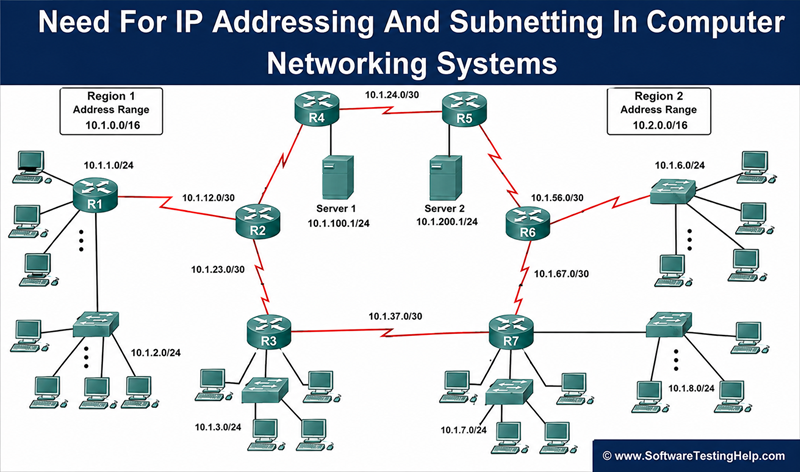
Understanding Subnetting with an Example of Interconnection of Network Devices:

The above figure shows how subnetting is used for interconnection of subnetworks. Firstly, as per our need for the number of hosts required to be connected and meet the other requirements of the network, we customize the subnet mask and network ID accordingly and assign to the devices thereafter.
The above network is using class C network mask and /29 subnet mask means network IP can be divided into 8 subnets. Each router has a unique IP address for each linked subnetwork.
There is an important point to be noticed that the more the bits we carry from the subnet mask for host ID then the more will be the subnets obtainable for the network.
Example 2:
Class B Network:
| Subnet mask | Notation in binary | Number of Usable IP | Number of Subnets |
|---|---|---|---|
| 255.255.128.0 | 11111111.11111111.10000000.00000000 | 32766 | 2 |
| 255.255.192.0 | 11111111.11111111.11000000.00000000 | 16382 | 4 |
| 255.255.224.0 | 11111111.11111111.11100000.00000000 | 8190 | 8 |
| 255.255.240.0 | 11111111.11111111.11110000.00000000 | 4094 | 16 |
| 255.255.248.0 | 11111111.11111111.11111000.00000000 | 2046 | 32 |
| 255.255.252.0 | 11111111.11111111.11111100.00000000 | 1022 | 64 |
| 255.255.254.0 | 11111111.11111111.11111110.00000000 | 510 | 128 |
| 255.255.255.0 | 11111111.11111111.11111111.00000000 | 254 | 256 |
| 255.255.255.128 | 11111111.11111111.11111111.10000000 | 126 | 512 |
| 255.255.255.192 | 11111111.11111111.11111111.11000000 | 62 | 1024 |
| 255.255.255.224 | 11111111.11111111.11111111.11100000 | 30 | 2048 |
| 255.255.255.240 | 11111111.11111111.11111111.11110000 | 14 | 4096 |
| 255.255.255.248 | 11111111.11111111.11111111.11111000 | 6 | 8192 |
| 255.255.255.252 | 11111111.11111111.11111111.11111100 | 2 | 16384 |
The above table shows the details of the number of subnets and hosts that can be connected per subnet mask by using Class B subnetting Scheme.
For connecting a host in big quantity and WAN communication systems, the Class B subnetting is very effective as it gives a wide range of IP’s for configuration.
=> Watch Out The Simple Computer Networking Basics
Frequently Asked Questions about IP Subnetting
How many usable IP addresses are available in a /29 subnet?
There are a total of 8 IP addresses in a /29 subnet; out of which 6 can be used for hosts. One address is reserved for the network address and one for the broadcast address.
What is the subnet mask for /29?
The subnet mask for /29 would be 255.255.255.248. It offers 6 usable hosts and is commonly used for small networks and public IP allocations.
How do I calculate a subnet mask manually?
In order to calculate subnet mask manually, you need to convert the CIDR value into binary form. For instance, 24 bits CIDR would be 24 bits long binary and would give the result of subnet mask 255.255.255.0.
What is the difference between CIDR and subnet masks?
CIDR notation uses the concept of a prefix size (/24), which specifies the number of bits that specify the network ID part of an IP address. Subnet masks express this concept using dotted-decimal notation (like 255.255.255.0).
What is a subnet mask table?
Subnet mask tables are charts for converting CIDR prefix sizes, subnet masks, and available numbers of hosts into one another, allowing network administrators to calculate the number of hosts in a particular network.
How many hosts are available in a /24 subnet?
/24 network includes 254 available host IP addresses and two reserved addresses (the network ID address and the broadcast address).
What is a wildcard mask?
A wildcard mask refers to the inverse of a subnet mask. The use of this type of mask is common in routing and access control lists. For instance, the wildcard mask for 255.255.255.0 is 0.0.0.255.
What are private IP address ranges?
There are three sets of private IPv4 addresses, which include the following:
10.0.0.0 – 10.255.255.255 (10.0.0.0/8)
172.16.0.0 – 172.31.255.255 (172.16.0.0/12)
192.168.0.0 – 192.168.255.255 (192.168.0.0/16)
These addresses cannot be routed on the Internet and are therefore used internally
What is the easiest way to learn subnetting?
The simplest way to become proficient in subnetting involves the following steps: memorizing CIDR blocks (/24, /25, /26, /27, /28, /29, /30), learning how to count the number of hosts, and working with subnet masks and subnet calculators.
Conclusion
In this tutorial, we have learned the need for IP addressing and Subnetting in the computer networking systems, with the help of different examples.
The IP addressing scheme and Subnetting are the building blocks in defining the subnetworks and IP’s within a large network.
The different formulas we have used will help us in determining the hosts that we can connect in a particular network and how also enable us to know how a huge network can be divided into many smaller networks for easier communication.
Was this helpful?
Recommended Reading
-

Computer Networking: The Ultimate Guide to Computer Network Basics and Networking Concepts Computers and the Internet have changed this world and our lifestyle very significantly over the last few decades. A few decades ago, when we wanted to do a long distance trunk call to someone, then we had to…
-

A Complete Guide to Layers of TCP/IP Model: We learned all about Firewall Security in our previous tutorial. Here, in this tutorial, we will learn about TCP/IP Model. The TCP/IP model refers to transmission control protocol and Internet protocol. The current Internet model is using this network model for communication purposes.…
-
An In-depth look at Firewall With Classic Examples: We explored All about Routers in our previous tutorial in this Networking Training Tutorials for All. In this current modern-day communication and networking system, the use of the internet has evolved vastly in almost all sectors. This growth and usage of the…
-
Role and Significance of Routers in Computer Networking System: Our previous tutorial in this Full Networking Training Series explained us about Layer 2 and Layer 3 switches in detail. In this tutorial, we will see about Routers in detail. Routers are widely used everywhere in our daily life as these…
-
Difference Between Layer 2 and Layer 3 Switches in Computer Networking System: In this Beginner's Networking Training Series, our previous tutorial briefed us about Subnetting and Network classes in detail. We will learn the various features and application of Switches at layer-2 and layer-3 of the OSI reference model. We…
-
Explore the Differences between LAN, WAN, And MAN. Layers of the OSI Model were explained in detail in our previous tutorial. In this tutorial, we will take a look at the most common types of network. Various types of computer networking systems are used for communication systems all throughout the…
-
What is OSI Model: A Complete Guide to The 7 Layers of the OSI Model In this Free Networking Training Series, we explored all about Computer Networking Basics in detail. OSI Reference Model stands for Open system interconnection reference model which is used for communication in various networks. The ISO…
-
All You Need to Know about Wide Area Network (WAN) Network Design: In this Networking Training Series, we learned all about the TCP/IP Model in our previous tutorial. This tutorial will explain all about WAN in detail along with Examples. A wide area network (WAN) is a telecommunication network that…


