


Get reliable email delivery & excellent support with the top Amazon SES competitors. Pick the best Amazon SES alternative with a user-friendly interface for flexible deployment options and high deliverability:
As far as email service providers go, Amazon SES is undoubtedly one of the most popular tools out there. You can attribute this popularity to its price, which is cheaper than many of its contemporaries in the market.
While this low price has garnered it a lot of fanfare over the years, its setup has been a major source of grief for users.
Amazon SES Replacements: Make the Right Choice

Configurations within SES can be painstakingly tedious as you are expected to follow a series of hard-to-grasp instructions. If you value your time, Amazon SES might not be the best email service provider.
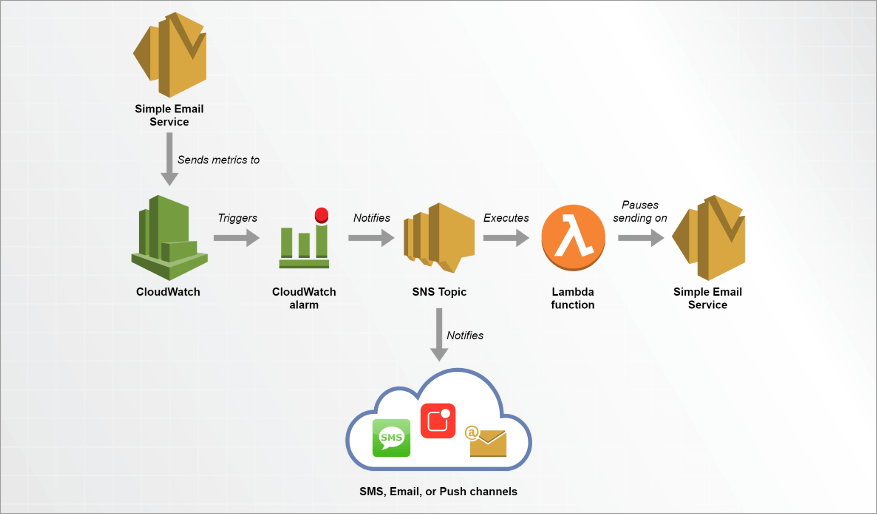
via Amazon AWS
Here is the video on how to set up Amazon SES to send emails:
Fortunately, there are alternatives in the market that don’t require a complicated setup just so you can start sending emails. I’ve used Amazon SES in the past for transactional emails. My frustrations with the tool are what compelled me to look for alternatives.
I see this article as an opportunity to recommend alternatives that I believe are far more user-friendly than Amazon SES.
So, without much further ado, let’s dive in.
How I Picked These Alternatives for Amazon SES
Having used Amazon SES extensively for months, I knew exactly what I wanted from an alternative option. Here are the factors I considered while shortlisting tools:

1. User-friendliness: As I mentioned before, most users, including myself, have gripes with Amazon SES because of its complex configuration. The tools I’ve mentioned on this list are all easy to use. Both technical and non-technical users will have an easy time using them.
2. Deliverability Improvement: You must go for email service providers that have a proven track record of landing emails into inboxes. Look for tools that come with features that specifically help with improving an email campaign’s deliverability rate.
3. Easy Integrations: Make sure the tool you choose facilitates easy integrations with your entire tech stack, if possible. Every tool I’ve mentioned here offers robust integrations with prominent third-party applications for a better user experience.
4. Scalability: An email service provider should be able to handle any volume of emails. Choose a service that is easier to scale in a bid to accommodate both current and future email volume.
5. Templates: I’ve mentioned tools on this list that offer pre-built templates and an email builder. You can use them to customize an email per your preference or create a new one from scratch.
6. Price: It is hard to beat Amazon SES pricing. That said, it is not difficult to find a tool that offers its service for a reasonably affordable price. Each tool mentioned on my list offers flexible plans, with subscriptions catering to small start-ups as well as large enterprises.
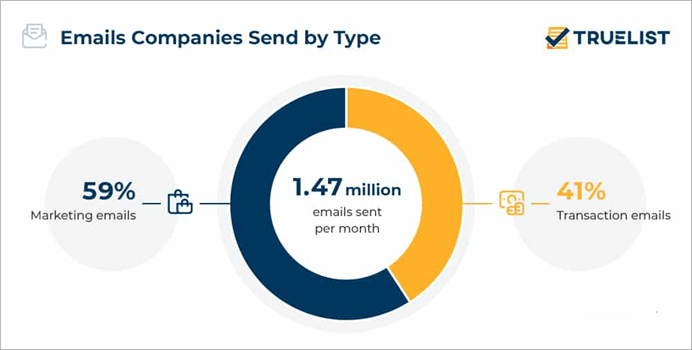
via Truelist
Expert Advice
List of the Best Amazon SES Alternatives
- Zoho ZeptoMail
- MailerSend
- Mailtrap
- SendPost
- Mailgun
- PostMark
- Twilio SendGrid
- Mailchimp
Comparing the Top Amazon SES Competitors
| Name | Best for | Top Features | Price | Rating |
|---|---|---|---|---|
| Zoho ZeptoMail | Sending and managing transactional emails, creating Mail Agents. | SMTP Relay, Email Insights, Suppression List | Starts at $2.50 per credit | 5/5 |
| MailerSend | Analytical dashboard, collaboration, and integrations | User management, Email builder, Split testing | Free for 3000 emails. Starts at $28/month | 4.5/5 |
| Mailtrap | Email sending, testing, and marketing | Email Logs, Email Testing, Email Editor | Email Sending starts at $15/month. Email Sandbox starts at $14.99/month. | 4.5/5 |
| SendPost | Email sending and validation API | Deliverability stats, rate limiting, and smart alerts | $3 for every 10000 emails | 4.5/5 |
| Mailgun | Transactional and marketing emails, Analytics. | Email validation, Email Accessibility, Email Testing | Starts at $15/month | 4.5/5 |
Best Alternatives of Amazon SES:
#1) Zoho ZeptoMail
Best for Sending and managing transactional emails, creating Mail Agents.
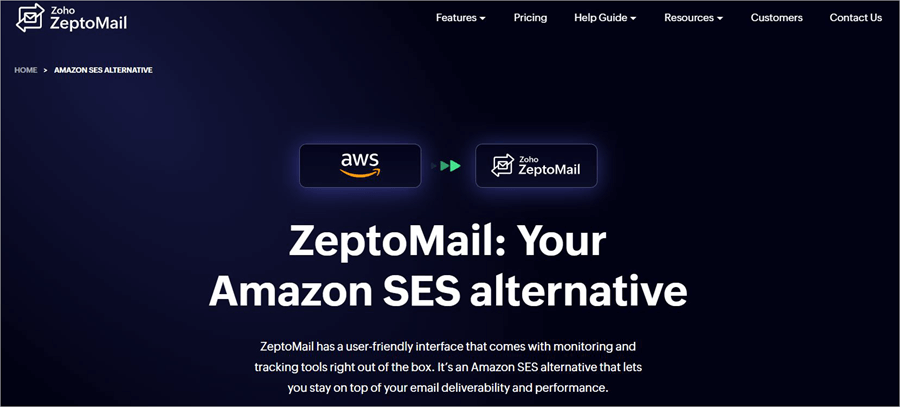
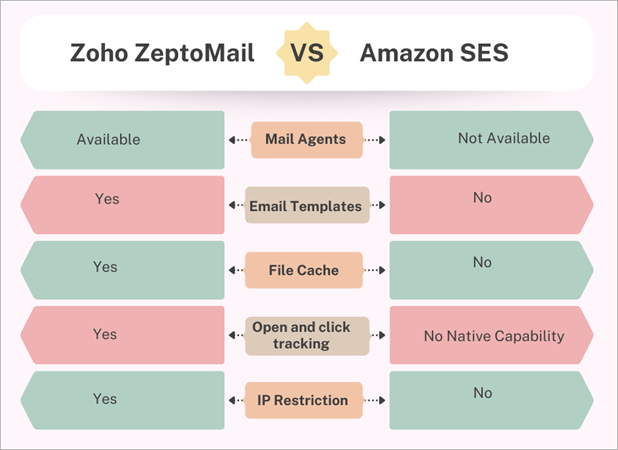
With ZeptoMail, you get a feature-rich and secure platform ideal for sending and managing transactional emails. While Amazon SES is largely used for marketing and transactional emails, ZeptoMail emphasizes the latter. This laser focus on transactional emails is ultimately what gives ZeptoMail an edge over Amazon SES.
You can count on the platform to send transactional emails optimized for best deliverability. ZeptoMail also features a library containing a ton of intuitively designed templates. As such, you have the privilege of either creating your email from scratch or choosing a sample template instead for convenience.
It is also quite simple to categorize your emails by creating multiple “Mail Agents”. By creating “Mail Agents”, you’ll be able to group emails based on their type, application, purpose, and other factors. Each created group will have its analytics and credentials.
You are also provided with deep insight into each email sent. All the information you need to improve the performance of your emails is offered. This includes insight into clicks, open rate, bounce rates, and status of all emails sent.
ZeptoMail is relatively simpler to set up and use when compared to Amazon SES. All of its features are easily accessible, thus making the prospect of sending transactional emails hassle-free.
Who is it for?
I would say ZeptoMail is best suited for businesses that seek an email service provider solely for the purpose of sending transactional emails. Businesses of all sizes and spanning different industries will find this platform of great use to them.
Further Reading => Top-Rated SMTP Services to Look For
Features
- SMTP Relay: Setting up ZeptoMail with any application or program your business depends on is quite simple. The platform facilitates simple SMTP configuration, thus making it easier to plug ZeptoMail with any application.
- Email Segmentation: You get segmented emails via ZeptoMail by creating multiple groups called MailAgents. The emails can be categorized based on their application, domain, type, etc. Each created group will feature its credentials and analytics.
- Email Insights: Get deeper insights into each sent email. With real-time information on status, bounce rates, open rates, and clicks, you can take measures to improve the performance of your email campaigns.
- Suppression List: Email addresses that are known for frequent bounces can be added to a suppression list. Once added, these addresses will be blocked from receiving emails in the future, thus dramatically bringing your bounce and spam rates down.
- Email Templates: The platform offers a ton of ready-made templates to help you create compelling transactional emails. You can customize these templates with ease and even add attachments and images to them.
| Pros | Cons |
| User-friendly | Nothing significant |
| Email template library | |
| Flexible pricing | |
| Security-first approach | |
| Integration with Zoho and other third-party applications | |
| Comprehensive Reports |
Price: ZeptoMail adheres to a pay-as-you-go model of pricing. It will cost you $2.50 per credit. A single credit represents 10,000 transactional emails.
Website: https://www.zoho.com/zeptomail/amazon-ses-alternative.html
#2) MailerSend
Best for Analytical dashboard, collaboration, and integrations.
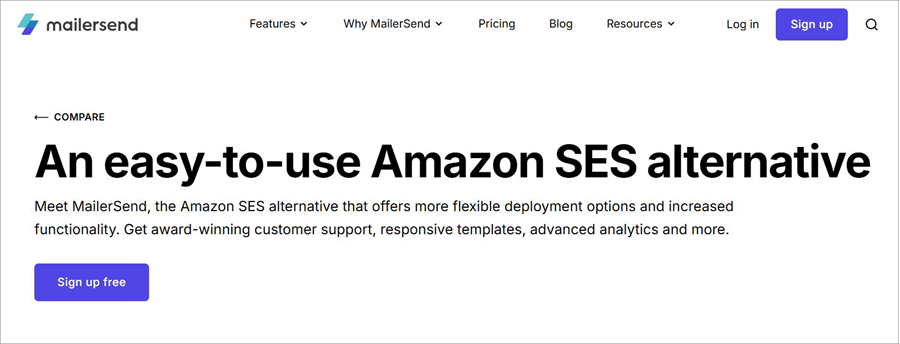
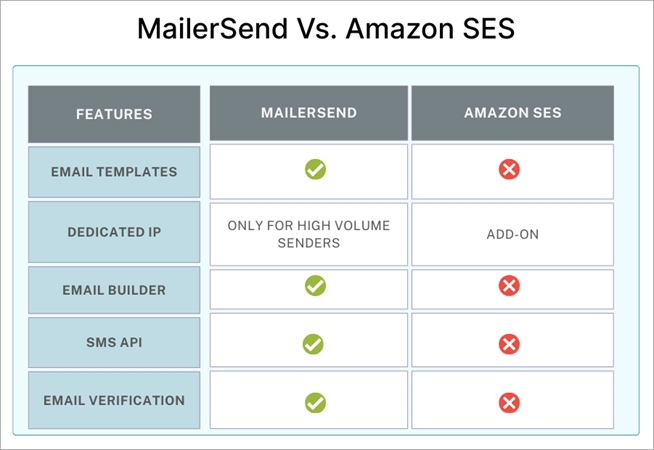
Most folks who’ve used MailerSend in the past hold it in high regard for its functionality and flexible deployment. I consider it one of the best Amazon SES alternatives for its analytical capabilities and the integrations it facilitates. The platform does a great job of optimizing your transactional emails before they are sent.
MailerSend proves quite helpful in keeping bounce rates and spam reports at bay. As I mentioned before, the platform is lauded for offering flexible deployment options. You get detailed documentation to assist with the deployment and setup. Simply plug in MailerSend’s API or SMTP relay to any app, and you are good to go.
Similarly, establishing integrations is also a breeze with MailerSend. The platform integrates seamlessly with various third-party applications without any coding necessary. Building emails is also quite simple, as you are provided with three different options. You can opt for the drag-and-drop builder, go with the HTML editor, or use the rich-text editor to create stunning transactional email designs from scratch.
You can easily monitor the performance of your emails once sent via the analytical dashboard. You get comprehensive insight into the open, clicks, and bounce rates. You can create custom reports as well.
Who is MailerSend for?
MailerSend is best-suited for developers and businesses, especially small and mid-sized enterprises. Developers can use MailerSend’s API and SMTP relay to integrate transactional emails into any application. MailerSend is perhaps the best option for start-ups because of its free plan that lets you send 3000 emails without paying a dime.
Features
- Email Building: Creating emails from scratch is a breeze with MailerSend. You get three types of editors to create transactional emails. You can choose from a custom HTML editor, a Rich-text editor, and a drag-and-drop template builder.
- Split Testing: You can use MailerSend to perform A/B tests on emails. You can split-test two or more versions of an email to check which version performs better. You are also provided with clear A/B testing metrics to make an informed decision.
- Result Tracking: The platform grants you an overview of your email activity in real-time. You get to analyze the performance of your email against a wide range of key metrics. Referring to the analytical dashboard can help you keep an eye on the deliverability and engagement that your emails manage to farm.
- User-Management: MailerSend is excellent for team collaboration. You can grant access to multiple users and manage access roles with ease.
- Email Verification: MailerSend comes with an in-built email verification list to ensure emails are sent to authentic addresses. Email addresses with frequent bounces are automatically added to the suppression list.
| Pros | Cons |
| Free plan | Priority support is only available with the more expensive plan. |
| Drag and drop template builder | |
| Tracking and analytics | |
| 24/7 Support | |
| Built-in email verification | |
| Multiple domains |
Price: MailerSend offers flexible and affordable pricing plans. They are as follows:
- Starter: $28/month
- Professional: $88/month
All plans are billed annually. There is a free-forever plan, which will let you send 3000 transactional emails. A custom enterprise plan is also offered upon contact.
Website: https://www.mailersend.com/compare/amazonses-alternative
#3) Mailtrap
Best for Email sending, testing, and marketing.

Mailtrap is another great alternative to Amazon SES if you are seeking a tool that can go toe-to-toe with the latter when it comes to cost and analytics. The tool serves multiple different purposes for multiple different parties.
Developers can use it to gain better control over their email infrastructure’s performance, whereas businesses can use the tool to launch and optimize email marketing campaigns. In my opinion, the tool works best when it is used to fix sending issues associated with transactional emails.
Also Read => Best Email Marketing Services
Its dashboard is one of the platform’s most endearing aspects. The dashboard features detailed analytics with key stats connected to all emails sent. These insights can prove helpful during troubleshooting and debugging. Mailtrap also works with almost all mailbox providers. These include prominent names like Gmail, Outlook, and Office 365.
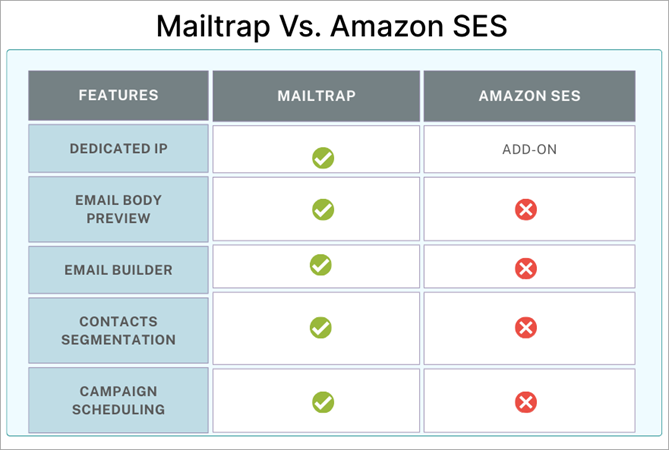
You’ll be able to check email performance for each of these providers. Creating and scheduling email marketing campaigns is also simple with Mailtrap. You can use templates or rely on AI to create emails. Scheduling is also simple, as you set an email to be sent at a specific date and time weeks in advance.
Who is Mailtrap for?
Mailtrap is yet again a tool that I’d recommend to developers and businesses. Developers can rely on Mailtrap’s RESTful API and SMTP for the reliable sending of transactional emails. On the other hand, businesses and marketers can rely on the app to create, send, manage, and monitor email marketing campaigns.
Features
- Email Logs: The platform provides you with access to detailed email logs. You get access to an extended history of up to 30 days. You can refer to these logs to get a better understanding of your email’s performance after it was sent.
- Email Segmentation: You can categorize emails into multiple groups based on various factors. Each segment will have its corresponding metric.
- Email Testing: Mailtrap is one of the email testing tools that can be used to test and debug emails in staging, dev, and QA environments. You can rely on a flexible API to automate test flows. You can also assess an email’s content to validate HTML/CSS as well as check its spam score.
- Email Templates: You are provided with a sizeable selection of ready-made email templates. You can craft campaigns from scratch in varying designs using these templates.
- Email Editor: Mailtrap comes with a drag-and-drop email builder. This builder, alongside a responsive AI, can help you create compelling email campaigns without wasting any time.
| Pros | Cons |
| Flexible pricing | The analytics interface could benefit from a slight makeover. |
| Free plan | |
| Helicopter view dashboard | |
| Drag-and-drop email builder | |
| Template library | |
| Email testing |
Price: Mailtrap is free to use. Its premium plans are flexible and affordable. The Email Sending plans for email marketing and API/SMTP start at $15/month. The Email Sandbox plans for testing email flows start at $14.99/month.
Website: https://mailtrap.io/mailtrap-amazon-ses-alternative/
#4) SendPost
Best for Simple email sending and email validation API.
SendPost is another platform I have no problem recommending to developers and businesses as a possible alternative to Amazon SES. The platform stands out for offering a clean UI/UX and a simple email API. Both of these elements work hand-in-hand to make the task of sending emails via SendPost quite convenient.
The platform is also highly scalable. It offers you dedicated IPs, detailed stats, and pro-deliverability tools to handle the increasing volume of emails. SendPost has API SDKs in more than 14 programming languages. This makes the tool ideal for sending and validating transactional emails.
IP reputation and blocklist tracking is another area where this platform shines. You don’t need to make any effort to retrieve data related to these elements manually. The platform retrieves this data for you automatically so you can make an informed decision.
Keeping track of your emails is also effective with this tool. With deeper analytics and smart alerts to rely on, you can track the overall performance of your sent emails. The insights provided do a good enough job of helping you get to the bottom of an issue concerning the deliverability of your emails.
Who is SendPost for?
The clean email API makes the tool ideal for developers. Besides this, I believe e-commerce businesses will also find value in SendPost, especially for its ability to send personalized, interactive emails. The platform is also great for large email senders and ESPs due to its alerting and email throttling capabilities.
Features
- Deliverability Stats: The platform provides you with detailed deliverability stats. You get stats for email ISPs, sub accounts, SMTP errors, etc. You can refer to these stats to get an idea of your emails’ overall performance.
- Smart Alerts: SendPost lets you set up smart alerts and notifications. Once setup, you are immediately notified of any issues related to hardbounce or blacklisting via Slack or email.
- Dedicated IPs and Pools: SendPost lets you manage both dedicated and shared IP pools. You can rely on the tool’s IP warmup and advanced routing capabilities, which are both based on email volume and receiving domain.
- Rate Limiting: The speed at which emails are sent can be restricted at an IP. These emails can be routed from an IP pool depending on certain rules.
- Email Segregation: Like the best email service providers, SendPost also helps you segment your emails. You can categorize emails into sub-accounts and groups based on customers, product, email type, and other factors.
| Pros | Cons |
| 24/7 support | Some users have complained about minor issues with reports. |
| Automated alert setup | |
| 90-day log retention | |
| Clean UI/UX | |
| Transparent pricing |
Price: SendPost also sticks to a pay-as-you-go pricing model. You are charged $3 for every 10,000 emails sent. SendPost also offers a free demo upon request.
Website: https://www.sendx.io/sendpost/
#5) Mailgun
Best for Transactional and marketing emails, Analytics.
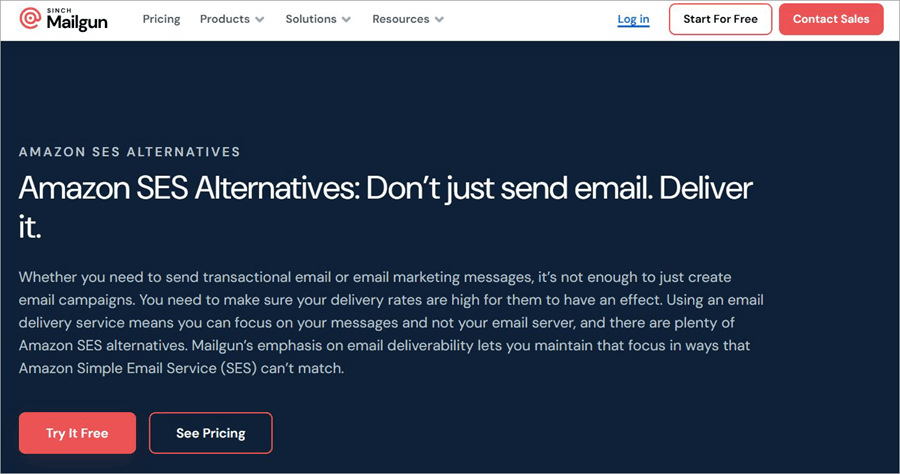
Like Amazon SES, Mailgun is a platform that lets you send and manage transactional as well as marketing emails. Unlike Amazon SES, though, Mailgun does not charge you extra bucks for attachments with your emails. This makes the platform a more cost-effective alternative to Amazon SES on this list.
Everything you’ve come to expect from a tool that specializes in transactional emails is available with Mailgun. You can use this tool’s SMTP relay to integrate transactional emails into any application your business uses. The configuration and setup to do this are quite simple, and you don’t need to be a skilled developer.
Mailgun also offers an effective email validation service. All addresses on your list are verified. This thorough validation ensures your emails steer clear of blocklists and inboxes that are essentially spam traps. You can count on Mailgun’s validation service to drastically improve your email’s open and bounce rates.
Who is Mailgun for?
I believe both developers and businesses who want to send and manage transactional emails will find Mailgun useful. The platform’s scalability and integrations make it ideal for businesses of all sizes.
Features
- Email Analytics: Like the best tools on this list, Mailgun also stands out for its analytical capabilities. You are provided with detailed insights into your email’s performance. You can assess your campaign’s performance based on the open rate and how many unique clicks it gets.
- Email Validation: You can rely on Mailgun’s validation services to ferret out invalid email addresses within your list. This can help you land emails in valid inboxes and improve your conversion rates in the process.
- Email Accessibility: The platform arms you with the tools necessary to create an email that is easy to comprehend. You can create emails that are EAA and ADA compliant with Mailgun.
- Email Testing: The platform lets you perform A/B tests before sending an email. You can analyze your email’s text, images, and check for spammy content to make sure your email campaigns deliver results.
- Inbound Email Routing: Mailgun can simplify incoming emails by parsing them for useful content. This way, only important data is extracted and presented to you from complex email threads.
| Pros | Cons |
| Email validation | The support isn’t responsive. |
| Comprehensive analytics | |
| Flexible Pricing | |
| Email template builder | |
| AI-Powered Tools |
Price: Mailgun can be used for free to send 100 emails per day. Its premium plans are affordable. They are priced as follows:
- Basic: $15/month
- Foundation: $35/month
- Scale: $90/month
The premium plans can be used for the first 30 days without paying a dime.
#6) Postmark
Best for Deliverability stats, Email API, and Customer Support.
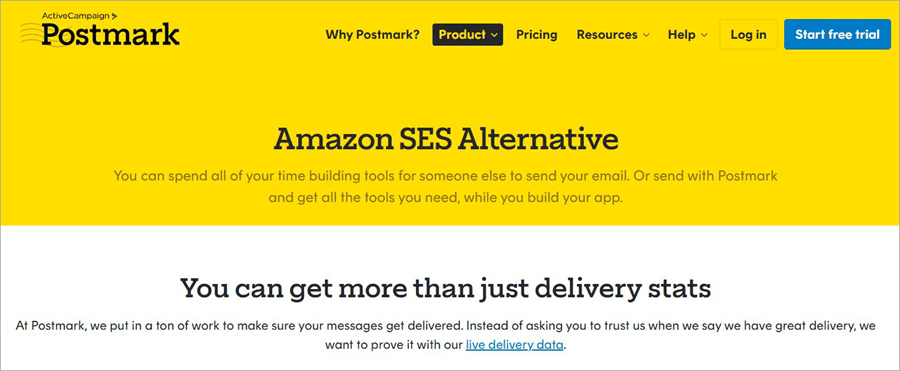
Postmark is in a league of its own when it comes to SES alternatives. It stands out by offering comprehensive and insightful deliverability stats that let you understand just how well your emails are performing. This tool offers everything you need from a transactional email service provider.
Creating a transactional email that converts is simple with this platform, as you are provided with a variety of ready-made templates. You can choose to customize these templates or create an email from scratch via Postmark’s intuitive email builder.
Support is another one of Postmark’s greatest strengths. You can reach out for support via live chat, email, or phone, round-the-clock. The official site is also stacked with resources to help you navigate the tool without intervention.
It is also worth mentioning that Postmark integrates seamlessly with ActiveCampaign. This integration proves invaluable as you can send transactional emails via any automation in ActiveCampaign. You can also hope to elevate your email marketing efforts by using Postmark with ActiveCampaign.
Further Reading => Most Popular Email Marketing Tools
Who is Postmark for?
Postmarks is a tool I’d recommend to marketing agencies and enterprises of all sizes because of the features being offered. The tool is especially ideal for Bootstrapped startups, as you can send up to 100 emails per month for free. Furthermore, its premium plans are also quite affordable.
Features
- Email API: Postmark offers powerful RESTful APIs and libraries in almost every programming language out there. As such, Postmark makes it easier to integrate emails with any product or app your business uses.
- Message Streams: Each email sent via Postmark is optimized for better deliverability via these features. Message streams are either classified as transactional or broadcast, This classification helps the tool route emails to the right sending IPs.
- Customizable Templates: Your subscription to Postmark will include pre-built templates for different types of transactional emails. You can customize and personalize these emails per your preference with the help of Postmark’s built-in tools and editor.
- Inbound Email Addresses: Postmark lets you use an automatically generated inbound email address or customize one from scratch. You can create multiple inbound addresses for each domain.
- Email Logs: By default, Postmark stores the full content of each email sent for up to 45 days. You can adjust this data retention time frame per your preference. All the data you need to assess your email campaign’s performance is readily available to you via your account’s dashboard.
| Pros | Cons |
| Highly scalable | Historical records are only kept for up to 45 days |
| Free to use | |
| Responsive support | |
| Integration with ActiveCampaign and many other third-party applications | |
| Dedicated IPs for high-volume sender |
Price: Postmark can be used for free to send up to 100 transactional emails per month. If you want to send more emails, you’ll need to subscribe to any of the following plans:
- Basic: $15/month
- Pro: $60.50/month
- Platform: $138/month
Website: https://postmarkapp.com/compare/amazon-ses-alternative
#7) Twilio SendGrid
Best for Email Infrastructure that’s purpose-built to scale.
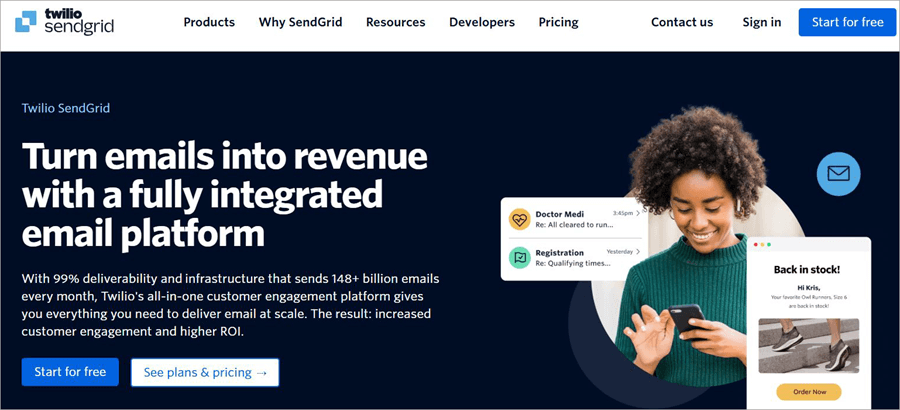
User-friendly, collaborative, and reliable are three things that I believe perfectly describe Twilio SendGrid as an email service provider. Like Amazon SES, you can rely on SendGrid for email marketing as well as transactional emails. Unlike its competitor, though, SendGrid impresses with a scalable email infrastructure.
You are also provided with intuitive tools for authentication, IPS monitoring, and advanced analytics. All of these tools prove useful in managing this infrastructure.
As such, you can count on SendGrid’s RESTful API and SMTP relay to create, send, and manage emails at scale. The tool is also feature-rich. You’ll find advanced features in the tool as well, like dynamic templates and the ability to validate emails.
Suffice it to say, if you are looking for an alternative to Amazon SES that’s easy-to-use and highly scalable, you are going to adore Twilio SendGrid.
Who is Twilio SendGrid for?
Just like Amazon SES, Twilio SendGrid serves businesses and developers. Due to its scalable infrastructure, the tool is suitable for businesses of all sizes. On the other hand, the tool caters to developers with RESTful Email APIs and SMTP relay.
Further Reading => Best SendGrid Alternatives of the Year
Features
- Dynamic Templates: SendGrid comes with pre-built templates, which can be customized with HTML editing or a WYSIWYG editor. These templates can be personalized for language, imagery, location, etc.
- Deliverability Insights: You are provided with in-depth insights into your email campaigns via a streamlined dashboard. You can assess the performance of your emails against several key metrics like open rates, bounces, processed mail, etc.
- Email Marketing: SendGrid offers features that can automate your email marketing efforts considerably. It lets you create high-impact email automations. You are also provided with a centralized view to monitor the performance of your campaigns.
- Email Validation: SendGrid will verify each address on your email list in real-time. The tool’s validation capabilities do a good job of scrubbing your list clean of invalid addresses. This is a good feature to improve your sender reputation.
| Pros | Cons |
| 24/7 Support | The cheaper plan is very limited in terms of the features being offered. |
| Dynamic Templates | |
| Email Marketing automation | |
| A 60-day free trial |
Price: Twilio SendGrid offers the following plans:
- Essentials: Starting $19.95/month
- Pro: Starting at $89.95/month
A 60-day free trial is also offered with the ability to send 100 emails per day. You can also request a plan customized to your preference by calling SendGrid’s team.
Website: https://sendgrid.com/en-us
#8) MailChimp
Best for Email Marketing and Marketing Automation.
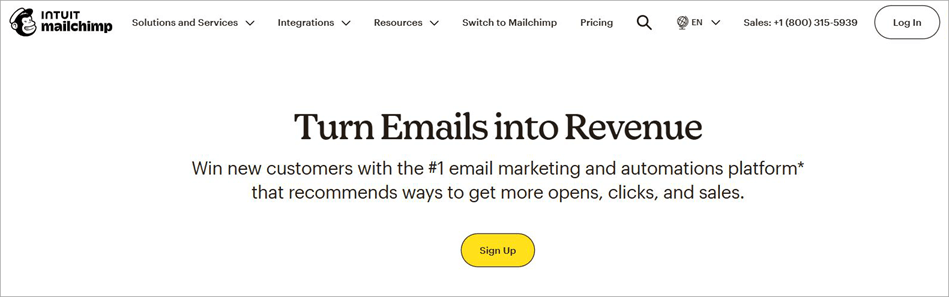
MailChimp is a household name by now. After all, it is a widely used platform for streamlined email marketing. Its popularity aside, the tool’s many features and user-friendly nature also make it an ideal alternative to Amazon SES. The tool is perhaps best used for marketing automation.
You can create email marketing campaigns with ease. You have an email builder as well as a stacked template library to assist you. The platform also features AI capabilities that further simplify the tasks of creating compelling, high-conversion marketing and transactional emails.
Once a campaign is launched, you can track its performance via MailChimp’s filterable dashboard. You are provided with granular insights into your campaigns in a visual format. As such, it is easier to understand how your emails are performing, what’s going wrong, and how to fix the issue at hand.
Although it is relatively expensive, it is one of the more user-friendly tools on this list. If you are looking for an easy-to-use tool to manage marketing and transactional emails that also facilitates robust integrations, Mailchimp could be the tool for you.
Who is MailChimp for?
MailChimp is suitable for any business, freelancers, or agencies that wish to streamline their email marketing endeavors for better results. E-commerce enterprises will find the tool especially useful, as it integrates seamlessly with prominent e-commerce platforms like WooCommerce and Shopify.
Features
- Marketing Features: The tool’s primary purpose is to help you launch email marketing campaigns optimized for high conversion and deliverability. It lets you split-test your emails and even automate several redundant aspects of a typical campaign.
- Content Creation: You are provided with ready-made templates to create high-conversion emails. There are several stunning designs to choose from. You can rely on its generative AI capabilities to write emails as well.
- Audience Management: The tool features some impressive CRM capabilities. You can segment your contact and email list with ease. You can also rely on the tool to send targeted emails.
- Marketing Automation: The tool lets you considerably automate your campaigns to save time. You can launch retargeting ads, personalize emails automatically, and set up transactional emails that are triggered based on user actions.
- Analytics: Tracking campaign performance is simple and can be done via the dashboard provided to you. You get real-time insights and smart recommendations to boost the performance of your campaigns.
| Pros | Cons |
| User-friendly | Relatively expensive, especially when compared with Amazon SES. |
| Robust Integrations | |
| AI Marketing Tools | |
| Email builder | |
| Build personalized campaigns |
Price: For transactional emails, it will cost you $20 per block to send up to 500 thousand emails per month. For marketing emails, the plans start at $6.76/month. A free plan that lets you use the tool in a very limited capacity is also offered.
Website: https://mailchimp.com/
FAQ’s on Amazon SES Google Alternative
1. Is Amazon SES worth it?
Amazon SES is worth it in the sense that it is one of the most cost-effective email service providers out there. Its reliability and scalability are undeniable. The only problem I have with the tool is its configuration.
This is a problem echoed by many other users as well. Plus, if you want a tool that is more focused on transactional emails, Amazon SES might not be your cup of tea.
2. What makes an email service provider a better alternative to Amazon SES?
Like I mentioned before, Amazon SES stands out for its reliability, cost-effectiveness, and scalability. However, it isn’t exactly user-friendly. Its configuration can be tad bit complex. A good alternative would make up for the drawbacks of Amazon SES.
It should be easy to set up and use. You should look for a tool that lets you send and track transactional emails on a more granular level.
3. What are the best Amazon SES alternatives?
According to my experience, I would claim the following tools to be some of the best alternatives to Amazon SES:
• Zoho ZeptoMail
• MailerSend
• Mailertrap
• SnapX
• Mailgun
You’ll find a more in-depth review of each tool below. Hopefully, that can help you make an informed decision.
4. What is the difference between Amazon SES and SNS?
The difference between Amazon SES and SNS is the difference between day and night. However, people still end up confusing one for the other. Just know that while SES helps in receiving and sending emails, SNS serves a more general purpose of messaging. It is mostly used for notifications via email, SMS, or other forms of communication.
With SES, you can send high volumes of transactional and marketing emails. On the other hand, SNS helps you distribute messages in real-time via alerts and push notifications.
5. Can Amazon SNS be used as an alternative to SES?
No, both have different purposes to serve. SNS is for real-time message distribution via alerts and push notifications. It cannot be used for mass email campaigns like SES can.
6. Is Amazon SES expensive?
No, instead, this is one of the cheapest email service providers you are going to find in the market. Only a few notable tools come even close to matching Amazon SES’s pricing. It only costs you $0.10 to send 1000 emails via this tool.
7. Why use Amazon SES?
Amazon SES serves as a cost-effective solution for large-scale email sending. It addresses or tackles many challenges associated with sending emails at a higher volume. I am talking about challenges associated with server management, network configuration, and IP addresses.
These are all issues you don’t have to worry about when using Amazon SES. You can use it to send transactional and marketing emails using your email address and domain.
8. Can Amazon SES receive emails?
Yes, Amazon SES can receive emails. To make this possible, you’ll need to publish a mail exchange record within your domain’s DNS configuration. This published mail exchange will then route all incoming emails to Amazon SES.
9. Is Amazon SES an SMTP?
SMTP is a common protocol used to send emails. As such, Amazon SES does let you use SMTP to send emails. You’ll need a few things to successfully send an email via Amazon SES’s SMTP interface. This includes:
• SMTP Interface port number
• SMTP Endpoint address
• SMTP user name and password
• Email address verified with Amazon SES
• Client software that communicates with TLS
Conclusion
Amazon SES is a decent email service provider with a few glaring limitations. On one hand, I could praise it for its reliability and cheap price. On the other hand, it is hard to look past the difficult setup, extra cost for support, and very basic add-on features.
Fortunately, there are alternatives out there for folks who seek a tool that prioritizes convenience above everything else. Those are the tools you’ll find on this list. These are hands-down some of the best Amazon SES alternatives you are going to find today for sending and managing both marketing and transactional emails.
As for my recommendation, I would pick ZeptoMail for its user-friendliness, emphasis on transactional emails, and accurate deliverability stats.
Research Process
- I spent 18 hours researching and writing this article so you can have summarized and insightful information on which Amazon SES Alternative will serve you best.
- Total alternatives researched: 16
- Total Amazon SES alternatives shortlisted: 8
Was this helpful?
Recommended Reading
-

List of the best free Transactional Email API Service providers with detailed review and comparison: The white label Email API services are used to send transactional emails, newsletters, marketing emails, and promotional emails. Examples of transactional emails are the emails that we receive about social media updates, password resets, the…
-
Read this comprehensive review of Mailgun Email Marketing Service including its benefits, features, pricing, comparison of different Mailgun alternatives, etc.: Advertising is a crucial part of any business. When you own a business, in order to grab customers, you need to make people aware of what you are offering, how…
-
Here we will provide you the list of the top Email Validation API to verify emails for accuracy and quality before sending: If you wish to drive traffic to your website, boost customer engagement, or simply enhance your brand’s visibility, email marketing is arguably the greatest tool you have at…
-

List and Comparison of the Best Free Email Service Providers of 2026: In today's technological world, email is the most common way of communication, whether it is for business or personal use. There are several email service providers in the market with their own unique capabilities. This article will, in…


