Coviant Diplomat MFT is a reliable one-stop secure managed file transfer solution for any business. Read our in-depth review that unveils all about the tool to effortlessly automate and manage file transfer from anywhere:
In 2025, analysts estimated that the global average cost per breach reached around $4.44 million. This means that data breaches are a prevalent problem. Businesses benefit from secure file transferring solutions such as Coviant’s Diplomat MFT during this crisis.
For over 20 years now, Coviant’s Diplomat MFT has been the most sought-after managed file transfer solution around the globe. It is one of those rare tools that has continued to evolve since its inception, ensuring better security and regulatory compliance for businesses across industries.
Table of Contents:
Coviant Diplomat Managed File Transfer: An In-Depth Review
With the release of Diplomat MFT 9.4.1 in late 2025, I was both curious and cautiously optimistic about what the software had in store for us.
Does the latest version improve on its predecessor, Diplomat MFT 9.4? How significant a role do the new enhancements play in ensuring streamlined compliance and robust security?
I’ll attempt to answer these questions and more in this hands-on review of Coviant Software’s flagship MFT solution.
So, without much further ado, let’s get started.
Overview of Diplomat MFT
Diplomat MFT is an award-winning, feature-rich tool by Coviant Software that facilitates no-code, secure file transfer.
Here is a video for your reference:
Since its inception over 2 decades ago, this easy-to-use software has helped businesses in heavily regulated industries securely transfer sensitive files across SFTP, web-servers, cloud-storage, emails, and other mediums. The software supports various file transfer protocols like SFTP, FTPS, and HTTPS.
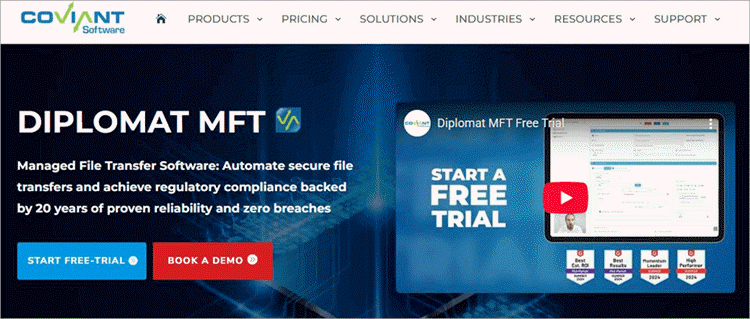
Thanks to the Edge-Gateway and SFTP server option, you can count on Diplomat MFT to handle the most complex file transfer processes. In addition to that, the software also supports prominent global data security standards like HIPAA/HITECH, PCI/DSS, GDPR, DORA, and more.
As such, leading organizations widely revered the software in the healthcare, manufacturing, legal, retail, government, and other industries that must comply with strict regulations.
It is also one of those rare MFT solutions that has evolved considerably over the years, introducing new features and enhancements that promise to further streamline the user experience.
The release of its 9.4.1 version last year serves as a testament to this fact. The new update builds on its already impressive predecessor, and I was floored by the extent of this. It introduces new improvements in the areas of visibility, administration, connectivity, and security.
Now that you know what Diplomat MFT entails, now would be a good time to segue into its features.
Check the video below on Diplomat MFT 9.4.1
Diplomat MFT Core Features
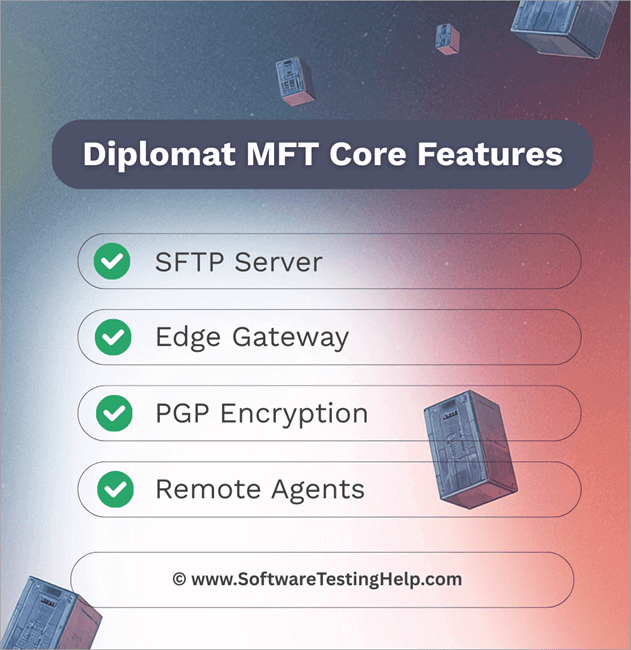
Here’s a deep dive into some of Diplomat MFT’s key features, which set it apart from so many of its contemporaries.
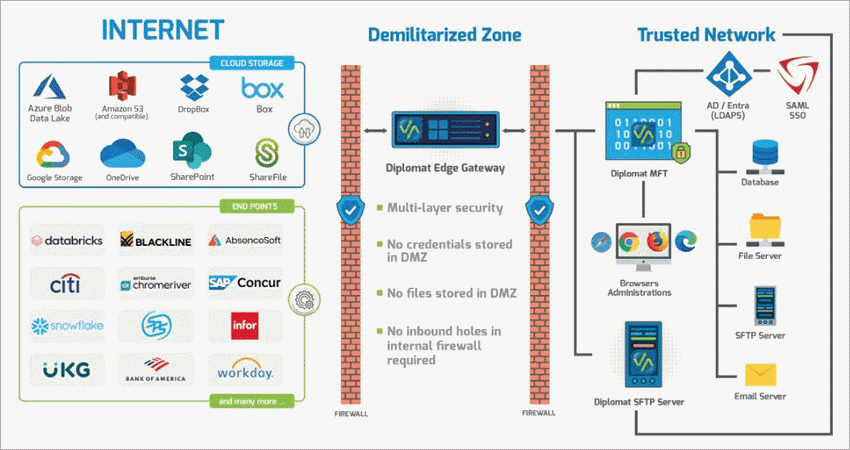
#1) SFTP Server
As far as enterprise-level SFTP server solutions go, Diplomat MFT is one of the best. You get a no-code, out-of-the-box SFTP server option that promises automated PGP encryption and enterprise-level scalability. This essentially makes the software ideal for organizations of all sizes and can help with secure file transfer, regardless of volume.
#2) Edge Gateway
I consider Edge Gateway to be a highlight of Diplomat MFT, especially when it comes to ensuring security. It essentially serves as a secure, external-facing extension installed in the DMZ and has no access to any type of sensitive information. Its core purpose is to act as a proxy for Diplomat MFT when interacting with external clients.
Edge Gateway securely coordinates the movement of SFTP traffic between Diplomat MFT and the internet. While doing so, it also ensures there are no inbound holes in the firewall while preventing sensitive files and credentials from being stored in the DMZ. This drastically reduces the risk of data breaches.
Thanks to Edge Gateway, organizations employing Diplomat MFT can expect maximized security, streamlined administration, and minimal threat vectors.
#3) PGP Encryption
As I said before, Diplomat MFT comes with built-in PGP (Pretty Good Privacy) encryption. Diplomat MFT automatically encrypts or decrypts all files you exchange or transfer through it. Organizations can count on this software to protect their data both in transit and at rest.
As the encryption is automated and integrated seamlessly into workflows, there is no room for manual errors. The level of encryption facilitated by Diplomat MFT makes it perfect for several organizations struggling to meet compliance standards as dictated by certain regulatory bodies.
For instance, healthcare institutions can use Diplomat MFT to meet strict regulations like HIPAA and HITECH.
#4) Remote Agents
This is yet another feature that ensures robust security for users of Diplomat MFT. With Remote Agents, Diplomat MFT offers a highly secure method to transport files. The tactic leverages OpenPGP encryption and authentication to facilitate secure, one-step data transfer between the MFT software and a remote location.
A Diplomat Remote Agent can be deployed in any location. It can be in a private cloud or a trading partner site. This also means that you don’t need two distinct solutions for secure file transfer and PGP encryption. There’s also no need for FTP or SFTP servers outside the firewall.
Furthermore, PGP keys for authentication can be reset whenever needed. You can also rely on a Diplomat Remote Agent to persistently update PGP keys for data encryption or decryption, thus requiring no intervention from your side.
New Enhancements in Diplomat MFT 9.4.1
Diplomat MFT is one of those rare MFT solutions that’s constantly evolving with new features and enhancements being introduced with each update. Perhaps this is one reason why the software has managed to gain such a strong foothold in the industry for over 20 years.
Diplomat MFT continued this tradition by releasing yet another update with version 9.4.1. This latest release comes with enhancements or features that promise even better unified security and streamlined compliance.
Those features are as follows:
#1) Unified Security
i) IP Access Rules
The new version offers control on a granular level, as evidenced by the new IP Access controls for both individual SFTP users and groups. While Diplomat MFT already helped you whitelist individual accounts, this new feature grants you the ability to perform this function per group and across the entire server, thus ensuring easier management.
The image below shows IP Access Rules:
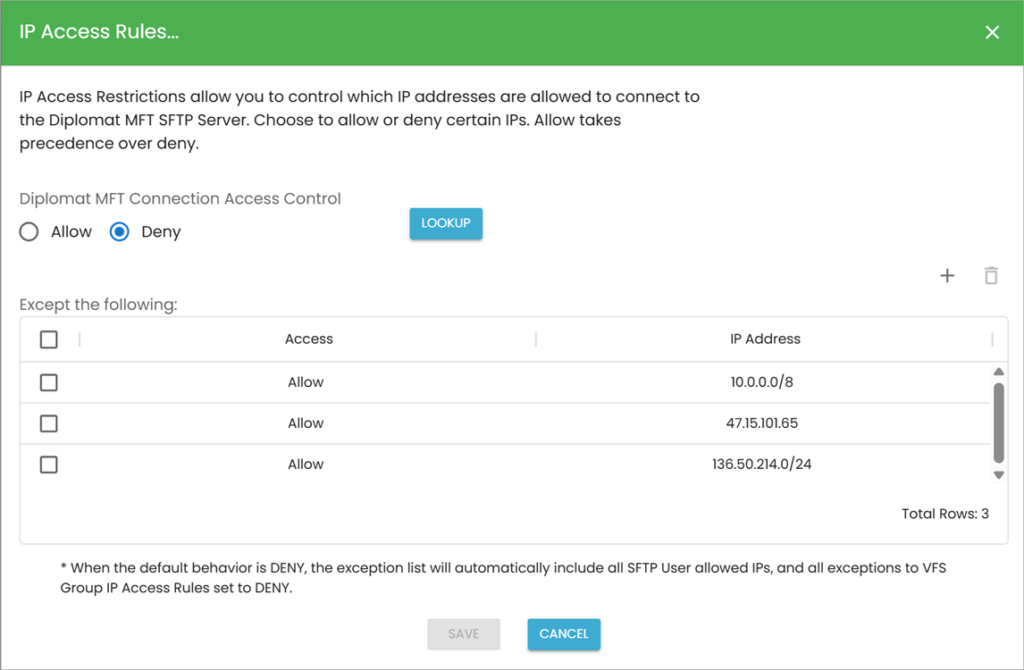
Rest assured, Diplomat MFT 9.4.1 lets you block any IP address that is deemed high-risk. This is an excellent enhancement, granting users the power to ensure only trusted accounts have access to sensitive files.
ii) Threat Intelligence
With the new 9.4.1 update, Diplomat MFT has become a pioneer in the industry. It is now one of the first software of its kind to feature built-in threat intelligence. This feature references multiple legitimate data sources to block malicious IP addresses in real-time.
The image below depicts Advanced Threat Intelligence Settings:
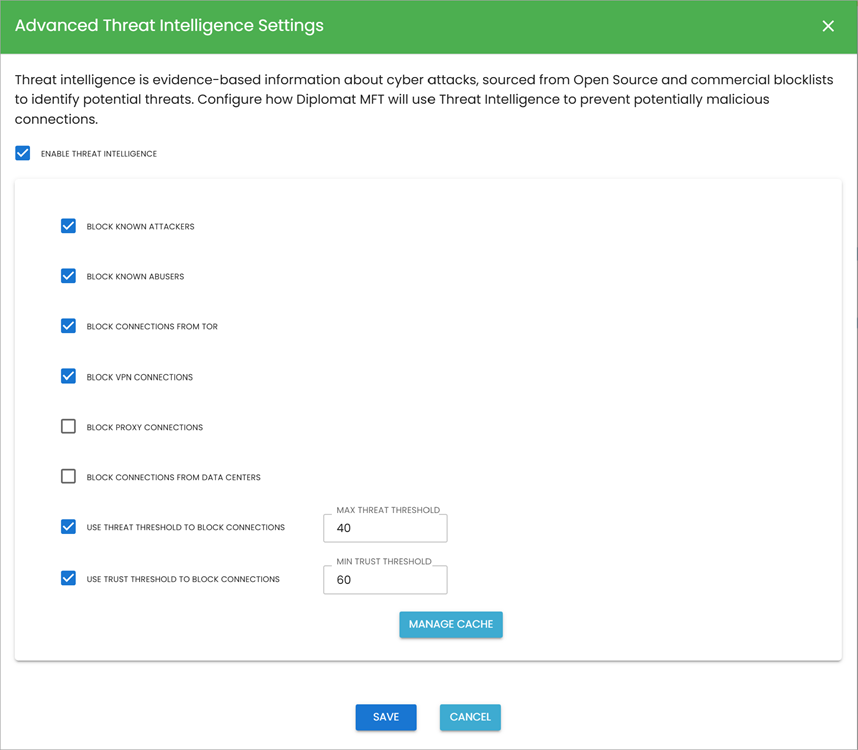
Besides malicious IP addresses, you can count on the software to also block connections routed through anonymized VPN services. Thanks to this new feature, Diplomat MFT is now much better at detecting advanced threats and intrusions.
iii) PGP Enforcement
Honoring the request of their loyal customer base, it is now possible to enforce PGP encryption on inbound files. All you need to do is simply check the box in the decryption, which is labeled Delete Source Files If Not Encrypted, and the software will automatically remove all files that aren’t PGP encrypted. It is that simple.
The image below depicts the file handling process:
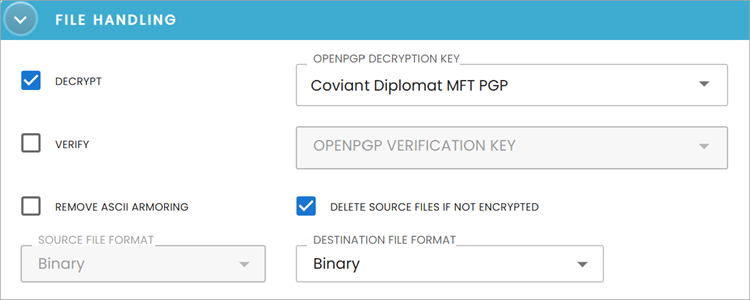
Not only will this add another layer of security to protect your sensitive files, but improve policy compliance tenfold.
#2) Streamlined Compliance
i) SFTP Report
In a bid to help organizations meet their regulatory requirements, the software now offers you detailed SFTP Partner Audit Reports. One can use these reports to audit their SFTP partner supply chain. These reports contain insights into various aspects of your supply chain.
Here is the image of the SFTP partner audit report from Coviant software:
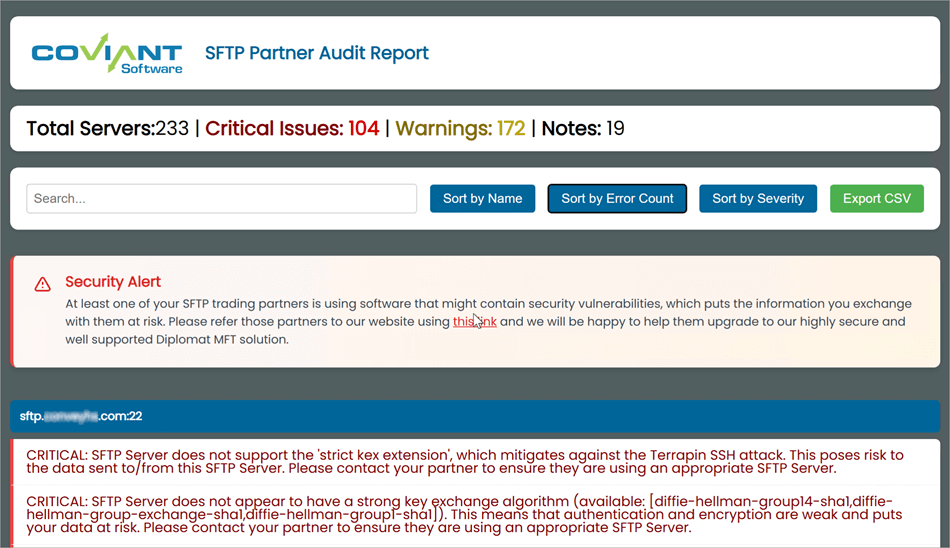
You can have the software generate a report for you outlining all of your organization’s connections to SFTP servers. You can give scores to highlight any warnings and failures. These reports can help you monitor your SFTP partner supply chain and make sure everything is working as it is supposed to.
ii) Connections Map Report
Diplomat MFT 9.4.1 also promises greater visibility. No other feature proves this better than the newly added connections map report. This map basically helps the user visualize where the data is coming from and going to.
Here is an image of the Connections Map Report:
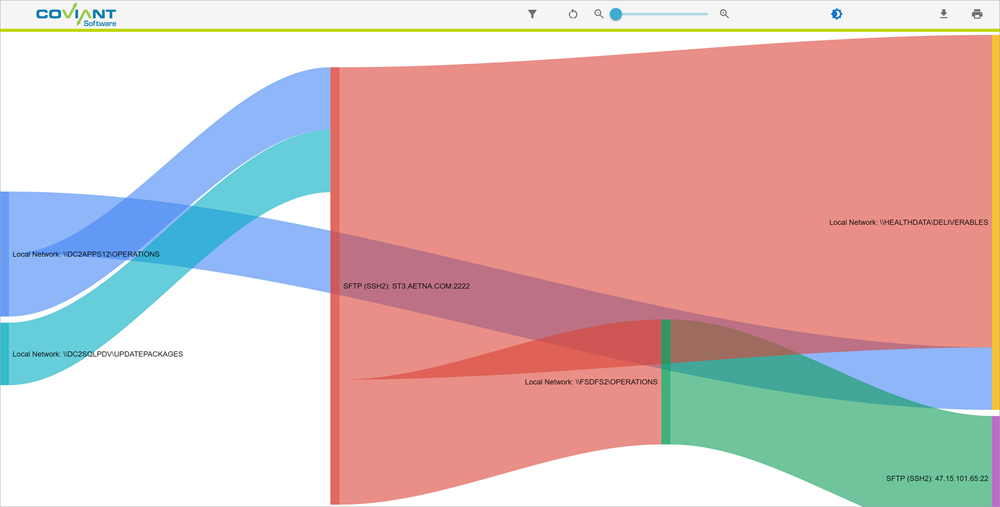
This feature is particularly effective at helping organizations gauge the scale of their endpoints, a practice that has now become mandatory if healthcare organizations wish to meet HIPAA or HITECH compliance after 2025.
Suffice it to say, this new feature can provide significant help to a healthcare institution trying to meet stringent regulations.
Mass General Brigham – a prominent healthcare organization, used Diplomat MFT to securely transfer 1 million+ files per month and manage 180+ PGP keys automatically.
iii) Granular Permissions and Custom Roles
No organization can even think of meeting regulatory standards like the GDPR or the GLBA if they fail at managing user permissions. Thankfully, that is not something you need to worry about as the user of Diplomat MFT 9.4.1.
Here is an image of Admin Roles:
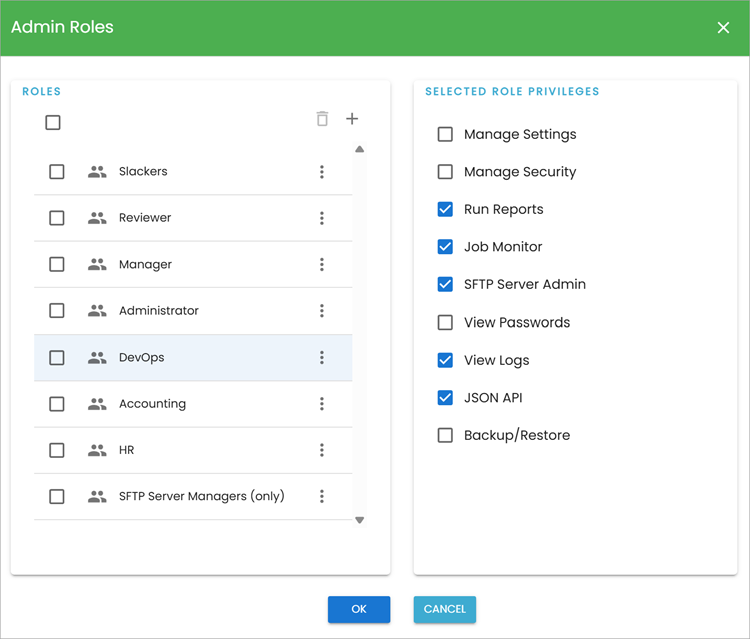
The new version offers fully customizable, granular, role-based access controls. It is now far more convenient and flexible to manage user access to certain transactions, folders, and files.
Roles can now be automatically mapped to each administrator based on user attributes like group membership. By allowing users to manage permissions and user roles on a granular level, the software effectively enhances regulatory compliance.
A major US Financial Institution had its requirements for role-based user and administrative privileges addressed by Diplomat MFT very quickly.
iv) Support for SSO for Administrators
The addition of Single Sign-On via SAML v2 in the latest update further proves just how serious Coviant is about bolstering security. Administrators now have the privilege of simply clicking on the SSO login button to securely log into their Diplomat MFT account.
Given below is the image of the SSO login button:
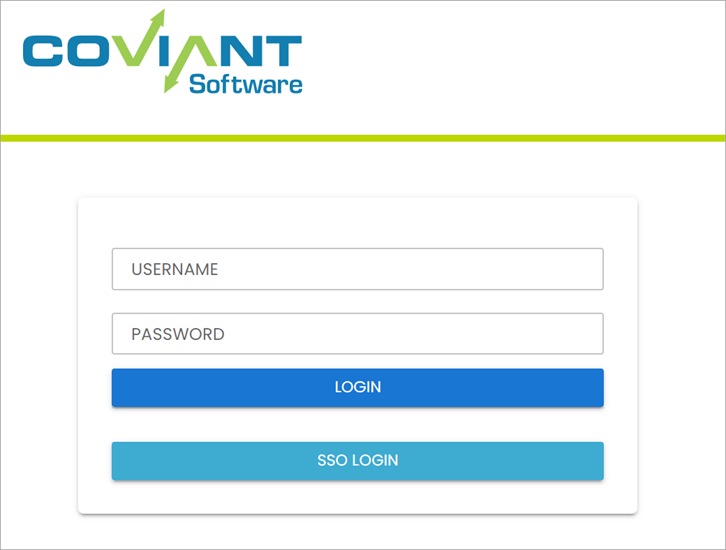
Besides simplifying administrative log-in, this feature also centralizes user management while reducing administrative overhead.
All the above enhancements combined do a great job of ensuring better regulatory compliance.
With these features in tow, Diplomat MFT proves effective at aiding organizations in highly regulated industries like finance, government, legal, and higher education, etc., to adhere to global data security standards like the GLBA (US Finance and Banking), GDPR (UK and Europe Data Protection), DORA (Europe Digital Data Protection), and more.
Integrations Facilitated by Diplomat MFT
A good MFT software will facilitate easy integration with several relevant third-party apps. I’m delighted that Diplomat MFT performs admirably in this regard as well. Organizations can ensure smooth integration of the software with their current technology infrastructure.
Diplomat MFT can easily integrate your managed file workflows with various cloud services like Google Cloud, AWS, Azure, Oracle, Dropbox, etc. The new version also facilitates easy integration with Zoho WorkDrive, enabling automated file transfers to the platform and eliminating manual work.
How to Get Started with Diplomat MFT
Contact the Coviant Software team to get started with a 15-day free trial
Pricing
Coviant Software offers a flexible subscription structure to its users. Diplomat MFT is available in 3 editions, which are as follows:
The Basic edition costs $1149/year and features the core Diplomat MFT platform. The Standard Edition costs $2899/year and comes with features like OpenPGP Encryption, Rich Scheduler, and File monitoring.
The most expensive Enterprise edition will cost you around $10,999/year and features extensive protocol support with advanced file handling capabilities.
In hindsight, the flexibility in pricing here enables the platform to meet varying budget and business requirements. It is also one of the more affordable no-code MFT software out there.
There’s also a 15-day free trial. So, you can give this tool a try, test all of its features, without spending a dime.
Pros and Cons
| Pros | Cons |
| Built-In PGP Encryption | Some users have complained about finding the initial setup a bit complex. |
| Neat, easy-to-navigate UI | |
| Flexible, Transparent pricing | |
| Meets global data security standards like the PCI, GDPR, DSS, DORA, etc. | |
| Facilitates easy integration with various cloud services. | |
| No-code file transfer. |
Frequently Asked Questions
1. What is Managed File Transfer?
Managed File Transfer, or MFT, refers to a software that essentially automates the exchange of files between two systems securely. A typical MFT solution comes with advanced features meant to both simplify and streamline an otherwise complex file transfer process.
In doing so, such a solution prevents sensitive files from being exposed during transit while also helping organizations meet regulatory compliance.
2. What features should an MFT software have?
In my opinion, a modern MFT software should offer the following features:
• Automated file encryption.
• Ability to support various file transfer protocols
• Granular access controls
• Detailed audit trails
• Easy integration with various technologies.
• Workflow automation
• Excellent file conversion and compression.
These are features you’ll find in Coviant Software’s Diplomat MFT.
3. Is Diplomat MFT suitable for enterprise file transfer?
At its core, I would say that Diplomat MFT is one of the finest enterprise-grade MFT solutions I’ve ever had the privilege of using. You can count on it to easily handle even the most complex file transfer processes.
It ensures enterprise-level scalability, robust security, easy integrations, and excellent compliance with government bodies like the GDPR, HIPAA, DORA, etc.
4. Why is automated PGP encryption important?
Simply put, manual PGP encryption is rather challenging and demands the use of complex command-line applications. You need to be technically proficient enough to pull off PGP encryption manually. As such, automating this makes sense, as it makes the entire endeavor considerably more convenient.
You can count on a tool like Diplomat MFT for both automated PGP encryption and decryption, thus keeping your files protected in transit and at rest.
5. What should one look for when choosing an MFT software?
I believe one should look for the following features when choosing an MFT software:
• A user-friendly interface
• Budget-friendly subscription plans
• Excellent no-code automation.
• Ability to scale to meet a growing organization’s demands
• Easy integration with various cloud services, CRM’s, etc.
• Advanced security features like threat intelligence, PGP encryption, and SSO sign-in.
• Supports a wide range of data transfer protocols
• Supports compliance with global data security standards (HIPAA, DORA, GDPR, PCI)
Conclusion
Diplomat MFT was always a great no-code file transfer software in my book. With the release of 9.4.1, the software goes a step further in cementing itself as an advanced MFT solution that organizations in highly regulated industries can trust.
With significantly improved visibility, security, and administrative capabilities, Diplomat MFT does an exceptional job at both simplifying complex file transfer processes and streamlining regulatory compliance.
The software excels at protecting files in both transit and at rest, especially as the new version now comes with built-in threat intelligence. The software also gives you detailed logs and audit trails, which play a critical role in compliance reporting.
Whether it is for compliance or enhanced security, Diplomat MFT is a software I would recommend without hesitation to organizations of all sizes.
For more quick MFT-related guides, you can explore our range of tutorials below:
- Top 11 Best Managed File Transfer (MFT) Software Solutions
- Top 10 MOVEit Managed File Transfer Alternatives and Competitors
- Best Cleo File Transfer MFT Alternatives
- Top 8 OFTP2 (Odette File Transfer Protocol 2)
- The Top 11 Secure MFT Server Options
Was this helpful?
Recommended Reading
-

Simplify your file transfer process with these top Cleo MFT Solutions. Pick the best Cleo File Transfer Alternatives for secure and scalable file transfers in compliance with industry regulations: Organizations across the globe have stringent policies and standard operating procedures when it comes to transferring sensitive information to the process…
-
Evaluate the Top FTP automation tools to understand the importance of automating file transfers. Pick the best File Transfer Automation Software for secure and automated data exchanges: File transfer automation is the programmatic movement of files that enables you to securely schedule file transfers from one device to another, along…
-

Explore, compare and understand the concept of SFTP Server that will help you choose the right SFTP server software for secure file transfers: SFTP Server Software is an application that transfers files through an encrypted connection and protects data as well as your credentials in transit. Another solution for the…
-
Review and comparison of the top online File Transfer Protocol Servers. Select the best FTP Server to securely transfer files: File Transfer Protocol servers are solutions that will let you store files and access them over the Internet. FTP is a set of standard protocols for transferring files over the…