


What does the blinking green light on Xfinity router mean? Discover all proven solutions from experts to fix Xfinity router blinking green light issue and get back online in minutes:
An Xfinity router blinking green means the router is trying to establish an internet connection with the Xfinity network, but the connection is not going through. It also indicates that the router is facing intermittent disconnection.
If the Xfinity router green light is stable, then the router is connected to the Xfinity network, and the internet connection is stable.
Blinking Green Light on Xfinity Router: Expert Solutions

In this article, we will explain why the Xfinity router is blinking a green light and its meaning. We will also address the factors causing this issue and explain some solutions with step-by-step instructions that will help you resolve it.
Suggested Read => Best Modems for Xfinity
This article is useful for all types of users, including those experienced in handling electronic devices, tech-savvy individuals, and beginners. This guide will provide you with an in-depth understanding of Xfinity routers that blink green and will help you fix the router issue and establish a stable internet connection.

If you are looking for step-by-step instructions for the installation of an Xfinity router, then you can look at the video below:
Causes for Xfinity Router Blinking Green
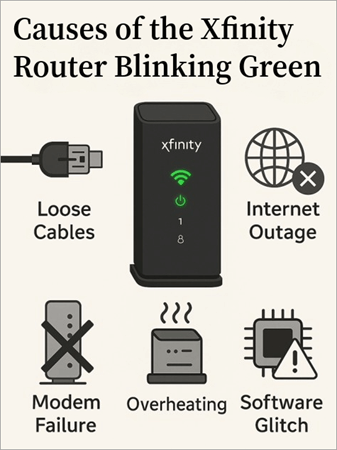
Let’s see some of the most common reasons that cause the Xfinity router to blink green:

#1) Connection Issues with ISP: You may come across a lot of instances where you find your devices and connections are working fine, but the problem lies with Xfinity.
There is a probability that the Internet Service Provider (ISP), Xfinity (by Comcast), is going through technical problems. The routine maintenance activities over the Xfinity network and server may also cause connection disruption.
#2) Hardware Malfunction: Another common reason for the Xfinity router blinking green is a malfunction of the Xfinity router, or there is also a probability of loose or faulty cables or splitters. The router may blink green due to clogging if the router and cables are unused for a long time or uncleaned.
#3) Overloading Connections: If your Xfinity router is serving devices above its usage limits, then the device may overheat or overload, leading to malfunction. Overheating may make the router struggle to maintain a stable internet connection, causing it to blink green.
#4) Outdated Firmware: If your router firmware has not been updated for a long time due to software issues, then the router may create connectivity issues, and the Xfinity router may start blinking green.
Suggested Read => Update the Router Firmware for Different Routers
The above-mentioned causes are common, and if you try to analyze your router blinking green problem while considering these factors, you can easily locate your issue, which will help you fix it at the earliest.
Steps to Resolve the Xfinity Router Blinking Green
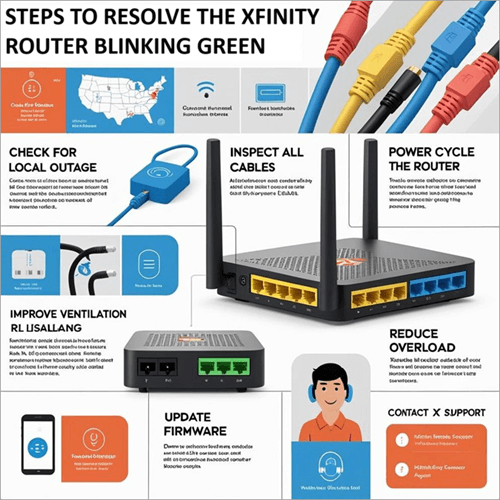
From the above section, it is easy to locate the cause of your Xfinity router blinking green. In the following section, we will see step-by-step instructions to resolve these issues and fix the internet connection.
Further Reading => Top WiFi Companies: Best Internet Service Providers
#1) Service Outage in your Area: In case of an outage or service disruption in your area, you can adopt any of the following methods to get in touch with Xfinity:
- You can visit the Xfinity Status Center to learn about the outages in your area.
- You can use the Xfinity App (iOS/Android) and go to Account -> Status Center to check the latest outage status. It will show the real-time updates, planned maintenance, and network issues in your area.
- You can also get in touch with XFINITY support directly, which is available 24/7
- 1-800-XFINITY (1-800-934-6489).
- XFINITY also provides Chat Support. You can get the status of the service outages by chatting with their team personnel.
#2) Hardware Malfunction: Due to wear and tear of electronic and electrical devices like routers, cables, and splitters, there is a possibility of malfunction, or devices may encounter intermittent disconnection. To overcome such issues, you need to check for any cuts or damage to the accessories.
If you are not aware of this process, then you can contact the XFINITY support team. Also, sometimes the power outlet may not work as per standards, so you need to try placing the device into other power outlets to check whether the issue persists.
#3) Updating Firmware: If the router is updating the firmware, then it can display a blinking green light. You can wait for the update to complete, and you can check the firmware status by logging into the router admin panel.
If the router gets stuck while updating its firmware, then you need to restart the router (switch it off and on). The router updates the firmware itself, but sometimes, due to software corruption, it may get stuck. In such a scenario, you can contact the XFINITY team to resolve the issue.
#4) Restart the Router: With an electronic device and consistent usage, the router may get hung or slow. You can restart the router to reset its connectivity and establish a new connection with the XFINITY network. Restarting the router means the router will shut down and will start up after a few minutes.
The best way to perform this activity is to switch OFF manually and ON the power switch of the router. You can also restart the router through the XFINITY app by navigating to Connection Trouble -> Restart gateway.
#5) Overheating or Overloading: When you connect more devices to your router above its prescribed connection limits, the router may try to serve all devices, resulting in overuse and overheating. You can switch OFF the router and disconnect some devices, and then try switching it ON.
Sometimes, even dust clogging in ports, loose cables, etc., can also create connectivity issues, so keeping them clean and tidy will help avoid the occurrence of such router issues.
The above steps will surely help to resolve the Xfinity router blinking green and let you connect to the Xfinity service to browse the internet.
Recommended Reading => Difference Between a Modem and a Router
Xfinity Router Blinking Green Light: Preventive Measures
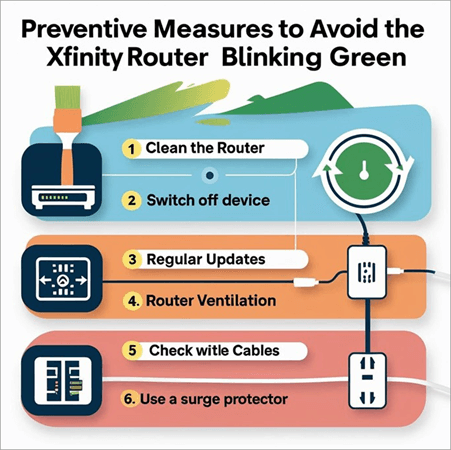
To avoid repetitive Xfinity router blinking green, let’s take a few preventive measures:
#1) Cleaning the Router: If the router is left untouched for a long duration, then dust or debris can interfere with port connectivity, leading to connection errors. Cleaning the router frequently will help you overcome connection issues.
Suggested Read => Perfect Guide on Router Setup & Configuration
#2) Switch OFF device: Switching off the router when not in use will help the electronic devices to cool down and may reduce wear and tear. Keeping them consistently ON would damage the electronic components available in the devices.
#3) Regular Updates: Users need to ensure that the software of the router is updated regularly. You can monitor the status through the Xfinity app or contact its support team to verify the details. You can even check its status through the Xfinity router’s admin panel.
#4) Router Ventilation: Placing the devices in a well-ventilated place can also help prevent devices from overheating.
#5) Checking Cables: Wires, cables, and splitters get damaged because of overuse. You can check them once in a while and replace them as and when required.
We hope these preventive steps help your router function smoothly and without issues for a longer period.
Also Read => Best Fiber Optic Modems
Other Lights on Xfinity Router Displays
Besides the green light, the Xfinity router displays other lights to indicate different information.
The table below summarizes the different colors the router displays and respective statuses, along with the action to be taken. Hope this will help you understand the complete behavior of your Xfinity router and take appropriate action whenever required.
| Light color | Xfinity router status | Action to be taken |
| After activation: solid white/white with purple tint | The router is ON | The device is active and functioning properly. No action is required. |
| During activation: Solid or blinking white or white with a purple tint | The router is activating, so there will be limited functionality | Initial setup is in progress and the complete activation needs to be completed. |
| Solid red | No Internet connectivity | The device is unable to connect to the internet. Contact Xfinity support for assistance. |
| Blinking blue | WPS connection is in progress | The router/gateway is trying to connect to another device via WPS. Wait for the connection to complete. |
| Other colors or blinking patterns | System sync in progress. | The router is trying to establish a connection with Xfinity systems. You can wait up to 15 minutes. if the blinking doesn’t stop, then you contact Xfinity support. |
FAQs on Xfinity WiFi Router Blinking Green
1. What if my Xfinity router is white?
If your router is showing a steady white light, the router is ON and working perfectly fine.
If white light is blinking, it means the router is not completely active, and you have to contact Xfinity for its activation.
2. Why is my Xfinity router blinking orange?
It means the Xfinity router is not able to establish a connection to the Xfinity network. To resolve this issue, you should get in touch with the Xfinity support team.
3. What is the Xfinity outage map?
You can access the Xfinity outage map to find outages or service disruptions in your area.
4. Why is my Xfinity router blinking blue?
An Xfinity router blinking blue means the router is in WPS mode. It is trying to connect with another WPS-activated device in your network.
5. Why is my Xfinity router blinking green after a reset?
It shows the router is trying to get connected to the external Xfinity system. You need to wait a few minutes to see if the green light gets stable, or else contact the Xfinity team.
6. Why is my Xfinity router blinking green?
A blinking green light indicates that the Xfinity router is in the process of establishing a connection with the Xfinity network.
Conclusion
Xfinity router blinking green indicates the router is trying to establish an internet connection, or the router is facing an intermittent disconnection. As discussed above, many reasons may cause such problems.
Before performing any troubleshooting steps, it is recommended to get in touch with the Xfinity support team. This will help you understand whether the issue is with the Xfinity network or at your end.
Recommended Reading => Top Cable Modem for Fast Internet
If there is no outage at Xfinity, then you can opt for troubleshooting steps like rebooting the router, checking cables, and looking for firmware updates, etc. If you’ve done everything but haven’t gotten success, then you can contact Xfinity support for help.
It is recommended to carry out some preventive measures to avoid router issues in the future. You can adopt activities like cleaning the router ports, ensuring the router is getting firmware updates, preventing the router getting overheating, checking cables or splitters, etc.
We hope this step-by-step article has helped you understand the details about the Xfinity router blinking green and ways to fix it successfully.
Was this helpful?
Recommended Reading
-

Role and Significance of Routers in Computer Networking System: Our previous tutorial in this Full Networking Training Series explained us about Layer 2 and Layer 3 switches in detail. In this tutorial, we will see about Routers in detail. Routers are widely used everywhere in our daily life as these…
-
Have you subscribed to Spectrum Internet's high-speed plan but not experienced high-speed internet browsing? The top-rated list of routers for Spectrum gives you the option to select the one that fits your needs: Constant lags during the internet keep on getting a lot frustrating at times. It's time to switch…
-

Learn how to Update the Router Firmware for different routers through this step-by-step guide with screenshots: Routers are devices that allow the transmission of data packets from a device to the servers. They act as a wall against all network threats, including viruses and potential data threats. Therefore, it is…
-
Know What is the exact difference between a Modem and a Router: In our last tutorial, we explored all about Network Vulnerability Assessment in detail. In our other tutorials, we have already discussed in detail about the working, configuration, and set-up of routers with the help of different examples in…


