


Playwright vs Selenium – Learn all the differences, Pros and cons, benchmarks, and use cases for each platform before making your final decision. Compare their capabilities and decide which one is the best choice for you in 2026.
Selecting Playwright or Selenium means much more than deciding on a solution for browser automation. While Selenium still holds the reputation of a standard tool for legacy and corporate automation, Playwright has become increasingly popular due to its unique architecture and robustness.
This guide will help you compare both solutions in terms of performance, user-friendliness, CI/CD support, parallel testing, debugging, and practical use cases.
Which Is Better — Playwright or Selenium?
Playwright will be your best bet if you are developing a new testing environment for single-page applications and want to ensure speed, native auto-waiting, and easy CI/CD integration. If you need extensive support for legacy systems, have legacy systems to test (Internet Explorer or others), have large legacy codebases that must remain untouched, and support multiple languages (Ruby, PHP, Kotlin), go for Selenium.
What is Playwright and Selenium Framework
Selenium is a well-known browser automation tool, long-standing and widely used as an industry standard, with flexible options and support for most well-known programming languages.
Selenium is a browser UI automation tool that lets us write code to create automated tests/test scripts. Selenium is always robust and widely compatible with different browsers and programming languages.
Playwright is comparatively new in the market. It is a modern end-to-end automation framework supporting multiple programming languages with unique features like writing code from scratch and avoiding boilerplate code.
(A boilerplate code in a computer language is some sections of code that are used repeatedly in some places with little or no variations to that code. For instance, methods like ‘public void getName() and public void setName(String)’).
Playwright, a newer testing framework, boasts a modern architecture and advanced features tailored for contemporary web applications. It overcomes limitations by offering native browser control, automatic waiting, quicker execution, and a host of other extensive, user-friendly capabilities.
Check the video below on Playwright Vs Selenium:
Introduction to Tools and Framework
Clarification on the terms:
- Tool is a software application, mainly focusing on testing specific functions like UI testing and API testing, and helps to perform a set of tasks without enforcing a particular structure for organizing your code.
- Combining tools into frameworks amplifies their capabilities.
- Examples: Selenium WebDriver for UI automation/to automate browser actions, Postman tool for API testing, JMeter tool for Performance Testing
- Framework is a structured environment allowing how to organize your code, how tests are run, how components are supposed to interact, and where the files are supposed to go.
- Frameworks help in how to do something, providing structured guidelines with reusable components for doing it right by scaling, maintaining, and standardizing the work.
- Examples: Testing frameworks like TestNG, JUnit, Automation frameworks like Hybrid framework, Data-driven Framework, and Page Object Model (POM), Playwright with Test Runner is a Framework.
- Summary of Tool and Framework:
- Tool: only automates the browser actions, and you have to build on your own: Test structure, Reports, Asserting, Logging, and Utilities.
- Framework: have proper Test Structure, Assertions, Reporting, Reusable page classes, parallel execution set up, and consistency in file organizing.
- Selenium Web Driver – it is an automation tool
- Playwright – it is an automation tool
- Selenium + TestNG +POM is a framework.
- Playwright Test Runner- it is a framework.
Let’s explore Playwright and Selenium’s key features and best practices in more detail.
Playwright Vs Selenium: Key Differences
Explore the key differences and similarities between Playwright and Selenium frameworks.
Playwright Framework
Playwright is a modern end-to-end browser automation framework designed for testing modern web applications and was created by Microsoft in 2020.
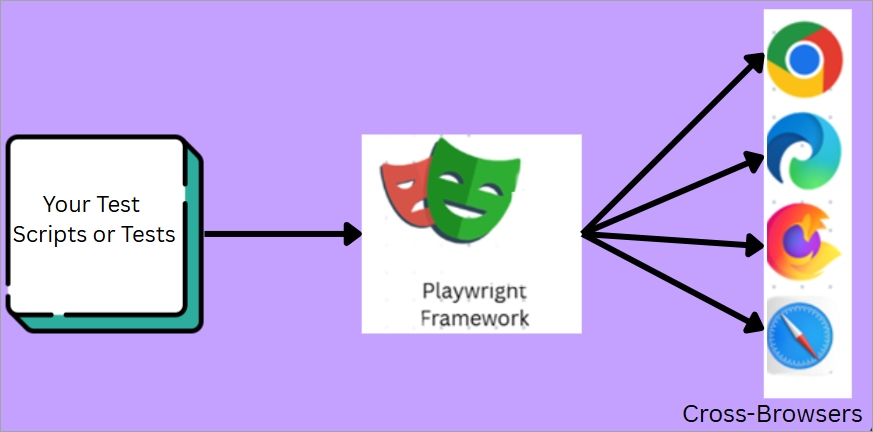
The design of the playwright solves reliability and flakiness issues, also allows controlling multiple browsers like Chromium, Safari, Firefox using a single API, and supports multiple programming languages like JavaScript, Java, .NET, Python.
Playwright makes use of a single WebSocket connection instead of the WebDriver API and HTTP (Hyper Text Transfer Protocol), which is the reason for Playwright’s speed is faster in execution.
Playwright will communicate with each of the drivers separately, instead of relying on a single WebSocket to communicate with each of the drivers, which stays in until all the testing is complete. This will enable the commands to be sent over a single connection much faster, which will reduce the likelihood of failures and improve the test’s stability.
Whereas Selenium works by sending each command as an HTTP request and receiving the JSON response. Interactions of a single request are sent separately as HTTP requests, for example, opening the browser, or browser window, entering intended text into the input box, or clicking on an element are all sent as separate HTTP requests.
Selenium Framework
Selenium is also an end-to-end browser automation and testing tool created by Thoughtworks in 2004 and currently maintained by Selenium HQ. Selenium
It is an open-source automation tool for end-to-end browser application projects. It automates the browser by interacting with the UI elements, just like user actions are performed, or to replicate like users to check how the application behaves as expected and as per the requirements.
QA Testers can opt for a wide range of programming languages like Java, JavaScript, Python, .NET, Ruby, etc., to create the test scripts, offering more flexibility to choose from.
Architecture View of Selenium
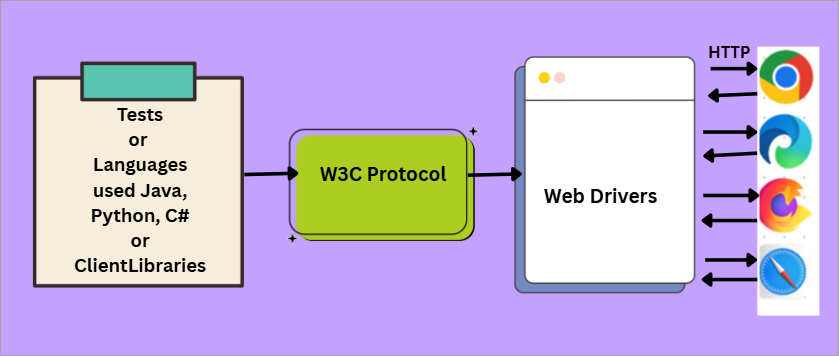
Selenium makes use of the WebDriver API to interact between browser drivers and web browsers. The way it operates is that Test cases are translated into JSON and sent back to browsers, which will then execute the commands and send the HTTP responses back.
Selenium Framework consists of 4 components: Selenium IDE, Selenium Grid, Selenium WebDriver, and (Selenium RC), which is deprecated and now merged with WebDriver/Selenium 2, Selenium 3, and Selenium 4 (is a new and improved version)
The main component of the entire Selenium Suite is Selenium WebDriver.
Selenium 4.0 of the Selenium WebDriver Architecture contains 4 major components:
- Selenium Client Libraries (Languages used to write test scripts, like Java, Python etc.)
- W3C or driver protocol
- Drivers of different browsers
- Realtime Browsers
Selenium is one of the robust frameworks used for testing automated web applications.
| Playwright features | Selenium features |
|---|---|
| • For Faster test execution and is Open-source framework | • Most popular automation framework and is opensource framework too |
| • Supports multi-browsers coverage and cross-platforms testing | • Supporting wider ranges of browser compatibility |
| • Auto-wait for function | • Wait commands -manual set up required |
| • Simultaneously / Parallel execution of tests | • Multi-languages are supported |
| • Has a built-in test runner(@playwright/test) | • For the smooth automation flow, provides flexible integrations with wider testing frameworks and CI/CD pipeline tools. |
| • Screenshots and trace viewer (provides test failure analysis report with screenshots, and action logs and DOM snapshots). | • For the robust test environment set up supports multi-platforms like Linux, Windows, MacOS making it more versatile. |
| • Testing Capabilities with complex scenarios is flexible. | |
| • Set-up and configuration process are Simple | |
| • Powerful feature like Network Interception and mocking which allows to capture and simulate HTTP requests and responses during test execution. |
Playwright Vs Selenium Performance Comparison
| Performance Vector | Playwright (CDP WebSocket) | Selenium (W3C WebDriver / BiDi) |
| Architectural Protocol | WebSocket-based connection through the Chrome DevTools Protocol. Data stream is continuous. | Used to be HTTP request-response based. Tending to use WebSocket-based bi-directional connections (WebDriver BiDi). |
| Average Per-Action Speed | Rapid (average delay ~290 ms). Direct manipulation of the browser engine removes protocol overhead. | Moderate (average delay ~536 ms). Additional layers of translation introduce delays. |
| Local Memory Footprint | Compact (average memory usage ~2.1 GB with 10 parallel workers). Efficient context isolation utilizes the shell of the parent process. | Higher (average memory usage ~4.5 GB with 10 parallel workers). Each test uses an entirely separate browser stack. |
| Average Memory per Worker | 95 MB per single Browser Context. | 180 MB per native Browser Instance. |
| Wait & Synch Handling | Auto-waiting. It checks the element is stable, visible, and clickable before running any commands. | Manual synchronization. You need to configure the WebDriver Wait in your code. Failing to do that causes instability. |
| CI/CD Compute Required | Short (around 16 hours of runners) for 5k tests. The fast initialization reduces total pipeline time. | Long (about 32 hours of runners) for 5k tests. The browser driver binaries start slower on virtual machines. |
| Parallel Flakiness Rate | Between 1.4% and 1.8% under heavy multitasking environment. Workers for each thread reduce the chances of blocking threads. | ~5.1% under heavy parallel processing without proper tuning because of asynchronous delays. |
| Distributed Scalability | Shards execution threads for the native threads locally on the CPUs. | Highly scalable through Selenium Grid. Uses external infrastructure to process tests under heavy loads. |
Comparing Core Components for Playwright Vs Selenium
Playwright -> It is an open-source end-to-end testing of web browser applications and is faster in test execution and modern compared to other tools.
Selenium -> It is mature with flexibility and most suitable for legacy applications or legacy projects.
Both are powerful browser automation tools, yet they differ in their architecture, speed of execution, WebKit Support (Browser), wider community, and ecosystem. While Selenium has been one of the industry standards for more than 2 decades now, Playwright is offering more modern features with faster execution.
| Sr num | Features | Playwright | Selenium |
| 1. | Invented/ Developed By | Microsoft | Selenium Community |
| 2 | Initial Release made in | 2020 | 2004 |
| 3 | Architecture | Direct Web Controlling (No WebDriver) | Client-Server controlling (Web Driver protocols involved) |
| 4 | Type | Automation tool + Test Framework | Automation Tool |
| 5 | Safari Browser Testing | Yes supported (WebKit supported) | Limited support /Only on macOS |
| 6 | Programming Languages | C#, Python, Java | Java, Python, C#, JS, Ruby, |
| 7 | Screenshots and Videos | Built-in | External Libraries to handle |
| 8 | Learning | Easy to moderate | Moderate to steep |
| 9 | Community Support | Rapidly Growing | Matured and very large community support already in place |
| 10 | iframes Handling feature | Easy to handle | Complex to handle |
| 11 | DOM Support | Excellent | Partial |
| 12 | Best used /Suitable for | Modern Web Applications | Legacy projects and Enterprise applications |
| 13 | Is it Open-Source | Yes | Yes |
| 14 | Playback feature/ Recording | Selenium IDE available | Codegen |
| 15 | OS(OperatingSystem)Supported | Windows, MacOS and Linux | Windows, MacOS, Oracle Solaris (UnixOS), Linux |
| 16 | Browser Automation of Mobile Devices | Android and iOS mobile devices are supported | With an Appium framework’s help, Selenium supports mobile automation |
| 17 | File Upload/File Handling Feature | Playwright has built-in support for any file uploading and downloading | With an Appium framework’s help, Selenium supports mobile automation |
How to Install Playwright and Selenium Step by Step
Here is a step-by-step guide to install Selenium and Playwright using VS Code.
Install Playwright Using VSCode
Playwright is developed by Microsoft and is an open-source web automation framework for writing end-to-end tests for browser applications by using a single API that automates the apps running on browsers like Chromium, Firefox, and WebKit.
#1) Launch Visual Studio Code (VS Code)
#2) Look for Extensions on the View menu bar and tap on it
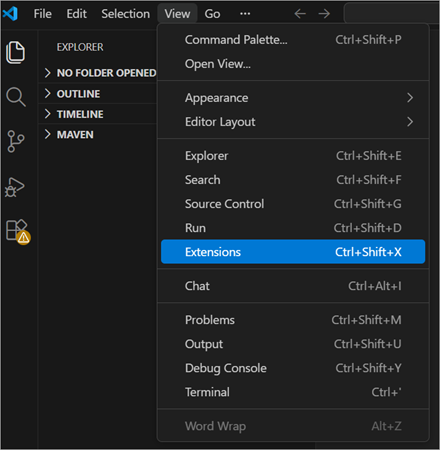
#3) Search for ‘Playwright Test’ by typing, and you will see the official extension by Microsoft. Install it.
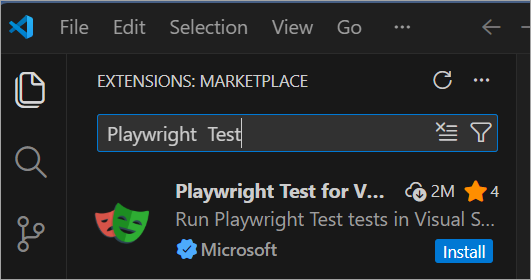
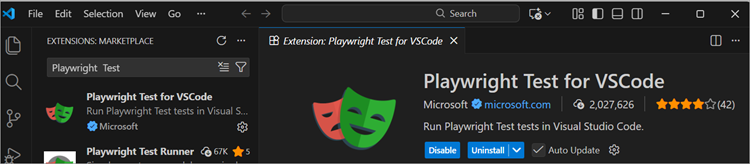
#4) After the above installation, do this step: Ctrl +Shift +P will open the Command Palette
#5) Run this command:‘Install Playwright’.
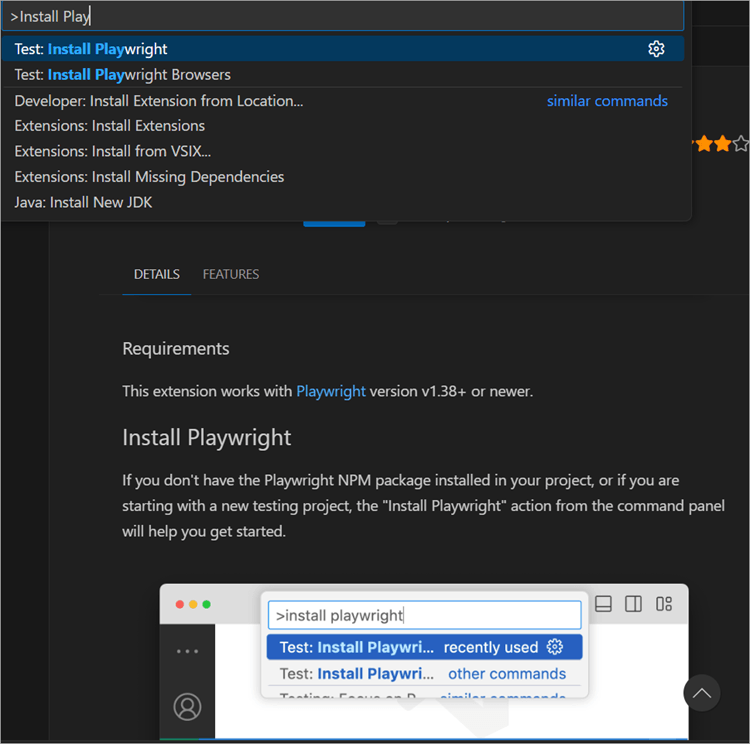
#6) These steps will set up your Project folder on VS code and then you can start writing your Playwright test scripts. In the screenshot below, in my case, I have given my project folder name as ‘PLAYWRIGHT_P1’
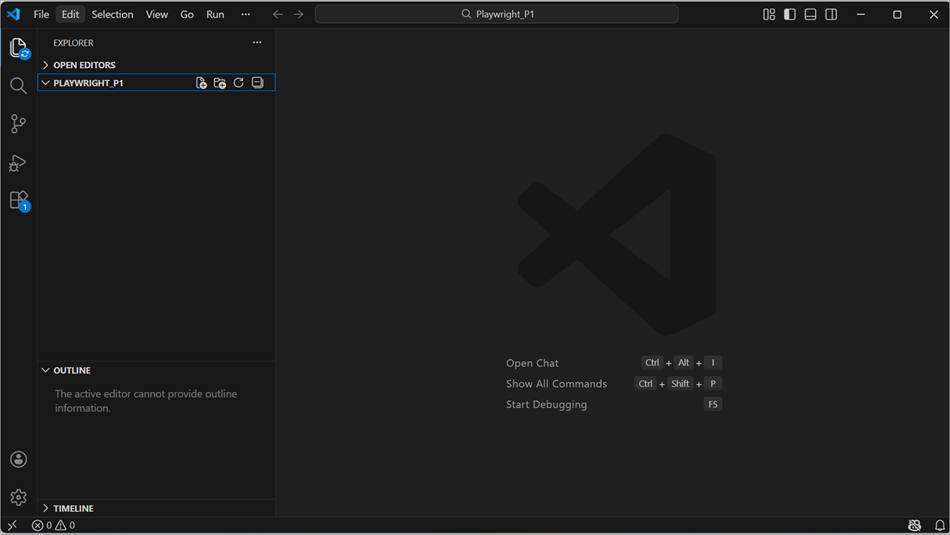
#7) Write First Test /First Playwright Test and Execution.
- To execute the Test, run/execute below command yarn playwright test
- To get the test execution report, below is the command yarn playwright show-report
Follow the official links for more details and to start from the beginning:
https://playwright.dev/docs/getting-started-vscode
https://playwright.dev/docs/intro
Install Selenium Using VSCode
To install Selenium (using Java) in VSCode (Visual Studio Code):
Firstly, need to download the Java Development Kit(JDK). Download from https://www.oracle.com/in/java/technologies/downloads/
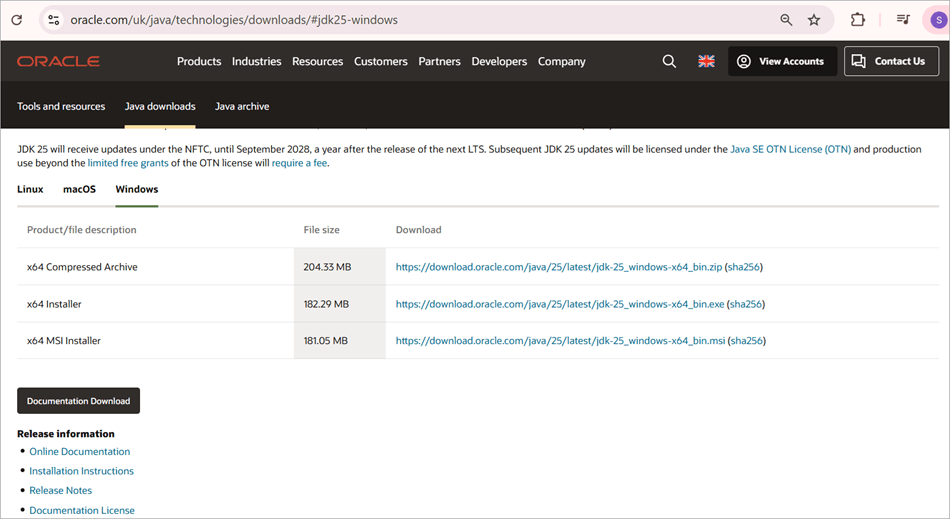
[Via oracle.com]
2. Once downloading is done, install it and set up the environment variables on your machine, ie Go to My Computer > Properties > Advanced System Settings > Advanced > Environment Variables for JDK
3. Download an IDE(Integrated Development Environment) for Selenium, like VS Code, IntelliJ IDEA, Eclipse etc.
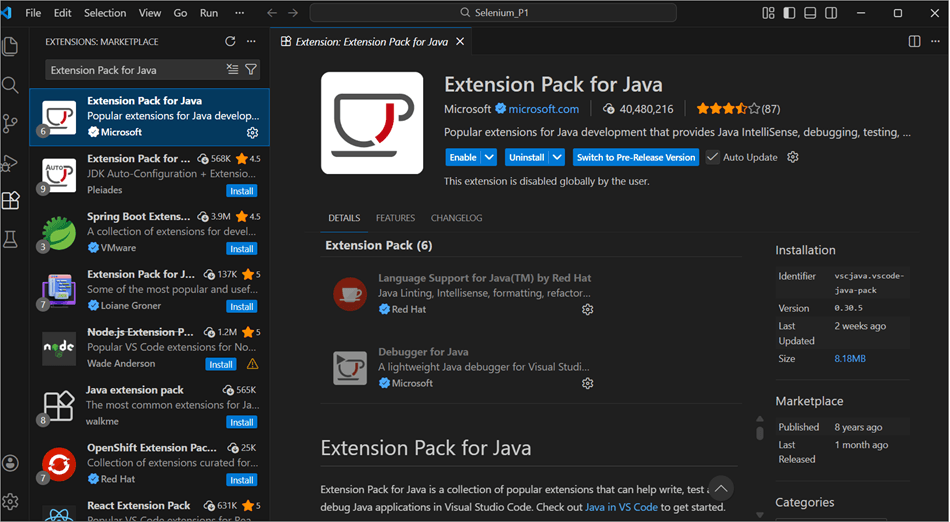
3(a) For VS Code, there is Java extension available named “Extension Pack for Java”. After you install this extension and Enable, restart VSCode
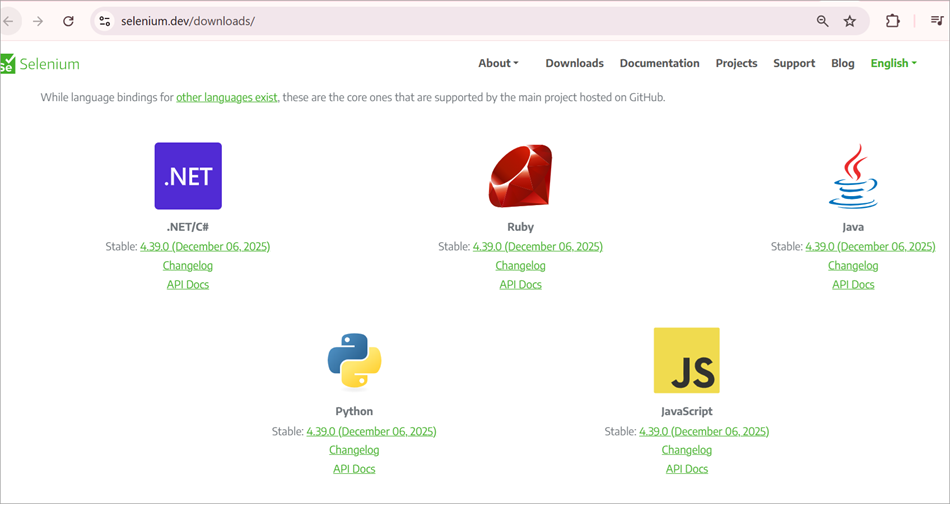
3(b) Download the latest Selenium version for Java on https://www.selenium.dev/downloads/
Select the Java icon and download it. After that, unzip it. Put it somewhere where you can be accessible.
4. Download the drivers, for example, Chrome Drivers and Firefox Drivers.
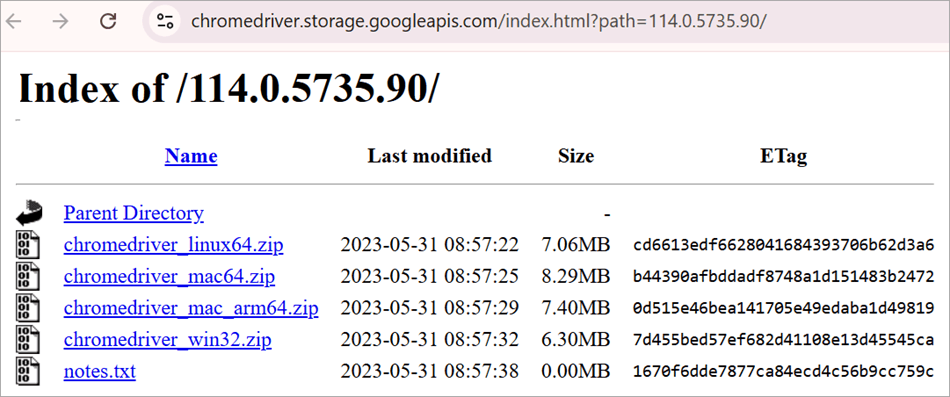
For Chrome drivers, visit https://sites.google.com/chromium.org/driver/downloads
Select first link(latest version) you will be navigated to https://chromedriver.storage.googleapis.com/index.html?path=114.0.5735.90/
Update to the latest Chrome browser (to check the latest version of Chrome window right corner 3 dots- > help – > About Google Chrome will show you Chrome’s version
Download the ‘chromedriver_win32.zip’ file for a Windows machine
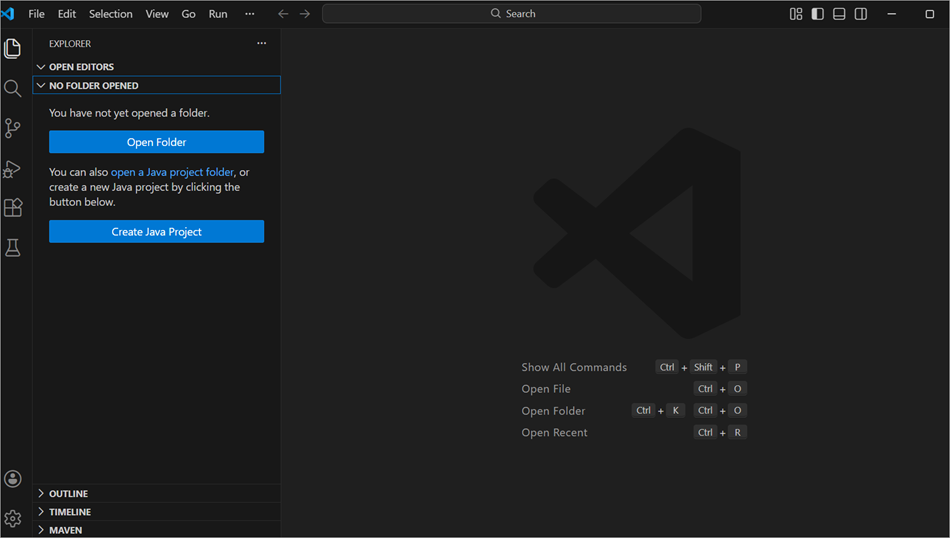
5. Now, create a new Java project, then create a Driver’s folder under ‘src’.
Now move the drivers downloaded in the previous step to the Drivers folder.
6. Go to “Referenced Libraries” and click on the + icon. If unable to see this directory, then scroll down. Import the JAR files, including those in the lib folders.
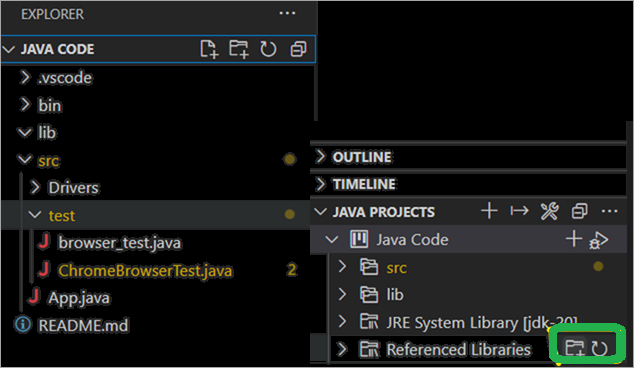
Make sure all the libraries’ files are selected. Till here the setup, now you may start writing your tests using the Java language and testing on VS Code.
Follow the official links below for more details and to start from first:
- https://code.visualstudio.com/docs/languages/java
- https://www.selenium.dev/documentation/webdriver/getting_started
To launch a browser in headed mode in Selenium:
WebDriver driver = new ChromeDriver(options);
driver.get("https://www.softwaretestinghelp.com/")
Playwright Vs Selenium: Best Practices
This section delves deep into the best practices of the Playwright and Selenium tools.
Best Practices of Playwright
Playwright is revolutionizing significantly in newly emerging frameworks in its approaches to web automation testing. Currently, Playwright is the Next-Gen automation tool.
Let’s see the best practices of Playwright when building scalable and maintainable test scripts.
#1) User Interactions should be Focused: Think like an end user takes actions on real web applications, for example, filling the forms, clicking on buttons (CTA- Call To Action), namely signup, login, go to Cart, Account, which guides users to take next steps and navigations across the pages, which helps to identify the issues earlier that end-users might encounter.
#2) Write Isolated Test Scripts: To make troubleshooting easier and increase the reliability of the tests, each of the tests should work independently and make sure they do not rely on the other tests.
Also, before running your scripts, reset everything to the starting point, resetting the database, clearing test data sets, and clearing up all the leftover data or information from the previous tests. Following these steps will help where exactly look for the root cause when problems occur.
#3) Stable Selectors Usage in One Central File: Creating reliable tests is crucial to identifying the elements on your web page. The ideal approach is to use dedicated test attributes such as ‘data-testid’, for example, data-testid = “save-button” instead of using CSS classes and or XPath.
In the future, if at all you wish to change the page design or structure, these specialized attributes won’t change, making your test scripts more stable.
‘Role-based’ selectors can be used too in order to identify elements by their purposes, like ‘text inputs and buttons’ instead of their appearances. Also, keep all selectors in a single central file for easier maintenance and updates.
Below code sample for good practice:
await page.click ('[data-testid="save-button"]');
#4) Testing on Multiple Browsers: Testing should be carried out on multiple browsers, such as Chrome, Safari (or Webkit), and Firefox.
To ensure the application is running smoothly across all browsers, this cross-browser testing needs to be carried out, focusing mainly on important functionalities/features across all the multiple browsers. In-depth feature testing can be done only on the main targeted browser.
Below code sample, which runs the same automation logic on multiple browsers:
const browsers = ['chromium', 'firefox', 'webkit'];
for (const browserType of browsers)
 {
  const browser = await playwright[browserType].launch(); //Run your tests
}

await page.goto(https://www.softwaretestinghelp.com/ );
  console.log(await page.title());
  await browser.close();
}
Details of the Code sample:
- [‘chromium’, ‘firefox’, ‘webkit’] –> For browser engines are listed respectively
- Chromium: For Chrome/ Edge browser
- Firefox: For the Firefox browser
- Webkit: Is a rendering engine that is incorporated into the Safari browser. (think Webkit is like a car’s engine and Safari browser is the car itself, which is the front-end browser)
- For (const browserType of browsers) –> This line loops through each of the browsers, ensuring the same logic of testing is implemented and is executed on each browser at a time.
- Const browser = await playwright[browserType].launch(); -> This line dynamically launches each of the browsers
- //Run your tests -> This is a commented line inside a loop, you may perform here,
- browser context is created, open the desired page, execute the tests script/steps, and assertions are performed.
Main Purpose of this code is to avoid repeated use of the code and re-use of the same test logic to ensure consistent behavior of an application across multiple browsers.
Also, note that the tests are run sequentially, launching one browser at a time and not by launching parallelly. I.e., this code snippet launches one by one like Chromium, Firefox, Webkit, and then runs the same test scripts or test logic for each of the browsers when launched, which would verify your cross-browser compatibility.
If at all needed to go for parallel execution, the Playwright Test runner is preferably used.
Playwright Test Runner is a built-in component of the automation framework for optimization and to streamline providing the out-of-the-box solutions to run, debug, and manage test scripts across multiple browsers efficiently.
Ensure to close the browser, which will avoid memory leakage.
#5) Test Coverage Goals need to be defined: Creating and focusing on a clear test strategy, and which part of the application requires the most testing, is very important for the end users as well as for the business. To name some features to be focused on are: user authentication journey, payment processing, data saving, and submitting forms.
Instead of detailed testing, the core main features are given concentrated attention where end users’ critical journeys are involved and likely to cause problems if these user flows are broken.
#6) Playwright’s built-in tools to be utilized efficiently: There are built-in tools that come with the Playwright tool; take the best advantage of those built-in tools. Namely, Playwright’s Test Runner helps in executing and managing both unit testing and end-to-end testing efficiently.
Playwright’s code generator, by watching browser interactions, can generate/ converting those interactions into tests/ test code, which is helpful in getting started with new feature scenarios.
Also, it has a video recorder capable of automatically capturing test runs and making it easier to track the root cause of the problems that occurred.
These are the built-in tools of Playwright working together during test creation and also during maintenance.
#7) Writing Consistent Test Names and or Clear Test Names:
Example of the good practice of the test case in Playwright’s Test runner:
test ('user is able to login with correct id and password', async () => {});
Now, the code details are explained below:
- test () – This is a function. It defines the individual test case and is provided by the Playwright test (@playwright/test)
- ‘user can login with correct id and password’ – This is the Test Name and is a description of the test to be verified, which will display on the terminal as output and may also appear on reports/logs. The teams, such as Developers, Testers, and other non-technical people involved in the project, can quickly understand what the test does.
- async () – This is a callback function, and this is where the tests or test steps go.
- async is Playwright’s operations, like typing, clicking, and navigation, are asynchronous, allowing for multitasking.
- {} – For now, this is an empty string where the test logic has not been written yet. This test does nothing.
- When you execute this test, Playwright executes it immediately and passes it. But no browser will be launched, and no actions will be performed on this test.
To sum up, this line of code is just the test case without any test step, hence it does nothing yet.
Actual logic will be like this:
test ('user is able to login with correct email id and password'  , async ({ page }) => {
  await page.goto('https://gmail.com/login');
  await page.fill('#email', 'tester1@gmail.com');
  await page.fill('#password', 'password1234');
  await page.click('#login');
  await expect(page).toHaveURL('/home');
});
#8) Automation testing and monitoring the CI/CD pipelines
#9) Proper handling of the wait function
This approach will help your tests become more reliable and, at the same time, complete test runs much faster than anticipated.
Examples of bad and good samples are stated below,
// example of Bad practice
await page.waitForTimeout(2000);

// example for Good practice
await page.waitForSelector('[data-testid="loaded-content"]');
Let’s see what does an above line of code does:
- await page.waitForSelector(‘[data-testid=”loaded-content”]’); -> This code waits for the specific element to appear on the page before the tests continue for execution.
- [data-testid=”loaded-content”] -> Telling playwright to pause the execution until it finds the element that matches the selector that is found in the DOM (Document Object Model). DOM is nothing but A language-independent API that turns an HTML and XML document into a tree of nodes like elements, text, and attributes, for example, changing the button’s text.
- data-testid=”loaded-content” -> Selector targets element, once the element is found/appears, ‘await’ will resolve and tests continue.
Actual logic will be looking like this:
// example for Good practice
await page.goto('https://testing.com/home');
await page.waitForSelector('[data-testid="loaded-content"]');
await page.click('[data-testid="loaded-content"] button');

OR
await page.locator('[data-testid="loaded-content"]').click();
Playwright will be waiting automatically until element is found or to appear and then become actionable.
Selenium Best Practices
It’s not a choice, it is an essential thing to build scalable, maintainable, and efficient test scripts for automation and understand the best practices for both the automation frameworks.
Best practices for creating scalable and maintainable Selenium test scripts.
#1) Test Plans and Test Designs of the test cases should be done well in advance: To have a proper Test plan is very much essential to carry out the testing activities more efficiently.
QA engineers should think about potential scenarios, logical edge cases, and create comprehensive test plans from the end users’ perspectives. Otherwise, without a proper strategy in place, diving into automation straight away may cause blockages at later stages.
Hence, QA teams should not only concentrate on the verification of test scripts that run successfully, but also should concentrate on extensive test scenario planning too.
#2) For the Test Coverage, Identification, and Prioritization of the Test Cases: QA engineers should have clarifications on which test scenarios are and are critical and to be executed on priority.
That is how, by identifying and prioritizing, reliable test cycles are established.
#3) Google Chrome Browser window should be set to 100%: To achieve precision in Selenium Automation testing, the browser’s zoom on ‘Customize and Control of Google Chrome should be set to 100%, which will guarantee that mouse interactions are accurate and at the right coordinates to mock the native browsers too.
This is crucial during cross-browser compatibility testing, as in some of the older versions, if zoom is not 100% may interrupt identifying the elements properly. Also, to avoid issues like NoSuchWindowException.
#4) Rather than hardcoding Test Data, the use of external data files is ideal: External data files like CSV, Excel or JSON files for managing the test inputs. Test data hardcoding is not ideal and may have maintenance issues in the future.
During Data-driven testing, this approach is also followed, which makes it easier to update the test data files.
#5) BDD framework with Gherkin Language: Writing the test cases in plain Gherkin style language is BDD (Behaviour Driven Development), which allows both technical and non-technical users to understand the scenarios and contribute towards them.
BDD tests standard format tests are in Given, When, Then keywords, which helps to build any gaps between technical teams and business teams, which improves the overall quality and reliability.
Ex:
- Given that the user tries to log in on the web page,
- When the user provides valid credentials,
- Then the user should land on the dashboard after successful login
#6) Manual setup of Explicit and Implicit Wait commands: An efficient way is to use Explicit and Implicit Wait commands for the Selenium automation scripts.
#7) Ideally run Selenium Tests on Real devices: Precise test results can only be expected from the real devices when web application testing is carried out, as more accurate bugs can be found and robust web applications can be released.
#8) Unique Locators need to be used: Example: To submit the form of the login page, inputting the username and password, and to automate this step, firstly locate the input fields of those text fields and the submit button element. If it fails to identify it, the login authentication script will fail.
#9) POM-Page Object Model to be Implemented: When the Website UI changes with increasing customer demands for new features on their website, UI elements corresponding locators do change as a result. QA teams need to accommodate writing new test cases again, over the period of time, this becomes tedious for maintenance.
#10) Parallel Testing helps reduce time and effort: Parallel testing is nothing but running / execution of the different application modules simultaneously across various browsers.
Parallel test execution helps in reducing the time and effort for faster delivery of an application, specifically beneficial during compatibility testing and cross-browser testing.
Parallel testing by making use of TestNG in Selenium guidance.
#11) Organize the Project Directory to Maintain uniformity: By being consistent in directory structure maintenance test code is easier
Considerations for Both Playwright and Selenium
There are some of the considering factors regardless of the tool you have chosen, such as:
- Long-term Maintenance of Test Suite: Factors like long-term maintainability of your test suite, how well the community is supportive, and whether documentation is available.
- Evaluate Integration with Existing Testing Tools: Evaluate on your current development and testing stack how well these frameworks integrate.
- Scalability: When test complexity and volume of the project grow, consider how well each of the tools handles them efficiently and reliably.
- Learning Curve: Make sure to assess current team members’ skills and time availability for learning new tools.
Verdict of Playwright Vs. Selenium: Use Cases & Strengths
There is no exact answer here as to which one is best among these two frameworks! It purely depends on the industry’s standards, considering their requirements, already existing technology stacks, their workflows, and current team structure. Based on its research, one should be able to decide upon which will be winner tool for them.
Since both tools have strong key features and capabilities for modern web applications, automation testing.
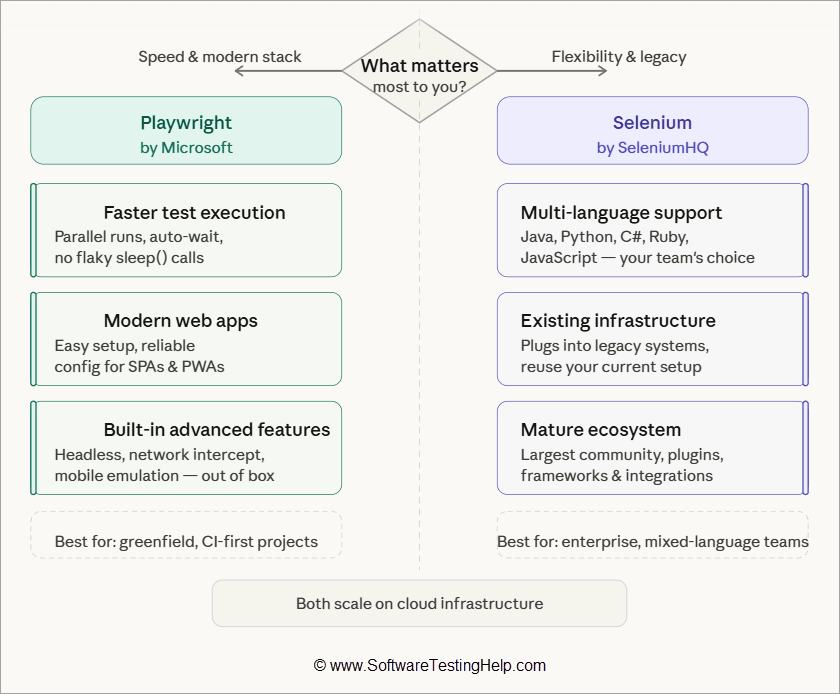
Where does Playwright shine?
Playwright: Choose this tool if you want to go for speed or faster execution of test scripts. It is reliable, stable, easy installation and configuration steps/ guidelines for modern web application projects.
Choose Playwright if out-of-the-box support is required for headless testing, network interception, and mobile emulation testing.
Where does Selenium shine?
Selenium: Choose this tool if desiring to have a wider range of programming language support, such as Java, JavaScript, C#, Ruby, and Python.
Choose Selenium if there is an existing test infrastructure and you wish to integrate with the legacy systems.
Both of the tools can scale at the cloud infrastructure level.
Frequently Asked Questions
1. What is Selenium framework?
Selenium is one of the widely used open-source automation framework which supports multiple programming languages for web application testing, along with supporting multiple web browser testing (cross-browser testing).
2. What is Playwright tool?
Playwright is an open-source automation tool for end-to-end testing used for modern web applications. Playwright is developed by Microsoft.
3. Is Playwright going to replace the Selenium tool?
No, it will not. Playwright is just an alternative to modern web applications with easier initial configuration setup, auto-waits, and a modern architecture.
Selenium is still widely used and is dominant in some legacy applications and enterprise application environments even now because of its mature ecosystem support, broader integration capability, and stability.
4. Which tool is faster, Selenium or Playwright?
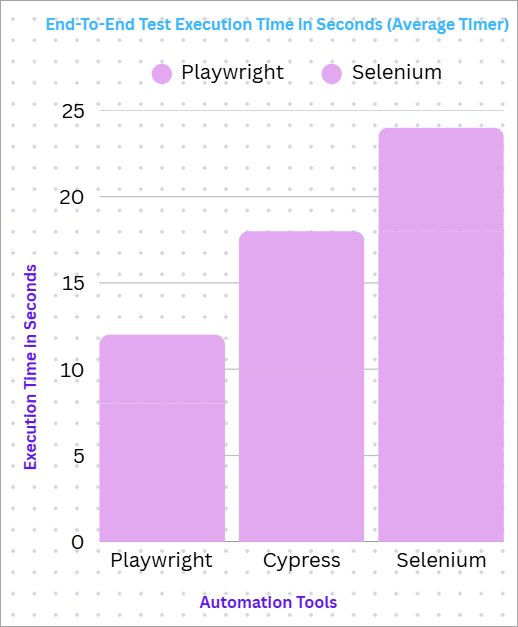
Considering the auto-wait functionalities or features and modern architecture, ‘Playwright’ is much faster than Selenium.
5. Which tool is easier to set up, Selenium or Playwright?
Playwright is easier to set up than Selenium, as the browser comes bundled.
Whereas Selenium needs to separate drivers’ configurations.
6. What is the main difference between these 2 tools, Playwright & Selenium?
Selenium requires the external drivers for browsers to set up and needs/ requires manual wait functions.
Playwright has built-in browser driver support and auto-wait functions.
7. Java programming Language in Playwright?
Yes, Playwright supports the Java Programming Language along with other languages such as Python, JavaScript, and C#. You may refer to the official document here: https://playwright.dev/java/docs/intro
8. Which tool is the best one for debugging and reporting purposes?
‘Playwright Trace Viewer’ is the best one. Selenium depends on the plugins.
Conclusions
In order to ensure the seamless delivery and consistency in end-users’ experience, ‘Cross-browser testing’ is one of the essential phases during test automation frameworks. It is equally applicable to both manual and automated testing on real devices for web applications, ensuring reliable and accurate test results.
Playwright is a more powerful and modern web automation tool that is more suitable for end-to-end testing. The main feature, like execution speed, makes it a dominant choice for modern web application projects. Proper installations and configurations are the best first steps to create reliable and end-to-end scalable tests across browsers and platforms.
Post-installations and configurations, cloud execution, test-runner interactions, and browser-specific issues can be identified earlier, and ensure browser compatibility, which helps in accelerating testing workflows, providing robust and versatile solutions for modern web applications testing.
Selenium, no doubt, is still a popular option for robust web browser automation testing for a seamless user experience and consistency across different browsers and platforms. This framework has a long history and is trusted by a larger community with broader language compatibility.
This would be an excellent choice if having legacy applications and existing Selenium-related frameworks with requirements for integrations. Its strong history makes it stable and well-documented with vast community support, but one thing it may often need to do is additional setup and custom handling in order to manage flakiness, parallel execution, and managing waits.
For more browser automation tools-related guides, you can explore our range of tutorials below:
- Top 30 Web Application Testing Tools
- Selenium 3 Vs Selenium 4: Complete Tester’s Guide
- Step-by-Step Guide to ByPass Captcha Using Selenium
- Geb Tutorial – Browser Automation Testing Using Geb Tool
- 10 Best Cross Browser Testing Tools
- Top 20 Best Automation Testing Tools
- The Top 8 Browser Security Solutions for Enterprises
Was this helpful?
Recommended Reading
-

How to work on Data Driven Framework in Selenium Using Apache POI? Data Driven Framework is one of the most popular Automation Testing Frameworks in the current market. Data Driven automated testing is a method in which the test data set is created in the excel sheet, and is then…
-

This Tutorial on Essentials Of Java In Selenium Explains Major Java Concepts and Their Implementation in Selenium, Collection class, etc with Examples: In this tutorial, we will discuss the major Java concepts that are used in Selenium Testing like OOPS concepts, collection class, and some common interview questions that are…
-

How to Generate Extent Reports in Selenium WebDriver: Selenium provides inbuilt reports using frameworks such as JUnit and TestNG. Although the built-in reports provide information on the steps that are executed as part of the test case, they need more customization to be shared with all the major project stakeholders.…
-

In this article, we explore ways to build selenium tests faster with Ranorex Webtestit. Let's get started. If you’re like most of the testing professionals, then you are all about efficiency! When it comes to a task like test automation, you need to focus on building tests rather than configuration…


