In this article, we have reviewed the top test case writing tools. These are the best test case management tools to manage end-to-end tests.
In a day, Testers perform various activities, such as recording requirements, creating test cases, execution of test cases, document creation, requirement tracing, etc.
If all the activities are not managed and tracked, then things will become chaotic and can impact the deliverables as well. To avoid such situations, a test case tool plays a big role.

Table of Contents:
The Need for Test Case Writing Tools
Test Management tool helps in managing all the testing related activities in one place. There are both open source and paid tools available in the market that are very easy to use and are handy.
These tools help to reduce the manual testing efforts as writing the Test Cases in Excel and maintaining the complete data is very tedious. As the team grows it becomes difficult to manage, track, and maintain the traceability of all the data on the excel sheet, and that’s where the Test Case tool comes into the picture.
Currently, Automation plays a big role, hence the tool is expected to support the same. Tools should also support agile and continuous testing, followed by organizations.

Pro Tip: While choosing a Test Management tool, one should keep in mind that the tool should manage the test cases in such an effective way that it reduces the manual efforts of the team, saves the cost, and efficiently tracks the test cases. Before finalizing, the tool users should try the trial version of the tool to get a good idea about them.
To choose the tool, consider factors such as budget. The tool should be good at managing the data in terms of tracking and reporting. The tool chosen should have a support feature so that for any issue or any integration required, tickets can be raised and issues can be resolved.
List of Top Test Case Writing and Management Tools
Here is a list of popular Test Case writing Tools:
- QACoverage
- PractiTest
- Testiny
- Doc Sheets
- TestFiesta
- PlusQA
- TestRail
- Kualitee
- Test Collab
- TestLodge
- qTest
- QMetry Test Management
- Zephyr
- Pivotal Tracker
- Hiptest
- Spira test
- QASE
- ReQuest
- Tuskr
- TestCaseLab
Comparing Test Case Management Tools
| Tools | Our Rating | Deployment | Users | Price | Free Trial | Features |
|---|---|---|---|---|---|---|
| QACoverage |  | Cloud-based and on-premise | Small to large businesses for managing projects. | It starts at $19 per user per month. | 14 days. | Requirements Management, Test Design, Test Execution, etc. |
| PractiTest |  | Web-Based, Cloud, SaaS | Small to Large businesses | Professional: $39/month | 14 days | Test Management/ Requirement Management, Traceability |
| Testiny | | Web-Based, Cloud, SaaS | Small to large businesses | $17/user | 14 days | Test case management, Reports, REST API, Integrations |
| Doc Sheets | | SaaS and on-premise | Small to large businesses for managing projects. | Quote | 60 days | Requirements Management, Test Case Management, Traceability, Project Management |
| TestFiesta |  | Web | Small to large Businesses/QA teams | Free to use. Paid plan starts at $10/user/month | 14 days | AI Test-Case Generation, Reusable Templates, Customizable tags, Shared Steps. |
| TestRail | | Web-Based, Cloud, SaaS Installed -Windows | Small to Large businesses | $34/mo. per user $351/yr. per user | 14 days | Test case writing, Test plan, QA Reports, |
| Kualitee | | Web-Based, Cloud, SaaS | Small to Large businesses | $7/month per user | 15 days | Template reusable, Test report creation, export data |
| TestLodge | | Web Based, Cloud, SaaS | Small Business | Basic: $49/month | 30 days | Test Plan, Test Suite, Test Run, Dashboard |
| qTest |  | Web-Based | Small & Midsize businesses | Current pricing details can be taken by contacting Tricentis. | 14 days | Support processes Agile, DevOps, and BDD, which are in demand these days. |
| QMetry | | Web-Based, Cloud, SaaS | Small to Large businesses | $2500/year | 15 days | Customized dashboard and reports, Integration with tools |
| Zephyr | | Web-Based, Cloud, SaaS Installed -Windows | Small to Large businesses | $10/month | 30 days | Integration with other tools, Requirement based testing |
| TestCaseLab | | Web Based, Cloud, SaaS | Small to Large businesses | It starts at $12/month | 14 days | Test case management, Test plans, Test runs, Test Reports, Integrations with bug-tracking tools. |
Let’s go through the tools in detail:
#1) QACoverage
Best for project management.

QACoverage is an agile collaboration platform that will help you with project management. It has functionalities to manage the software project life cycle. It will boost quality acceleration, help you with consolidating workflows and expand the visibility. It is the solution for requirements management, test design, test execution, ticket management, reporting modules, etc.
Features:
- Test Design module will let you create manual test cases for different categories and test types.
- It provides a facility to import a lot of test cases from excel spreadsheets.
- You will be able to associate test data with pre-conditions & post-conditions and individual steps for test instructions with expected results.
- It has features to monitor the completeness of requirements traceability.
- It has a test case execution module with functionalities of monitoring progress, recording individual actual results for each step in a test case, etc.
Verdict: QACoverage is an all-in-one platform for managing the projects with requirements module, test design module, test execution module, ticket management module, agile module, reporting, and dashboard module. It will let you monitor test design progress.
Price: A free trial of 14 days is available for a cloud-based solution. A cloud-based solution has two plans, Test Case Manager ($19 per user per month) and Application Lifecycle Manager ($29 per user per month).
A self-managed solution is also available with two pricing plans, Test Case Manager ($99 per user per year) and Application Lifecycle Manager ($199 per user per year). The Perpetual License price starts at $299 per user.
Our Rating: 5
#2) PractiTest
Best for its unique feature for hierarchical filter trees are best to be used.

This Test Design tool includes everything like Planning, Managing, Controlling, Tracking, Reporting, and sharing in one platform. But its major focus is on testing. It helps to create the test suites very easily and has the ability to customize the fields and filters to sort the data.
It manages all the test runs and bugs raised on one platform. Reusable test suites/steps can be formed and edited/refined anytime.
Features:
- Test Management/ Requirement Management -Manages the complete testing process.
- Traceability
- Bug Tracker
- Rest APIs
Cons: PractiTest does not support on-premises, it only has a SaaS solution.
Price:
- Professional: $39/month/User
- Enterprise: $49/month/user
- Unlimited: PractiTest can be contacted for the same.

A 14-days free trial can be availed for this tool.
Our Rating: 3.5
#3) Testiny
Best for test management and manual testing for small to large QA teams.

Testiny aims to make manual and automated testing and test case management as seamless as possible. It is designed to be extremely responsive and has an intuitive, very easy to use UI. It helps testers perform tests without adding bulky overhead to the testing process and manage test cases with ease.
Don’t just take our word for it, take a look at Testiny yourself.
Testiny is a new, straightforward test management tool built on the latest technologies.
Further Reading => Check our Testiny Review Here
Features:
- Manage your test cases in a tree-structure – intuitive and easy
- Outstanding rich-text test case editor with different templates for test cases
- Create custom fields to adapt test cases to your needs
- Amazing test case change-tracking in the history view
- Easily create and handle your test cases, test runs, with steps, preconditions, etc.
- Powerful integrations with other tools (e.g. Jira, GitLab, Azure DevOps, …) to link requirements and defects
- Instant updates – all browser sessions stay in sync. iImmediately see if a colleague made changes, completed a test, etc.)
- Powerful REST API
- SSO, audit logs.
Cons:
- Limited feature-set so far, but the tool is growing very fast
Price:
- Free for open-source projects
- 14 days free trial with all features
- $17/€15 per user (discounts for yearly subscriptions)
- Volume discounts for bigger teams
- Unlimited projects, test cases and test runs

#4) Doc Sheets
Doc Sheets is like a spreadsheet application to manage your test case and is designed to handle large amounts of data.

You can easily keep track of all the test data using DocSheets’ built-in tools for organizing and tracking changes to test cases. If requirements or other artifact changes, it is easy to synchronize changes with test cases to avoid errors and inconsistencies in the test cases. DocSheets also allows the reuse of test cases to save time.
Using reporting and analysis tools for test data can facilitate monitoring progress or detecting problems with the testing process. Team collaboration tools let the teams stay on the same page throughout the testing process.
You can take your testing process to a new level with DocSheets traceability tools. A high-performance, scalable SaaS solution for managing test cases and projects, Doc Sheets, helps you efficiently plan and execute your tests.
#5) TestFiesta
Best for AI-powered test creation.
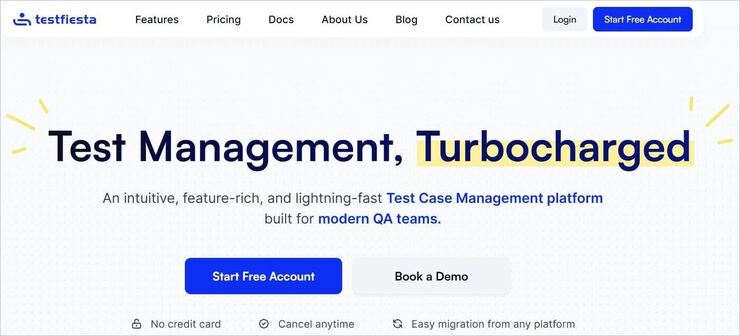
With TestFiesta, you get a test management platform tailor-made for modern QA teams. It stands out for its AI-powered test case creation and streamlined workflows. Its AI can save you time in creating test cases.
You get a highly customizable workspace to group, assign, and reuse your test cases. Furthermore, you get comprehensive reports that grant you actionable insights. You can use those insights to track your tests and catch bottlenecks affecting your project’s progress.
Features:
- Unlimited customizable tags that can help you sort and filter test cases.
- Reuse test cases across multiple setups with reusable configurations.
- Build flow once and reuse it again and again with “Shared Steps”.
- Facilitates native GitHub and Jira integrations.
- Add Custom Fields to ensure all important details related to your tests get covered.
- Track progress and catch issues before it is too late through comprehensive reports.
Verdict: TestFiesta deserves a spot on my list. You get a feature-rich test case management platform designed by a team of seasoned QA professionals. The platform excels when it comes to test-case creation, thanks to its superior AI. It is also built-to-scale, catering to any team, regardless of its size.
Price: TestFiesta is free to use in a limited capacity. For instance, the free-version does not grant you access to its AI-driven test-case generating capabilities.
You’ll need to subscribe to its Organization plan, which starts at $10/user/month, to use the platform to its fullest potential. You are provided with a 14-day free trial of TestFiesta’s paid plan.
#6) PlusQA
Best for managing test cases and representing the testing progress in graphical forms through the Dashboard.

PlusQA tool provides all the data in one place, which makes it more effective and demanding. Test case creation, execution, bugs found, tracking of bugs all in one tool makes it easier for the user to access and work.
Features:
- Test cases give user access to write, edit, and execute test cases.
- Allow users to raise and track a bug. Also, let the user prioritize the bugs in the tool itself.
- Allow users to manage real devices in the Device Lab feature where users can add and edit the devices.
- Allow users to manage the android and IOS application builds.
- A Dashboard allows users to get information in visual form to have a better understanding for improving the application.
Price: For pricing details, users need to get in touch with PlusQA through their website.
Our Rating: 5
Website: https://plusqa.com/test-platform/
#7) TestRail
Best for built-in and custom templates which are one of the best features for TestRail.

TestRail has a centralized test management process which helps testers, developers, and other stakeholders to access the QA related data very conveniently. It manages and tracks the data effectively.
Features:
- Test case writing features allow the user to record all the required data such as pre-conditions, test data, expected and the actual result, etc.
- The test plan allows the user to organize all the test plans in one place only.
- QA Reports feature allows the user to check the testing progress status from these reports.
- TestRail can be integrated with bug tracker tools.
- QA Software features allow the user to sort and prioritize test cases. Status dashboard and detailed reporting are part of this feature only.
Cons:
- Test case creation takes time, and the feature to upload the test cases directly to the tool would have been a benefit.
Price:
- $34/month per user (on TestRail own server)
- $351/year per user (TestRail can be installed on a user’s private server)

A free trial of the tool is available for 14 days.
Our Rating: 5
Website: https://www.gurock.com/testrail/
#8) Kualitee
Best for tracking the test cases very effectively so that the tester does not have to put in the effort again and again. It is best for manual as well as automation testing.

Kualitee is a powerful tool with several features. Along with Test Management, it has Project Management, Defect Management features, third-party integrations, etc. Everything i.e. Projects, Test cases, Tasks, Defects, Requirement all can be managed under one roof only.
Further Reading => Check our Detailed Review of QA Sphere Test Management Tool
Features:
- Allow users to create test case templates that can be reused.
- Allow users to attach screenshots or links so that all the necessary information can be provided.
- Allow users to create test reports as per his/her requirement to show such as status and coverage of the test, etc.
- Allow user to export data in a format which they want (Excel, Word, CSV)
Cons:
- Few features respond a bit slow.
Price: $7/month per user with unlimited Projects.

A 15-days trial can be availed by signing up on the website.
Our Rating: 4.5
Website: https://www.kualitee.com/
#9) Test Collab
Best for all size organizations.

This tool is very user friendly and can be integrated with Bug Tracker and Automation tools. It follows agile methodology, tracks the time, manages the requirements & test cases, and tests plans in a very effective way.
Features:
- Test cases can be categorized and managed in one place.
- Test execution report shows all the data of Executed/Passed/Failed cases in graphical formats.
- Custom Reports can be created.
- Issues can be reported in the integrated bug tracker.
- Requirements can be linked with test cases.
Cons:
- If a user wants to create his/her reporting template, then that cannot be done as the user has to choose from the ones which Test Collab has.
Price:
- Free: $0/month–200 Test cases/400 executed Test Cases/3 Users
- Startups: $25 per user/month–Unlimited Test cases/Unlimited executions, Unlimited Projects/Hosted Version
- Enterprise: Need to get in touch with Test Collab through their site.
- It provides – Everything unlimited/Custom Contracts/Premium Support/Hosted/Self Hosted option in Enterprise.

Free trials can be availed for the tool.
Our Rating: 4.5
Website: https://testcollab.com
#10) TestLodge
Best for small and medium-sized companies.

It is highly recommended for beginners, as it has all the basic essential features and is easy to use with a simple interface. All the reports can be downloaded in PDF format and are in a proper sequence. This tool is integrated with Trello which raises a bug itself in the tool when any test case fails.
Features:
- Test Plans can be created using the templates.
- Test Suite can be created by importing test cases via excel.
- In Test Run, this tool helps to identify the cases to be marked pass, fail, not run.
- This tool is flexible enough to work with long-established project management tools as well as with agile methodologies.
- The dashboard helps to view the testing progress in graphical form, and also reports required can be extracted from the tool.
Cons:
- A bug cannot be related to test cases.
Price:
- Premium: $199/month: 1500 test plans/10,000 Test Cases/3000 Test Runs/Unlimited Users and Test Suites
- Plus: $99/month: 500 Test Plans/3000 Test Cases/1000 Test Runs/ Unlimited Users and Test Suites
- Basic: $49/month: 150 Test Plans/600 Test Cases/300 Test Runs/ Unlimited Users and Test Suites
- Personal: $24/month: 50 Test Plans/200 Test Cases/100 Test Runs/ Unlimited Users and Test Suites
Offers Yearly plan as well with the saving of 10% on the above prices.

30-days free trial for the tool can be availed.
Our Rating: 4.5
Website: https://www.testlodge.com
#11) qTest
Best for small to large-scale companies.

qTest test case management tool is used to create and run the test cases and to manage the test run. It has the capability to create the defect document automatically. By following the latest trend, it supports agile testing tools.
Features:
- Manages test execution. It can create test plans very easily, which can be reused.
- Test cases can be scheduled, and test automation can be run.
- This tool can be integrated with tools like JIRA, which makes it easy and faster to use.
- Support processes Agile, DevOps, and BDD, which are in demand these days.
Cons:
- qTest insights are not that intuitive to use.
Price: qTest pricing is based on the type of licenses as named or concurrent. Current pricing details can be taken by contacting Tricentis.
Our Rating: 4
Website: https://www.tricentis.com
#12) QMetry Test Management
Best for companies of all sizes.

QMetry tool is one of the best management tools, integration with JIRA makes it more productive. Test Cases can be managed or categorized in a way that can be reused for another test run. Another great feature is the Jenkin plugin to import the results.
Features:
- Test cases and requirements are managed using versions. Test cases can be linked or can be mapped with another user story.
- Automation test case execution does not require filling in the result manually, it will be captured automatically.
- Testers can personalize the dashboards and reports.
- The tool can be integrated with JIRA. Multiple JIRA projects can be integrated with QMetry projects.
Cons:
- Integration with JIRA does not let create Epic or Subtask when issues are being added from QMetry.
Price: $2500/year: Up to 10 users

15-days free trial facility can be availed by the user.
Our Rating: 3.5
Website: https://www.qmetry.com/qmetry-test-management/
#13) Zephyr
Best for businesses of all sizes.

Zephyr is one of the most used Test case management tool. It supports continuous testing i.e. agile and helps not only to increase the productivity of the team but also the quality of testing and make releases faster than expected.
Zephyr has 3 options available while deployment, i.e. Zephyr for JIRA Cloud/Server or Data Center.
Features:
- Requirement based testing
- Creation, planning, and execution of test cases.
- Test script reviews
- Dashboard to review testing progress or testing metrics based on testing activities performed on individual projects.
- Automation
- Integration with other tools.
Cons:
- The format of test cases is not customizable.
- All the test cases and results cannot be exported in a single file.
Price: $10/month: Zephyr for JIRA

A free trial period of 30 days can be availed.
Our Rating: 3.5
Website: https://www.getzephyr.com
#14) Pivotal Tracker
Pivotal tracker helps to manage the projects smartly. It let the user prioritize the tasks, track the status, and manages the workflow. It helps to manage the team and support scrum. It helps to get the velocity calculated for the sprint. It lets the user know in which stage exactly the project is.
Website: https://www.pivotaltracker.com
#15) Hiptest
Hiptest is now known as “Cucumber Studio”. This is an open-source tool that is available for a free trial of 30 days. It helps the user to learn in production. Agile test management can be done which gives complete visibility to all the stakeholders for the testing activities being performed and their results.
Website: https://hiptest.com
#16) Spira Test
Spira Test manages all the QA activities in one place with complete traceability. Test case management includes reviewing the test cases, test coverage of requirements, and data-driven testing.
Rest features include requirements management, bug tracking, and reporting.
Website: https://www.inflectra.com/SpiraTest/
#17) QASE
It is an open-source, cloud-based test management tool that is used by QA and development both. It is useful for managing test plans, test cases, and manual test execution. It has a quick support team that responds in 30 minutes.
Website: https://qase.io
#18) ReQtest
ReQtest is a web-based application that can be used by small, medium businesses as well as enterprises. Main features include test case management, requirement management, execution, and tracking of the project.
A free trial can be availed for 10 days for ReQtest.
Website: https://reqtest.com
#19) Tuskr
Best for Test Management and Reporting.

While evaluating Tuskr, you’ll find three things that stand out, its enterprise-class features, affordable pricing, and above all, ease of use. It has features that rival most of the big players in the test management space.
When it comes to pricing, it is the most economical solution, with a free plan for small teams and an affordable plan at $9 monthly per user for teams above five users. The biggest advantage of Tuskr is its easy learning curve, you can quickly onboard and start using it without spending a lot of time in training.
Features:
- Easily create test cases with its WYSWYG editor where you can directly insert tables, copy-paste images, and bulk edit.
- Tuskr also allows you to add custom fields based on your project requirements.
- Once you have created test cases, you can assign them based on the number of test cases or the effort required.
- You can create a custom dashboard based on the user requirements, it also has unique burndown charts that let you monitor progress.
- It can integrate more than 400 applications seamlessly using webhooks.
Pricing:
- Free for less than 5 users.
- Basic plan starts at $9 monthly per user.
- Advanced plan starts at $12 monthly per user.

#20) TestCaseLab
Best for manual testers and QA teams managing test cases efficiently.
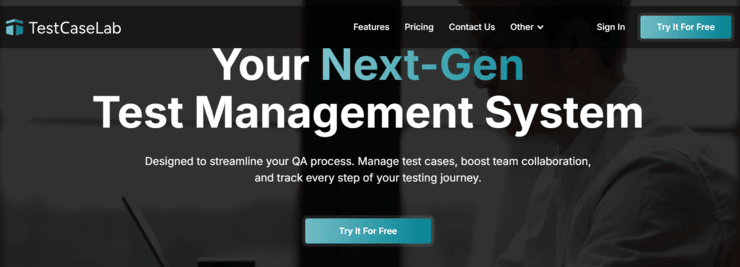
TestCaseLab is a comprehensive test case management tool designed to help QA teams organize, execute, and track testing processes from start to finish. Unlike traditional test case managers, TestCaseLab provides full-cycle test management, allowing teams to plan test runs, execute tests, log results, track progress in real-time, and report bugs – all in one place.
Features:
- Dashboard & Reporting – Monitor project statistics, track test progress, analyze team activity, and generate detailed reports to improve QA efficiency.
- Test Case Management – Create structured test cases, group them into test suites, customize templates with extra fields, and collaborate with your team in real-time.
- Test Planning – Build structured test plans, use checklists for better organization, bulk include/exclude test cases, and set test execution priorities.
- Test Execution – Run test cases, log actual results, mark pass/fail statuses, and track progress live. The Quick-pass feature speeds up repetitive test executions.
- Bug Reporting – Report defects directly to Jira, Redmine, Trello, YouTrack, and other integrated bug trackers without leaving the test run.
- Powerful API – Automate test case management, integrate with custom tools and streamline QA processes using TestCaseLab’s API.
Price:
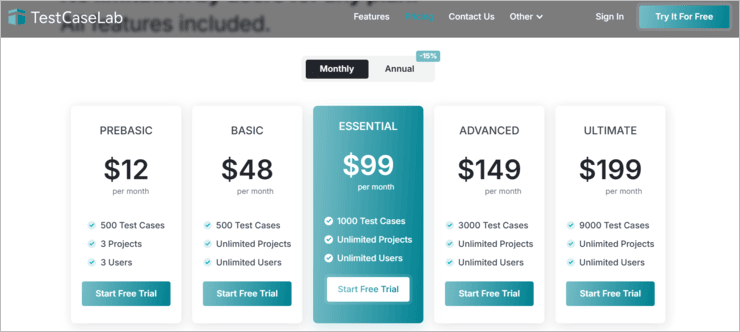
- Prebasic: $12/month – 500 test cases, 3 projects, 3 users
- Basic: $48/month – 500 test cases, unlimited projects, unlimited users
- Essential: $99/month – 1,000 test cases, unlimited projects, unlimited users
- Advanced: $149/month – 3,000 test cases, unlimited projects, unlimited users
- Ultimate: $199/month – 9,000 test cases, unlimited projects, unlimited users
- 14-day free trial available with full feature access.
Our Rating: 5
Frequently Asked Questions
1. Can JIRA be used for test case management?
JIRA is a project tracking tool, but it can be configured to support the test management tools.
2. What is test case management?
A test case management software is required where testing activities are required. It helps to manage testing activities such as requirements, test cases, test execution, tracking, and reporting.
3. What is Testpad?
Testpad is a test plan tool that makes test case management easier and simpler.
4. Is there any tool to write test cases?
There are several test management tools such as TestRail, PractiTest, QTest, Zephyr, etc. and are good for writing test cases.
Conclusion
Several Test Management tools are available in the market. Every tool has pros and cons and can be chosen based on the kind of requirement and the budget user has. The test case management software helps to deliver complex projects easily as it tracks and keeps records of all the activities and hence speeds up the processes.
QACoverage, TestCaseLab, PlusQA, TestRail, and Kualitee are our top recommended solutions. TestRail is also a good test case documentation tool based on its intuitive and easily understandable behavior. The best part of TestRail is that it works for both traditional and agile processes.
QMetry and PractiTest are also the popular tools that come in the top list and can be a great choice for managing testing activities.
Research Process:
- Time taken to research and write this article: 26 Hours
- Total tools researched online: 30
- Top tools shortlisted for review: 15
Was this helpful?
Recommended Reading
-

Review of the top Azure Cost Management Tools with features to increase your Azure cloud investment. Pick the best Cost Management tool for Azure as per your needs: Dozens of Azure cost management tools are available today in the market. We have hand-picked the best ones, focusing on cost optimization…
-

Test Case Management Using TestRail: A Complete Hands-on Review Tutorial and WalkThrough The TestRail tool provides web-based test case management which is a combination of sophisticated project management capabilities with features optimized for testing. This tool can be used for any type of project including Agile Development and Testing Methodology.…
-
The term "Test Management" encompasses anything and everything that we do as testers and we take the help of the best and most efficient test management tools to perform this task. The testing daily process: Creating and maintaining release/project cycle/component information. Creating and maintaining test artifacts specific to each release/cycle…
-
Comprehensive list of the best Software Testing Tools. Put an end to your search for the right Manual or Automated Testing Tool with this informative list: We are happy to present this exclusive list of the most popular QA Testing Tools that are available in the market. Get Ready To…