


Deeply explore the differences & similarities between Managed Vs Unmanaged Switch. Compare their features, performance & pricing to pick the right switch to meet the network requirements of your business:
A switch (managed and unmanaged) is a core device in a computer network or Local Area Network (LAN) and Virtual LANs (VLANs) environment that ensures data is securely transmitted from one device to another device.
This post will discuss how the switch operates, the difference between managed and unmanaged switches, their characteristics and features, and finally, how to pick the right switch for your network.
Table of Contents:
- Unmanaged Vs Managed Switch: Which One to Choose
- What are Switches
- How Does a Switch Work
- Types of Switches
- Difference Between Managed and Unmanaged Switch
- Top Features of Switches
- How to Pick the Right Network Switch
- Common Mistakes to Avoid While Choosing a Network Switch
- FAQ’s on Managed Switch Vs Unmanaged Switch
- Conclusion
Unmanaged Vs Managed Switch: Which One to Choose
We will also discuss the common mistakes people make while selecting the right switch for their network.

What are Switches
In simple terms, a Switch is a network device used to connect multiple devices and communicate or exchange information in a computer network.
Further Reading => Basics of Computer Networking
The switches are the backbone of a network, efficiently directing data traffic between devices like computers, servers, printers, and IoT devices for creating congestion or slowness in the network.
Here is a video tutorial on Network Switches and Ethernet:
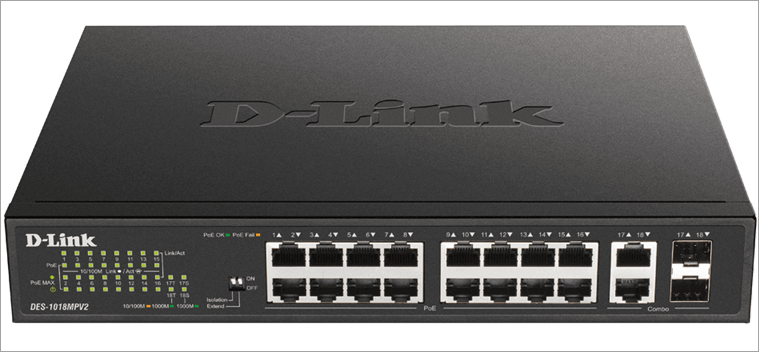
Given below is the image of D-Link 18-Port 10/100BASE-TX PoE Unmanaged Switch.
[Via Zenarmor]
How Does a Switch Work
Switch uses the MAC (Media Access Control) address, which is a unique number available at the NIC (Network Interface Controller) of every device in the network. This MAC table is used to receive and forward information as data packets to their specific destination port in the network without transmitting to all devices.
A switch exchanges information (data packets) from a source to a destination in the following steps:
- Sender: A device on a network transmits the data/information to another device with the help of the receiver’s MAC address.
- Switch: It receives the data with the destination MAC address and, based on information in its MAC address table, it forwards the packet only to the destined port in the network.
- If the switch does not find the destination MAC address in its table, then it sends it across all ports (this process is called flooding), and once it receives the information from the destined device, then it updates its MAC table. So that next time, it will directly send the data packet to that specific port.
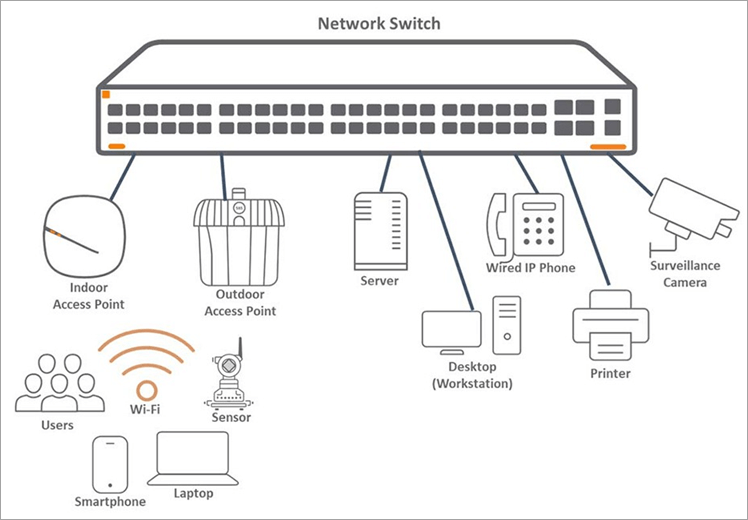
The basic connection diagram of network devices to a switch is shown below:
[Via Todahika]
Types of Switches
As there are different sizes of networks, like home networks, SMB (small to medium business), and large enterprise networks, to fulfill the exchange of information in varied sizes of networks, different types of switches are adopted.
Primarily, there are two types of Switches:
- Managed switch
- Unmanaged switch
Let’s look at the details of these switches.
What is a Managed Switch
Managed switches are used in mid to large complex networks like data centers and large financial institutions, where the security, scalability, and performance are of prime importance.
This type of switch allows network admins to monitor, control, and optimize the network traffic with the help of advanced features like VLANs, QoS (Quality of Service), and remote management. Managed switches require configuration and management of the device to ensure optimum usage of the device.
Managed switch operates at the data link layer (also called Layer 2) of the OSI model, and some even advanced models operate at Layer 3 of the OSI model and support IP routing functionality.
Also Read => Difference Between Layer 2 and Layer 3 Switches
What is an Unmanaged Switch
It is a plug-and-play device. It does not require any configuration or monitoring of settings. These types of switches are suitable for home or SOHO (Small Office/Home Office) networks, where advanced features are not required. Unmanaged switches are simple, cost-effective, and ideal for basic setups.
Unmanaged switches are easy to operate and maintain without any requirement for a highly skilled technical person.
Difference Between Managed and Unmanaged Switch
The major difference lies in four key areas: Control and Configuration, Performance, Security, and Cost.
The table below summarizes this difference:
| Key factors | Managed switch | Unmanaged switch |
|---|---|---|
| Control & Configuration | • Offers full control and configuration options • Supports VLANs, port mirroring, link aggregation • Enables monitoring and network optimization | • Plug-and-play • No configuration needed • Limited to basic connectivity |
| Performance | • High performance under heavy traffic • Supports QoS, STP/RSTP for redundancy and traffic prioritization | • Suitable for basic needs (SOHO) • Poor performance under load • Not ideal for complex networks |
| Security | • Advanced security features (802.1X, ACLs, VLANs) • Supports threat monitoring and access control | • Basic security • No advanced traffic monitoring • Vulnerable in large or sensitive networks |
| Cost | More expensive due to advanced capabilities | Inexpensive and cost-effective for simple networks |
Top Features of Switches
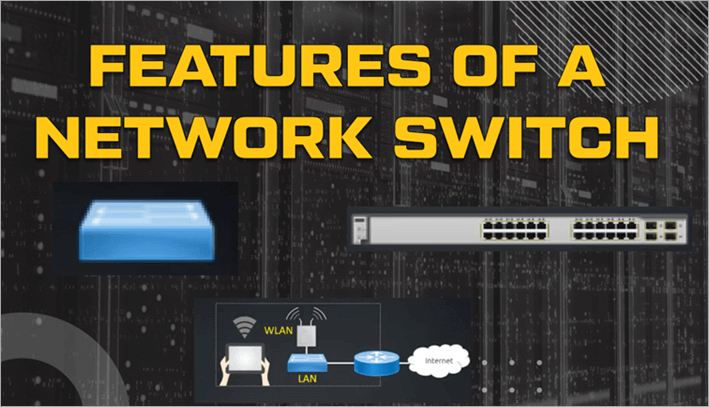
These features will give you the complete idea of how they function and manage a network in terms of data handling, network segmentation, security, and monitoring.
[Via NGT Academy]
#1) Data handling and Traffic Management
This feature governs how data is transmitted and optimized across the network.
- Intelligent Data Forwarding: Switches maintain a MAC table that comprises the MAC addresses of all NICs (network interface cards) in the network. This MAC table helps switches forward data only to the destined port instead of broadcasting to all nodes, reducing bottlenecks and improving efficiency.
- Full-Duplex Communication: It enables data to be transmitted and received at the same time over a single link. This can help double the theoretical bandwidth capacity of the connection. It also eliminates collisions and improves network efficiency and throughput.
- Quality of Service (QoS): This mechanism prioritizes critical applications and services over others. Certain types of traffic, like IP (VoIP), video conferencing, online gaming, etc, get preferential treatment and adequate resources over others to avoid network congestion and optimize performance.
- Link Aggregation: It is a technique that combines multiple physical network links (Ethernet cables) into a single logical link. This aggregation helps increase bandwidth by summing the capacities of the individual links and enhances redundancy, as traffic can automatically fail over to an operational link if one of the physical links in the group fails.
- Spanning Tree Protocol (STP): Spanning Tree Protocol (STP) is a network protocol that prevents network loops in networks, which can cause broadcast storms and MAC address table instability.
#2) Network Architecture and Segmentation
These features help divide and organize the network for better performance, manageability, and security.
- Network Segmentation: Due to segmentation, switches ensure reduced collision domains and also isolate traffic for better control and performance.
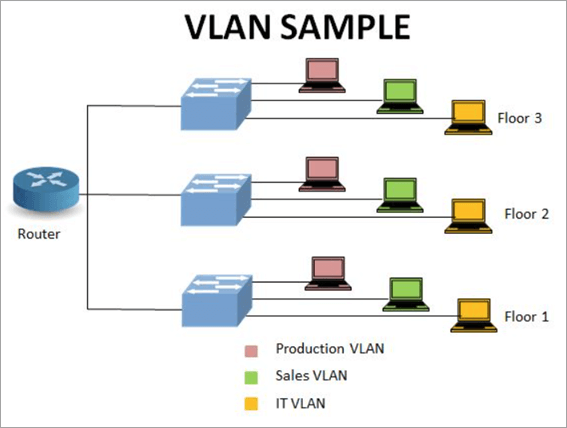
- Virtual LANs (VLANs): A VLAN (Virtual Local Area Network) is a logical grouping of devices on a network that behaves as if they’re on the same physical network segment, even when they’re physically distributed across different switches or locations. This segmentation enhances network security by isolating traffic between groups, improves performance by reducing broadcast traffic within each segment.
The following image shows the VLAN setup.
[Via networkhope]
#3) Monitoring and Diagnostics
These features help administrators keep the network healthy, troubleshoot problems, and optimize network performance.
- Port Mirroring: This process mirrors the data from one or more ports to a specific port for monitoring. It allows network admins to analyze and debug network traffic without affecting the flow of data on the source ports.
- Simple Network Management Protocol (SNMP): This protocol helps to track port status, traffic statistics, device health, and receives alerts for various network events. Network admins use this data for the administration and management of the network.
- Remote Management: This feature allows centralized management of a switch for remote locations through various modes like CLI, GUI, or cloud platforms. It helps to keep a strict vigilance on a network.
#4) Security Features
Robust security features like 802.1X Authentication, Access Control Lists (ACLs), Port Security, and Private VLANs prevent unauthorized access and keep the network secure.
802.1X Authentication serves as the first line of defence, acting as a digital gatekeeper that requires devices to authenticate before they can even connect to the network. On top of this, Access Control Lists (ACLs) provide a more granular level of security by filtering traffic based on specific metrics like IP or MAC addresses.
Further Reading => LAN Vs MAN Vs WAN: Key Differences
To further enhance security, Port Security controls the number of devices to be connected to a single port, which prevents unauthorized device swapping.
Private VLANs add another layer of isolation. This feature segments a standard VLAN into smaller, isolated sub-groups, preventing devices from communicating with each other even if they belong in the same broadcast domain, thus enhancing confidentiality.
How to Pick the Right Network Switch
Whether you’re setting up a small home office or are looking for a network solution for a mid-sized organization, or designing or managing an extensive enterprise network, choosing the right switch is critical to ensuring proper data throughput, security, and scalability, and long-term operating cost.
Below is a detailed guide to selecting the appropriate switch, with reasons for each consideration.
- Determine your network requirements
- Level of management and advanced features
- Number of ports and speed
- Include PoE for powered devices
- Prioritize features like VLANs or QoS for complex networks
- Plan for scalability and growth.
- Balance the budget with reliability
Determine Your Network Requirements
Understanding your network’s purpose and complexity helps to pick the right switch that meets the current and future demands without over- and under-budgeting.
First, you need to consider all devices that are part of the network, like computers, servers, IoT devices, etc.
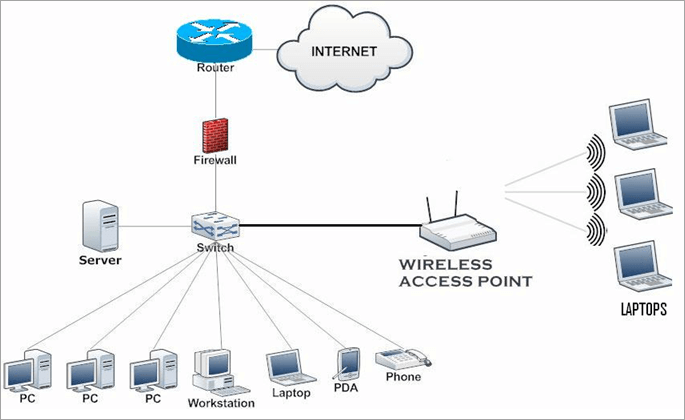
For example: For a home or small office, you may require connecting 10 to 20 devices, so in such scenarios, a simple unmanaged switch with 8–24 ports will suffice your needs.
A SOHO network setup is shown below:
In case if you are looking for a mid-size organization where you need to connect a number of devices and require advanced features like security, control of data transfer, etc, then you should look for a managed switch with 24-48 ports with advanced features and sometimes probably with additional uplink or fibre ports.
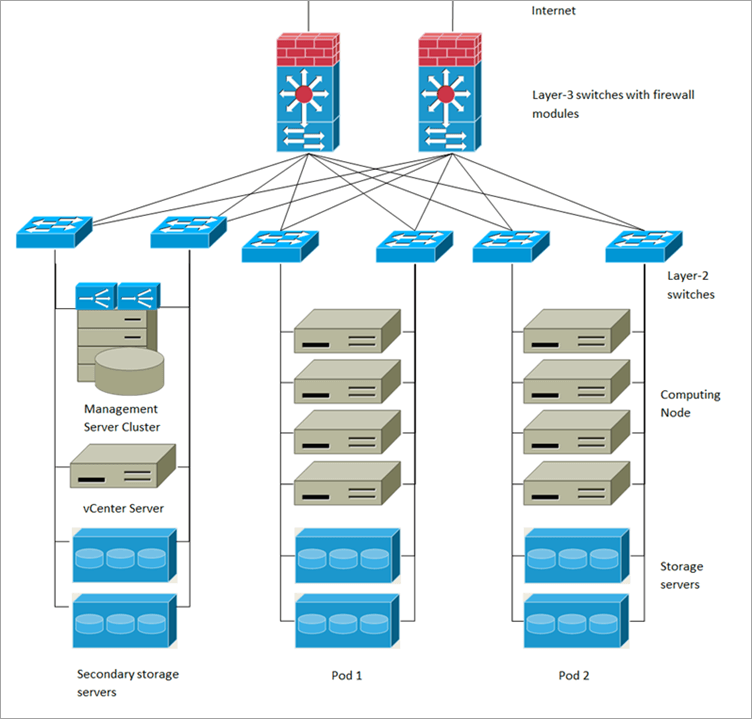
For complex networks like large institutions or data centers, one should prefer Modular switches like Cisco 9400 series, Aruba 8400, Juniper’s QFX series, and Dell PowerSwitch series.
Such switches can support hundreds of ports, depending on the modules installed in the switch. Such switches provide not only advanced features like security, control of data transfer, and privacy, but also centralized management of the entire network.
The diagram below shows a large, complex network setup:
Management Level & Advanced Features of Switches
One of the important parameters to look into while selecting the switch type is of advanced features and management level required to maintain your network. It will determine the level of control, scalability, and security of the network.
Unmanaged Switches: It is ideal for small and simple networks without any much management and security needs.
For example, these switches are suitable to connect a few PC’s, a printer, a Wi-Fi device, etc, in your network.
These switches are best compatible for a small office or home network. These are cost-effective and don’t need a highly skilled person to install and set up.
Managed Switches: These switches are best suited for medium to large-sized networks. Managed switches offer advanced features like VLANs, QoS, Link Aggregation, SNMP, and ACLs to have complete control of the network traffic.
If your network has multiple subnets or needs internal routing, then Layer 3 switches will be feasible for routing between VLANs/subnets (IP address-based).
Managed switches are expensive and require technical expertise to maintain and manage them.
Number of Ports and Speed
The number and speed of ports determine how many devices can connect and at what performance level. The ideal network should have enough ports to accommodate current devices, plus additional ports for future growth.
The switches come with common ports like 8, 16, 24, or 48 ports and modular-type switches allow adding additional.
For a SOHO network 8 to 16-port switch will suffice the need, while mid-size and large networks may need a higher model based on their current and scalability plans.
Port Speed: It needs to be carefully planned, as mismatched speeds may create bottlenecks in the network, reducing performance.
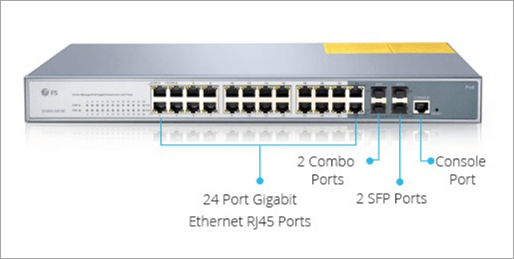
The figure below shows a switch with 24 ports and Gigabit speed.
[Via Linden Photonics]
For example, if you have devices operating at 1 Gbps and you choose a 100 Mbps switch, then it would create a mismatch of speed, leading to slowness in the network.
Fast Ethernet: Small to mid-sized networks should use speeds ranging from 100 Mbps to Gigabit Ethernet. Even nowadays, 100 Mbps is getting obsolete.
10 Gigabit (10 Gbps): High-speed ports are required where performance is paramount, like server connections, backbones, or high streaming requirements, etc.
Multi-Gigabit (25/40/100 Gbps): Nowadays, datacentres and AI servers require to be hosted on multi-gigabit infrastructure due to their enormous speed and connection requirements.
Power over Ethernet (PoE)
If your network includes devices such as IP cameras, WAP (wireless access points), or VoIP phones, then it’s important to plan for delivering both power and data over the same Ethernet cable using the Power over Ethernet (PoE) feature. This approach reduces cabling costs and simplifies installation.
Standard Ethernet cables transmit data till 100 meters, but switches designed for PoE and PoE+ can transmit data up to 400 meters.
Plan for Scalability and Growth
While selecting a switch, the network should have space for future growth to avoid a complete overhaul that would be expensive, as well as create network turbulence. So, the ideal network design facilitates the provision of additional ports.
Modular Switches: It can also be an excellent choice in this regard, as they allow you to add more ports or upgrade to faster interfaces, such as SFP+ (Small Form-factor Pluggable, Enhanced) or QSFP (Quad Small Form-factor Pluggable) modules, as your network growth increases.
It is best to plan to let the switch support emerging standards like multi-gigabit ports, like 2.5G/5G or Wi-Fi 6/6E, for handling next-generation technology.
Budgeting and Brand
Buying an expensive managed switch for home use may not be worth as you will not be able to utilize its full capability. Contradictory this, buying an unmanaged switch for large networks will create network havoc, which in turn may lead to network issues.
So, the bottom line is that evaluating the current network needs and keeping some buffer for future needs would help to balance the right technical approach and cost that will ensure high performance network at a good price.
Brands: The best unmanaged switches recommended for home and small office use are Netgear, D-Link, and TP-Link.
Best managed switch for mid to large enterprises: Cisco, Aurba, Mellanox, Arista Networks, are recommended as they provide better support, warranties, and regular firmware updates.
Common Mistakes to Avoid While Choosing a Network Switch
Here are common mistakes people make when selecting a network switch for a computer network
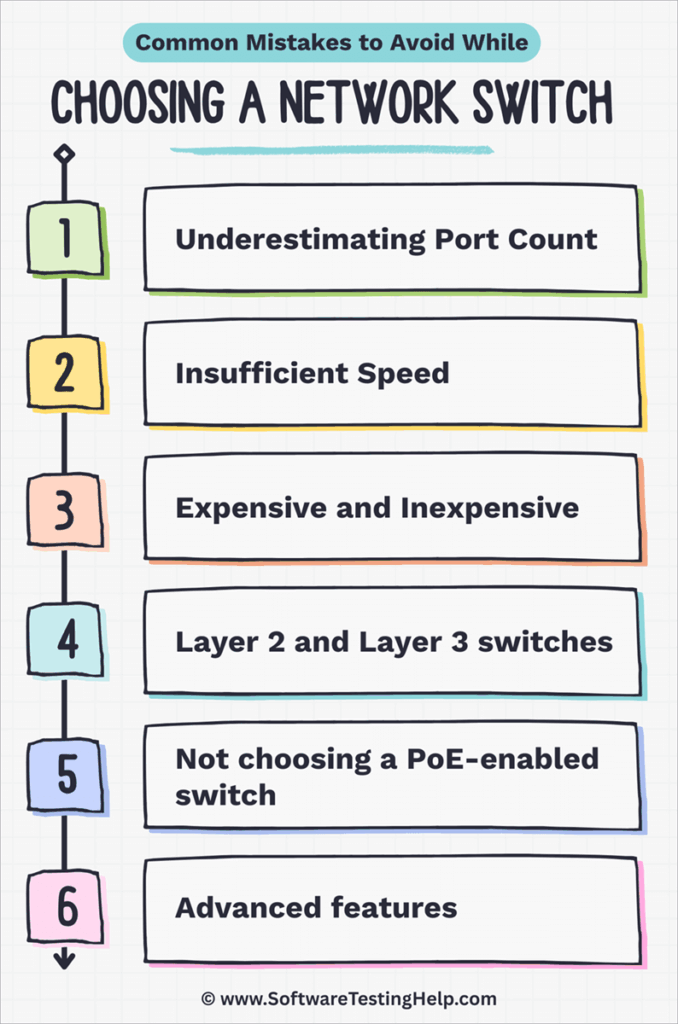
- Underestimating Port Count: Not buying enough ports, taking into consideration scalability.
- Insufficient Speed: Choosing an Ethernet (10/100 Mbps) switch when a Gigabit (1 to 10 Gbps) switch is needed, creating bottlenecks.
- Expensive and Inexpensive: Using an expensive managed switch for a simple home network and an unmanaged switch for a business network compromises security and reduces network performance
- Layer 2 and Layer 3 switches: A Layer 2 switch is used for the transmission of data in the same VLAN, and a Layer 3 switch (called a router) is used when the data transmission between different VLANs is required.
- Not choosing a PoE-enabled switch when devices (IP cameras, WAPs, VoIP) need power over Ethernet.
- Advanced features: No thorough analysis of advanced features for future requirements, such as VLAN, Quality of Service (QoS), ignoring redundancy/high availability features, and skipping essential security features such as port security, ACLs, etc.
FAQ’s on Managed Switch Vs Unmanaged Switch
1. What are the characteristics of a managed switch and an unmanaged switch
Managed switch
• It can be installed in various topologies such as ring, mesh, STP (Spanning Tree protocol), stacking, etc.
• It offers centralized management and administration through a remote protocol.
• It has secure features to monitor, control, and optimize network traffic.
• Its ability to prioritize traffic based on criticality reduces latency in the network.
Unmanaged switch
• It supports only star and daisy chain topologies.
• It’s easy to install and use due to its plug-and-play mode.
• These are cost-effective compared to managed switches.
• It does not require expertise to install and operate.
2. Explain Unmanaged Switch vs Hub.
The primary difference between an unmanaged switch and a hub is the way they handle and manage data transmission.
An unmanaged switch intelligently transmits data from one device to another device in the network without creating any bottleneck or slowness in the network, while a hub transmits data across all ports rather than transmitting to the destined port.
Hub working creates broadcast traffic, leading to slowness and a bottleneck in the network.
3. Explain Unmanaged vs managed switch for home.
Unmanaged switches should suffice for your home environment and are relatively inexpensive. Their plug-and-play features make them simple to operate and install in the home network.
Managed switches come with many advanced features and security controls that make them ideal for more complex networks, which are typically not required in a home environment.
4. Explain the difference between Managed vs unmanaged switch for gaming.
For the vast majority of gamers, an unmanaged switch does all that they need. Unmanaged switches operate on a plug-and-play basis and essentially provide the simple functionality of increasing your wired network connections.
On the other hand, managed switches provide advanced features and finer control over the network, which is not required in gaming. Managed switches come at a cost and require some level of technical expertise to configure.
5. What are the best unmanaged switches?
Picking the best unmanaged switch depends on your specific needs, such as the number of ports, speed requirements, cost, and other feature requirements.
Here are some of the top picks, which are mostly preferred in this category:
• TP-Link TL-SG105-M2 (5-Port, 2.5GbE)
• TP-Link TL-SG108 (8-Port, Gigabit)
• NETGEAR GS308 (8-Port, Gigabit)
• TRENDnet TPE-TG380 (8-Port, 2.5G with PoE+)
6. What are the advantages of a managed switch?
The advantages of managed switches are that they optimize network performance through network segmentation and QoS, provide traffic control and management, network security through ACLs and VLANs, scalability, and flexibility to meet specific network and traffic requirements.
7. Is the POE switch managed or unmanaged?
A Power over Ethernet (PoE) switch can be either managed or unmanaged, depending on the model and its features. Both types supply power and data on the same Ethernet cable, yet they differ in controls and features.
A managed POE switch can be controlled, secured, and comes with advanced features; it is best suitable for big, complex networks, whereas an unmanaged POE switch is best suitable for small networks with no additional features for network management and control.
Further Reading => Hub vs Switch – Learn the Differences Now
Conclusion
Before closing this post, let’s briefly summarize which type of switch is suitable for different users.
Whether a managed or unmanaged switch is right for you depends entirely on your requirements concerning cost, network size, and data reliability.
If you are looking for a home use or a small office purpose, then you can prefer an 8-port or 16-port unmanaged switch. The reason is that an unmanaged switch is a plug-and-play device and does not require any technical skill set to operate it.
Unmanaged switches are even suitable from a budget point of view and will save you time and headaches to operate them.
Even if there arises a need for expansion in the future, you just need to replace the existing switch with a higher port switch without worrying about any configuration or installation. The network will function as it was before without any performance issues.
If you are looking for a mid-sized or large-sized network, you need to go for a managed switch for better performance, data security, and other advanced features. A large enterprise has its own support team, so it will maintain the operation of switches.
Even future scalability can be easily handled by creating VLANs. For large established businesses, cost is not an issue as they need data security, privacy, and reliability, and all these are possible with a managed switch.
Was this helpful?
Recommended Reading
-

Difference Between Layer 2 and Layer 3 Switches in Computer Networking System: In this Beginner's Networking Training Series, our previous tutorial briefed us about Subnetting and Network classes in detail. We will learn the various features and application of Switches at layer-2 and layer-3 of the OSI reference model. We…
-

This tutorial explains the differences between Network Hub VS Network Switch. Understand the differences along with working principles, applications, demerits, etc: In our previous tutorials, we had already discussed in detail the working, configuration, and set-up of switches with the help of the different examples in the networking system. But…
-
Understand the complete differences between Switch and Router, including their applications, merits, demerits, working, etc: In our previous tutorials, we had already discussed in detail the working, configuration, and set-up of routers and switches with the help of the different examples in the networking system. But here we will discuss…
-
Curated List of Top LAN Monitor Tools with Features and Comparison. Select the BEST LAN Monitoring Software for Optimum Network Performance and Health: A LAN Monitor is an application that scans the entire network to ensure that all the network devices are working as expected. It generates alerts for suspicious…


