Do your phones listen to you? Our quick guide reveals the truth behind why does your phone listen to you and how to stop your smartphone from listening to your conversations.
Have you ever discussed some product and found an advertisement for it in Instagram, Facebook, or any other application? There can be nothing more irritating than feeling that your phone is listening to you all the time.
To sum up, one can say that phones can use microphones for voice assistants and applications, if one gives his/her permission for that, but there is no evidence that they record conversations for targeted advertising.
In this guide, we will cover does your phone listen to you, why targeted advertisements seem to be eerily accurate, how to find out what apps are accessing your microphone, and how to make your phone stop listening to you.
Does Your Phone Listen to You?
No, your phone does not secretly record your calls to show you personalized ads.
- Proximity Matching: You get ads based on the search queries made by those who are near you physically.
- Predictive AI: Algorithms predict your requirements based on your browser history and demographic data.
- Voice Assistants: Your devices listen locally for wake words like “Hey Siri” and “Hey Google”, but not for advertising.
Does Your Phone Listen to You?
If my brief time on earth has taught me anything, then it would be never to take a corporation at their word. Your concerns for privacy stemming from this question are legitimate.
What this topic demands is a deeper deliberation, and that is exactly what I intend to do with this article.
Key Takeaways
- Your iOS or Android isn’t listening to or recording everyday conversations.
- There isn’t enough empirical data to suggest phones are spying on their users.
- A phone can listen to its surroundings legally if voice assistants like Siri or Google Assistant are enabled or if certain apps have Microphone permission.
- Apps usually use predictive algorithms and track user activity online to send targeted ads.
- Hackers can listen to your phone’s surroundings via malicious software or Spyware like Pegasus.
- Review microphone and app permissions regularly to ensure apps aren’t listening to you or collecting data.
- Using a VPN, disabling personalized ads, updating the phone OS, and installing cybersecurity software can strengthen privacy on both iOS and Android devices.
If you think your phone is listening, then here is the video that explains how to fix it:
| Signs your Phone is Listening | Signs it is just ad Targeting |
|---|---|
| Your phone battery is draining quickly, indicating spyware. | Seeing ads for items you typed into Google. |
| Skyrocketing data usage | Seeing ads for items your friend liked on Social media. |
| Strange clicking or background noise, especially when you are on a call. | Ads appear after you walk past a store |
| A green or orange dot on top of your screen, indicating an on microphone. | No mic lights on the phone. Ads just appear after normal internet browsing. |
How Voice Assistants Actually Listen
Contrary to what you may suspect, your phone isn’t constantly recording the sounds and voices transpiring around it. That said, most phones today come with intelligent voice assistants that do listen. Siri on iPhone, Alexa on Amazon, and Google Assistant are some prominent examples.
How Google Assistant/Gemini Responds

[via Google Assistant]
These voice assistants respond to specific wake words like “Ok Google” or “Hey Siri”. These triggers are managed on a smartphone through dedicated neural chips. The voice assistants only activate and start recording when they hear the aforementioned wake words.
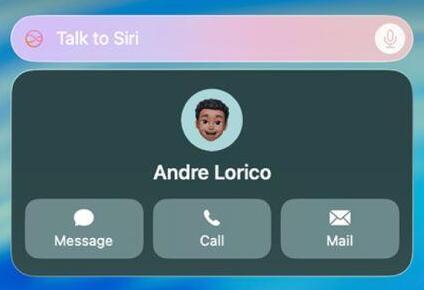
[Via Apple Support]
How Siri Listens for “Hey Siri
E.g., I say “Hey Siri” to my iPhone and follow up with a question, like let’s say: tell me something about the famous Hollywood director Christopher Nolan. Siri will receive this question, send it to the internet, and then respond to me with what it deems the best answer.
Your phone’s microphone remains inactive when those wake-words aren’t spoken. That is what Google and Apple claimed. However, recent class-action lawsuits have raised red flags with regard to how these voice assistants function and whether these tech giants can be trusted.
Is My Phone Listening To Me: Lawsuits That Changed Everything
In a recent report by Nixplay, 60% of millennials believed their phones were listening to them. The same report stated that 55% of Americans think their phones are spying on them and collecting their data to customize ads.
Is my phone listening to me? This question was floating around the internet even before Apple and Google were hit by massive lawsuits. Even though these expensive phone-listening lawsuits didn’t prove anything, they planted a seed of doubt among smartphone users, at least in the states.
Let’s briefly look at what those lawsuits entailed.
#1) Apple’s $95 Million Siri Settlement: Over the years, Apple has been the subject of many class-action lawsuits. The Apple Siri Lawsuit settlement was the most recent one that made headlines. The lawsuit was brought by claimants alleging that Apple had eavesdropped on them via their voice assistant Siri.
They further alleged that Apple had recorded customers who had unintentionally activated Siri without using the wake word to trigger it. Apple agreed to settle the lawsuit by paying $95 million. In doing so, it denied any wrongdoing while avoiding the risk of a future court case.
Throughout the lawsuit, Apple has maintained that Siri never sold the data it recorded and that it only settled to avoid further litigation.
#2) The Google Assistant Lawsuit 2026: Google also found itself in a similar predicament to Apple, where some smartphone users accused the tech giant of illegally recording and sending their private conversations to advertisers via Google Assistant.
Just like Apple, Google also settled the case by agreeing to pay $68 million to avoid the uncertainty and cost of future litigation. The settlement would cover anyone who bought a Google device since May 18 of 2026. The settlement is pending final approval, and the hearing has been set for October 1 2026.
What Court Documents and Investigations Revealed
In the case of Apple’s Siri and Google Assistant, the court found that both assistants activated after misunderstanding certain background noise as “hot words”, aka “False Accepts”. As such, both Siri and Google Assistant ended up recording people’s voices without their consent or awareness.
The court found that these recordings, which included private, confidential snippets, were being sent to human reviewers.
While both Apple and Google denied any wrongdoing and settled out of court, these lawsuits did push them to introduce mandatory user opt-in systems for data collection.
Why it Feels Like Your Phone is Listening to You
It can feel like your phone is listening when you say something about a certain product and then see an advertisement of it just a few minutes later. But being able to find an advertisement for a particular product doesn’t prove that your phone was recording your conversation. Advertisers use much more sophisticated ways to target their audience.
- Search and browse history: Your searches, websites, videos you watch, and interaction with content can provide advertisers with information about your interests.
- Location and app usage: Location, activities in different applications, and even device activity can tell about your habits, interests, and places you frequent.
- Personalized ads: By using this data, algorithms will determine the audience to which you belong and which items you might want to buy.
- Other sources of data: Further details about you may be found from advertisers, data suppliers, and devices. For example, your activity might fit into some broader pattern characteristic of certain household or audience.
- Confirmation bias and Baader-Meinhof effect: Humans tend to remember coincidences but forget incongruences. In other words, we remember only those ads that somehow correlate with something we talked about before.
As a result, we tend to think that our phones record our conversations because, on the one hand, the coincidence happens; on the other hand, we forget hundreds of ads that don’t relate to anything we’ve ever talked about.
Do Phones Listen to You? Let’s Test and Find Out
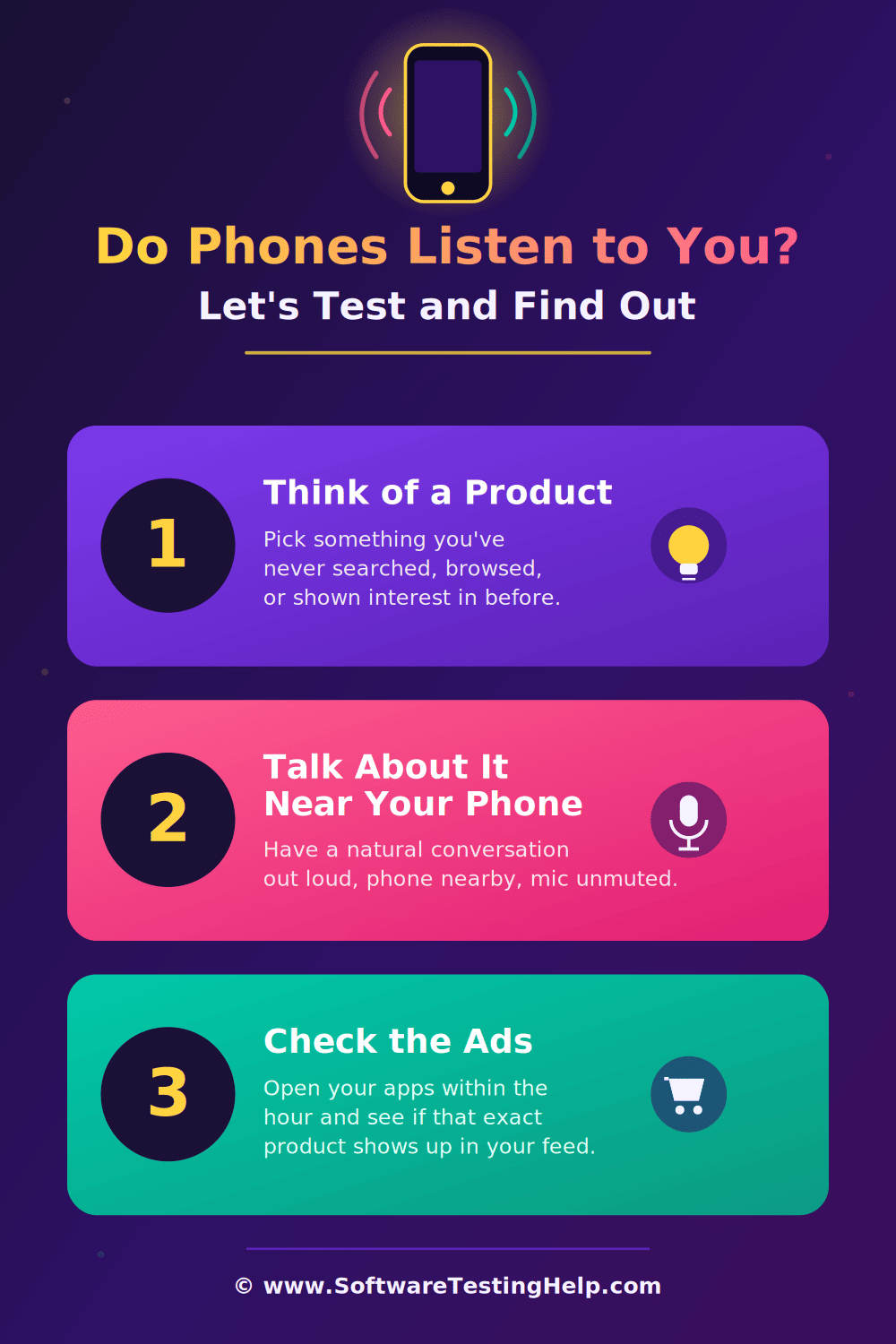
If you are concerned and would like to put your mind at ease, I suggest you try a little experiment. It would go as follows:
#1) Think of a Product
The first thing I want you to do is to think about a product. Let that product be something that you wouldn’t normally be interested in. When I decided to undertake this experiment, I thought of those Casio Calculators. Those antiques were the best contenders for this experiment that I could think of.
#2) Talk About it Near Your Phone
Once you’ve locked the product, it is time to talk about it. You’d want to be near your phone when talking about this product. Throw out phrases like “How cheap is a Casio Calculator? or where can I buy a Casio Calculator?” Play around with different keywords and phrases while the product name remains constant.
#3) Check the Ads
Now, start surfing. Log into your social media feeds or visit YouTube and see what ads pop up. If you see ads for the product you picked, then you can answer in the affirmative to the question “do phones listen to you for ads”.
In my case, I didn’t see any ads for a Casio calculator or any other product from the same brand.
I understand why one might think that their phone is listening to them. Take, for instance, the recent news on a feature Google intends to launch for its Pixel phones.
What Is the Pixel Audio Memory Feature?
The news of Google launching a feature called Audio Memory for Pixel phones started doing the rounds on the internet recently. The feature basically turns your device into an ambient recorder, listening to its surroundings for the entire day.
The feature is designed to identify nearby music and log tracks into a unified list. That said, the leaked news also shows that the feature is meant to listen to everyday conversations as well. Therein lies the problem.
Skeptical folks fear the feature will enable surveillance and transform their phones into wiretapping devices. Google itself has said that the feature will save recordings on the device and won’t be sending them to its server.
Now, whether or not the feature proves the skeptic true will only be known when it is finally launched. The reception to this news is just another example of the cynicism that has seeped into the minds of tech users, as their concerns for online privacy grow.
Is it Legal for Your Phone to Listen to You?
Well, it is legal for your phone to listen to you if you’ve granted apps or certain features permission to your device’s microphone.
It is also legal for voice assistants like Siri, Google Assistant, and Alexa to listen if they’ve been enabled on your phone and you’ve used the wake words (Hey Siri, Ok Google) to trigger them.
On the other hand, illegal listening would entail audio being recorded on your phone by spyware or malicious software without the device owner’s consent or awareness. A good example of such spyware would be the infamous “Pegasus”.
If you don’t want a phone to listen to you, my advice would be to restrict microphone access to apps and disable voice assistants.
How to Check Which Apps Have Microphone Access
It is very simple to check which apps on your phone have Microphone access; here’s how you do it:
On Android:
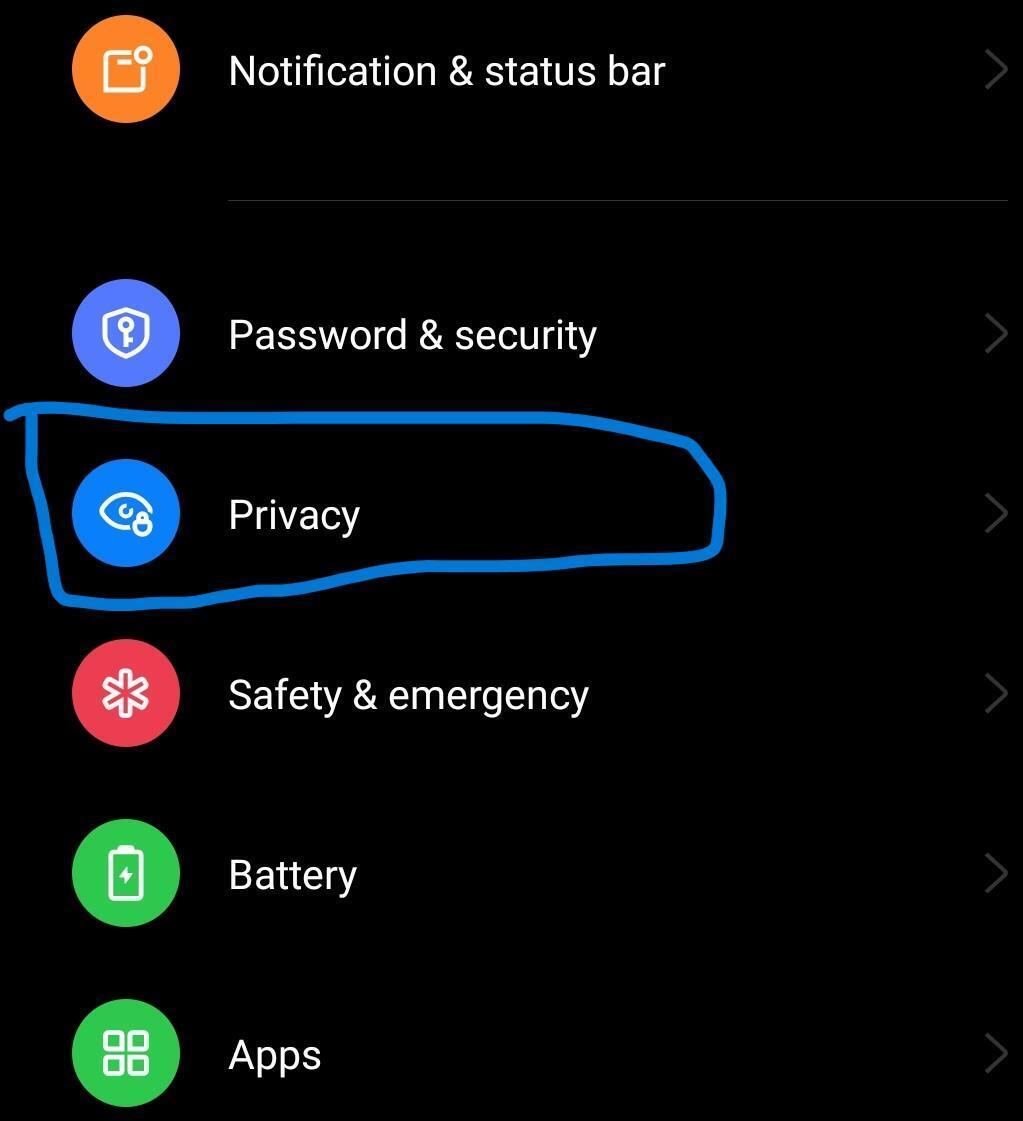
- Open Settings > Privacy
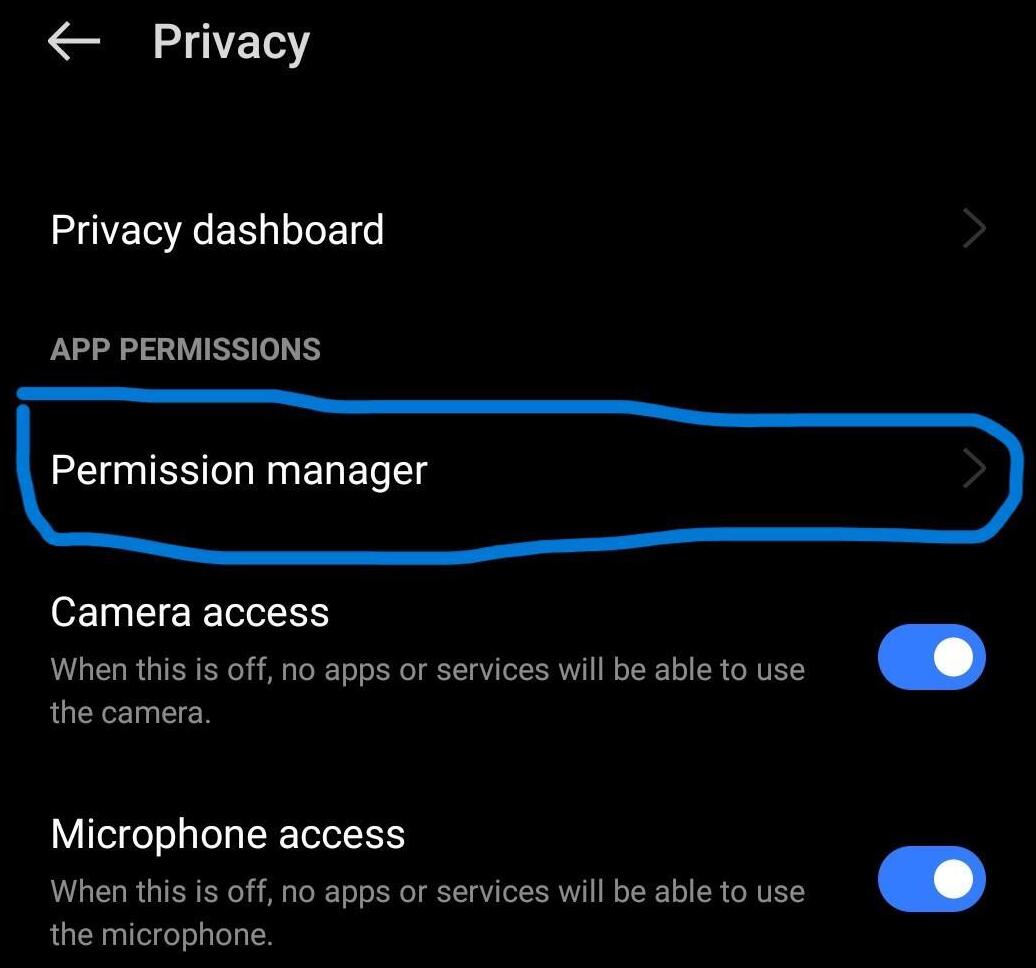
- Select Permission Manager > Microphone.
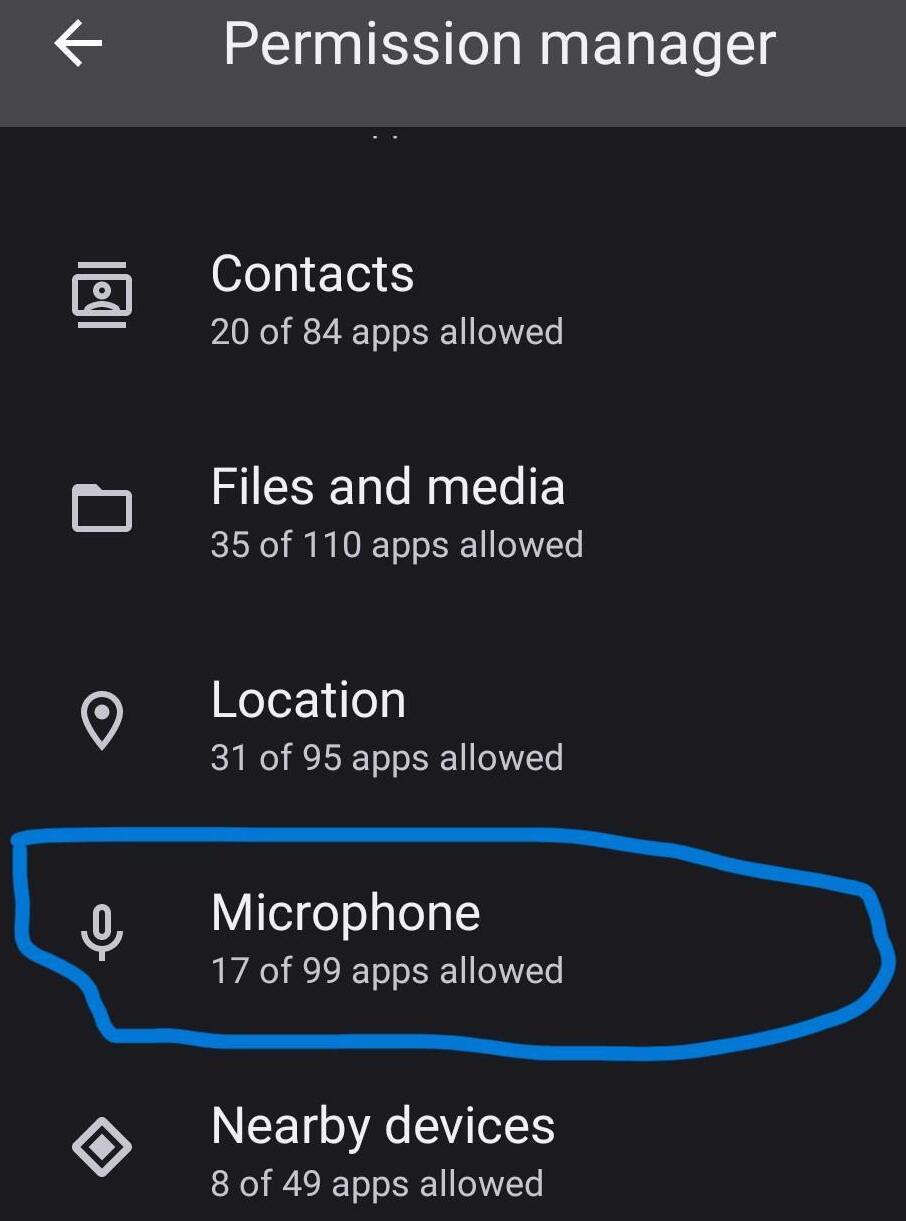
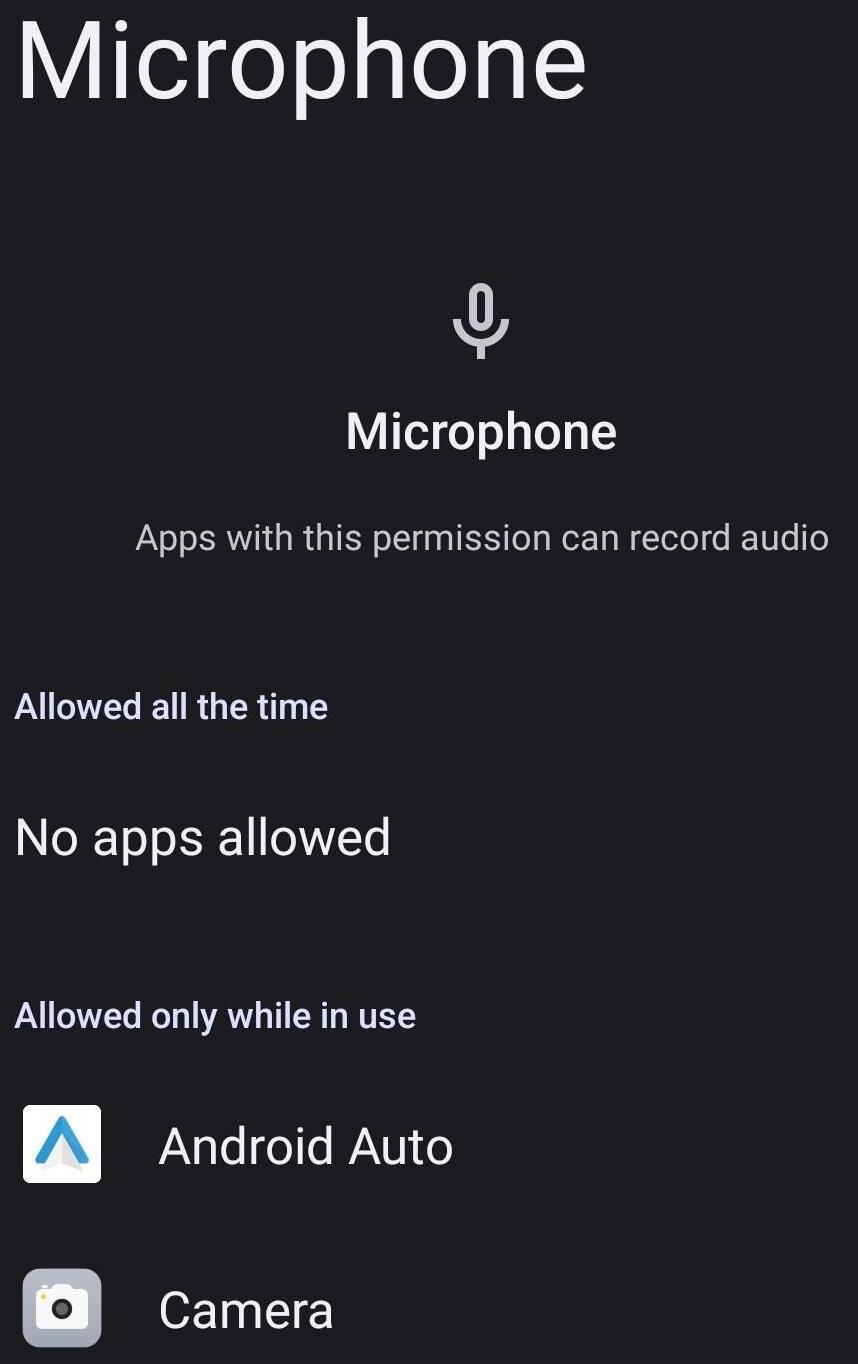
- You’ll now see a list of all apps that have access to your device’s Microphone.
Alternatively, your device will show a green indicator at the top whenever an app is using the microphone. Simply swipe down and tap on the indicator to check which app it is.
On iPhone
- Open Settings > Privacy and Security.
- Select Microphone to see a list of all apps using it.
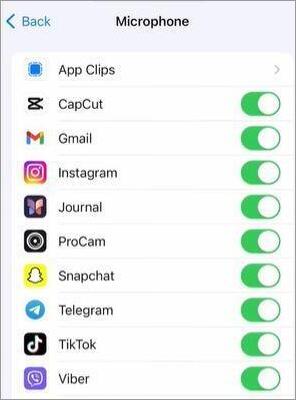
[via App Tutor]
Alternatively, an orange dot will appear when an app is using the microphone on the device. Swipe down to find out which app it is.
How to Stop Your Phone From Listening to You
Here’s everything you can do to stop your phone from listening to you.
#1) How to Stop Your iPhone From Listening
This section includes the simple steps to stop your iPhone from listening to you.
i) Disable Siri
To disable Siri, do the following:
- Go to Settings > Siri.
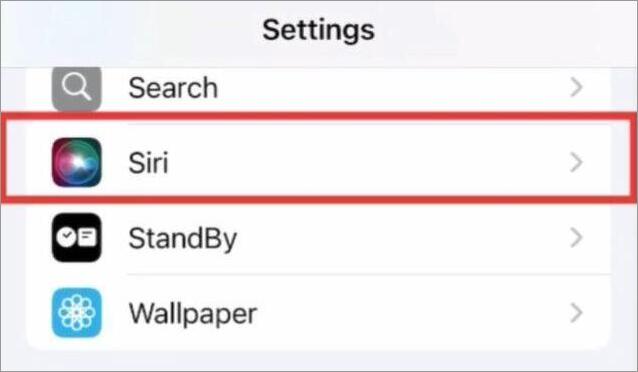
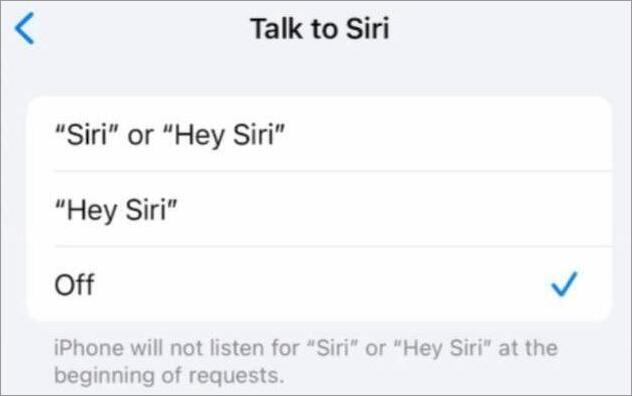
- Select “Talk to Siri”.
- Tap on “Off” to disable Siri.
ii) Disable Microphone Permissions
- Go to Settings > Privacy and Security.
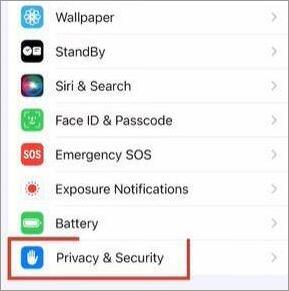
- Select Microphone
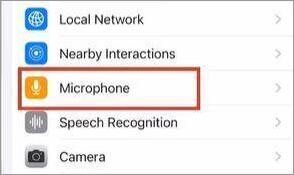
- Toggle off next to each app you wish to deny Microphone permission.
#2) How to Stop Your Android Phone From Listening
i) Disable Google Assistant
- Open the Google app and tap on your Profile icon.
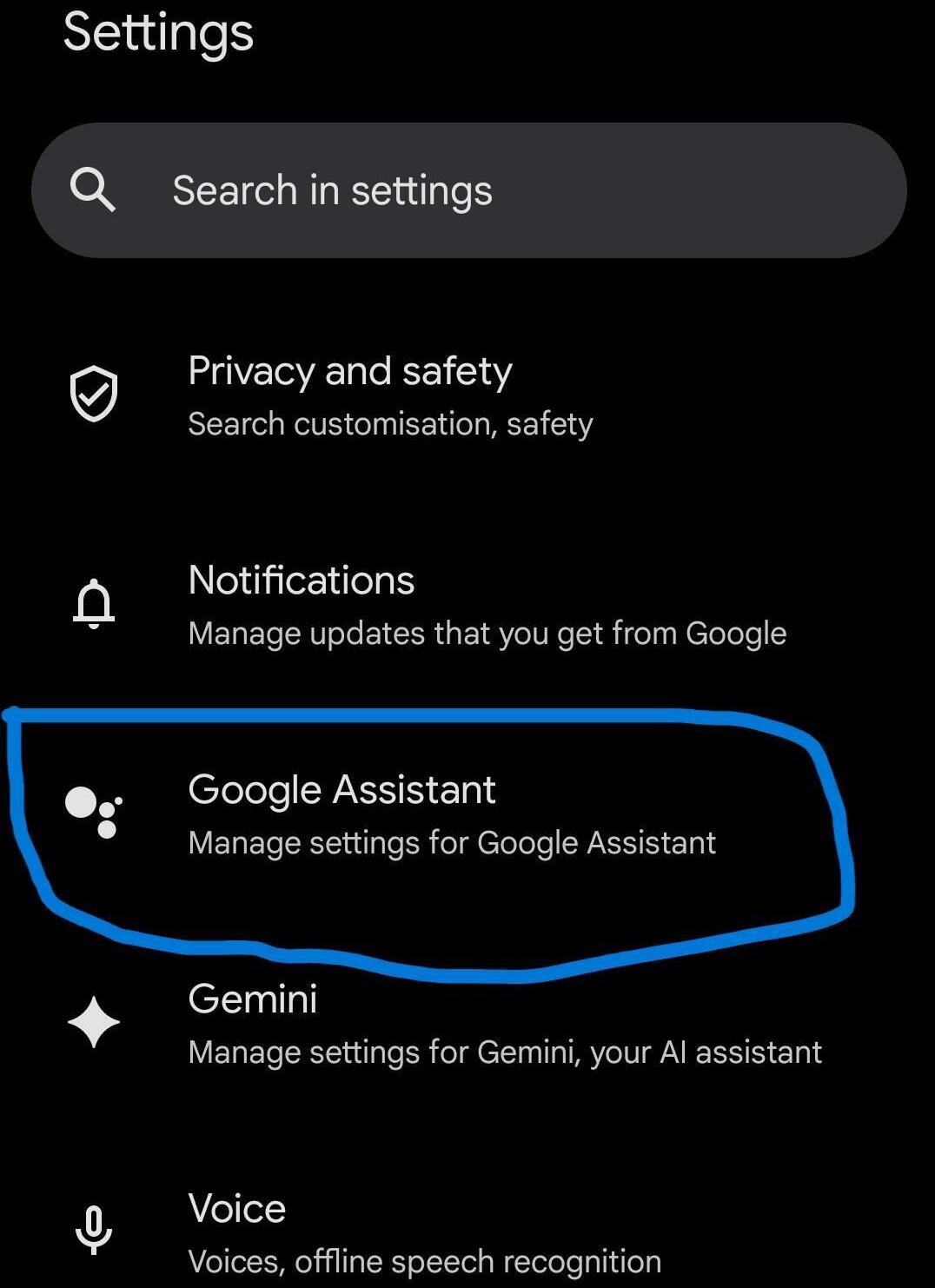
- Select Settings > Google Assistant > General.
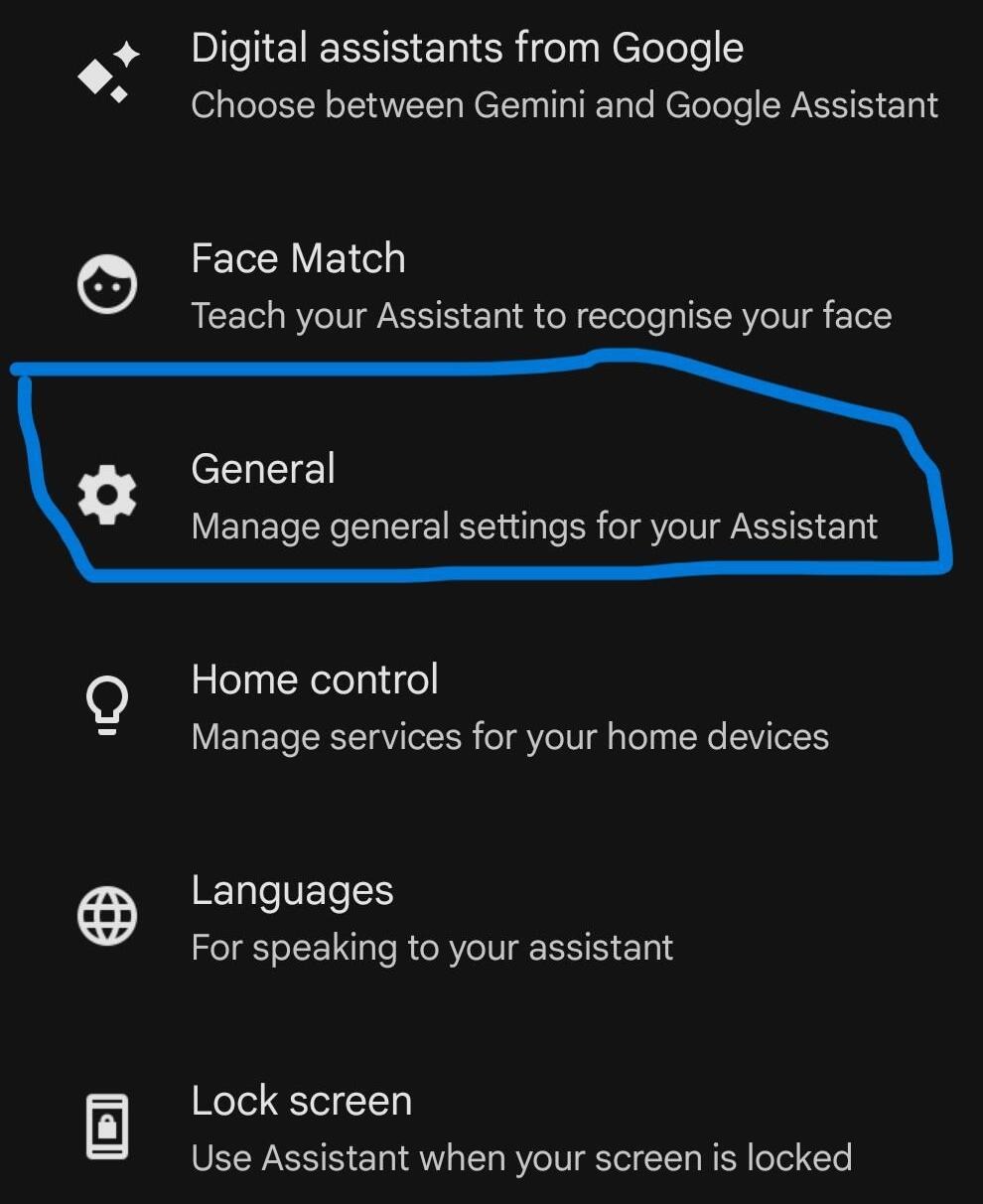
- Here, toggle off Google Assistant to disable it.
ii) Disable Microphone Permissions
- Go to Settings > Privacy
- Toggle off Microphone Access to deny all apps permission.
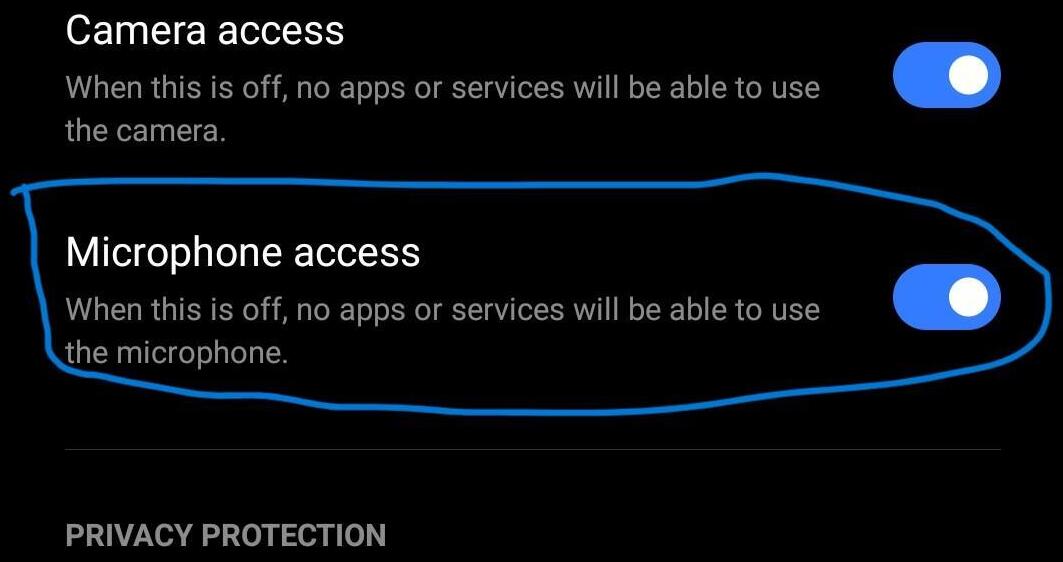
Alternatively, select Permission Manager > Microphone to disable permission for specific apps.
I would recommend reviewing your app’s Microphone permissions periodically to know which apps are listening and which aren’t. This will also help you identify a strange app that shouldn’t have Microphone permission but does.
How to Protect Your Phone Privacy Beyond the Microphone
Besides disabling your phone’s voice assistant and managing Microphone permissions, there are many other things you can do to tighten privacy on your phone.
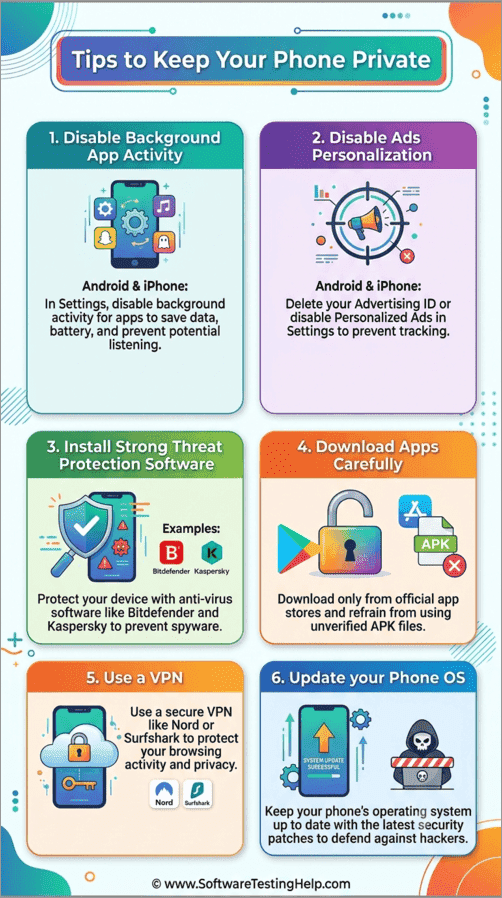
Some noteworthy tips from our experts are listed below:
#1) Disable Background App Activity
Some apps continue to operate in the background even after you’ve shut them down. These apps continue to exhaust data, consume your device’s resources, and might listen in on you.
On an Android device:
- Go to Settings > Apps > App Management.
- Select an App and tap on Battery Usage.
- Toggle off the option that says “Allow Background Activity”.
On an iPhone:
- Go to Settings
- Select General
- Tap on Background App Refresh and disable it for certain apps.
#2) Turn Off Personalized Ads and Tracking
With this feature on, your phone basically has your consent to gather data about your online activity so you can get relevant ads. If you don’t want your phone to track your digital footprint, I would suggest disabling this feature.
On Android:
- Go to Settings
- Tap on Google
- Select Ads > Tap on Delete Advertising ID.
On iPhone:
- Go to Settings.
- Tap on Privacy and Security.
- Select Apple Advertising and toggle off “Personalized Ads”.
#3) Install Strong Threat Protection Software
As I mentioned before, the issue of illegal listening on a phone can largely be attributed to spyware or malware that found its way onto your device without your awareness.
To make sure such software doesn’t get installed on your phone, I suggest downloading strong anti-virus or anti-malware software on your phone. Bitdefender and Kaspersky are two really good options.
#4) Download Apps Carefully
When downloading apps on your phone, I suggest sticking to ones you can find on the official Google Play Store or Apple Store. Refrain from downloading APK files from websites online. You never know which of these apps might contain spyware.
#5) Use a VPN
VPNs are great tools to hide your browsing activity. They come in handy when connecting to a public network. Try Nord or Surfshark. Any VPN that doesn’t keep user logs or throttle your internet speed will prove sufficient.
#6) Update Your Phone OS
This goes without saying. Always keep your phone’s OS up to date. Hackers are known to exploit system vulnerabilities. Regular updates contain patches that fix these vulnerabilities and ensure proactive protection for your phone.
How to Find If Your Phone Is Listening Right Now
You can quickly determine whether any application is currently utilizing your microphone or has ever done so by utilizing the privacy settings in the operating system.
Method 1. Check the Privacy Icons in the Status Bar
- iOS (iPhone): You will need to look in the top-right corner or the Dynamic Island. An orange icon tells you an application is using your microphone while a green icon means the camera (and perhaps the microphone) is being used.
- Android: You will need to see the top-right part of the status bar where the green microphone icon (or a green dot) shows up every time an application uses the microphone.
Method 2: Access Microphone Usage Logs
- For iOS device: Open the Settings app > Privacy and Security > App Privacy Report. Switch on “Data & Sensor Access” to get a timeline of all apps that have used the microphone in the past 7 days.
- For Android device: Open the Settings app > Privacy > Privacy Dashboard. Select Microphone to get an hourly log of all applications that have used the microphone within 24 hours.
Method 3: Watch for System Notifications
- Unexplained battery or data usage spikes: Recording audio in the background increases data consumption and processing.
- Check the Settings app > Battery and Settings app > Cellular/Data Usage for applications with unusually high background activity.
- Misfires with voice assistants: If Siri or Google Assistant triggers without you saying a command, something else might be listening to you.
Frequently Asked Questions
1. How to stop phone from listening to you?
There are several things you can do to stop a phone from listening to you.
• You could try disabling voice assistants like Google Assistant and Siri.
• You could also try disabling Microphone permissions for certain apps.
• You could try restricting apps from running in the background.
• Using a VPN or anti-malware software can also help.
You’ll find a detailed guide on how to disable the voice assistant or disable Microphone permissions on iOS and Android devices in the above article.
2. Is “Hey Google” always listening?
Yes, but only in local mode on your device in a low power idle mode. Dedicated hardware processes a short loop of audio locally to detect the wake word “Hey Google.” Nothing is recorded or sent to Google servers unless the wake word is detected.
3. Do your phones listen to you for ads?
Not really. Your phone isn’t constantly listening to its surroundings, trying to capture an interesting conversation to later bombard you with a relevant ad. Instead, most apps use predictive algorithms and track a user’s online activity (searches, engagement on social media, GPS location) to send targeted ads.
4. Is my phone recording my conversations?
No, your phone is not recording everyday conversations. Although an app may listen to surrounding audio if you permit it. Besides mic permissions, a voice assistant may start listening to you in response to wake words like “Hey Siri” or “Ok Google”.
5. How to know if my phone is bugged?
You’ll notice some signs if your phone is bugged, like:
• Heavy battery drain
• Phone heating up
• Unusual background activity
• Unusual sound in the background when you are on the phone.
• Unusual data spikes
Most spyware apps run subtly in the background and remain hidden. The best way to protect your phone against them would be by installing strong cybersecurity software.
6. Is Siri always listening?
Like Google, Apple’s Siri uses a separate low-power coprocessor that listens only for the wake words “Siri” and “Hey Siri”. Audio clips are continually overwritten in the local RAM until the activation occurs.
7. How do I know which application is using my microphone?
Look at the top right corner of your screen:
iOS (iPhone): A small orange dot will show when the microphone is being used by some app.
Android: A green microphone or dot will appear. To find out the name of the app, swipe down from the top.
Check history: Check your history through Settings > Privacy & Security > App Privacy Report (iOS) or Settings > Privacy > Privacy Dashboard (Android).
8. Is there any way that my microphone could be used without my consent?
No, because current iOS and Android operating systems prevent the app from using your microphone unless you give permission. The only way that the app can use the microphone without your awareness would be if you’ve given it the “Always Allow” permission or if there’s some spyware on your phone.
9. How do I keep seeing advertisements about stuff I was just talking about?
It is because of cross-device tracking, proximity matching, lookalike audiences, and search history and not using the microphone to listen. All the available data about your location, interests, browsing habits, and people near you who have looked up the product are used by advertisers. It is supplemented by selective attention (Baader-Meinhof phenomenon).
Conclusion
Does your phone spy on you? It is not as you may think. There is no strong proof that smartphones are recording your conversations in order to show you advertisements. Nevertheless, apps and voice assistants have access to your microphone if you permit them to do so.
Your advertisement is not based on what you are talking about but on other aspects like search queries, browsing habits, location, applications you use, and ad profiles. Therefore, you should not believe that your phone spied on you just because you saw an advertisement of something you talked about.
In order to keep yourself safe, you should examine microphone permissions, disable voice assistants, check recent microphone activity, and minimize tracking and personalized ads.
Research Process: The total time involved to complete and publish this article is approximately 43 hours. This content was created through a structured research approach to ensure accuracy and reliability.
For more related guides, you can explore our range of tutorials below:
- The 8 Best Phone Tracker App Without Permission (Review)
- How to Check Call History of Any Mobile Number (100% Free)
- The Top 10 Hidden Spy Apps For Android Undetectable
- 10 BEST FREE Text SMS Tracking Apps Without Target Phone (Spy)
- Why Is My Phone So Slow? 5 Easy Ways to Speed Up Your Phone
- Why Is My Android Phone Not Allowing Me to Make Calls
- What is Android System Key Identifier
- Why Phone Calls Going Straight to Voicemail (10 Fixes)
Was this helpful?
Recommended Reading
-

Read this review to explore different effective methods to understand how to Record Phone Calls on iPhone: In a majority of states across the United States, the law mandates it to get consent from a single or all parties to the conversation to legally record a phone call. It is…
-
Here we will explore multiple ways to understand how to Share Your Location on iPhone with others: Sharing live locations is a useful thing today. It is especially useful when you don’t know the exact address and you would like to tell someone where you are. Be it an Android…
-
Read this review to compare and select among the List of Platforms That Can Help You Find Out: Who Called Me From This Phone Number: After all, it could be an annoying telemarketer trying to sell you a new product or a prankster who wishes to have some fun at…
-

Review and Comparison of the top free SMS Tracking Apps Without Target Phone. Pick the best SMS Tracker of your choice from this exclusive list: From knowing your child is safe at all times to catching a cheating spouse in the act, one could have many legitimate reasons to track…