


Get to know how Cloudflare spots Selenium web-driven browsers from our simple guide. Discover the various methods to Bypass Cloudflare using Selenium along with some of the top Selenium alternatives that boost compatibility:
Most organizations use Cloudflare to protect their websites from malicious traffic from spammers, credential stuffing, automated abuse, and other online threats. While these protections are essential for website security’s sake, sometimes they interfere with genuine automation activities.
However, automation engineers often face difficulties when Selenium automation scripts are to be executed against websites that are defended by Cloudflare.
How to Handle Cloudflare in Selenium: Complete Guide

Since many organizations are opting to choose Cloudflare as their web application’s security service provider, it is crucial to understand how Cloudflare is recognizing an automated testing traffic and how Selenium tries to interact with such kind of protections, which is increasingly becoming more important and unavoidable.
What is Cloudflare?
Cloudflare is one of the most popular web infrastructure and widely used security and performance platforms for web applications.
Cloudflare is a Content Delivery Network (CDN) and a digital security provider company that blocks HTTP traffic (malicious traffic) going to the targeted server and carries out security checks to spot and to minimize any application-layer DDoS attacks. [Acronym for DDOS is “Distributed Denial of Service”].
This article explains how Cloudflare identifies Selenium web-driven browsers, common scenarios wherein automations will get blocked, its ethical approaches to handle Cloudflare challenges, along with Selenium alternative automation testing tools that will help to improve compatibility.
Key Takeaways
The key takeaways from Cloudflare are listed below:
- Cloudflare’s core purpose is to defend websites from malicious traffic and bot activities.
- Selenium automation detection is based on browser behavior and repeated signals.
- Most often, the CAPTCHA is triggered by automation patterns that are suspicious.
- Best practices here are to use authorized testing and staging environments.
- The recommended approach here is to have a workaround and work with administrators, instead of bypassing these protections.
- Alternative tools are Playwright and Cypress.
Understanding Cloudflare Challenges
Cloudflare is designed to provide several layers of security mechanisms to differentiate between legitimate users and potentially harmful automated bots.
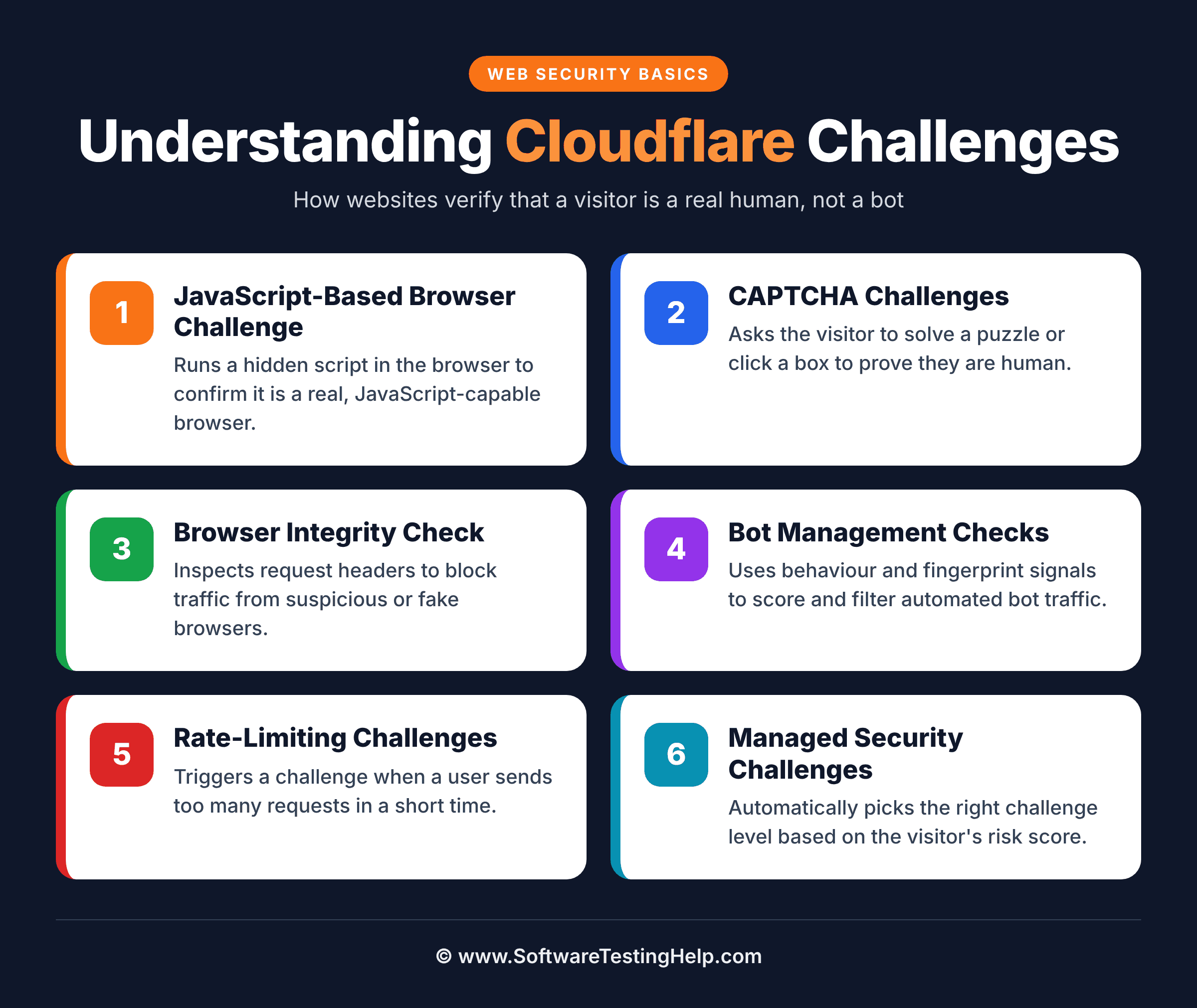
Based on the website’s security settings and the threat levels, Cloudflare uses several challenge mechanisms that visitors may encounter, such as:
- JavaScript-based browser Challenge
- CAPTCHA Challenges
- Browser integrity checks Challenge
- Bot management Checks
- Rate-limiting Challenges
- Security Managed Challenges
The above-mentioned mechanisms will try to analyze the browser’s behavior, activities and characteristics, request patterns, network traffic behavior, scrolling, and other signals before allowing users to have access to the websites they are browsing.
Can Selenium Reliably Bypass Cloudflare on its Own
No, Selenium alone cannot reliably provide a guarantee for bypassing Cloudflare, and it doesn’t have a built-in mechanism to bypass security challenges.
But Selenium can automate real browsers and is useful in testing Cloudflare-protected browser applications, depending on Cloudflare’s security configurations and assessment of the browser sessions/behaviors, along with authorized test environments to conclude successful testing.
Hence, modified versions of Selenium or enhancements like Selenium Stealth plugins and Puppeteer stealth plugins are a must and are required to adopt during testing.
How Does Cloudflare Detect Selenium
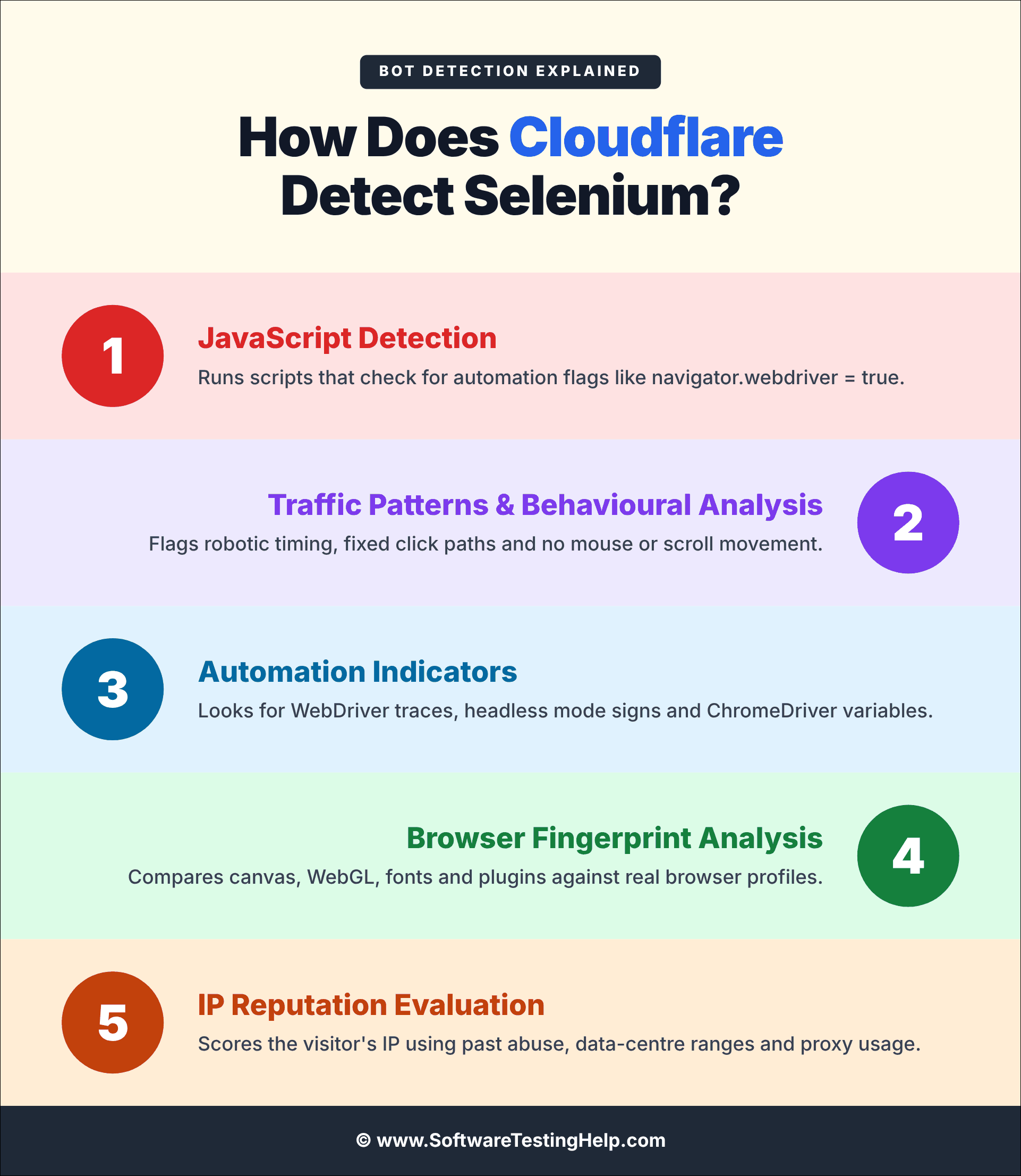
There are multiple detection techniques that Cloudflare makes use of to detect Selenium, such as:
- JavaScript detections
- Traffic patterns and behavioural analysis
- Automation indicators
- Browser fingerprint Analysis
- IP Reputation evaluation
#1) JavaScript Execution Analysis
Standard user browsers and automated environments sometimes behave differently. Most of the security checks are carried out whether the browser will execute the JavaScript correctly and properly or not.
#2) Traffic Patterns and Behavioural Analysis
Whenever a large volume of repetitive requests is performed, it is likely to trigger the security mechanism process.
Cloudflare will try to evaluate browsing behavior patterns like:
- Navigation speed in the browser
- Interactions patterns behaviour
- Mouse movements
- Duration of the Sessions
- Frequency of the request
For Behavioural analysis, human users may:
- Move the mouse
- Scroll down the pages and vice versa.
- Unpredictable navigations
- Spend varying durations of time reading the contents.
#3) Automation Indicators
Automation indicators simply mean that certain browsers might try to reveal automation activities that include:
- Automation-specific settings on browsers.
- Webdriver-related flags.
- Headless characteristics of browsers
#4) Browser Fingerprint Analysis
Whenever there are inconsistent fingerprints, it will appear to be suspicious behaviour and hence Cloudflare will analyse the browser attributes like:
- Browser Screen resolution
- Browser plugins
- User-agent string
- Time zone settings
- Languages settings
- Graphics rendering information
#5) IP Reputation Evaluation
Cloudflare will try to assess:
- Any previously flagged IP address ranges.
- If geographical activities are abnormal.
- Any known proxy networks
- Datacentre IP address ranges.
How to Bypass Cloudflare With Selenium
The main goal to handle Cloudflare is to maintain the compliance and reduce the false positives.
There are different methods to handle Cloudflare in Selenium, namely:
Method 1: Use Updated Browsers
It is always a good practice to make sure to use the current version of:
- Selenium
- Browser Drivers
- Chrome Browser
- Firefox Browser
- Edge browser
For the benefit of a more realistic browser behaviour experience, improved JavaScript execution and better compatibility.
Example:
WebDriver driver11 = new ChromeDriver ();
driver11.manage().window().maximize();
driver11.get("https://sthexamplesite.com");
Method 2: Test in Approved Environments Only
The most effective solution whenever possible is to:
- Usage of pre-approved QA environments
- Usage of pre-approved Staging environments
- Requests for test environments allowlist of IPs
Method 3: Usage of Explicit Waits
An appropriate way to make Selenium interact with an application more naturally is to use Explicit Waits, for the benefit of better user simulations, reduction in timing issues, and stable test suite execution.
Example:
WebDriverWait wait = new WebDriverWait(driver11, Duration.ofSeconds(11));
WebElement SigninButton =wait.until(ExpectedConditions.elementToBeClickable
(By.id("Signin")));
Method 4: Try Using API Testing Wherever Appropriate
Please note that not each and every application necessarily requires a browser automation testing.
There is an API testing, which can significantly reduce the dependence on web browser interactions, for the benefit of faster test executions, reduction in challenges exposure along with less maintenance efforts.
Example:
given()
.when()
.get("/api/users")
.then()
.statusCode(200);
Method 5: Cloudflare Analytics Should be Monitored
It is a good practice to carry out the following if you own the website:
- Analyse the challenging logs
- Check for and identify the blocked requests
- Security events must be reviewed
- Security events must be fine-tuned
For the benefit of better visibility and a faster troubleshooting process.
Method 6: Monitoring the Rate Limits
At all times, avoid usage of the excessive request/s frequency, for the benefit of improved test reliability, reduction in server load along with lower risk scores.
An example of best practice is:
Thread.sleep(4000);
driver11.navigate().refresh();
It is poor practice to use the for loop to handle this, example:
for(int i = 0; i < 1000; i++)
{
driver11.navigate().refresh();
}
Method 7: By Collaborating With Security Teams
Larger organizations quite often create:
- Dedicated QA test environments
- Testing purposes allow lists and
- Custom security policies
These are the approaches preferred in an attempt to work around the security measures or security controls.
Techniques to Handle Cloudflare Blocks During Selenium Testing
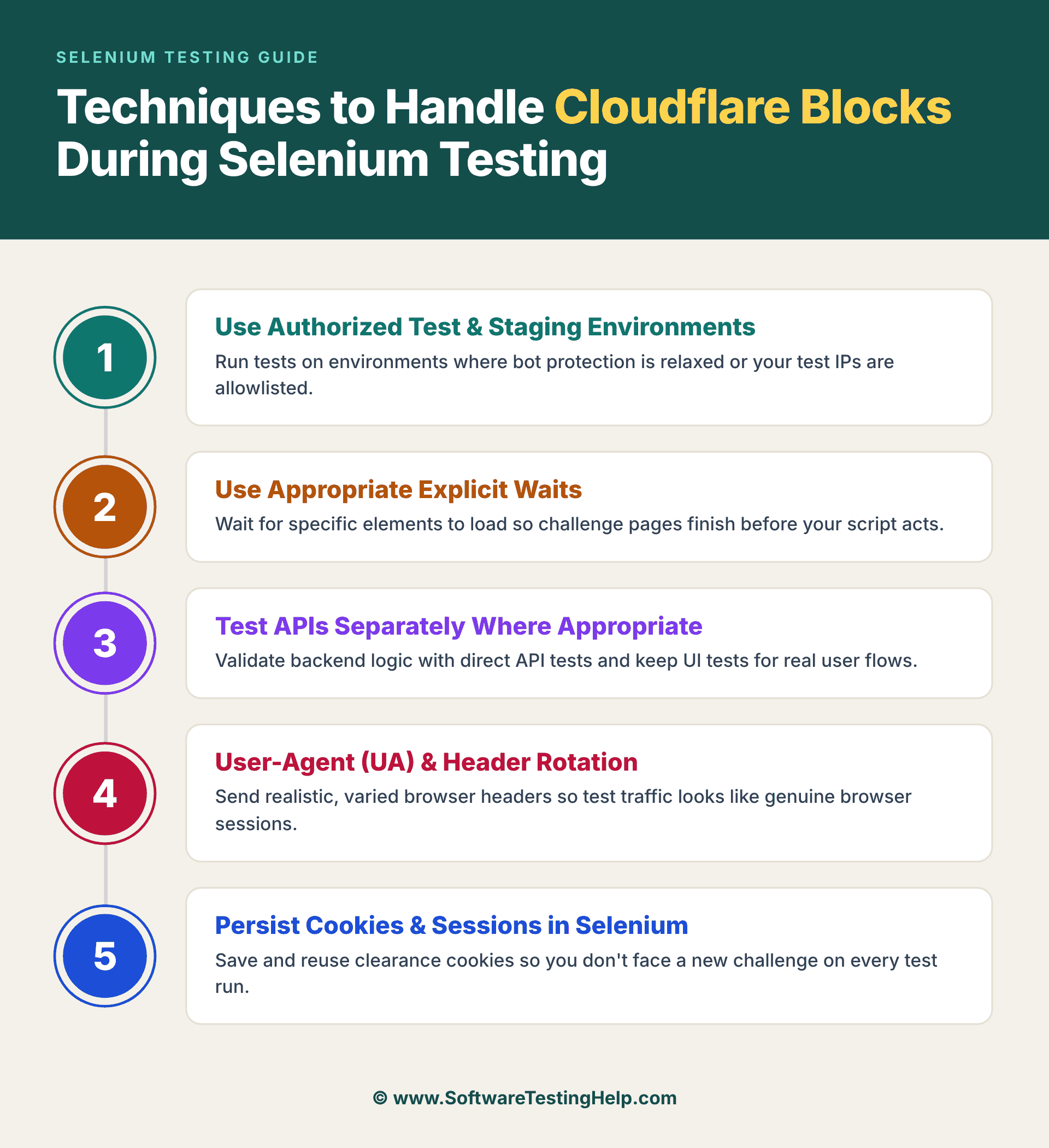
There are several techniques to handle Cloudflare, some of the practical techniques QA test teams can use are:
- Use authorized Test and Staging environments
- Use of appropriate Explicit waits
- Testing APIs separately where appropriate
- User-Agent (UA) and Header Rotation
- Cookies and session persistence in Selenium
#1) Use Authorized Test and Staging Environments
A dedicated test and staging environments should be used where possible to run the Selenium tests. Security teams can help set up the automation test environment along with maintaining security controls appropriately.
#2) Usage of Appropriate Explicit Waits
Usually, Cloudflare challenges can involve Client-side processing. Selenium tests should not assume the test application page is immediately available, tests should wait for a certain time for the expected application status. Hence, Explicit waits are preferred in test scripts which makes the tests reliable and efficient.
#3) Test APIs Separately Where Appropriate
Not necessarily all functional tests have to go through the browser and Cloudflare. If a web applications’ backend exposes an authorized API, then API testing can be carried out for suitable scenarios, namely:
- CRUD operations
- Authentication user flows
- Data validations
- Response validations
- Negative test scenarios testing
- Performance testing
Then, Selenium can just focus on the Browser-specific user journeys, reducing the unnecessary dependency on Cloudflare-protected UI pages.
To conclude, the most reliable approach is to make sure Selenium testing is compatible with authorised test and staging environments via controlled traffic, proper Cloudflare configurations and monitoring along with collaborating with Security teams and not to circumvent Cloudflare’s detection mechanisms in production.
#4) User-Agent and Header Rotation
User-agent recognizes the browser and Operating system making an HTTP request; for example, browser sends the User-Agent which indicates that the request is originated from Chrome browser running on Windows operating system.
This User-Agent information is used by Web Applications along with other requests and signals when monitoring incoming traffic.
User Agent and Header Rotation may change the HTTP characteristics presented to web application, but note that they are not reliable nor a standalone method to bypass Cloudflare. Cloudflare’s own security mechanisms may consider multiple browsers, sessions and network signals
User-Agent configuration is evaluated to ensure different supported browsers & OS on authorized test/ stag environments behave as expected during security and compatibility testing.
Test Case Scenario -> Chrome /Windows -> Firefox / Windows -> Edge browser /Windows -> verification of Application behaviour.
User Agent Rotation means changing the User Agent value between browser sessions or requests.
Example:
Request 1 -> Chrome /Windows
Request 2 -> Firefox /Windows
In Selenium scripts, Chrome browser’s User-Agent can be configured when creating the browser session, in Java:
ChromeOptions options1 = new ChromeOptions ();
Options1.addArguments(“—user-agent=YOUR_TEST_USER_AGENT”);
WebDriver driver11 = new ChromeDriver(options);
This is useful for verification of the application on different browsers configured in the authorized test environment.
Header Rotation means changing selected request headers between browser sessions or test requests.
Example:
HTTP Headers provide additional information about a request, such as:
- user-agent
- Accept
- Accept-Language
- Content Type
- Referrer
- Cache control
- Set-cookie
To summarize, the signals collectively influence the traffic evaluation.
User Agent + HTTP Headers + Browser Characteristics + Cookies / sessions + Network Signals + Request Behaviour
#5) Cookies and Sessions Persistence in Selenium
In this section, let’s see how Selenium handles browser cookies and session state and also how session persistence can have an impact on repeated Cloudflare challenges.
Firstly, what is Cookie persistence?
Cookies are small pieces of data that is stored by browser which is associated with particular website. They can contain preferences, authentication data, session management and other related browser state.
Cookie persistence is more relevant when testing Cloudflare-protected web applications, as Cloudflare will issue cookies as part of the security and challenging mechanisms it has.
Example: In Java
In Selenium, Cookies are accessed via the WebDriver cookie API:
Set<Cookie> cookies = driver11.manage().getCookies();
How to retrieve a specific cookie? When is it useful?
A specific cookie can be retrieved too, like,
cookie cookie = driver11.manage().getCookieNamed(“session_id”);
During testing it is useful to check whether an application’s session is valid and it remains as valid when users navigate across the web pages and or when restarting the browser session.
To Save Cookies:
Selenium can retrieve these cookies that are stored by the browser. A testing framework can then persist the relevant cookies in to test-data store appropriately. Example flow would look like this:
Browser Session -> Login Verification -> Session Cookies -> Save Test Session
Example in Java:
Set<Cookie> cookies = driver11.manage().getCookies();
for(cookie cookie: cookies) {
system.out.println(cookie.getName() + “=” + cookie.getValue());
}
To Reuse Cookies:
When a user starts another authorised testing session, cookies can be added back to the browser using the method called ‘addCookie ()’. Firstly, the browser should navigate to the appropriate domain before adding a cookie to that domain /website.
driver11.get(https://exampletestsite.com);
Cookie cookie = new Cookie(
“session_id”,
“test-session-value”
);
driver11.manage().addCookie(cookie);
driver11.navigate().refresh();
So, Cookie persistence can preserve the genuine browser session state, but may not guarantee that Cloudflare will not issue another security challenge notification.
Session Persistence and Repeated Challenges:
For instance, you open a new Browser, navigate to your application/test website, have Cloudflare verification done, test as per your scenarios and then close the browser.
The Flow would look like this:
New Browser -> Open Application -> Cloudflare Verification -> Test scenarios – > Close Browser
So, the next test session starts with a new browser state again, but with Session Persistence, the flow would look like:
Browser Session -> Establish Authorised browser Session -> Save browser Session State -> Restore browser Session State -> Continue Testing
This is more useful and efficient during regression suite testing, as each and every test may not necessarily have to repeat the same setup process.
Also, useful to note that when the test objective is to test any web application features or functionality after the genuine session has been already established.
Scenarios in Which Cloudflare Blocks Selenium
Common scenarios where Cloudflare may block Selenium automation are:
- Try to access the protected Sign in pages repeatedly.
- Fails at multiple times security checks.
- Usage of outdated browser versions.
- Send out hundreds of requests per minute.
- Trigger rate-limiting rules
- Browser configurations used are unrealistic.
- Try to operate from previously flagged IP addresses.
- Content accessed without any authorization
- When Large-scale scraping operations are carried out.
- When repetitive navigation patterns are observed, and execution is carried out.
- Run tests from public cloud infrastructure.
Ethical Considerations While Bypassing Cloudflare Challenges
The main goal of Cloudflare is to provide protection to websites and users from malicious activities, automated bot attacks, and abuse. All kinds of automation activities and their efforts should abide by the website’s policies, any security requirements in place, and terms of service provided.
Selenium users are always advised to carry out automation on those websites they have full explicit authorization to access and can manage. Any attempts to access without the permission of the website’s owner will lead to violating the organizations policies and the legal agreements under applicable regulations. This will also have a direct negative impact on performance and security.
Hence instead of bypassing these security measures or protections, organizations should always try to collaborate websites security teams, administrators and try to use the approved test environments by establishing the certain lists for authorized automation activities and have transparent communication with the security teams.
Being responsible in automation best practices will always help to balance the testing team efficiency along with website security measures to assure that both quality and cybersecurity purposes are met.
Is Bypassing Cloudflare Illegal During QA Testing?
Bypassing Cloudflare is not automatically illegal in all situations. However, any attempts to circumvent the security control settings on a website without any prior permission can be unlawful and may pose potential chances of violating a website’s terms of service, policies, computer misuse laws, along with any other applicable regulations.
Hence, it is advisable that QA testing and security level testing of Cloudflare-protected applications be performed only when you have suitable authorization from the website owner or web application owner.
A better and safer approach is to use a dedicated test environment that is authorized to carry out testing and also make sure the website owner configures Cloudflare protection specifically for authorized testing.
The main objective of bypassing Cloudflare should always be to validate the web application’s behavior and security control settings instead of circumventing protections on third-party web applications.
Selenium Alternatives to Bypass Cloudflare
There are some Selenium alternatives to bypass Cloudflare-protected modern web applications during testing and browser automation.
Some of them are:
- Playwright
- Puppeteer
- Cypress
Detailed Review:
#1) Playwright
Playwright is the best and strongest alternative among the rest of them
Playwright is one of the popular modern browser automation and end-to-end automation testing frameworks developed by Microsoft. It supports cross-browsers like Firefox, Chromium, and WebKit (Safari), making it suitable for cross-browser testing along with providing auto-waits, browser-context isolation, parallel execution, web-first assertions, and built-in tracing capabilities.
For Cloudflare-protected web applications, Playwright is considered the strongest alternative to Selenium, where its main objective is legitimate testing and troubleshooting rather than circumventing security measures and security controls.
Pros and cons:
| Sl No | Pros | Cons |
| 1 | Faster execution | Ecosystem is smaller than Selenium |
| 2 | Built-in Auto-waits capability | Some legacy interactions are fewer |
| 3 | Stronger modern web support | Talent pool is smaller |
| 4 | Cross-browser support is excellent | Newer Technology |
| 5 | Strong debugging and tracing features capabilities | Browser-binaries needs maintenance along with Playwright versions |
| 6 | Supports multi-languages like, Java, Python, .Net, JavaScript/Typescript | Efforts needed during migration which may require rewriting of existing Selenium tests. |
| 7 | Supports Chrome, Firefox and WebKit | May require learning new APIs |
Website: https://playwright.dev?
#2) Puppeteer
Best for Chromium-focused automation testing projects.
Puppeteer is a browser automation library (Node.js library) capable of controlling Chromium via the DevTools rules and is maintained by the Chrome Browser Automation team.
Puppeteer provides a high-level API for controlling browser internals, handling heavy JavaScript pages and intercepting headers, particularly suitable for Chromium-based automation testing.
The latest version of Puppeteer supports the Firefox browser via WebDriver BiDi.
Pros and Cons:
| Sl No | Pros | Cons |
| 1 | Faster Execution | Browser diversity is limited |
| 2 | Simpler and developer-friendly APIs | Chromium-focused with less broad browser coverage than Playwright |
| 3 | Supports modern browser automation | Migration from Selenium may need significant code changes |
| 4 | Supports Firefox and Chrome browsers | Cross-browser capabilities are not broader as Playwright |
| 5 | Stronger automation Capabilities | Comparatively Enterprise adoption is less |
| 6 | Developer tooling is good | Testing ecosystem is smaller. |
| 7 | Good with Performance | Not as focused on enterprise test orchestration as Selenium |
Website: https://pptr.dev/
#3) Cypress
Best for front-end-focused (developer-friendly) web automation testing projects.
Cypress is also one of the popular functional and end-to-end web automation testing platform which is designed focusing on Developer-friendly features testing and debugging. Particularly supportive for front-end teams due to its interactive test runner and stronger debugging capabilities.
For those web applications protected by Cloudflare, Cypress can be considered where its primary requirement is to carry out Functional and end-to-end testing, specifically within the controlled Testing QA, and Staging environments.
Pros and Cons:
| Sl No | Pros | Cons |
| 1 | Setup is easy to get started | Browser limitations are there |
| 2 | Debugging capabilities are excellent | Multi-tab support is limited |
| 3 | Beginner-friendly and Strong frontend testing experience. | Less flexible than Selenium, and Cross-browser flexibility varies from Playwright and Selenium. |
| 4 | Much Faster Feedback | Primary goal is Web-focused |
| 5 | Auto-waiting capability | Advanced browser workflows may need some workarounds. |
| 6 | Excellent browser interactive debugging | Design is not meant for all types of browser automation testing. |
| 7 | Developer experience is good | Test restructuring is required during migration from Selenium. |
Website: https://www.cypress.io
In a nutshell, the Best Selenium Alternatives to Bypass Cloudflare are briefed below:
- Playwright: First, Best and strongest alternative, and is suitable for Modern-Cross-browser testing projects.
- Puppeteer: Second best, suitable for Chromium-based automation testing projects.
- Cypress: Third-best, suitable for front-end-based automation testing projects.
Benefits of Selenium for Cloudflare Challenges
Despite security measures being in place, Selenium plays an important role and remains valuable for additional checks because of the following capabilities it possesses and offers:
- Provides extensive browser support.
- It is compatible with most of the enterprise test automation frameworks.
- Having larger community support and ecosystem.
- Provides support for multiple programming languages.
- Support for cross-platform execution.
- Powered with debugging and reporting capabilities.
- Larger automation projects are scalable.
- Selenium provides flexible options for UI, Functional testing and regression runs.
- Integration with CI/CD pipelines is made simpler.
- Industries can have long-term adoption and support.
Advantages of Using Selenium for Testing Cloudflare-Protected Web Applications
From a QA tester’s perspective, Selenium Test Automation against Cloudflare-protected web applications has several advantages, such as:
#1) Actual or Real-browser Testing: As Selenium drives real browsers, it allows QA teams to test real browser sessions to interact with Cloudflare’s challenging security mechanisms.
#2) End-to-End Test Validation: The complete user journey can be validated by QA testers even when Cloudflare protection is applicable. Like opening the application, authenticating, navigating across different pages, filling the forms, and other unique feature workflows.
#3) Testing Session and Cookies: Selenium WebDriver can inspect and can manage the web browser’s cookies, which is useful for testing session persistence and application behaviour after 5proper security verification.
#4) Test Network and Proxy: Selenium provides Proxy capabilities, which are utilized in authorised test environments for validations, i.e. how applications behave when the browser traffic passes through different network configurations.
#5) Useful for Debugging Automation Issues: When an automation test execution starts and if it receives any unexpected challenges, Selenium provides access to browser-level behavior, which will help QA teams to investigate the root cause of the problem.
#6) Frameworks and Tools: External tools like TestNG and reporting tools can be integrated with existing frameworks along with CI, CD pipelines. Also, during regression suite testing, Cloudflare-related scenarios can be considered in this suite.
Selenium also allows automation of web interactions, which is ideal for handling JavaScript execution checks, specifically on websites with heavy pages. Hence, with the right tools like Undetected ChromeDriver, it is possible to bypass Cloudflare-protection.
Frequently Asked Questions
1. Can Selenium check Cloudflare-protected web applications?
Yes, Selenium can check Cloudflare-protected websites, provided test teams have authorization and are following the approved test environment practices.
2. Is Cloudflare blocking Selenium automatically?
No, it is not blocking automatically. Cloudflare first evaluates the challenging traffic and multiple signals that may appear to be suspicious and then handles it.
3. Selenium triggers CAPTCHA Challenges. Why?
CAPTCHAs are often triggered by the IP reputation blocks, Browser characteristics, traffic patterns signal along with Security policy measures.
4. Should QA Test teams attempt to bypass Cloudflare protections?
Legitimate test arrangements along with approved test environment access should be the primary focus of organizations rather than attempting to circumvent the security measures or security controls.
5. For Enterprise testing, what is the best approach?
By using the dedicated Test environments, monitoring the Cloudflare analytics dashboards, co-ordinating with administrators, and collaborating with the security teams where applicable.
6. Is headless browser mode always blocked?
No, headless mode is not always blocked. There is a significant improvement in modern headless browsers, and some environments still evaluate them quite differently. Advanced security systems like Cloudflare may easily flag such default headless setups but most of the websites and modern internal applications are allowing them without any issues. Detection is purely based on risk analysis signals rather than an absolute block.
(Headless mode means running a program or an application without the GUI (Graphical User Interface) or any visible window on screen. Instead of visual window display, it is running in background and is controlled through code, network connection or using command line).
7. What is the best and safest approach to test Cloudflare-protected websites?
By implementing the pre-approved testing practices, using authorized testing environments and staging environments, along with Co-ordinating with the site’s administrators.
Conclusion
Cloudflare plays a very critical role when it comes to defending websites against any malicious web traffic, any cybersecurity threats along with automated abuse activities.
Selenium-focused automation tests may trigger security measures challenges, which are typically the result of network reputation analysis, traffic patterns, and risk analysis systems that evaluate browser behaviors, and not exactly the issue with Selenium itself.
The most important and effective strategy is not defeating the security controls but instead work around the authorized test environments, by collaborating with the security teams, by maintaining the realistic configurations of browsers along with respecting the rate limits.
By having a clearer understanding of Cloudflare challenges like CAPTCHA mechanisms, IP reputation and its blocks, JavaScript execution checks, and browser detection techniques, SDET and QA teams can develop/build reliable and security-complaint automation testing frameworks.
There is no doubt Selenium remains the most powerful web automation testing tool. When this is combined with responsible testing best practices, it continues to provide immense value addition for web application automation testing, for regression suite testing, and overall Quality Assurance capabilities and their initiatives across all sizes of organizations.
Research Process: The total time involved to complete and publish this article is approximately 40 hours. This content was created through a structured research approach to ensure accuracy and reliability.
For more-related guides, you can explore our range of tutorials below:
- Top 10 Best DDoS Protection Services to Secure Your Website
- Playwright Vs Selenium: Which One to Choose
- Network Security Testing and Best Network Security Tools
- Global App Testing Review: On-demand Web & App Testing Service
- Top 11 Web Application Firewalls (WAF) Vendors
- Web Application Testing Guide: All You Need to Know
Was this helpful?
Recommended Reading
-

This Article Explains Website Accessibility Testing Using Selenium With Simple Code Examples. It Covers The Two Main Solutions For Writing Web Accessibility Tests: What Is Website Accessibility? The Internet is designed for different types of people from different countries, with different languages and different abilities. People in the world have…
-
In-Depth Tutorial On ChromeDriver for Running Selenium Webdriver Tests on Chrome Browser: Handling browser alerts while automating through Selenium will be discussed in this article. Moreover, we will elaborate on the set up of the Selenium script for the Google Chrome browser along with appropriate examples and pseudo-codes. Upon going…
-

In the previous tutorial, we discussed the technical implications of implementing logging in a framework. We discussed log4j utility at length. We discussed the basic components that constitute log4j from a usability perspective. With the Appenders and layouts, a user is leveraged to choose the desired logging format/pattern and the…
-
Cucumber Selenium WebDriver Java Integration with Example: In the last tutorial, we discussed the Cucumber tool, its usage, and different features. Moving ahead in our free Selenium online training series, we will discuss how to set up a cucumber project and will discuss the integration of Selenium WebDriver with Cucumber.…


