


Learn the core differences between Selenium 3 Vs Selenium 4 frameworks with real-time examples. Compare their features and architecture to make the right choice and upgrade your automation skills today.
Selenium contains numerous changes in Selenium WebDriver, such as W3C WebDriver specification, Selenium Manager, improved Grid, Relative Locators, and even new browser automation features. But what are the differences between Selenium 3 and Selenium 4 and what is changed while migrating the framework to a newer one?
Here we will discuss Selenium 3 vs Selenium 4 and compare both in terms of differences, architecture, sample codes, features, and migration steps in order to make the right choice and move to the right version.
Selenium 3 vs Selenium 4: What Every Tester Should Know
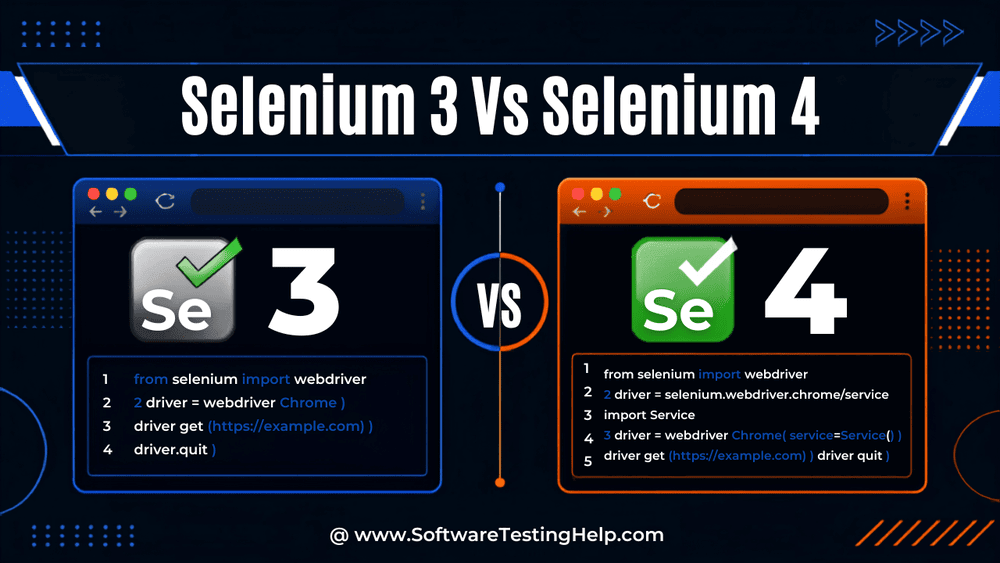
The primary difference between Selenium 3 vs Selenium 4 is the communication protocol used. Selenium 3 uses the JSON Wire Protocol where HTTP conversion takes place between the client libraries and browser drivers. Selenium 4, on the other hand, uses the WebDriver Standard by W3C that enables browser communication directly without any intermediary layers.
As technologies evolve, so do modern web technologies and their browser standards. Selenium 4, a successor to Selenium 3, was introduced to resolve Selenium 3’s limitations and to provide more enhanced features, improved developer experiences, and better browser integrations.
Most of the companies and/or people are learning Selenium 4 because of its advanced capabilities while they are still on Selenium 3 and considering upgrading to Selenium 4.
It is a crucial factor to understand the core differences and learn thoroughly for QA engineers, automation testers, and organizations before they plan to upgrade from Selenium 3 to Selenium 4.
What Is the Difference Between Selenium 3 and Selenium 4?
If you are in the middle of deciding to migrate to Selenium 4 or stay on Selenium 3, the best recommended choice for your modern web automation projects is to go for Selenium 4.
Selenium 4 offers so many improved features, such as browser compatibility via W3C WebDriver compliance, debugging capabilities, built-in WebDriver handling/management with Selenium Manager, enhanced Selenium Grid features, support for DOM (built-in APIs), Relative Locators, and WebDriver Bi-Di (bidirectional protocol) capabilities.
From now on, Selenium 3 will be best suited just for maintaining legacy suites or frameworks and will no longer have support for further development and active enhancements, which will lack the enhanced features and new capabilities of Selenium 4.
In this tutorial, we will learn an overview of each framework, its key features, architecture, advantages, limitations, and best practices.
Selenium 3 vs Selenium 4 Comparison Table
| Sl No | Key Features Differences | Selenium 3 | Selenium 4 |
|---|---|---|---|
| 1 | Communication Protocol | JSON WIRE Protocol | W3C WebDriver Standard |
| 2 | W3C Standard Complaint | Partially supported | Full support |
| 3 | DevTools API Integration | No | Yes |
| 4 | Selenium Grid UI and Grid Architecture | Grid UI: NO Grid Architecture: Basic | Grid UI Yes Grid Architecture: Advanced/Enhanced |
| 4.1 | Selenium Grid: Hub and Node Consolidation Feature | Hub and Node architecture is separate | Hub and Node can run on single server /standalone mode with improved distributed architecture |
| 5 | Tab Management | JS(JavaScript) based | Native support |
| 6 | Window Management | Support is limited | Native support |
| 7 | Browser Compatibility | Good | It is better |
| 8 | Debugging Feature | Basic | Advanced |
| 9 | Cloud Integration | Limitedly available | Enhanced features |
| 10 | Network Monitoring | No | Yes |
| 11 | Relative Locators | No | Yes |
| 12 | Selenium Manager | No | Yes |
| 13 | WebDriver Bi-Di (Bidirectional Protocol)- 2- way communication between web driver and browser for console logs, events like network activities, DOM events and downloads | Not supported | Supported with continuous expansions |
| 14 | DOM Support : Built-in APIs to have access to DOM elements without relying on JavaScript execution | Native support not available | Native support available |
| 15 | Selenium IDE – Is returned as browser extension for Chrome, Firefox and MicroSoft Edge | Deprecated | Revived & redesigned: Where it supports for recordings, playback, testcases reusages and as well as exporting test data to multiple languages like Java, C#, Python and JavaScript. |
What Are Selenium 3 and Selenium 4
This section includes a brief overview of Selenium 3 and Selenium 4.
Selenium 3: Overview and Key Characteristics
When Selenium 3 was introduced and released in 2016, it was a popular automation framework that most software testing organizations longed to use.
As the specific goal of Selenium 3 was to improve browser compatibility, browser-specific driver implementation should be simplified. Hence, it became the many production test environment automation systems, too.
Although it was built on the WebDriver and JSON wire protocol, which worked very well for most of the use cases, the only thing Selenium 3 did not fully align with was the W3C WebDriver final standard. Selenium 3 has the following components: the Selenium WebDriver, Browser Drivers, Selenium IDE, and Selenium Grid.
Browser driver examples are:
- For the Firefox browser – GeckoDriver
- For Google Chrome – Chrome Driver
- For the Safari browser – Safari Driver
- For the Edge browser – Edge Driver
Selenium 4: Overview and Key Characteristics
Selenium 4 was introduced and released officially in 2021 with a major milestone. Selenium 4 is the latest upgrade, majorly designed for modern web application automation and its testing requirements.
The specific goal of Selenium 4 is to provide new capabilities and improvements architecturally, aiming to make the automation process much faster, more reliable, scalable, and easier to maintain.
Selenium 4 is fully aligned with the W3C WebDriver Standard complaint which helps make the browser automation experience much faster and more reliable for modern web technologies.
The core purposes of Selenium 4 are:
- Improve browser communication.
- Support modern web technologies/standards.
- Improve test script development.
- Eliminate the dependency on the JSON Wire protocol.
- Some enhancements in Selenium Grid UI.
- Improved debugging and monitoring capabilities.
The core components of Selenium 4 are mostly similar to Selenium 3, except that the JSON wire protocol is replaced with the newer W3C WebDriver standard-compliant protocol, along with some advanced capabilities. Let us get to know them in detail in the upcoming sections.
For the current Selenium 4 version, you may download it from here
Architecture: Selenium 3 Vs Selenium 4
The architecture of Selenium 3 and Selenium 4 is explained below in detail.
Architecture of Selenium 3
The architecture of Selenium 3 is all about using Selenium WebDriver (Client as IDE), Browser Drivers for communicating with corresponding browsers, and parallel testing using Selenium Grid.
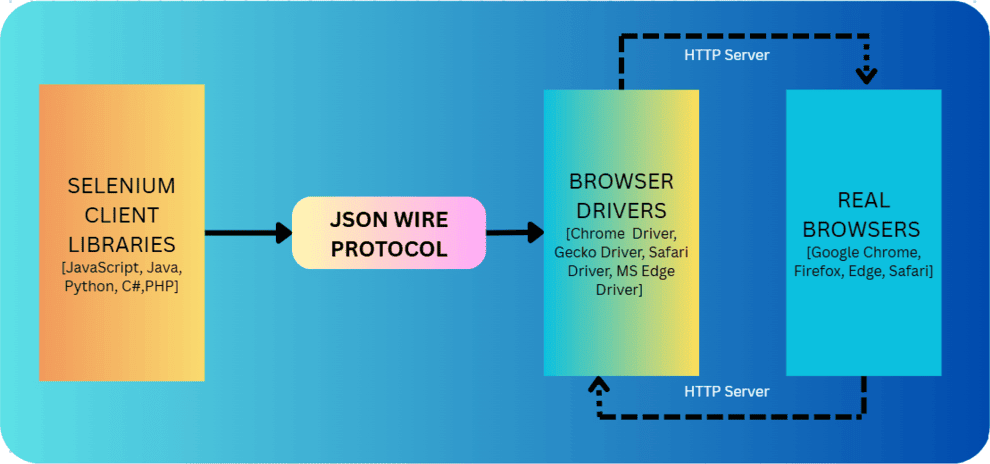
Selenium 3 is based on the Client-Server architecture, allowing developers and QA testers to carry out web automation testing of an application.
Selenium 3 comprises main components like:
i) Selenium Client Libraries (programming languages to write test scripts)
ii) Browser Drivers for communication
iii) Real Browsers
iv) JSON Wire Protocol (JavaScript Object Notation)
Selenium 3 using JSON Wire Protocol just means that it makes it less complicated during information/test data exchange between Client and Server via HTTP (Hypertext Transfer Protocol). I.e., whenever a request is sent from the Selenium Client via HTTP, it is received by the JSON Wire Protocol.
Browser drivers ensure this request. Once this request is processed by the HTTP server, it sends back the response to the client for that request for processing.
Summary of Selenium 3 Architecture:
In Selenium 3, the communication flow is between Test data/test scripts and the real browsers via the corresponding browser drivers. i.e
Test Scripts -> JSON Wire Protocol -> Browser Driver -> Real Browser
The JSON Wire Protocol is a communication bridge between automation test scripts and corresponding browser drivers.
Selenium 4 Architecture
The architecture of Selenium 4 provides enhanced capabilities and improvements upon the architectural model. Selenium 4’s key differences from Selenium 3 are W3C WebDriver Complaint and the introduction of Selenium DevTools APIs, which have a significant impact on the architectural level and overall performance.
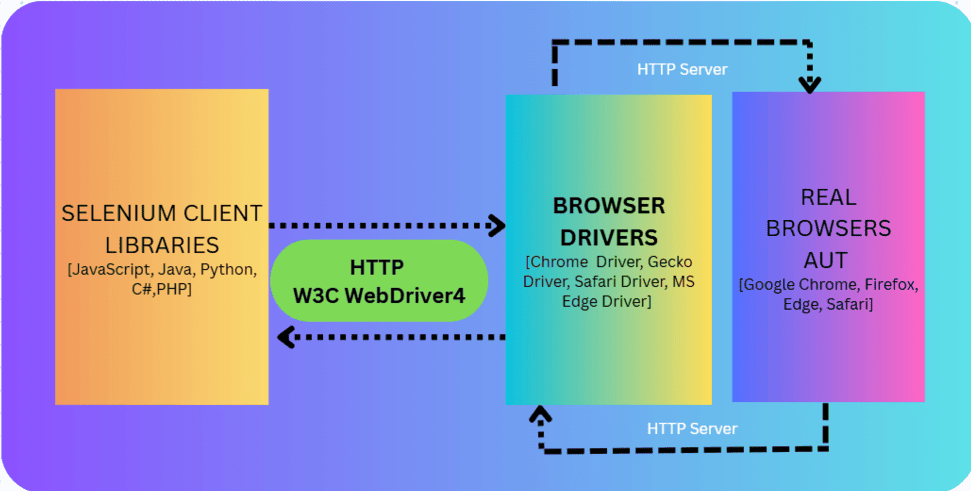
Selenium4 is also based on the Client-Server architecture, just that the communications happen via the W3C WebDriver Protocol. The client here is Selenium and WebDriver language bindings libraries. The server is browser Drivers.
Whenever the Selenium Client sends out requests for test data, WebDriver language bindings operate automated test scripts on the Web Browser (this is the client’s request). Corresponding Browser Drivers receive this client’s request and send back the response.
Selenium 4 consists of main components such as:
i) Selenium Client Libraries (Programming languages to write test scripts)
ii) Browser Drivers for communication
iii) Real Browsers
iv) W3C WebDriver Protocol
Summary of Selenium 4 Architecture:
In Selenium4, the communication flow is direct and is between Test scripts and browser drivers via the W3C WebDriver standard.
Test Script → W3C WebDriver Protocol → Browser Driver → Browser
By using this W3C WebDriver protocol, communication between client and server is consistent across browsers, reducing compatibility problems, and is much faster.
Architectural Differences of Selenium 3 and Selenium 4
The main changes between Selenium 3 and Selenium 4 are in the communication model.
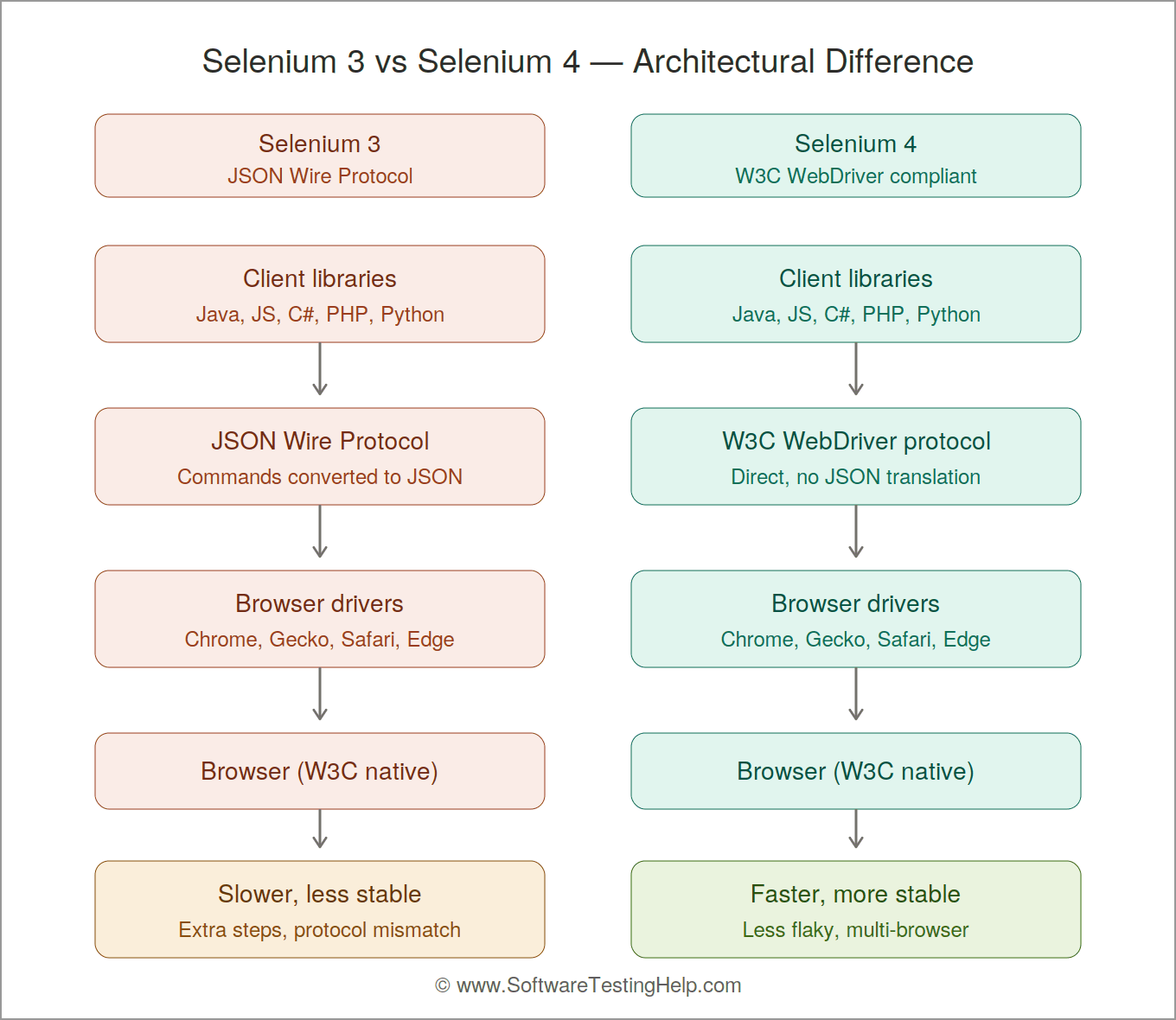
Selenium 3 uses JSON Wire Protocol:
- In Selenium 3, multiple programming languages like Java, JavaScript (JS), C#, PHP, Python, etc. are supported to write test scripts. They communicate using Browser Drivers via JSON Wire Protocol. These Client libraries (Java, JS, etc.) send a command; it is converted to a JSON pattern and sent to the browser drivers like Gecko Driver, Chrome Driver, Safari Driver, Edge Driver, etc.
- JSON payload will be parsed by the browser, execute the actions, and then the response is returned.
- Although this method worked effectively, whenever new browser features are introduced, some interaction issues were noticed, such as inconsistencies, extra conversion steps, and time delay between an action and the corresponding responses returned.
- Hence, leading to discrepancies and incompatibility between Web Browser Protocols and Selenium.
Selenium 4 is W3C WebDriver Compliant:
- Selenium 4 is modern and is developed using the W3C WebDriver Protocol, which is used by most of the major browsers as their communication medium. Here, the browser communication is with the same protocol, meaning translating to JSON payload overhead is eliminated, making communication direct and much faster.
- Since there is elimination of the dependency on the JSON Wire protocol, there is increased stability without inconsistencies, providing better multi-browser compatibility, less flaky tests, and quicker execution times.
Key Features of Selenium 3 and Selenium 4
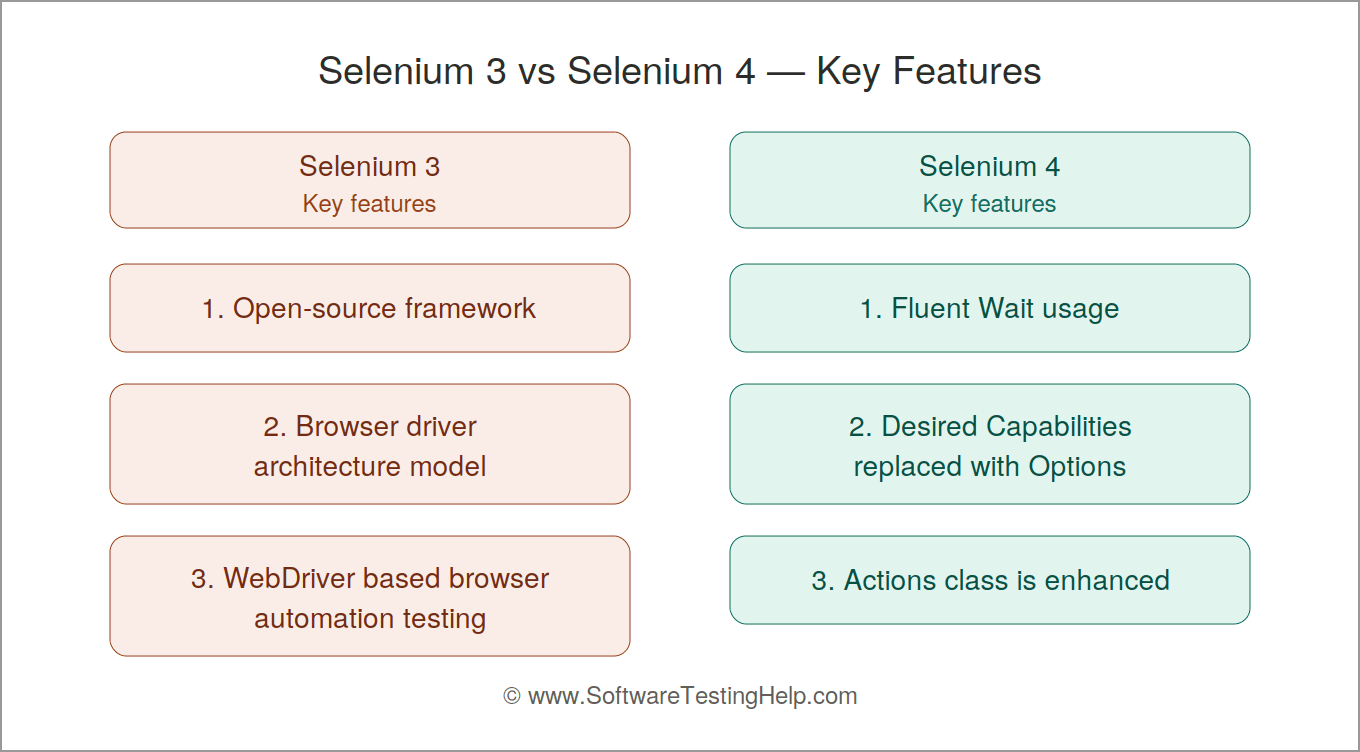
Features of Selenium 3
There is no doubt that Selenium 3 was considered the dominant web automation testing framework for many years and also became the industry standard for browser automation testing. The key features have laid the foundation for the new capabilities’ enhancements in Selenium 4.
Let’s have a glance at the most important key features of Selenium 3:
#1) Open-Source Framework: Selenium 3 is a popular open-source framework that is free to use and has a larger community support, hence widely adopted across many organizations.
#2) Browser Driver Architecture Model: In Selenium 3, there was a browser specific drivers were introduced, such as:
- Chrome Driver
- Gecko Driver
- Safari Driver
- Edge Driver
Browser Communications flow looks like this:
Test Scripts -> JSON Wire Protocol -> Browser Drivers -> Browsers
#3) WebDriver-based Browser Automation Testing: The core component of Selenium 3 is WebDriver, which has key capabilities like,
- Navigations controlling
- Frames, forms, and window handling
- Elements identification
- Direct browser interactions
#4) Multi-browser Testing Support: Selenium 3 supports cross-browser testing, which allows the web application to be verified across different browsers such as:
- Google Chrome
- Firefox
- Safari
- Microsoft Edge
- Internet Explorer
#5) Multiple Programming Languages Support: QA testers can choose the programming languages that fit well with their projects and skills.
Where Selenium 3 offered /supports multiple languages to choose from, such as:
#6) Dynamic Web Elements Handling: Selenium 3 supports various Locators to handle web elements dynamically like:
- Class Name
- ID
- Name
- XPath
- CSS Selector
- Link Text
- Tag Names
#7) Parallel Execution Using Selenium Grid: For the benefit of faster execution, broader improvements in testing coverage, and reducing the testing lifecycle time, Selenium Grid provides parallel execution and remote browser execution facilities also for distributed testing activities.
#8) CI/CD Integration Support: Selenium 3 integrates with popular CI/CD tools like:
- Jenkins
- Azure DevOps
- Git Labs
- GitHub
This supports browser automation testing within DevOps pipelines.
#9) Screenshot Capture Facility: Selenium 3 provides a screenshot capturing facility during test report failures root cause analysis, which helps with defect documentation and also helps throughout the testing life cycle.
#10) Strong Community Support: Selenium 3 benefits from wider community support, Open-source contributions, online guides, and extensive documentation.
#11) Frames and Window Handling: Selenium 3 handles multiple windows, browser alerts/pop-ups, iframes, and JavaScript alerts.
#12) Data Driven Testing: Selenium 3 supports Data-Driven Testing and can be integrated with multiple data files such as:
- CSV files
- Excel Files
- XML or JSON data
- Databases
This will enable the same test execution to be carried out with various datasets.
Selenium 4 Key Features
Selenium 4 introduces major changes along with other core purposes mentioned above. The main changes are in.
- Fluent Wait usage
- Desired Capabilities are replaced with Options.
- Action Class is enhanced
Let us know about these major changes in detail:
#1) Fluent Wait Usage: FluentWait is the mechanism for the wait condition in Selenium and is used to dynamically wait for an element with the help of a polling strategy, i.e., the maximum amount of time to wait for the condition and also how frequently the condition should get checked.
In Selenium 3, it accepted 2 separate parameters: likeint and TimeUnit.
Code snippet example for Selenium 3 which shows specifying the timeouts and polling intervals with TimeUnit:
Wait<WebDriver> wait = new FluentWait<>(driver1)
    .withTimeout(40L, TimeUnit.SECONDS)
    .pollingEvery(6L, TimeUnit.SECONDS)
In Selenium 4, 2 methods can be utilised, withTimeout() and pollingEvery(), where they accept a single parameter now.
Code snippet example for Selenium 4, where it accepts only a ‘Duration’ object as a single parameter. This makes the APIs more in line with modern web practices by making use of this package, java.time.Duration
Wait<WebDriver> wait = new FluentWait<>(driver2)
    .withTimeout(Duration.ofSeconds(40L))
   .pollingEvery(Duration.ofSeconds(6L))
#2) Desired Capabilities are Replaced with Options: In Selenium 4, to configure browser-specific settings such as incognito, remote capabilities extensions, and headless mode, ‘Options classes like ChromeOptions and FirefoxOptions’ are used instead of Desired Capabilities classes to define browser capabilities in Selenium 3. Ie,
In Selenium 3, Desired Capabilities were used to define the testing requirements, such as browsers, versions, and platforms/OS (Operating Systems).
Specifically, when running test scripts on Selenium Grid and/or Cloud providers, ‘Desired Capabilities’ are often used to configure the browser-related settings.
DesiredCapabilities chromeSettings = DesiredCapabilities.chrome();
chromeSettings.setPlatform(Platform.WINDOWS);
chromeSettings.setVersion("latest version");
WebDriver driver1 =
new RemoteWebDriver(new URL("http://examplesite.com"), chromeSettings);
In Selenium 4, these Desired Capabilities are replaced with the Options classes; hence, the QA Engineers and SDET or automation testers have to create an ‘Options Object’ to set the testing requirements and pass them to the constructor/Driver constructor.
Example:
ChromeDriver(Capabilities) is now replaced by ChromeDriver(ChromeOptions)
FirefoxDriver(Capabilities) is replaced by FirefoxDriver(FirefoxOptions)
ChromeOptions options1 = new ChromeOptions();
options1.setCapability("browserName", "chrome");
options1.setCapability("platformName", "Windows 10");
options1.setCapability("browserVersion", "latest version");
WebDriver driver1 =
new RemoteWebDriver(new URL("http://examplesite.com/home"), options1);
Likewise, for the rest of the other browsers too.
#3) Actions Class in Enhanced: In Selenium, for any advanced user interactions with the browser, this ‘Action Class’ is responsible.
For example, user interactions include clicks on buttons, mouse hovering/movements, drag and drop, and keypresses, etc. and this Actions class is part of the \org.openqa.selenium.interactions package that we import. This package is used to simulate any complex scenario actions that are not possible to handle with Web Element methods.
In Selenium 3, to invoke the click method, we needed moveToElement(), but in Selenium 4 is simplified by allowing direct interactions with the elements, making the code look more readable.
Note that the drag-and-drop logic remains the same in both versions of Selenium 3 and 4.
Example code snippets are shown below:
// In Selenium 3
Actions actions1 = new Actions(driver);
actions1.moveToElement(onElement).click().build().perform();
// In Selenium 4
Actions actions2 = new Actions(driver);
actions2.click(WebElement).perform();
Example: To double-click on a web element,
In Selenium 3, moveToElement(onElement).doubleClick() is being replaced now.
In Selenium 4, doubleClick(webElement) is currently used.
Likewise, a couple of new methods have been added to the Actions Class which were previously mentioned in this package ‘org.openqa.selenium.interactions’.
Selenium 3 vs Selenium 4: Advantages and Limitations
Advantages of Selenium 3 and Selenium 4
Selenium 3 Advantages:
- Open-source Ecosystem: Selenium 3 is free to use, and no licensing cost is applied or required, making it efficient and cost-effective for all sizes of organizations.
- Support for Multiple Programming Languages: Multiple languages like Java, JavaScript, Perl, C#, Ruby, PHP, etc
- Supports Cross-browser Automation Testing: Testers can verify the web applications functionality on different browsers like Google Chrome, Safari, Firefox, Edge, and IE.
- Larger Community Support: Wider community support offers open-source contributions, community forums can also refer to the documentation, tutorials, and some blogs too, which will play an important role during troubleshooting, bug triage, and make analysis easier.
- Scalable at Enterprise Level Applications/Systems: Industries with a larger number of automation test scripts can be executed using the Selenium Grid and Cloud facility platforms, which makes Selenium 3 suitable for enterprise-level automation at a larger scale.
- Selenium Grid for Parallel Test Execution: For faster feedback and reduction in execution time, Selenium Grid supports the parallel execution of test scripts.
- CI/CD Integration Pipelines Supported: Selenium 3 can integrate easily with CI/CD tools like Jenkins, GitLab, Azure DevOps for continuous integration and continuous delivery of browser automation testing.
- Flexibility for Framework Customization: Test Automation Frameworks can be customized by making use of some pattern mechanism or popularly known as design patterns, such as Page Factory, POM(Page Object Model), Hybrid Framework, Keyword-driven framework, and Data-driven framework.
- Platform-independent Model: Selenium 3 supports multiple operating systems, i.e., it can run on macOS, Windows, or Linux machines. This will make Selenium 3 suitable for diverse development of web applications and testing environments.
- Data-driven testing is supported: Test data can be retrieved from various test files such as
- CSV files
- Excel files
- JSON and XML files
- Databases, which enables test execution of the same test case with various datasets.
- Seamless Integration with Popular Frameworks like TestNG, JUnit, NUnit to provide features like assertions/pop ups, parameterization, reporting, and parallel execution support.
Selenium 4 Advantages
Advantages of new Selenium4 are listed below:
- W3C WebDriver Standardization
- Better Compatibility & Communication of browsers
- Selenium Grid UI Architecture is improved
- Improvements in native tab and window management.
- Browser DevTools APIs integration
- Relative Locators are introduced
- Enhanced Debugging capabilities
- Maintenance effort is much simplified by utilizing the Selenium Manager.
- Test Execution is much faster, which helps to reduce execution time.
- Desired Capabilities have improved
- Enhancements in Actions Class
Limitations of Selenium 3 and Selenium 4
Selenium 3 Limitations
Selenium 3 gained popularity along with some limitations over the period, such as:
- Support for modern browser features was limited
- Browser communications delays with
- Inconsistent behaviours in browsers
- Lacked built-in Relative Locators
- Heavily dependent on the JSON wire protocol/payload
- Browser DevTools integration not supported
- Selenium Grid setup is a bit complex
- Modern debugging capabilities were not supported
Please note: Selenium 3 will not be maintainable hereafter and is suitable for stable legacy suite maintenance due to the lack of new enhanced features provided in Selenium 4.
To address these gaps or limitations, Selenium 4 was invented.
Limitations of Selenium 4
Some of the limitations of the new Selenium 4 are listed below:
- Migration efforts are required for the legacy application frameworks, along with a learning curve for new features.
- Compatibility testing is required initially.
- Third-party plugins require updates at times.
- For new capabilities and enhancements, training is required.
However, the above-mentioned limitations can be overcome with a proper approach and consistency in learning & adopting where the advantages are surpassing in value or importance.
Real-Time Examples for Selenium 4
Selenium 4 real-time use cases are listed below:
1. Education-related Platforms Testing: With Selenium 4, various testing scenarios can be tested, which improves the execution reliability across multiple browsers, such as:
- Online assessments verification
- Enrolment to new courses
- Students’ registration flow
- Certification certificate generation
2. Banking Applications Testing: In these evolving modern technologies, banks have changed and are adopting accordingly. At the same time, banking systems have high demand for security validation checks, browser compatibility checks, and high reliability. Hence the Selenium 4’s browser DevOps API integration helps in monitoring the:
- Browsers’ performance execution speed, and scaling.
- API requests and
- Security headers
3. OTT Platforms Testing: OTT platforms testing revolves around streaming applications which require validation across:
- Apps user logins
- User Subscriptions flows
- Player settings or Video player playback control settings.
Hence, Selenium 4 is offering improved browser and browser driver interactions and debugging capabilities support.
4. E-Commerce Testing: For any E-Commerce website testing, Automation test scenarios would look like,
- Look for a desired product/Search for a specific product.
- Check for the shopping cart accepting items added to it / Cart validations.
- Checkout payment workflows
- Payment gateway testing
Here, Selenium 4 offers the benefits by monitoring the network, with better debugging facilities and overall improved stability across e-commerce applications.
(Common stability issues may include – Flakiness in test scripts, browser driver version may mismatch, and incompatibility across multiple browsers; these are improved in Selenium 4).
Selenium 3 to Selenium 4 Migration Guide
In case you wish to upgrade the current Selenium 3 automation project to Selenium 4, consider following the below-mentioned approach that will help avoid incompatibilities and spot deprecated APIs prior to the execution of the full test suite. The migration process is described in detail on the Selenium official page.
Step 1: Check the Current Version of Selenium: Determine which Selenium 3 version is used in your current project. You may check the version of Selenium in your pom.xml, build.gradle, requirements.txt, package.json, etc. files.
Step 2: Make a Backup of Your Current Test Project: Make sure to create a separate Git branch or copy the current project before making the migration. It will help you easily switch back to Selenium 3 in case of problems.
Step 3: Upgrade Selenium Dependency: Upgrading the Selenium 3 dependency with a latest Selenium 4 version compatible with the project will be done. After upgrading, the project needs to be rebuilt to detect any compilation or dependencies issues.
Step 4: Upgrade the APIs: Looking for APIs from Selenium 3 which are not available or deprecated in Selenium 4. For instance, the Java APIs such as findElementById() need to be upgraded to findElement(By.id()).
Step 5: Upgrading Browser Capabilities: DesiredCapabilities and custom capabilities should be checked. In Selenium 4, the W3C WebDriver API is being used and therefore the capabilities must be following W3C standards. Browser capabilities and cloud providers’ capabilities also should have the corresponding vendor prefix.
Step 6: Updating Waits and Timeouts: Replace any usage of old syntax for timeouts in Selenium with Selenium 4. As an example, Java WebDriverWait and FluentWait classes use new Duration instead of the old (long, TimeUnit) syntax.
Step 7: Updating Driver Configuration: Think about how you set up different drivers for browsers like ChromeDriver and GeckoDriver. Because Selenium Manager is included with Selenium, you can utilize.
Step 8: Update Code Related to Actions, Window Handling, etc.: Check whether you are using the Actions API, window handling features and other WebDriver methods whose compatibility has been discussed in Selenium’s official migration guide.
Step 9: Check Selenium Grid Configuration: In case you are using Selenium Grid and/or remote WebDriver, check your Grid configuration and browser capabilities and sessions after updating.
Step 10: Run Your Test Suite and Fix Issues Begin by running a few selected important tests and not the entire test suite right away. Compile your tests and fix any deprecation warnings, browser-driver issues and failed sessions before running your regression suite.
Best Practices While Migrating to Selenium 4
It is always advisable and ideal to follow the best practices during migration, couple of them are listed below, first and foremost:
#1) Deprecated APIs should be Reviewed: Make sure to check the Release notes and replace those deprecated methods with new ones.
Examples:
Selenium 3:  new WebDriverWait(driver,10);
Selenium 4:  new WebDriverWait(driver, Duration.ofSeconds(11));
#2) Framework Design Model can be Improved: Take this migration as an opportunity and refactor the existing code, modify the POM (Page Object Models), and get rid of any duplications that are occurring.
#3) Relative Locators Implementation Should be done Carefully: To improve code readability Relative Locators are used, and when unique IDs are there, avoid overusing these Relative Locators.
#4) Migration Should be done Gradually: All the projects’migrations should not be done simultaneously. Firstly, start with small-scale frameworks implementation (Pilot-Projects- initial temporary idea implementation for short-term trial) and then move to Smaller Frameworks where the project is a streamlined version with operational methodology for the larger project delivery (ex, Scrum/Agile is in place)
non-critical web applications,
and then later on moving on to non-critical web applications projects where this is fully operating/perform the business functionalities on a day-to-day basis along with a set budget as per the business value.
#5) Usage of Selenium Manager: By utilization of Automatic browser driver management (Selenium Manager) reduces maintenance efforts.
Examples: Checks are involved in validating Chrome driver compatibility, Firefox Gecko driver compatibility safari compatibility.
#6) Performance Monitoring: It is always ideal to monitor performance by comparing execution speed, resource consumption, and test checks against failure rates during both before and after migration takes place.
Final Verdict and Future of Selenium in General
Final Verdict:
Although Selenium 3 played a crucial role in establishing the automation of web applications/ browser automation as a standard practice in software testing. However, modern web technologies are still demanding faster execution and seeking, debugging capabilities, window management and browser standardization can be improved.
Hence, Selenium 4 came into existence and is an important milestone in automation testing history to address the above new capabilities by introducing W3C WebDriver compliance.
DevTool integration, window tab improvements, and many more new enhanced capabilities. These new key features are making Selenium 4 stand out for faster execution, where enterprise organizations are looking to build robust, future-ready automation frameworks for modern web applications using modern technologies.
Future of Selenium:
Selenium remains a foundational and widely used standard automation framework while continuing to adopt and evolve around modern web technologies.
Selenium’s wider community support is considered the largest and one of the most actively evolving in the Software Testing automation industry. Where contributors worldwide are supporting, hence Selenium is no doubt still a preferred test automation framework irrespective of organizations of all sizes.
In the future, Selenium is expected to provide enhancements across:
- AI Automation Integration: AI (Artificial Intelligence) and ML (Machine Learning) have become an essential part of Software development, ie by utilizing ML algorithms, Selenium can perform and analyse large amounts of data during the automation process, identify patterns and trends across the automation testing life cycle, and help in optimization. Alongside, scripless AI automation tools packed with AI-powered algorithms can help to optimize the test scripts, reducing the time and resources required for automation testing.
- IoT (Internet of Things) continues to expand: Selenium continues to expand its support for IoT testing capabilities such as wearables, home appliances, smart home appliances and every other connected device.
- Demanding growth in Cloud technologies like AWS, Google Cloud, and Azure DevOps: these platforms are rapidly in demand and the go-to solution for any software application deployment and testing. Hence, Selenium is continuously adopting and evolving to integrate deeply with these cloud platforms, which helps in setting up and run the test scripts in cloud-based infrastructure called Selenium Cloud. This will help in saving costs, providing flexibility, and scalability when compared with traditional on-premises testing platform infrastructure.
To conclude, Yes, Selenium looks forward to a brighter future with continued efforts in development and improved versions of new capabilities, integrating with AI and ML, expanding on IoT testing tools with growing demand for automation testing across all industries of all sizes. Selenium is still well – positioned itself in the automation testing world.
Frequently Asked Questions
1. What is Selenium Manager?
Selenium Manager automatically manages the web browser drivers during driver communication, reducing manual intervention or manual configurations.
2. What does DevTools Integration in Selenium 4 mean?
In Selenium 4, Chrome development properties like Network and Fetch help in identifying any issues swiftly and can edit the code on the spot.
Hence, DevTools integration enables interactions between the browser developer Tools, for security validations, Performance analysis, network monitoring, device emulation and providing native support via its Chrome DevTools interface.
3. Which protocol is used in Selenium 3 for web interactions?
Selenium 3 uses the JSON Wire Protocol for communication between the browser drivers and the WebDrivers.
4. Which protocol is used in Selenium 4 for web communication?
Selenium 4 makes use of the W3C WebDriver Protocol during browser communication between WebDriver and the browser drivers.
5. Give examples for Relative Locators.
Relative Locators are useful in identifying web elements based on the positions relative to other elements in the DOM, whereas Selenium 3 usedfindElement commands to identify the web elements relative to another element.
Some of the examples are:
near(),
above()
below()
right()
left() of an elements
6. Explain Action Interface.
The Action Interface is built using the Action Class, which is a single user interaction and then using the perform() method it is executed.
7. When should you be on Selenium 3 and when to migrate to Selenium 4?
Selenium 3:
It is always ideal to upgrade to newer versions. However, it is acceptable to remain on Selenium 3 on below conditions, such as:
– When your existing framework is already in a good state and is stable
– When the applications are nearing the end
– When migration resources are not available
– Most importantly, if there are no new browser issues encountered.
Note that it is not recommended to rely on for a longer period of time on Selenium 3.
Selenium 4:
For most of the organisations of all sizes, Selenium 4 provides clear-cut, concise long-term benefits. Hence, the migration towards Selenium 4 can be prioritized when your:
– Projects are newly starting
– Browser DevTools capabilities are required
– Cross-browser compatibility issues are occurring
– Selenium Grid UI scaling is required
– Wish to expand to use the cloud-based infrastructure
– Costs for maintenance are exceeding/increasing comparatively
8. Which version of Selenium is best suitable for web automation testing?
It is ideal to opt Selenium 4 over Selenium 3, because of its additional advanced new features and improved/enhanced capabilities.
For example, new adjustments are made to Fluent Wait, Desired Capabilities are replaced with Options, Actions Class in enhanced along with the native Chrome DevTools protocol to help automation testing easier and faster.
9. Is Selenium 3 still actively maintainable?
Selenium 3 will not be supported going forward and actively maintained due to new enhancements and capabilities releases announced in Selenium 4.
Selenium’s development of new feature enhancements has been fully focused on Selenium 4, with more improvements across browser compatibility, performance-related optimization, and any big fixes.
The existing Selenium 3 automation suites continue to function well and at times may face compatibility issues in the future as browser features are evolving. For these reasons, the recommended choice is to go for Selenium 4 for your newer automation projects and planning to have long-term maintenance and scalability.
Please check the official website here for more info: https://www.selenium.dev/documentation/legacy/selenium_3/
Conclusion
Selenium 4 has more advanced capabilities and improvements that address the modern web technologies’ needs. Selenium 4 is replacing the JSON Wire Protocol with the W3C WebDriver protocol, which eliminates the conversion overhead, making the overall Selenium 4 architecture model a robust and flexible one for the test automation process.
Some of the popular new enhancements in Selenium 4 include the W3C WebDriver protocol, Chrome DevTools API, Enhancements in Window Management, Desired Capabilities are replaced with Options such as ChromeOptions & FirefoxOptions, new Action classes, and Relative Locators are introduced, which makes the migration process pretty straightforward.
Chrome Driver Syntax is remaining same between Selenium 3 & Selenium 4, but the underlying mechanism impacts hugely in Selenium 4, making the test automation process much easier, faster, reliable and scalable.
Please visit https://www.selenium.dev/documentation/webdriver/troubleshooting/upgrade_to_selenium_4/ to upgrade from Selenium 3 to Selenium 4.
Research Process: The total time involved to complete and publish this article is approximately 41 hours. This content was created through a structured research approach to ensure accuracy and reliability.
For more-related guides, you can explore our range of tutorials below:
- Selenium 4 – New Features and Improvements
- Playwright Vs Selenium: Which to Choose
- Cypress Vs Selenium: Which is Better
- Selenium Framework Project and Folder Structure
- Selenium Grid Tutorial: Setup & Cross Browser Testing Example
Was this helpful?
Recommended Reading
-

Get equipped with the necessary knowledge and skills to implement automated tests effectively with this step-by-step guide on Automating TestNG in Selenium: The TestNG framework is an open-source advanced automation testing framework for the Java programming language. JUnit and NUnit inspire it, and it has some new functionality that makes…
-

Welcome to our free Selenium Tutorial Series! This tutorial series was created in response to the requests of our readers. Starting from the very basics of web automation, you will reach advanced topics through practical examples. This tutorial series includes all you need to know about test automation with Selenium,…
-
In the previous tutorial, we discussed the technical implications of implementing logging in a framework. We discussed log4j utility at length. We discussed the basic components that constitute log4j from a usability perspective. With the Appenders and layouts, a user is leveraged to choose the desired logging format/pattern and the…
-
In the previous tutorial, we started with the representation of the sample project hierarchy and various framework components. We also discussed the data source – “excels” used to store the test data and their Excel manipulations. We also discussed the new strategies and resources to mature our framework. Now we…


