


Discover the latest Mobile Browsers that combine innovative features, speed & security. Explore the best Browsers for Android and pick the perfect one to enhance your mobile browsing experience with privacy controls:
Android’s browser is a web application used for accessing online content on Android-supported devices, including mobile phones and tablets. There are a plethora of browsers for Android available in the market, one better than the other, each offers its distinct set of features like an ad blocker, fast page loading, tab management, sidebar, avoid trackers, and so on.
Users need to select the best browser for their Android phones for the best user experience. Although Google Chrome is the default browser on all Android phones, there are many other amazing options available, such as Firefox, Microsoft Edge, Kiwi, Brave, etc.
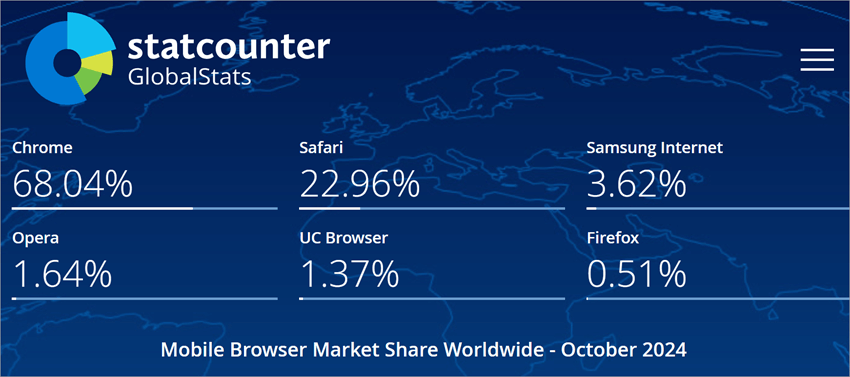
Top Mobile Browsers: Market Trends
Need for Android browser:
An Android browser is extremely important for any Android user, as it is the platform from which you can access online content, websites, and other applications. These browsers come with various essential features, like:
- Ad blocking: Most browsers offer an ad-blocking feature that enables the users to block unnecessary ads or pop-ups
- Quick tab switching: Various browsers offer a quick tab-switching feature that smoothens the browsing experience.
- Ability to save bookmarks: You can save websites or URLs as bookmarks and access them anywhere or on any device.
- Browser extensions: Various browsers include extensions support that add custom features to your browser as per your preferences.
- Enhanced user experience: A good Android browser with effective features enhances the user experience in a great way.
Factors to be considered while selecting the best Web Browser for Android:
When choosing an Android browser for a better user experience, consider certain factors.
- Page loading: Check for the performance of the browser or the page loading time. Select one that offers fast page loading which ensures smooth browsing.
- Security and privacy: Check for the security and privacy features of each listed browser. Select one that includes strong security measures like HTTPS support, such as blocking, tracking prevention, and so on.
- Customization: Many browsers provide customization options to enhance your browsing experience.
- Specific features: Check specific features that you want in the browser. It may be incognito mode, reading mode, password manager, etc.
- Compatibility: The most important factor is to check the compatibility of the browser with your processor to ensure smooth performance.
How we selected the tools:
We selected the below-listed browsers after thorough research from a huge list of browsers. We considered certain factors that any browser should have like-
- Private or incognito mode
- Ad blocker
- Extensions support
- Fast page loading
- Tab management
- Compatibility
- Security and privacy features.
Also Read =>> How to Open Recently Closed Tabs in Chrome
In the article, we covered all about the Browsers for Android, their needs, market share, etc supported with a list of the best mobile browsers in the market. These browsers are being listed, taking into consideration certain essential factors and a thorough study.
List of the Best Browsers for Android
Here is the popular list to consider:
- Google Chrome
- Firefox
- Microsoft Edge
- Kiwi
- Brave
- DuckDuckGo Private Browser
- Samsung Internet Browser
- Vivaldi
- Ecosia
- Dolphin
Comparing the Top Android Browsers
| Browser | Best for | Released on | Downloads | Required OS |
|---|---|---|---|---|
| Google Chrome | Fast, reliable, and user-friendly browser for everyday web activities. | 7 February 2012 | Above 10,000,000,000. | Android 10 and above. |
| Firefox | Customisable browser with over 600 extensions. | 21 December 2010 | Over 100,000,000. | Android 5.0 and above. |
| Microsoft Edge | Enhanced browsing experience with copilot and AI-powered functionalities. | 29 November 2017 | Over 100,000,000 | Android 8.0 and above. |
| Kiwi | Browsing in peace avoiding annoying ads | 4 April 2018 | Above 10,000,000 | Android 7.0 and above. |
| Brave | Fast internet and secure browsing. | 12 October 2016 | Over 1,00,000,000 | Android 9 and above. |
Detailed Reviews:
Google Chrome
Best for fast, reliable, and user-friendly browsers for everyday web activities.

Google Chrome is one of the most popular Browsers for Android we have in the market. It offers fast, secure, and easy-to-use applications for your browsing requirements. It includes various amazing features like personalized search results, built-in Google Translator, Auto-fill and so much more.
You can even know all about a word on the website by just tapping on that word and it will gather all the information about that word within the page. You don’t need to open a new tab to know about the word.
It ensures safe browsing by warning you against suspicious websites or links that you may attempt to open and suffer later. You can also use its voice search for searching anything by just using your voice. You don’t need to type in anything when you are in a hurry. It provides you with smart personalized recommendations based on your previous browsing history.
Released on: 7 February 2012.
Downloads: Above 10,000,000,000.
Required OS: Android 10 and above.
Features:
- Fast page loading: It loads the page in a blink depending on the internet connectivity, which makes it smooth for the users to browse easily and efficiently.
- Developers’ favorite: It provides various effective developers tools to help them in developing, testing, and optimizing websites.
- Safe browsing: It ensures safe browsing with its built-in security features that prevent potential online threats, malware, phishing, etc.
- Pre-installed on devices: It has been pre-installed on new devices as it has been developed by Google, known for its reputation in the IT world and the users continue using it as their default browser.
- Accessible across multiple devices: You can access your bookmarks, passwords, search history, etc anywhere or on any device you want by just signing in to your Chrome account.
- Other features: Apart from what is mentioned above, there are many more amazing features that Google Chrome provides, including built-in Google Translator, Auto-fill, voice search, incognito browsing, and so on.
Why we selected Google Chrome:
We selected Google Chrome among the top Android browsers that one should look up to for experiencing secure and amazing browsing with a bundle of impressive features. It enables you to get all the history backups or downloads wherever you sign in to your account on any device.
Pros:
- Smooth browsing experience.
- Fast page loading.
- Allows working on multiple tabs simultaneously.
- Tools for web development are available.
- Helps in testing and optimizing websites.
- Prevents malware, phishing, and other online threats.
- Robust and user-friendly.
Cons:
- Consume system resources that slow the system performance.
- Arose privacy concerns as it collects the browsing data of its users.
- Adversely affects the battery life of devices.
Our Review: Google Chrome is undoubtedly the most familiar Android browser that anyone knows as it is pre-installed on the devices. It is recognized for providing a safe and smooth browsing experience to its users with a plethora of features including incognito browsing, Auto-fill, voice search, built-in Google Translator and so much more.
Website: https://play.google.com/store/apps/details?id=com.android.chrome&hl=en_US
Also Read =>> Top Translator Websites for professionals and individuals
Firefox
Best for customizable browsers with over 600 extensions.

Firefox or Mozilla Firefox is one of the leading Browsers for Android currently existing in the market, which is known for its exceptional functionalities and features. It is backed by a non-profit organization called Mozilla Foundation, which makes it focus more on people’s well-being or their privacy first rather than on making more profits.
It is known for its privacy control feature that can block trackers and scripts effectively.
Serious Nerd Cred is their unique community which helps in modifying its user’s browsing experience. It offers various essential functionalities, including a streamlined home screen, private browsing mode, enhanced tracking protection, and much more.
Released on: 21 December 2010
Downloads: Over 100,000,000
Required OS: Android 5.0 and above
Features:
- Seamless browsing: It offers a seamless browsing experience across multiple devices with password management, browsing updates, continuity, and more.
- Search bar suggestions: It suggests the sites you previously searched or the sites you visit most in the search bar to quickly take you to the desired content.
- Updated home screen: It enables you to browse on your mobile from the same thought you left on your laptop as its homepage shows the latest searches you have done on other devices along with recent bookmarks, top sites, and popular articles.
- Enhanced tracking protection: It provides enhanced tracking protection against trackers and scripts and blocks tracking content in all windows.
- Private browsing mode: It allows you to use the browser in private browsing mode to hide the search history.
- Organized tabs: It allows you to open as many tabs as you want and mark them in numbers or thumbnails to make you easily find the required one.
Why we selected Firefox:
Firefox has been selected for its extreme capabilities of providing a customizable browsing experience to its users where they can tailor the functions exactly the way they want. Their goal is to provide a browser with the utmost safety and security.
Pros:
- Enhanced tracking protection.
- Private browsing mode is available.
- The homepage displays the recent searches made on any device.
- Limited-edition wallpapers are available.
Cons:
- Extensions may not be compatible with other browsers.
- Inconsistent integration of Google services.
Our Review: Firefox is recommended for those users who require privacy and a customizable browsing experience. Anyone, anywhere can access this global resource without paying any fees for their regular browsing needs. It provides enhanced tracking protection that protects the users from trackers, crypto miners, fingerprints, and so on.
Website: https://play.google.com/store/apps/details?id=org.mozilla.firefox&hl=en_US
Microsoft Edge
Best for enhanced browsing experience with copilot and AI-powered functionalities.

Microsoft Edge is an AI-powered Android browser developed by Microsoft in the year 29 November 2017 which aims to provide a personalized, safe, and secure browsing experience to its users.
It enhances your web searches with its Copilot feature wherein you can find concise, comprehensive, and cited answers in a flash. In Windows 10, it is the default browser and supports multiple platforms, including Android, desktop, etc.
Further Reading => Remove Yahoo From Chrome Browser – Default Search Engine Fix
Released on: 29 November 2017
Downloads: Over 100,000,000
Required OS: Android 8.0 and above.
Features:
- Enhanced searches: It includes copilot through which you would be presented with the most concise and comprehensive answers.
- Tailored browsing experience: It allows you to customize your browsing experience with available extensions including cookie management, speed control, website theme, and more.
- Enhanced privacy protection: It ensures utmost safety and security to its user’s data from trackers and hackers with features like private mode, no search history, password monitoring, default tracking, ad blocker, and more.
- Built-in shopping tools: It offers various coupons, rewards, cashback, and other benefits to its users while they shop with participating retailers.
- Read aloud: It enables you to listen to the content on the go and improve your reading skills with its read-aloud feature with your preferred language and voice.
- Ad-blocker: It enables you to block unnecessary and distracting ads that hinder your browsing experience and keep you focused.
- Other features: There are many other features apart from what has been mentioned above, including images with DALL-E 3, a private browser, default tracking prevention, and more.
Why we selected Microsoft Edge:
We selected Microsoft Edge for providing a smarter way to do things like listening to your desired content on the go in your preferred language and voice. It enables you to transform your ideas into content effortlessly with the help of its built-in Copilot feature.
Pros:
- Blocks phishing and malware attacks.
- Enhanced privacy protection is provided.
- Ad blocker is available.
- Customizable browsing experience.
- Built-in Copilot.
Cons:
- The shopping feature is available in the US only.
- Comparatively, adopt new web technologies slowly.
Our Review: Microsoft Edge is a fast and secure Android browser best for providing enhanced search results and personalized browsing experience.
It also blocks phishing and malware attacks in its Microsoft Defender SmartScreen along with various other privacy protection measures, including no search history, password monitoring, default tracking, ad blocker, and more.
Website: https://play.google.com/store/apps/details?id=com.microsoft.emmx&hl=en_US
Kiwi
Best for browsing in peace and avoiding annoying ads.

Kiwi is a fast and cool Android browser with extension support that enables you to do many things on the internet freely without hindrance. You can do internet surfing, listen to music, read the news and so much more within the same browser.
It is based on Chromium and webkit technology just like other popular browsers. It looks like Chrome with the advantage of using Chrome extensions that Chrome itself can not use.
Released on: 4 April 2018
Downloads: Above 10,000,000.
Required OS: Android 7.0 and above.
Features:
- Technology: It is based on the best technology called chromium, which is used by most of the popular browsers.
- Pop-up blocker: It includes an inbuilt pop-up blocker through which you can block the unnecessary ads coming your way and creating hindrances.
- External DM: It enables you to chat with your FB friends without even installing the Facebook app. You can simply open the chats on its homepage.
- Privacy: It ensures you a safe browsing experience by avoiding trackers or unnecessary interruption by blocking annoying notifications, trackers, pop-ups, and more.
- Extensions support: It allows you to use Chrome extension and other extensions to enhance the browsing experience.
- Customization: Various custom options are available, including moving the address bar, hand button, swiping for navigation, and so on.
- Other features: There are various other cool features that it provides, including a bottom address bar, custom downloads folder, night mode, and so on.
Why we selected Kiwi:
Kiwi has been selected among the top list of best Android Browsers for its extensions support where the users can enhance their browsing experience. There are many other benefits of using it like it includes various developer tools, has a simple interface that would be easy to navigate, blocks unwanted ads or pop-ups, and so on.
Pros:
- External DM facility is available.
- Simple and friendly user interface.
- Various developer tools are available.
- An inbuilt ad pop-up blocker is included.
- Fast page loading speed.
Cons:
- Ad blocking deactivates itself.
- Limited support.
- Compatibility issues with certain extensions.
Our Review: Kiwi is recommended for those users who want to browse in peace. It means it allows you to block unnecessary pop-ups or ads and also enables you to chat with your friends directly on the platform without even downloading the specific social media platform. The best part is, that you can use Chrome extensions that the chrome itself can not do.
Brave
Best for fast internet and secure browsing.

Brave is one of the secured browsers for Android that includes certain advanced security features like encrypted data traffic, script blocking, cookie blocking, and much more. It was released on 12th of October 2016. It includes in-app purchases and has been used by over 65 million users worldwide.
It offers a 3x faster browsing experience with various other powerful features, including Adblock, VPN, an incognito search engine and so much more.
Released on: 12 October 2016
Downloads: Over 1,00,000,000.
Required OS: Android 9 and above.
Features:
- AI Assistant: It offers a unique AI assistant: Brave Leo from whom you can ask anything. It searches and lets you know the precise answers, can translate languages, and much more.
- Incognito search engine: It provides you with an incognito or private search engine that would not track your search history. Searching for anything is free and secure.
- Lightning-fast page loading: It reduces the page loading time and provides you with a 3x faster browsing experience.
- Advanced security features: It provides extremely competitive privacy and security protection to its users with encrypted data traffic, script blocking, cookie blocking, and more.
- Boost battery life: With blocked ads, you would get cleaned searches with less junk, which ultimately saves your data and battery life.
- Rewards: It offers you a reward in the form of BAT (Basic Attention Token) that you can earn for your attention that can be used for in-app purchases, tipping content creators, etc.
Why we selected Brave:
Brave offers various competitive features that most of the browsers do not include. It provides BAT rewards, encrypted data traffic, integration with Tor browser, and so on, which is why it has been selected among the top Android browsers.
Pros:
- Personalized private search.
- Incognito mode.
- Free ad blocker.
- Advanced security features.
- Blocks infected ads with malware.
Cons:
- Compatibility issues reported.
- Occasional website breakages were reported due to aggressive ad and tracker blocking.
Our Review: Brave is one of the fastest and most secure browsers with various amazing features like a free built-in adblocker, sync bookmarks securely, import/export bookmarks, Tor integration and so much more. Despite many great features, there are some of its downsides due to its aggressive ad and tracker blocking some websites lose their functionality.
Website: https://play.google.com/store/apps/details?id=com.brave.browser&hl=en_US
DuckDuckGo Private Browser
Best for best-in-class web, search, email, and app protection.

DuckDuckGo Private Browser is one of the most secure browsers one could have. It was released on 8 April 2011 and now has been downloaded over 50,000,000 times. It offers you a bundle of security and privacy features that most of the browsers do not provide.
It includes blocking email trackers (Beta), automatic encryption, cookie tracking, fingerprinting, link tracking, Google AMP tracking, and much more.
Released on: 8 April 2011.
Downloads: Over 50,000,000.
Required OS: Android 8.0 and above.
Features:
- By default private search: It includes private search by default. When you search for anything, it will not get tracked and the search history will also not be saved.
- Privacy protection: It provides a dozen privacy protection features, including Block Email Trackers (Beta), automatic encryption, block cookies tracing, fingerprinting, prevent link tracking, Google AMP tracking, and much more.
- Fire button: It includes a fire button. On pressing it, you can clear your browsing data and the open tabs with lightning speed.
- Bangs feature: With this feature, you can directly search within any website by just typing the shortcut before the query to get more efficient answers.
- User interface: It is a simple browser with a clean and straightforward interface without any needless clutter, making the platform easy to navigate.
- Quick access to information: It provides instant answers to your search queries, which enables you to save time in getting the relevant answers.
Why we selected DuckDuckDo Private Browser:
DuckDuckGo Private Browser has been selected for its exceptional privacy protection features that ensure the utmost security of data and sensitive information to the users. It includes blocking email trackers (Beta), automatic encryption, cookie tracking, fingerprinting, prevent link tracking, Google AMP tracking, and much more.
Pros:
- More efficient searches.
- Simple user interface.
- Fewer ads and pop-ups.
Cons:
- Desktop syncing is not available.
- Limited platform support.
- Some websites do not work due to compatibility issues.
Our Review: DuckDuckGo Private Browser is suitable for those users who want a browser that offers private search with tracking prevention. It supports multiple platforms, including macOS, Windows, Android, and iPhone. Although there is a bundle of advantages to using this browser, it has some downsides like it does not completely block ads and pop-ups.
Website: https://play.google.com/store/apps/details?id=com.duckduckgo.mobile.android&hl=en_US
Samsung Internet Browser
Best for Secret Mode, biometric web login, and content blocking.

Samsung Internet Browser is one of the popular browsers that provide optimized, secure, and private browsing capabilities. It was released in 2015 and its downloads have fantastically reached 1,000,000,000, making it one of the reliable browsers of its time.
It offers a bundle of amazing features like built-in ad blocking, extension support, privacy protection, tools for menu editing, VR support, accessibility features, and many more.
Released on: 24 August 2015.
Downloads: Above 1,000,000,000.
Required OS: Android 8.0 and above.
Features:
- In-built ad-blocking: It enables you to browse with fewer distractions and improves page loading with its default ad-blocking feature.
- Extensions support: It offers various extensions support to enhance the browsing including translation, ad block, turn off the lights, and more.
- Privacy protection: It protects the security and privacy of its users with various measures like smart anti-tracking, warning before opening any infected websites, content blocking, and more.
- Tools menu editing: It allows you to customize the tools menu by just long pressing any button in the Tools menu.
- VR support: It offers you this amazing feature that many other popular browsers do not support, wherein you can enjoy VR content with compatible VR headsets.
- Accessibility features: It enhances accessibility with features like high contrast mode, font size adjustments, reader mode, etc.
Why we selected Samsung Internet Browser:
We selected the Samsung Internet Browser due to its different offerings like Virtual Reality support, accessibility features, tools for menu editing, etc that many other popular browsers do not offer. It ensures secure, private, and optimized web browsing.
Pros:
- Supports wear OS-based watches.
- 24/7 customer support.
- Web content-blocking filters are provided.
- A built-in ad-blocking feature is available.
- Improved page loading times.
Cons:
- Compatibility issues with certain websites are reported.
- Limited customization options with less extension support.
Our Review: Samsung Internet Browser has everything that any good browser should have. It ensures secure browsing with features like content-blocking, ad-blocking, anti-tracking, warnings and so much more. It offers limited customization options comparatively.
Website: https://play.google.com/store/apps/details?id=com.sec.android.app.sbrowser&hl=en_US
Vivaldi
Best for syncing data between devices safely.
Vivaldi is a powerful Android browser packed with various flexible features to enhance the surfing experience of its users. It provides a unique desktop-style tab arrangement. When you use it on mobile or tab, then you will get the tab arrangement just like your desktop along with other features like a flexible tab bar, two-level tab stacks, etc.
It includes all essential features that a browser should have, including built-in ad and tracker blocker, privacy, security, seamless data sync, and so on.
Released on: 6 September 2019
Downloads: Over 5,000,000.
Required OS: Android 8.0 and above.
Features:
- Blocks trackers: It prevents trackers from stealing your personal information that is present around the web. So you can have a secure browsing experience.
- Privacy and security: It ensures utmost security to its users, avoiding any kind of tracking of browsing history or activities on the web.
- Sync across devices: You can easily access your account on any device you want and can start where you left off on other devices. It syncs all your browsing history, Passwords, Bookmarks, Tabs, Notes, Reading lists etc.
- Customizable homepage: It allows you to edit the browser’s start page as per your preference, including search engine shortcuts, notes, speed dials, modes, themes, and more.
- Desktop-style tabs: It provides a unique desktop-style tab arrangement that no other platform offers. You can club multiple open tabs together with its unique two-level tab stacks.
- Avoid ads: It includes a built-in ad blocker that prevents unnecessary ads from coming your way and hence ensures an uninterrupted browsing experience.
Further Reading => Is Shift Browser Safe to Download
Why we selected Vivaldi:
We selected Vivaldi for its unique offerings, such as a desktop-style tab, two-level tab stacks, customizable start page, sync-able browsing history, and others. It prevents ads and trackers from hindering your browsing experience.
Pros:
- End-to-end data encryption.
- Two-level tab stacks.
- Seamless across devices.
- In-built ad and tracker blocker.
- Desktop style tabs.
- Customizable start page.
Cons:
- Steeper learning curve.
- Limited extensions support.
Our Review: Vivaldi is an Android browser with various distinctive features, like desktop-style tabs, built-in tools, a powerful bookmark manager, a screenshot tool, and more. It is most suitable for developers who need to handle huge workloads efficiently. It ensures utmost security, covered with end-to-end encryption and strict privacy laws.
Although it provides a desktop-style view within the mobile or tab, but lacks certain features as compared to its desktop counterpart.
Website: https://play.google.com/store/apps/details?id=com.vivaldi.browser&hl=en_US%C2%A0
Ecosia
Best for reducing the digital carbon footprint.
Ecosia is a 100% not-for-profit tech company that dedicates its whole profit to reducing the digital carbon footprint and planting trees. It has planted over 200 million trees in over 35 countries till now with its revenue.
It has all essential features like ad blocking, fast page loading, privacy protection, and so on. It discloses all its monthly financial reports and shows where exactly they are spending their funds.
Released on: 26 July 2013.
Downloads: Over 10,000,000.
Required OS: Android 9 and above.
Features:
- Ad blocking: It includes in-built ad blocking features to avoid unwanted ads that may pop up on your screen and create a hindrance.
- Privacy protection: It ensures the privacy and security of its user’s data with SSL-encrypted searches and assurance of no data or location tracking.
- Digital carbon footprint: It ensures eco-friendly searches by reducing the digital carbon footprint.
- Transparent financial disclosure: It discloses all its financial reports and shows where they are spending its funds. 100% of revenue is contributed towards the attainment of environmental sustainability.
- Contribution to the planet: On every search of its users, it plants a tree. It contributes towards protecting wildlife, tackling climate change, and connecting with the local communities.
- Other features: It includes various other features like incognito mode, bookmarks, downloads, ad blockers, and more.
Why we selected Ecosia:
Ecosia is a carbon-negative browser known for reducing digital carbon footprints and CO2 from the environment by planting trees on every search of its users. It is a 100% non-for-profit organization that utilizes its whole funds in the direction of environmental sustainability.
Pros:
- SSL encrypted searches.
- User-friendly interface.
- Reduces digital carbon footprints.
- Radical transparency.
- Built-in ad blocker.
- Commitment to environmental sustainability.
- Funds tree planting projects.
Cons:
- Less comprehensive search results.
- Tree plantation depends on revenue generation.
Our Review: Ecosia is one of the pioneering Android browsers based on Chromium technology, which gives you an intuitive user interface with a fast and secure browsing experience. It aims to negate the digital carbon footprints along with carbon dioxide in the environment by playing trees on every search made by its users. Overall, it is a great choice with all the essential features that a user needs.
Website: https://play.google.com/store/apps/details?id=com.ecosia.android&hl=en_US%C2%A0
Dolphin
Best for gaming-specific features to control the game with intuitive gestures.

Dolphin is one of the best web browsers on the Android market with exclusive features like an HTML5 video player, incognito browsing, ad blocker, and much more.
It includes a sidebar, by swiping right you would be presented your bookmarks & browsing history, and by swiping left it shows various add-ons that you can have like a video downloader, web to PDF and translator, and more. It also includes various gaming-specific features to control the game with intuitive gestures.
Released on: 8 May 2010
Downloads: Over 50,000,000
Required OS: Android 5.0 and above.
Features:
- Ad blocker: It allows you to block pop-ups, ads, banners & ad videos and lets you browse conveniently.
- Personal Gesture: It offers a unique feature called gesture control for more convenient navigation. You can set B to go to the Bing site or the letter D for DuckDuckGo.
- Quick downloads: It enables you to download videos with a blazing fast speed under its video downloader.
- Multiple search engines: It enables you to switch different search engines like Google, Yahoo, Yandex, Bing, Duckduckgo, etc more conveniently within the browser.
- Webzine: It offers a visually appealing experience through a magazine-style layout wherein you search for news, articles, and much more.
- Other features: There are many more features like private browsing, sonar, themes, quick sharing, and many more.
Why we selected Dolphin:
Dolphin has been selected among the best browsers for Android for its unique features such as multiple search engine support, webzine features, and gaming-specific features. It allows you to switch to different browsers conveniently and provides a visually appealing experience through a magazine-style layout wherein you search for news, articles, and much more.
Pros:
- A quick share on mostly used apps.
- Customizable themes.
- Incognito or private browsing is provided.
- Quickly download files with blazing fast speed.
- Multiple tab bars are provided.
- Add or pop-up blocker is available.
Cons:
- Performance issues and battery drain are reported.
- Limited community and support resources.
Verdict: The Dolphin browser is suitable for those who want secure & fast browsing, personalization, ad blocking, and content saving. It includes a bundle of impressive features like voice search, bookmarking, wallpaper library, content sharing to social networks, flash player, screen cut, web to PDF converter & editor and so much more.
Website: https://play.google.com/store/apps/details?id=mobi.mgeek.TunnyBrowser&hl=en_US
FAQ’s on Web Browsers for Android
1. What is Android’s browser?
Android’s browser is a web application used for accessing online content on Android-supported devices, including mobile phones and tablets. There are a plethora of Android browsers available in the market, one better than the other, each offers its distinct set of features like an ad blocker, fast page loading, tab management, sidebar, avoid trackers, and so on.
2. Which one is the best browser for Android?
The best browsers for Android are:
1. Google Chrome
2. Firefox
3. Microsoft Edge
4. Kiwi
5. Brave
3. How to update Chrome on Android?
Chrome can be updated simply on the Google Play Store. You need to press your profile icon on the top right corner and then select manage apps and devices, now you need to press on updates available. Here you will find Google Chrome. Now press update and your Google Chrome will be updated.
4. Can Firefox replace Chrome on Android?
Yes, Firefox can be set as a default in any Android browser. There are different settings for different Android versions. You can tap on the 3 vertical dots placed in the top right corner, then press settings, set as default browser toggle, and select Firefox.
5. What is the fastest browser on Android?
Many browsers claim fast page loading including Google Chrome, Brave, Samsung Internet Browser, Ecosia, etc. But Brave is considered to be the fastest browser on Android of all time with a 3x faster browsing experience.
6. What is the best alternative to Chrome for Android?
The best alternative to Chrome for Android is Firefox, which includes seamless browsing, search bar suggestions, enhanced tracking protection and so much more.
7. What is the safest private browser for Android?
Various browsers provide utmost security and privacy to their users, but Brave is considered to be the safest private browser for Android to provide advanced security features including encrypted data traffic, script blocking, cookie blocking, and more.
Conclusion
Choosing the best browsers for Android is a task in itself, as we have a plethora of browsers available in the market one better than the other. We researched and listed the best among them, taking into consideration various essential factors like developer tools, ad blocking, private browsing, quick tab switching, the ability to save bookmarks, and so on.
If you need to have a developer tool, then you can go with Google Chrome or Kiwi. If you need extension support, then you can choose from Firefox, Kiwi, Vivaldi, and Samsung Internet Browser. In this way, you can select the best web browser for Android based on your priorities.
Our Review Process:
- Time taken to research this article: We spent 21 hours researching and writing this article to get a useful summary list of games with a comparison of each for your quick review.
- Total browsers researched online: 31
- Total Android Browsers Shortlisted for review: 10
Was this helpful?
Recommended Reading
-

Review this tutorial to learn all about Incognito mode. Learn to Open Incognito Tab on various browsers and different operating systems: Private browsing, or going Incognito, as we know it today, is not a new concept. It has been around since 2005. But it took some time for every browser…
-
Compare the top Private Browsers for iOS and Android to identify the best private browsing apps as per the requirements: Private browsing refers to the use of browsers or surfing the web in a way to not get tracked and traced. It erases the history & cookies of the sites…
-

Read this review to know about the top Remote Browser Isolation Software. Protect your company from web-borne attacks with the best Remote Browser Isolation Solutions: Browsers are the initial attack surface for various threats, from phishing to browser exploits and malicious downloads. However, until recently, there was no specific security…
-
Review and comparison of the Best Ad Blocker for Safari. Put an end to the content being blocked because of ad placement by websites on the landing page with these Safari Ad Blockers: Are constant ads getting on your nerves? Too many ads can frustrate and a simple solution is…
-
Cloudification and digital transformation have disrupted traditional network security products. Thanks to the cloud and the web, users can communicate globally, access SaaS applications all over the world, and access knowledge resources that can help them with their core business efforts. A wide range of new capabilities is now available…
-
Here's a complete guide with a demo to LambdaTest, a cloud-based cross-browser testing tool for Manual Web App and Automated Browser testing: Many web developers would have come across situations where their website or web application worked as expected on a couple of browsers only (or browser versions). Cross-browser testing…
-

Here is an in-depth tutorial on the process of browser automation through Geb Tool for your benefit: Geb (pronounced "jeb") is the answer to any kind of browser automation challenges. It is a very effective tool to perform automation testing over the web. Geb originated out of the need to…


