


This MySQL STORED PROCEDURE tutorial explains how to create, update, list, delete and call STORED PROCEDURES in MySQL:
MySQL Provides STORED PROCEDURES to have a collection of MySQL statements grouped together in a function that can be called on-demand with specific input parameters.
With these, you get to reuse the code and MySQL scripts which result in considerable time and effort saving and provide high quality and performance with the modularised structure to the MySQL Scripts.
=> Read Through ALL MySQL Training Tutorials Here
These are stored in the database/schema similar to other elements like tables, indexes, triggers, etc. In this tutorial, we will understand various elements, parameters, body, etc to create these stored procedures.
MySQL STORED PROCEDURE

Advantages
As discussed earlier, these allow a great degree of code reuse and help in avoiding duplication or repeating the same SQL scripts again and again at different places.
Some of the major advantages of using these are as below:
- Code reusability.
- Lesser Network transfer – E.g. for web applications -instead of calling individual queries, a procedure that can directly return the desired result can be executed.
- More secure – The Database Administrator can GRANT or REVOKE privileges at a procedure level.
- Modularised code structure.
MySQL CREATE PROCEDURE Command
In this section, we will see how we can create these in MySQL. We will look at the syntax and various elements that are a part of the procedure definition and declaration.
Note: In this tutorial, we will be using MySQL Workbench Client to create the procedures.
Alternatively, these can be created from the command line as well as through directly executing .sql script files.
Syntax:
DELIMITER {custom delimiter}
CREATE PROCEDURE {procedureName}([optional parameters])
BEGIN
	// procedure body...
	// procedure body...
END
{custom delimiter}
In the simplest form, you can create these using the syntax above
Here
#1) procedureName: This is the name of the procedure. This is similar to function names that we have in almost all the programming languages.
- It’s recommended to have the stored proc names begin with sp_ or sp to identify that it’s a proc.
- Also, the name of the procedure should indicate the steps happening within the procedure body. For example – a procedure that would fetch balance for a given account, you can name it as – sp_GetAccountBalance or spGetAccountBalance
#2) {custom delimiter}: This is used when you are creating procs using the command line or through GUI clients. It’s useful to have a custom delimiter so that the MySQL server knows when the stored proc is ending and the entire procedure body can be sent as a single method.
Please note that delimiter is optional and is redundant if there are no statements in the procedure that end with a semicolon ‘;’
#3) Procedure body: This is one or multiple MySQL statements that would get executed whenever the created proc would get called.
Using DELIMITERS While Creating STORED PROCEDURES
While creating these in MySQL as they may contain one or more SQL statements that have a default delimiter of semicolon ‘;’, it’s important to have a separate Delimiter which would mark the start and end to pass the entire procedure body to the server as a single function.
To change the delimiter to a custom value, the syntax would be
DELIMITER {custom value}
Example
DELIMITER //
With the above statement, the MySQL server would change the delimiter to ‘//’ instead of ‘;’ Once the proc is created and saved in the MySQL server, you can switch back the DELIMITER to semicolon using the command below.
DELIMITER ;
This would again reset the DELIMITER to semicolon.
Test Data
We will create a schema named stored_proc_tutorial and keep all related tables and actual procs in this schema.
We will also have a test table named student data which is having student marks data.
-- create schema
CREATE SCHEMA stored_proc_tutorial;

-- table creation
CREATE TABLE studentMarks (stud_id SMALLINT(5) NOT NULL AUTO_INCREMENT PRIMARY KEY, total_marks INT, grade VARCHAR(5));


-- insert sample data
INSERT INTO studentMarks(total_marks, grade) VALUES(450, 'A'), (480, 'A+'), (490, 'A++'), (440, 'B+'),(400, 'C+'),(380,'C')
,(250, 'D'),(200,'E'),(100,'F'),(150,'F'),(220, 'E');
Creating MySQL STORED PROCEDURES
In this section, let’s see the different ways by which we can CREATE MySQL STORED PROCEDURES. We will learn how to create procedures without any parameters and with different types of supported parameters.
With a Simple SELECT QUERY
Let’s now see how we can CREATE it for selecting data from the studentMarks table.
If we were to just get that data through a single query, then we can run the below query.
SELECT * FROM stored_proc_tutorial.studentMarks;
Let’s now see how we can run this query as a part of the procedure body.
DELIMITER $$
CREATE PROCEDURE GetStudentData()
BEGIN
	SELECT * FROM studentMarks;
END$$
DELIMITER ;
Let’s validate by calling the above-created procedure.
CALL GetStudentData();

Note: In order to call an already created proc, you can use the below syntax.
CALL {procedureName}({inputParamsList})
With Input And Output Parameters
MySQL Procedure Parameters
In MySQL, the procedure parameters can be any one of these three types.
#1) IN: IN Parameter is like a local function argument that we have in almost all programming languages like Java, C#, etc.
The IN parameters need to be passed along with the procedure call and are protected. What this means is that being protected is the value of the IN parameter can change during function execution but is retained once the execution flow is completed. i.e the changed value is local to the function execution.
#2) OUT: OUT Parameter is an OUTPUT parameter in which the procedure is supposed to return once the function execution is complete. The default value can be changed during procedure execution and returned back to the calling function or statement.
#3) INOUT: INOUT is a combination of IN and OUT parameters. It can be optionally specified when the procedure is called and can be modified and returned back to the caller.
Given below is the syntax for specifying parameters in a MySQL procedure.
[IN/OUT/INOUT] {parameter_name} {datatype}
#4) Parameter type: Can be one of IN, OUT or INOUT
#5) parameter_name: Identifier for the declared parameter
#6) Datatype: The type of data that the declared parameter would contain. It can be any of the MySQL-supported data types.
=> Check Here For The Complete List of Datatypes Supported by MySQL
Let’s see examples of all the different types of parameters and how they can be used within the MySQL procedures.
Creating a Procedure with Input Parameters
Let’s now see how we can pass input parameters in order to fetch the required results.
For example, for extending the above example for fetching student data, let’s create a procedure to fetch the details of students with the student ID being passed as an input parameter.
DELIMITER //
CREATE PROCEDURE stored_proc_tutorial.spGetDetailsByStudentName(IN studentId INT)
BEGIN
    SELECT * FROM studentMarks where stud_id = studentId;
END //
DELIMITER ;
In the above definition, you can see that:
- The stored proc name also includes the DB name as a prefix – This indicates in which DB the procedure should be stored and a part of after being created.
- We have created one IN parameter named studentID of type INT – It’s important to note that the type of parameter is IN which is essentially an INPUT parameter whose value can be used by the proc but cannot be altered.
- We have used the IN parameter in our SELECT query to fetch the student details for the id supplied as the IN parameter.
In order to ensure, that the procedure was created successfully, you can refer to the MySQL Workbench Schemas list:
- Select the schema/database where the proc was created.
- Select the Stored Procedures menu.
- You will see a list of created procedures.

Let’s now call this procedure and see, how we can fetch the details of a particular student with the given ID.
CALL stored_proc_tutorial.spGetDetailsByStudentName(1);
//Output

Creating Procedure with Output Parameters
In the previous section, we learned about using Input (IN) parameters which were mentioned when it was being called.
Let’s now see how we can use Output or OUT parameters.
For example: Suppose we want to calculate the average marks of all the students from the studentMarks table and return the average as an OUT field.
DELIMITER //
CREATE PROCEDURE stored_proc_tutorial.spGetAverageMarks(OUT average DECIMAL(5,2))
BEGIN
    SELECT AVG(total_marks) INTO average FROM studentMarks;
END //
DELIMITER
Here, you can see that we have created a procedure named spGetAverageMarks and specified a parameter named average with data type DECIMAL.
Let’s now see how we can call this procedure. This can be done in a similar way, as we did for the procedures having no parameters or having IN parameters.
But, here as we have an OUT parameter that would be returning a value, we can specify a placeholder prefixed by ‘@’
For example: In this case, we have specified “@average_marks” which would hold the value of OUT parameter average as returned by the execution.
CALL stored_proc_tutorial.spGetAverageMarks(@average_marks);
Once it is executed, you can run SELECT for the OUT variable, to fetch the result.
SELECT @average_marks;

Procedures With INOUT PARAMETERS
INOUT parameter is a special type of parameter that is a combination of IN i.e. INPUT and OUT i.e. OUTPUT parameter.
What this essentially means is that the CALL to the procedure can pass a value to this parameter and it can alter the value and pass the same back to the user or caller.
Let’s try to understand this with an example.
Suppose we need to have a function that takes an initial value of the counter and increment it with a given number.
DELIMITER //
CREATE PROCEDURE stored_proc_tutorial.spUpdateCounter(INOUT counter INT, IN increment INT)
BEGIN
	SET counter = counter + increment;
END //
DELIMITER ;
You can see above that we have declared 2 parameters – counter of type INOUT and increment of type IN.
So here for the INOUT parameter – we are using the passed value and updating it for the caller’s use.
In order to execute this, we are setting the value of the INOUT parameter @counter to 10 and passing 3 for the increment IN parameter.
The expected result is => 10 + 3 => 13 (which is returned in @counter variable in the procedure execution)
SET @counter=10;
CALL stored_proc_tutorial.spUpdateCounter(@counter,3);
SELECT @counter;

MySQL STORED PROCEDURES Local Variables
Just like how we discussed the different types of supported parameters, we can also use Local Variables inside the procedures for temporary storage that have a scope limited to just that procedure itself.
Syntax
DECLARE {varName} DATATYPE [DEFAULT value] ;
Let’s understand the use of local variables with the help of an example.
Suppose we want to find the count of students who is having marks below the average marks of all the students.
Let’s create a proc.
DELIMITER //
CREATE PROCEDURE stored_proc_tutorial.spCountOfBelowAverage(OUT countBelowAverage INT)
BEGIN
    DECLARE avgMarks DECIMAL(5,2) DEFAULT 0;
    SELECT AVG(total_marks) INTO avgMarks FROM studentMarks;
    SELECT COUNT(*) INTO countBelowAverage FROM studentMarks WHERE total_marks < avgMarks;
END //
DELIMITER ;
Here you can see that we have declared a local variable named avgMarks.
DECLARE avgMarks DECIMAL(5,2) DEFAULT 0;
This variable would hold the value of the calculated average from the first SELECT query.
SELECT AVG(total_marks) INTO avgMarks FROM studentMarks;
It’s also important to note that the value can also be assigned to a local variable using the SET if it’s a static pre-computed value.
For example:
SET avgMarks = 150.5
Once the value is set, we are then using the value from the local variable, to find the count of students having total_marks below the computed value (into avgMarks)
SELECT COUNT(*) INTO countBelowAverage FROM studentMarks WHERE total_marks < avgMarks;
Let’s now see the result of calling this procedure.
CALL stored_proc_tutorial.spCountOfBelowAverage(@countBelowAverage);
SELECT @countBelowAverage;
//Output

Listing All STORED PROCEDURES
For looking at all the procedures in a database, through a GUI client like MySQL Workbench, you can always navigate to the desired schema and expand the storedProcedures node to get a list of all of them created in that DB.

However, at times its desired to have a list of procedures with a given search condition. For example: Find all the procs that are having their names starting with sp.
SHOW PROCEDURE STATUS WHERE name LIKE 'sp%'
//Output

You can see that the output lists all the procs whose names start with ‘sp’.
We can also filter these by DB.
SHOW PROCEDURE STATUS WHERE db='stored_proc_tutorial'
Updating a STORED PROCEDURE
Similar to updating an existing table, or updating the datatype of the column field, at times, it might be required to UPDATE an existing procedure.
But updating an existing one is not straightforward as a simple ALTER TABLE command.
There are 2 levels of updates that can be done to an existing procedure.
#1) Updating comments, security type, etc. In order to do this, we can use the ALTER PROCEDURE command but it just supports very limited things that can be updated.
Syntax:
ALTER PROCEDURE {procedure_name} [CHARACTERISTIC...]
Here
- {procedure_name}: This is the fully qualified name of the procedure that we want to update.
- Characteristic: This is the list of values that we want to change. Some of the supported ones are – COMMENT, LANGUAGE, SQL SECURITY, etc.
Let’s try to update comments through ALTER PROCEDURE command.
We are creating a new procedure with no comments.
DELIMITER //
CREATE PROCEDURE stored_proc_tutorial.spAlterProcTutorial()
BEGIN
    SELECT "Hello World!";
END //
DELIMITER ;
Let’s now use ALTER to add comments.
ALTER PROCEDURE stored_proc_tutorial.spAlterProcTutorial COMMENT 'altering comments!'
We can now run SHOW CREATE PROCEDURE, to see the definition with updated comments.
SHOW CREATE PROCEDURE stored_proc_tutorial.spAlterProcTutorial;
In the Form Editor view, you can see the updated definition of CREATE PROCEDURE with the comments updated.
 x
x
#2) Updating procedure body, number, and types of parameters. For example, you want to add a new IN parameter, or change the data type of an existing parameter, etc, then there is no way to directly update these through a command.
The only option in such cases is to
- DROP the existing procedure.
- CREATE the new procedure with an updated body/parameter list etc.
Deleting a STORED PROCEDURE
DROP PROCEDURE command can be used to delete the procedure from a given database.
Syntax:
DROP PROCEDURE [IF EXISTS] {stored_proc_name}
Example: Suppose we want to delete the stored proc named spGetAverageMarks.
DROP PROCEDURE IF EXISTS stored_proc_tutorial.spGetAverageMarks;
We can also DELETE or DROP a procedure from the GUI clients like MySQL Workbench.
#1) Simply expand the StoredProcedures option in a given schema.
#2) Select the proc to be deleted and right-click.
#3) Select the Drop Stored Procedure Option.
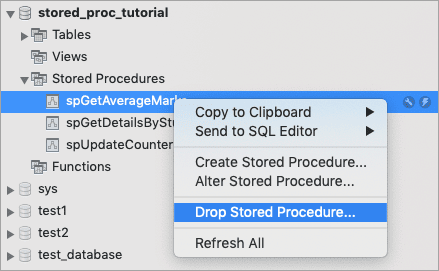
#4) Select DROP NOW to DROP immediately or REVIEW to view the SQL script and then execute.

Note: In order to execute the DROP PROCEDURE command, the users must have the privilege of the ALTER ROUTINE command.
Calling a Procedure From Another STORED PROCEDURE
We can use the concept of nested procedures when it’s possible to call a procedure from within another procedure.
Let’s understand this with the help of an example.
We will call a procedure from another procedure to return the overall result of a student. If student marks are above average – then the result would be PASS else – FAIL
We will create 2 procs
#1) First, is named spGetIsAboveAverage would return a Boolean value if the student marks are above average or not.
- Calculate the AVERAGE using the AVG function and store results in a local variable.
- Fetch marks for the student ID passed in the function call.
- Compare the studentMarks with average marks and return the result as 0 or 1.
#2) Second one is named spGetStudentResult – It will pass studentId as input (IN) and expect result as output (OUT) parameter.
- Calls the first procedure spGetIsAboveAverage
- Use the result returned from step 1) and set the result to PASS or FAIL depending on the value from step 1) being 1 or 0 respectively.
Let’s see the code statements for both procedures.
Code for Procedure 1
DELIMITER $$
CREATE PROCEDURE stored_proc_tutorial.spGetIsAboveAverage(IN studentId INT, OUT isAboveAverage BOOLEAN)
BEGIN
	DECLARE avgMarks DECIMAL(5,2) DEFAULT 0;
	DECLARE studMarks INT DEFAULT 0;
    SELECT AVG(total_marks) INTO avgMarks FROM studentMarks;
	SELECT total_marks INTO studMarks FROM studentMarks WHERE stud_id = studentId;
	IF studMarks > avgMarks THEN
		SET isAboveAverage = TRUE;
	ELSE
		SET isAboveAverage = FALSE;
	END IF;
END$$
DELIMITER ;
Code for Procedure 2
DELIMITER $$
CREATE PROCEDURE stored_proc_tutorial.spGetStudentResult(IN studentId INT, OUT result VARCHAR(20))
BEGIN
      -- nested stored procedure call
	CALL stored_proc_tutorial.spGetIsAboveAverage(studentId,@isAboveAverage);
	IF @isAboveAverage = 0 THEN
		SET result = "FAIL";
	ELSE
		SET result = "PASS";
	END IF;
END$$
DELIMITER ;
As you can see above, we are calling the spGetIsAboveAverage procedure from within spGetStudentResult
Let’s now call the procedure to fetch results. (The average marks for all the entries in studentTable is 323.6)
For PASS – We will use studentID 2 – having total marks – 450
Since 450 > 323.6 – we will expect the result to be “PASS”
CALL stored_proc_tutorial.spGetStudentResult(2,@result);
SELECT @result;

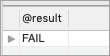
For FAIL result we will use studentId – 10 having total marks – 150
Since 150 < 323.6 – we will expect the result to be “PASS”
CALL stored_proc_tutorial.spGetStudentResult(10,@result);
SELECT @result;
Using Conditional Statements
Let’s now see how we can use conditional statements like IF-ELSE or CASE etc within a procedure.
For example, we want to write a procedure to take studentId and depending on the studentMarks we need to return the class according to the below criteria.
Marks >= 400 : Class – First Class
Marks >= 300 and Marks < 400 – Second Class
Marks < 300 – Failed
Let’s try creating such a procedure using the IF-ELSE statements.
DELIMITER $$
CREATE PROCEDURE stored_proc_tutorial.spGetStudentClass(IN studentId INT, OUT class VARCHAR(20))
BEGIN
	DECLARE marks INT DEFAULT 0;
	SELECT total_marks INTO marks FROM studentMarks WHERE stud_id = studentId;
    	IF marks >= 400 THEN
		SET class = "First Class";
	ELSEIF marks >=300 AND marks < 400 THEN
		SET class = "Second Class";
	ELSE
		SET class = "Failed";
	END IF;
END$$
DELIMITER ;
As seen above, we have used
- IF – ELSEIF block within the body to query student marks and SET the OUT parameter named class which is returned to the procedure caller.
- studentId is passed as an IN parameter.
- We’ve declared a local variable named ‘marks’ which would fetch the total_marks from the studentMarks table for the given ID and store it temporarily.
- The local variable is used in comparison with the IF ELSE-IF block.
Let’s try running the above procedure for different inputs and see the result.
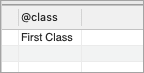
For student ID – 1 – total_marks are 450 – hence the expected result is FIRST CLASS.
CALL stored_proc_tutorial.spGetStudentClass(1,@class);
SELECT @class;
For student ID – 6 – total_marks is 380 – Hence the expected result is SECOND CLASS.
CALL stored_proc_tutorial.spGetStudentClass(6,@class);
SELECT @class;

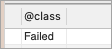
For student ID – 11 – total_marks are 220 – Hence expected result is FAILED.
CALL stored_proc_tutorial.spGetStudentClass(11,@class);
SELECT @class;
Error Handling in STORED PROCEDURES
Like any other programming language, MySQL can also throw errors and exceptions while executing queries.
So, while executing individual queries on the terminal or client, you can either get a success response or an error that defines what went wrong.
Similarly, in MySQL procedures, these errors can occur.
We can add handlers to it to handle any generic or specific error code that was thrown during procedure execution. This error handler can direct the execution engine to either continue the procedure execution or exit with some message.
Declaring a Handler for Error
To handle exceptions or errors, you would need to declare a HANDLER within the procedure body.
The syntax for declaring handler is
DECLARE {action} HANDLER FOR {condition} {statement}
{action} can have values
- CONTINUE: This would still continue executing the current procedure.
- EXIT: This procedure execution would halt and the flow would be terminated.
{condition}: It’s the event that would cause the HANDLER to be invoked.
- Ex – and MySQL error code – ex. MySQL would throw error code 1062 for a duplicate PRIMARY KEY violation
- SQLWARNING / NOTFOUND – etc are used for more generic cases. For example, SQLWARNING condition is invoked whenever the MySQL engine issues any warning for the executed statement. Example, UPDATES are done without a WHERE clause.
{statement} – Can be one or multiple statements, which we want to execute when the handler is executing. It would be enclosed within BEGIN and END keywords similar to the actual PROCEDURE body.
Note: It’s important to note that, you can declare multiple handlers in a given MySQL procedure body definition. This is analogous to having multiple catch blocks for different types of exceptions in a lot of programming languages like Java, C#, etc.
Let’s see an example of HANDLER declaration for a DUPLICATE KEY INSERT (which is error code 1062).
DECLARE EXIT HANDLER FOR 1062
BEGIN
  SELECT 'DUPLICATE KEY ERROR' AS errorMessage;
END;
As seen above, we have created a handler for error 1062. As soon as this condition is invoked, the statements between the BEGIN and END block would be executed.
In this case, the SELECT statement would return the errorMessage as ‘DUPLICATE KEY ERROR’.
We can add multiple statements as needed within this BEGIN..END block.
Using Handler Within STORED PROCEDURE Body
Let’s now understand how these handlers can be used within the body of the MySQL procedure.
We will understand this with the help of an example.
Let’s create a procedure that would insert a record in the studentMarks table and have IN parameters as studentId, total_marks, and grade. We are also adding an OUT parameter named rowCount which would return the total count of records in the studentMarks table.
Let’s also add the Error Handler for Duplicate Key record i.e. if someone invokes it for inserting a record with an existing studentID, then the Error handler would be invoked and will return an appropriate error.
DELIMITER $$
CREATE PROCEDURE stored_proc_tutorial.spInsertStudentData(IN studentId INT,
IN total_marks INT,
IN grade VARCHAR(20),
OUT rowCount INT)
BEGIN

-- error Handler declaration for duplicate key
DECLARE EXIT HANDLER FOR 1062
    BEGIN
	SELECT 'DUPLICATE KEY ERROR' AS errorMessage;
    END;

-- main procedure statements
INSERT INTO studentMarks(stud_id, total_marks, grade) VALUES(studentId,total_marks,grade);
    SELECT COUNT(*) FROM studentMarks INTO rowCount;
END$$
DELIMITER ;
Let’s now call this Procedure with an existing student id.
CALL stored_proc_tutorial.spInsertStudentData(1,450,'A+',@rowCount);
The output would display an error message defined in the error handler.
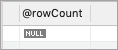
Also since it’s an exit handler, the main procedure flow would not continue. Hence, in this case the rowCount OUT parameter would not be updated as this statement is after the INSERT statement that had generated the error condition.

So, if you try to retrieve the value of rowCount, you would get NULL.
SELECT @rowCount;
Let’s DROP this procedure, and re-create with CONTINUE action instead of EXIT for the error handler.
DROP PROCEDURE stored_proc_tutorial.spInsertStudentData
DELIMITER $$
CREATE PROCEDURE stored_proc_tutorial.spInsertStudentData(IN studentId INT,
IN total_marks INT,
IN grade VARCHAR(20),
OUT rowCount INT)
BEGIN
	DECLARE CONTINUE HANDLER FOR 1062
    BEGIN
		SELECT 'DUPLICATE KEY ERROR' AS errorMessage;
    END;
	INSERT INTO studentMarks(stud_id, total_marks, grade) VALUES(studentId,total_marks,grade);
    SELECT COUNT(*) FROM studentMarks INTO rowCount;
END$$
DELIMITER ;
As you can see above, instead of `DECLARE EXIT’, we are now using ‘DECLARE CONTINUE’ which would result in continuing the execution after handling the error code.
Let’s try to call this procedure with an existing student ID.
CALL stored_proc_tutorial.spInsertStudentData(1,450,'A+',@rowCount);
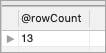
You will still see the same error, but the rowCount would be updated this time, as we have used CONTINUE action instead of EXIT.
Let’s try to fetch the value of the rowCount OUT parameter.
SELECT @rowCount;
MySQL STORED PROCEDURES vs FUNCTIONS
MySQL provides 2 ways to create methods or code to be re-used in the form of FUNCTIONS and PROCEDURES.
However, there are certain differences between both of them:
| PROCEDURE | FUNCTION |
|---|---|
| Supports different type of parameters like IN, OUT and INOUT. | Supports only input parameters. |
| They can call functions. | Functions cannot call procedures. |
| Exceptions can be handled in procedures. | No exception handling possible in FUNCTIONS. |
| Might or might not return a value. | A FUNCTION is expected to return a result always. |
| These cannot be called from within SELECT statements. | Functions can be called from within SELECT statement. |
| They are mainly used to process repeatable tasks. | FUNCTIONS are used to compute values and return results to the caller. |
| These are pre-compiled - i.e. they are compiled once and the compiled code is reused for subsequent calls being made to the procedure. | FUNCTIONS are compiled every time when they are called. |
Frequently Asked Questions
Q #1) Does MySQL have stored procedures?
Answer: MySQL has STORED PROCEDURES that are stored as a part of the database/schema like other entities as tables, indexes, etc.
These can be created using CREATE PROCEDURE command and can have optional parameters specified to pass data as well as obtain results as a result of procedure execution.
Q #2) How do I view a stored procedure in MySQL?
Answer: These are generally associated with a database in MySQL (exceptions can be system-generated procedures)
In order to list all the procedures, you can:
- View through GUI clients like MySQL workbench, by expanding the StoredProcedures option within a database or schema.
- Obtain list by executing command SHOW PROCEDURE STATUS.
SHOW PROCEDURE STATUS WHERE name LIKE '%Student%'
The above command would list all the procedures having the word Student in the name.
Q #3) Why use stored procedures in MySQL?
Answer: They are a means to have a robust modular structure for repeatable SQL scripts which help in:
- Reusing existing scripts.
- Optimized performance by reducing Network transfer.
- Easy to keep as versioned scripts as a part of the code repositories etc.
However, to work with them, might require a good amount of knowledge/skills and hence would involve some amount of learning curve.
Q #4) What are output parameters in the stored procedure?
Answer: MySQL supports output parameters used by the OUT keyword. These are the parameters that the caller would use and expect the called procedure to update.
Example: We have a procedure to fetch the highest marks from a student data table. We can have one like this with the highest marks stored in an OUT parameter.
DELIMITER //
CREATE PROCEDURE stored_proc_tutorial.spGetMaxMarks(OUT highestMarks INT)
BEGIN
    SELECT MAX(total_marks) INTO highestMarks FROM studentMarks;
END //
DELIMITER

-- calling procedure
CALL stored_proc_tutorial.spGetMaxMarks(@highestMarks);

-- obtaining value of the OUT parameter
SELECT @highestMarks;
Q #5) How do I pass different types of parameters to a SQL stored procedure?
Answer: MySQL supports 3 types of parameters that could be passed when a procedure is called.
The syntax is the same for all
CREATE PROCEDURE {stored_proc_name}([OUT|IN|INOUT] parameterName {dataType}
The different parameter types have different utilities.
IN: This type is used when the procedure caller needs to pass some data that would be used by the procedure.
OUT: This type is used when the caller expects some value to be calculated by the called procedure. For example, finding the highestMarks, averageMarks from the Student data table, etc.
INOUT: This is a special type of parameter that can be passed by the caller as well as updated by the procedure execution and sent back to the caller. One example can be – Caller passing the initial value of a parameter and the called procedure does some manipulation and updates the initial value.
Q #6) Where does MySQL store the stored procedures?
Answer: In MySQL, these are stored in a System table ‘informationschema.routines`
To view all the entries in this table, we can run a SELECT query on this table (Note: These permissions are usually available to root users or system administrators).
SELECT * FROM information_schema.routines
Reference => Information schema.routines table
Q #7) How can I call stored procedure in another stored procedure in MySQL?
Answer: It’s perfectly valid to call a procedure from within another. One important point, you need to ensure is that the procedure being called should exist and should be valid before its being called in another procedure. It’s just like calling a function within another function in any other coding languages like Java, C#.
Conclusion
In this tutorial, we went through the Introduction of STORED PROCEDURES in MySQL.
We learned about creating simple procedures, the concept of using DELIMITER in the procedure definition, and different types of Parameters supported by them.
We also learned about how these can be called and how the values passed back from the procedure execution can be used.
In addition to these, we learned about handling error codes within the procedure body through error handlers and how we can call an existing procedure from within another one’s definition or body.
These are widely used in a lot of mature projects that are doing very heavy database interactions and calculations. These can largely impact the performance of the applications and can greatly enhance the reusability of scripts and reduce Network data transfer for optimized performance.
=> Check Here For MySQL Training Series
Was this helpful?
Recommended Reading
-

Hands-on MySQL Tutorial Series to learn MySQL basic and advanced concepts through programming example: MySQL is a Relational Database Management System (RDBMS) and it has benefits and features like Data Security, High Availability & Cloud Service. MySQL has turned out to be one of the most popular open-source databases used by…
-
In this tutorial, we will learn about syntax and usage of MySQL SHOW DATABASES command with programming examples. We will also learn how to filter results using LIKE and WHERE clauses: This command is used to list down the databases available on a MySQL server. The command also provides options…
-
Learn to use the MySQL SHOW USERS command to list users with various use cases like SHOW ALL USERS, SHOW CURRENT USER and more: In MySQL, in order to SHOW USERS (unlike in other databases ex-Oracle, MSSQL), you can use mysql.user table to list down all the configured users for…
-
This tutorial explains what is MySQL CASE Statement, when to use it, how to use it with update statement, and when statement in programs: The MySQL CASE statement is a conditional construct and it returns values against a given condition being evaluated as true or false. It's similar to a…


