


List of the Best Artificial Intelligence AI Software With Reviews And Comparison.
What is AI Software?
Artificial Intelligence (AI) Software is a computer program which mimics human behavior by learning various data patterns and insights.
Top features of AI software include Machine Learning, Speech & Voice Recognition, Virtual Assistant etc.
AI combined with Machine learning is used to provide users with the required functionality and make the business process a much simpler one.
AI software is used to build and develop an intelligent application from scratch with the help of Machine learning and deep learning capabilities.
Table of Contents:
Types of AI Software
There are four different types:
- Artificial Intelligence Platforms: This will provide the platform for developing an application from scratch. Many built-in algorithms are provided in this. The drag-and-drop facility makes it easy to use.
- Chatbots: This software will give the effect that a human or person is doing in a conversation.
- Deep Learning Software: It includes speech recognition, image recognition, etc.
- Machine Learning Software: Machine learning is the technique that will make the computer learn through data.

[image source]
What AI Can Do?
With the help of AI, we can develop smart systems that will not only help us in businesses or offices, but also at home. Smart systems can perform so many tasks for us, right from setting the alarm to switching on/off the lights.
With the help of AI, gathering or collecting data from different portals becomes much easier. With the help of ML, we can apply different algorithms to data to get it in our required form.
While doing online shopping, we get recommendations based on what we see or purchase. This, in turn, will help in getting more business. All this is possible, just because of AI (Deep Learning and Machine Learning).
When you want to buy some products or services, you probably visit the concerned website, where you get help through online conversation or chatting window that is always available. This 24*7 help is possible only because of AI (Chatbot).
Robotic Process Automation Vs Artificial Intelligence
RPA software copies human actions and AI copies or imitates human intelligence. AI is learning and thinking about the ability of an application.
Industries using AI: Retail, Finance & Banking, Education, Healthcare, Energy & Utilities, Technology, etc.
Top Artificial Intelligence Software
Enlisted below are the best Artificial Intelligence Software that is available in the market.
Comparing the Best of AI Software
| AI Tools | Functionality | Supported OS/ Languages/Platform | Best Feature | Price |
|---|---|---|---|---|
| Hostinger | Website building | Web-based | 150+ Customizable templates, SEO-friendly content generation | $2.99/month |
| Google Cloud Machine Learning Engine | Machine Learning | GCP Console | Trains model on your data. Deploy it. You can manage it. | Per hour per training unit costs: US: $0.49 Europe: $0.54 Asia Pacific: $0.54 |
| Azure Machine Learning Studio | Machine Learning | Browser based | Model will get deployed as a web service. | Free |
| TensorFlow | Machine Learning | Desktops, Clusters, Mobile, Edge devices, CPUs, GPUs, & TPUs. | It is for everyone from beginners to experts. | Free |
| H2O AI | Machine Learning | Distributed in-memory Programming Languages: R & Python. | AutoML functionality included. | Free |
| Cortana | Virtual Assistant | Windows, iOS, Android, and Xbox OS. Supported Languages: English, Portuguese, French, German, Italian, Spanish, Chinese, and Japanese. | It can perform so many tasks from setting reminders to switching on the lights. | Free |
| IBM Watson | Question-answering system. | SUSE Linux Enterprise Server 11 OS Apache Hadoop framework. | It learns lot from small data. | Free |
| Salesforce Einstein | CRM system | Cloud based. | No need for managing models and data preparation. | Contact them for pricing details |
| Infosys Nia | Machine Learning Chatbot. | Supported devices: Windows, Mac, & Web based. | It provides three components, i.e. Data platform, Knowledge platform, and automation platform. | Contact them for pricing details. |
| Amazon Alexa | Virtual Assistant | OS: Fire OS, iOS, & Android. Languages: English, French, German, Japanese, Italian, and Spanish. | It can be connected to devices like Camera, lights, and entertainment systems. | Free with some amazon devices or services. |
| Google Assistant | Virtual Assistant | OS: Android, iOS, and KaiOS. Languages: English, Hindi, Indonesian, French, German, Italian, Japanese, Korean, Portuguese, Spanish, Dutch, Russian, and Swedish. | Supports two way conversation. | Free |
| Plavno | — | — | ChatGPT Integration, AI Agent Development, Language Model Fine Tuning | Quote-based |
| CustomGPT.ai | Custom AI chatbot | Web-based | Multi-lingual support, sitemap integration, multi-source data integration | Starts at $89/month |
Detailed review:
Recommended: Best AI Website Builder – Hostinger
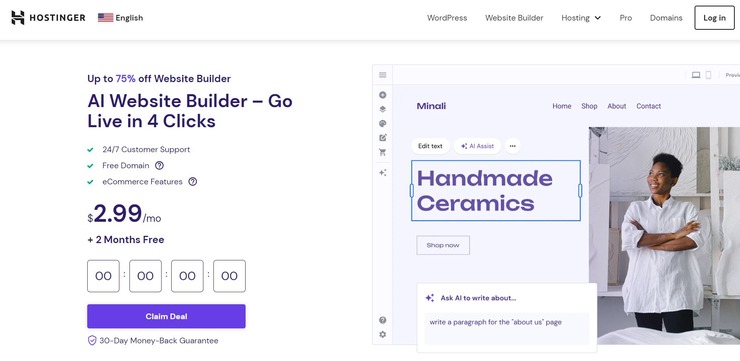
Hostinger presents you with a website builder completely driven by AI. To get our website built by this AI-driven solution, you’ll start by answering three simple questions. Hostinger’s website builder will use the answers you provided as a basis for building a website.
The tool will also SEO-friendly content for your website. You can customize the site further with the help of a drag-and-drop editor.
Features:
- Drag and Drop editor
- 150 Website templates to choose from
- Set-up eCommerce store
- Integrate with over 20 payment gateway systems
Pros:
- Free Domain
- Customizable, readymade templates to choose from
- 24/7 live support
Cons:
- Limited integration
Price: The Website builder costs $2.99/month. You’ll get two months more for free owing to a current ongoing offer. A 30-day money-back guarantee also applies to the current plan.
#1) Google Cloud Machine Learning Engine

Google Cloud Machine Learning Engine will help you with training your model. Components provided by Cloud ML Engine include Google Cloud Platform Console, gcloud, and REST API.
Features:
- Google Cloud will help in training, analyzing, and tuning your model.
- This trained model will then get deployed
- Then you will get predictions, monitor those predictions, and will also be able to manage your models and their versions.
- Google Cloud ML has 3 components, i.e. Google Cloud Platform Console is a UI interface for deploying models & managing these models, versions, & jobs; gcloud is a command-line tool for managing the models and versions, and REST API is for online predictions.
Pros:
- Provides good support.
- The platform is good.
Cons:
- Needs improvement in documentation.
- Difficult to learn.
Tool Cost/ Plan details: The cost of training is different for the US, Europe, and the Asia Pacific.
- For the US: $0.49/hour per training unit.
- For Europe: $0.54/hour per training unit.
- For the Asia Pacific: $0.54/hour per training unit.
There are different prices for the predefined scale tire and prices vary as per the region. Hence, you need to contact them for detailed pricing information.
Website: https://cloud.google.com/ml-engine/docs/pricing
#2) Azure Machine Learning Studio

This tool will help you to deploy your model as a web service. This web service will be platform-independent and will also be able to use any data source.
Features:
- It can deploy the models in the cloud on-premises and at the edge.
- Provides browser-based solution.
- Easy to use because of its drag-and-drop feature.
- It is scalable.
Pros:
- No programming skills are required
- It can be integrated with open-source technologies.
Further Reading => A Complete Image Processing Guide
Cons:
- Lack of transparency in pricing details for the paid features.
Tool Cost/ Plan details: It provides a free account. You will be provided with over 25 services with this account. If required, you can upgrade at any time by paying additional charges.
Website: https://azure.microsoft.com/en-us/services/machine-learning-studio/
#3) TensorFlow
It is a numeric computational tool and an open-source system. This ML library is mainly for research and production.
Features:
The solution can be deployed on:
- CPUs, GPUs, and TPUs.
- Desktops
- Clusters
- Mobiles and
- Edge devices
- Beginners and experts can use APIs provided by TensorFlow for development.
Pros:
- Good community support.
- Features and functionalities are good.
Cons:
- It is difficult to learn and will take time to learn it.
Tool Cost/ Plan details: Free.
Website: https://www.tensorflow.org/
Further Reading => TensorFlow Tutorial – Beginners Guide
#4) H2O.AI
H2O AI is for banking, insurance, healthcare, marketing, and telecom. This tool will allow you to use programming languages like R and Python to build models. This open-source machine learning tool can help everyone.
Features:
- AutoML functionality is included.
- Supports many algorithms like gradient-boosted machines, generalized linear models, deep learning, etc.
- Linearly scalable platform.
- It follows a distributed in-memory structure.
Pros:
- Easy to use.
- Provides good support.
Cons:
- Documentation needs improvement.
Tool Cost/ Plan details: Free
Website: https://www.h2o.ai/
#5) Cortana

Cortana, – a virtual assistant, will perform multiple tasks like setting reminders, answering your questions, etc. Supported operating systems include Windows, iOS, Android, and Xbox OS.
Features:
- It can perform several tasks, – right from placing an order for a pizza to switching on the light.
- It uses the Bing search engine.
- Supported languages include English, Portuguese, French, German, Italian, Spanish, Chinese, and Japanese.
- It can take voice inputs.
Further Reading => Top-Rated AI-Testing Tools of the Year
Pros:
- Voice recognition can save time.
- It provides many featured skills.
Cons:
- Some featured skills like FitBit scenarios and OpenTable are available only for the US.
Tool Cost/ Plan details: Free
Website: https://www.microsoft.com/en-us/cortana
Further Reading => Amazon Alexa vs. Google Home – Explore the Differences
#6) IBM Watson

IBM Watson is a question-answering system. It provides support to SUSE Linux Enterprise Server 11 OS with the help of the Apache Hadoop framework. When you train your model with Watson, it will deeply understand the real concepts.
Features:
- Supports distributed computing.
- It can work with the existing tools.
- Provides an API for application development.
- It can learn from small data as well.
Pros:
- Robust system.
- Helps in making business processes smarter.
Cons:
- Decentralized reporting.
Tool Cost/ Plan Details: Free.
Website: https://www.ibm.com/watson/
#7) Salesforce Einstein

It is a Customer Relationship Management (CRM) system. This smart CRM system is for Sales, Marketing, Community, Analytics, and Commerce.
Features:
Sales:
- Provides more awareness about the opportunities.
- Captures data and saves the effort of data entry by adding new contacts.
- Helps in prioritizing the opportunities based on history.
Marketing:
- It will help in giving recommendations for the best products.
- Image recognition will help in providing deeper insights like where a specific product will be used more etc.
- Engagement scoring is one of its important features.
Several other features are provided for analytics, platform etc.
Further Reading => ZeroGPT: Best AI Checker Tool for Blog Publishing
Pros:
- No need to manage the models.
- No data preparation is required.
Cons:
- Difficult to learn.
- It is expensive.
Tool Cost/ Plan details: Contact them for their pricing details. Salesforce provides a 30-day free trial.
Website: https://www.salesforce.com/products/einstein/overview/
#8) Infosys Nia

Infosys Nia will help enterprises by making complex tasks into simpler ones. It has three components, i.e. Data platform, Knowledge platform, and automation platform.
Further Reading => Janitor AI Review with Alternatives
Features:
- It helps in improving systems and processes to empower the business.
- It has a conversational interface.
- Provides automation for repetitive and programmatic tasks.
- Automation platform combines RPA, Predictive automation, and Cognitive automation.
- Knowledge platform is all about capturing, processing, and reusing knowledge.
- The Data platform provides advanced data analytics and machine learning platform.
Pros:
- Infosys Nia provides Chatbot, Advance machine learning, and business applications.
- It helps in capturing knowledge from different processes and systems.
Cons:
- Difficult to learn.
Tool Cost/ Plan details: Contact them for pricing details.
Website: https://www.edgeverve.com/artificial-intelligence/nia/
#9) Amazon Alexa
It is also a virtual assistant like Cortana. It can understand English, French, German, Japanese, Italian, and Spanish.
Features:
- API is provided to support development.
- It can be integrated with the existing products using AVS (Alexa Voice Service).
- It is a cloud-based service.
- It can be connected to devices like cameras, lights, and entertainment systems.
Pros:
- It can be used on millions of devices.
- Provides support to build more Alexa gadgets.
Also Read => Alexa Not Connecting to the Internet
Tool Cost/ Plan details: Free with some Amazon devices or services.
Website: https://developer.amazon.com/alexa
#10) Google Assistant

It is a virtual assistant by Google. It can be used on mobiles and smart home devices. Supported operating systems include Android, iOS, and KaiOS. Languages supported by Google Assistant are English, Hindi, Indonesian, French, German, Italian, Japanese, Korean, Portuguese, Spanish, Dutch, Russian, and Swedish.
Features:
Functions which Google Assistant can do are:
- Supports two-way conversation.
- Search for the information on the internet.
- Event scheduling
- Setting alarms
- Can do hardware settings on your device.
- Can display your Google account information.
- It can recognize objects, songs, and can read visual information.
Pros:
- It can be on your phone, speaker, watch, laptop, car, and TV.
- You can delete the previous conversation.
Cons:
- To use it with speakers, you must have Google Assistant-enabled speakers.
Tool Cost/Plan Details: Free. You can download or install it from the Play Store.
Website: https://assistant.google.com/#?modal_active=none
#11) Plavno
Plavno is a software development company you can approach to build a personalized AI-based product. Right from the get-go, you are assured full transparency and control via Agile over your project. The company is home to highly qualified developers who possess the experience and skills necessary to deliver top-quality AI software on time.
From product discovery to eventual optimization and maintenance, you can count on Plavno’s team to be by your side throughout the development process. The team excels at ChatGPT integration. You can count on Plavno’s team to employ OpenAI’s APIs to facilitate an integration that seamlessly blends with your organization’s tech setup and workflow.
Features:
- Product Development
- ChatGPT Integration
- Language Model Fine Tuning
- Natural Language Processing
- AI Agent Development
Further Reading => Best Artificial Intelligence Development Services
Pros:
- AI Consulting
- Full Transparency and Control via Agile
- Timely Delivery
- Get AI software customized as per your requirements
Cons:
- Some clients have reported mild communication issues.
Price: Cost will vary and depend on the complexity of your project. You should contact Plavno’s team to discuss your requirements and get a clear quote.
#12) CustomGPT.ai
CustomGPT.ai will help you provide smarter customer service operations. It is a no-code AI solution. You can integrate this platform with several data sources, websites, and tools like Hubspot and SharePoint to get instant and precise answers without any hassle.
This secure RAG-based platform is trusted by the leaders including MIT and Bernalillo County. It doesn’t train your data and ensures complete privacy and control. It offers industry-leading accuracy, SOC-2 Type 2 and GDPR compliance.
Features:
- Can upload documents for content ingestion in over 1400 formats.
- Integrate information from multiple data sources like podcasts, videos, websites, etc.
- Supports over 93 languages.
- Powered by anti-hallucination tech to only deliver factual, accurate responses.
- Can generate responses with citations and sources.
Pros:
- No-code set-up.
- Can deliver personalized responses.
- GPT-4 powered.
- Business-grade security.
Cons:
- The cost may be too expensive for some small businesses and start-ups.
Pricing Info: CustomGPT.ai offers the following subscription plans:
- It offers a free trial of 7 days.
- Standard: $89/month
- Premium: $449/month
A custom enterprise plan is also available upon request.
Website: https://customgpt.ai/
Additional Tools
#13) Ayasdi
Ayasdi provides AI for Finance, Healthcare, and Public sector. It provides a framework for application development that is scalable, reliable, and manageable.
Website: https://www.ayasdi.com/
#14) Scikit learn
It is an open-source, simple, and reusable data analysis tool. It is for classification, regression, the grouping of objects, pre-processing, model selection, and dimensionality reduction. This tool is for the Python programming language.
Website: http://scikit-learn.org/stable/
#15) Meya
This tool is for developers. It provides a cognitive platform. Using this platform, the developer will be able to build, train, and host their bots.
Website: https://www.meya.ai/
#16) Viv
Viv provides an AI platform to the developers to distribute their products. Viv is a personal assistant developed by Siri.
Website: http://viv.ai/
#17) BlockChain
BlockChain is a free wallet. It is for digital currency transactions. You will send, receive, and store digital currencies.
Website: https://www.blockchain.com/
Conclusion
In this article, we have explored all the top Artificial Intelligence Software that is available in the market.
For Machine learning all the above-mentioned software are good but when compared to the others in the top 10, Azure Machine Learning Studio & H2O are much easier to use.
As a virtual assistant Google, Alexa, and Cortana are equally good.
=> Contact us to suggest a listing here.
Was this helpful?
Recommended Reading
-

The List of the Best On-premises and Cloud-Based Call Center Software for Inbound and Outbound Calls with Pricing and Feature Comparison: What is Call Center Software? Call Center Software is an application that has the functionality for managing customer communications coming from multiple channels and sources. It helps agents make…
-

Comparison of the Best Free Android and iOS Mobile App Development Software Tools and Platforms to create stunning high-quality Mobile Apps for Your Business: App development software is an application that helps with the app development process by providing functionalities like IDE, code-free development, templates, API, data synchronization, and Analytics.…
-

The most frequently asked questions to me till date are "What is the future of software testing business?? "Should I consider software testing as my career option?" - Now you don't need to ask these question to me any more. See the good news below.
-

Get Ready to Check Out Some of the Top Software Testing Trends for 2026. Learn what trends will critically affect you and how to help yourself get ready for the game from this informative article. Nowadays, we witness enormous changes in technological advancements as the world is becoming more and…
Clear understanding of artificial intelligence
It’s helped me learn about different AI tools and important it’s Easy understands
Easy to understand