


List and Comparison of the Top IT Asset Management Software:
Keeping track of business assets is important for every organization. A record of assets is required for regulatory compliance purposes. Moreover, accurate records of physical and digital assets also help in efficient resource planning.
Gone are the days when organizations used to keep manual asset management registers. Today different types of asset management apps are available and they in turn save time and improve the efficiency in keeping a record of the company’s assets.
Here we will explain the process of IT asset management and why it’s important. Also, here you will find a review of the top Asset Management Software available online.
What is IT Asset Management?

IT asset management refers to an all-encompassing computer system that tracks the organization’s assets. The International Association of IT Asset Managers (IAITAM) has defined IT asset management as “a set of business practices that incorporates IT assets across the business units within the organization.”
The process helps to support strategic decision-making in an IT ecosystem.
The purpose of an IT asset management solution is to:
- Effectively help manage the assets.
- Improve visibility of assets.
- Ensure optimum utilization of assets.
- Reduce IT and software costs.
- Ensure compliance with regulatory requirements.
IT asset management ties the assets with the IT infrastructure of the organization. With a robust asset management system, management and IT professionals can review and monitor all types of assets within the organization. The information can be used to make detailed decisions about purchases and other aspects of the asset’s lifecycle.
You can view IT asset management as a combination of IT and accounting services. The IT systems are used for records of assets for accounting purposes. The information contained in the systems can be used to prepare an accurate balance sheet. This can help the management in making informed business decisions.
In addition, investors can analyze the financial position of the business more accurately.
Our TOP Recommendations:
 |  |  |  |  |
 | | | | |
| Robin by Atera | NinjaOne | SuperOps | Zendesk | Jira Service Management |
| • Remote management • Monitoring & alerts • Patch management | • Real-time asset information • Alerts on asset change • Monitor & manage software at scale | • Asset Discovery • Automated • Custom Alerts | • Quick onboarding • Automated ticket creation • Set priority-level alerts | • Asset Tracking • Asset Discovery • Incident Management |
| Price: Starts at $129/tech./month Trial version: Yes | Price: Quote-based Trial version: Available | Price: $89 monthly Trial version: 21 days | Price: Starts at $49/agent/month Trial version: 14 Days | Price: $49 monthly Trial version: Free for 3 agents |
| Visit Site >> | Visit Site >> | Visit Site >> | Visit Site >> | Visit Site >> |
How to Select the Best IT Asset Management Software?
You will find different asset management software online. Asset management software can be classified based on the types of assets that they help to manage.
Infrastructure Asset Management Software: The app is used to record physical infrastructure assets such as roads, utilities, power generators, transport equipment, etc. They are generally used by public organizations and large companies.
Financial Asset Management Software: This software is used to record the financial assets owned by the company. The assets include investment funds, securities, loans, and other financial assets.
Software Asset Management: The app is used to manage purchase, use, upgrade, license renewal, and other aspects of the software applications within a company.
Physical Asset Management: The asset is used to manage all kinds of physical assets owned by a company. These include computer equipment, light fixtures, tables, cabinets, and other physical assets.
You should buy an asset based on business requirements. Make sure that you are clear about what you want with the asset management system. Prepare a list of all types of features that you want in the asset management software.
Large firms would require software that can record all the above features. Small business owners may have only fewer requirements. Once you have determined the needs, you should research online to find the required software.
Best Asset Management Software with Prices and Features
Here is a list of the 10 best asset management software including price, suitability, and best features.
Comparison of Top Asset Management Software
| Asset Management Software | Best For | Price | Features |
|---|---|---|---|
| Robin by Atera | Small to medium-sized MSPs, Enterprise companies, IT Consultants and internal IT departments. | $129 Per Technician, for Unlimited Devices. | Inventory Management, Network Troubleshooting, etc. |
| NinjaOne (Formerly NinjaRMM) | Managing projects, communication, & work. | Starter: $39 per month Pro: $79 per month Business: $124 per month Enterprise: Contact them to get a quote. | Recurring tasks, Task dependencies, team chat, Time tracking & reporting, etc. |
| SuperOps | Small to medium-sized IT teams and consultants | Starts at $89/month | Easy-to-use interface, Excellent Customer support, Splashtop integration. |
| xAssets | Full lifecycle ITAM, SAM and Network Discovery. | Free Edition: Fully functional, restricted to 1 user, $60/month for additional users. Professional Edition: Starts at $1,000 per year. | Hardware Asset Management, Software Asset Management, License Compliance, Reporting and BI capabilities,Procurement, Receiving and Approvals, etc. |
| Zendesk | Seamless Integration with Asset Management tool – AssetSonar | Starts at $49/agent per month | Asset lifecycle management, Access control, employee onboarding and offboarding |
| InvGate Asset Management | Companies with 1000 to 5000 employees. | Starts at $0.21/node/month | Asset Lifecycle Management, automated asset discovery, integrations, easy to use interface. |
| Jira Service Management | SMBs, IT Operations and Business Teams | Premium plan starts at $47 per agent. Custom enterprise plans are also available. | Asset tracking, Asset Discovery, Incident Management, and Problem Management. |
| Freshservice | Assets and Project Management. | $19 to $99 per user per month. | Asset management, Custom & scheduled reports, Incident management, Multiple languages, License management. |
| Auvik | The complete network visibility and control. | Get a quote plans, Essentials & Performance. | Discovery & mapping, inventory & documentation, hardware lifecycle data, etc. |
| ManageEngine Endpoint Central | Small to large businesses. IT Teams. | Contact for quote | Hardware Warranty Management, Software License Management, Software Metering. |
| AssetExplorer | Manage IT Hardware, Software and Licenses. | Free Edition: Fully functional, restricted to 25 nodes. Professional: Starts at $955/year for 250 IT assets annually. | Asset Lifecycle Management, Hardware Asset Management, Software Asset Management, Software License Management, License Compliance Management, CMDB, Purchase orders and Contract Management, Remote Control, Reporting. |
Let’s see their detailed reviews.
#1) Robin by Atera
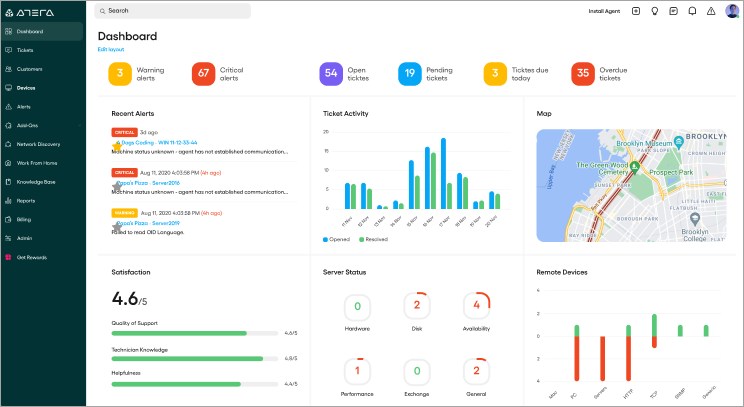
Robin offers an affordable and disruptive per-tech pricing model, allowing you to manage an unlimited number of devices and endpoints for a flat low rate.
You may opt-in for a flexible monthly subscription or a discounted annual subscription. You’ll have three different license types to choose from and can trial Robin’s full feature capabilities FREE for 30 days.
Robin is a cloud-based, Remote IT Management platform that provides a powerful and integrated solution, for MSPs, IT consultants, and IT departments. With Robin, you can Maintain and track unlimited inventory for a flat low rate.
Additionally, Robin’s Network Discovery add-on instantly identifies unmanaged devices and opportunities. The ultimate all-in-one IT management tool suite, Robin Includes everything you need in one integrated solution.
Robin includes Remote Monitoring and Management (RMM), PSA, Network Discovery, Remote Access, Patch Management, Reporting, Script Library, Ticketing, Helpdesk, and so much more!
Features:
- Easily Monitor and manage unlimited endpoints, servers, and desktops, both Mac and Windows.
- Instantly scan networks in minutes to discover SNMP devices, printers, firewalls, switches, and routers, etc.
- Inventory Management; search and log all connected devices, document software inventory, and manage software licenses.
- Troubleshoot network issues with one integrated platform, including ticketing and automatic billing.
- Proactively monitor the performance and availability of all your managed devices. CPU, memory, HD utilization, hardware, availability, and more.
- Automated reports that track and measure your networks, assets, system health, and overall performance.
- Customized alert settings and thresholds, and run automatic maintenance and updates.
Verdict: With Robin’s fixed pricing for unlimited devices and seamlessly integrated solution, Robin is a top choice IT Asset Management Software for MSPs and IT professionals. Try 100% free. It’s risk-free, no credit card is required, and gain access to all Robin has to offer!
#2) NinjaOne (Formerly NinjaRMM)
Best for: Managed service providers (MSPs), IT service businesses, and SMBs / mid-market companies with small IT departments.
Pricing: NinjaOne offers a free trial of their product. Ninja is priced on a per-device basis based on the features needed.
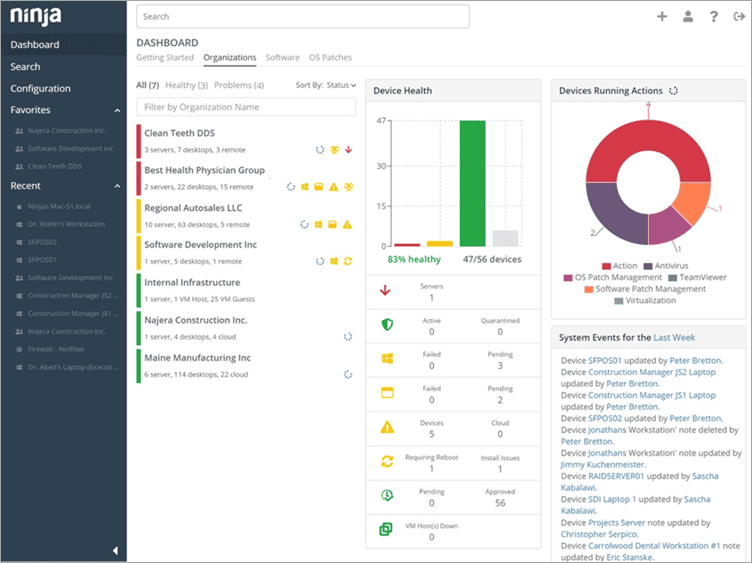
NinjaOne automates the hardest parts of IT, delivering visibility, security, and control over all endpoints for more than 20,000 customers.
The NinjaOne automated endpoint management platform is proven to increase productivity, reduce security risk, and lower costs for IT teams and managed service providers. The company seamlessly integrates with a wide range of IT and security technologies. NinjaOne is obsessed with customer success and provides free and unlimited onboarding, training, and support.
NinjaOne is #1 on G2 in endpoint management, patch management, remote monitoring and management, and mobile device management.
Features:
- Get full up-to-the-minute hardware and software inventories on all your devices.
- Monitor the health and productivity of all your Windows servers, workstations, laptops, and MacOS devices.
- Monitor the health and performance of all your routers, switches, firewalls, and other SNMP devices.
- Automate OS and third-party application patching for Windows and MacOS devices with granular controls over features, drivers, and security updates.
- Remotely manage all your devices without interrupting end-users through a robust suite of remote tools.
- Standardize the deployment, configuration, and management of devices with powerful IT automation.
- Directly take control of devices with remote access.
Verdict: NinjaOne has built a powerful, intuitive IT management platform that drives efficiency, reduces ticket volumes, and improves ticket resolution times that IT pros love to use.
#3) SuperOps
Best for Upper-SMB to mid-market IT teams that need asset inventory, hardware/software tracking, and configuration control tied directly to tickets and endpoint actions – not sitting in a separate CMDB or spreadsheet that goes stale a week after rollout.
Pricing: Asset management is a core module included in every plan – no module-by-module licensing math. Transparent, per-endpoint pricing with volume discounts and a free trial.

SuperOps’s intuitive IT management platform, driven by Remote Monitoring and Management (RMM) has everything you need to manage your client’s network of assets – all in one place. It comes with tightly integrated Professional Services Automation (PSA) for better context.
It hosts an array of intuitive features to help technicians be at their productive best—remote desktop management, community scripts for powerful automation, patch management to keep endpoints up to date, system tray icons for better accessibility, and much more.
Features:
- Automated hardware and software discovery across desktops, laptops, servers, and mobiles
- Full asset profile: specs, installed software, patch status, policies, tickets, and history in one view
- Auxiliary asset information (warranty, vendor, procurement, user assignment) linked to the asset
- Cross-OS coverage: Windows, macOS, Linux, plus iOS/iPadOS and Android via native MDM
- Policy-based configuration enforcement across device groups
- IT documentation module with installation procedures, SOPs, and credentials associated to each asset
- Lifecycle tracking from onboarding policy (auto-run scripts, install apps, apply patches) to retirement
- Real-time reporting on asset health, compliance, and software inventory
Verdict: Dedicated ITAM tools give you a clean inventory but leave the harder half – actually using that data to drive compliance, patching, or fixes – to a different system. SuperOps treats the asset as the hub: tickets, remote sessions, patches, policies, and documentation all hang off it. For IT teams managing 400–2,500 endpoints who are tired of CMDBs that go stale, it’s worth a trial.
#4) xAssets IT Asset Management Software
Best for: Full lifecycle IT Asset Management, Software Asset Management, Software Licensing, and Network Discovery.
Pricing: The free edition is restricted to one user and 100 discovered nodes. Additional users can be purchased at $60 with each user adding another 100 discovery nodes.
Additional nodes can also be quoted on request. Professional and Enterprise editions start at $1,000 per year and a free trial is offered with no formal time restrictions.
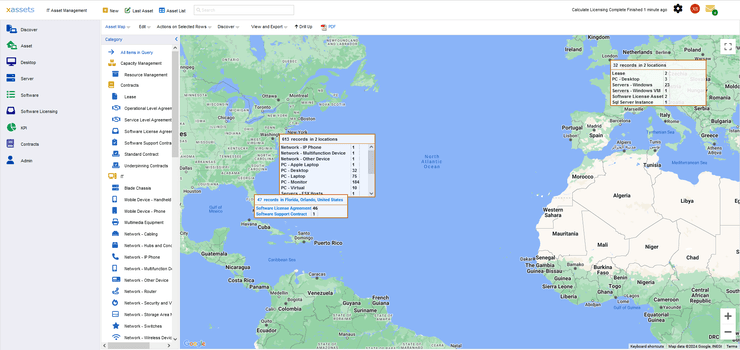
xAssets ITAM removes the time and costs barriers to acquiring an ITAM system that closely fits your business.
Most of the requirements are met quickly “out of the box”, thereby allowing excellent time to value. Their platform allows rapid configuration so complex requirements including workflow, reporting, and integrations are met in very short timescales.
Features:
- Full lifecycle IT asset register and CMDB.
- Software asset management
- Integrate with Intune, AD, System Center, AWS, GCP, Azure, JIRA, and others.
- Agentless zero-impact network discovery.
- Agent-based discovery for remote workers
- Procurement and contract management.
- Financials and depreciation
- Barcoding
- Service management
- Spare parts and storage
- Disposal and Obsolescence
- Key performance indicators and management reporting.
Verdict: xAssets completeness of vision in terms of ease of use, functionality, integrations, flexibility, security, scalability, and support, makes it a strong competitor and an excellent option for organizations of all sizes requiring IT asset management. Rapid configurability is a strong feature that enables customers to solve specific problems and build excellent user experiences that closely match their requirements.
#5) Zendesk
Best for Seamless Integration with Asset Management tool – AssetSonar
Price: Zendesk offers 4 pricing plans. The Team Suite plan costs $49/agent per month, The Suite Growth Plan costs $79/agent per month and the Suite Professional plan costs $99/agent per month. There is a 14-day free trial as well.
Zendesk is a customer service software that offers seamless integration with AssetSonar for asset management. This integration lets users consolidate IT assets, service requests, ticket data, and issues from within the software itself. The software considerably simplifies IT service delivery, thus offering a hassle-free experience to customers, employees, and IT admins.
Features:
- Assign assets to employees for quick onboarding
- Automated ticket creation
- Resolve service requests immediately
- Identify all items that need to be recovered from existing employees
- Set priority-level alerts
Verdict: While Zendesk offers an excellent help-desk service, its integration with AssetSonar makes it reliable for smooth IT asset management.
#6) InvGate Asset Management
Best for Companies with 1000 to 5000 employees.
Price: From $0.21/node/month
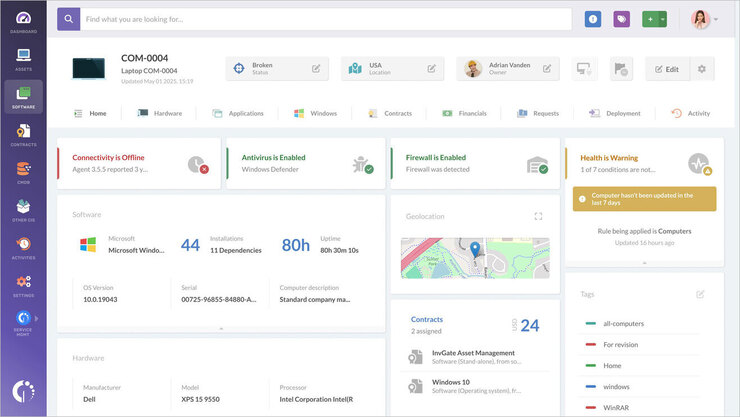
InvGate Asset Management is the perfect solution to automate the lifecycle of IT assets, from procurement to disposal. It acts as a single pane of glass to manage all physical, virtual, and cloud resources.
Its intuitive interface and multiple data entry points make having a complete inventory of IT assets a breeze. Additionally, modules like Contract Management, Software Compliance, and Deployment contribute to handling software and contracts seamlessly.
Another upside of the tool is its ability to integrate with leading Service Management solutions, such as InvGate Service Management, ServiceNow and Jira, to unify all IT operations in one place. On top of that, you can also connect it to other tools to amplify its coverage.
Lastly, its AI-powered features speed up agents’ time to find the answers they need and act accordingly.
InvGate Asset Management comes with a 30-day free trial.
Features:
- Automate your asset discovery through multiple sources, such as Discovery, Agent, CSV, etc.).
- Manage, automate, and report throughout your IT assets’ complete lifecycle.
- Integrate with leading Service Management solutions.
- Customize reports and share them with users in the platform and via email.
Verdict: InvGate Asset Management is a powerful tool that provides full visibility of the IT infrastructure. Its ease of use and flexibility makes it a great companion for organizations from all sizes and industries.
Check our InvGate Asset Management Review Here
#7) Jira Service Management
Best for SMBs, IT Operations, and Business Teams.
Price: Jira Service Management is free for up to 3 agents. Its premium plan starts at $47 per agent. A custom enterprise plan is also available.

Jira Service Management arms IT operation teams with all the tools they need to keep tabs on the assets they are in charge of managing. You can rely on Jira to track IT assets for auditing, inventory management, and other such purposes.
The software is also exceptional about asset discovery. It is capable of scanning your entire network to discover assets, which can then be recorded in an organization’s asset repository or CMDB.
Features:
- Asset Tracking
- Asset Reviews
- Asset Discovery
- Migrate asset information from popular third-party tools
- Problem and Incident Management
Verdict: Jira Service Management, in many fascinating ways, is the perfect alternative to most traditional CMDBs out there. It entails a data structure that is both open and flexible, which is ideal for the seamless management of assets across the organization.
#8) Freshservice
Pricing: $19 to $99 per user per month.

Freshservice is an online asset management solution that can help you to maintain records of hardware, software, contracts, and other assets. The assets can be grouped by location, created by, created date, and asset type. You can track assets through different phases and even get a timeline at a glance.
Features:
- Asset management
- Custom & scheduled reports
- Incident management
- Multiple languages
- License management
- Contract and project management
Best for Assets and project management.
#9) Auvik
Best for complete network visibility and control.
Pricing: You can get a quote for Auvik’s Essentials and Performance pricing plans. It offers a free trial for the tool. As per reviews, the price starts at $150 per month.

Auvik network management software can automatically discover distributed IT assets. It gives visibility into the connectivity of every device and how the network is configured. It has capabilities for automating network visibility and IT asset management.
Features:
- Auvik’s discovery & mapping features can get the data from sources like CDP, LLDP, forwarding tables, etc.
- With the help of network protocols, the tool identifies and captures all the details of every device on the network.
- It has capabilities for identifying the devices that need an upgrade.
Verdict: Auvik is a network visibility and IT asset management platform. It has the capabilities of automated mapping, inventory, and documentation. Auvik is a cloud-based solution and easy to use.
#10) ManageEngine Endpoint Central
Best for Small to large businesses. IT Teams.
Price: There is a free edition alongside 4 paid editions. You’ll need to contact the team for a quote.

Endpoint Central is a tool tailor-made for IT administrators who seek simplicity in managing multiple servers and devices on their network. The software is great at managing and monitoring assets found in one’s network.
The software can help you keep track of all your digital assets. Plus, you also get to configure alerts to get notified instantly if a change in hardware or software inventory is detected.
Further Reading => Top PC Inventory Management Tools
Features:
- Hardware Warranty Management
- Software License Management
- Software Metering
- Periodic Asset Scans
Verdict: With Endpoint Central, you get an ITAM tool that allows IT teams to manage both software and hardware assets from a single console anytime, anywhere, from any device.
#11) AssetExplorer

[image source]
AssetExplorer is web-based IT asset management (ITAM) software that helps you monitor and manage assets in your network from purchase to disposal. From multi-source discovery techniques to real-time hardware and software dashboards, AssetExplorer covers every aspect of IT asset management.
With the built-in software asset management module, you can track software usage and maximize software license compliance.
Features:
- Multi-source asset discovery
- Scheduled asset scans
- Real-time hardware and software asset dashboards
- Software license management and metering
- Software asset management
- Purchase order management
- Asset life cycle management
- IT asset inventory management
- Configuration Management Database (CMDB)
- Native Microsoft SSCM integration
Best for managing software and hardware assets.
#12) Spiceworks IT Asset Management Software
Price: Free

Spiceworks IT Asset Management software allows you to monitor your network hardware and software. You can monitor all types of network devices such as switches, routers, gateways, and others. The software will automatically detect assets on the network, categorize them, and prepare a detailed report.
Features:
- Monitor network licenses and devices.
- Manage licensing, network, exchange, etc.
- Report on inventory, assets, and licensing.
Best for Managing IT network infrastructure.
#13) Snipe-IT
Price: Self-Hosted – Free, Hosted – $39.99 per month.

Snipe-IT is an open-source online asset management software app. The app comes with a lot of features that can make managing your inventory easy. The dashboard gives an overview of the most recent activity. You can also integrate the app with your system using the REST API.
Features:
- Monitor assets based on location, assignment, and status.
- One-click check
- Email alerts in case of expiring licenses.
- Asset auditing
- Import and export assets.
- Generate QR code labels.
Best for Mobile management of assets.
#14) Asset Panda

Asset Panda is a scalable asset management app for managing all types of assets – physical and digital. You can create workflows and actions to streamline the asset management process.
Further Reading => Top Trending CMMS Software Solutions for Your Business
Features:
- Centralized asset management.
- Disaster recovery capabilities.
- Customized reporting
- Help desk module
Best for Tracking and management of all types of assets.
#15) GoCodes
Price: $30 to $125 per month.

GoCodes is a robust asset management software tool. The basic version of the software is free and supports custom fields, QR codes, audits, excel imports and exports, GPS tracking, maintenance, APIs, reports, analytics, and inventory management.
You can go for the paid version if you want advanced features such as company URLs, data backups, recurring services, asset stock transfer, and advanced access control.
Features:
- Manage unlimited assets with an Enterprise solution.
- Manage multiple roles.
- GPS location tracking
- Fixed asset depreciation
- Inventory module
- Report designer
- API Access
- Custom Labels
Best for Managing all types of assets with depreciation.
#16) EZOfficeInventory
Price: Basic – Free; Paid $27 to $112.5 per month.

EZInventory contains a comprehensive solution for tracking assets. The software solution consists of barcode asset tracking, fixed asset tracking, inventory tracking, RFID asset tracking, tool tracking, and IT hardware and software tracking.
Features:
- Auto-discover IT assets.
- Manage hardware and software licenses.
- Checkouts
- Barcode, QR Code, & RFID.
- Managing purchase orders.
Best for Managing hardware and software assets.
#17) Samanage

Samanage is an IT asset management solution. The software supports a range of features. Highlights of the asset management software include change management, a self-service portal, automation, ticketing, and risk detection.
Features:
- Contract and asset management.
- Risk detection
- Configuration management.
Best for Managing IT hardware and software.
#18) AssetCloud
Price: $595 to $4,295

AssetCloud is a versatile asset management software tool. The application allows you to manage physical and digital assets. You can generate pre-built reports to know about overdue checkouts, warranties, scheduled maintenance and more.
Features:
- Manage and track IT purchase orders.
- Equipment maintenance schedule.
- Tag items with labels.
- Cross-reference IT landscape.
Best for Managing IT hardware, software, and licenses Simplify workflow.
#19) ServiceNow ITSM and ITAM

ServiceNow has been a leader in the ITSM market for 7 consecutive years, according to Gartner’s Magic Quadrant for IT Service Management Tools. ServiceNow offers two products for IT asset management: ServiceNow ITSM and ServiceNow ITAM.
Pricing: Contact a ServiceNow consultant to estimate the implementation cost of an IT asset management solution for your business.
Features:
ServiceNow ITSM
- Asset lifecycle management from asset planning to retirement.
- Assets’ worth tracking throughout their actual lifecycles.
- Asset governance control, including control of asset distribution and enforcement of the policy, contract, and regulatory requirements.
- Asset audit management.
- Stockroom inventory management for hardware and consumables (mouse devices, computer keyboards, etc.).
- Contract management, including automation of contract approval and renewal.
- Reports and dashboards on incidents, change requests, etc.
- Multi-scanning multiple barcodes or groups of codes via a mobile interface for fast entry of the asset information into ServiceNow ITSM.
ServiceNow ITAM
- Hardware asset management (hardware normalization, hardware asset dashboard, mobile asset inventory audit, etc.).
- Software asset management (software spend detection, license workbench, license change projections, etc.).
- Configuration Management Database (data health tools, reporting on configuration items and audit trail, and more).
- Discovery (automated discovery of all IT resources, firewall audit, and reporting, security certificate management, etc.).
Verdict: ServiceNow is a flexible platform that provides lifecycle automation of IT and non-IT assets, including tracking their financial, contractual, and inventory details, which helps reduce IT costs and improve IT service quality.
#20) Nifty
Pricing:
- Starter: $39 per month
- Pro: $79 per month
- Business: $124 per month
- Enterprise: Contact them to get a quote.
All Plans Include:
- Unlimited active projects
- Unlimited guests & clients
- Discussions
- Milestones
- Docs & files
- Team chat
- Portfolios
- Overviews
- Workloads
- Time tracking & reporting
- iOS, Android, and Desktop apps
- Google single sign-on (SSO)
- Open API

Nifty is a collaboration hub that offers visual project management that helps IT teams have a clear overview of their workflows.
Nifty accels at longer-term implementations that are driven by a schedule, as well as nimble workflows such as ticket management that can be automated and measured after the fact. Whether you’re looking to manage a process or speed up resolutions, Nifty is the tool that your team will unite around.
Features:
- Project Milestones are updated based on key task completion to reflect the progress of an initiative.
- Cross-portfolio reporting to ingest all roadmaps at large.
- Task Tags and Custom Fields standardize information across the account for meaningful scalability.
- Milestone and Task reports are downloadable as .CSV or .PDF.
- Project document creation and file storage to keep contracts, scopes, and information filed in relevant places.
#21) SolarWinds
Best for Automated cataloging, tracking, and maintaining of core business tech assets.
Price: Contact for quote.

Solarwinds is a phenomenal IT asset management tool that allows you to track contract statuses throughout the lifecycle of an asset while collecting key inventory data.
This web-based application can easily track your organization’s entire hardware and software stack. This includes everything from computers and laptops to networking equipment and mobile devices.
Features:
- Track and analyze financial data against actual pieces of inventory.
- Collate all software and hardware-related information along with data on owners, location, etc. in one platform.
- Effective and efficient incident and problem management about assets.
- Assures greater asset visibility and compliance.
- Excellent Automation
Verdict: With Solarwinds, you get advanced and powerful IT asset management software that automates the process considerably. The software works best at tracking and tagging all sorts of hardware/software properties and information about them from your computer or mobile device.
#22) Kandji
Best for Medium to Large Businesses and IT Admins.
Price: Contact to request a quote.

With Kandji, you get device management software specifically designed for Apple products. You can use this platform to set up and configure devices for new employees remotely and instantly. The platform is so easy to use that new employees will be able to use pre-configured devices right out of the gate.
The devices can be organized based on department, location, and team. You also only need to drop a new device into the platform’s blueprint section to assign it the right controls, automation, and apps.
Features:
- Zero-Touch Deployment
- User-Initiated Enrollment
- Conditional Logic for Assignments
- Automated Migration
Verdict: Kandji is a good asset management software that offers an unprecedented level of visibility across your entire fleet of Apple devices. The software is ideal for users and admins who wish for a more streamlined device management experience.
#23) SysAid
Best for Asset monitoring, Inventory management, and CI Tracking.
Pricing: SysAid offers 3 pricing plans. You’ll need to contact them to get an accurate quote for each of these plans. A free trial is also offered.

With SysAid, you get an asset management solution that holds all sorts of important data about your company’s most valuable assets. If you wish to view, secure, and manage your assets directly from within your service desk, then SysAid is the software for you.
SysAid also excels in inventory management as you get a complete view of all the hardware and software components in your network. SysAid also helps in automatically importing data to your CMDB.
Further Reading => Best Facility Management Services
Features:
- Real-time asset monitoring
- Custom alerts that notify you of changes in software and hardware usage.
- Discover all assets in the network with a bird’s eye view into.
- Automated reporting
- Inventory management
Verdict: SysAid proves to be an invaluable tool for those who wish for an asset management solution that allows organizations to manage all of their IT assets directly from within their service desk.
What does an Asset Management System do?
An asset management system performs multiple functions. You can use an asset management application to monitor all types of assets. Using asset management software, you can track physical and digital assets.
Asset management software can be used to track inventories, hardware devices, software, and other software. The system also helps in asset lifecycle management. The software can track assets at all stages right from purchase to disposal.
The system helps to optimize the process of asset management. You can use an asset management system to track all type of documents including software installations, business services, documents and others in a single repository.
The application of an asset management system generally starts with recording information about the physical and digital assets of the company. The information is used for monitoring the location of assets and making appropriate asset management decisions.
Asset management systems track assets, ensure licensing compliance, and monitor maintenance history. Using the system saves the time and effort involved in auditing the assets.
An important component of the IT management system is the contract data. Data is often collected from the manufacturer or retailer and it includes details such as license entitlements, version number, vendor SKU, service levels, and other critical information about assets.
Importance of Asset Management System
IT asset management is important for businesses of all sizes. The software helps in an accurate record of all types of assets. Using the software can help in efficient resource planning. It can also reduce the risk of theft of assets.
An asset management system will help to monitor the assets located in different locations and departments. You will get to know where the assets are located. You can run reports to learn about ownership, service details, and other insightful information.
Improved visibility of assets ensures that the assets are not misplaced. You can add assets and details and schedule a periodic audit of the assets. The stock control module will alert you in case when the minimum threshold is reached. This will ensure that the inventory items are always fully stocked.
Asset management software also helps in managing the depreciation of assets. Previously most of the companies were monitoring assets manually using spreadsheets. This process was often error-prone thereby resulting in problems with the valuation of assets.
IT asset management allows for better knowledge about the planned purchase of assets. The system leads to more informed decision-making about assets. Moreover, it allows for the timely replacement of critical assets of the company.
With the use of asset management software, the management will also have a more complete picture of the net cost of the assets. The asset management application brings all the required information in a single repository. This helps to ensure proper asset management and planning in compliance with ISO 55000.
- Capture early-stage costs.
- Document changes to assets.
- Plan proper service and maintenance.
- Capture the cost of disposal.
- Determine profit or loss on the sale.
Asset management software can accurately calculate the value of assets including the depreciated cost. This helps in more accurate calculation of the profit or loss on the sale of assets.
Moreover, it ensures that regulatory requirements are complied with while purchasing and disposing of assets. This helps in optimizing the profit from the asset generated through its lifecycle.
What is Asset Lifecycle Management?
Asset Lifecycle Management refers to optimizing the use of assets.
The asset lifecycle typically consists of four stages:
- Planning
- Purchase
- Operation and Maintenance
- Disposal
IT asset management system can help to optimize the use of assets throughout the asset’s life cycle. The software can help in establishing the requirements of assets. The management can know about the asset requirements after analyzing the existing assets.
By looking at the asset management report, the management will know whether the existing assets will meet the current needs of the organization or not.

Effective planning of assets through different stages of an asset lifecycle will ensure that the assets are properly maintained. In addition, it will help in monitoring the practical sufficiency of the current assets. The management can know about excess assets. Also, they will know about outdated assets that require replacement.
With a good asset management system, asset managers can estimate the options for the provision of assets as well as the funding of acquiring new assets. Effective planning of assets will help in delivering value for the organization.
Apart from planning, asset management systems also allow efficient acquisition of assets. The decision-makers will be able to accurately define the cost requirements. They can use the information contained in the asset management system to make an informed purchase decision.
Once the asset is purchased, an asset management system will help in knowing about the maintenance requirements of the asset. This, in turn, will ensure the proper operation of the assets. Moreover, it will reduce the repair cost over the life of the asset.
Lastly, when the asset has reached the end of life, an asset management system can tell whether the sale on disposal will be reported as a profit or a loss. The asset management software will accurately calculate the gain or loss based on the purchase price and depreciated cost of the asset.
The benefits of asset life cycle management using an asset management system are:
- Better forecast of the asset purchase.
- Informed purchase decisions.
- Ensure timely maintenance.
- Know the depreciated cost of the asset.
Conclusion
Reading about the best asset management software will make it easy to select the right software for the firm.
Make sure that you check the online reviews and ratings before purchasing the software. Most of the reviews regarding the software should be positive, otherwise, it’s not worth purchasing the software.
Consider trying a free demo before making an actual purchase. This will help you to try the software to ensure that it meets the requirements.
=> Contact us to suggest a listing here.
Was this helpful?
Recommended Reading
-

This Tutorial Explains all about Management Reviews including Review Metrics and the Difference Between Audit and Management Review: Management Review is an important aspect of managing any organization, system, or enterprise. Management Review Meeting must be carried out on a regular interval, it should have a defined structure and agenda.…
-
Explore the top-rated Talent Management System (TMS) with pricing and features. Read these reviews from experts and pick the right Talent Management Software of your choice: Talent management is important for organizations. Aligning human resources with the overall business strategy is a critical element for the success of a company.…
-
Explore the top Fixed Asset Software with features and comparison to select among the best in the industry: An asset is something that you own which has some value in economic terms. An asset can be converted into cash when needed. Fixed assets are those that are owned for longer…
-

List of the Best Paid as well as open source free Digital Asset Management Software Tools in 2026: Digital Asset Management is used to manage, organize, and retrieve digital media assets. Digital media assets mean organizing, creating, sharing photos, videos, content, files and animations across the globe in the cloud.…


