


Explore this list of the top SAP job scheduling software for streamlining workflows, with comparisons and detailed reviews to help you choose the right solution.
A typical SAP job scheduling software is used to schedule several temporary and intermittent jobs that usually run unattended. Their primary function is to control the flow of workloads or jobs. The software does so by making the monitoring and management of these workloads considerably simple.
Job scheduling software is extremely valuable, especially for businesses with limited manpower.
This software can help both small and medium-sized enterprises manage labor costs while simultaneously optimizing computer resources and improving SLAs. This software helps businesses assemble tasks into end-to-end processes after automating them.
Overview of SAP Job Scheduling Software Solutions

This class of tools supports multiple applications, making it easier for organizations to manage complex workflows across departments. This article highlights software that integrates with the SAP ecosystem to help businesses schedule jobs.
There are many options available, which can make selecting the right SAP job scheduler confusing. This article recommends the top SAP scheduling software, covering functionality, features, price, and benefits to help you decide.
Market Trends: According to a kbv Research , the workload scheduling and automation market is expected to grow at a CAGR of 10.1% and could stand at $3.6 billion by 2026.

Expert Advice:
- To find a suitable SAP planning & scheduling software for your business, we would first recommend you determine what purpose you want the job scheduler to serve.
- Ensure the scheduler supports the specific features your business requires (for example: SLA handling, retry and escalation policies, job dependencies, calendars, and audit trails).
- Make sure the software offers you an easy-to-use interface to create schedules.
- Compare two to three SAP automation solutions side-by-side with regard to their functionality, usability, features, and price to determine which software best caters to your organization’s specific needs.
- It should integrate seamlessly with ERP Systems.
- Finally, go for tools that offer flexible pricing plans.
Suggested Reading => Windows Batch Scheduling Software Review
Benefits of SAP Job Scheduling
Using an SAP job scheduler can be extremely beneficial for IT teams and businesses. Some of its most prominent benefits are as follows:
- Agile and automated scheduling of jobs and processes.
- Support integrations that streamline workload and processes.
- The event-driven architecture of some solutions allows the customizing of jobs.
- Improved monitoring and notification systems.
- Save costs by avoiding expenses on unnecessary tools and their license fees.
List of the Best SAP Job Scheduling Software
Popular SAP job-scheduling services include:
- RunMyJobs by Redwood
- ActiveBatch
- Stonebranch
- JAMS Scheduler
- Tidal Software
Comparing the Best SAP Job Scheduler
| Name | Best for | Support | Deployment | Ratings |
|---|---|---|---|---|
| RunMyJobs by Redwood | Robust job scheduling and event-driven automation across SAP and non‑SAP systems | Phone, live chat, 24/7 rep, email support | SaaS, On-premises, Cloud-based & Hybrid | 5/5 |
| ActiveBatch | Cross-Platform Job Scheduling | FAQ, email support, live chat, knowledge base | On-premises, Cloud-based & Hybrid | 5/5 |
| Stonebranch | Agile workload automation and SAP orchestration. | Phone, live chat, email support | Cloud-based | 4.8/5 |
| JAMS Scheduler | Supporting cross-platform job dependencies | FAQ, email support, live chat, knowledge base | On-premise, Cloud-based | 4.5/5 |
| Tidal Software | Job scheduling and workload automation | Phone and email support | On-premises, Cloud-based & Hybrid | 4.5/5 |
Detailed Reviews:
#1) RunMyJobs by Redwood
Best for Robust job scheduling and event-driven automation across SAP and non‑SAP systems.
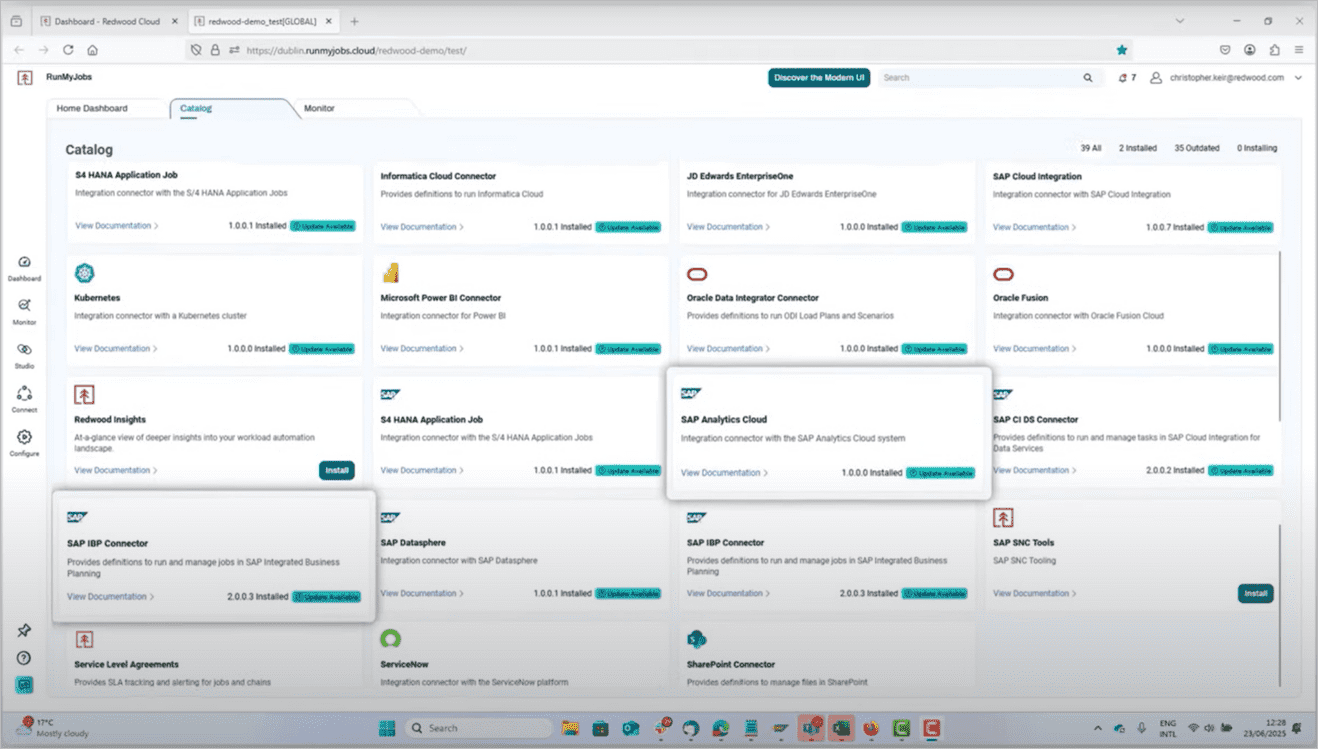
RunMyJobs by Redwood is the only SAP-certified SaaS-based job scheduler that seamlessly integrates with SAP S/4HANA. It’s a centralized solution to automate business processes, manage all jobs and dependencies, and seamlessly coordinate process chains across your entire SAP and non-SAP tech stack, even with multiple time zones, instances, and servers.
“Redwood is a Gartner® Magic Quadrant™ Leader for 2 consecutive years”. This award is a complete proof of why industry experts trust its vision, thereby keeping them the Leader always.
Redwood Software was recognized as a Leader, positioned furthest for Completeness of Vision in the 2026 Gartner® Magic Quadrant™ for SOAP report.
RunMyJobs is the first choice for SAP customers because it’s the only job scheduler that keeps a clean core through direct integration to legacy SAP ECC, SAP S/4HANA, BTP applications, and more SAP applications or non-SAP systems. Drag-and-drop editor, along with an extensive library of 1000+ templates, lets you create jobs within minutes.
- RunMyJobs by Redwood – the #1 WLA solution for SAP environments – stands out as the only one that is both an SAP Endorsed App and included in the RISE with SAP reference architecture.
- Redwood and SAP share a trusted partnership built on over 20 years of co-development, innovation, and roadmap alignment, making RunMyJobs a strategic extension that maximizes the ROI of your SAP investments – now and in the future.
- SAP customers trust Redwood’s automation fabric solutions to integrate with the latest SAP technologies, drive mission-critical outcomes, and maximize the value of their SAP investment – now and into the future.
With RunMyJobs, you get,
Features:
- Gartner® ranks RunMyJobs as a Leader in the Magic Quadrant for Service Orchestration and Automation Platforms (SOAPs).
- Pre-built out-of-the-box integrations and co-development of APIs for legacy SAP ECC and new SAP products, including S/4HANA, BTP, and more.
- Modern SaaS solution with lightweight agents for 1 click, 5-minute upgrades, high availability, and disaster recovery.
- Low-code, drag-and-drop visual process development with over 1000 out-of-the-box SAP wizards and templates.
- Monitoring of all processes from a single pane of glass with SLA monitoring and alerts.
- Seamlessly integrate with enterprise JSCAPE MFTaaS to create a true single pane of glass.
- AI-powered orchestration, development, troubleshooting, onboarding, and SLA adherence.
- Build or deploy connectors with ease, without operational disruptions, thanks to OOTB connectors and the Connector Wizard.
Pros:
- Only job scheduler that maintains a clean core.
- Direct SAP S/4HANA integration.
- Ease job scheduling between SAP and non-SAP applications, systems, and data.
- Trusted SAP partner for over 20 years with the most certifications including “works with RISE,” “certified for S/4HANA,” “job scheduling,” and “utilities cloud.
- Real-time automation in response to real-time events.
- Integrated audit trails and source control rollback.
- Rapid integrations and scaling, thanks to agentless architecture.
- AI automation co-pilot.
Cons:
- Best suited for technical and enterprise users
Further Reading => Check our Detailed Review of RunMyJobs by Redwood and SAP
Verdict: With RunMyJobs, you get a wide range of enterprise connectors as well as templates and wizards to enable the quick and simple creation of jobs. Overcoming typical challenges faced by SAP scheduling tools, it excels in orchestrating complex job dependencies, enhanced job scheduling, and real-time monitoring.
RunMyJobs is at the forefront of my list, recognized for its exceptional SAP job scheduling, AI agents, and workload automation capabilities.
Price: Contact for a quote.
#2) ActiveBatch
Best for cross-platform job scheduling.

ActiveBatch provides advanced, event-driven scheduling that supports complex, cross-platform workloads. The software excels at monitoring IT processes in real time.
ActiveBatch offers you the privilege to monitor scheduled jobs in real time. The software also presents users with detailed reports which make it further easier to streamline and simplify job workflows. Another area where ActiveBatch works is in the integration department.
Aside from SAP, ActiveBatch integrates smoothly with other data warehousing, business processes, and infrastructure automation solutions.
Features:
- With 30 years of automation expertise and a Leader position in the 2024 Gartner® Magic Quadrant™ for SOAPs report, we believe Redwood Software for its SaaS experience, enterprise integration expertise and strong global footprint.
- Automated hand-offs.
- Constraint-based scheduling.
- Set event triggers for IT and business tasks.
- Supports granular date/time scheduling.
Pros:
- Comes with a drag-and-drop builder for easy workload orchestration.
- Event triggers keep manual intervention at bay.
- Facilitates self-service job scheduling.
- Prevents SLA breaches and job failures with IT process monitoring.
Cons:
- More suitable for IT, Systems, or Operations professionals.
Verdict: ActiveBatch by Redwood’s advanced job scheduling capabilities and feature-rich and event-driven architecture make it a worthwhile tool to check out. You stand to save a lot of time and money using ActiveBatch to simplify and automate complex workloads.
Price: Contact for a quote.
#3) Stonebranch
Best for Agile workload automation and SAP orchestration.

Stonebranch is another great SAP job scheduler that is also very simple to use. The tool comes loaded with features that surpass the limitations that have restricted several other SAP job scheduling tools in the past. This software allows you to schedule jobs on both SAP NetWeaver and SAP S/4 Hana simultaneously.
The software arms its users with a powerful visual drag-and-drop builder that allows you to create complex workflows capable of running jobs across the entire SAP ecosystem and other third-party applications. Stonebranch also allows you to tackle IT violations with the help of dashboards and insightful audit trail reports.
Further Reading => BEST ETL Job Scheduling Software to Look For
Features:
- Create jobs from a traditional web-based browser or standard SAP interface.
- Visual drag-and-drop workflow designer.
- The event-based system triggers to run automation in real time.
- Managed File Transfers.
- Load balance between cloud SAP systems with a cloud cluster.
Pros:
- Very simple task with automated capabilities.
- Ideal for workflow monitoring.
- Supports public, private, and hybrid cloud environments.
- No software installation within your SAP instance.
- Easy error handling.
Cons:
- More suitable for large enterprises than smaller businesses.
Verdict: Stonebranch’s job scheduling software simplifies the way SAP end-to-end business processes are defined and managed to attain optimal SAP acceleration. The software allows you to trigger and monitor SAP business processes based on SAP events in real-time. This is a great SAP advanced planning and scheduling software for you to try.
Price: Contact for a quote.
#4) JAMS Scheduler
Best for Supporting cross-platform job dependencies.

The Integration of JAMS with SAP yields a ton of very fruitful benefits. First and foremost, you get an application that supports cross-platform and cross-application job dependency. The tool facilitates easy enterprise-wide job scheduling with a single point of control.
Simply put, JAMS makes the task of executing a job on SAP servers look like a walk in the park.
JAMS ensures that all SAP processes are executed efficiently, thus leaving enough room for business managers to deal with more pressing issues. The response triggered by JAMS to events is exceptionally immediate, thus helping you save valuable time and money.
Features:
- Automate processes like process chains, ABAP programs, etc.
- Orchestrate event-driven job processing.
- Supports multiple SAP instances and environments.
- Monitor and Manage dependencies between external processes and SAP.
Pros:
- Comprehensive workload automation.
- Event-based scheduling and integrated workflows.
- Can reduce training and maintenance costs.
- Facilitates point-and-click selection of SAP Job variables.
Cons:
- Documentation needs serious work.
Verdict: JAMS is an SAP job scheduler that comes packed with industry-grade scheduling capabilities. It works on several accounts, including when it comes to exception-based management, enhanced manageability, and role-based security.
Price: Contact for a quote.
Website: https://jamsscheduler.com/
Check our JAMS Scheduler Detailed Review
Further Reading => Most Popular Open Source Job Schedulers to Look For
#5) Tidal Software
Best for Job scheduling and workload automation.

Tidal Software provides its users with a comprehensive suite of adaptors that are almost the entirety of SAP’s ecosystem. The software is integrated seamlessly with both legacy SAP systems as well as newer solutions along with Java and ABAP technology stacks. The software shines for workload automation and is very easy to use.
As of today, the SAP automation solution can automate over a million workloads for organizations with limited manpower. Another thing that makes Tidal Software so remarkable is its ability to adjust workflow on-premise, in the cloud, and on hybrid servers.
Features:
- Redwood is a 2024 Gartner® Magic Quadrant™ for SOAP Leader.
- Comes with a component that facilitates event resolution.
- Automate, control, monitor, and schedule workload across different frameworks.
- 24/7 supportive network.
- Cross-application job orchestration.
Pros:
- Highly customizable.
- No custom prearranging is required.
- Supports integration with multiple applications.
- Facilitates on-premise, cloud, and hybrid automation tasks.
Further Reading => Most Popular SAP Native Scheduler Alternatives
Cons:
- More visualization options would’ve been nice.
Verdict: Tidal Software’s integration for SAP offers businesses a job scheduler that possesses advanced job scheduling capabilities. This makes the software capable of facilitating cross-application orchestration and easier management of sophisticated workloads.
Price: Contact for a quote.
Website: https://www.tidalsoftware.com/integration-types/sap/
Frequently Asked Questions
What is SAP Job Scheduling Service?
SAP Job Scheduling Service lets you define, manage, and monitor one-time or recurring jobs across SAP landscapes, including dependencies, retries, and notifications.
What is SAP Redwood?
Redwood, a popular job automation and scheduling software, also offers SAP Central Process Scheduling applications. This application extends the benefits that the SAP Solution Manager Application is known for.
The software creates a fully controlled process automation environment by adding a powerful automation infrastructure across a business’s entire application landscape.
Which software is best for Job Scheduling?
There are multiple software out there that claim to be great for job scheduling. However, only a few do justice to the features they offer.
Given below is a short list of software that are phenomenal SAP Job Schedulers:
– RunMyJobs by Redwood
– Stonebranch
– JAMS Scheduler
– Tidal Software
– SAP Job Scheduling Service
What is an SAP Batch Job?
A batch job in SAP can be defined as a scheduled background program that can run regularly without any human intervention. Batch jobs have more allocated memory than their counterpart jobs that often run in the foreground.
How do you schedule a Standard Job in SAP?
It is quite simple to schedule a standard job in SAP and will require the following steps:
– First, log in to the system as a batch user.
– Go to transaction SM36.
– Select Default Scheduling.
– All SAP Default jobs will be scheduled.
– You can check by going to SM37 and logging into the system as a batch user.
Conclusion
Adopting reliable SAP job scheduling software streamlines workloads and automates processes across teams and systems.
Further Reading => Most Popular Cron Scheduler Alternatives
As per our recommendation, we suggest you give RunMyJobs by Redwood, ActiveBatch by Redwood, and Stonebranch a chance, largely because of their features and useful association with SAP.
Research Process:
- We spent 9 hours researching and writing this article so you can have summarized and insightful information on which SAP Job Scheduling Software you should check out.
- Total tools researched: 15
- Top tool shortlisted: 5
Was this helpful?
Recommended Reading
-

Comprehensive Review and Comparison of the Best Free Online Schedule Maker Software suitable for Personal, Business, or Educational Purposes: Creating a schedule helps you keep track of important activities in life. Schedules remind you of what you need to do and at what time. They also serve as a record…
-
Read this comprehensive review and comparison of the top Enterprise Job Scheduling Software Tools to select the best IT Job Scheduler for your Business: Job scheduling software is an application that will make your systems and applications interact together. Unlike traditional schedulers, it can orchestrate complex workflows across multiple servers…
-
List of the Best Free Instagram Scheduler To Schedule Instagram Posts And Hashtag Suggestions: What is Instagram Scheduler? The Instagram Scheduler is an application that will allow you to schedule the posts and will automatically post the content. It will provide hashtag suggestions and analytics. These tools are used as an…
-
Select the right Workload Automation (WLA) Tool from this comprehensive list to manage your workload effectively. This article includes a list of the most popular Workload Automation software along with features, pricing, and comparison. Organizations of all types and sizes face these challenges of digital transformation i.e. the process of…
-
Here is the ActiveBatch Workload Automation and Enterprise Job Scheduling Software Hands-on Review Tutorial. With the drastic increase in new technologies, systems, apps, and data to manage, the IT environments are becoming much more complicated. This is paired with the difficulty of finding the right people with the right technical…
-
Here we review and compare the Best Workload Management Software Tools to help select the Workload Allocation Software as per your need: According to research, 80% of global knowledge workers reveal that they feel overworked and are near burnout. In addition, 82% of employees opine that they don’t feel engaged…
-
Read this complete guide to Workload Automation to understand what is it, its process, types, benefits to enterprises, examples, etc: The dynamics of the business world also see a parallel increase in the complexity of its IT environment. Enterprises today are faced with the major challenge of efficiently managing multiple…
-
Comparison of Workflow Automation vs Workload Automation to understand why these two automation technologies seem similar yet are different: In the last decade, the word “Automation” has become synonymous with convenience. We have clearly witnessed how it has proven to be a boon in all spheres of business. Organizations are…


![Top 12 Workload Management Software Tools [2021]](https://www.softwaretestinghelp.com/wp-content/qa/uploads/2021/04/©-www.SoftwareTestingHelp.com_.png)


You’ve put together a comprehensive overview of the top SAP job scheduling software solutions for 2024. The article effectively highlights the importance of such Squadly’s software in streamlining workflows, particularly for businesses with limited resources. The inclusion of expert advice and benefits adds value by providing readers with practical insights into selecting the right software for their needs. Well done!