


Comparison of the Best RPA (Robotic Process Automation) Tools in the market:
In any organization, there are a lot of tasks that are repetitive and time-consuming in nature. While doing these types of tasks, there is always a huge possibility for error occurrence because of repetition.
Hence, in order to avoid these errors and save time, a lot of RPA Software is available in the market.
Daily tasks that are performed on the software by employees are automated using the bot. The software which uses the bot for performing this automation is called the RPA software. A bot is nothing but an infected computer with malicious software.

Table of Contents:
What is Robotic Process Automation?
Robotic Process Automation saves time and human efforts to a major extent.
It is a time saver and a cost-effective one too. Important features of robotic process automation include platform independence, scalability, and intelligence.
Every RPA system must include the three capabilities stated below:
- Communicating with the other systems in either way screen scrapping or API integration.
- Decision making
- Interface for bot programming.
It is not mandatory to have programming skills for using RPA Tools. Small, Medium as well s large-scale organizations can use RPA tools, but these organizations should be able to depend on the software heavily.
Types of Robotic Process Automation
Given below are the various types of RPA:
- Attended automation: These tools will require human intervention while performing automation processes.
- Unattended automation: These tools are intelligent and have decision-making capabilities.
- Hybrid RPA: These tools will have combined capabilities of both attended and unattended automation tools.
Industries using RPS:
Robotic process automation is mainly used in Banking, Insurance, Retail, Manufacturing, Healthcare, and Telecommunication industries.
- Healthcare: In the healthcare industry, it will help in appointments, patient data entry, claims to process, billing, etc.
- Retail: For the retail industry, it helps in updating orders, sending notifications, shipping products, tracking shipments, etc.
- Telecommunications: The telecommunications industry, it will help in monitoring, fraud data management, and updating customer data.
- Banking: Banking industry uses RPA for more efficiency in work, for accuracy in data, and for the security of data.
- Insurance: Insurance companies use RPA for managing the work processes, entering customer’s data, and for applications.
- Manufacturing: For the manufacturing industry, RPA tools help in supply chain procedures. It helps with the billing of materials, Administration, Customer services & support, Reporting, Data migration, etc.
How is it Different From A Desktop Application?
Both Desktop applications, as well as RPA, perform multiple tasks.
But how are these two different?
The difference will be identified for decision-making capability.
RPA helps for front-end operations and back-end operations.
While dealing with the front-end operations, RPA will require an understanding of the natural language. Backend operations require dealing only with structured and unstructured data. Dealing with structured data means working with a database and dealing with unstructured data includes working with documents and images.
General functions of RPA include:
- Opening different applications like emails, moving files, etc.
- Integration with the existing tools.
- Collecting data from different web portals.
- Processing data which includes calculations, data extraction, etc.
Points to consider while selecting the tool:
- Platform independence
- User-friendliness
- Cost
- Scalability
- Industry-specific
- Maintenance and support services by a company
- Tool Smartness: It should act as an end-user.
Top Robotic Process Automation RPA Tools
Given below is a list and comparison of the most popular RPA tools.
Comparison of Top RPA Tools
Given below is an exclusive comparison of the Top 5 best Robotic Process Automation Tools.
| Blue Prism | Uipath | Automation Anywhere | Fortra’s Automate | |
|---|---|---|---|---|
| Best suited for Industry type | Core RPA Capabilities | Core RPA Capabilities | Core RPA Capabilities | Core RPA capabilities |
| Platform independence | Supports any platform. | Yes. Supports Citrix. | Yes. On-premise and in the cloud. | Desktop or on-premises |
| User-friendliness | Yes. Developers | Yes. Even for non-developers | Yes. For anyone. | No-code, quickly build bots with form-based development. |
| Cost | $ 15000 to $ 18000 annually. | Free | Contact them for pricing details. | Contact them for a personalized quote. |
| Scalability | — | Can handle any process, in any number irrespective of its complexity | Yes. Scalable. | Scalable to enterprise level |
| Maintenance and support services by company | Help Guide, Online-portal, Email, Contracts, & Training’s | Trainings, Video tutorials, Community forum, & Implementation support | Training’s & Certifications | Documentation, videos, FAQs, tickets, academy |
| Tool Smartness: It should act as an end-user. | Yes | Yes | Yes | Yes |
| Architecture | Client Server Architecture | Web Based Architecture | Client Server Architecture | Client-server architecture |
| Is recorder available? | No. | Yes | Yes | Yes |
| Industry size | Medium Large | Small Medium Large | Medium Large | Small, medium |
| OS Support | Windows Mac Web-based | Windows Mac Web-based | Windows Mac Web-based | Windows |
Let’s start!!
#1) Inflectra Rapise

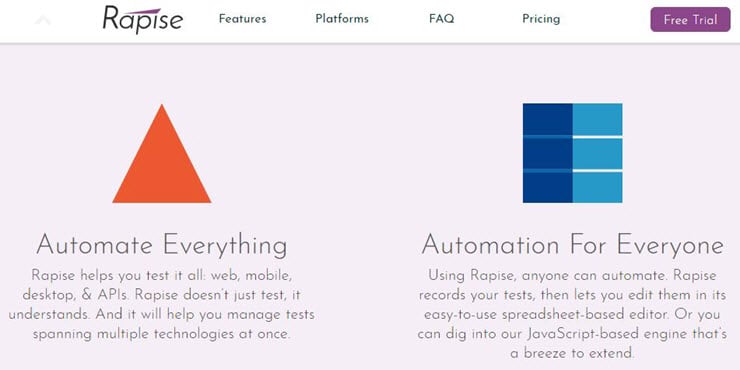
Rapise by Inflectra is primarily a test automation system specializing in testing complex applications such as MS Dynamics, Salesforce, SAP. Now in its 7th version, Rapise provides support for hybrid business scenarios and can automate Web, Desktop, and Mobile applications.
With Rapise, testers and engineers can connect to the user interface of the applications under test, simulating the user actions to complete the business tasks. While Rapise is friendly both for programmers and non-developers and is available as an on-premise solution.
Features:
- Supports automation projects of any size.
- The built-in support for record and play functionality, including analog (coordinate-based) and synthetic “Simulated Objects” task recording and playback.
- Web & desktop automation; Web and screen scraping.
- A unique code-less methodology called Rapise Visual Language (RVL) for ease of recording and maintaining automation processes.
- REST and SOAP calls and email processing (Gmail, Office 365, private mail servers).
- Provides an open platform for enhancements and integration.
Pros:
- Non-developer friendly
- Backed up with training and certifications
- Fast execution
Cons:
- Windows-only platform
Pricing: $4,999 / Single developer license, unlimited execution agents; Unlimited support and free upgrades for 1 year from purchase.
#2) Blue Prism
Blue Prism RPA provides all core capabilities.
It can work on any platform with any application. For using this tool you should have programming skills but it is user-friendly for developers. This tool is perfect for medium and large organizations.
Features:
- It supports a multi-environment deployment model.
- Security is provided for network and software credentials.
- It can be used on any platform.
- Can work for any application.
Pros:
- High-speed execution.
- Platform independence.
Cons:
- You should have programming skills.
- High price.
Tool cost or Pricing: $ 15000 to $ 18000 annually.
Official URL: https://www.blueprism.com/
#3) UiPath

UiPath provides all core capabilities. It provides support for Citrix. It is user-friendly for non-developers too. It can handle complex processes. And this tool is perfect for any size of business.
Features:
- It provides security by managing credentials and providing encryption and access controls based on the role.
- It can automate faster. Eight to ten times faster automation through Citrix too.
- It provides an open platform.
- It can handle any process, in any number, irrespective of its complexity.
Further Reading => List of the Top Alternatives to Microsoft Power Automate
Pros:
- No programming skills are required.
- Ease of use through drag and drop facility.
- It provides good features, free of cost.
Cons:
- Limited coding functionality.
Tool cost or Pricing:
For small teams and individuals, UiPath provides the community edition. It is free.
UiPath Enterprise RPA: Contact them for pricing details.
Official URL: https://www.uipath.com/
#4) Automation Anywhere

Automation Anywhere provides all core capabilities. It provides on-premise and cloud services. This user-friendly tool is perfect for medium and large organizations.
Features:
- Provides Bank-grade security.
- Provides security through authentication, encryption, and credentials.
- Real-time reports and analytics.
- Provides platform independence.
Pros:
- User-friendliness.
Cons
- IQBot needs improvement.
Tool cost or Pricing: Contact them for pricing details.
Official URL: https://www.automationanywhere.com/
#5) Pega

Pega is a Business Process Management tool. It can be used on desktop servers. It provides only cloud-based solutions or services. It can work on Windows, Linux, and Mac. This tool is perfect for medium and large businesses.
Further Reading => Most Popular Personal Robot Assistant
Features:
- It will help you in the deployment of your solutions to the customers.
- It provides a cloud-based solution.
- It doesn’t store any execution data in a database, rather everything gets stored in the memory.
- With this tool, you can distribute the work to desktop, server, and employees as well.
Pros:
- Because of the event-driven approach, it works faster.
- It is a robust and reliable tool.
Cons:
- There is no on-premise solution.
Tool cost or Pricing: It starts at $200 per month. Contact them for pricing details. The company provides a free trial too.
Official URL: https://www.pega.com/
#6) Contextor
This tool is perfect for any size front office. It provides on-premise and cloud services. It provides support for Citrix. It works for all workstation applications.
Features:
- Contextor can communicate with the active applications as well as with the applications that are minimized.
- It can communicate with all workstation applications in parallel.
- It supports Citrix and RDP hybrid virtualization environments.
- It provides reports and analytics.
Pros:
- It works fast.
- It can be easily integrated with AI.
Cons:
- It only supports the Windows operating system.
Tool cost or Pricing: Contact them for pricing details.
Official URL: https://contextor.eu/en/
#7) Nice Systems

Nice RPA tool is named NEVA-Nice Employee Virtual Attendant. It is a smart tool and helps employees in repetitive tasks.
Features:
- It provides attended and unattended server automation.
- It will help you in automating mundane tasks, Compliance adherence, and in Up-sell.
- This system is made for employees from the back offices, Finance, HR, etc.
- It provides cloud-based and on-premise solutions.
Pros:
- It provides advanced analytics.
Tool cost or Pricing: Contact them for pricing details.
Official URL: https://www.nice.com/
#8) Kofax

Kofax can work with any application virtually. Coding skills are not mandatory for this tool. It can process data from any website, desktop application, and portal.
Features:
- It does repetitive tasks efficiently.
- Intelligent tool for monitoring and optimizing the processes.
- It can be managed centrally from a server.
- Easy to integrate with the Kapow Katalyst Platform.
Pros:
- Efficient tool.
- It can work fast.
Cons:
- Needs to improve training videos.
- It may be a little difficult to learn.
Tool cost or Pricing: Contact them for pricing details.
Official URL: https://www.kofax.com/
#9) Kryon

Kryon RPA is named as Automate.
It has three solutions for automation. Unattended, Attended, and Hybrid. An unattended solution is an intelligent tool that can make decisions. Attended tool will give you speed, accuracy, and efficiency at work.
Hybrid automation is the combination of both attended and unattended automation.
Features:
- Kryon provides attended and unattended and hybrid automation.
- It is a scalable system.
- It helps in improving productivity.
- It provides a recording facility.
Pros:
- Efficiently performs repetitive and time-consuming tasks.
- It is user-friendly.
Tool cost or Pricing: Contact them for pricing details.
Official URL: https://www.kryonsystems.com/
#10) Softomotive

Softomotive has two solutions for robotic process automation.
It includes Enterprise Automation and Desktop automation. Enterprise automation will help in increasing the productivity, performance, and efficiency of enterprises. Desktop automation is for individuals and small teams.
It can automate desktop and web-based tasks.
Features:
- This tool will help you from the design process to the production process.
- It provides accuracy, security, and error handling.
- It can be easily integrated with SAP, Salesforce, Oracle Financials, PeopleSoft Automation, etc.
- It is supported by .NET and SQL servers.
Pros:
- Easy to use.
- It works five times faster than humans.
Cons:
- It is supported only by the SQL server.
Tool cost or Pricing: Contact them for pricing details.
Official URL: https://www.winautomation.com/
#11) Visual Cron
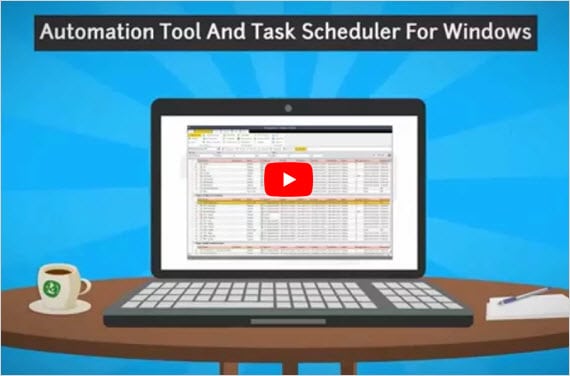
Visual Cron is an automation tool for task scheduling and integration. It is for Windows only. Programming skills are not mandatory for this tool.
Features:
- You can customize tasks according to technology.
- You can do programming using the API.
- Visual Cron can develop the features, as per your requirements.
- User-friendly interface.
- You can use the tool even if you don’t have programming knowledge.
Pros:
- Easy to learn.
Cons:
- It supports only the Windows operating system.
Tool cost or Pricing: Contact them for pricing details. It provides a trial period of 45 days.
Official URL: https://www.visualcron.com/
#12) Another Monday Ensemble

Another Monday offers a complete automation Ensemble that covers the automation journey from end to end.
The automatic process analysis via their new tool AM Muse can easily be exported to the AM Composer with its intuitive Drag & Drop implementation interface. Unique Split & Pull architecture for maximum efficiency and scalability. Straightforward and centralized administration through AM Console.
Features:
- Provides automatic documentation of process logic with AM Muse.
- Drag & Drop workflow configuration: no developer knowledge needed.
- Text recognition with OCR.
Pros:
- Quick scaling: Unique ability to pull tasks from the database, task transparency due to data collection. Operation at full capacity – little to no idle times.
- Increased efficiency through standardization of process parts.Change of elements centrally and with no need for access to systems.
Tool cost or Pricing: Contact them for pricing details. It provides a free trial period of 30 days.
#13) Keysight’s Eggplant

Keysight’s Eggplant Software offers Robotic Process Automation Solutions to automate the execution of repetitive tasks. It provides increased productivity and reduces errors.
It has a universal fusion engine that enables the system to test any type of system, from mobile to mainframe. It can be hosted on Windows, Mac, and Linux. It provides end-to-end automation and can interact with various systems to complete the task.

Features:
- Eggplant has data-driven automation features that enable the linking of data sources and execution of a task for each record.
- Eggplant Functional has capabilities for automating any front-office and back-office applications.
- Eggplant DAT has features for working with any data repository and with scrape data directly from the screen.
- It has extensive verification and validation functionalities that validate the execution of the process.
Pros:
- Eggplant Robotic Process Automation is a solution designed for process experts.
- It supports automated as well as manual processes or a combination of both.
- It can be deployed in unattended and attended modes.
- It is compatible with common packaged apps such as SAP, Oracle, etc.
Cons:
- No such cons to mention.
Pricing: You can get a quote for their pricing details.
#14) Fortra’s Automate
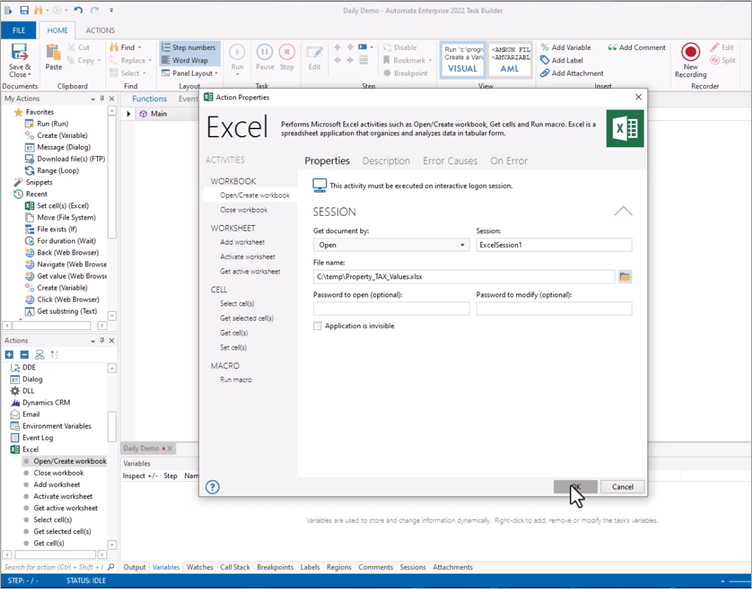
With Fortra’s Automate, you can get up and running fast with no-code automation for both GUI and back-end functionalities. Form-based development lets you quickly build bots and leverage over 70+ automation actions.
Powerful out-of-the-box API and native integrations bring together the applications that keep your business running. And with the Automate Recorder, easily build, update, and deploy robust, UI-driven automation. Plus, bots can be deployed as attended or unattended with concurrent execution of tasks – no restrictions.
Features:
- The powerful API integration kit makes it easy to connect with critical business applications.
- A best-in-class step recorder makes it simple to build automation that mimics user interactions.
- Features over 70 out-of-the-box native actions and 700 sub-actions to common applications.
- Intelligent document processing capabilities enhance automation and make unstructured data more usable.
Pros:
- User-friendly, codeless automation allows you to build bots fast.
- Allows concurrent execution of tasks with no restrictions.
- Enterprise-grade security features that let you build more secure bots with greater control over User access and workflows.
- Built and priced for employee-driven, enterprise-wide automation.
Cons:
- No cons to mention
Pricing: Contact Fortra for a personalized quote. With Fortra’s Automate, there are no hidden costs to scale.
Additional Tools
#15) AntWorks:
AntWorks RPA is called as ANTstein. It can work with any type of data and it supports a code-free environment. It helps in BOT development without programming and designing processes.
Official URL: https://www.ant.works/
#16) Redwood software:
This tool will help you by automating repetitive tasks. The system is easy to use and scalable. Redwood provides robotic processes as a service.
Official URL: https://www.redwood.com/
#17) Jacada:
Jacada RPA is for supporting interactions, Contact centers, and customer services.
For customer services, Jacada has taken the best features from RPA and desktop automation. It helps in improving accuracy, customer satisfaction, and productivity.
#18) Work Fusion:
For automating data-related tasks, WorkFusion has provided SPA which is an AI-driven RPA. Also, it provides one more tool which is named RPA Express. And you can download it for free.
Official URL: https://www.workfusion.com/
Conclusion
Further to our comparison of each tool in detail here, Blue Prism is the best tool but you should get trained before using it. And training is costly as well.
UiPath is easy to use even for non-developers. It provides the same features, and even it servers small-scale industries. For workstation applications, Contextor is the best option as they have a specialty in it.
=> Contact us to suggest a listing here.
Was this helpful?
Recommended Reading
-

Comprehensive list of the best Software Testing Tools. Put an end to your search for the right Manual or Automated Testing Tool with this informative list: We are happy to present this exclusive list of the most popular QA Testing Tools that are available in the market. Get Ready To…
-

This article will provide a detailed overview of the automation testing process—a comprehensive, step-by-step manual for commencing automation testing on your project. In many organizations, quality is the first preference. If you find yourself in such an organization and formal test automation has not been done yet, you could be…
-
A Comprehensive List and Comparison of the Best Build Automation Tools to Speed Up Your Automated Deployment Process: Automated Build Tool is a software that compiles the source code to machine code. Automation tools are used to automate the whole process of software build creation and the other related processes…
-
From designing a strategy to picking right solutions, here are 5 steps to transition from manual to automation testing successfully. Automated tests can minimize regression bugs and overcome multiple manual testing challenges, enabling teams to deliver more qualified applications. That’s why many teams are transitioning from manual to automated testing.…


