Are you struggling to turn off or change sensitive content on X (Twitter)? Discover the simple steps to See Sensitive Content On X from our exclusive guide and adjust your content preferences instantly:
Ever wondered why X says this media may contain sensitive content?
Many times, while scrolling through Twitter, you might have come across a box stating, “This tweet might have sensitive media”.
The platform does this precisely on posts that may invariably include nudity, graphic violence, or other media that may disturb viewers. By doing this, Twitter gives users additional control over what they see online and helps make a safer browsing experience for all.
Sensitive Content On X (Twitter): Complete Guide
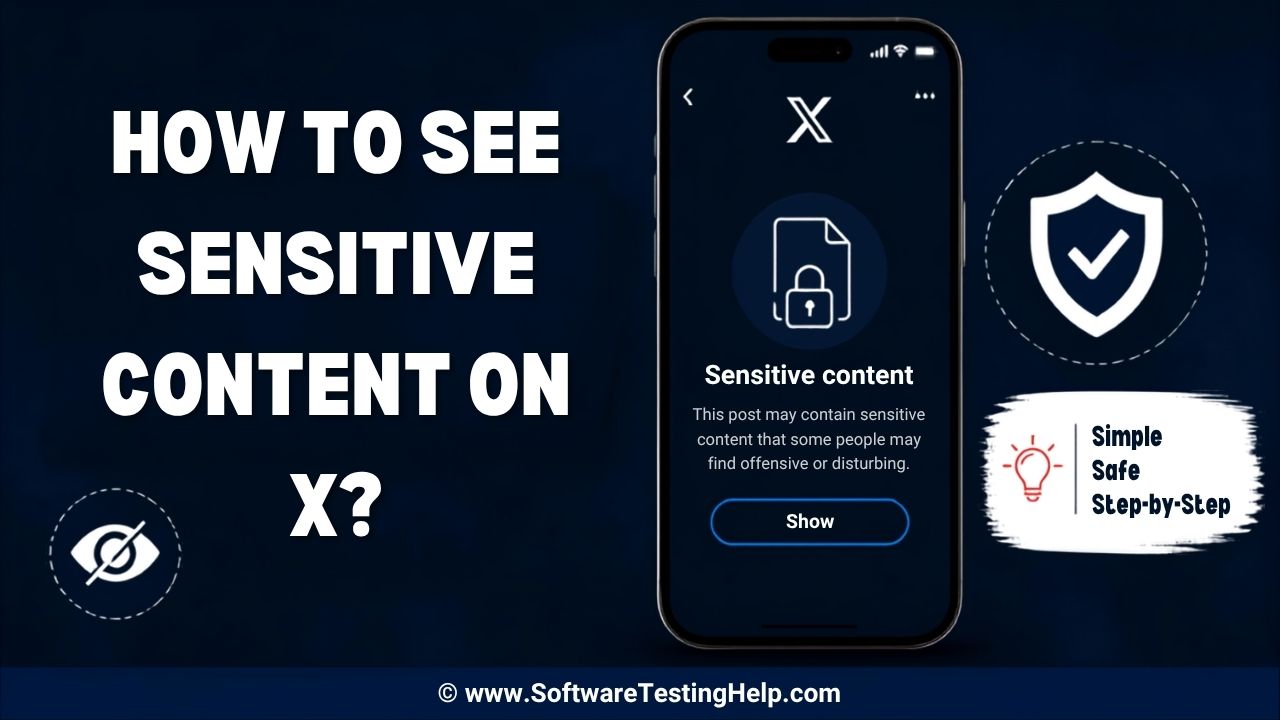
But this doesn’t mean you can never view the hidden content. If you’re comfortable, you can adjust your settings to change how sensitive media is displayed on your device.
So, how to see sensitive content on Twitter?
In this article, we’ll help you with X’s content settings for web, iOS, and Android so that you get to view the restricted content at your own discretion.
Check the video guide below on how to see sensitive content on X:
Quick Answer: How To See Sensitive Content on X
If you want to view sensitive content on Twitter: Tap on your Settings > Privacy and Safety > Content you see icon. Here, you will find Display media that may contain sensitive content, which you can toggle on. On mobile (Android/iPhone), change the settings using the mobile browser at twitter.com.
The exact steps for X sensitive media search settings vary based on the device you’re on.
Well, before diving into the step-by-step instructions and other modalities, here’s a quick comparison of which method works on each platform:
| Platform | In-App Toggle | Browser Required? | Recommended Method |
|---|---|---|---|
| Web/Desktop | Not applicable | No | You will have to update the settings directly from your X browser account |
| iPhone (iOS) | No | Yes | To access X settings, use a mobile browser |
| Android | Yes | Optional | Use the X app, or if the option is missing, go to any mobile browser |
What Counts as Sensitive Content on X?
Sensitive content refers to media that may not be visually appropriate for everyone to see or might be offensive to some users.
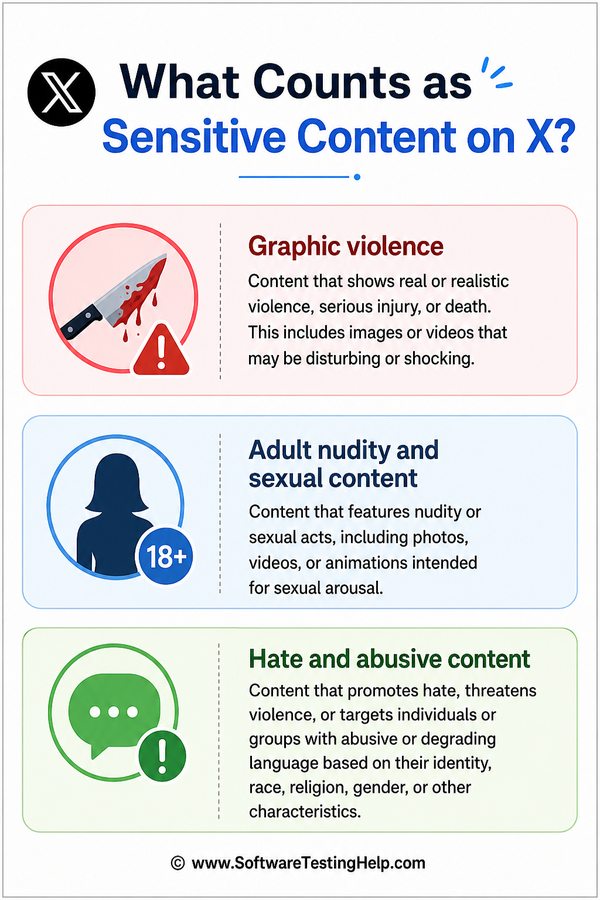
These essentially involve posts containing:
- Graphic Violence: This includes certain real-life depictions of physical harm, injuries, deaths, brutal accidents, intensive medical procedures, among others.
- Adult Nudity and Sexual Content: This can include sexually suggestive content, partial nudity, pornography, or states of sexual arousal.
- Certain media that users may find disturbing include hateful imagery: These are certain logos, images, or flags that are historically associated with various hate groups.
However, it is important to understand that not all sensitive content is against X’s rules. In fact, the platform invariably allows users to share a wide range of mature content, provided they apply a content warning label and comply with the platform’s content policies.
Requirements Before Changing Sensitive Content Settings on X
Before you change the settings of the X platform, there are certain prerequisites that you must follow:
- An Active Account: You must have an active Twitter (X) account, in which you must sign in using your username and password.
- Age Verification: The age requirement for sensitive content on X is a minimum of 18 years old, which should be confirmed by your birth date. According to the UK’s Online Safety Act, the Irish Online Safety Code, the European Union Digital Services Act, and Australia’s Online Safety Act, X now requires ID or selfie-based age verification for users in these places.
- Access to Web Browser: Since the mobile app does not show this option, it is important that you use a computer or phone web browser.
- Latest X App (Recommended): Use the latest version of the X app if you’re using Android, since sensitive content settings may be available there.
- Stable Internet Connection: To update and save your account settings, you must have a stable internet connection.
How to View Sensitive Content on X (Web/Desktop)
To see certain waived content on web or desktop, let’s see X’s sensitive content settings for this year:
- On your web browser, open your Twitter account and sign in.
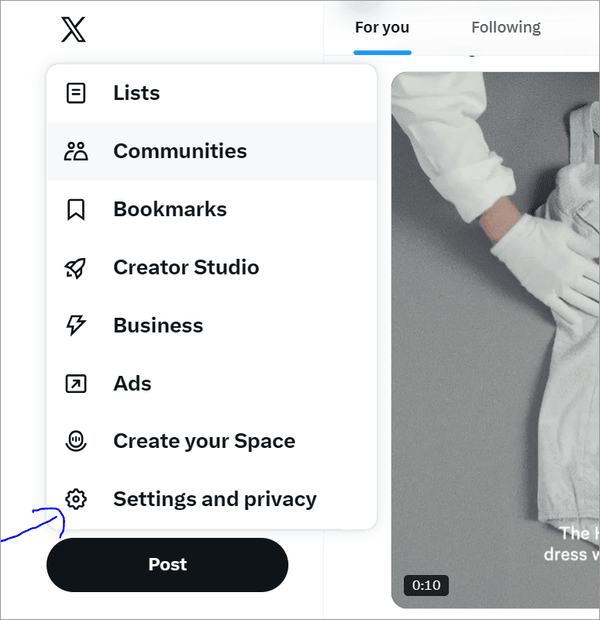
- On the left sidebar, click the More button.

- From the pop-up menu, select Settings and privacy.
- Under the X activity section, choose the option Content you see.
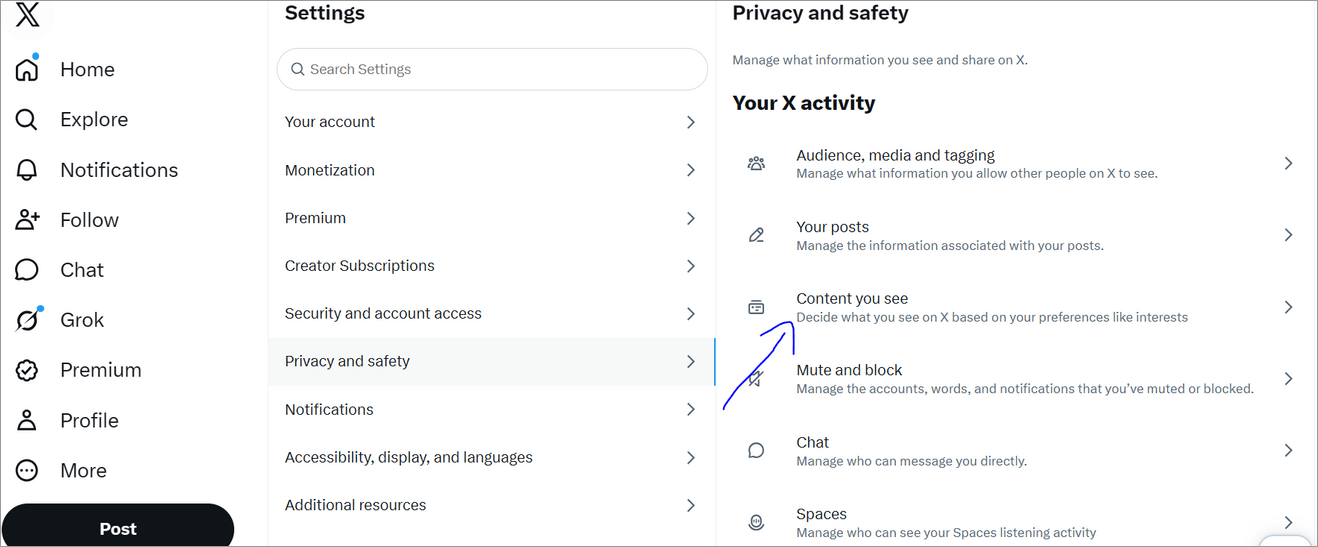
- There you’ll find Display media that may contain sensitive content; choose the same.
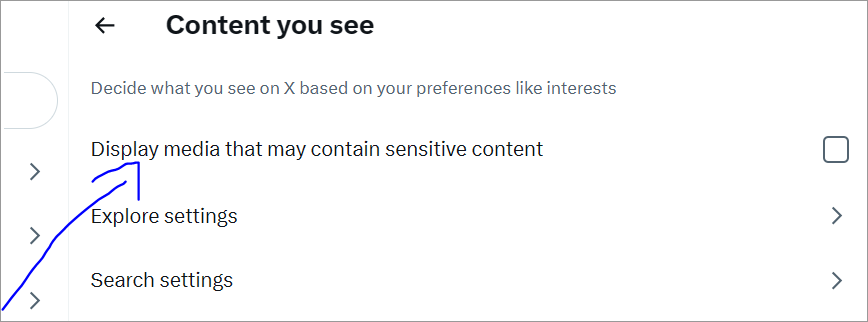
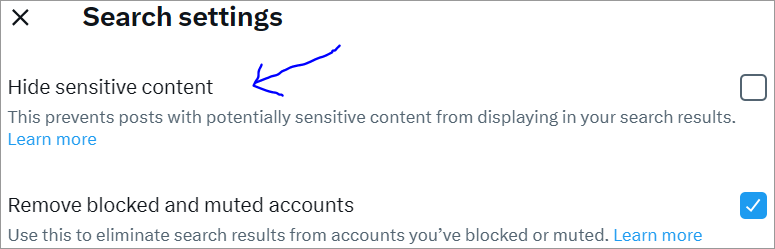
- Next, under Search settings, uncheck the box stating Hide sensitive content. This will allow sensitive media to appear in your searches.
Well, if you’re contemplating whether you can see sensitive content on X without an account, the answer is no.
This is because:
- X does not allow those who are not signed in to view sensitive posts or media.
- If you’re not logged in and while browsing, you come across a sensitive post and click on it, X will prompt you to sign in. However, certain posts that have not been marked as sensitive may still be visible.
The video below explains how to show sensitive content on X – Twitter:
Steps to See Sensitive Content on X App
This section includes the steps to see sensitive content on X App on iOS and Android.
#1) On iOS
Wondering how to see sensitive content on the X app on iPhone?
Well, to begin with, you are required to use a mobile web browser such as Chrome or Safari to log in to an X account. This is because the sensitive media toggle is usually hidden for iOS apps, which thus requires you to change the settings on the website first and then restart your app to see the applied settings.
Follow the steps below to enable sensitive content on your iPhone:
- On your iPhone, open either Safari or Chrome and go to X.
- Here, log in to your X account.
- In the top left corner, tap on your profile icon.
- Go to Settings and Privacy.
- Tap on the tab Content you see.
- Select and check the display media that may contain sensitive content.
- Right below that tab, click on Search settings.
- Ensure that the box with the label Hide sensitive content is turned off if you wish that such content also appears in your search results.
- Close the X app or refresh and open it again to see the changes.
Here is the video which shows how to allow sensitive content on X iPhone:
#2) On Android
Unlike iPhone users, Android users can access sensitive content via the X app directly. If this option is not visible, one can always go to a web browser to get started.
Follow these simple steps to see sensitive content on your Android device easily:
- On your mobile device, open the X app and log in to your account.
- In the top left corner, tap on your profile picture.

- Choose Settings and Privacy.
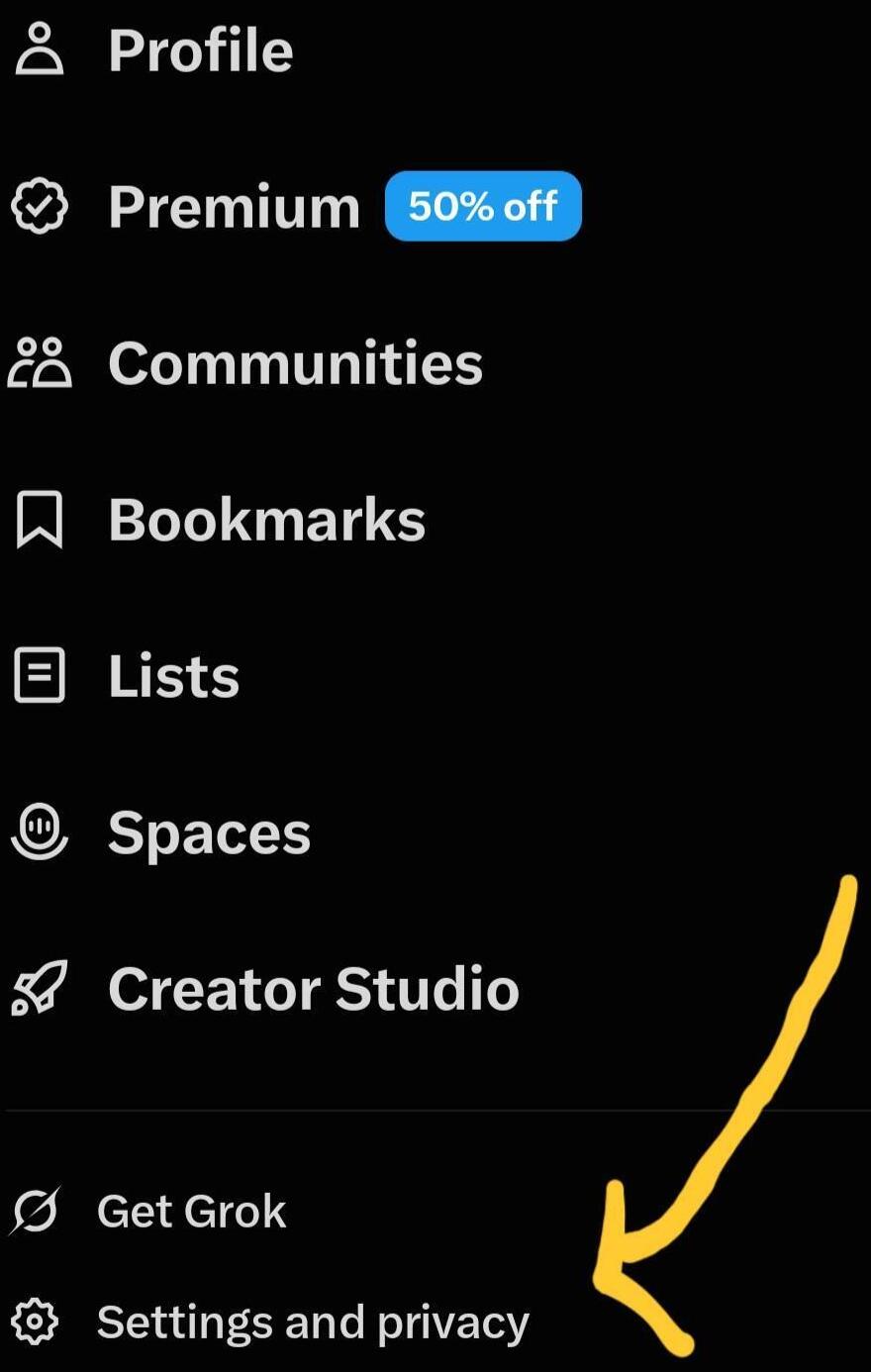
- Select Privacy and Safety.
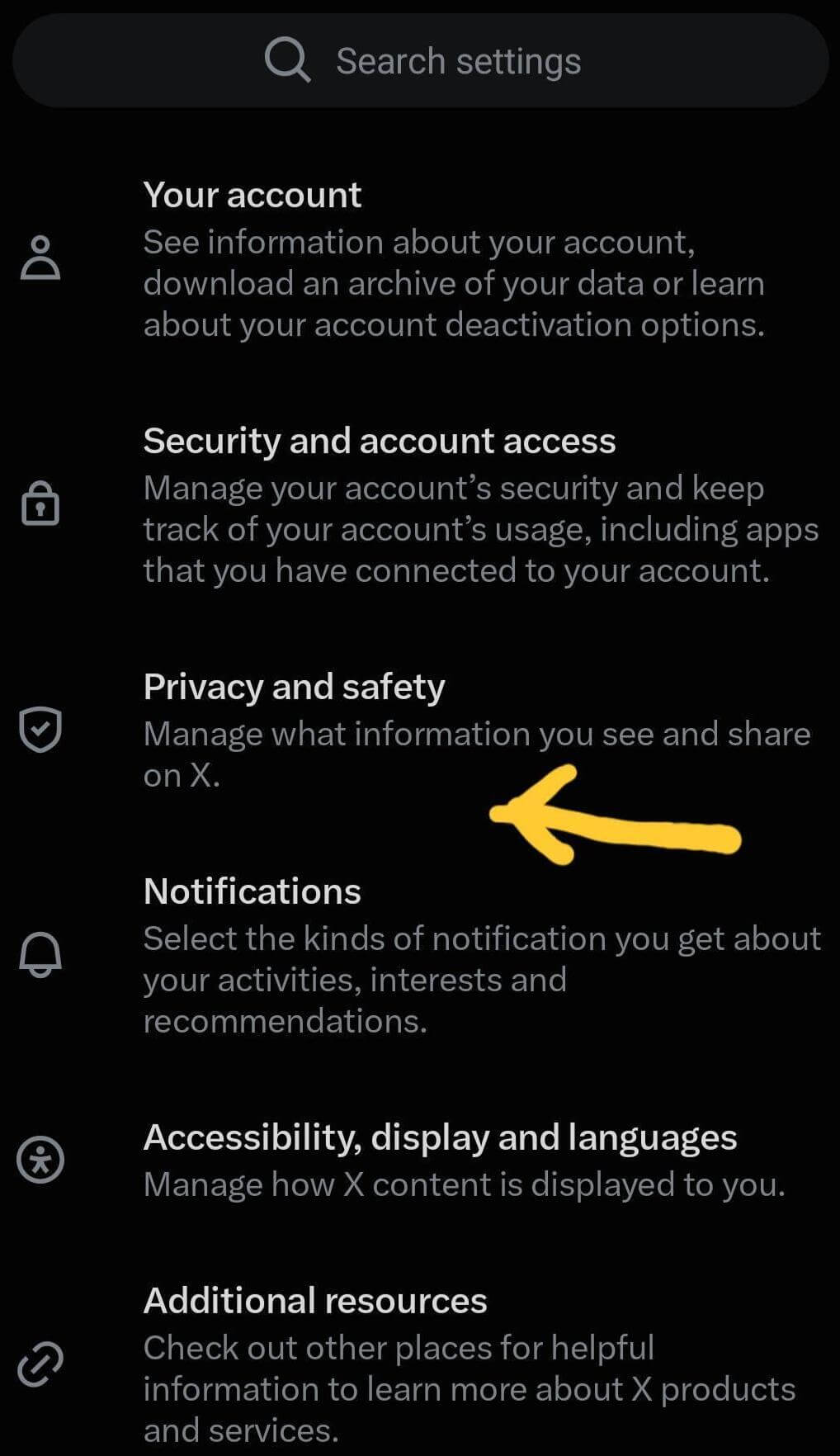
- Tap on Content you see.
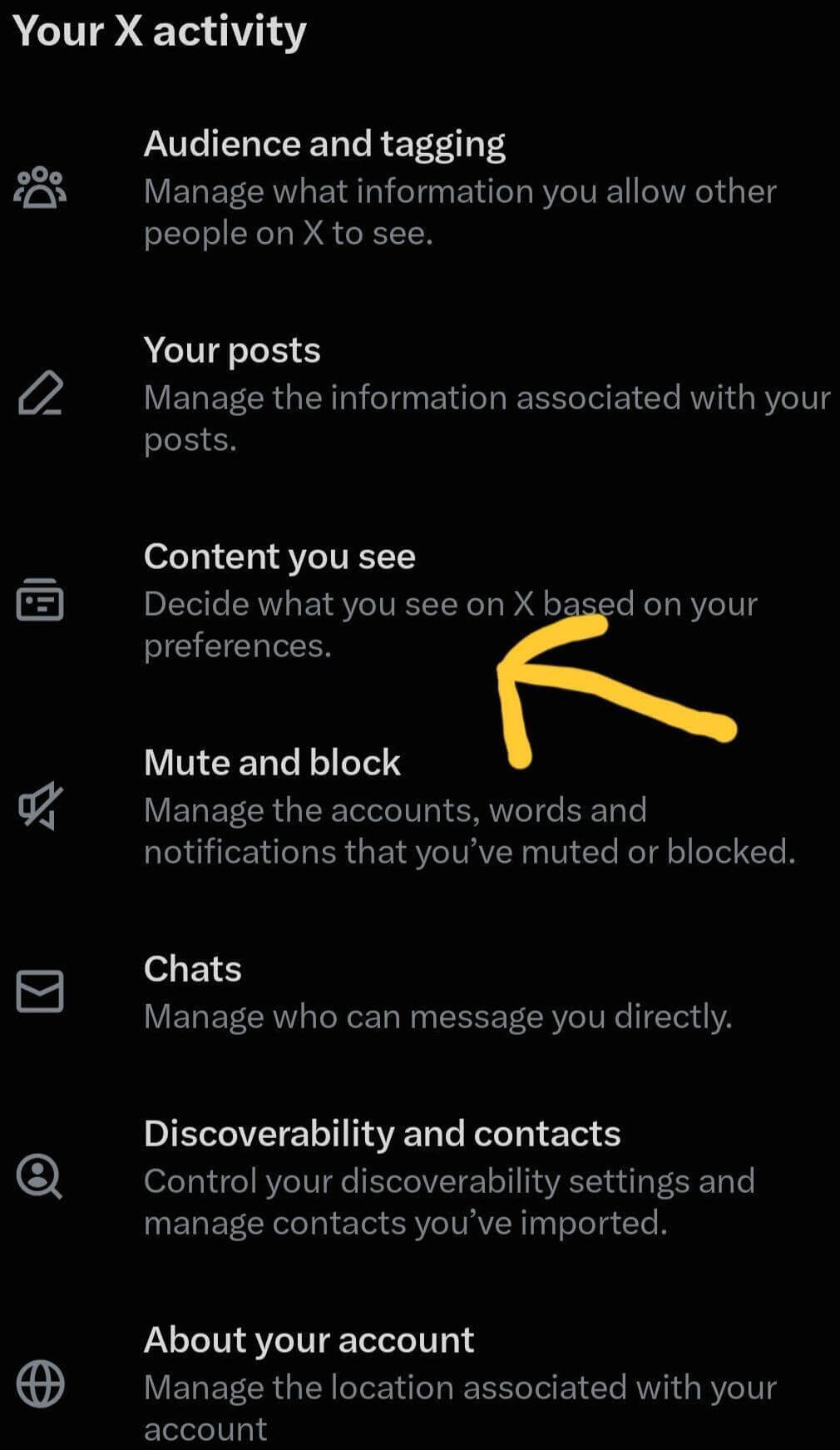
- Turn on display media that may contain sensitive content X.
- Click on Search settings and uncheck the box stating Hide sensitive content, if you want such sensitive content to appear in your search results too.
- Refresh to save the settings.
How to Show Sensitive Content in Search Results?
Even after you have enabled sensitive media display on your device, X may still hinder visibility of certain content in search results.
To enable the same, follow the steps below:
X (Twitter) Search
- On your web browser, log in via the X app.
- Tap on More, and go to Settings and privacy.
- Choose Privacy and safety, and the Content you see option.
- Tap on Search settings.
- Finally, uncheck the box stating Hide sensitive content.
- Return to the search page and refresh to save your settings.
How to Turn Sensitive Content Back Off?
If you no longer wish to see sensitive media and are wondering how to turn off sensitive content on X, you just need to follow the simple steps below to get started:
- Log in to your X account through a web browser.
- Tap on your profile icon or in the side menu, select More.

- Choose Settings and privacy.

- Tap on Privacy and safety.
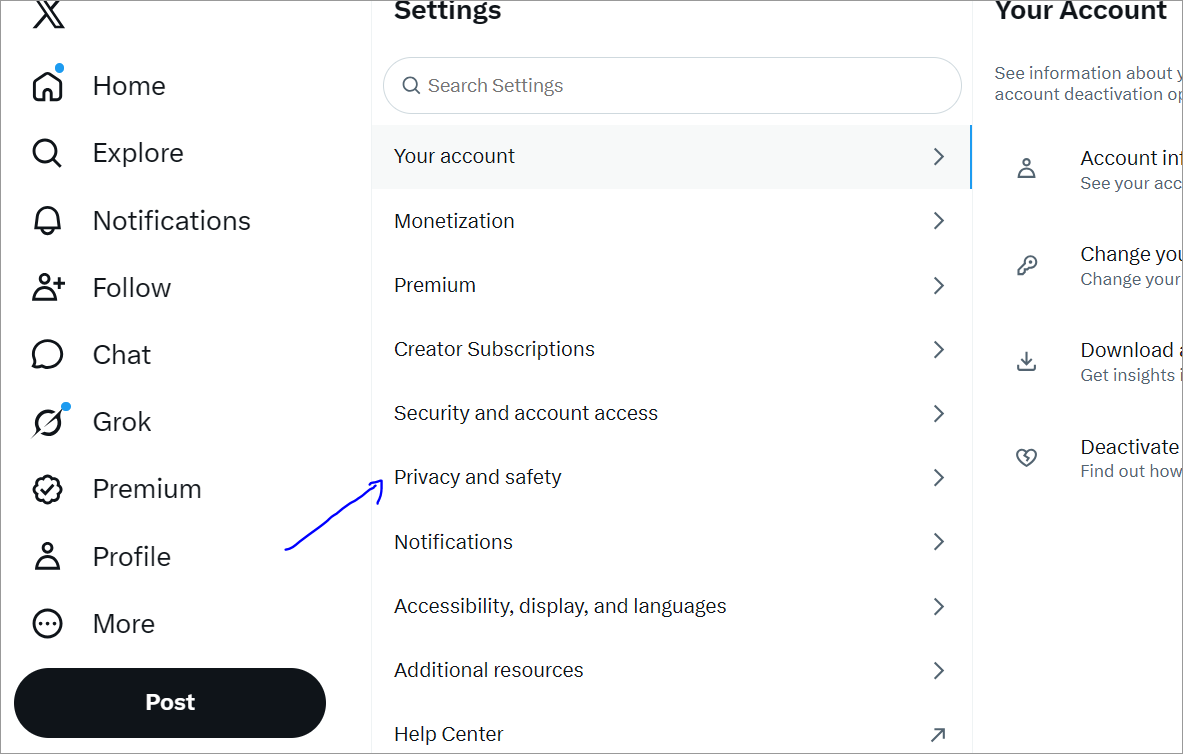
- Select the Content you see option.
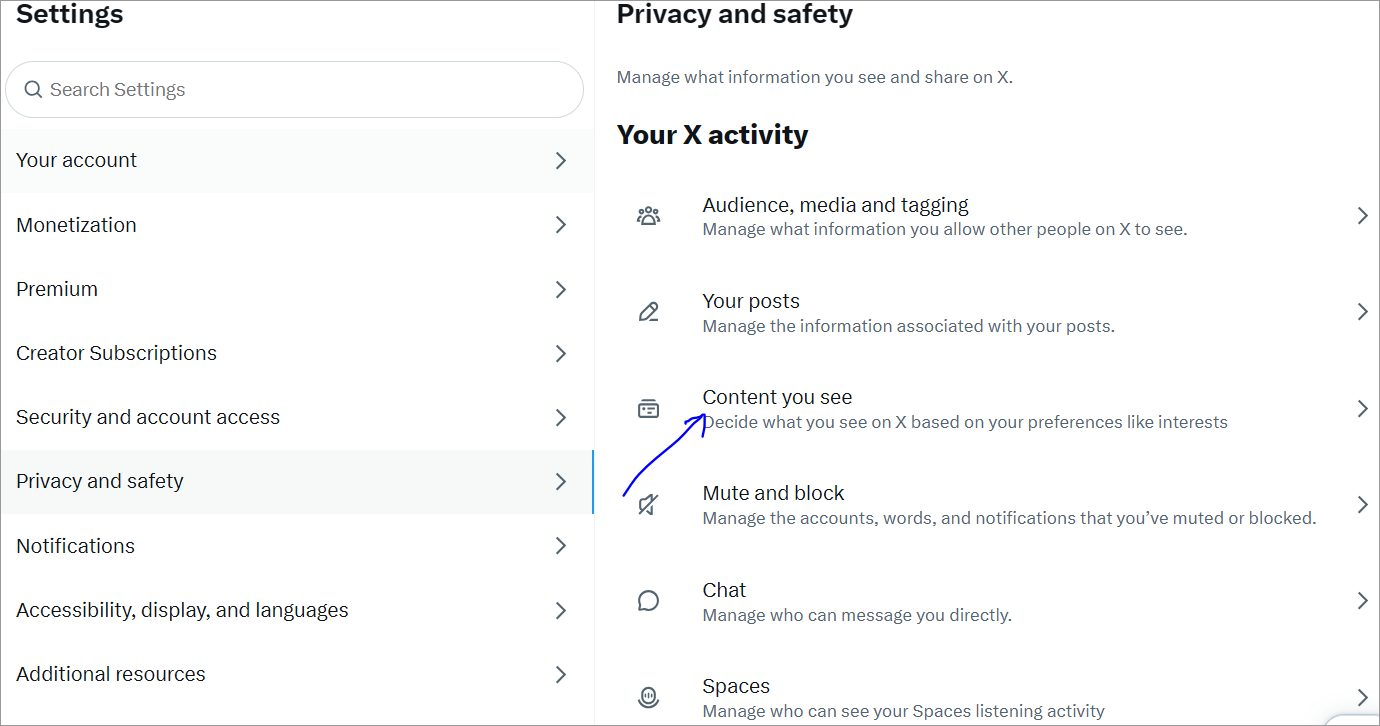
- Turn off the Display media that may contain sensitive content tabs.
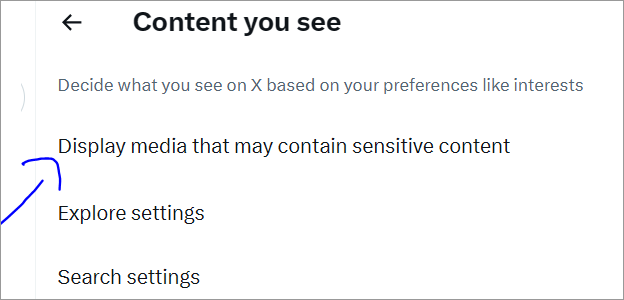
- Once done, also go to Search settings.
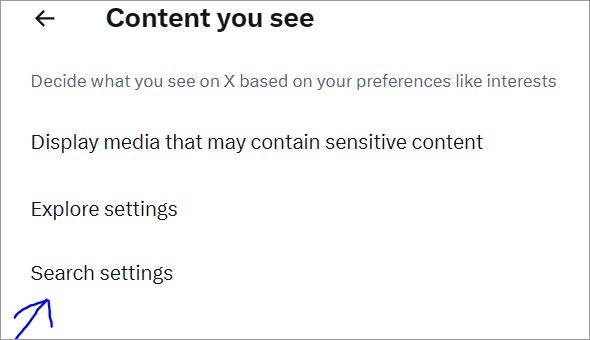
- Turn on Hide sensitive content to prevent posts that are mature and sensitive from appearing in your search results.
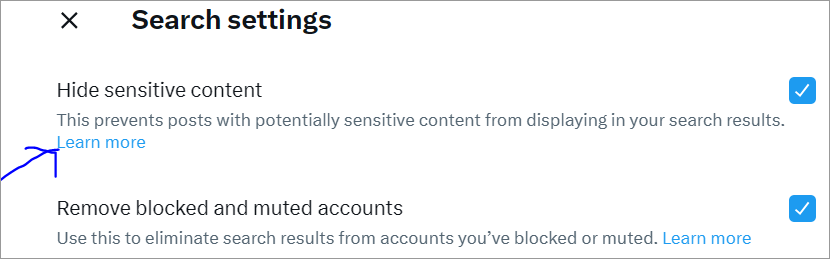
- For the updates to happen, refresh your web page or app.
The video below explains how to Turn Off Sensitive Content Settings on X (Twitter):
How to Mark Your Own Posts as Sensitive?
If you wish to mark your individual posts as sensitive, follow these simple yet effective steps:
- To your draft post, add a photo or video.
- On the image preview, click on the Edit (web) or Paintbrush (mobile) tab.
- At the bottom or in the corner, click on the Flag icon.
- Check for the tags such as Nudity, Sensitive, or Violence that fit your content.
- Click on Save or Done and post the content.
If you wish to mark all the other posts that you do in the future, here is what you can do:
- On the X app, go to Settings and Privacy.
- Tap on Privacy and safety, and choose Your posts.
- Check the box stating Mark media you post as containing material that may be sensitive.
Troubleshooting: Why Sensitive Content Still Isn’t Showing
If you’re still wondering as to why you can’t see sensitive content, then it might be that you need to look forX sensitive media search settings and enable the same from a web browser.
The problem in viewing sensitive content may appear because of one of the following reasons:
- You might not have signed in since sensitive media only appear in logged-in accounts.
- If you’re under the age of 18, you will not be able to see mature content.
- It might be that your settings did not save. You can log in to your X account with the help of a web browser. Go to the option stating More > Settings and privacy > Privacy and safety > Content you see, and check Display media that may contain sensitive content.
- Your search filtering might still be enabled, preventing you from viewing such content. Allow search visibility by going to the menu that says Content you see, tap on Search settings, and ensure that the option Hide sensitive content box is unchecked.
- Another reason you’re unable to view sensitive content is that it may have been removed by the owner.
- There may be cached app data. You can close and reopen the app, or clear the cache and try again.
What if You Don’t Change Media Settings and Post Sensitive Media?
If you post mature content without marking it, it will be sent to X for review. If they find that content needs sensitive content marking, they may:
- Label the content as being potentially sensitive, or if there is a live video, that may be removed entirely.
- They might also change the concerned person’s account settings to Mark media you post as containing material that may be sensitive, so that future posts remain marked accordingly. However, one can change their media settings through the account settings page.
If someone repeatedly posts mature content without marking the media as sensitive, X may:
- Label the concerned account as having potentially mature media.
- Permanently adjust their account’s settings to Mark media you post as containing material that may be sensitive, which will help users to determine whether they wish to click on the post to view the content.
How Can You Report Sensitive Content on Twitter?
If you come across any sensitive media on Twitter and wish to report the same, you can do so by following the below-mentioned steps:
- Go to the post with the mature content.
- On the post, click on the three-dot icon.
- Choose the option: Report post.
- Select the option “It displays a sensitive image” or click on the option that best suits your needs.
- Finally, follow the instructions/prompts on the screen to finish reporting the content you deem sensitive.
Frequently Asked Questions
1. What is sensitive content on X?
Sensitive media refers to those posts that may contain adult nudity, graphic violence, or hateful imagery. In other words, these are those media that users might not wish to see while scrolling through their X account.
2. How do I turn off the 18+ filter on X?
In order to turn off the 18+ filter on the X app, log into your Twitter account with the help of a web browser. Click on the following options: Settings and privacy > Privacy and safety > Content you see, and check Display media that may contain sensitive content.
3. Why can’t I see sensitive content on X?
If you can’t see the sensitive content on X, then you need to go to the More icon and click on Privacy and safety settings. Find the Content you see option and tap on the box that says Display media that may contain sensitive content. You’ll be able to see the mature content once the settings are saved.
4. Why can’t I see sensitive content on Twitter after changing settings?
If you can’t see the sensitive content on Twitter even after changing the settings, you may need to toggle the “Hide sensitive content” option to see such content in your search results. In some cases, you might also need to log into the web browser version in order to bypass app restrictions.
5. Can I filter sensitive content by category?
No, X does not allow users to filter sensitive content by category. It allows a single toggle wherein one can hide or display mature media that are classified or marked as sensitive.
6. Does X notify the account owner if I report their content as sensitive?
No, currently X does not notify the owner of the account who has posted the sensitive media if their content is reported.
Conclusion
X hides sensitive media by default to allow users better control over what they wish to see and to give everyone a safer browsing experience. However, if you’re comfortable viewing such media, you can enable the option that states Display media that may contain sensitive content, and view the content at your discretion.
With the right settings and control, you can customize your experience on the X app per your choices and preferences!
Research Process: The total time involved in completing and publishing this article is approximately 42 hours. This content was created through a structured research approach to ensure accuracy and reliability.
For more related guides, you can explore our range of tutorials below:
- Twitter Advanced Search – The Ultimate Guide on How to Use it
- FIX: How to Disable Restricted Mode on YouTube
- How to Make Your Twitter Account Private [QUICK STEPS]
- 10+ Best Twitter Viewer Tools: Can We See Who Viewed
- Twitter Follower Tracker to Check Who Unfollowed Me on Twitter
- 7 Top Sotwe Alternatives (Twitter Viewers)
- Top 10 Twitter To MP4 Converters [Updated Rankings]
Was this helpful?
Recommended Reading
-

Comprehensive Review & Comparison of Top Social Media Management Tools. Select the Best Social Media Management Software as per your Requirements: Do you want to boost your brand awareness, or substantiate your brand power? Do you dream of heavy traffic on your website? Do you wish for a more loyal…
-
List & Comparison of the Top Social Media Marketing Companies. Select the Best Agency for Branding Your Products & Increase Inbound Traffic And Visibility: Social media is an essential part of digital marketing for industries of all profiles, sizes, and businesses. This article provides a list of the Top Social…
-
List of The Top Social Media Marketing Tools with Features and Comparison. Select the Best Social Media Tool To Harness The Power of Social Media Platforms: When the concept of Social Media Platforms first came to light in the late 2000s, everybody jumped to get a taste of their new…
-

Unlock the key to effective Social Media Management and elevate your digital strategies with the top Social Media Scheduling tools. Make a wise decision to streamline and optimize content timing in one place: In an era where digital visibility is important, how do you ensure your social media updates reach…