Here we review the Best Editorial Content Calendar Software to help the content team choose the Content Calendar Tools as per their need:
An editorial content calendar is a tool to plan the content of the website. You can use this tool to schedule tasks for the content management team. It is an administrative tool to manage the content team.
With an editorial content calendar, you can plan and monitor tasks assigned to the team. Here, in this tutorial, we will review the 15 best content calendar tools you can use for scheduling tasks and collaborating with the content team.
Table of Contents:
Editorial Content Marketing Calendar Tools

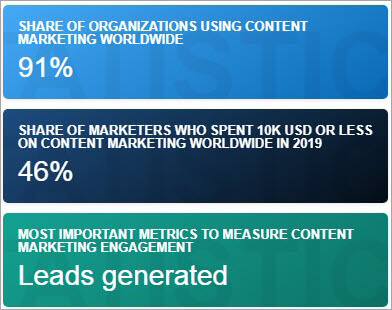
Market Trends: The content marketing industry is valued at more than $36.8 billion. The industry is expected to grow at a CAGR rate of 14.3 percent by 2026 reaching $107.54 billion.
Below is an overview of the Content Management Industry:
[image source]
Expert Advice: Content calendar tools allow you to do more than just scheduling tasks. You should look at the features and compare the prices when selecting a tool for managing content tasks.
Our TOP Recommendations:
 |  |  |
 | |  |
| monday.com | HubSpot | Wrike |
| • 360° customer view • Easy to set up and use • 24/7 support | • Free CRM • Best email automation • Social Media Management | • Free for up to 5 users • Pinnable to-do lists • Interactive reports |
| Price: $8 monthly Trial version: 14 days | Price: $45.00 monthly Trial version: Infinite | Price: $9.80 monthly Trial version: 14 days |
| Visit Site >> | Visit Site >> | Visit Site >> |
List of Top Content Calendar Software
Here is a list of popular and free content calendar tools:
- monday.com
- Hubspot
- Semrush Marketing Calendar
- SocialPilot
- Trello
- CoSchedule
- Google Calendar
- Loomly
- Airtable
- Kapost
- WordPress Editorial Calendar
- Answer The Public
- Asana
- Evernote
- Sprout Social
Comparison of Top Editorial Calendar Tools
| Tool Name | Best For | Platform | Price | Free Trial | Ratings ***** |
|---|---|---|---|---|---|
monday.com | Managing and scheduling marketing, CRM, HR, etc. | Windows, Mac, Android, iOS, Web-based. | Free plan, The price starts at $8/seat/month. | 14-day free trial available for the premium version | |
Hubspot | Planning and organizing digital marketing content. | Android, iphone, PC | Free. | N/A | |
Semrush Marketing Calendar | Managing content calendars & campaigns for freelancers, SMBs, & agencies. | Web-based | Pro $139.95 /month Guru $249.95 /month Business $499.95/month | 7-days | |
SocialPilot | Visualizing and managing content strategy using a social media calendar. | PC | Agency: $85 per month Small Team: $42.50 per month Professional: $25.50 per month Enterprise: Custom quote. | 14-day | |
Trello | Editorial calendar management for individuals and teams. | Android, iphone, PC | Basic: Free Business Class: $10/user per month Enterprise: Custom quote. | 14-days. | |
CoSchedule | View, schedule, and share digital marketing projects | PC | Basic: $29/user per month Marketing Suite: Custom quote. | 14-day. | |
Google Calendar | Creating events, tasks, and reminder for individuals and team. | Android, iphone, PC | Free. | N/A |  |
Sprout Social | Planning publishing strategy and maintaining oversight of the content team. | Windows, Android, iPhone/iPad, Mac, Web-based | Standard: $99/user/month, Professional: $149/user/month, Advanced: $249/user/month, | 30 Days | |
Let’s review the content marketing calendar tools below.
#1) monday.com
Best for managing and scheduling marketing, CRM, Sales, HR, Software Development, IT, Construction, and other projects.

monday.com is a task management scheduling software that is targeted at both individuals and agencies. The app can be used for assigning tasks, monitoring status, setting priorities, and viewing the due date and timeline of the assigned tasks.
Features:
- Team planning
- Project overview
- Gantt views
- Calendar view
Verdict: monday.com is an affordable app for managing content management tasks. The software has features that will suit the requirements of individuals, agencies, and enterprises.
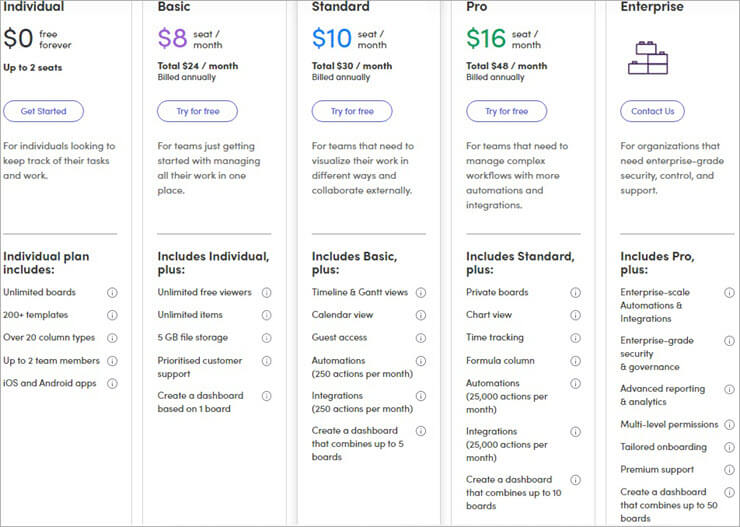
Price: monday.com is available in five different packages.
The price of the basic version is free which is appropriate for individuals. The paid version cost starts at $8 per seat per month and is targeted to agencies and enterprises. The calendar view feature is available in Standard and Pro packages. You can also try the Premium version of the software for up to 14 days.
#2) Hubspot
Best for planning and organizing digital marketing content.
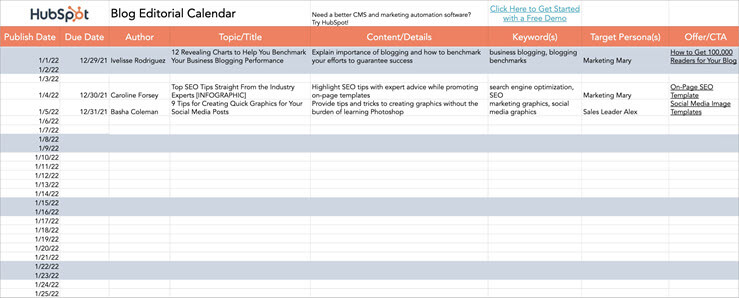
HubSpot Blog Editorial Calendar Templates is a spreadsheet template that you can use to manage the blog team. The template can be used to manage content for a website or social media profile. You can customize the template based on your own content management requirements.
Features:
- Blog editorial sheet
- Customizable template
Verdict: Hubspot Blog Editorial Calendar is a free template for managing blog content. It can manage a large content project and team using MS Excel and Google Sheets.
Price: Free.
#3) Semrush Marketing Calendar
Best for managing content calendars and campaigns for freelancers, SMBs, and agencies.
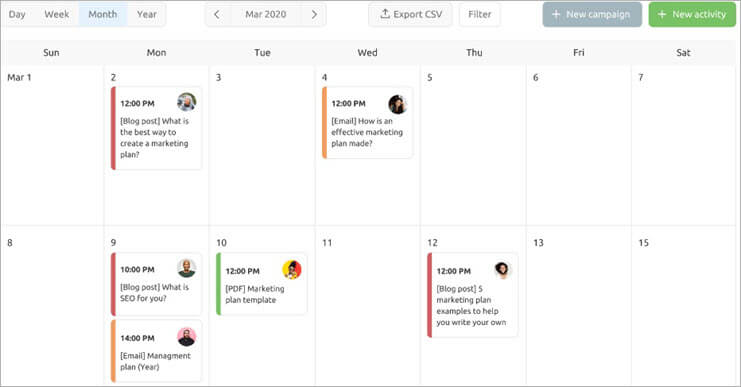
Semrush marketing calendar app allows website owners to analyze and monitor websites. The calendar tool can be used to assign tasks to the content team. Users can analyze competitor’s traffic, rankings, social media results, and much more using the tool.
Features:
- 40+ SEO, PPC, SMM tools
- Analyze competitor’s website
- Content management platform
- Google Studio integration
Verdict: Semrush Marketing tool is not for everyone. The tool is targeted at marketing professionals and agencies who want to analyze the website apart from managing the content.
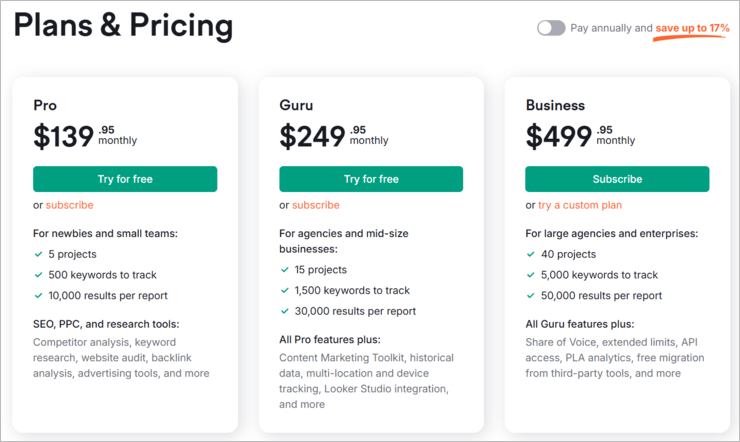
Price: With Semrush, monthly subscriptions, as well as annual billing options, are available. It offers three pricing plans,
- Monthly plans new pricing: Pro plan $139.95, Guru $249.95, and Business $499.95
- Annual plans new pricing: Pro plan $1299.95, Guru $2499.95, and Business $4999.95
- A free trial is available for Pro and Guru Plans.
Here is a comparison table that lists the features of the different plans:
#4) SocialPilot
Best for visualizing and managing content strategy using a social media calendar.

SocialPilot is a simple and easy-to-use content management tool. The software allows the management of website and social media content. The tool is suitable for digital marketing professionals and agencies.
Features:
- Social media account management
- Analytics
- Bulk scheduling
- Content discovery
- Customer management
Verdict: SocialPilot is an all-in-one content management application for digital marketing professionals and firms. The application has all the must-have features required to manage social media and website content.
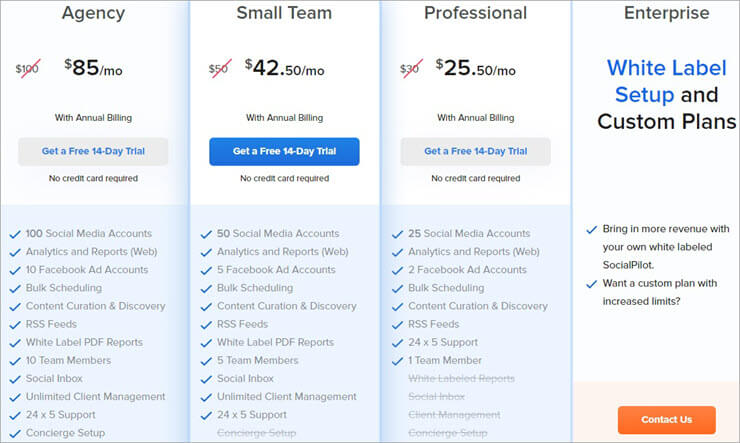
Price: SocialPilot is available in four packages. The price of the package starts at $25.50 per month. A free 14-day trial allows you to test the features of the software.
Here are the details of the different packages:
#5) Trello
Best for editorial content management for individuals and teams.
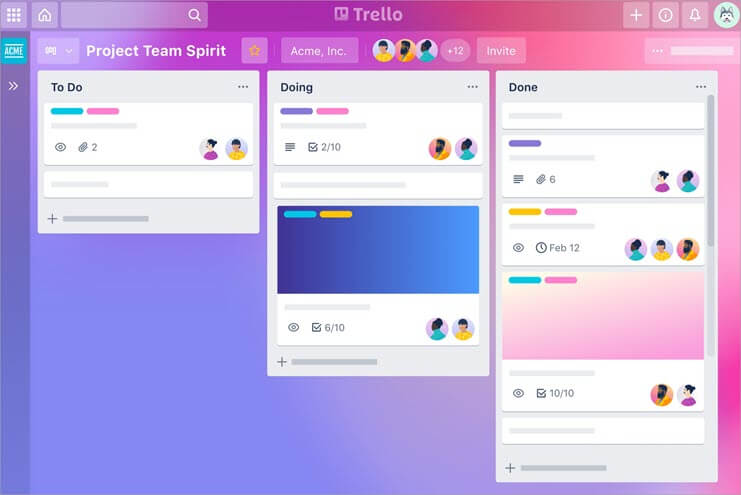
If you want an easy-to-use content management app with advanced features, you should consider Trello. The application supports managing complex content management teams and tasks.
Features:
- Assign and monitor due dates
- Activity logs
- Automated command runs
- Timeline view
- Advanced checklists
Verdict: Trello is one of the best editorial content calendar applications. But you have to sign up for a paid package for the calendar view for managing tasks and content.
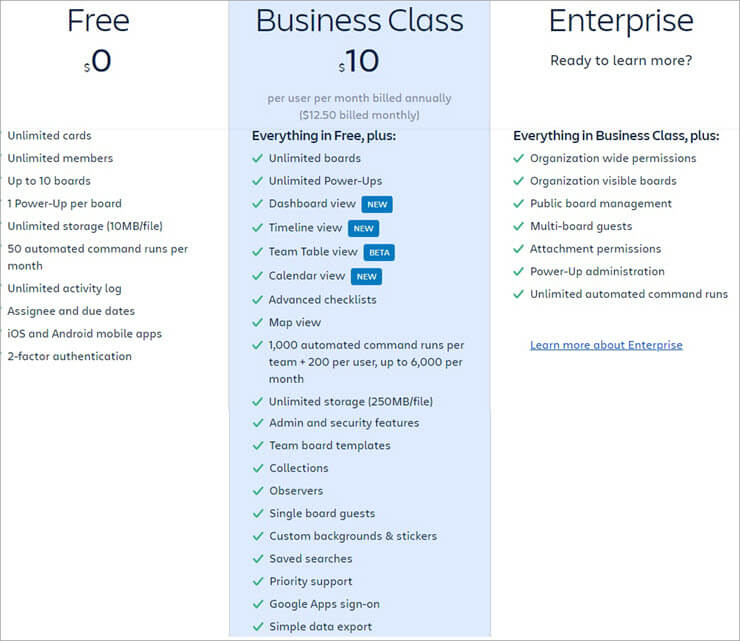
Price: Trello is available in three packages.
The free version allows unlimited cards, activity logs, members, and up to 10 boards. A business-class package costs $10 per user per month and has advanced features like a timetable view, unlimited boards, calendar view, and map view. You can also sign up for a 14-day free trial with unlimited functionalities to test the application.
Website: http://trello.com/
#6) CoSchedule
Best for viewing, scheduling, and sharing digital marketing and content management projects.
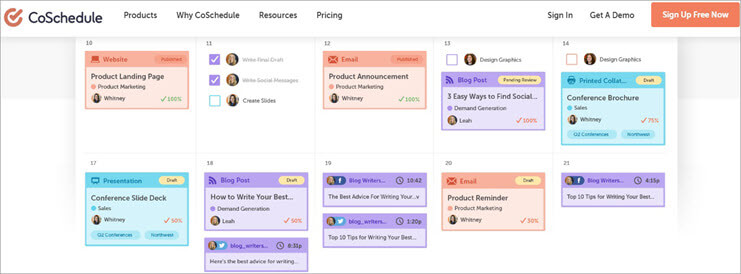
Coschedule is a versatile content management application. The application allows you to manage content management tasks and workflows. It allows sharing of the read-only calendar with the team. The app can coordinate and manage content projects, processes, and teams.
Features:
- Real-time calendar
- Custom views
- Share calendars
- Manage workflows
Verdict: Coschedule is a top-rated content management application. Most professionals and agencies will find the editorial content management application to be affordable and value for money.
Price: Coschedule application is available in two versions.
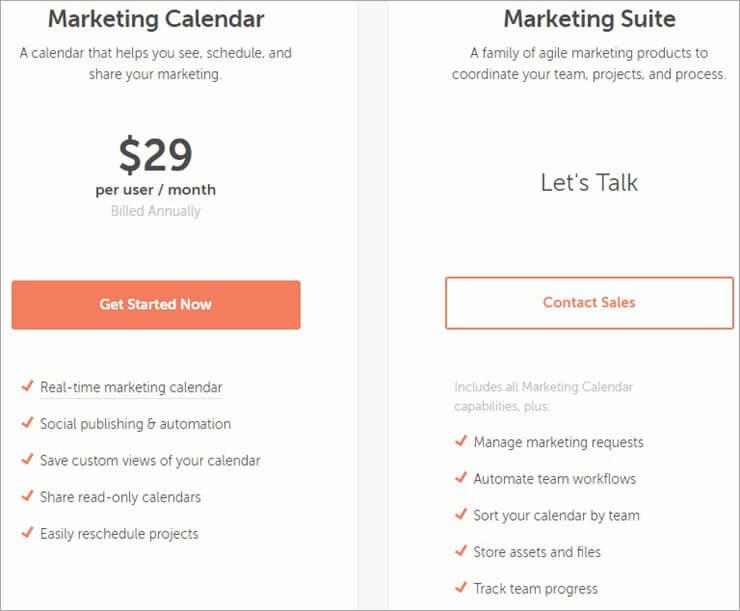
The Marketing Calendar application costs $29 per user per month. It features a real-time calendar, social publishing, and automation tools, and shared read-only calendars. The marketing suite is for enterprises that want to manage and automate team workflows. You can try the features of the software for 14 days.
Website: https://coschedule.com/editorial-calendar-tools/
#7) Google Calendar
Best for creating events, tasks, and reminders for individuals and teams for free.
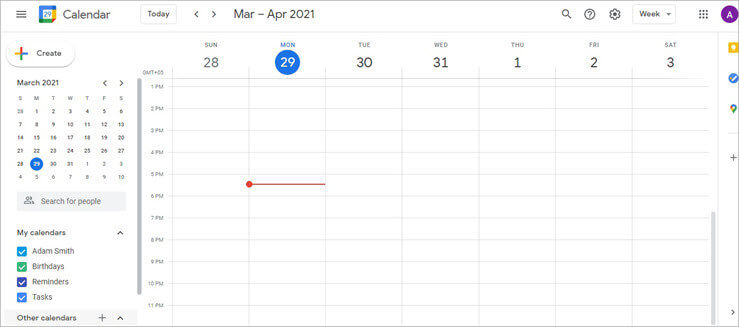
Google Calendar is a simple and efficient online scheduling tool. The cloud-based app allows content managers and website administrators to assign tasks and set a deadlines. The application can sync the information over different desktop and mobile devices.
Features:
- Create events, notes, and reminders
- Yearly, monthly, and daily calendar views
- Tasks and reminders
- Integrate with Google Suite apps
Verdict: Google Calendar is a simple and easy-to-use online scheduling app. Content managers can use the app for assigning and monitoring tasks to the team.
Price: Free.
Website: https://www.google.com/calendar
#8) Loomly
Best for collaboration, publishing, and measuring results of content projects.
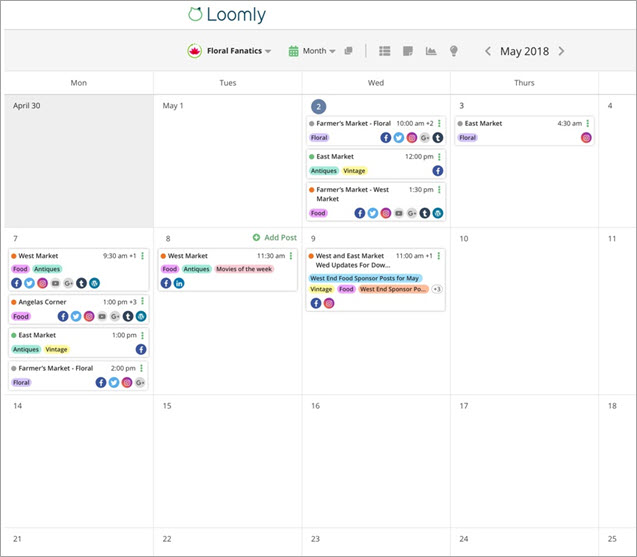
Loomly is a great content management tool that can be used to manage content tasks. The application has advanced features for managing complex workflows. It supports post-idea generation, hashtag suggestions, audience targeting, and advanced analytics.
Features:
- Content tasks management
- Social media account overview
- Custom workflow
- Post ideas
- Hashtag suggestions
Verdict: Loomly is an easy social media calendar management software where managers can plan, create, and publish the content of several daily tasks continuously and efficiently. This tool is suitable for both individuals and teams.
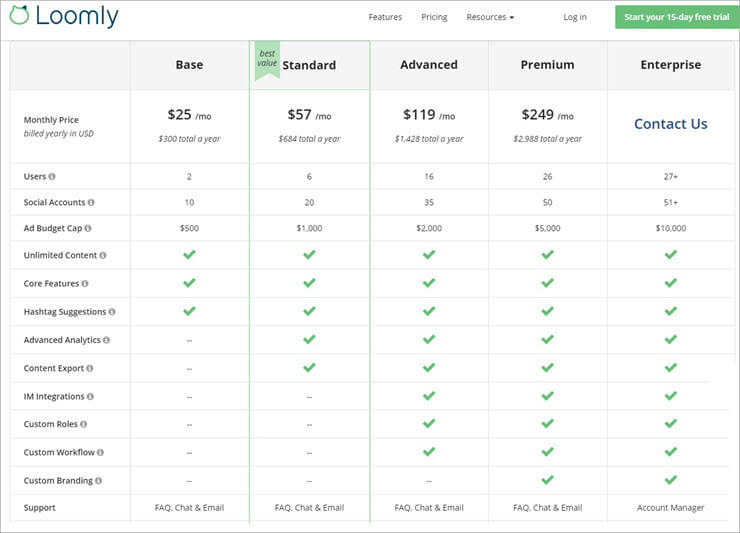
Price: Loomly is available in five different packages.
The price of the Basic package is $25 per month which supports 2 users and 10 social accounts. Standard, Advanced, and Premium versions are available at $57, $119, and $249 per month, respectively, and support more users and social accounts. If you want to test the functionalities of the software, you can sign up for a free 15-day trial.
Website: https://www.loomly.com/
#9) Airtable
Best for building customized systems and workflows for content management.
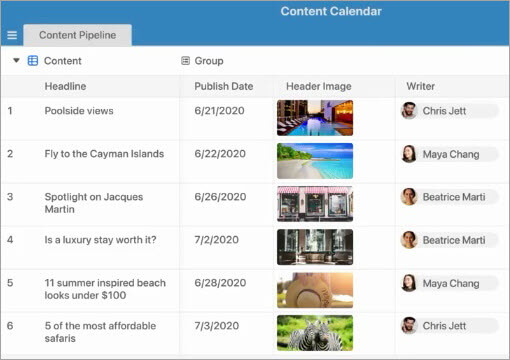
Airtable is a content management application targeted at individuals and agencies. The free content calendar software can be used for managing blogs with basic features. Agencies should sign up for a paid version that has more advanced content management features for managing complex workflows.
Features:
- Multiple views – grid, calendar, kanban, form, and gallery
- Attach files
- App integration
- Whitespaces for organizations
Verdict: Airtable is a unique content management app. The application is suitable for individuals and teams to collaborate on different workflows.
Price: Airtable is available in four packages, including Free, Plus, Pro, and Enterprise. The paid plan price starts at $10 per seat per month. You can also sign up for a 14-day trial to test the functionalities of the application.

Website: http://airtable.com
#10) Kapost
Best for planning, producing, and analyzing the marketing content.

Kapost is a dedicated content management application. You can use the application to align the content strategies with the customers. It has basic content management features for managing a small content team.
Features:
- Assign tasks
- Manage content team
- View status
- Integrate with apps
Verdict: Kapost is a useful app for managing the content team. The application may not have advanced content scheduling features. However, the basic feature will meet the requirements of most users.
Price: You have to contact the company for a custom quote.
Website: http://kapost.com/
#11) WordPress Editorial Calendar
Best for assigning and managing posts using a WordPress dashboard.
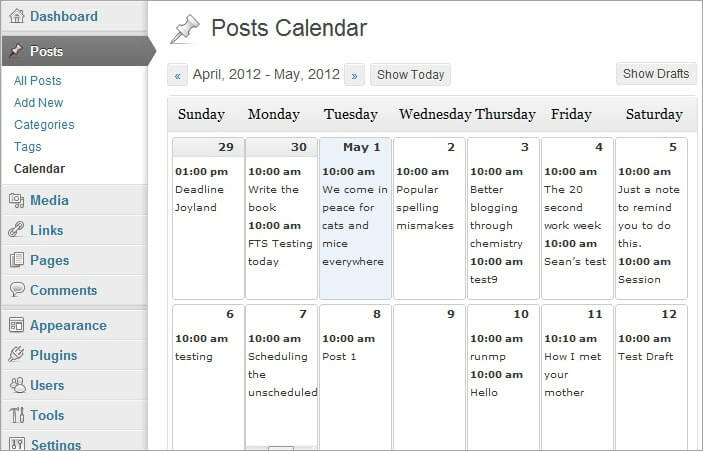
WordPress Editorial Calendar is a free plugin that makes it easy to manage content. The open-source plugin can be used by WordPress website administrators to manage the content team. The authors can also use the free content calendar app to edit and publish posts. Guest contributors can create and publish draft posts that can be viewed and published by the administrators.
Features:
- Drag and drop
- Quick edit post titles and content
- Publish or manage drafts
- See the status of posts
- Manage posts from multiple authors
Verdict: WordPress Editorial Calendar is a free app that is a must-have for WordPress website owners. The tool lets the website owner view, monitor, and update posts from different writers.
Price: Free.
Website: http://wordpress.org/plugins/editorial-calendar/
#12) Answer The Public
Best for discovering content ideas for freelancers, agencies, and teams.
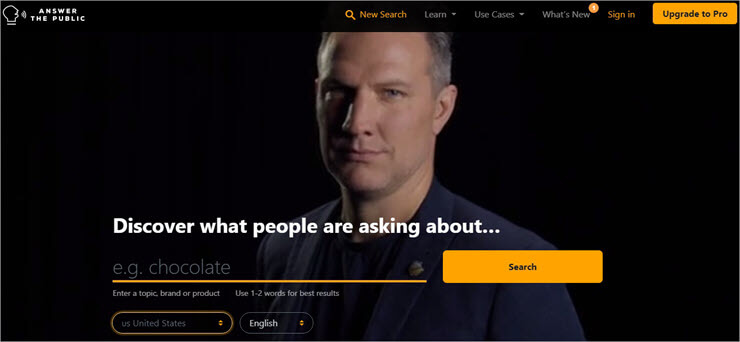
Answer The Public allows you to discover what people are thinking about different terms. The application allows you to generate content ideas for the team. You can search for topic ideas using different keywords.
Features:
- Generate content ideas
- Compare data over time
- Listening alerts
- Export data
Verdict: Answer The Public is not a calendar app but a content generation website. You can use the online tool to generate ideas for the content team.
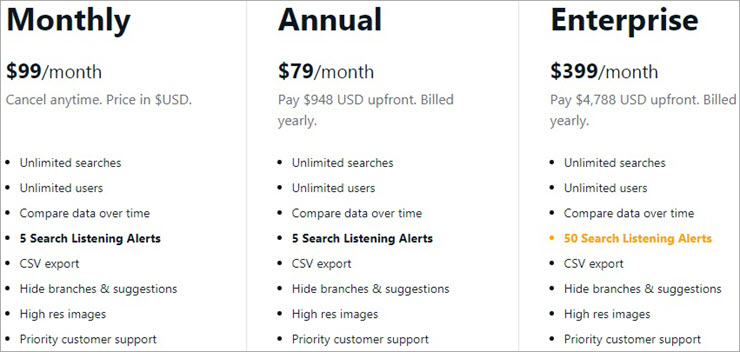
Price: Answer The Public is available in three versions: Free, Pro, and Enterprise. Pro versions have no search limit, while the Free version is limited to about $500,000 based on the site traffic. The annual cost of the Pro version is $79 per month, while the cost of the Enterprise version is $399 per month.
Here are the details of the different packages offered to the customers:
Website: https://answerthepublic.com/
#13) Asana
Best for managing workflows of the content production team.
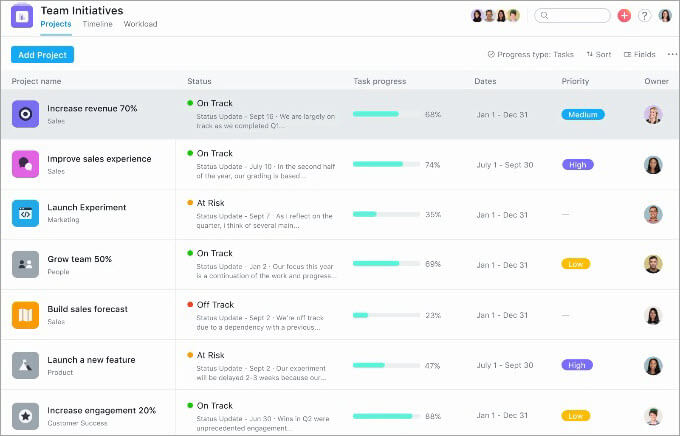
Asana is a task management software that can be used for managing projects. The application can be used for managing unlimited projects and tasks. The software can integrate with dozens of apps that can extend the functionalities of the application.
Features:
- Calendar view
- Status updates
- Salesforce integration
- Tasks management
Verdict: Asana is ideal for individuals, agencies, and teams. The price of different packages is affordable for different target markets. Individuals and enterprises can both benefit from the application.
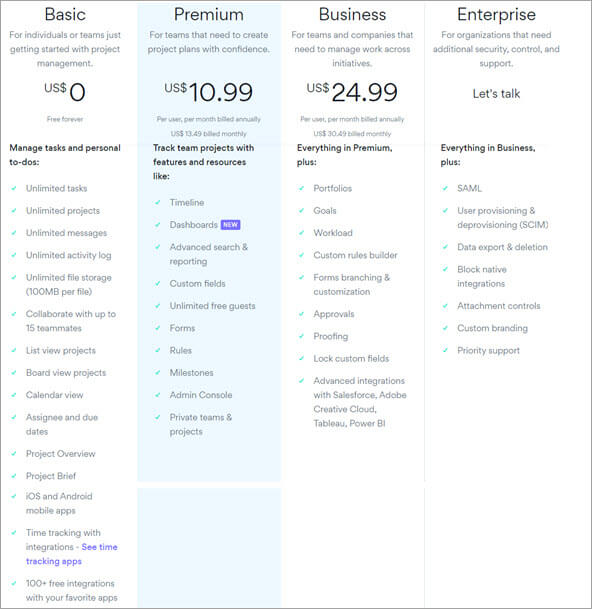
Price: Asana is offered in four different packages, including the Basic, Premium, Business, and Enterprise versions. You can test the premium features by signing up for a 30-day trial.
Here are the salient features of the different plans:
Website: http://asana.com/
#14) Evernote
Best for capturing content ideas and scheduling tasks for the team.

Evernote is a note management app that can also be used for content management. You can assign tasks to different group members, attach audio and PDF files. The app also has a strong indexing feature allowing you to search for texts in notes, images, and emails.
Also read =>> Best alternatives to Evernote
Features:
- Sync notes across devices
- Offline access
- Scan notes and receipts
- Connect to MS Teams and Slack
- Share notes and tasks with others
Verdict: Evernote is a must-have tool for content managers and website administrators. It lets you manage more than the content team. The tool can be used for assigning tasks and creating and managing digital notes.
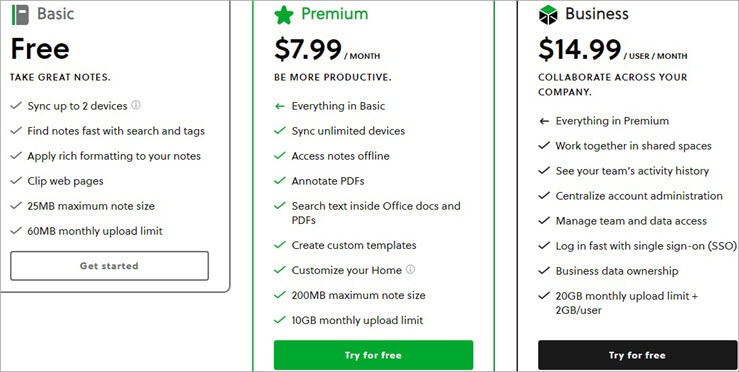
Price: Evernote is available in three packages: Basic, Premium, and Business. A 14-day free trial is also available to test the premium features of the application.
Here are the details of the different plans including price and features:
Website: http://www.evernote.com/
#15) Sprout Social
Best for planning publishing strategy and maintaining oversight of the content team.
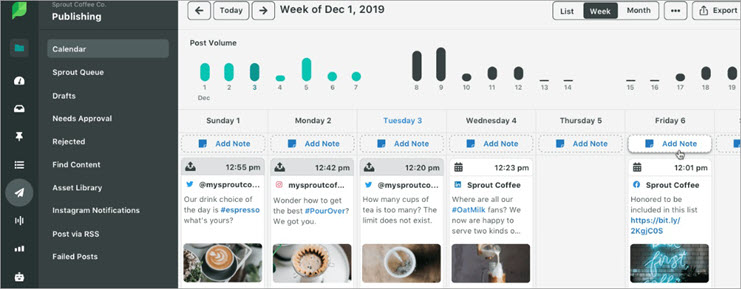
SproutSocial is a comprehensive content management tool. The application has dozens of features to manage the content. It supports social content calendar, review management, competitor’s social profile, and many other features.
Features:
- Social profiles
- Publish, schedule, draft, and queue posts
- Review management
- Custom workflows
- Chatbot and automation tools
Verdict: SproutSocial allows you to do much more than assigning and monitoring tasks. You can manage social profiles and analyze the profiles of the competitors. However the price of the app is a bit high as compared to most other content management calendar apps.
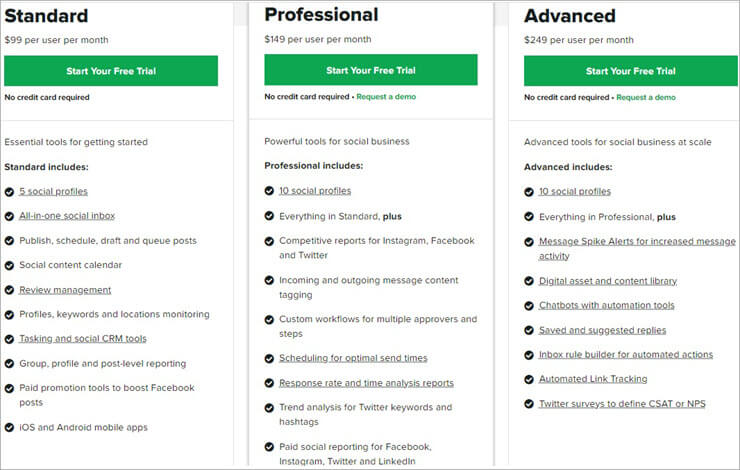
Price: SproutSocial is available in Standard, Professional, and Advanced packages that cost $99 per user per month, $149 per user per month, and $249 per user per month, respectively. You can also sign up for a 30-day trial to test the features of the software.
Website: https://sproutsocial.com/features/social-media-calendar/
Frequently Asked Questions
1. What is editorial content calendar software?
This is an application to plan and schedule tasks for the content team. The tool can assign tasks and monitor performance using an online content calendar.
2. What are the features of an editorial content calendar tool?
The content calendar application contains different features to manage and collaborate with the content team. The tool allows you to assign posts to different team members. You can assign blog topics and view the status of the posts. Some tools also have an online collaboration feature allowing you to communicate and share posts online.
3. Why should you use editorial content calendar software?
Editorial content calendar is typically used by the content manager to assign and monitor tasks. Managers can use the content calendar application to monitor performance.
Conclusion
Trello and CoSchedule is the recommended software for managing the content teams for professionals and agencies.
Suggested reading =>> Social Media Calendar Templates
If you are looking for a simple content calendar application to schedule tasks, you should use WordPress Editorial Calendar or Google Calendar. HubSpot Content Calendar Tools is a simple content management spreadsheet that can help in managing content tasks.
To generate content ideas for the team, you should consider using Answer The Public and SproutSocial content management software. If you want a content management application for managing notes, the best software includes Evernote and Asana.
Also Read =>> Best Digital Marketing Books to read
Research Process:
- Time taken to research this article: Writing and researching the article on the best editorial content calendar tools for the readers took about 10 hours.
- Total tools researched: 30
- Top tools shortlisted: 15
Was this helpful?
Recommended Reading
-

List of The Most Popular Content Marketing Software With Features and Comparison. Select The Best Content Marketing Tool For Better Customer Retention: Content Marketing is a tactical marketing approach to reach out and retain the audience. The content distributed is relevant thus it attracts consumers by providing authentic information. Business…
-
Read this review to compare top ECM Software services and select the best Enterprise Content Management Software for your requirements: How often have we heard the saying ‘Content is King’ in the modern age? These words are nothing short of golden, as they speak of a truth that businesses today…
-
List of The Top Social Media Marketing Tools with Features and Comparison. Select the Best Social Media Tool To Harness The Power of Social Media Platforms: When the concept of Social Media Platforms first came to light in the late 2000s, everybody jumped to get a taste of their new…
-
Comprehensive List & Comparison of Top Hootsuite Alternatives With Description, Features, and Pricing to Help you Select the Best Hootsuite Competitor: Hootsuite is an outstanding tool to manage multiple social networking sites and it also helps develop a connection with the customers. Hootsuite is the best way to promote a brand…
-
List & Comparison of the Top Social Media Marketing Companies. Select the Best Agency for Branding Your Products & Increase Inbound Traffic And Visibility: Social media is an essential part of digital marketing for industries of all profiles, sizes, and businesses. This article provides a list of the Top Social…
-
Comprehensive Review & Comparison of Top Social Media Management Tools. Select the Best Social Media Management Software as per your Requirements: Do you want to boost your brand awareness, or substantiate your brand power? Do you dream of heavy traffic on your website? Do you wish for a more loyal…
-
List of The Most Popular Digital Marketing Software With Features & Comparison. Read This Review To Select the Best Online Marketing Tool for Your Business: You might have seen several changes in marketing over the past several years in terms of how the goods and services are now being promoted.…
-
List and Comparison of the Top Digital Marketing Companies. Select the Best Digital Marketing Agency Based On This Detailed Review: To get the maximum ROI from Digital Marketing or reaching the right audience at the right time and place it is very important to reinvent your digital marketing strategy. An…