


Explore the top Learning Management Systems to manage your learning programs easily. Pick the best LMS tool to identify learning gaps across your organization and empower your business culture:
Do you know what the meaning of LMS “Learning Management System”?
Let us take a look at the meaning of each word in the “Learning Management System” in detail.
Learning is the core of delivering any educational or training program by an individual.
Management is the stem of the learning program which manages all the schedules for each and every individual. The system is nothing but an e-platform to deliver learning programs.
Online Learning Management System Solutions: Top Picks

LMS is designed to help an individual develop, manage, and provide online courses and programs to learn. It provides a platform for the students and instructors to learn and highlight their skills wherever and whenever they want as per their convenience.
LMS is an application that is used to administer, track, and report & deliver learning programs.
LMS covers almost all the major markets like schools, educational institutions, corporate, medical industry, etc. It becomes handy in identifying the communication gap between the instructor and the learner by checking each individual’s progress on quizzes and assessments.
Learning online becomes more fun with video tutorials, stories, and features like gamification, etc.
LMS has changed the learning perspective of every individual across the globe. It has provided a wide scope for the users to choose and learn in whichever field they want to excel, as all the information can now be shared across the globe.
Further Reading => TOP School Management Software To Look For
Where is LMS Used?
You will find one or the other connection of LMS in the respective industry which you are looking for. Any individual who adopts online learning uses an LMS.
LMS is used by:
- Almost all Corporate and organizations.
- All Educational institutions (Schools &Universities).
- Many government companies.
- Private tuition and institutions.
What problem does LMS solve?
LMS solves all the major learning issues of each individual as mentioned below.
- Employee Training can be found in each and every industry whether it may be software, educational, corporate, or government. We need to train the employees as per our needs which LMS can do easily. It automates most of the tasks. Tracks the progress of individuals, due to which, a lot of time and money is saved by the organizations.
- In LMS, we can create learning programs, courses, and tutorials and post them so that anyone can enhance their skill set with those materials. This comes in handy when an employee may leave the company or retire so that the knowledge stays safe.
- We can educate the common public by creating awareness programs and tutorials on anything that may be useful.
What is the Process of LMS Platforms?
LMS is a platform that is open for individuals and professionals to learn and display their skills.
Students can opt for learning programs while professionals can deliver learning courses. It provides the flexibility to its users to learn from anywhere. It shares discussion forums on a public note. The users can learn the topic that they want easily and the cost is very less comparatively.
Benefits of Learning Management Software
- LMS provides an all-in-one platform for learning and upgrading the skill set.
- It provides tons of online courses, which gives the user an option to choose as per their choice.
- It helps in tracking individual development progress.
- It reduces the learning cost and time of travel and space arrangements.
How much does the LMS cost?
Usually, in most of the sites, US$1 to US$10 is charged per student per course.
Advantages of LMS:
- Learning Management System helps to streamline the learning pattern which in turn saves time for the instructors so that they can utilize that time to focus more on each individual’s progress.
- Everything has become digital, hence it saves a lot of money on buying notebooks, copies, etc.
- It gives the freedom to the user to learn from anywhere and thereby increases mobility.
- As things become digital, learning becomes more interesting with the existence of video tutorials, clips, gamification, etc.
- Easy and effective management is possible with LMS and information accessibility becomes quick and accurate.
Disadvantages:
Though there are several advantages of LMS, there are certain limitations too.
- The biggest drawback of Online Learning is that many things that need to be physically done could not be accomplished.
- The impact of face-to-face interaction is reduced, as no gathering is required for learning.
- It increases the tunnel effect of learning, hence the scope of wide thinking may get reduced and the user may just see through LMS, thereby leaving many opportunities outside.
- Some students need motivation and encouragement to learn which will be missing and thereby credibility issues will be present.
Our TOP Recommendations:
 |  |  |
 | | |
| SkyPrep | iSpring Learn | Thinkific |
| • Learner Engagement • Course Creation • User Management | • Course Builder • Insightful Reports • Training Automation | • Course Creation • Template Selection • Live Events |
| Price: $199 – $499 USD per month Trial version: 14 days | Price: Starts at $3.66 per user/month billed annually Trial version: 30 days Free Demo | Price: $39 monthly Trial version: 1-month free trial |
| Visit Site >> | Visit Site >> | Visit Site >> |
Best Learning Management System of the Year
Below is the list of the top Learning Management Software with all the required details. This exclusive list will, in turn, help you to choose which LMS is a good fit for your purpose.
- SkyPrep
- iSpring Learn
- LearnWorlds
- Thinkific
- Groundwork1
- Docebo
- Moodle
- Litmos
- Canvas
- Edmodo
- Blackboard
- Joomla LMS
- Brightspace
- Schoology
- eFront
- Adobe Captivate Prime LMS
- Knowmax
- Mindflash
- MasterStudy WordPress LMS
- ProProf Training Maker
- Absorb LMS
- Rippling
- SocialGlow
- TalentLMS
Comparing the Top LMS Software
| LMS Software | Rating | Deployment Type |
|---|---|---|
SkyPrep | 5/5 | Cloud-hosted & Open API |
iSpring Learn | 5/5 | On Premise |
LearnWorlds | 4.8/5 | Cloud-hosted, Mac, Android, iOS, Linux, Chromebook |
Thinkific | 4.8/5 | Cloud hosted |
Groundwork1 | 4.5/5 | Cloud Hosted |
Moodle | 4.5/5 | On Premise |
Blackboard  | 4.5/5 | Cloud Hosted |
Schoology | 4.3/5 | Cloud Hosted, Open API |
SocialGlow | 4.5/5 | Cloud, Android, iOS |
TalentLMS | 4/5 | Cloud Hosted, Open API |
Let’s Explore!!
#1) SkyPrep
Best for Small to large organizations looking for an easy solution to train employees, customers, and/or partners.
Price: $199 – $499 per month. It also offers a free trial of 14 days.

SkyPrep is an award-winning Learning Management System, recognized by industry experts for its ease of use and outstanding customer support. The cloud-based solution enables you to deliver, manage, and track your training with ease.
SkyPrep’s intuitive platform helps you to create online learning programs quickly and with little effort. Create courses and reports to track learner performance with only a few clicks of a button. Enhance the learning experience by using game-based learning to make training more enjoyable and engaging for your team.
By using SkyPrep, you will be able to onboard employees, train customers on your products, and keep up with compliance requirements effortlessly.
Core Features:
- Capable of creating courses and unlimited training content with real-time reporting.
- Enhances the course distribution and provides the ability to customize the course as per the customer’s requirement.
- Track and analyze learner progress and course performance.
- Allows learning and development professionals to sell courses online.
- Customize your platform with white-labeling options from custom colors and logos to personalized automated emails.
- Offers a brilliant resource center, user tracking, and management process for the improvement of each individual.
- Powerful integrations and is fully secure. It also supports multiple language interfaces for better communication.
- Train multiple audiences through sub-platform hierarchies.
Cons:
- SkyPrep has a course authoring tool but it offers limited functionality.
- Cannot swap old videos with new ones in the Resource Center. You will need to delete the existing video and upload a new one.
Number of Customers: 500+.
Deployment Type: Open API and Cloud hosted.
#2) iSpring Learn
Best for those looking for an intuitive but comprehensive solution for corporate training.
Price: The price varies depending on the number of users and the subscription you choose. Business subscription – from $2.00 per user/month. Enterprise subscription – from $2.55 per user/month. Billed annually. Has a free 30-day trial.
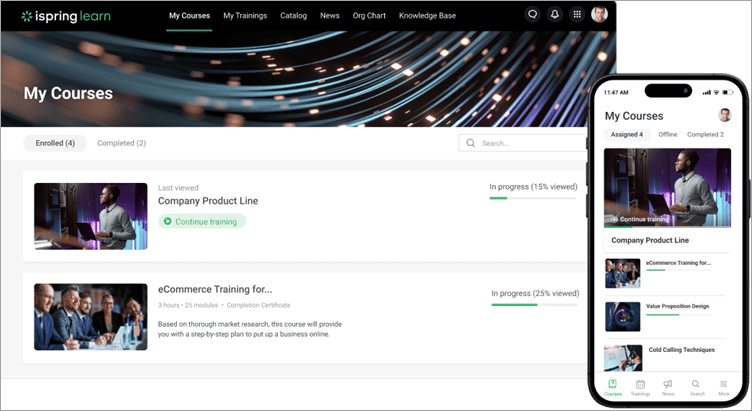
The platform offers great authoring capabilities. You can make simple page-like courses with quizzes directly on the platform using built-in tools or create advanced courses with the powerful iSpring Suite authoring tool. Then you can easily upload them to the LMS (the authoring toolkit is included in the subscription). Once the courses are ready, you can combine them into learning tracks to create long-term training programs and easily track learners’ progress through detailed reports.
With iSpring Learn, you can deliver blended learning programs with ease. You can conduct virtual training sessions without leaving the platform and conveniently schedule them in the LMS calendar so your employees won’t miss important events.
The platform also comes with some unique features that go beyond typical LMS functionality. You can assess employees’ performance using the 360-degree evaluation module, clearly demonstrate your company’s structure in an organizational chart, and share important announcements in a built-in corporate newsfeed.
Also read => Spring Suite Max – Hands-on Review
Core Features:
- Comes with a simple built-in tool for creating page-like courses, as well as the powerful iSpring Suite authoring toolkit for creating advanced SCORM-compatible courses.
- Automates the training process: enrolls learners in courses, and sends out reminders and notifications.
- Comes with mobile apps for iOS and Android for learning on the go.
- Provides over 20 comprehensive reports on learners’ progress and results.
Cons:
- Doesn’t work as a marketplace, so you can’t sell courses.
- No xAPI, PENS, or LTI support.
Number of Customers: Over 59,000 clients worldwide
Deployment Type: Cloud-based
#3) LearnWorlds
Best for Coaching institutes and corporate training.
Price: Starter plan : $24/month, Pro trainer : $ 79/month, Learning center : $249/month, Custom corporate plan also available. All plans are billed annually. A 30-day free trial is also available.
LearnWorlds is a cloud-based learning management software with intuitive course-building capabilities. It comes packed with a ton of features and tools, all of which are ideal for creating content pertaining to training material.
You get to create interactive videos with synchronized eBooks, transcripts, certifications, and assessments. The platform also offers users a site builder with a plethora of customization resources. You get an option to choose from over 200-page sections and experiment with various design elements to create a compelling online learning academy.
Core Features:
- Highly Customizable Site-Builder.
- Simple course creation.
- Advanced Reporting tools.
- Zoom-enabled video conferencing.
- Easy payment gateway integrations.
Cons:
- No free plan is available.
Deployment Type: Cloud-based, Mac, Android, iOS, Linux, Chromebook
#4) Thinkific
Best for Creating and Selling Digital Courses/Training Material.
Price: Free plan available, Basic Plan – $39/month, Pro – $70/month, Premier – $399/month.

Thinkific empowers you to create, promote and sell your expertise with full control over your business and branding. With a user-friendly course builder, you will be able to create all sorts of digital learning products that cater to a broader audience base.
Add to that, you don’t need to be a technical wizard to create a digital product using this platform. To start building a learning module to sell, you first need to select a template from a whole set of readymade designs offered. Then, use the drag-and-drop editor to customize your course content.
You can add your brand logo and implement a color scheme that closely matches your brand. Finally, you can preview the course made before publishing it.
Core Features:
- Easy course creation
- Build websites to Promote Business
- Monetize course content
- Tons of pre-built templates
- Offer live lessons, member-only content, and events.
Cons:
- Its best features can only be accessed with the expensive premier plan.
Deployment Type: Cloud-Hosted
#5) Groundwork1
Best for Simple training needs such as non-profit volunteer training, corporate employee training, as a quick solution that gets training done quickly and easily.
Price: The price depends on how many active trainees you need. It starts at $15/user/year for 20 people and goes down to $5.50/user/year for 1000 people.
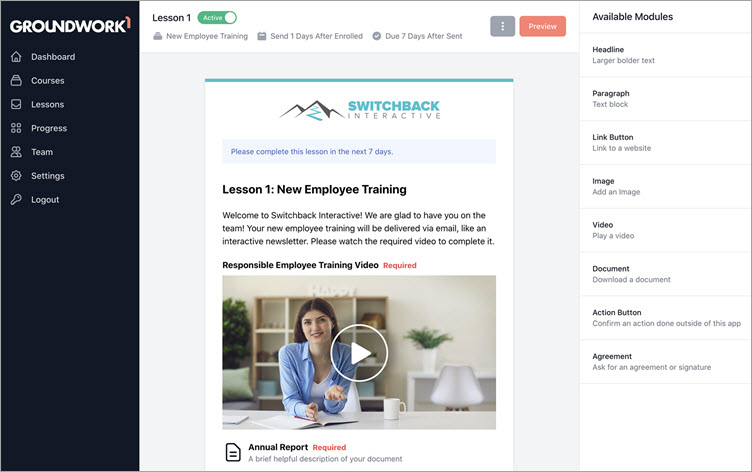
Groundwork1 makes training materials easier to access by delivering your training directly via email. Employees complete the lessons the same way they would read an email newsletter in their own inbox.
Lesson materials can include text and images as well as trackable interactive links like videos, quizzes, downloads, checkboxes, and web resources. Clicking on the interactive links brings employees to branded lesson landing pages without the need to log in.
Using the training grid you can keep tabs on who has completed their training and who has not. You can export reports or view an employee’s detailed progress. The system will follow up and remind trainees to complete their training until it is finished.
Core Features:
- Advanced Lesson designer that allows for custom lessons.
- Automatic reminders to follow up on incomplete training.
- Trackable videos that make sure the video gets watched.
- E-signatures to ask trainees to verify their understanding.
- Training matrix that gives a high-level overview of courses and people.
Cons:
- Doesn’t have SCORM compatibility.
- Doesn’t have interactive capabilities such as discussion boards.
Deployment Type: Cloud Hosted
#6) Docebo

Best for Supporting multiple environments without any integration issues, thereby saving a lot of time.
Price: $10 per customer, plus one-time registration fees. It provides a 14-day trial version for its customers.

Docebo is a very popular learning management system worldwide. It opens the door for all the automated, personalized, and unmatched experiences of learning.
It provides support for onboarding efforts and enhances the customer’s growth through excellent learning. It gives you all the facilities on one web application page, which can be used anywhere.
Further Reading => Most Popular Duolingo Alternatives of the Year
Core Features:
- It supports APIs, gamification, language and localization, white labeling, and good customization.
- It does automated admin tasks easily, scalability, certification, and re-training, makes mobility easy for its customers.
- It has a lot of pages, coach and share, quick notifications, content mark place so that the customer can import and create a course easily.
- It also has ITL classrooms, good extensions, high performance, and an advanced reporting structure for the customer’s improvement.
- Powerful user and UI experience, strong integration mechanism, salesforce integration, and an audit trail.
Cons:
- Needs improvement in the API part so that all objects can be accessed easily.
- At the initial level, new users may face difficulties due to the complexity of the application.
- Customer support needs to be more active for the issues raised.
Number of Customers: 1500 approximately.
Deployment Type: Cloud-Hosted, Open API
Website: https://www.docebo.com/
#7) Moodle

Best for It is open-source and is supported by a global community of developers, due to which localization becomes easy and it is highly configurable.
Price: $80 – $500 per year. Moodle offers a free version for its customers and a customized version by quote.


Moodle is a popular learning management system developed to provide tutors, administrators, and customers with a single strong, safe, and secure integrated platform for developing customized learning platforms for its customers.
It offers multiple dynamic programs to learn anywhere, anytime. It can be used for both the teaching profession as well as learning.
Core Features:
- It offers a single platform for learning, multiple course creation, and quick backup along with convenient data management.
- It has collaborative tools and plans, detailed reporting and logs, quick notifications and alerts along regular security updates.
- It has a customizable site design and layout, embeds external resources, and handles the user’s responsibilities and permissions.
- It comes with multilingual capability, multimedia integration, multiple progress tracking functions, and outcomes & rubrics.
- It has a personalized dashboard, peer and self-assessment, a safe authentication process, and mass enrollments with support for open standards.
Cons:
- It has a difficult learning curve at the initial level of learning.
- The interface has not been updated to a new version along with the other features and looks a bit clumsy.
- It is not capable of allowing learning programs to be assigned to different categories.
Number of Customers: 100000 approximately
Deployment Type: Cloud-Hosted, Open API
Further Reading => Best APIs for Learning Management System
Website: https://moodle.org/
#8) Litmos

Best for Managing the resources, tracking user progress, and generating feedback reports on their performance.
Price: $6 – $2500. Litmos offers a free trial version of 15 days for its customers.


Litmos is a famous Learning Management System that is very simple and easy to use. Litmos LMS is mainly used for training employees, customers, partners, and compliance learning. When Litmos is integrated with the system, it offers several unique features that are essential for organizations.
It helps in increasing the performance training for both internal and external groups. It increases the skill upgrading performance.
Core Features:
- Litmos is an online course builder, which uses content creation tools that support multiple formats and is in the form of a module.
- It offers Instructor-Led Training in a virtual environment along with assessments and quizzes to benchmark knowledge retention.
- It offers customized learning paths, reports, and dashboards for reviewing performance and gaining insight into the learning impact.
- Litmos helps to build E-Commerce and easy maintenance of your programs along with an update for each one with messages and notifications.
- It offers gamification and leaderboards to motivate customers along with a correct and meaningful survey and feedback.
Cons:
- Litmos has to improve on the customization section for a better customer experience.
- The production issues are resolved after a long time by the support team then that in turn results in decreased customer satisfaction.
- More improvised reporting capability to give a proper and satisfactory response.
Number of Customers: 3500 approximately
Deployment Type: Cloud-Hosted, Open API.
Website: https://www.litmos.com/
#9) Canvas

Best for Education and helps to make learning simple and easy thereby increases the productivity of its users.
Price: $22.50 per year. It also offers a free trial version for its customers.


Canvas is a famous Learning Management system that gives a platform to the learners and educators to display their skills when they want to. It is very simple and easy to use. Its features include open source, supporting customization, good support, high speed, secured, scalable, and low risk as it is cloud-based.
Canvas was developed to get out of the customer’s way and let them do their things.
Core Features:
- It offers a collaborative workspace, hence customers can record and upload video messages and share resources.
- It allows integrated learning outcomes, copy-paste HTTP links from browsers, LTI integration, and RSS support.
- It has open API and integrated tools like Google documents, Ether pad, and media reporting for improved customer experience.
- It has a content editor to customize the user profiles as per their requirements and analytics.
- It also supports external integrations like Facebook, Google, and Canvas mobile apps for Android and IOS.
Cons:
- Canvas customization can be improved for a better customer experience.
- Canvas grade book has been made more complex after renovation.
- The e-portfolio section is clumsy and the reporting needs to be more accurate.
Number of Customers: 3000 approximately
Deployment Type: Cloud-Hosted
Website: https://www.canvaslms.com/
#10) Edmodo

Best for Collaborative learning for individuals, hence students can interact more in an open environment.
Price: $1 – $2500 per year. It also offers a free trial for its customers.


Edmodo is a team that is dedicated to improving the learning skills of students, teachers, parents, and admins everywhere. It helps to connect the learners with people and customers to reach their full potential.
It is also the largest learning network for K-12 students, teachers, and administrators. It is capable of engaging customers throughout the learning program.
Core Features:
- It offers a free administrator account that the customer can activate and helps to speed up the learning programs.
- When the customers get good scores on assessments it awards badges to each student.
- It helps to create polls for students and creates a community network for better learning and communication.
- The customers can personalize the app as per their requirements and Edmodo measures the progress of the customers.
- It offers online classroom discussions and provides a network that connects students, administrators, and parents.
Cons:
- It should provide the guardian with a login functionality that allows them to monitor their children.
- It can improvise a lot in its customization section by providing more flexibility to students, teachers, etc.
- The file upload functionality should be improved, as it should show the recent files to upload from the library.
Number of Customers: 3, 50,000 approximately.
Deployment Type: Cloud-Hosted, Open API
#11) Blackboard

Best for Testing and assessment, group discussions, and a dedicated profile for the learning of users.
Price: $2500 per year for school. It also offers a free trial for customers to get its functionality flavors.

Blackboard is a famous Learning Management System for K 12. It offers power personalized competent learning.
It helps to make teaching and studying live with advanced innovative studying technology which helps the tutor to adapt according to the new standards, upgrade learning, and deliver a powerful and accurate digital learning experience for the students.
It makes the students realize their full potential.
Core Features:
- Blackboard provides students with portfolios and enhanced cloud profiles.
- It also offers students a preview, safe-assign, and calendar of any meetings or discussions on any day as a pop-up.
- It has a powerful collaborative integration mechanism and data management for students.
- It offers group management, grading enhancements process, blackboard drive, and content editor.
- It provides good social learning, a retention center, enrollment of programs, dynamic contents, and active collaboration.
Cons:
- The latest upgraded version has some issues with the tutor and learner connection setup.
- The support team is not ready to help online unless the local support team has checked first.
- The grade center is not at all good and needs to be improved as a priority for a better experience of the tutor and learner.
Number of Customers: 16000 approximately.
Deployment Type: Cloud-Hosted, Open API
Website: https://www.blackboard.com
#12) Joomla LMS

Best for Self-registration and enrollment of users for any learning program of their choice.
Price: $299 – $799 per year. It also offers a free trial of one month for experiencing its features.

Joomla LMS is a popular learning management system that is used worldwide and runs on Joomla.
It provides tutors and learners with a wide range of flexible and scalable virtual learning platforms. It is created for organizations to build their business by training their employees, teaching students, and selling courses online. As it is based on Joomla, it also comes with a highly secure environment.
Core Features:
- It supports SCORM 1.2, 2004, AICC compliance, multi-language user interface, configurable LMS front page & search user-friendly URLs.
- Joomla LMS has self-registration and self-enrollment, import-export users, customizable user profiles, and global & local user groups.
- It helps to create online courses in minutes, control course displays, design media-rich resources, manage access levels, etc.
- Create surveys and view quiz statistics, check the number of attempts, print quiz results, add media files to questions, and use 14 different question types.
- It has a forum, course chat, chatting users list, course announcements, email, automatic email notification, calendar view, etc.
Cons:
- Installing plug-ins always causes an issue as some errors are incompatible.
- Not highly secure and customization is difficult and requires an experienced professional.
- No Automatic cache cleaning and automatic updates are slower when compared to the other LMS.
Number of Customers: 1200 approximately.
Deployment Type: On-Premise
Website: https://www.joomlalms.com/
#13) D2l Brightspace

Best for Personalized learning experiences and course content is described very systematically.
Price: $1 – $1250 per month. It also offers a free trial version of one month for its customers.


Brightspace is a famous Learning Management System that is used to create an inspiring learning experience. It is capable of engaging customers’ minds, driving learning success, and inspiring a modern workforce.
Right from school to college or to any global organization, Brightspace creates a good learning experience for all. It completely gives a highly personalized and digital experience.
Core Features:
- Brightspace is capable of designing effective courses, create engaging content, and developing effective assessments.
- It simplifies class administrations, customizes the look and feel of the application, and provides a strong learning environment.
- It has a wide learning repository, a digital portfolio, and an assignment grader for students to know their performance.
- It has a binder, pulse, and virtual classroom for its students and provides a unique learning experience and video assignments.
- It has a good user interface and is highly customizable and scalable for customers.
Cons:
- Setting up Dropbox to synchronize with the grade book is not easy and requires a highly skilled person.
- D2L is lacking in the quiz tool, and integration with the other parties needs to be improved.
- The mobile interface can be made more simple and good for easy navigation of students.
Number of Customers: 2000 approximately
Deployment Type: On-Premise, Open API.
Website: https://www.d2l.com/
#14) Schoology

Best for Good amount of quizzes and assessments that increase the overall idea of the users on a particular learning program.
Price: $10 per month. It also offers a free version for one month to its students and teachers.


Schoology is a powerful Learning Management system and is created for the collaboration between the instructor and the student.
It is very useful to develop and spread learning materials. It provides a flexible learning platform for customers to experience a unique digital learning experience. Students can share their practice both locally and globally. It offers a supremely versatile e-platform.
Core Features:
- It offers instructional tools that allow the instructors to design assignments quickly. Tools are available like highlighting and annotating.
- It offers strong communication and collaboration along with data, analytics, and personalized learning.
- It has a strong feature of interoperability and assessment management along with asynchronous learning.
- It offers employee training, gamification, content library, mobile learning, and synchronous learning.
- It offers SCORM compliance, testing, and assessments, automated grading systems, curriculum management, etc.
Cons:
- The grading system is not good and creates difficulties while grading students based on their performance.
- There is some functionality differences in access to IOS devices and web-based applications which thereby creates confusion.
- Assessment variety needs to cover a wider range to offer more knowledge to the students.
Number of Customers: 2000 approximately
Deployment Type: Cloud-Hosted, Open API
Website: https://www.schoology.com/
#15) eFront

Best for Flexible environments and user-friendly learning programs.
Price: $750 – $2000 per month.


eFront is an upgraded and new Learning Management System. It was mainly developed for organizations that require highly configurable digital learning features and is secured. It is full of innovative learning processes and has the latest ways to enhance skillsets which allows training more people which also improves customer satisfaction.
It is capable of controlling learning programs and courses effectively.
Core Features:
- Content friendly, assessment and surveys engine, Scorm & Tin Can, Assignments, HTML5, and reusable contents.
- Includes marketplace, files repository, certifications, and course rules, learning path, gamification & communication tools.
- Reporting, Skill, and skill gap testing, jobs, multi-tenancy, user types, security, mass actions, API, and archive support.
- Themeable, website builder, access to source code, plugin builder, discounts, payment gateways, credits, etc.
- Includes the User interface, scalability, compatibility, accessibility, multi-lingual, and web standards.
Cons:
- It needs to improve the automatic update feature as it lags sometimes.
- The user manual documentation is not good for reference, hence it may get difficult for beginners.
- The support team should be available 24*7 due to geographic regional differences.
Number of Customers: 6000 approximately.
Deployment Type: Open API, On-premise, and Cloud-hosted.
Website: https://www.efrontlearning.com/
#16) Adobe Captivate Prime LMS

Best for Those who like video tutorials with entertainment like gamification etc.
Price: $4 – $16 per month for a registered user. It offers a free trial version of one month for its customers.

Adobe Captivate Prime is called as the next-generation Learning Management System that is capable of delivering customized learning experiences on many devices.
It aligns and combines all the online and local training to enhance the skill set of employees. It is basic, simple and easy. It is highly flexible for customer customization and can automate routine tasks easily.
Core Features:
- It is simple and automates tasks by assigning learning plans and synchronizing the users for a good experience.
- It engages users with gamification, video streaming, mobile-friendly learning, and personalized dashboards.
- It can track an individual’s learning progress, and provide progress information with a robust reporting framework.
- The user can also create sub-instances for LMS, powerful API integration, and strong accessibility features.
- It is very fast & highly secured, and 24*7 support is provided by the support team for any issues online.
Cons:
- The support team is weak in terms of technical issues and takes a lot of time to resolve.
- When a PowerPoint file is imported, it converts them to an image file.
- For interacting with the third party, a lot of coding is done manually and that can be reduced or automated.
Number of Customers: 500 approximately.
Deployment Type: Open API and Cloud hosted.
Website: https://www.adobe.com/in/products/captivateprime.html
#17) Knowmax

Best for SMBs & Enterprises who’re looking beyond LMS & Quiz management. It acts as a central repository for organization-wide knowledge & learning needs.

Knowmax is an enterprise-grade knowledge management platform that acts as a single source of truth. It helps in faster on-boarding of agents & employees which helps in cutting down training time and results in saving training cost.
It also helps in the overall learning curve and helps improve time to proficiency for agents while they’re operational. Knowmax primarily consists of modules such as decision trees, visual how-to guides along with training, learning & assessment components.
Core Features:
- Create effective online education and expand skills.
- Quiz & Challenges for enhancing process knowledge with detailed reporting.
- Real-time notifications for agents on new updates.
- Unlimited Course & Batch Creation – Diversified content depending on the learning ecosystem.
- Dedicated Coaches and User Profiles- Personalize the learning phase for each user by adopting.
- Foster a culture of Knowledge Sharing and collaboration to solve problems.
- Real-time Reporting and robust analytics course-wise, assessment-wise, user profile-wise.
- Personalize your platform with white-labeling options from brand colors and logos.
Deployment Type: Cloud, On-premise, Hybrid & Open APIs.
#18) Mindflash

Best for Launching initial programs, global & blending training, distinct content needs, and as a complete solution for large programs.
Price: It has three pricing plans i.e. Standard, Premium, and Enterprise. You can get a quote for any of these plans. As per reviews, Mindflash LMS’s price starts at $3500/year.

Skip the classroom, train anywhere. Mindflash’s cloud-based e-learning platform provides a simple, intuitive training solution for employees working from home, in the office, or field.
We make it easier for business leaders to enable customers, contractors, their employees, and other key partners for success through dynamic training courses available online.
Core Features:
- Mindflash is useful for Employee Training, Onboarding, Virtual Classroom, and Compliance Training.
- It provides Perfect Content Conversion Features that will let you create new course content or import the existing one.
- It is the solution for every industry and can be used by enterprises.
- It provides the features for quizzes, reports & dashboards, SCORM & API, etc.
Cons:
- As per the reviews, reporting features need improvement.
Deployment Type: Cloud Hosted.
#19) MasterStudy WordPress LMS

MasterStudy LMS is a full-fledged WordPress plugin, which allows you to create courses with various types of lessons, quizzes, assignments, and Zoom meetings in a hassle-free way.
After building the courses, you will be able to promote and sell your learning content right on your website. There are many tools and features that scale your e-learning business and provide the best experience to your students. You can also add as many instructors as you want to establish your school or an entire education centre.
Core Features:
- There are a variety of quizzes that are available: Single Choice, Multi-choice, True or False, Item Match, Image Match, Image Choice, Keywords, and Fill the Gap.
- It offers five types of lessons: Text, Video, Slides, Live Streams, and Zoom conferences.
- The certificate builder gives the instructors to create beautiful fully custom certificates to award the students after completing the courses.
- It comes with an intuitive course builder module, where you can easily build and include your learning content on your site.
- Multiple add-ons will provide you with rich tools to enhance your educational resources, with things such as gradebook for tracking the students’ progress, course bundles to pack your content into one product, and much more.
- It has a highly qualified support team and detailed documentation.
Cons:
- You will need to buy a pro version of the plugin in order to get all features.
Number of Customers: 10 000+
Deployment Type: On-Premise, WordPress plugin
#20) ProProf Training Maker

Best for Businesses of all sizes in all industries as well as educational institutions and private tutors.
Price: Starts at $2/learner/month (billed annually). Try any plan free for 15 days.

ProProf Training Maker is the world’s easiest cloud LMS that you can use to deploy corporate training programs such as compliance, HR, and sexual harassment training. Lightweight, clean, and intuitive, the platform can help you get online employee training up and running in minutes.
It provides both pre and post-training support and people of all experience levels can use it. Its suite of software solutions for workplace training includes a quiz-making tool, surveys, collaboration tools, and advanced reporting.
Core Features:
- ProProf Training Maker offers a premium library of 100+ ready-to-use courses and templates. These resources are easily customizable with branding.
- A centralized and secure virtual classroom lets you manage learner groups, group admins, course assignments, and tracking in one place.
- The Q&A community facilitates knowledge sharing and peer-to-peer social learning.
- Beautifully designed quizzes for assessment keep learners engaged and help you evaluate knowledge retention.
- The LMS also supports reporting & analytics that help you extract insights on course participation, completion rates, engagement levels, and knowledge gaps.
Cons:
- Full features are available only with the premium plan and above.
Number of Customers: 15+ million
Deployment Type: Cloud Hosted (Amazon and IBM).
#21) Absorb LMS

Best for Enterprise & mid-market customer and partner training and mid-market & small business employee training.
Price: Starting at $1,250 Absorb Software offers tailored pricing options to ensure all your needs are met.
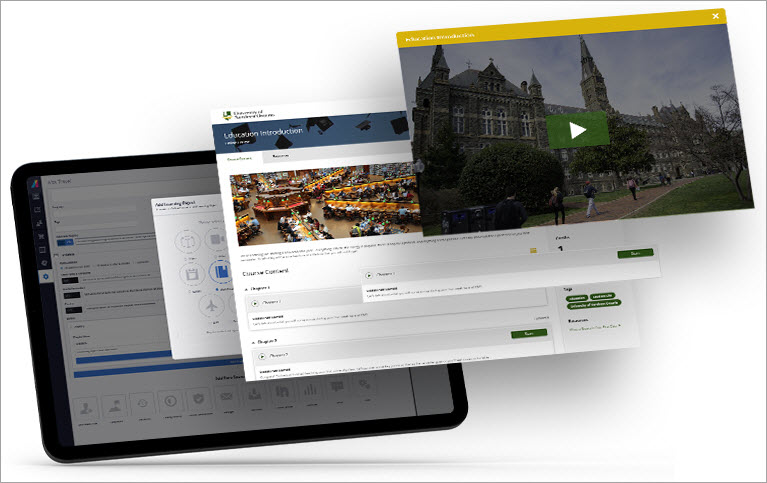
Absorb is a cloud-based learning management system (LMS) engineered to drive business productivity and deliver a top-tier learner and admin experience. Absorb LMS is a powerful and flexible software that allows its customers to fit the LMS to their learning program.
Core Features:
- Intelligent Assist: An AI feature that helps manage day-to-day admin tasks more efficiently using natural language, ask a simple or even complex request, and be taken directly to the pre-configured report page or action screen with one click.
- Absorb Pinpoint: Uses AI and natural language processing to automatically transcribe and timestamp your video lessons – and then makes them searchable. A simple search query gives learners a direct path to the point in the video or transcript they need, transforming longer LMS video content into contextualized microlearning experiences.
- Absorb Engage: A set of collaborative tools, like discussion and breakout rooms, that help facilitate learner engagement and boost user experience to keep your learners hooked.
- Absorb Create: an online course builder and authoring tool that allows you to easily craft and publish interactive eLearning courses to the LMS, or in SCORM, xAPI, and HTML5 formats.
Cons:
- Enterprise pricing is only available by talking to sales.
- Lacks the scheduling functionality to send more than one daily report.
- Enrolling in an ILC that has more than one session can be confusing.
Number of Customers: 1750+
Deployment Type: Cloud hosted
#22) Rippling

Best for Automate employee training and compliance.
Price: Starts at $8 per month. Contact for a custom quote.
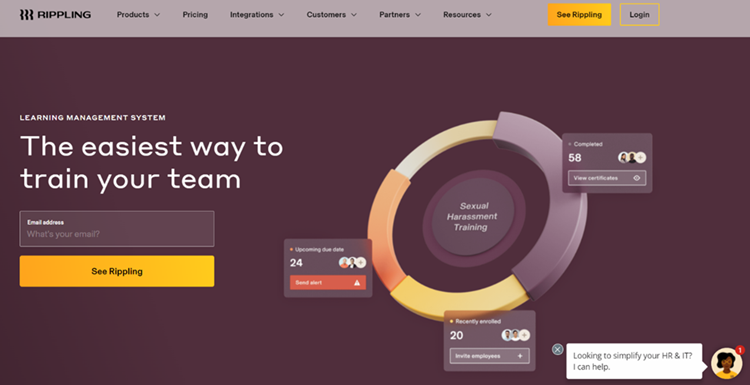
Rippling will allow you to deliver the right courses at the right time to make sure your employees get the training they need for both their and the organization’s benefit. You only need to set up enrollment rules once. Rippling will then proceed to assign courses, track progress, and send reminders.
Core Features:
- Over 1000+ pre-built courses to select from.
- Upload your own SCORM e-learning course.
- Built-in quizzes to assess employees’
- Record certifications and store them in Rippling’s secure database.
Cons:
- The response time for implementation can be a tad bit slow.
#23) SocialGlow
Best for People who want to build a community and host courses online.
Price: The platform adheres to a very flexible pricing structure. The basic plan will cost you $49.95/month. The plus plan costs $99.95/month and the premium plan costs $299.95/month.

SocialGlow lets you create a course online in just a few minutes. You’ll be able to create lessons, modules, videos, transcriptions, etc., and host it online. The platform also lets you gamify your courses to boost engagement on them. You can expand the reach for your courses by reaching out to potential members via SMS, push notifications, and email.
Core Features:
- Store, manage, and share videos
- Embed videos from YouTube, Wistia, etc
- Integrate with over 5000 apps.
- Plan and schedule events and groups
- Ready-made templates to create pop-ups, events, and content
Cons:
- The platform is a bit pricier
Number of Customers: —
Deployment Types: Cloud, Android, iOS
#24) TalentLMS

Best for – The support team provides an excellent response due to which the work becomes a lot easier when issues are fixed quickly.
Price: Ranging from $29 – $349 per month when billed annually. It also comes with a free version for up to 5 users and 10 courses.


TalentLMS is a very flexible learning management system that is developed to create a compact, instinctive, simple, and hassle-free learning experience. It is an online e-platform, which is instantly available and provides great scalability and power to spare.
It offers strong program development tools that adjust to various e-learning platforms.
Core Features:
- TalentLMS comes with strong management of course authoring, course branding, course catalog, course marketplace and is content-friendly.
- It has a good custom homepage, reporting, branding, and fields that provide flexibility to the customers as per their needs and requirements.
- It provides individual plans, defines user roles, mobile accessibility, grading system, and training metrics for customers.
- It has good registration management, ILT support, web conferencing, display transcripts, data import and export, testing, etc.
- It supports exam engines, e-commerce, notifications, multi-organization structure, training metrics, etc.
Cons:
- The setup of learning programs and materials can be more structured and robust.
- More control over language variations can be implemented.
- TalentLMS needs to improve a lot in the customer support department.
Number of Customers: 4100 approximately.
Deployment Type: Cloud-Hosted, Open API
Website: https://www.talentlms.com
Conclusion
We learned how online or digital learning is influencing the education system. We also came to know how the digital platform has changed the learning experience of each individual through its features, flexibility, scalability, and portability.
With LMS, users are now able to enhance their skill set whenever they want according to their convenience. We learned about different types of LMS along with their pricing information, dashboard interface, core features, and some cons of each tool.
We saw about their customers, their reliability, deployment types, and supported browsers and devices along with their official website. Though it has several benefits, there are certain cons as well. Thus, E-learning is a combination of both advantages as well as disadvantages.
Based on the above factors it is now easy to decide which LMS is best suited for your organization.
Small & Medium Scale Organization: TalentLMS, Docebo, ISpring, Adobe Captivate Prime LMS, Schoology LMS, and Canvas LMS are best suited for this scale due to their low cost and good features.
Large Scale Organizations: Edmodo LMS, Moodle LMS, eFront LMS, Absorb LMS, Joomla LMS, and SkyPrep LMS are best suited for large-scale organizations as these come up with enterprise versions which is of high cost and provide extra advanced features that prove to be essential and require a specific team to handle such operations and thereby budget problem is also not there.
We hope this new way of digital learning will prove to be beneficial for the development of the human race.
Was this helpful?
Recommended Reading
-

Udemy Provides 2500+ Courses that can help Anyone Master any skill. This Tutorial Provides a list of Top 100 Free Udemy Courses for you to Start Learning Today: Nowadays, "Learning on Your Schedule" anytime, anywhere is a great advantage to learners due to the FREE online courses available on various…
-
Explore the top-rated Talent Management System (TMS) with pricing and features. Read these reviews from experts and pick the right Talent Management Software of your choice: Talent management is important for organizations. Aligning human resources with the overall business strategy is a critical element for the success of a company.…
-

Best Retail POS System for Small Businesses: Reviews and Pricing Comparison A retail POS system is a system that includes a customer display, barcode scanner, receipt printer, cash drawer, monitor, computer, and debit/credit card reader. POS systems offer the functionalities of CRM to interact with the customers or integration with…
-
The List and Comparison of the Best POS Systems for Restaurant: A Restaurant POS system is an application that is used to track sales, cash flow, and food inventory. It helps restaurant owners in managing their business by simplifying the process of bookkeeping. The use of POS Systems will not…



Why don’t you include BrainCert They are performing well with tons of features guys.