This post consists of easy ways to recover the deleted YouTube videos and watch them again.
If you are searching for a particular video on YouTube and found out that the video is unavailable for any reason then this guide will help you to find and watch that video easily.
In the following article, we have discussed best 5 ways that will allow you to recover deleted YouTube videos. These ways include watching deleted YouTube videos through Wayback Machine, YouTube video finder services, internet archive, etc..
How to Find and Watch Deleted YouTube Videos Quickly
Below are the five easy ways that will help you view deleted YouTube videos.
- Way 1: Wayback Machine: You can visit https://web.archive.org/ and enter the URL address of the youtube video to find whether any archived version is available.
- Way 2: YouTube Video Finder Tools: There are tools that will help you to find the deleted YouTube videos based on URLs or video IDs.
- Way 3: Search Video Titles: You can try by search the exact video title on YouTube to find possible reuploads on another channels. You can try searching on Google using the video title along with the creator’s name or use Google Videos to find copies uploaded to other video-sharing websites.
- Way 4 – Check YouTube History & Playlist: Get the URL/ID of the video from the watched videos section in YouTube or the saved playlists.
- Way 5 – Contact the Video Creator: Request the creator of the video if he still holds an original copy or if posted the video anywhere else.
How to View a Deleted YouTube Video
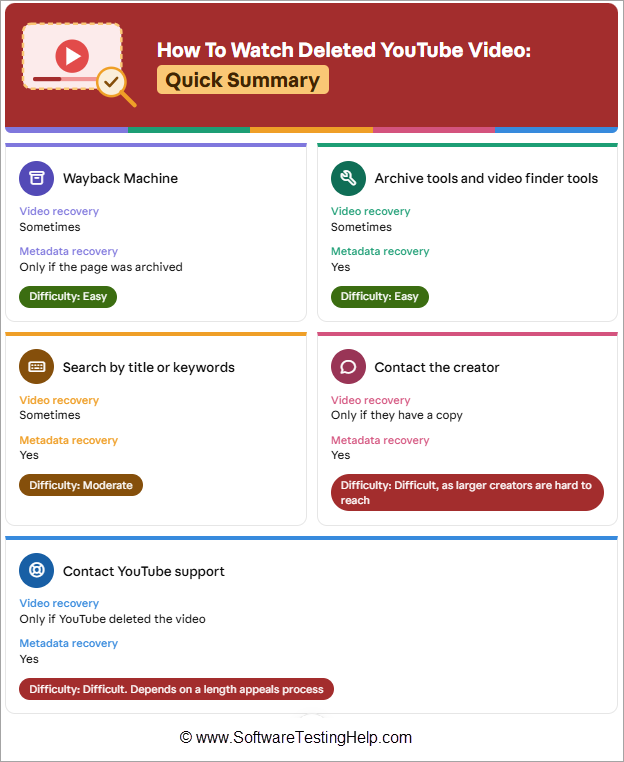
You can watch a deleted YouTube video by first finding the video’s URL or ID and then using the Wayback Machine or any other archive tool like the Archivarix. Alternatively, you can also rely on YouTube video finders like TubePilot or search for the video by title, description, or keywords.
You can also try contacting YouTube Support or getting in touch with the video’s creator. Your chances of recovering the video will depend on whether it was archived or saved before being deleted.
| Method | Video Recovery | Metadata Recovery | Difficulty |
| Wayback Machine | Sometimes | Only if the page was archived | Easy |
| Archive Tools and Video Finder Tools | Sometimes | Yes | Easy |
| Search by Title or Keywords | Sometimes | Yes | Moderate |
| Contact the Creator | Only if they have a copy | Yes | Difficult, as larger creators are hard to reach |
| Contact YouTube Support | Only if YouTube deleted the video | Yes | Difficult. Depends on a length appeals process |
How to Watch Deleted YouTube Videos
Given below are some of the tested ways to watch deleted YouTube videos.
#1) What You Need First: Find the Video URL or ID
You can’t possibly find a lost or deleted YouTube video without its URL. So here’s what you need to do first: identify or find out that particular video’s unique ID.
Just look at this URL that I picked randomly from YouTube:
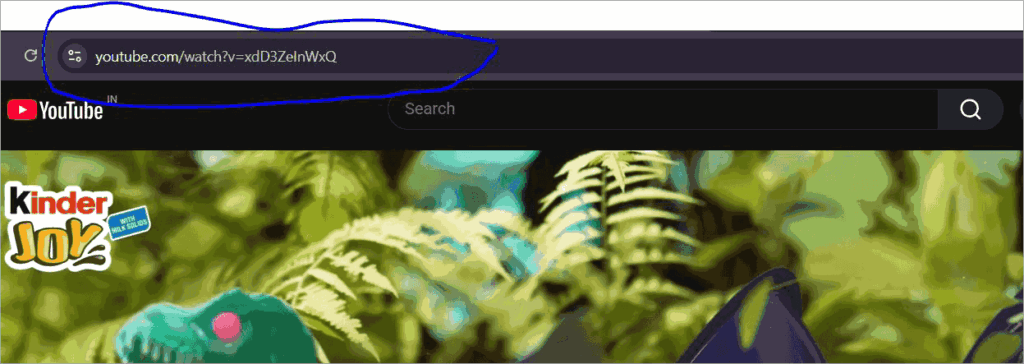
This is what a YouTube video URL looks like. Now, pay heed to the characters appearing after v=: xdD3ZeInWxQ. This combination of letters or characters represents the video’s unique ID.
As long as you have this ID, finding a deleted YouTube video is going to be easy.
Now, I get it. Nobody actually remembers a YouTube URL. So, the tricky part here, in the initial stages at least, will be to somehow find out the video’s URL or unique ID.
As such, I suggest you make a few stops in the following places and hope to God you find the URL.
- YouTube’s Watch History: If you were logged in when watching the YouTube video you are desperately trying to find, check your YouTube watch history.
- Browser History or Bookmark: If you were streaming the video on YouTube’s website via your desktop browser, then it would make sense to check your browser history. Open your browser’s history and look for the video by typing the title or using keywords you remember being associated with the video. I also like to bookmark pages I would like to revisit down the line in Chrome. So if you remember bookmarking the YouTube video’s page, check your browser’s bookmark list.
- Playlists: I have a habit of “Saving” videos that I find interesting to playlists I’ve created within YouTube. Perhaps you do the same, and if so, I suggest checking your Playlist folder, Watch Later folder, or liked videos list on the platform.
- Social Media Search: Maybe you shared the video’s link to WhatsApp or Instagram. I suggest checking your feed on those platforms to see if that’s the case.
- Google My Activity: Open My Activity > Sign in to your Google Account > Click on YouTube History > Manage History to find the URL of the video you watched.
#2) Use the Wayback Machine to Find Archived YouTube Videos
How to Find Old YouTube Videos via the Wayback Machine:
With the URL or Video ID in hand, you’ll now need a tool that’ll help you unearth the video. The best place to start would be the Wayback Machine.
Here is the video on how to find a deleted YouTube video with the Wayback Machine:
Backed by the Internet Archive, the Wayback Machine is a digital library for internet sites. This tool may help you find a deleted YouTube video.
This is how you use it:
1. Visit https://web.archive.org/ to access the Wayback Machine.
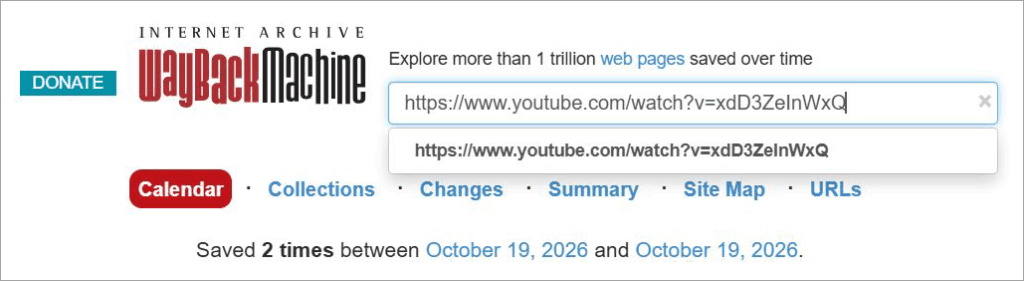
2. Paste the YouTube video’s URL or ID in the designated box.
3. Hit the “Enter” button.
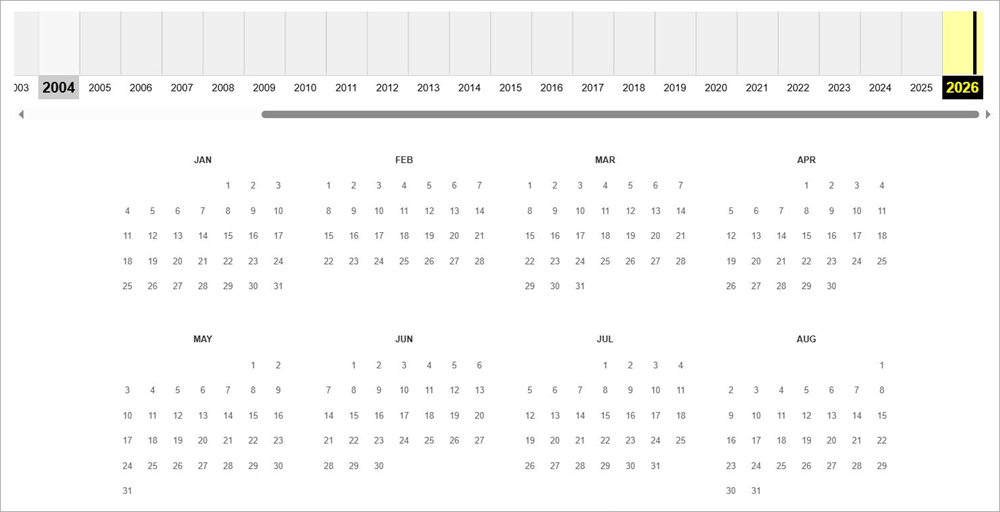
4. A calendar may appear on the screen as soon as you hit the “Enter” button. If you remember the year when the video came out, mention it here.
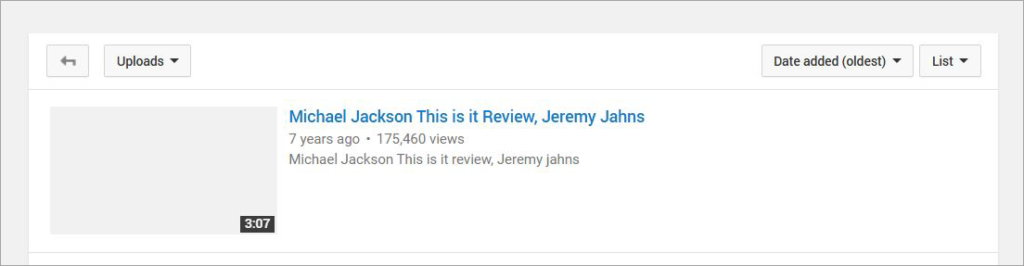
5. Select the video link that appears and play the video.
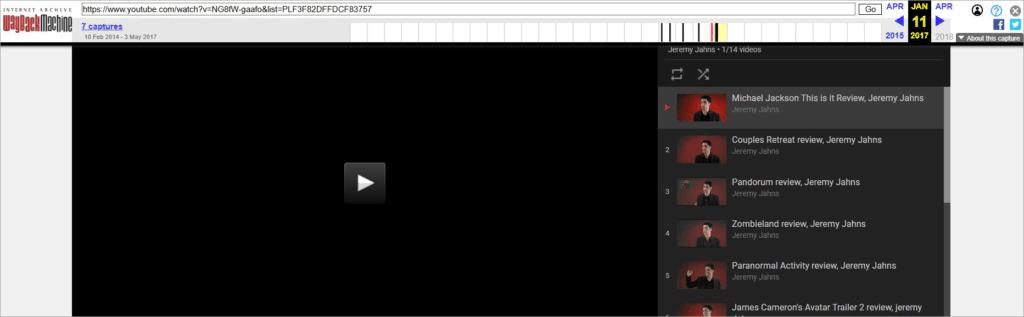
It is also possible that the Wayback Machine did not archive the video you are looking for. In that case, this tool won’t help you.
#3) Use a YouTube Video Finder or Archive Search Tools
If the Wayback Machine doesn’t work, don’t lose hope just yet. There are other tools and services we can still use to try to find the deleted video.
I know of a few dedicated web-based YouTube Video Finders that might help. TubePilot, for instance, is a great tool. It is also free to use.
1. Just visit here
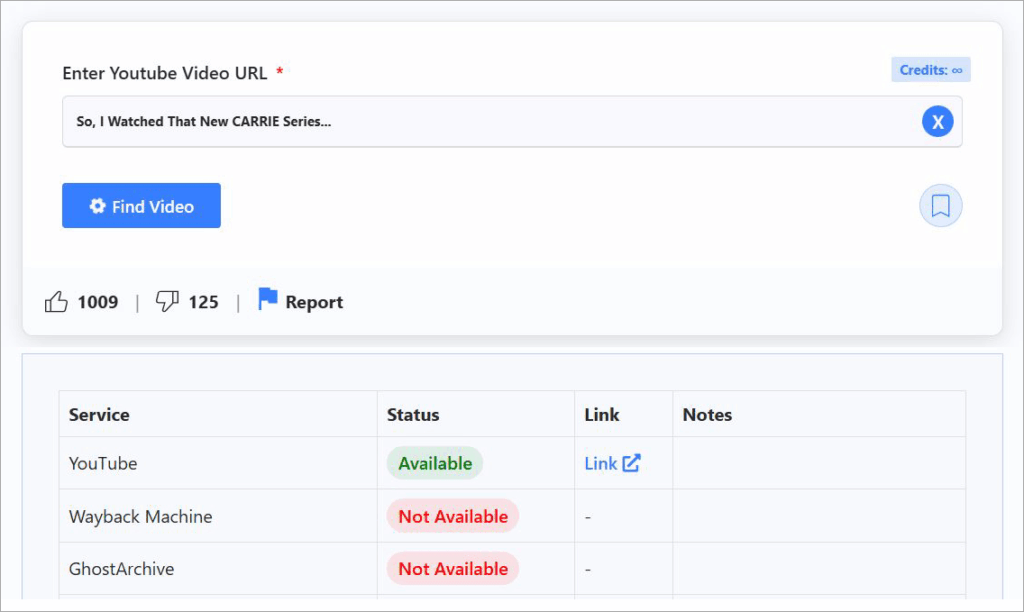
2. Paste the YouTube video URL or ID you are trying to find and hit “Enter”.
TubePilot will not only find the video but also tell you whether it is available on prominent digital libraries like the Wayback Machine, Ghost Archive, etc.
Other tools similar to TubePilot that come to mind are ZeroTwo and NicheProwler. Besides the URL, you can also search for a video by keyword or title on these tools, although the process might not be as effective.
As for Archive Search Tools, Archivarix might be the best one after the Wayback Machine. In my search for a video, the tool not only found the video I was looking for but also handed me a detailed report on the creator of the video.
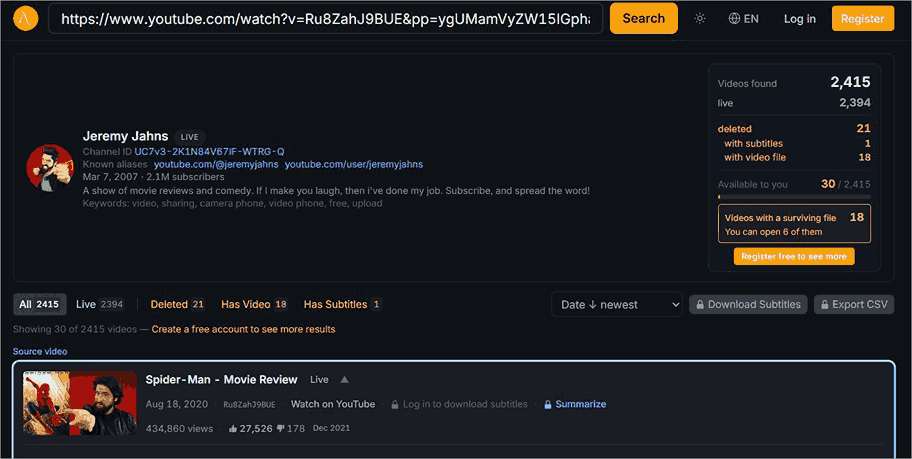
In an instant, I knew how many videos that creator uploaded, how many have been deleted since, and how many of those deleted videos can be viewed successfully.
You’ll also come across sites that’ll ask you to download and install software on your system. Avoid these sites like you would avoid a plague. Remember that no tool can guarantee you the recovery of a deleted video.
So far, we’ve discussed how to watch deleted YouTube videos with a link, but what if you don’t have one?
#4) Find Deleted YouTube Videos by Title, Description, or Keywords
How to See Deleted YouTube Videos by Title, Description, or Keywords:
Rationally speaking, I don’t expect you to remember the URL or ID of a deleted video you saw long ago. I don’t even remember the title of the video I watched 5 minutes ago. Hence, this method will guide you on How do I watch a deleted YouTube video without the link?
That said, you can still find a deleted YouTube video if you remember the video’s title, description, or keywords associated with it.
So, for those asking how to watch deleted YouTube videos without a link, here’s what I suggest you do:
I) Google Search
If you know the title of the video, just Google it.
To get the exact result, I suggest typing the following in your search queries: site:youtube.com/watch “The title of the video”.

If you remember the creator’s name, type that as well. The more keywords you use, the more likely you are to find the exact video.
II) Archive Tools
Archive tools like the Wayback Machine and Archivarix let you search for a video by title, description, and keywords as well. Simply type the video’s title, creator’s name, or describe things you remember about it via keywords and hit the “Enter” button.
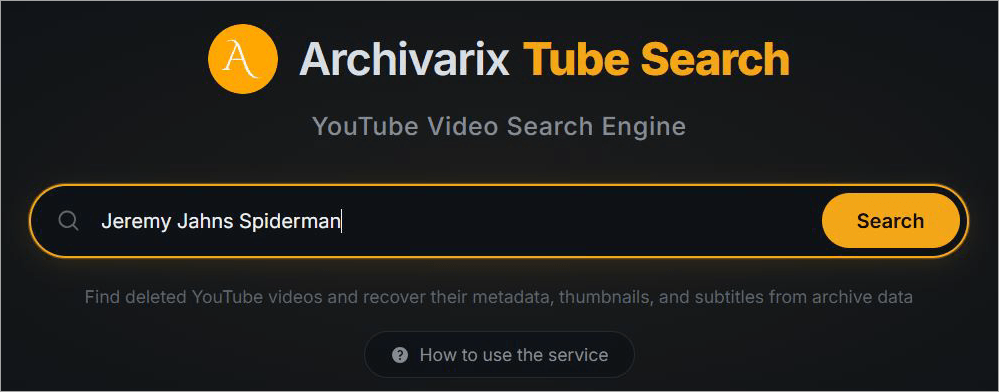
For instance, I was trying to find Jeremy Jahns’ (a popular film critic on YouTube) review of the 2002 Spider-Man movie.
So I went to Archivarix and typed Jeremy Jahns Spider-Man. These keywords were enough for the platform to find me a copy of the video I was looking for.
If you remember the exact title of the video, you are going to have an easy time finding the video. If not, I suggest mixing up several keywords that are in some way connected to the deleted video and keep searching.
III) Look for the Video on Other Platforms
YouTube isn’t the only video streaming library on the internet. You’ve also got the likes of Vimeo, Dailymotion, and Facebook. There is a chance that the deleted video was also uploaded on the above platforms.
So I suggest visiting these websites one by one and searching for the video by keywords, description, or title.
#5) Contact the Video’s Creator or YouTube Support
Getting in touch with the video’s original creator or YouTube support is the path I suggest you take only once all other options are exhausted.
I) Contacting YouTube Support
YouTube support can prove helpful only if you believe the video was deleted by the platform itself and not by the original creator. If you were the creator of the video deleted by YouTube, then you can appeal the video’s deletion by contacting support.
Once you’ve appealed, YouTube’s support team will review your request and decide whether to restore the video based on the applicable circumstances.
II) Contacting the Creator
Contacting the creator can prove more effective than calling YouTube support, especially if you believe that the video was deleted by the creator.
Even if the video was deleted by YouTube, the creator probably has a backup copy that he or she may willingly share with you if they deem your request reasonable.
To contact the creator, look for their business email or DM them on Instagram or Facebook, if they have a profile there. Once you establish contact, be polite in your request. Explain why you need the video in clear terms.
Small creators often respond sooner than larger creators. Remember, they are not obliged to share the video with you. Do not resort to harassment. Back off immediately if your request is denied.
Should You Use Third-Party Downloaders: Risks and Legal Notes
In your attempt to recover a deleted video, you’ll come across a dozen or so websites that promise to not only retrieve the video but also help you download it. These are websites I advise you to stay away from.
No service or tool out there can recover a video that’s been deleted at the source. Services that promise to do just that are misleading you and intend to cause harm.
Some of these websites feature giant download buttons. There is a real risk of you downloading harmful malware or a virus onto your system by hitting that button.
You’ve also got websites online that ask for your Google password. This is a clear phishing attempt.
As for YouTube downloaders that’ll help you download a video that already exists, you can use them with caution. Just remember that redistributing a downloaded YouTube video is considered a serious copyright violation. Use those sites to download videos for personal use only.
Expert Tips: If None of These Methods Work
Well, if none of the above-mentioned methods work, then the video is gone for good.
You could still try doing the following in a last-ditch attempt to find the video:
- Go to Google and type “quotes” or transcripts that you may remember from the video alongside the video’s title or the creator’s name. If the creator has published content related to the video on some online forum like Reddit, then the search result will show that.
- Maybe some random blog or social media post discussed or shared a link to that video at some point in time. Search for the video by title, keyword, or description on forums or social media sites.
- Sometimes, creators delete the original video only to upload a re-edited version of that same video again. Check whether the creator has reuploaded the video. On YouTube, type the creator’s name or video title alongside the term “Re-Upload” and check whether a new version of the video exists.
FAQs about YouTube Deleted Videos
1. Is it possible to watch a deleted YouTube video?
Yes, it is possible to watch a deleted YouTube video only if that particular video’s URL was saved or if the video was archived.
2. Where do deleted videos go on YouTube?
Once a video is deleted from YouTube, it is removed from the platform’s servers and databases. This means everything from the video to the likes and comments it got will be erased from YouTube.
That said, if the video was saved on your playlist or Watch Later list, you’ll still find it listed there. However, its playback won’t work.
3. Is there a YouTube Wayback Machine?
Yes, there is a YouTube Wayback Machine. In fact, the Wayback Machine stores archived snapshots of YouTube pages. That makes the platform ideal for watching older or deleted YouTube videos, although not all YouTube pages are archived by the tool.
4. Is the Wayback Machine legal?
Yes, the Wayback Machine, as a non-profit digital library operated by the Internet Archive, is legal to use.
5. Does the Internet Archive have deleted YouTube videos?
Yes, the Internet Archive does store some deleted YouTube videos. However, whether or not you can watch these videos will entirely depend on how those YouTube pages were captured.
Sometimes, the Internet Archive only captures the web page’s HTML while ignoring the actual video stream. So, you may find the video there but not be able to play it.
6. Is it legal to watch deleted videos through archives?
Yes, it is generally safe to watch deleted videos through archives like the Wayback Machine, but only for personal viewing. Downloading and distributing that video for commercial use will violate copyright laws.
I would also recommend only watching deleted videos through official archives like the Wayback Machine and avoid third-party mirrors, as they may carry malware and viruses.
7. What’s the difference between deleted, private and unlisted videos?
Deleted videos cease to exist on YouTube. They are gone permanently unless the creator decides to reupload them.
Unlisted videos are hidden from search results and recommendation pages. However, anyone with access to that video’s URL can still view the video.
On the other hand, private videos are hidden from everyone except the owner. Access is restricted to those who have an invited link from the creator or video owner.
Conclusion
So, there you have it: how to watch YouTube videos that have been deleted. If you have the video’s URL or ID, finding it will be easy, as there are many websites and services online that store and maintain YouTube archives. The Wayback Machine or Archivarix are great places to start.
You could also try using YouTube Video Finders like TubePilot. If you don’t remember the video’s URL, you can still try your luck by searching for the video by its title, description, or keyword.
Just remember that there is no guarantee that you’ll find the deleted video. Its recovery will largely depend on whether the video’s webpage was archived in the first place. If the video is important to you, I suggest you still try, even contacting the video’s creator.
Research Process: The total time involved to complete and publish this article is approximately 42 hours. This content was created through a structured research approach to ensure accuracy and reliability.
For more-related guides, you can explore our range of tutorials below:
- YouTube Private Vs Unlisted: Here is the Exact Difference
- Why Is My YouTube Not Working Today? How to Fix It Fast
- YouTube Comments Not Loading? Top 9 Methods to Fix
- How To Manage YouTube TV Membership Settings: Complete Guide
- What Is Ambient Mode On YouTube and How It Works (On/Off)
- How to Fix YouTube Glitching: 10 Fixes That Actually Work
- How To Record YouTube Live Stream (Best YouTube Screen Recorder Apps)
- YouTube TV Family Sharing in Different Locations
- How to Remove or Disable YouTube Shorts
Was this helpful?
Recommended Reading
-

Wondering how to make a video with special effects & animations. Read this review of the top Video Maker Tools to pick the best Video Maker App to create splendid jaw-dropping videos: Now, since businesses have digitalized, they have transformed their promotion techniques as well. They now require eye-catching images…
-

This tutorial reviews the top TikTok Video Downloader with comparison to help you download your favorite TikTok videos for watching offline: TikTok has become a sensation within a very little span of time. It was founded in China in the year 2016, with the name 'Douyin'. In 2017, the Chinese…
-
Review of Top YouTube Video Downloader Apps with Features, Pricing & Comparison. Select the Best Free Online YouTube Ripper for PCs to Download YouTube Videos: YouTube is the most-watched video streaming website. Launched in 2005, the online video platform features a wide variety of content, including TV clips, educational videos,…
-
Want to know how to improve video quality? Read this review to find out about the best Video Quality Enhancer Software for optimizing image and audio quality: Video enhancer software can increase the quality of the videos. You can use the video quality enhancer app to increase the quality of…