List of the Best Open Source Free Help Desk Software Solutions with Features and Comparison:
Help Desk software is a software application developed to capture, track, and maintain customer queries online. This is a one-point contact for customer issues and their fixes.
It’s a software application that is developed for service persons to keep track of their customer’s requests, and as a result, they can deal with customer issues very easily.
This facility provided by companies to the customers increases the customer’s interest in the business deals as a lot of work for the customer is being handled by this software application.
Back were those days when businesses were mostly done face to face and the client’s service persons had to visit each customer individually to resolve their issues which indeed wasted a lot of time, money, and effort.
However, the introduction of Help Desk Software has changed the way we do business deals as it issues tickets online, automates most of the suite, and gains accuracy in reporting and optimization.

Help Desk software has become a single-stop point for customers and employees to reach out to for any issues. It is designed with many good features to resolve the customer’s issues and nowadays it is becoming a necessity for every client.
There are many types of help desk ticketing software, like basic help desks, enterprise help desks, open-source help desks, etc.
Table of Contents:
- Features of Help Desk Solutions
- Top Help Desk Software
- Comparing Top 5 Help Desk Tools
- #1) Atera
- #2) NinjaOne Help Desk
- #3) Zendesk Help Desk
- #4) Freshdesk
- #5) monday.com
- #6) Freshservice
- #7) Jira Service Management
- #8) Zoho Desk
- #9) RemotePC
- #10) ServiceDesk Plus
- #11) HubSpot
- #12) Jitbit
- #13) HappyFox Cloud-based Help Desk Software
- #14) LiveChat
- #15) Kayako
- #16) Hiver
- #17) ProProfs Help Desk
- #18) SolarWinds Web Help Desk Software
- #19) Salesforce
- #20) SysAid
- #21) LiveAgent
- Other Popular Help Desk Tools
- Frequently Asked Questions
- Conclusion
Features of Help Desk Solutions
Some of the important features are mentioned below for your reference:
- It has a point-of-contact feature that tells how the customer can contact your support via community, social media, phone, message, emails, etc.
- It has a ticket management system that saves and maintains customer queries into tickets and follow up with them.
- It also has an inbuilt knowledge base or self-service feature which will consist of many FAQs for customer queries.
- It supports an intelligent automation mechanism that automates the repetitive and predictable tasks inclusive of some FAQs which the customers keep on asking to save time.
- It supports a good integration process, hence companies can integrate with social media accounts like Facebook, Twitter, and Instagram to get feedback on their products.
Benefits of Help Desk Ticketing Software
The major benefits are:
- Using the Help Desk System, the work progress can be more efficient as customers can submit their issues quickly and get their problems resolved much more quickly thereby increasing productivity.
- It is a multi-tasking software as it allows the staff to categorize and organize issues based on priority.
- This is highly customizable, hence the client can make modifications as per their business requirements for improved business access.
- It comes with an auto-assign feature, because of which the tickets get prioritized and automatically assigned to the concerned team for resolution.
Demerits
As we know, with every good thing there are certain limitations and weak points.
Help Desk applications also have certain demerits as explained below:
- Sometimes the quality of the knowledge database has become a big question on the reliability of this software. Will it easily integrate with the existing knowledge database?
- It may be difficult at times to use this software and their learning curves.
- If the client is adding a new ticketing system, then it might take the customer and the staff to get acquainted with the application flow to have a seamless process.
- A large investment has to be made in this software and later, upgrading those will cost a lot of money.
- Some software lags some essential features even after paying good money for it.
Suggested Reading => Top CRM Software Tools That You Should Know

As we can see the increase in demand and efficiency of help desk software has drastically increased in recent years.

Our TOP Recommendations:
 |  |  |  |  |
 | | | | |
| Atera | NinjaOne Help Desk | Zendesk | monday.com | Jira Service Management |
| • Automatic Configuration • Ticket Automation • Centralized Storage | • Ticketing Automation • Event Automation • Endpoint Management | • Highly flexible ticket management • Strong knowledge base portal • Advanced analytics with an open API | • 360° customer view • Easy to set up and use • 24/7 support | • Request Queues • SLA Policy Set-Up • Reports & Metrics |
| Price: $129.00 monthly Trial version: Available | Price: Quote-Based Trial version: Available | Price: US $5/agent/month Trial version: Available | Price: $8 monthly Trial version: 14 days | Price: $49 monthly Trial version: Free for 3 agents |
| Visit Site >> | Visit Site >> | Visit Site >> | Visit Site >> | Visit Site >> |
Top Help Desk Software
Get ready to explore the list of the best open-source free Help Desk Ticketing Software that is available in the market.
Comparing Top 5 Help Desk Tools
| Software Name | User Rating | No. of Users | Free Version | Deployment Type |
|---|---|---|---|---|
| Atera | 4.9/5 | NA | No | Hybrid |
| NinjaOne Help Desk | 5/5 | 6000 customers | No | Cloud-Hosted and On-premise |
| Zendesk | 4.7/5 | 535000 | No | Cloud Hosted |
| Freshdesk | 4.9/5 | 40000+ Customers | Yes | Cloud-based |
| monday.com | 4.9/5 | 500000+ | Yes | Cloud Hosted |
| FreshService | 4.9/5 | — | Yes | Cloud Hosted |
| Zoho Desk | 4.6/5 | More than 100,000+ Users | Yes | Cloud Hosted |
| RemotePC | 4.7/5 | — | No | Cloud & Web |
| ServiceDesk Plus | 4.8/5 | 100,000+ | Yes | Cloud and On-premises. |
| HubSpot | 4.5/5 | More than 78,700 companies. | Yes | Cloud Hosted |
| Jitbit | 4.8/5 | — | No | Cloud-hosted & On-premise. |
| Happyfox | 4.2/5 | 44000 | Yes | Cloud Hosted |
Detailed reviews:
#1) Atera
Best for Enterprise companies, User-Friendly Ticketing and Helpdesk System.
Price: Annual Plan: $129 per month per technician, Growth Plan – $179 per month per technician, Power Plan – $209 per month per technician.
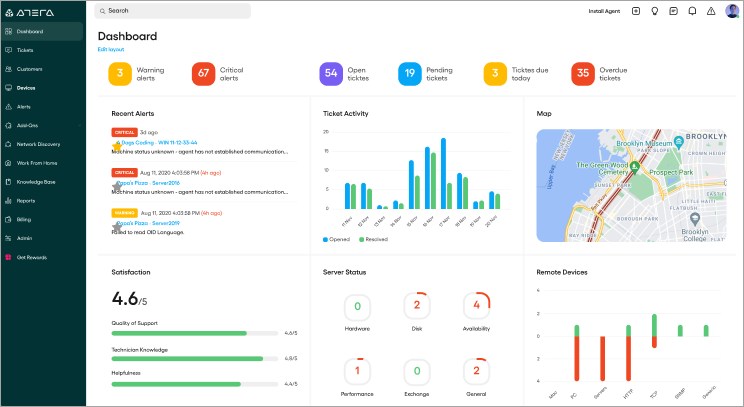
Atera brings you helpdesk software that is tailor-made for MSPs and IT service providers. You get a helpdesk and ticketing system that allows you to connect with a client and address their queries effectively and efficiently. With this platform, the raised tickets are automatically synced between your client’s customer portal and Atera’s UI.
As such, communication between you and your clients is always seamless. Atera also allows you to schedule tickets to appear at one time or a later date. It is also very simple to edit or delete tickets on this platform. Atera particularly shines by offering you the ability to create a fully customized and branded customer portal that can be used by your clients to raise tickets or connect with you.
Features:
- Respond to new and closed tickets, thanks to the automatic configuration of emails.
- Automate and streamline tickets with just a few clicks.
- Create a customized and branded customer portal that is fully synced with your ticketing system.
- Centralize storage of important information, tips, and tricks by creating and managing a robust knowledge base.
#2) NinjaOne Help Desk
Best for Ticketing Automation.
Price: Contact us for a free quote. A free trial is also available.
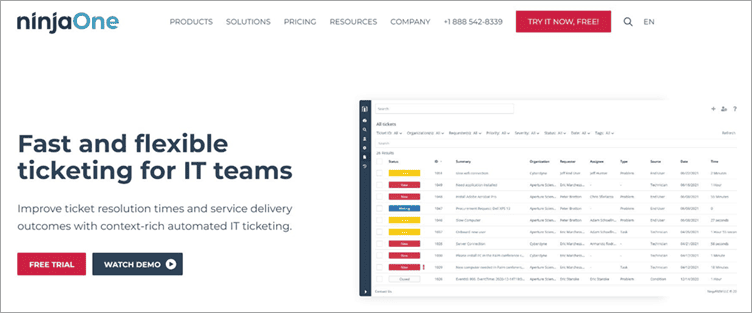
NinjaOne automates the hardest parts of IT, delivering visibility, security, and control over all endpoints for more than 20,000 customers.
The NinjaOne automated endpoint management platform is proven to increase productivity, reduce security risk, and lower costs for IT teams and managed service providers. The company seamlessly integrates with a wide range of IT and security technologies. NinjaOne is obsessed with customer success and provides free and unlimited onboarding, training, and support.
NinjaOne is #1 on G2 in endpoint management, patch management, remote monitoring and management, and mobile device management.
Features:
- Ticketing Workflow Automation
- Event and Time-based ticket automation
- Highly customizable ticketing interface
- Facilitate easy collaboration between multiple technicians
- Integrated with endpoint management.
#3) Zendesk Help Desk
Best for all customer interactions across phone, chat, email, social media, and any other channel you can imagine, come together in one place.
Price: US $5 – US $199 per agent per month. It also comes with a one-month trial version for users to experience its features.

Zendesk is more than a help desk software, it is a customer service and engagement platform that provides support for Omnichannel. This means that all customer interactions across emails, chats, social media, mobile, etc all come together in one place. It has everything a customer needs to build a good customer experience.

Features:
- It provides highly flexible ticket management with automated workflows along with multi-channel support.
- It has a strong knowledge base portal and community forum with a customer-facing web interface.
- It provides robust reporting and advanced analytics with an open API, thereby enabling seamless integration into your business.
- It has both public and private forums with good mobile support for iPhone, iPad, Android, etc.
#4) Freshdesk
Best for Intelligent automation features that automate repetitive help desk tasks and thereby increase productivity.
Price: US $19 – US $99 per agent per month. It offers a 21-day free trial version for its customers.

Freshdesk is a reliable help desk software. It is developed in such a way as to meet the requirements of both small and large-scale companies. It offers a wide range of capabilities, like automation tools, multi-channel support, self-service portals, etc.

It keeps track of the tickets created by the customers. It is robust and comes with an all-in-one package for an improved customer experience.
Further Reading => List of the BEST Field Service Management Software
Features:
- Freshdesk can convert emails to tickets and respond quickly to them. It also never misses any emails in the clutter.
- It comes with an intuitive reporting system which is inbuilt to track the team’s performance, and customer satisfaction and identify the pain areas.
- It has an intelligent automation feature that automates the ticket assignment process and says goodbye to all repetitive chores.
- It has an inbuilt knowledge base so the customer does not need to wait for a long time when they need an issue answered.
#5) monday.com
Best for helping teams manage their tasks and workflows.
Price: monday.com offers four pricing plans, i.e. Basic ($39 per month), Standard ($49 per month), Pro ($79 per month), and Enterprise (Get a quote). All the mentioned prices are for annual billing and 5 users. A free trial is available for the product.

monday.com provides a platform for IT professionals to manage their IT operations. This collaborative software will be a work operating system.
It provides helpdesk functionalities that will allow you to streamline and execute requests. You will automate your support processes. This application will help you close more tickets with less redundant distractions.
Features
- monday.com provides a highly secure and reliable platform.
- It provides various types of views, like calendar views and map views.
- It provides the features of advanced search, form customization, and time tracking.
- It has features of custom tags, private boards, automation, and dashboards.
- It provides collaboration features for multiple employees.
#6) Freshservice

Freshservice is a part of Freshworks and it’s a service desk application that is simple. It is capable of Modifying IT to another level and various business methods with surprisingly simple usage, easy configuration, and service desk resolution in the cloud.
It is being preferred a lot by the customers due to the automated internal process, getting the most out of CMDB, thereby keeping you on top of KPIs and also improving the employee experience. It supports a good integration mechanism.
#7) Jira Service Management
Best for its issue-tracking features. It helps the customers to get to the root cause of each problem with the essential details.
Price: US $10 – US $20 per month. It offers a free trial version of 7 days to its customers.

Jira Service Management is a famous help desk software that comes with tons of features to provide solutions to service management and customer service. It offers a complete end-to-end service to its customers. It has a good user interface and helps to resolve issues quickly.

It comes with a good support team. It is one of the most used help desk systems in the world.
Features:
- Jira has self-service features that allow customers to help themselves with any information. In addition, the user can add confluence to Jira for more information.
- Jira helps us achieve complete control over assets as it allows us to reference, track, and tie requests with assets directly from Jira.
- Integrate with Jira software to get to the root cause of the problem before it gets escalated.
- Deliver on SLAs and automates those repetitive tasks for faster execution of the process.
#8) Zoho Desk
Zoho Desk is the industry’s first context-aware software built to resolve everyday customer service challenges. This omni-channel customer service software is easy to sign up and use. It has a unified platform with the right set of tools for ticket management, telephony, instant messaging on all popular channels, AI, automation, survey, analytics, and self-service.
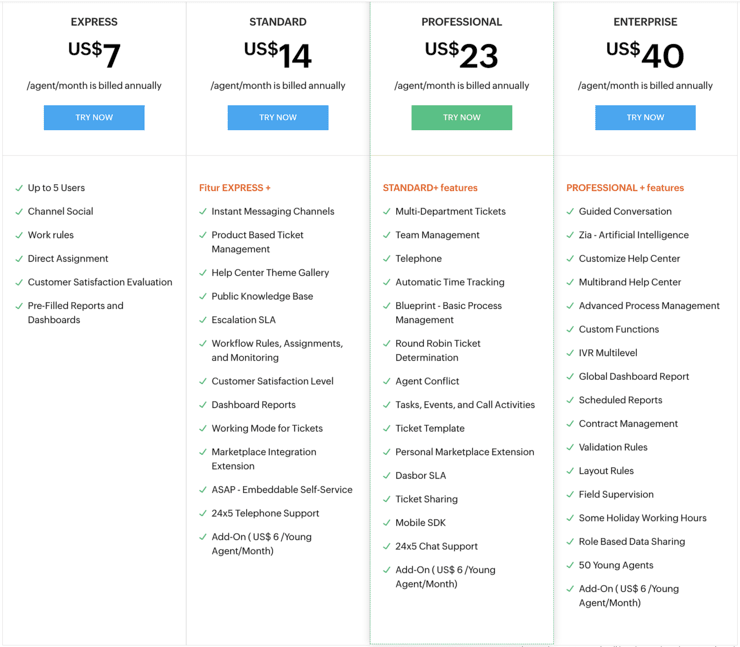
All you have to do is set it up for your business and explore the seamless customer service experience. You can try the following editions as per your business.
requirements.
Price: Zoho Desk offers a 15-day free trial after which teams can continue with the free plan for 3 agents or choose from the paid editions ranging from US $14 – US $40 per agent per month. It is easy to set up and broadly customizable.
It has an intuitive ticketing view and makes team collaboration easier. It packs all the automation and analytics necessary to scale to any volume of customers. It is widely extensible and offers integration options to connect with other business tools used by the team for context and continuity.
Zoho Desk is an award-winning help desk built to help companies across sizes and industries. Teams can start small and scale as they grow.
Features:
- The omni-channel ticket management covers all modes of communication, including social media and all popular instant messaging channels.
- The upgraded User Interface is highly user-friendly and has several accessibility controls.
- It has a multi-brand and multilingual help center that promotes customer self-service through knowledge base portals and community forums.
- It comes with Android and iOs mobile apps for agents and managers to keep on top of things.
- There’s a dedicated Zoho Desk visual app called Radar for agents and managers to manage their everyday operations on the go.
#9) RemotePC
Best for security and ease of use.
Pricing: There are four pricing plans with RemotePC, Consumer ($22.12 -first year), SOHO ($52.12 – first year), Team ($187.12 -first year), and Enterprise ($374.62 -first year). A 30-day free trial is available for Team and Enterprise plans.

RemotePC is a tool to remotely access computers. It will let you access the customer’s PC/Mac remotely through the web and provide support. It has functionalities for managing files, transferring data, and printing documents remotely and effortlessly. It will help you collaborate.
Features:
- RemotePC provides features for Video/Text chat.
- It provides powerful integration and compatibility.
- You will be able to provide a secure remote session as RemotePC provides Industry-Standard TLS v1. And AES 256-bit encryption.
- You can view multiple monitors of the customer’s computers on your screen.
- It will let you record a remote session.
#10) ServiceDesk Plus
Best for Asset management features, which include asset discovery, agent scanning, system tools, contract management, etc.
Price: US $12 – US $598 per tech per month. It also offers a one-month free trial version for its customers.

ServiceDesk Plus is a complete ITSM suite with built-in ITAM and CMBD capabilities. With advanced ITSM functions, powerful automation, smart customizations, and easy-to-use capabilities, ServiceDesk Plus helps IT support teams easily deliver world-class service to end-users at lower costs.
It comes in three editions and is available in 37 different languages. Over 100,000 organizations across 185 countries trust ServiceDesk Plus to optimize IT service desk performance and achieve high end-user satisfaction. It offers various integration options for its customers and gives increased performance.
Features:
- Strong incident management processes that help resolve incidents swiftly and improve agent productivity to effectively manage the full life cycle of IT tickets.
- Comprehensive problem management features that can enable IT teams, to classify, analyze, and close issues. It reduces repetitive incidents to boost productivity.
- A change management system that allows IT teams to implement IT changes with minimal risk through streamlined planning, approval, and implementation.
- IT project management features that help with creating projects, managing resources, and tracking progress.
- Integrated knowledge management, a virtual assistant, and AI capabilities.
- Effective SLA management with proactive and reactive escalations and escalation actions.
#11) HubSpot
Best for Ticketing features of the service hub. It is best for CRM features.
Pricing: For Service Hub, HubSpot offers three pricing plans, Starter (Starts at $50 per month), Professional (Starts at $400 per month), and Enterprise ($1200 per month). It also offers free service tools that have all the features of HubSpot CRM plus Ticketing, Live Chat, Calling, etc.

HubSpot offers a Help Desk and Ticketing Software that will help you keep track of customer requests. You will have one platform to log in, organize, and keep track of customer issues.
Based on forms or emails by customers or through live chat, HubSpot can automatically create a ticket. It will also automatically send the ticket to the right person.
Features:
- You can create a helpdesk by adding routing and automation to tickets.
- HubSpot can help you with resolving critical issues faster by letting you prioritize the issues.
- It provides the functionality to gather feedback so that you will be able to build a better customer experience.
- It provides many more features, like Team Email, Conversations, Knowledge Base, etc.
#12) Jitbit

Jitbit is the only helpdesk ticketing system that is available both as a cloud-hosted SaaS and an on-premise solution.
It features a powerful automation engine that handles routing tasks, powerful SLA rules, Live Chat, asset management, knowledge base, file management, and even live screen recording. But its primary feature is handing support email, and this is where it shines best.
Jitbit is also priced much less than the competition once you include all the features mentioned.
#13) HappyFox Cloud-based Help Desk Software
Best For: It is mainly known for its strong ticket management system service to its customers.
Price: US $39 – US $99 per agent per month. It does not come with a free trial version for its users.

HappyFox is a good cloud-based help desk system that is famous for providing services to its customers in an efficient manner. It is easy and simple to set up. It mainly focuses on small-scale industries for its business. It has good automated features which in turn makes work a lot easier for the customers.
It is an all-in-one package for companies looking to implement the functionalities of large companies.
Further Reading => Some of the Worth Trying Knowledge Base Software
Features:
- It can convert an email into tickets and comes with a strong ticket merging as an escalation feature.
- It has a powerful integration mechanism with social media accounts like Facebook, etc.
- It has good support for emails, voice, chat, mobile channels, and any social media accounts along with the support for mobile devices like IOS, Android, etc.
- It has smart automation rules and support for more than 35 languages.
#14) LiveChat
Best For: It is mainly known for its seamless integration mechanism with more than 130 tools.
Price: US $16 – US $149 per month when billed annually. It also provides a 30-day trial version for its customers.

LiveChat is mainly a chat and desktop help application that is developed for service teams? It comes with various features and tools that are essential for its customers.

It is efficient in connecting clients and users directly in real-time which thereby improves customer satisfaction. It can integrate with other cross-applications and platforms efficiently.
Features:
- It has a powerful integration mechanism and is capable of seamless integration with more than 130 tools.
- It is simple and easy to learn. It is very clean and clutter-free, hence it is preferred a lot.
- It has an agent application that can request and manage a client’s desktop by simply using its remote desktop functionality.
- It has a good statistic and analytics feature which gives information about pre-chat surveys, agents availability, etc.
#15) Kayako
Best for Customization features. It has indeed made customization as never before.
Price: US $15 – US $100 per agent per month. It also offers a free trial version for its customers.

Kayako is a strong help desk ticketing software that is hosted in the cloud. This ensures that all user service channels are put in one place for an efficient customer satisfaction process.

It is designed to satisfy the needs of small as well as big companies. As it supports live chat and help desk, it is able to manage client requests or communication across multiple channels. It is an overall full suite of tools.
Features:
- It has a good integration process and supports ticketing with email integration, slack integration, simple webhook integration, etc.
- It is capable of setting SLAs to keep on top of customer conversations, phone call tracking, and recording.
- It has rich customer and organization profiles with strong support for e-commerce to increase sales and loyalty.
- It can offer customizable tickets, chats, customers, and custom fields to collect all the required information.
#16) Hiver
Best For Teams that use Google Workspace and are looking for an intuitive solution to manage customer queries right from Gmail.
Pricing: Hiver comes with a 14-day free trial, following which you can choose between 3 pricing plans. Growth ($22 per user/month), Pro ($37 per user/month), and Elite ($57 per user/month).

Built for Google Workspace (formerly known as G Suite), helps teams deliver fast and empathetic customer service right from Gmail. Support teams can use Hiver to assign customer emails, track everyday workload, and collaborate smoothly on queries in real-time.
Hiver also offers advanced analytics and automation — to help further improve the efficiency of its customer support teams. And because Hiver intuitively fits inside Gmail’s interface, teams can onboard themselves quickly and don’t have to spend a lot of time learning new software.
Features:
- Use Hiver’s auto-assignment feature to automatically assign queries to team members in a round-robin format.
- Leverage the workload distribution functionality to get a 360-degree view of what everyone on your team is working on and the status of all tasks, in real-time.
- Agents get to collaborate on customer queries by sending internal notes instead of using forwards or Ccs that only add to the clutter.
- Setup highly customizable automation to save time on repetitive tasks and create efficient workflows. Automation can assign customer queries to colleagues, categorize queries based on their nature, change the status of queries, and more — with zero manual intervention.
- Leverage Hiver’s advanced analytics dashboard to track key metrics (average resolution time and first response time, for instance) and view various types of reports for deeper insights into team performance.
#17) ProProfs Help Desk
Best for Easily managing all incoming customer communications with a user-friendly and intuitive ticketing system.
Price: ProProfs Help Desk comes with a forever free plan with limited features. To enjoy more features, you can go for the paid plans that start at $10/user/month. It also offers a 15-day free trial for its customers.

ProProfs Help Desk makes it easier for support teams to organize, assign, and resolve all support-related conversations from a single dashboard. You can easily merge all your customer-facing email accounts (such as info@, sales@, contact@, etc.) into a shared inbox.
Agents can use collaboration features such as internal notes, parent-child ticketing, canned responses, etc. to quickly respond to customer requests or issues. You can also reduce your support ticket volume by creating a dedicated knowledge base full of self-help articles, FAQs, and more.
Features:
- Discuss complex tickets internally using internal notes and share the most relevant responses.
- Avoid sharing duplicate replies with agent collision detection.
- Use custom signatures to give your emails a professional look.
- Track key metrics such as average response time, number of open tickets, and more.
- Share CSAT & NPS surveys with customers to capture valuable feedback.
#18) SolarWinds Web Help Desk Software

SolarWinds Web Help Desk Software comes with features for automated ticketing management, incident tracking, SLA reporting, asset management, and remote support integration.
The automated ticketing management system will allow you to automate tasks like ticket assignments, routing, and escalation. The system will alert you for unattended or unassigned tickets. It provides simplified project and task management with relational ticketing.
SolarWinds provides features for incident tracking and asset management. By integrating the Web Help Desk software with Dameware Remote Support software, you will support end-users. It will provide the reports to help you measure SLAs. It can be integrated with Active Directory and LDAP.
SolarWinds Web Help Desk is an affordable Help Desk Ticketing and Asset Management software. The price starts at $700 per tech. There will not be any monthly fees.
#19) Salesforce
Best for Omni routing and live messaging.
Price: Essentials plan: $25/user/month, Professional Plan: $75/user/month, Enterprise Plan: $150/user/month, Unlimited plan: $300/user/month. A 30-day free trial is also available.

Salesforce offers helpdesk software that arms its users with all the tools they need to strengthen customer engagement. The tool automates redundant tasks to make sure cases are resolved faster for greater customer satisfaction. The platform allows you to answer frequently asked questions with the help of AI-powered chatbots.
You get to offer personalized support to customers across all social and textual channels whenever needed. The platform also allows you to easily build a self-service center using its drag-and-drop editor, thus providing customers with the privilege of helping themselves.
Overall, Salesforce can be defined as a flexible helpdesk software that helps you deliver a more personal customer experience.
Features:
- Drag-and-Drop service center builder.
- AI-Powered chatbots.
- Automatically route calls to the right agent.
- Connect with mobile customers through live messages.
#20) SysAid
Best for Automated Help-desk management.
Pricing: SysAid offers 3 pricing plans. You’ll need to contact them to get an accurate quote for each plan. A free trial is also offered.
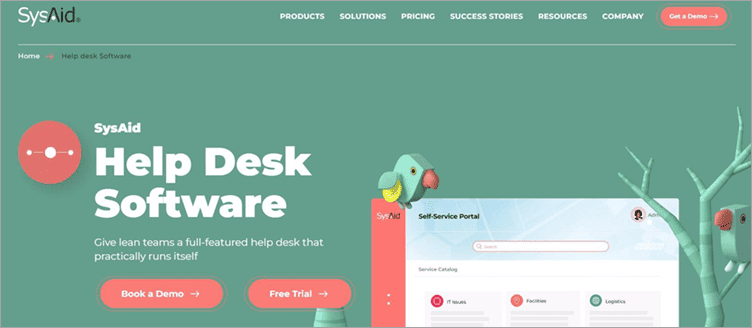
SysAid arms your organization with an automated way to sort tickets, manage assets, and resolve issues. SysAid is known to resolve issues faster than most of its contemporaries out there. This is mainly because all users, tickets, and assets are already cross-referenced inside SysAid.
Your IT teams can use SysAid to instantly resolve typical IT problems with the help of features like one-click issue submission and automatic password reset. All tickets raised within SysAid automatically route themselves to the correct desk, thus allowing businesses to deliver an impeccable customer experience.
Features:
- Self-Service Automation
- Asset Management
- Ticket Automation
- Built-in Remote Control
- Codeless Configuration
#21) LiveAgent
Best for LiveAgent is best known for its lean live chat widget, which is the fastest on the market, as well as its incredible support team that supports its users 24/7 through multiple communication channels.
Price: It is offered in a freemium pricing model. The paid plans range from $15 – $39 USD per agent per month. The software also comes with a free 14-day trial.

LiveAgent is a powerful help desk software that is capable of streamlining multiple communication channels into a single universal inbox. The software is easy to implement & utilize and offers more than 180 advanced help desk features and over 40 third-party integrations.
Features:
- A great ticketing system that transforms all incoming queries into tickets.
- A native live chat solution packed with advanced features, such as a real-time typing view or proactive chat invitations:
- A built-in call center with an IVR and unlimited call recording storage.
- Social media integrations with Facebook, Facebook Messenger, Twitter, Instagram, and Viber.
- Offers a vast knowledge base and a customer portal complete with FAQs, how-to articles, forums, and feedback & suggestion boxes.
Other Popular Help Desk Tools
#22) Vivantio Pro
Vivantio Pro is a powerful service management software that grows with customers. Due to its enterprise-class, it is preferred among many retail, healthcare, and government industries. It has good automation features which indeed save a lot of time and thereby allow the team to focus more on critical functions.
The best thing is that it is developed for both cloud-based and on-premise deployment.
Official URL: https://www.vivantio.com/
#23) SherpaDesk
SherpaDesk is a package help desk tool. It is an all-in-one application for professional services automation that gives you more time for relationships. It is a powerful customer management tool that is developed for IT services or any software development for taking care of their issues.
It has strong automation support that can generate invoices automatically and make decisions more accurately.
Official URL: https://www.sherpadesk.com/
#24) Wix Answers
Wix Answers is an all-in-one package for help desk software as it comes with a lot of inbuilt features. It comes with a complete knowledge base, built-in call center, and multi-channel ticketing system for your business.
It has good customization options and a streamlined interface thereby making it more reliable and effective for any business opportunity. It is a part of Wix, hence it is very robust and has a simple learning curve that makes it the choice of many users.
Official URL: https://www.wix.com/wixanswers
#25) Vision Help Desk
Vision Help Desk is mainly a user service application that is built out of extremely neat and effective functions. It simplifies customer support with its top-notch customer service software tools.
It is a help desk application that collects every incoming request from various channels like detail form, user email id, mobile phone, Chatting, and social media like Facebook and organizes them at one location. This help desk application has branches like help desk software and service desk application software.
Official URL: https://www.visionhelpdesk.com/
#26) ClickDesk
ClickDesk is known to make its customers happy with a click. It brings conversations with customers to life through voice and video chats.
It supports most of the cross-platform, hence it gets easy for the team to support any issues instantly to improve customer satisfaction. It also has a powerful integration system as it integrates with a lot of different software. It can be said as a tool with rich features for improving customer relationships.
Official URL: https://www.clickdesk.com/
#27) TOPdesk
TOPdesk is a famous service management software. It comes with both an on-premise as well as SaaS deployment process.
It is being preferred by many organizations as it is easy to use and quick to set up, suitable for any department like IT, FM or HR, comes with seamless integration with multiple other packages, and has a lot of implementation experience.
It has a clean user interface and a simple learning curve. It provides 24*7 support for its customers.
Official URL: https://www.topdesk.com/en/
Frequently Asked Questions
Given below are the answers to some of the most popular FAQs on Help Desk Solutions.
What is a Help Desk Software?
Help Desk software is a software application developed to capture, track and maintain customer queries online. It is a one-point contact for customer issues and their fixes.
Why has the Help Desk become so important these days?
As it is a multi-tasking software, it reduces the load on IT services and functions by quickly resolving customer issues. It emphasizes end-user functionality and is available for 24*7 support for its customers.
What is the purpose of using this Software?
It is developed to store customer issues, analyze them, prioritize them, and fix them as soon as possible through the online ticket system.
How does the help desk manage its requests from customers?
It generally manages its requests through issue-tracking systems.
What is the CRM ticketing system?
This ticketing system helps in prioritizing support requests with customer service level agreements and real-time response reports.
Which is the best Help Desk Software?
The best Help Desk includes Zendesk, LiveAgent, HappyFox, FreshService, Freshdesk, etc.
What is the Help Desk system used for?
It is mainly used for asset management and IT Service management tickets raised by the customers.
Conclusion
We explored the list of Top Help Desk Software systems.
We also learned – What is help desk software? Why did it come into existence? What are the functions and processes that Help Desk Software does? Why has it become a necessity for clients these days? along with the important features, aspects, benefits, and demerits of help desk systems, a comparison between the top software for improved selection as per the business requirements.
We came to know specific details about each software like dashboard look, description, features, benefits, pricing info, and the best features of each tool with the official URL. Without a doubt, it is very clear that this software has made client-customer relationships stronger with improved customer satisfaction.
This has made the task so easy in such a way that just tickets have to be raised by the customer and the rest will be taken care of by the support team.
The overall picture can be stated as until now Help Desk Software has proven beneficial to companies and customers as the work process has become much smoother and easier.
Was this helpful?
Recommended Reading
-

Comparison of the Best Free Android and iOS Mobile App Development Software Tools and Platforms to create stunning high-quality Mobile Apps for Your Business: App development software is an application that helps with the app development process by providing functionalities like IDE, code-free development, templates, API, data synchronization, and Analytics.…
-

The List of the Best On-premises and Cloud-Based Call Center Software for Inbound and Outbound Calls with Pricing and Feature Comparison: What is Call Center Software? Call Center Software is an application that has the functionality for managing customer communications coming from multiple channels and sources. It helps agents make…
-
In this tutorial, we will review the top 10 best Invoicing Software so that you can select the best Billing Software from the list: An Invoice is a document that contains information about the number of goods or services purchased, their rates per unit, the date of purchase, and the…
-

People often wonder who earns more, a software tester or a developer? You can find the answer in this article by comparing QA vs Software Developer salary. Let's begin. I was once asked, “Why are you a QA? You do decent QTP (VBScript) programming, why don’t you try development?”. It…