


Do you know what is Ambient Mode on YouTube and how it exactly works, along with the simple steps to turn it on or off instantly on YouTube and on other devices.
Do you know there is something like a light colored glow on your YouTube video that spreads to the area around your YouTube video? Yes, this is called YouTube Ambient Mode – an amazing light display which was designed to enhance the cinematic effect of your videos, and why is this happening now?
In this article, I will explain you all about YouTube Ambient Mode, its connection with dark mode and why it appears, and how you can enable/disable it.
What Is Ambient Mode on YouTube?
Ambient mode is a dynamic lighting effect that blends with the ongoing YouTube video’s colors, greatly enhancing the viewing effect. Using dynamic color sampling, this mode works by closely analyzing the colors of each of the video frames and blending them with the background color, almost emulating a TV experience. In simple terms, the YouTube app’s ambient mode works as a color gradient that extracts the color from the video footage and extends it to the background, making it look like the color oozing out from the video itself.
YouTube Ambient Mode: What It Is, How It Works & How to Turn It Off
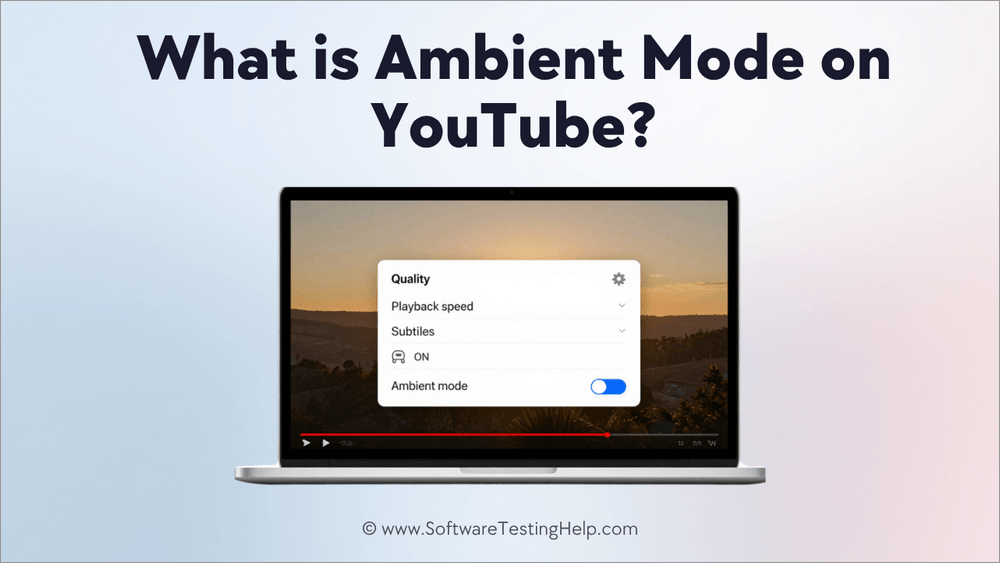
Introduced in October 2022, the ambient mode is an eminent redesign by YouTube that has invariably been a part of our everyday video experience, improving how we view video content across phones, tablets, or laptops.
Sounds exciting, right?
Well, let’s delve deeper to know more about this unique feature that makes our video experience one of a kind!
Is YouTube Ambient Mode the Same as Other “Ambient” Features?
No, the term “ambient mode” has different meanings and is not similar when used in the context of different devices.
Below are the specific features to which the term refers:
- YouTube Ambient Mode: It is primarily a dynamic lighting that enhances the area around the video player with a soft, glowy glint to enhance the user experience.
- Television Ambient Mode: In some TVs, this mode functions as a screen saver feature that stops the screen from becoming black when unused or kept idle for a long time.
- Headphone Ambient Mode: Popularly known as the “transparency” mode, headphone ambient mode is an in-built feature in noise-cancelling headphones. These headphones tend to filter out outside noise by using external microphones.
In a nutshell, the term “ambient” can have different meanings given the context and across the devices they are used in.
How Does YouTube Ambient Mode Work
Ambient mode on YouTube’s meaning is clear, but the real question is how this mode actually works and how it makes video content feel live.
Well, it happens through its algorithms that closely analyze the ongoing video’s color simultaneously while dynamically changing the background colors for each of the video frames. One thing to keep in mind is that one needs to enable the ambient mode dark theme while playing the video to make this feature work on their phone or laptop.
It is important to remember that in YouTube’s default video view, ambient mode is essentially visible. The same disappears in full-screen mode because of the absence of the surrounding background area that reiterates the glow. Likewise, the YouTube app ambient mode is not present in Theater (cinema mode).
However, on the YouTube mobile app, full-screen viewing with ambient mode has been initiated by Google, wherein the remaining screen space around the video is utilized on certain devices that have a wider display.
Why Does YouTube Ambient Mode Change Background Colors?
The Ambient Mode feature of YouTube changes the background colors since the application samples colors from the video being played and integrates them into the surrounding region.
The reasons for this functionality are:
- It extends the visual ambiance of the video outside the video player.
- It increases the immersion of the viewer since it creates an ambiance glow based on the colors of the video.
- The difference in appearance between the video and the dark background is diminished.
For example, when playing a video of an ocean, the color blue will appear in the surrounding background. When the scene switches to the sunset, then orange or red will be present.
How to Turn On Ambient Mode on YouTube
To turn on ambient mode on desktop, follow these simple steps:
- On YouTube’s desktop site, go to your profile picture present on the top-right side. Select “Appearance” from the dropdown menu and choose dark mode to enable ambient mode.
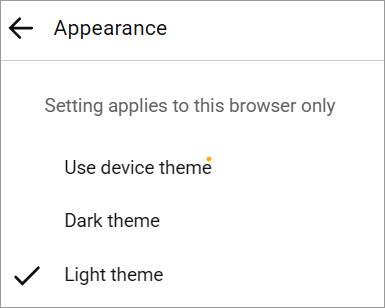
- Select a video of your choice and start playing it.
- Now, all you need to do is hover the cursor over the video being played and choose the control options displayed.
- At the bottom of the video, you’ll find the Settings gear icon.
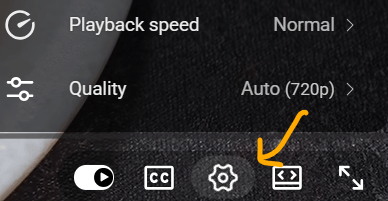
- Click on the icon, and in the pop-up menu, the Ambient mode option is available. Tap on it, and you’re good to go.
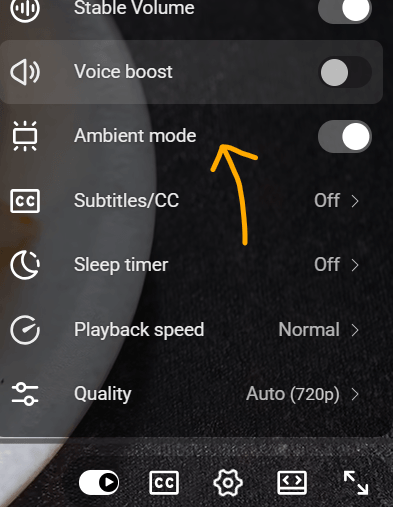
While this is an easy way to get started on desktop, follow the steps below to use YouTube Ambient mode on your mobile phone:
- For your Android or iOS device, go to your YouTube mobile app.
- Here too, you need to enable dark mode to get started.
- To enable dark mode, go to your profile picture, tap on settings, and choose the general option.
- Select Appearance and finally choose the dark theme.
- Play any video you wish to watch.
- Click on the screen to get the control options, and choose the settings gear icon.
- Finally, choose Additional settings and enable YouTube ambient mode.
How to Turn off Ambient Mode on YouTube
If you wish to turn off ambient mode, here is a simple step-by-step process to follow:
- Start playing the video on YouTube.
- Search for the ambient mode toggle present at the bottom of the video player.
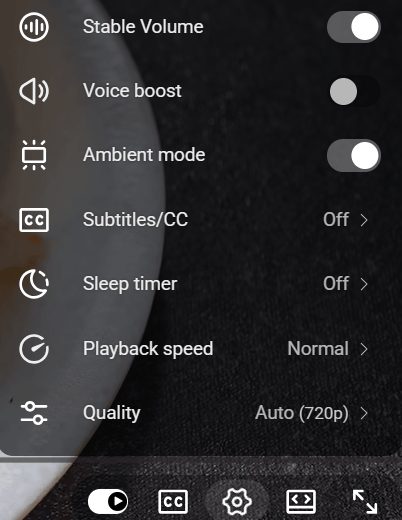
- Disable the feature by clicking on the toggle as shown below.
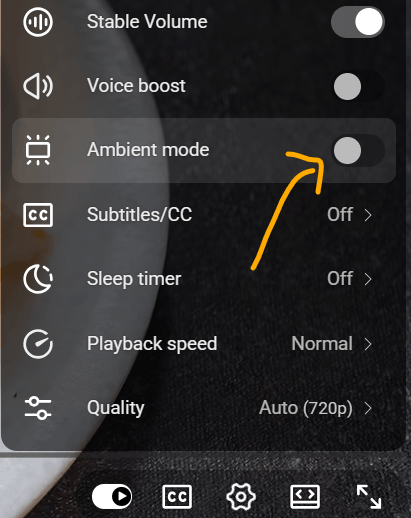
- Once done, the YouTube app’s ambient mode will change to your default appearance.
YouTube Ambient Mode vs Theater Mode vs Fullscreen: What’s the Difference?
| Feature | Ambient Mode | Theater Mode | Fullscreen |
| Main purpose | Immersive viewing experience | Videos player expands to occupy a larger portion of the web page | Makes the video fill the entire screen |
| Background effect | Adds a dynamic glow based on video colors | Uses a dark background around the player | Removes the surrounding YouTube interface |
| Video size | Standard player size | Larger player | Full screen |
| YouTube controls | Available | Available | Mostly hidden until you move the cursor |
| Best for | A more cinematic viewing experience | Watching videos in a larger player while browsing YouTube | Distraction-free viewing |
| Works with Ambient Mode? | — | Can be used alongside Ambient Mode | Ambient Mode effect is generally not visible outside the fullscreen video |
Does Ambient Mode Drain Battery or Use More Data
All this while, you might be wondering whether ambient mode drains the battery or uses more data.
Well, in some cases, slight battery drain has been noticed, but the ambient mode does not use more data. Since this mode prevents the mobile devices from going into sleep mode, the battery drain becomes noticeable.
Benefits of YouTube Ambient Mode: Our Tested Experience
The benefits of YouTube ambient mode are manifold, some of which are mentioned below:
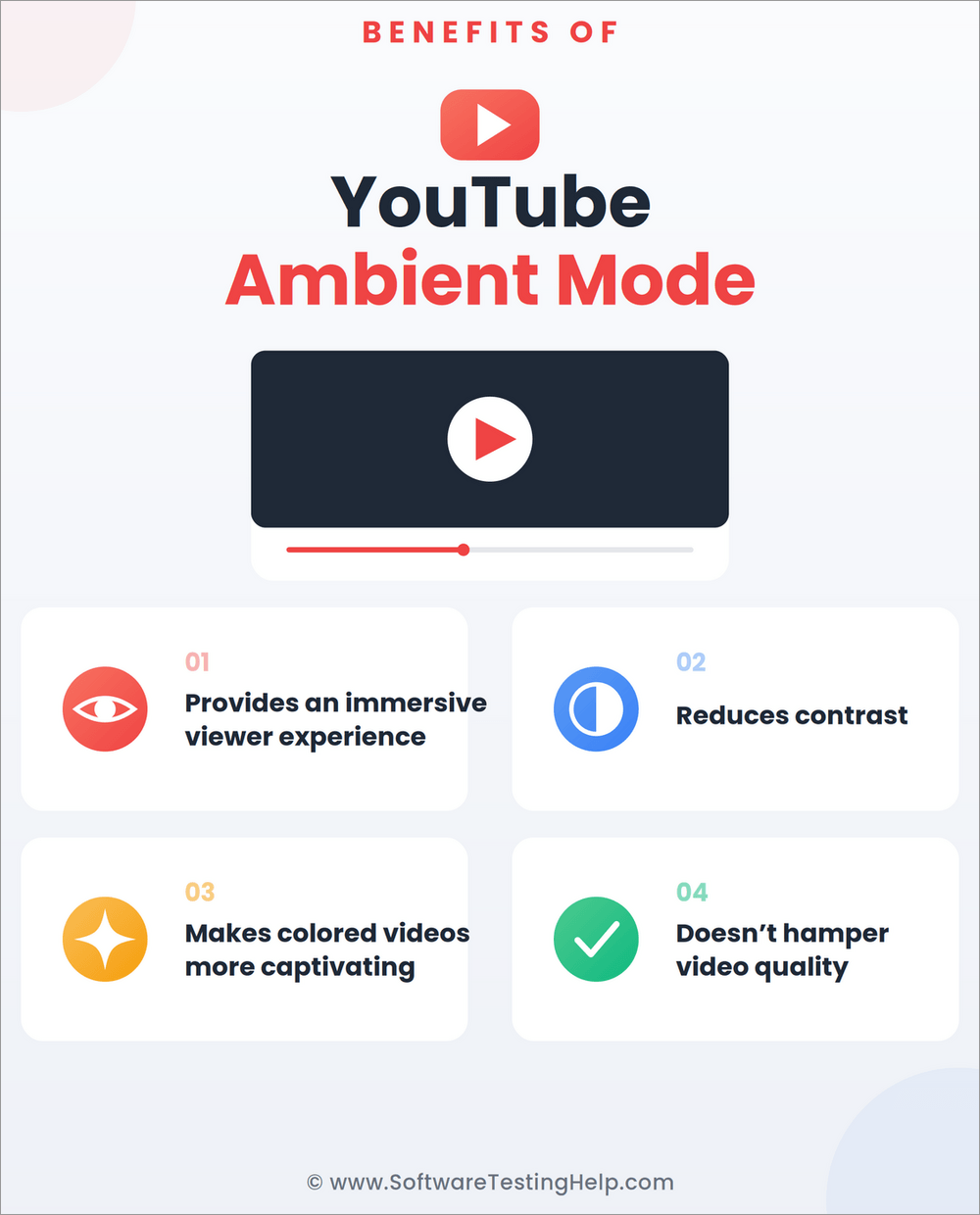
#1) Creates a More Immersive Viewing Experience
One of the biggest benefits of ambient mode on YouTube is the immersive experience it offers by blending the video’s color in the background, making the video more engaging.
#2) Reduces Contrast Between the Video and Background
Watching a bright video against a completely dark background can impact the optical experience and can also adversely affect the eye, straining it profoundly. Ambient mode reduces this harsh contrast by adding soft-colored lighting to the video’s background, making it suitable for long-hour watching.
#3) Makes Videos More Visually Engaging
Videos that have vibrant scenes such as travel vlogs or gaming and animated content look more realistic when watched in ambient mode.
Does Ambient Mode Affect YouTube Video Quality?
No. YouTube Ambient Mode does not affect the quality or resolution of the video that you are watching. This is just an aesthetic setting that is applied to the background area around the video.
The quality of the video that you are watching will still depend on the following things:
- Resolution of the video playback (720p, 1080p or 4K)
- Internet speed
- Youtube automatic quality settings
- The abilities of the device
- Original quality of the video
In conclusion, the YouTube Ambient Mode affects the background light effect but not the video resolution or bitrate. Deactivating it will not improve the video quality.
Does YouTube Ambient Mode Work on Smart TVs
Yes, but YouTube Ambient Mode works only on some smart TVs, primarily because televisions themselves provide an immersive experience. Also, many TVs possess their own ambient lighting, making them incompatible with the feature.
However, if your television has a feature supporting ambient backlighting, such as the one available on Philips Ambilight, the feature will work independently of YouTube.
Does Ambient Mode Affect Creators or Uploaded Videos
No, ambient mode does not affect creators or uploaded videos. Since it is a user-side optical effect that invariably allows the end-user to make changes to their video interface, it does not have any effect on the videos being uploaded or created.
The ambient feature is only there to help the user change their visual experience, wherein there is no impact on the video created or uploaded.
YouTube Ambient Mode Problems and Fixes
- Ambient Mode Is Not Showing: Make sure you have the updated version of YouTube’s application or browser where you use the YouTube site. To enable Ambient Mode, try enabling the Dark Theme feature. Relaunching the program or refreshing the web page will solve the issue if Ambient Mode does not work.
- Ambient Mode Won’t Turn Off: Locate the video settings and switch off Ambient Mode in there. If the effect still remains active despite the attempt to turn it off, refresh YouTube website or close and reopen YouTube application. Disabling browser extensions that affect YouTube and clearing the cached data might also fix the issue.
- Ambient Mode Looks Distracting or Flickers: Dynamic color effect may irritate people since it works differently for changing video scenes. Turn off Ambient Mode via the video settings. In case of unusual flickering even after turning off Ambient Mode, try to update your YouTube application, browser and graphic driver, or check whether browser extensions affect the video playing.
- YouTube Feels Slow With Ambient Mode Enabled: YouTube works slow after activating Ambient Mode, which means that your device/browser does not handle well with the additional visual effect. Disable Ambient Mode and close extra browser tabs and applications to fix the problem. Also, updating the browser, YouTube app, or operating system can improve the performance of the browser.
Frequently Asked Questions
1. What is ambient mode on the YouTube app?
Ambient mode on the YouTube app is a remarkable feature that subtly blends the video player’s color to the background to create a more cinematic and visually impactful experience. Instead of changing the video, this feature enhances the surrounding spaces with colors that match the ongoing video, making it immensely immersive.
2. Is ambient mode on YouTube good for the eyes?
Yes, the ambient mode on YouTube is good for the eyes since it reduces the harsh background contrast by subtly adding soft colors from the video to the background so that the viewing experience becomes more immersive.
3. Should I turn on ambient mode on YouTube?
Yes, you can turn on ambient mode on YouTube, but that is completely your personal choice, including your viewing habits. The mode can help you have a more immersive video experience, giving a theater-like effect.
4. Why did YouTube add ambient mode?
YouTube added ambient mode to give its users an immersive, cinematic experience no matter where they are in real-time. With the mode quietly blending with the video’s color, the user experiences a rich optical view of the video being watched.
5. Can you turn off ambient mode on YouTube?
Yes, you can turn off ambient mode on YouTube by simply playing the video, finding the ambient mode toggle option at the bottom, and disabling it.
6. Why does my YouTube keep going into ambient mode?
If your ambient mode keeps coming back, it might be because your dark mode has been enabled or YouTube has saved your previous preferences. To stop the ambient mode that persistently shows on your device, you need to toggle it off from your video settings and not from your main profile settings.
7. Why isn’t ambient mode showing up?
Ambient mode may not be showing up because of certain factors. If you’re using Google TV or Chromecast, ensure that you’re using the same Wi-Fi network both on your phone and the streaming device, since the option will not be visible if they are not synced.
Try to fix the issue by clearing the cache/data; otherwise, make sure “Apps only” mode is activated. If you’re primarily using YouTube, in the additional settings of the video player, toggle the feature.
8. Does YouTube Ambient Mode drain battery?
The use of Ambient Mode will require some extra processing, which can affect the battery’s life slightly. However, this will take little energy compared to video playback and screen brightness.
9. Does YouTube have Ambient Mode on Android?
Yes, it is. You can enjoy Ambient Mode on the Android YouTube app of a compatible version. Update your YouTube app to the latest version and enable Dark Theme if you cannot see the Ambient Mode.
10. Does YouTube Ambient Mode work on TV?
The availability of the feature depends on the YouTube app and your smart TV or streaming device. If the app supports Ambient Mode, check the video player settings.
Conclusion
YouTube’s ambient mode is an inventive feature that enhances the user experience by creating an immersive environment. No matter where you are or at what time you’re watching videos, this simple yet effective feature can instantly elevate your viewing experience.
While it is not necessary to use this mode, it is worth a try if you wish to enjoy a cinematic and appealing viewing experience. The best part is that you can always turn this mode off as and when required.
So, next time you’re watching videos, experiment with this YouTube feature and make your video experience more enjoyable!
Research Process: The total time involved in completing and publishing this article is approximately 38 hours. This content was created through a structured research approach to ensure accuracy and reliability.
For more related guides, you can explore our range of tutorials below:
- Why Is my YouTube Not Working Today? How to Fix It Fast
- YouTube Comments Not Loading? Top 9 Methods to Fix
- YouTube Private Vs Unlisted: Here is the Exact Difference
- 5 Ways To Fix YouTube Audio Renderer Error [With Screenshots]
- How to Fix YouTube Glitching: 10 Fixes That Actually Work
- How To Record YouTube Live Stream
- YouTube TV Family Sharing in Different Locations
Was this helpful?
Recommended Reading
-

Review of Top YouTube Video Downloader Apps with Features, Pricing & Comparison. Select the Best Free Online YouTube Ripper for PCs to Download YouTube Videos: YouTube is the most-watched video streaming website. Launched in 2005, the online video platform features a wide variety of content, including TV clips, educational videos,…
-

Select the best YouTube Subtitle Downloader per your requirements to download Subtitles from YouTube from the tools reviewed here: Multimedia has made things easier as now you can easily find a visual explanation for your questions and queries in an instant. Suppose, if any of your assignments or homework is…
-
Review and compare the top YouTube to GIF Maker and select the best YouTube to GIF Converter as per your specification: GIF or Graphics Interchange Formats have become immensely popular these days. It is a lossless format that supports 8 bits per pixel and can display 256 colors. GIF supports…
-
Read this review to compare and select the best YouTube Ad Blocker for Android, iOS, Windows, Mac, and various web browsers: YouTube is an amazing video streaming site where you will find endless good quality videos on almost any topic on earth. But Ads are its vice. You can take…


