Deeply explore the best CRM Software Tools with features & pricing. Select the right CRM tool to maintain better customer relationships for a successful business:
Customer Relation Management (CRM) can be defined as an organized approach to develop, manage, and maintaining a profitable relationship with customers.
CRM is all about the system of tracking and examining every interaction and communication we have with our customers and clients.
CRM basically provides the organization with a central pool, which assures simplicity, security, and scaling of customer interactions.
Top-Rated CRM Platforms: Enhance Your Business Growth

All the customers should be registered in the database of the CRM tool with some fields to identify their uniqueness so that the organization can connect with them when required. Thus CRM increases the business profits and customer list and interactions.
Many types of CRM are chosen based on customer requirements like Operational CRM, Analytical CRM, and Collaborative CRM.
Features of CRM System
The correct CRM helps to achieve contact management, Lead Management, Sales forecasting, instant messaging between employees, email tracking and integration with Outlook and Gmail, file, and content sharing, and dashboard-based analytics.
There are several famous CRM tools like Salesforce CRM, SAP CRM, ZOHO CRM, Oracle CRM, Microsoft Dynamics CRM, Nimble CRM, Sugar CRM, Hub spot CRM, PIPEDRIVE CRM, CRM Creatio, etc.
Benefits:
- It provides a better and improved client/customer relationship.
- It supports improved cross-functionality and thereby increases team collaboration.
- CRM offers strong efficiency in serving clients and more staff satisfaction.
- It reduces cost and manual effort.
Drawbacks of NOT using a CRM Tool:
- Without CRM it gets difficult to manage customer contacts in Excel.
- There is always a fight or moving between multiple tools.
- Increases the manual efforts to a great extent.
- Small scale easily loses track of business deals.
- Lesser accessibility of data and lesser customer satisfaction.
Our TOP Recommendations:
 |  |
 |  |
| monday.com | Klaviyo |
| • 360° customer view • Easy to set up and use • 24/7 support | • Email Marketing • SMS Marketing • Reviews |
| Price: $8 monthly Trial version: 14 days | Price: Starts at $45 per month. Trial version: Free to send 500 emails/month. |
| Visit Site >> | Visit Site >> |
List of the Best CRM Software
Enlisted below are the top CRM tools that are available in the market.
- monday.com
- Klaviyo
- HubSpot CRM
- Striven
- Zoho CRM
- Folk
- ClickUp
- SugarCRM
- SAP CRM
- Nimble CRM
- Oracle CRM
- Microsoft Dynamics CRM
- Brevo
- Oracle NetSuite
Comparing the Top CRM Tools
| CRM Software | Client Rating | Type | Cost | Mobile Support | Trial Version Available |
|---|---|---|---|---|---|
monday.com | 10/10 | Private | Average | Android, iPhone/iPad | Yes |
Klaviyo | 10/10 | Public | Average | No | Demo and Free plan available. |
HubSpot | 9.4/10 | FREE and Commercial | Free Trial Version | Yes | Yes |
Striven | 9/10 | Private | Average | Android, iOS. | Yes |
Zoho CRM | 9.5/10 | Commercial/Private | Medium Cost | Yes | Yes |
Folk | 9.5/10 | Private | Average | No | Yes |
ClickUp | 9.5/10 | Free and Commercial | Affordable | iOS and Android | Forever Free Plan Available. |
Sugar CRM | 8.1/10 | SMB | Medium Cost | Yes | Yes |
SAP | 8/10 | Commercial | Higher Cost | Yes | Yes |
Nimble | 8.3/10 | SMB | Low Cost | Yes | Yes |
Oracle | 8.2/10 | Commercial | Higher Cost | Yes | Yes |
Microsoft Dynamics | 7.6/10 | Commercial | Higher Cost | Yes | Yes |
Salesmate | 9/10 | Private | Average | iOS and Android | Yes |
Brevo | 9.5/10 | Private | Affordable | Android and iOS | 14 day free trial |
Oracle NetSuite | 9.5/10 | Private | — | Yes | No |
Let’s Explore!!
#1) monday.com
monday.com CRM software will allow you to manage customer data, interactions, and processes the way you want. It will keep all the data protected. It will allow you to capture the leads online through an integrated contact form. Leads can also be inserted automatically that were captured on other forms. monday.com will allow you to import the leads from various tools.

Developed By: Roy Mann and Eran Zinman.
Type: Private
Headquarters: Tel Aviv-Yafo, Israel
Initial Release: 2010
Operating Systems: Windows, Android, Mac, iPhone/iPad.
Deployment Type: Cloud-based and Open API.
Language Support: English
Annual Revenue: $120M-$150M
Number of Employees: 201-500 employees.
Companies Using monday.com CRM: WeWork, Discovery Channel, Carlsberg, Wix.com, Philips, etc.

Price: monday.com has four pricing plans i.e. Basic ($17 per month), Standard ($26 per month), Pro ($39 per month), and Enterprise (Get a quote). These prices are for 2 users and if billed annually. It offers a free trial for the product.
Prime Features:
- Session Management
- Advanced Account Permissions
- It will allow automation of 100000 actions per month
- It provides an Audit log.
- HIPAA Compliance
Other Features:
- This CRM software will allow you to build and customize the dashboard as per your requirements for gaining insights.
- It will provide a clear overview of sales, processes, performance, etc.
- It will allow you to automate repetitive tasks.
- It has features for setting automatic reminders, due date notifications, and assigning new tasks to teammates automatically.
Pros:
- monday.com is an all-in-one solution and easy to use.
- It can be customized to fit your sales workflow.
- It has advanced search capabilities.
- It can also provide time tracking, chart view, and private board features.
Cons:
- monday.com doesn’t provide a free plan.
- Toggling between the views on the project is difficult.
#2) Klaviyo
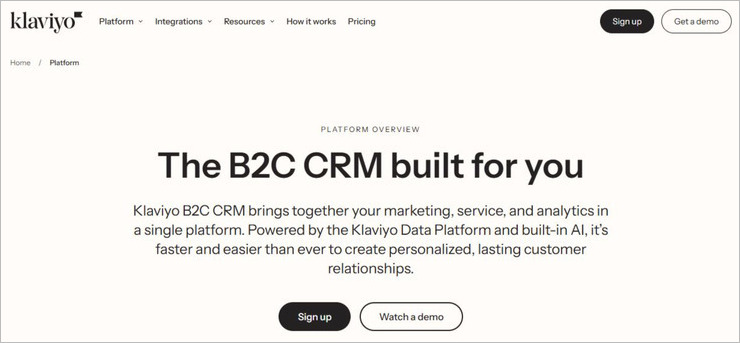
With Klaviyo, you get a feature-rich CRM tool tailored to meet the requirements of small to large B2C enterprises. Klaviyo serves you the perfect concoction of service, marketing, and analytics-based features. The platform is perhaps best used to expand a business’s customer reach via streamlined SMS and email marketing campaigns.
Developed By: Ed Hallen, Andrew Bialecki
Type: Public
Headquarters: Boston, USA
Initial Release: 2012
Operating Systems: Web
Deployment: Cloud-based
Language Support: English
Annual Revenue: —
Number of Employees: 1001-5000
Companies Using Klaviyo: Dollar Shave Club, VANS, Mattel, Glossier, Daily Harvest.
Price: You can send up to 500 emails for free with Klaviyo. Its email-only plan will cost you around $45 per month, whereas its Email + SMS plan will cost you $60 per month. The Marketing Analytics plan will cost you $100/month. You can get a free demo of the tool upon request.
Prime Features:
- Email Marketing
- SMS Marketing
- Marketing Automation
- Marketing Analytics
Other Services:
- Create campaigns and automated flows to send emails and texts from a single platform.
- AI-powered campaign personalization and testing
- Pre-built and custom reports are available.
- Capture all interactions across marketing and service channels.
Pros:
- Free plan
- Flexible pricing
- Real-time reporting
- Customizable templates.
- Smart AI that helps launch personalized campaigns.
Cons:
- Some users have reported a steep learning curve.
#3) HubSpot CRM

HubSpot CRM: In today’s competitive market, HubSpot is one of the famous and most commonly used CRM tools. It has created a great impact on its Clients with its powerful mechanism and capabilities. It is free to a huge extent and this attracts most of the Clients.
HubSpot’s simple platform allows Clients to start quickly without even changing much. It is simple and fast and has most of the features that the other CRMs possess. HubSpot without any doubt provides the best integration CRM environment which the other CRM tools do not provide for free. It is a flexible and powerful software.

Developed by: Brian Halligan, Dharmesh Shah.
Type: Free/Commercial
Head Quarters: Cambridge, Massachusetts.
Initial Release: June 2006.
Based on Language: Java, MySQL, JavaScript, HBase, etc.
Operating Systems: Linux, Windows, Android, iPhone, Mac, Web-Based, etc.
Deployment Type: Cloud-Based
Language Support: English
Annual Revenue: Approx. $375.6 Million annually till 2017.
Number of Employees: Approx. 2000 employees are working currently.
Companies Using HUBSPOT: F1F9, G2 Crowd, Heritage, Vifx, Vipu, Vivo net, Wedo, WeedPro, Track Light, Trust Radius, Thunderbird Online, Skyhook, Skyline, etc.
Price:
The free version comes with several features.
- Starter: US $50
- Basic: US $200
- Professional: US $800
- Enterprise: US $2400
Features:
- It gives you customization, a board for tasks, and helps to synchronize the marketing department.
- It comes with a good cell phone, Mail, and Website integration.
- It helps to manage the pipeline with total visibility.
- Logs every activity automatically and can see all the information about the contacts in one place.
Pros:
- It provides an excellent feature for searching companies.
- It continues to work in the background without disturbing the other tools.
- It comes with all famous Google features like Gmail, Google Drive, and Calendar.
- It keeps the Client records in one place and we can also read the feedback from Clients.
Cons:
- Through HubSpot, we cannot send emails across multiple companies at the same time.
- Its free version doesn’t have all the features.
- No auto-updating on Sidekick and we have to do it manually for the existing companies.
#4) Striven
With Striven, you get a comprehensive CRM system that powers an organization’s sales funnel from beginning to end. The software is particularly great because of its ability to automate sales funnels and marketing. The software’s also great at letting users track their sales pipeline from prospect to eventual closure.

Developed By: Chris Miles
Type: Private
Headquarters: New Jersey, USA
Initial Release: 2008
Operating Systems: Web, Android, iOS
Deployment Type: Cloud-based and Mobile
Language Support: English
Annual Revenue: Less than $5 Million (Approx)
Number of Employees: 1-10 employees.
Price: There are two subscription plans with the ultimate pay depending upon the number of users you wish to accommodate. The standard plan starts at $20/user/month whereas the enterprise plan starts at $40/user/month. A 7-day free trial is also available.
Features:
- Sales Funnel and Marketing Automation
- Detailed Sales Tracking
- Customer Report management
- Automated emails
Other features:
- Complete financial management
- Workflows automation
- Task Management
- Analytical reporting
Pros:
- Strong third-party integrations
- Customizable reports
- Activity dashboard.
Cons:
- Not suitable for larger enterprises
#5) Zoho CRM
Zoho CRM is a cloud-based Customer Relationship Management system that has been present in the market for over 15 years and caters to SMBs, enterprise customers, and varied types of businesses, irrespective of their size. It is an operational business platform that goes beyond being just a sales pipeline or lead management tool.
Zoho is trusted by 250,000+ businesses across 180 countries. It is the only vendor in the industry with over 40 in-house business apps that support mobile and integrate with more than 500 popular business apps.
Zoho CRM is the winner of PCMag’s Editor’s Choice Award in 2020 and the Business Choice Award in 2019 (for being the only vendor with a positive NPS score) making it the most recommended CRM by users and critics worldwide.

Developed by: Sridhar Vembu and Tony Thomas.
Type: Commercial/Private
Head Quarters: Austin
Initial Release: 1996.
Based on Language: Java
Operating Systems: Linux, Windows, Android, iPhone, Mac, Web-Based, etc.
Deployment Type: Cloud-Based, SaaS.
Language Support: A total of 28 languages.
English (US), English (UK), Hebrew, French, German, Spanish, Italian, Japanese, Korean, Portuguese (Portugal), Portuguese (Brazil), Russian, Arabic, Swedish, Bulgarian, Chinese (China), Chinese (Taiwan), Danish, Dutch, Polish, Hungarian, Turkish, Bahasa Indonesian, Vietnamese, Thai, Hindi, Croatian and Czech.
Number of Employees: 10,000+ employees
Clients: Hyatt, Netflix, Amazon, Purolite, IIFL, Saint Gobain, Tassal, Suzuki, etc.
Price:
- Free: Upto 3 users
- Standard: $14
- Professional: $23
- Enterprise: $40
- Ultimate: $52 [Exclusive 30-day trial]
- Custom Quote: On request, along with enhanced security, implementation, onboarding, and training.
Features:
- Omnichannel platform to connect with customers across different channels.
- Sales automation tools to manage leads, contacts, deals, and accounts through workflows and macros.
- Customizable dashboards and reports with multiple options to compare, contrast, and derive insights from your data.
- AI-powered sales assistant, Zia, to help you predict sales outcomes, detect anomalies, enrich data, identify email sentiments and the best time to contact someone.
- Marketing attribution tools provide you with insights into the distribution of your campaign budgets with corresponding ROI data.
- Internal chat feature plus forums, notes, and groups to facilitate effective team collaboration.
- Mobile CRM app to record data, schedule tasks, connect with customers, and update information even when you’re offline.
- REST API, deluge functions, widgets, web and mobile SDKs, sandbox, and developer edition allow you to extend your CRM’s potential with a mix of low code and pro code.
Pros:
- Quick and easy onboarding. Our migration system, Zwitch, helps you bring all your existing sales data into Zoho CRM in just a few clicks.
- Advanced security features like encryption, audit logs, IP restrictions, and two-factor authentication with customizable access to users.
- Mobile CRM app to stay ahead of the competition and in touch with your customers anytime, anywhere.
- Flexible contracts and pricing help you pay monthly or annually for only the things you need. No hidden costs.
- 24-hour support for premium users.
Cons:
- Free edition is limited to 3 users.
- Does not offer on-premise solutions.
- Free support is limited to 24/5.
#6) Folk
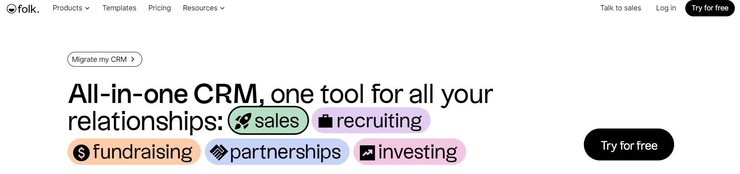
With Folk, you get an all-in-one CRM software that can take your sales, fundraising, and recruiting to the next level. The software streamlines various aspects associated with CRM seamlessly. You can use it to create pipelines automatically. It is also great at importing and syncing contacts from sources. It can also help you write personalized emails with an AI.
Developed By: Thibaud Elziere, Simo Lemhandez, Jean Yves Poilleux.
Type: Private
Headquarters: Paris, France
Initial Release: 2019
OS: Web-based
Deployment Type: Cloud-based
Language Support: English
Annual Revenue: —
Number of Employees: 11-50
Companies Using Folk: Sparkmate, Switchboard, Slite, Marble.
Price: Folk offers two plans. The standard plan costs $18/member/month. The premium plan costs $29/member/month. You can try the plans for free as well.
Features:
- Pipeline creation and management
- Contact Syncing
- AI-based email personalization
- Chrome Extension
Pros:
- Easy to use
- Reasonable pricing
- Tracking dashboard
Cons:
- The support could’ve been more responsive
#7) ClickUp

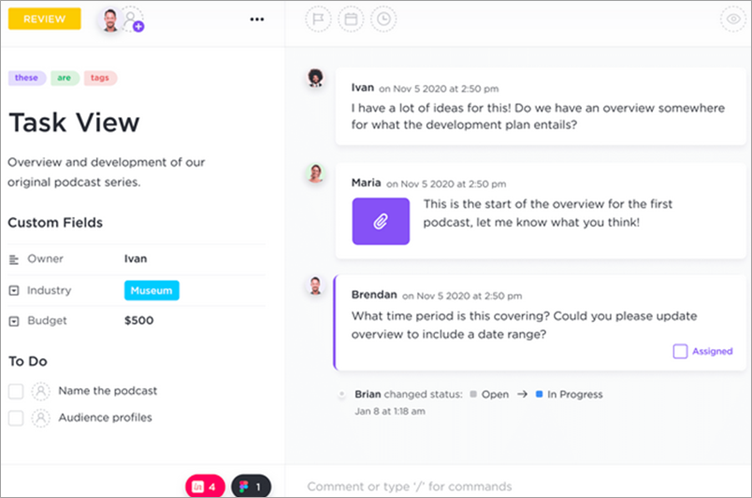
ClickUp is an all-in-one platform for planning, tracking, and managing all types of work with project management. It has a facility for the automatic import of the work instantly from other tools.
ClickUp offers flexible pricing options that make the platform suitable for freelancers as well as businesses of any size. It can be used by various teams such as HR, IT, Sales, Marketing, etc.
Type: Privately Held
Headquarters: San Diego, California.
Initial Release: 2017
Operating System: Windows, Mac, Linux, Android, iOS, and Web-based.
Deployment Type: Cloud-based
Language Support: English
Annual Revenue: $73 Million
Number of Employees: 201-500 employees
Companies using ClickUp: Google, Airbnb, Uber, Nike, etc.
Price: ClickUp offers a forever-free plan. There are four more pricing plans, Unlimited ($5 per member per month), Business ($9 per member per month), Business Plus ($19 per member per month), and Enterprise (Get a quote).
Prime Features:
- Advanced permissions.
- Unlimited custom roles.
- Access to managed services.
- Single sign-on.
Other Features:
- ClickUp provides the feature of ‘everything view’ that gives a birds-eye view of all tasks across every level of the organization.
- It has features of customizable tasks, nested subtasks & checklists, etc.
- It can provide more than 15 powerful views.
- ClickUp has functionalities for automation, relationships, integrations, etc.
Pros:
- ClickUp offers 100MB of storage even with a free plan.
- It supports unlimited members and tasks.
- It has two-factor authentication and real-time chat.
Cons:
- As per the customer reviews, the platform has a little learning curve.
#8) SugarCRM
In today’s market, SugarCRM is one of the rising customer management tools that serve thousands of companies that require good management for sales and marketing.
SugarCRM is quite impressive with a variety of communication options that it provides at a decent and affordable price. It also gives the flexibility to its Client in choosing the deployment method.
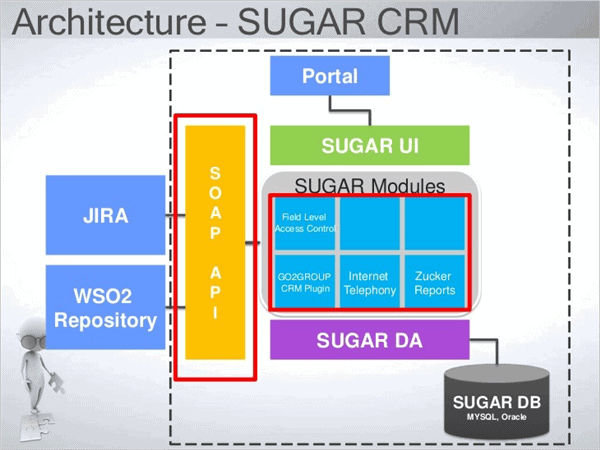
Refer to the below Architecture Diagram of SugarCRM:
Developed by: Clint Oram, John Roberts, and Jacob Tylor.
Type: Commercial/Private
Head Quarters: Cupertino, California, US.
Initial Release: 2004
Based on Language: Lamp Stack (Linux, Apache, MySQL, PHP)
Operating Systems: Linux, Windows, Android, iPhone, MAC, Web-Based, etc.
Deployment Type: Cloud-Based
Language Support: English, German, Spain, France.
Annual Revenue: Approx. US $96 Million and keeps growing.
Number of Employees: Approx. 450 employees are working currently.
Clients: CA Technologies, Coca-Cola, Dassaul System, Linder, Loomis, LUEG, Marathon, Reebok, the List, Ticomix, VMware, Zenoss, etc.
Price:
- Open Source: The trial version is completely free
- Sugar Professional: US $40 and keeps increasing.
Features:
- SugarCRM provides good sales, support automation, and lead marketing.
- It is a cloud-based deployment with good customization and online support.
- It has centralized storage with expanded workflows and role-based views.
- It has reference integration with SQL, MySQL, and Oracle support.
Pros:
- It helps to host instances on-site so that customization becomes a lot easier.
- It comes with all the features at an affordable price.
- Its centralized storage and integrated management of a project are beneficial.
- Overall, SugarCRM API and reporting are very impressive.
Cons:
- It has many breaks in a workflow.
- It has a difficult learning curve.
- A lot of manual programming is required for any customization.
- Development is quite complex for developers.

#9) SAP CRM
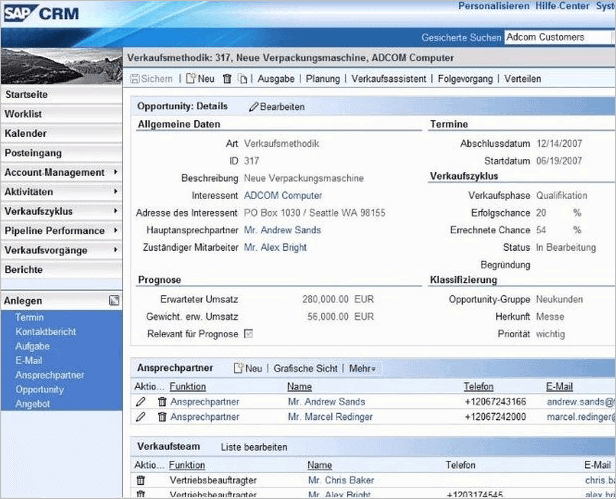
SAP CRM is one of the famous Customer Relations platforms that is developed to support improved working capabilities and also provides you with a very good customer interaction experience for better business growth.
SAP CRM allows deploying the application either in the cloud or on-premise depending on the customer requirement. It plays a vital role in boosting customer engagement, sales, and marketing. It automates and integrates all the customer-facing activities.
Refer to the below SAP CRM Architectural Diagram:

Developed by: SAP SE
Type: Commercial/private.
Head Quarters: Walldorf, Germany.
Initial Release: 2008
Based on Language: Java, ABAP
Operating Systems: Windows, Mac, Web-Based, etc.
Deployment Type: Cloud-Based, On-Premise.
Language Support: English, German, Spanish, Chinese, Swedish, Portuguese, Dutch, etc.
Annual Revenue: Approx. 23.5 Billion Euros and growing since 2001-2018.
Number of Employees: Approx. 89000 employees are working currently.
Clients: Accenture PLC, Agilent Technologies, Tribridge, Patterson Companies, Success Factors, Kitchen Aid, Oxy, etc.
Price: There is no official information about the prices provided by SAP. The client needs to contact the SAP Company to get Enterprise Pricing for their requirements.
Features of SAP CRM:
- It supports automating Salesforce with lead management.
- It helps to recover contact history, contact, and document management.
- It comes with a good sales report and partner management.
- It supports tracking of time, pipeline, and marketing Emails.
Pros:
- Its integration with ECC and BW is excellent.
- It provides many varieties of reports, tools, and views for analyzing and forecasting.
- It provides a decent 360-degree view for all the customers.
- It is extremely robust and flexible with tons of features.
Cons:
- It does not have a good interface UI.
- Deploying applications on-premise with SAP CRM requires a very technically skilled professional.
- Its cost is too high and more manual efforts are required to configure things.
- It does not have a good social capability, hence getting the social network centralized is very tough.
#10) Nimble CRM
Nimble is a famous CRM software that was developed for professionals and organizations to establish a better client-customer relationship in the multi-environment and crowded world.
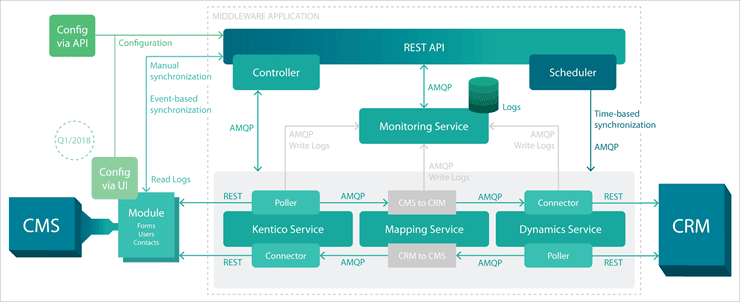
It provides a fast and quick approach for monitoring, engaging, and increasing business relationships. It helps to combine communications, and customers into a single platform for simple understanding.
Refer to the below diagram for Nimble Architecture:
Nimble has been awarded as the No. 1 CRM by FitSmallBusiness in 2017, the No. 1 CRM by G2 Crowd in 2018, No.1 Sales Integrated Tool by G2 Crowd in 2018, and Market Leader for Email Tracking Software by G2 Crowd.
Developed by: John Ferrara.
Type: Commercial/private.
Head Quarters: San Jose, CA, USA.
Initial Release: 2008.
Based on Language: R language, uses C++ to compile.
Operating Systems: iPhone, Mac, Web-Based, etc.
Deployment Type: Cloud-Based
Language Support: English
Number of Employees: Approx. 5000 employees are working currently.
Clients: SKYMAX, TOTUS TUUS, INTERMEDIO, THINGS WITH WINGS, Wayferry, You Too, Irun run, AP Consulting, Global Brain force, Hunter, Egentia, etc.
Price:
- Nimble Contact: US $9
- Annual Revenue: Approx. $100 to $500 USD per year
Features:
- It provides good customer contact management for a multi-environment with social listening and engagement.
- It is simple and client-friendly, thereby allowing all social media searching through it.
- We can check signals, set reminders, and can extend nimble with more tools.
- Here we can assign a task to anyone with improved sales pipeline tracking and reporting.
- API, Custom fields, Email signature capture, Smart App, group messages, etc.
Pros:
- It provides an excellent plugin of Chrome and automatically aggregates social accounts, thus manual efforts are reduced to a great extent.
- It offers a smart app that helps to collect information about a person and stores it in its database.
- It provides a centralized place for having emails, CRM-related data, and Calendar.
- It includes a handy feature of creating lists and group message facilities.
Cons:
- It doesn’t have a good email editor.
- It comes with a very poor deal management system.
- It lacks the integration of Slack and syncing with programs is not good.
- It comes with only one pipeline which n turn is a major drawback.

#11) Oracle CRM
Oracle CRM is one of the renowned and trusted CRM tools in today’s market among all the customers. Oracle CRM gives you a complete, Integrated, and Extensible Application Suite for modern customer experience.
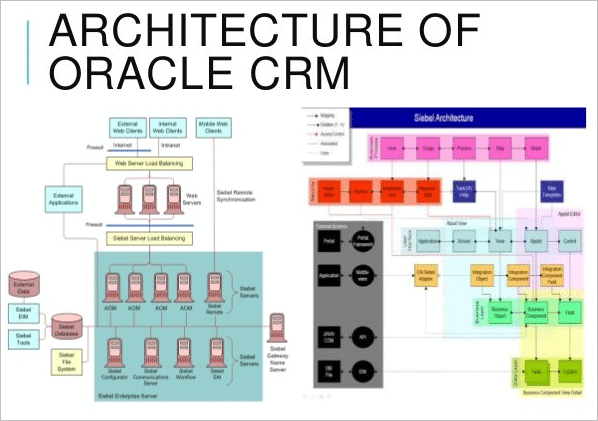
Oracle CRM provides you with reliable solutions for Marketing, Sales, Commerce, Social Platforms, Service and CPQ. It is robust and has a variety of deployment models. It helps to create good and healthy relationships with the customers.
Refer to the Architecture of Oracle CRM:
Developed by: Oracle
Type: Commercial
Head Quarters: Redwood City, California, USA.
Initial Release: 12th Sept 2005.
Based on Language: Siebel
Operating Systems: Linux, Windows, Android, iPhone, Mac, Web-Based etc.
Deployment Type: On-Premise
Language Support: English, Chinese, German, Japanese, Indian.
Annual Revenue: Approx. $11.8 Billion annually until 2018.
Number of Employees: Approx. 1, 38,000 employees are working currently.
Companies Using Oracle CRM: Accenture, TCS, Fusion5 Limited, Hyro Asia Limited, Larsen and Turbo, Wipro Technologies, Birla soft, Zensar Technologies, etc.
Price:
- Starting: US$75, Standard Version: US $90, Enterprise Version: US $125
- Self-Deployed Version: US $110
Further Reading => Most Popular CRM Software for Insurance Agents
Features of Oracle CRM:
- It provides social interactions with good integration of Client data.
- It supports business intelligence applications with self-service and e-billing.
- It provides integration with Siebel CRM and CRM gadgets.
- It has a good price and partner relationship management.
Pros:
- It helps in tracking Sales, Leads, and Opportunities.
- It has a very simple installation and integration with all the other Oracle tools is good.
- It helps to increase production and emphasizes on selling rather than looking.
- Good report and forecast feature.
Cons:
- Oracle CRM has a weak UI and hence it is not so Client friendly.
- The application becomes slow and has a complex learning curve.
- Integration can be improved.

Website: https://www.oracle.com/
Further Reading => Explore the BEST Facebook Lead Ads Integrations For Your CRM
#12) Microsoft Dynamics CRM
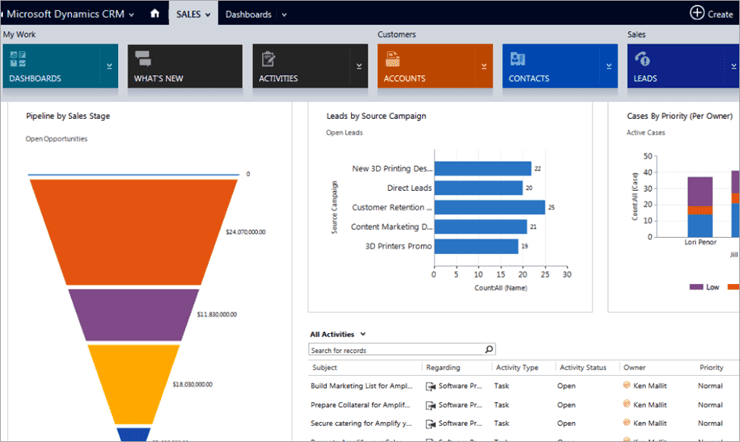
Microsoft Dynamics CRM is a popular and strong CRM software. It helps to streamline the processes and increases profit in sales, marketing, and service divisions.
It helps to create a strong bond with the customers thereby satisfying their expectations and requirements. It keeps centralized information about the customer and automates interactions. It is a server-client software.
Refer below the Architecture of Microsoft Dynamics CRM Tool:

Developed by: Microsoft
Type: Commercial
Head Quarters: Redmond Washington, USA.
Initial Release: 2003 Microsoft CRM 1.0
Based on Language: Net framework
Operating Systems: Linux, Windows, Android, Web-Based, etc.
Deployment Type: Cloud and On-Premise
Language Support: English
Annual Revenue: Approx. $23.3 Million annually till 2018.
Number of Employees: Approx. 1, 31,000 employees are working currently.
Companies Using Microsoft Dynamics CRM: 4Com, BluLink Solution, Calspan Corporation, Dallas Airmotive Inc, Extended Stay America, Cap Gemini, TCS, HCL, GE, Infosys, HCL, etc.
Price:
- Customer Engagement Plan: US $115
- Unified Operations Plan: US $190
- Dynamics 365 plan: US $210
- Applications and offers: US $40 to $170
Features:
- It helps to centralize the data of contact, sales, and marketing.
- It helps to visualize the information and helps to automate data with workflows.
- It has Android, IOS, windows, and web apps and creates a new database for the already available data.
- It helps to create data of the customers into Excel formats.
Pros:
- Good Client interface which is simple and easy to use.
- Supports both SaaS and on-premise.
- It provides automated workflows and thereby reduces manual efforts.
- It offers high customization.
Cons:
- Good compatibility with Microsoft products but slows down while interacting with others.
- Complex learning curve.
- It has been growing its functionalities in terms of the cloud until now.
- The capability to clone records is missing.
- Global Searching is left out in one version.
Website: https://dynamics.microsoft.com/
#13) FreeAgent CRM

FreeAgent offers a CRM platform that gives complete visibility into day-to-day activities, real-time collaboration, and code-free customization. It helps with optimizing sales, marketing, customer success, project management, etc.

Developed By: FreeAgent
Type: Privately Held
Headquarters: Walnut Creek, California
Operating Systems: Web-based platform.
Deployment Type: Cloud-based
No. of Employees: 51-200 employees
Price:
- Monthly as well as annual billing plans.
- Help Desk: $50 per user per month.
- B2B Customer Service: $75 per user per month.
Features:
- Automation features like automated assignments, condition-based automations, etc.
- Reporting tools like cycle time analytics, widgets, dashboards & dashlets, etc.
- FreeAgent CRM has process management capabilities like custom stages, approval workflows, etc.
Pros:
- FreeAgent CRM is a customizable platform and will let you tailor every aspect of the system.
- It offers personalization features like homepages, personal themes, and favorites.
- It supports integrations with Office 365, Mailchimp, Zapier, Twilio, Google Workspace, etc.
Cons:
- No such cons to mention.
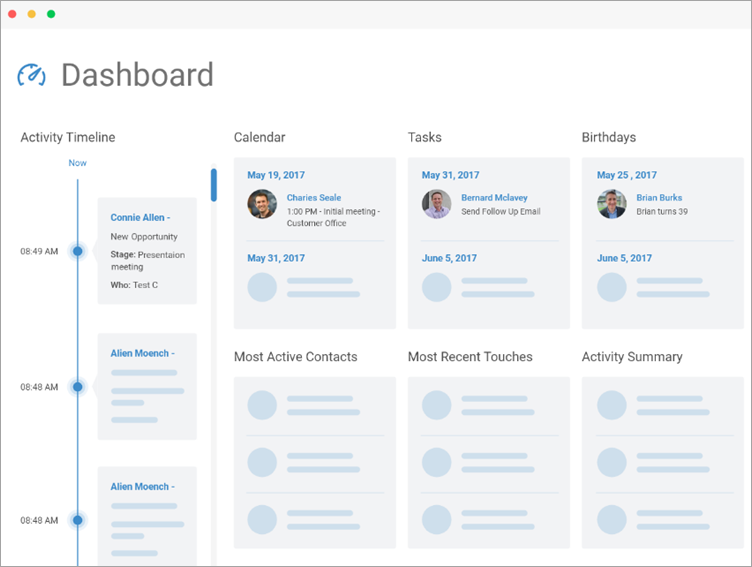
#14) BIGContacts

BIGContacts customer relationship management tool empowers small to medium-sized businesses to better manage their prospects and customers. With advanced marketing automation and reporting capabilities, this CRM tool can be a valuable companion for your business’s growth.
BIGContacts is incredibly simple to implement and navigate. You can capture and store all essential information, including social media activity and previous touches, for all your contacts in one place.
The tool is highly customizable and can be integrated with your existing business tools with ease. You can also use it to send emails, schedule meetings, and collaborate with team members.
Developed by: Bob Walton (Acquired by ProProfs)
Type: Private
Headquarters: Colorado Avenue, Santa Monica, California, USA
Initial Release: 2006
Operating Systems: Windows and web-based
Deployment Type: Cloud-based
Language Support: English
Number of Employees: 150-200 employees
Price: BIGContacts offers three pricing plans i.e. BIG ($5/user/month), BIGGER ($15/user/month), and BIGGEST ($25/user/month), billed annually. BIGContacts also offers a 30-day free trial.
Prime Features:
- Contact management
- Customizable dashboard
- Email marketing integration
- Custom sales pipeline
- Team and individual calendar
- Social media tracking
- Automated tasks and reminders
Other Features:
- You can easily customize the CRM dashboard to include the most relevant information.
- You can use report templates or create custom reports with ease.
- Capture more leads by connecting web forms with the CRM.
- Multiple integrations can help you manage your business processes easily.
- Get a complete overview of your pending tasks, contact data, and communication history in one place.
Pros:
- Affordable pricing
- Automated reminders for follow-up
- Clutter-free and easy to use
- Workflow management
- Email and letter templates
- Easy data import
- Helpdesk integration
Cons:
- The UI of the mobile CRM has scope for improvement.
- The search feature could be more intuitive.
#15) noCRM.io
noCRM.io is a lead management tool for small to medium-sized sales teams. It has features for differentiating cold prospects from hot leads, team collaboration, tracking lead communications & interactions, visual and personalized sales pipelines to monitor progress, and many more.

Developed By: noCRM.io
Type: Private
Headquarters: Paris, France
Operating Systems: Windows, Mac, iOS, and Android.
Deployment Type: Cloud-based.
Language Support: English, Spanish, French, Portuguese, German, and Italian.
No. of Employees: 11-50 employees
Companies using noCRM.io: Phenocell, Founder’s Choice, John Taylor, The British Bottle Company, Blueprint Tax, etc.
Price: It starts at $12 per user per month. Billed annually or monthly. A 15-day free trial is available.
Prime Features:
- Advanced email management with email tracking, customizable signatures, and templates.
- Advanced security and privacy settings.
- Priority support
- Team management features
- API and Advanced native integrations.
Other Features:
- Customizable Sales Pipeline
- Statistics and reporting
- Built-in Prospecting
- Sales Script Generator
- Email Integration
Pros:
- noCRM.io provides an easy way to create leads and grow the pipeline.
- It has functionalities for differentiating cold prospects from hot leads.
- It will increase team collaboration.
- It provides high-level security, GDPR & CCPA compliance.
Cons:
- No cons to mention.
#16) Creatio CRM

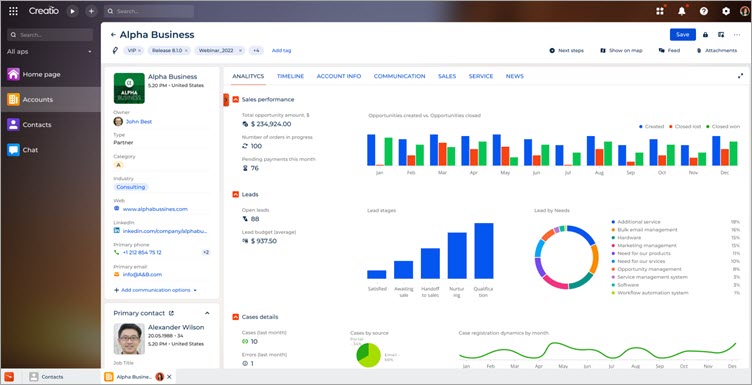
Creatio CRM is a full-fledged suite of products for marketing, sales, and service automation integrated into one no-code platform.
Marketing Creatio: A ready-to-use platform to automate marketing campaigns and lead management workflows with no code and a maximum degree of freedom.
Sales Creatio: An end-to-end platform to automate sales processes of any type with no code and maximum degree of freedom.
Service Creatio: An omnichannel platform to automate customer service workflows of any complexity with no code and a maximum degree of freedom.
Studio Creatio: A no-code platform to automate workflows and build applications with maximum degree of freedom.
Creatio products can be deployed as a single CRM bundle or as standalone solutions to fit your company’s exact needs.
Millions of workflows are launched on our platform daily in 100 countries by thousands of clients. Creatio has been widely recognized by key industry analysts (such as Gartner, Forrester, Nucleus, etc.), receiving multiple awards.
Developed by: Creatio
Type: Commercial
Head Quarters: Boston, Massachusetts.
Initial Release: 2014
Based on Language: JavaScript, HTML, UTF-5, CSS, Google Analytics, Microdata, etc.
Operating Systems: Windows, Android, iPhone, Mac, Web-Based, etc.
Deployment Type: Cloud-based and on-premise.
Language Support: English, German, Spanish, French, Italian, Dutch, Portuguese, Polish, Swedish etc.
Annual Revenue: Approx. $68 Million
Number of Employees: Approx. 700 employees are working currently.
Companies Using Creatio: AMD, Bayer, Kraft Heinz, Visteon, Société Générale Group, BNP Paribas Group, OKI, Heinz, Loreal, Unilever, Allianz, Ericsson, Ent, Volition Capital, etc.
Price:
Creatio provides you with a 14-day free trial for you to test all the features available. You also can get a free demo with CRM experts and after choose an option using composable pricing.
- Growth + CRM (Marketing, Sales, Service) starts from $40/user/month – provide automation to SMB clients.
- Enterprise + CRM (Marketing, Sales, Service) starts from $70/user/month – enable full-scale automation for corporate and enterprise needs.
- Unlimited + CRM (Marketing, Sales, Service) starts from $100/user/month – delivers limitless automation for advanced enterprise scenarios.
Creatio offers many various editions and pricing, which allows users to select the edition that best fits their business model. All Creatio licenses include a basic support plan, product maintenance, and free updates.
Prime Features:
- 360° Customer View
- Business Process Management
- Collaboration Tools
- Lead Management
- Opportunity Management
- Orders and invoices
- Omnichannel communications
- Analytics
Other Features:
- Studio Creatio provides extensive integration capabilities (.Net tools, REST, SOAP, OData, open API).
- Lead and Time management with export functions and calendar inbuilt.
- Sales management for business growth and knowledge management library.
- Trigger campaigns, personalized email marketing, and event management.
- It supports multi-environment with mobile IOS and Android apps.
Pros:
- Simple, Client-friendly, and has many features.
- Very good sales support team.
- Automating data is powerful.
Cons:
- The number of connectors can be increased.
- While in the customs zone, may be complicated to debug.
#17) Zendesk CRM

Zendesk is a sales CRM software designed to make the jobs of sales personnel in any organization tenfold easier. With the primary goal of deal closure and customer satisfaction in mind, this integrated tool streamlines daily sales tasks, tracks conversions, facilitates performance visibility, and improves sales pipeline management.
With Zendesk, a sales team gets the luxury of performing multiple functions from a centralized platform, in just a few clicks. Sales execs can schedule meetings, make calls, and monitor deal history without breaking a sweat. Furthermore, the platform’s mobile application helps you avail of all its features on the go, thus making sure your sales department gets the attention it deserves even when you are on the move.

Developed By: Mikkel Svane, Morten Primdahl, Alexander Aghassipour
Type: Public
Headquarters: San Francisco, USA
Initial Release: 2018
Operating Systems: iOS, Android, Mac, Windows
Deployment Type: SaaS
Language Support: 30 languages including English supported
Annual Revenue: $169.65 million
Total Employees: 5000 Active Employees (Approx)
Companies using Zendesk sell CRM: Intermind, Staples, Shopify, Mailchimp, and Instacart.
Price: Zendesk has three pricing plans. The “Sell Team” plan will cost $19 per user per month. The Sell Professional plan will cost $49 per user per month and the Sell Enterprise plan will cost $99 per user per month. A 14-day free trial is also available.
Top Features
- Sales Reporting and Analytics
- Sales Prospecting
- Seamless Integrations and API
- Sales Email Intelligence
- Native Dialer
Other Features
- Immediately log and record all contact-related emails in Sell. Receive real-time push notifications every time a prospect reads or clicks on an email.
- Initiate a call with just a click. Immediately log and record all outgoing and incoming calls.
- Connect Zendesk with all existing tools and applications currently being used by your business.
- Build a targeted list of prospects across multiple channels.
- Visually impressive customizable reports and analytical dashboards.
Pros
- Multiple email templates to help create and save sales emails.
- Centralized dashboard to perform and monitor all sales-related activity.
- Engage leads automatically by sequencing emails and tasks.
- Mobile Sales CRM Application.
- Robust customer support.
Cons
- No free plan
#18) Salesforce CRM

Salesforce CRM is one of the world’s leading cloud-based CRM tools/software which provides creative CRM solutions that can be effectively used for all business requirement companies from high-scale enterprises to small start-ups.
Salesforce CRM is based on the cloud, scalable, and in turn very easy to use too. Customizable and provides a platform for growth and upgrades. Supports mobile and integration.
Suggested reading => Top Salesforce Competitors
Salesforce CRM helps to understand customer requirements, indicates new ways to help, solves issues faster and provides a quick and clean deployment. With just a single view, we can do the selling, serving, and marketing like anything.
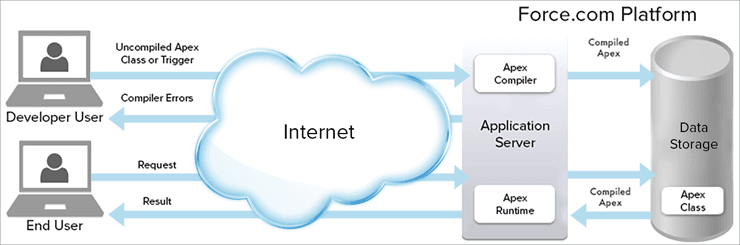
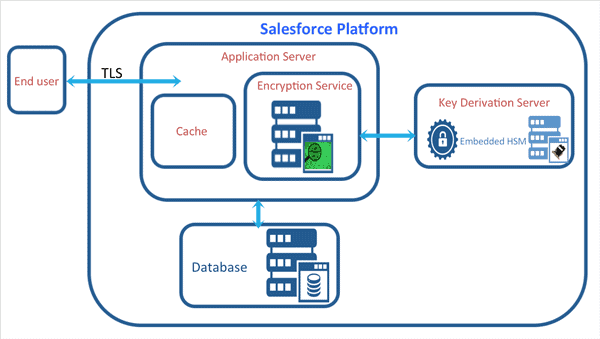
Refer to the below diagram for Salesforce Architecture:
Developed by: Marc Benioff, Parker Harris.
Type: Open Source/Public.
Head Quarters: The Landmark, San Francisco, California, US.
Initial Release: 1999.
Based on Language: APEX and Visual Force.
Operating Systems: Linux, Windows, Android, iPhone, Mac, Web-Based, etc.
Deployment Type: Cloud-Based
Annual Revenue: Approx. US $8.39 Billion
Number of Employees: Approx. 30,145 employees are working currently.
Clients: Spotify, Amazon Web Services, U.S. Bank, Toyota, Macy’s, T-Mobile, The New York Post, Accenture, Adidas, American Express, and AT&T.
Price:
- Open Source: Completely free
- Lightning Essentials: US $25 and keeps increasing as per the requirements.
Features:
- It provides communities and markets for sales and leads.
- It supports email integration and helps to run applications.
- Salesforce assists in forecasting and keeps the customer engaged all the time.
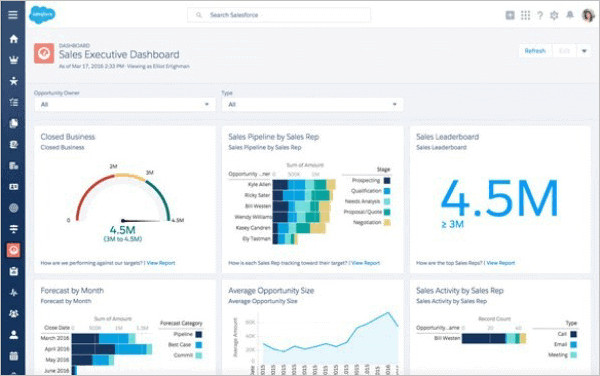
- It provides chatter, analytics, and real-time visualization.
Pros:
- It provides you with a custom dashboard.
- Software navigation is very simple and easy.
- It has a lot of social media capabilities that increase its popularity.
- It is cloud-based and provides business automation with efficient management.
Cons:
- It comes with costly customization and a complex environment as it needs a dedicated team to handle it.
- Salesforce up-gradation creates issues for Clients as the functionalities go hidden.
- Poor technical support staff and a complex process of generating reports.
Website: https://www.salesforce.com/in/crm/
#19) EngageBay
EngageBay’s CRM & Sales Bay helps you track deals in your sales pipeline and build better relationships with your customers.
With a simple pipeline for sales to eradicate miscommunication and confusion, the CRM & Sales Bay does an amazing job at aiding sales growth and fostering better customer relations.

Developed By: Sreedhar Ambati
Type: Private
Headquarters: Mountain House, CA.
Initial Release: 2017
Operating Systems: Windows, Android, Mac, iPhone/iPad.
Deployment Type: Cloud-based.
Language Support: English
Annual Revenue: Approx. $0.5M+
Number of Employees: Approx. 30 employees.
Prime Features:
- Contact Management
- Visual Deal Pipeline
- Appointment Scheduling
- Task Management
- Automated Data Entry
- Email Tracking
- Reporting
- Team Engagement
- Sales Reporting
Other Features:
- The CRM software allows you to manage and track deals.
- You can collaborate with the team through its shared team inbox.
- It allows you to save text templates and send bulk messages.
- You can make and receive calls from within the CRM.
- You can easily synchronize with the Marketing & Support departments.
Pros:
- CRM is free to use forever.
- EngageBay provides good automation features and can reduce the data entry time substantially.
- Tightly integrated with Marketing & Support functions.
- Provides 24/7 prompt and friendly support.
Cons:
- Limited native integrations. But Zapier is helpful in this regard.
- Lacks invoice generation.
#20) Act! CRM

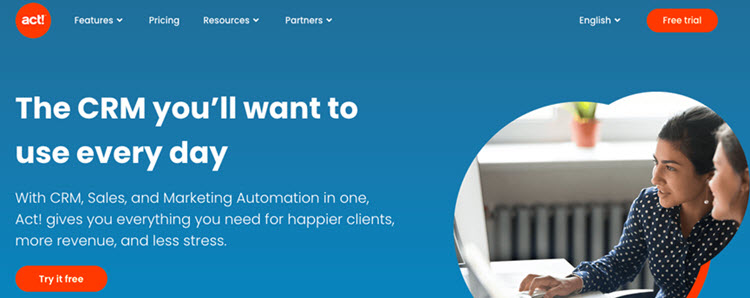
ACT! is a CRM, sales, and marketing automation platform. It has a completely customizable dashboard. It can be integrated into Outlook, Zoom, DocuSign, etc. You can prioritize your task list here.
It offers tools for capturing prospects, marketing tools, and tools to build stronger relationships. Marketing automation functionalities will perform repetitive and manual tasks. You just need to set up communications once and the tool will process further.
Developed By: Act!
Type: Privately Held
Headquarters: Scottsdale, Arizona
Initial Release: 1 April 1987
Operating Systems: Microsoft Windows
Deployment Type: Cloud-based and On-premises.
Annual Revenue: $100K to $5 M
Total Employees: 51-200 employees
Companies using Act! CRM: The Sherman Sheet, Cardinal Realty Group, Mercer Group, Inc. CharterCapital, Tramac, etc.
Price: Act! Offers cloud-based as well as on-premise solutions. An on-premise solution’s price starts at $37.50 per user per month. It has three pricing solutions, Starter ($12 per user per month), Professional ($25 per user per month), and Expert ($50 per user per month).
Top Features:
- Act! CRM can provide sales pipeline insights instantly.
- It has email marketing features and more than 170 responsive templates.
- It has capabilities for email tracking & metrics, drip marketing, surveys, campaign calendars, etc.
- It has features for lead management & scoring, event marketing, asset tracking, etc.
Other Features:
- Act! CRM has an interactive template editor.
- It offers functionalities for automating and managing the entire workflow from start to finish.
- Its advanced lead capture capabilities will take your lead capturing to the next level.
Pros:
- Act! CRM offers the solution with transparent fees and there will not be any hidden fees.
- It keeps your communications, calendar, and important documents in sync.
- It supports unlimited contacts.
Cons:
- As per reviews, customer service needs improvement.
- It is a bit pricey compared to its competitors.
#21) Freshsales

Freshsales is a fully-featured sales CRM platform that provides you with all the tools you need to simplify sales operations. The platform allows you to track a customer’s entire lifecycle, right from the moment they visit your website to their eventual conversion.
Freshsales also comes equipped with an intelligent AI, which helps you get a bird’s eye view of all current deals, especially highlighting those deals that need your attention the most. You also get measurable metrics that accurately inform you about your company’s sales performance.
Type: Private
Headquarters: San Mateo, California, USA
Initial Release: 2010
Operating System: iOS, Android, Windows, Mac, Web-Based
Deployment Type: Cloud-Based
Language Support: English
Annual Revenue: $364 million to $366.5 million
Number of Employees: 4300
Companies Using Freshsales: Dunzo, Sify, MTR, PharmEasy, Blue Nile, Cadence Health.
Top Features
- Event Tracking
- Create custom reports
- Automated and Personalized Emails.
- Respond to leads, analyze dashboards, etc. on the go via the Mobile app.
- Built-in phone, chat, and email features.
Verdict: Freshsales can be used as an effective CRM tool to nurture the best leads possible for your business, close deals, manage multiple pipelines and so much more. With Freshsales, it is incredibly simple to maintain and access the records of every single customer and prospect you’ve ever done business with. This is why Freshsales has our highest recommendation.
Price: Free Plan Available, 21-day free trial available for premium plans. Growth Plan: $15/user per month, Pro: $39/user per month, Enterprise: $69/user per month.
#22) Keap

Keap which is formerly Infusionsoft offers a CRM, sales, & marketing automation platform. The solution has features and functionalities for all types of businesses. It has editions for solopreneurs & new businesses, growing businesses, and established businesses.
Established businesses and teams can optimize the sales pipeline and grow online revenue. The tool contains the capabilities for CRM, secure payment platforms, e-commerce, and advanced automation.

Developed By: Scott and Eric Martineau
Type: Private
Headquarters: Chandler, Arizona
Operating Systems: Web-based, Android, & iOS.
Deployment Type: Cloud-based
Language Support: English
Annual Revenue: $100 million (USD)
Number of Employees: 501-1000 employees
Companies using Keap CRM: Hear and Play, Math Plus Academy, TITIN Tech – Story, Agency 6B, etc.
Price: Keap offers a free trial of 14 days. There are three pricing plans, Lite ($40 per month), Pro ($80 per month), and Max ($100 per month).
Prime Features:
- Lead Scoring
- Landing Pages
- Sales Pipeline
- A/B email testing
Other Features:
- CRM, Sales & Marketing Automation, Email Marketing, Payments, etc.
- It will let you sort the contacts into segmented lists that help with sending the right message to the right people.
- It offers functionalities for creating custom forms and allows embedding them to websites or landing pages.
- It has features for sending emails, making a call, etc.
- It is a platform for creating a personalized, customized sales and marketing process.
Pros:
- Keap offers a fully customizable platform.
- It is easy to set up automation.
- It allows integration with the programs like PayPal.
Cons:
- Keap is an expensive tool.
#23) Freshmarketer

Freshmarketer is a powerful all-in-one CRM tool that caters to the unique needs of eCommerce businesses. The platform allows businesses to engage with their customers seamlessly across SMS, Whatsapp, chat, and email channels. You can offer a much more personalized customer experience as Freshmarketer gives you a 360-degree context for your customers.

Developed By: Vijay Shankar, Shan Krishnasamy
Type: Private
Headquarters: California, USA
Initial Release: 2010
Operating Systems: Windows, Android, Mac, iPhone/iPad.
Deployment Type: Cloud-based.
Language Support: 30+ Languages supported.
Annual Revenue: $105M
Number of Employees: 5001-10000 employees.
Companies Using Freshmarketer: Pearson, Blue Nile, Honda, Fiverr, Vice Media.
Price: Freshmarketer is free to use for hundred marketing contacts. Its premium plan starts at $19/month. A 21-day free trial is also available.
Prime Features
- Email and SMS Marketing
- Multichannel Engagement
- Social Media Campaign Management
- Marketing segmentation
Other Features
- 360-degree customer view
- Unified customer data
- 24/7 Chatbot
- Customizable CRM
Pros
- Easy to set and deploy
- Flexible pricing
- CRM, sales, and marketing management all in one tool
Cons
- Documentation isn’t that great.
#24) Salesmate
Salesmate is a CRM & customer journey platform with powerful features of call recording, call masking, voicemail drop, call transfers, etc.
You will be able to connect your sales and support inboxes to receive all the messages in one place. It helps you to deliver 5 times faster and more exceptional customer experience. It contains the functionalities for automating business workflows.

Developed By: Salesmate
Type: Privately Held
Headquarters: Charlotte, North Carolina
Operating Systems: Web-based, iOS, and Android
Deployment Type: Cloud-based
Language Support: English
Annual Revenue: < $5 Million
Number of Employees: 51-200 employees
Companies using Salesmate: Sony Music, Faciliteq, Kissflow, Factorial Complexity, etc.
Price: Salesmate offers the solution with four pricing plans, Starter ($12 per user per month), Growth ($24 per user per month), Boost ($40 per user per month), and Enterprise (Get a quote). The platform can be tried for free for 15 days.
Prime Features:
- Contact management
- Built-in calling functionality
- Google CRM
- Messenger
- Reporting
Other Features:
- Sales pipeline
- Sales Automation
- Marketing Automation
Pros:
- Salesmate provides enterprise-grade security.
- It is completely customizable and you can get the system started quickly.
- It provides personalized support through one-on-one video, live chat, email, and phone.
- It offers a solution with affordable pricing.
Cons:
- No such cons to mention.
Website: https://www.salesmate.io/
#25) Brevo
Brevo features a CRM system that allows you to manage all your customers’ relationships in one place. Brevo greatly simplifies the CRM process. It doesn’t require any installation. All you have to do is upload your contact information and Brevo will do the rest. Brevo effectively centralizes all your contact information.
From calls to notes related to meetings, Brevo will organize them completely without a hassle. You only need to make updates once after all your information is uploaded to Brevo’s CRM contact profile. From here, you can create tasks on CRM, assign tasks to different team members, and also set deadlines for your tasks.

Developed By: Kapil Sharma and Armand Thiberge
Type: Private
Headquarters: Paris, France
Initial Release: 2007
Operating System: Mac, Windows, iOS, Android.
Deployment Type: Cloud, Saas, Web-Based, Desktop and Mobile.
Language Support: Supports 15 languages
Annual Revenue: $46.5 million.
No. of employees: 400
Companies using Brevo: Marcel, InFocus, Edwart Chocolatier, Les Raffineurs, etc.
Price: Free for 300 emails per month, Lite Plan starting at $25/month, Premium starting at $65/month, Customizable Enterprise Plan is also available.
Prime Features:
- Easy CRM Set-up
- Centralize Contact Information
- Easy CRM Profile Organization
- Create and Track CRM Tasks
Other Features:
- No installation of special service is needed to get started with Brevo’s CRM.
- Organize contacts in CRM based on source of acquisition, similar acquisitions, and other such criteria.
- Automate contact list management and follow-up emails.
- Allows you to keep teams organized
- Track every interaction with customers.
Pros:
- Very easy to use and set up
- Superior marketing automation
- Easily organize the contact list of a CRM.
- Very effective Live chat for excellent customer support.
Cons:
- Nothing significant.
Website: https://www.brevo.com/
#26) Oracle NetSuite
Oracle NetSuite offers a cloud-based CRM solution that provides a 360-degree view of your customers in real-time. It contains all the functionalities like sales order, fulfillment, renewal, upsell, cross-sell, etc.
Developed by: Oracle
Type: Private
Headquarters: California, US
Operating Systems: Android, iOS, and Web-based.
Deployment Type: Cloud-based
Language Support: English
Number of Employees: 10,001+
Companies Using Oracle NetSuite: BagoSphere, Bankstown Sports Club, Biomonde, etc.
Price: You can get a quote for pricing details. A free product tour is available.
Prime Features:
- Quotes
- Order Management
- Commissions
- Sales Forecasting
- Integrated e-commerce capabilities
Other Features:
- SFA
- Customer Service Management
- Marketing Automation
Pros:
- Oracle NetSuite CRM will streamline lead-to-cash processes.
- Your sales performance will get improved because of forecasting, upsell, and commission management.
- You will be able to manage global sales and services organizations.
Cons:
- No such cons to mention
Disclosure: We may earn commission from partner links on SoftwareTestingHelp. We publish unbiased product and service reviews; our opinions are our own and are not influenced by commissions from our advertising partners. Learn more about how we review products and read our advertiser disclosures.
Conclusion
CRM Tools have been used aggressively among all the companies for maintaining the organization’s workflows and a healthy and strong relationship with the customers.
For Small Scale Industries: HUBSPOT, Nimble, and CRM Creatio would be good as their cost is very low and affordable with most of the features and it doesn’t require a dedicated team towards it.
For Medium Scale Industries: monday.com, HUBSPOT, Nimble, SugarCRM, and ZOHO would be a good choice as again the prices are lower and provide vast features.
For Large-scale Industries: monday.com, SAP, Salesforce, PIPEDRIVE, and Oracle CRM would be a better choice as their enterprise edition is costly and provides good features for big companies to handle their vast customer data and for security reasons as well.
Suggested Reading => Top Real Estate CRM Software
Was this helpful?
Recommended Reading
-

This is a comprehensive review and comparison of the top Sales CRM Software and includes the top features offered by the best Sales CRM tools: A business cannot exist without doing enough sales. Apart from producing good quality products, a business owner also needs to focus on adopting various techniques…
-
Comprehensive list of the best Software Testing Tools. Put an end to your search for the right Manual or Automated Testing Tool with this informative list: We are happy to present this exclusive list of the most popular QA Testing Tools that are available in the market. Get Ready To…
-
Comparison of the Best Free Android and iOS Mobile App Development Software Tools and Platforms to create stunning high-quality Mobile Apps for Your Business: App development software is an application that helps with the app development process by providing functionalities like IDE, code-free development, templates, API, data synchronization, and Analytics.…
-

The List of the Best On-premises and Cloud-Based Call Center Software for Inbound and Outbound Calls with Pricing and Feature Comparison: What is Call Center Software? Call Center Software is an application that has the functionality for managing customer communications coming from multiple channels and sources. It helps agents make…