Looking for simple ways to resolve PS5 controller drift? Discover how to fix stick drift on PS5 controller and enhance your PlayStation gaming experience with all our possible solutions:
This exclusive guide will explain all about PlayStation 5 controller drift, including symptoms, causes, and fixes in simple terms.
PS5 controller is a device that includes buttons and two analog sticks that help you play your favorite games.
It comes with ultra-customizable controls, remarkable buttons, adjustable triggers, a built-in microphone and so much more. Sometimes the device gets defective and there is a stick drift PS5.
PS5 Stick Drift: Causes & Possible Solutions
What is Stick Drift PS5?
PS5 controller drift is the abnormal movements that can be observed within the game. The characters move anonymously. Sometimes while playing the game, the joystick got stuck in a certain position, resulting in some weird movements of the character despite the player not touching the controller.
This is called a stick drift PS5 controller. This occurs because of various reasons, including accumulation of dust & debris, wear & tear of internal parts, etc.
[image source]
In this article, we will learn about the concepts related to PlayStation 5 controller drift, understand the symptoms that may be shown, the causes that lead to this issue, and how to fix PS5 controller stick drift.
Also Read =>> Top Sony Playstation 5 Stores with ratings
Watch the video: Here’s a Sign Your PS5 controller is Going Bad
Symptoms of PS5 Controller Stick Drift
We can get to know our PS5 Controller is drifting when seeing symptoms like:
- Unmatched movements: When you notice any unmatched movements, like when you press something and the movements are opposite, it is a controller drift.
- No input: You do not give any input yet the character moves itself, here it is the case of controller drift.
- Stuck joystick: When your joystick gets stuck in a certain position and you cannot move it, then you have PS5 stick drift. You may have a PS5 controller left stick drift or the right stick.
Possible Causes of Controller Drift
- Dust Accumulation is the most general cause of controller drift. The dust accumulated within the sticks and made it defaulted. Most of the time, while we play, we eat simultaneously and hold our controllers with other dirty hands, which also lets the dirt go under the analog sticks. Hence, avoid dust to fix PS5 controller drift.
- Wear and tear of internal parts: Sometimes the internal parts get torn on their own, which leads to the deterioration and the drifting of the controller. The sensors get destroyed and register abnormal inputs.
- Excessive Pressure on Sticks: When you play aggressively and put excessive pressure on the controller sticks, it gets damaged. It could lead to drifting as well.
- Outdated Version: Sometimes our Controller or console is outdated. With the outdated version, it registers ghost movements or the inputs you have not made.
- Bluetooth Conflicts: Sometimes only the console’s Bluetooth leads to drifting. It gets stuck on its own and we need to turn off the Bluetooth for a minute and then again turn it on. The problem of drifting simply goes away with this small input.
- Damaged Product: Sometimes you get a damaged controller from the store itself. So a damaged controller can not work properly.
- Connection Problem: Try checking the internet connection. The slow or faulty connection also disrupts the game experience.
Suggested Read =>> Top PS4 Controller (Wired and Wireless)
How to Fix Stick Drift on PS5 Controller
There are many effective ways to fix the issue of controller drift:
Watch the video below How to FIX PS5 Controller Stick Drift & Moving on its own (Best Method)
- Reset the controller: You should first reset the controller when you go through such issues. To reset, you need to press the button for 5 seconds located at the center of the back side of the controller. Now reconnect it with the console.
- Thorough cleaning of the controller: It is necessary to thoroughly clean the controller regularly to see the best results. You can use an air spray to clean around the analog sticks and, with the help of a cotton swab, you can wipe the dirt out from the surface of the joystick.
- Adjusting input threshold: You can try decreasing the input threshold to the game if it is present in your PlayStation. It would not fix the controller issue but will temporarily make you play without any issues.
- Adjust the analog sticks: You can do a little exercise on the analog sticks before starting the game. This could be done by moving the sticks in different directions for some seconds and checking for any obstacle that could hinder you in between your games.
- Check for controller updates: Sometimes the controller requires a firmware update in that case it does not work properly. So you need to check for the firmware update. For this, you need to connect the controller to the PS5 and turn the console on. If it requires an update or installation, then it will be shown on your screen.
- Console update: Along with updating the PS5 Controller you need to check for the console’s update also. If it requires any update installation, then do it beforehand.
- On and off the Bluetooth: You can try doing on and off your console’s Bluetooth as sometimes connectivity issues occur due to Bluetooth conflicts as well. So you need to turn your Bluetooth off for a minute or two then turn it on. Now check whether your controller is working normally or your issue is resolved.
- PlayStation support: If you cannot fix the problem, then you can connect to PlayStation support. Here you will get more information and assistance you require.
- PlayStation repairs: In case you are not satisfied and not able to fix the issue after doing great efforts then you can go to the PlayStation repairs and get it repaired or replaced.
- Get a replacement: Sometimes the store gives you the replacement services if in case the product has been purchased within the past few weeks depending upon their policies. So don’t wait further, just go to the store and get it replaced, if it’s all new.
Things to avoid while fixing the drift:
- Don’t separate the parts: It is advised not to open the parts of the controller as you may not have the specialized tools to fix it. So it’s better to take it to the store for recovery. If the product is in the warranty and you have opened its parts then sometimes the store does not accept its warranty claim.
- Don’t use water to clean the surface: Do not ever use water to clean the surface as it would get into the inner parts and hinder its working. So it’s better to use alcohol-based solutions available in the market.
- Don’t press too hard: While playing the game, the user gets lost and in aggression, he presses the sticks too hard which may damage the controller.
- Don’t expose it to high temperatures or dusty places: Always store the controller in a cool place free of dirt. Do not ever expose it to high temperatures or dirt.
Also Read => Best PS5 Gaming Monitors
Test for PS5 Controller Drift
Before getting into the game, you should check your controller as it may be drifting and can spoil your gaming experience. There is a simple way to check whether your PS5 Controller is drifting or not. There are simple steps on how to fix controller drift ps5.
Step #1: You just need to start a game that requires analog sticks for the movement of the character.
Step #2: Now place the controller down on the flat surface and observe. If the character moves on its own then it is clear that your PS5 Controller is drifting. If it does not then you are good to go with the controller.
Recommended Reading =>> Best-selling video game consoles
FAQ’s on PlayStation 5 Controller Drift
1. Why do PS5 controllers drift so easily?
PS5 controllers drift so easily due to mishandling, simple wear and tear of sensors by regular use, dirt accumulation inside the controller, and so on. You also need to keep updating the console and controller to avoid any unnecessary hindrance.
2. How do I stop my PlayStation controller from drifting?
There are certain effective steps on how to fix stick drift ps5 through which we can stop unnecessary movements or drift. We can keep the software up-to-date, clean the controller thoroughly with an alcohol-based solution, reset the controller, adjust the analog sticks, and so on.
3. Which PS5 controller has no drift?
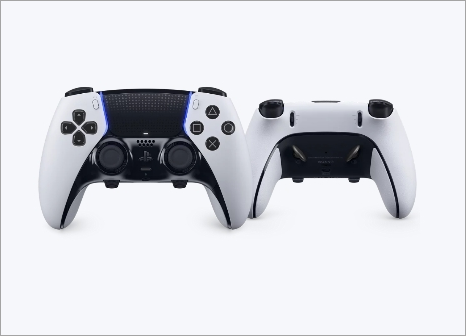
Before selecting a PS5 Controller we need to consider certain essential factors like design & aesthetics, performance features, durability or battery life, compatibility, etc. But the most important factor for a controller that makes it avoid drifting is magnetic Hall effect sensors. We have The Nacon Revolution 5 Pro that uses this feature and avoids drifting.
4. Can a low battery cause stick drift?
Yes, controller stick drift can also be caused by the low battery. It is the simplest reason behind the stick drift. Other reasons include dust accumulation, outdated software, aggressive use of controllers, etc.
5. Why is my PS5 constantly overheating?
Certain reasons cause the overheating of the PS5. Some of them are: clogging of air vents due to the accumulation of dust, poor airflow, and high power games that raise the temperature.
6. What is the average lifespan of a PS5 controller?
The lifespan of a PS5 controller depends on how often you use it or how you carry it. The average lifespan is assumed to be 417 hours if the analog sticks move 80 times per minute.
Conclusion
Due to certain reasons, the controller became obsolete after some time. We may notice anonymous movements or what we call drifting due to the default in the controller. We have described how to fix PS5 controller drift by following simple steps.
We can fix it by following certain steps like cleaning the surface, updating the console & controller, turning on and off the Bluetooth, and so on. Drifting is inevitable as the sensors are prone to deplete after some time on their own.
It is advisable to use the controller with ease to avoid pressing the sticks too hard during the play and avoid storing them in dusty places or at high-temperature areas to keep them in good condition.
Was this helpful?
Recommended Reading
-

Read our review of the top External Hard Drive for PS4 and compare their features, etc. to identify the best PS4 Hard Drive: Are you thinking about playing your favorite games on your favorite gaming console? A gaming experience in a PS4 is amazing. But, what's the use if you…
-
Here we will review the top-selling PS4 Controller and compare their features to find the best PlayStation controller as your game partner: Missing out on the fun of playing games on your PlayStation console? A good gaming controller is all that you'll need. A good PS4 gaming controller provides you…
-

Looking for the best monitor to use with your PS5? Look no further! We've compiled a list of top-rated gaming monitors for PS5 that are perfect for your setup. Keep reading for more information: Do you have a PS5 and want to upgrade your gaming experience? If yes, then having…
-
Do you have a console and want to play games at a higher refresh rate without any lag? If yes, then you need to review this list of best Gaming TVs to pick one of your choice: Gaming TVs can compete with gaming monitors these days. This can be a…
-
Here we will explore the top Sony Playstation 5 Stores with ratings to answer the most asked question, i.e. Where To Buy PS5 online or offline: If you are having a hard time getting your hands on a brand-new PS5, then don’t stress, as you are not alone. It has…
-
This is an in-depth review of the best VR Games with their features, pricing, ratings, and comparison. Select from this list of best Virtual Reality games: All the virtual reality platforms, namely Oculus, PlayStation VR, Samsung Gear VR, HTC Vive, Windows Mixed Reality, Valve, and even the cheaper virtual reality…
-
Want to play PlayStation games on PC? Read our review of the top PS3 & PS4 emulators and compare their features, etc. to identify the best PS4 Emulator: PlayStation is a home video game console developed by Sony Entertainment Network. It is the eighth generation console that supports single-play and…
-
Read this complete guide to compare and buy the Best Virtual Reality Headset for PC, PS4, and Xbox 360 based on the review, buying tips, and pricing: The purpose of a virtual reality headset is to immerse you in a virtual environment to feel as if you are fighting with…