


This tutorial explains in detail what Mutation Testing is, how to perform it, and the types of Mutation Testing with examples:
What is Mutation Testing?
Mutation testing is a fault-based testing technique where variations of a software program are subjected to the test dataset. This is done to determine the effectiveness of the test set in isolating the deviations.
It sounds a little complicated, doesn’t it?
Mutation Testing

Mutation Testing (MT) goes a long way, back to the 70s where it was first proposed as a school project. Then it was written off as it was very resource-intensive. However, as humans continued to develop more advanced computers, it slowly made a comeback and is now one of the most popular testing techniques.
Mutation testing definition
MT is also known as fault-based testing, program mutation, error-based testing, or mutation analysis.
As the name suggests, mutation testing is a software testing type that is based on changes or mutations. Miniscule changes are introduced into the source code to check whether the defined test cases can detect errors in the code.
Ideally, none of the test cases should pass. If the test passes, then it means that there is an error in the code. We say that the mutant (the modified version of our code) lived. If the test fails, then there is no error in the code, and the mutant is killed. Our goal is to kill all mutants.
Mutation testing also helps to test the quality of the defined test cases or the test suites with a bid to write more effective test cases. The more mutants we can kill, the higher the quality of our tests.
Mutation Testing Concepts
Before we discuss mutation testing further, let us explore some concepts that we will come across.
#1) Mutants: It is simply a mutated version of the source code. The code contains minute changes. Once the test data is run through the mutant, it should ideally give us different results from the original source code. Mutants are also called mutant programs.
There are different types of mutants. They are as follows:
- Survived Mutants: As we have mentioned, these are the mutants that are still alive after running test data through the original and mutated variants of the source code. These must be killed. They are also known as live mutants.
- Killed Mutants: These are mutants that are killed after mutation testing. We get these when we get different results from the original and mutated versions of the source code.
- Equivalent Mutants: These are closely related to live mutants, in that, they are alive even after running test data through them. What differentiates them from others is that they have the same meaning as the original source code, even though they may have different syntax.
#2) Mutators/mutation operators: These are what makes mutations possible, they are in the ‘driver’s seat’. They basically define the kind of alteration or change to make to the source code to have a mutant version. They can be referred to as faults or mutation rules.
#3) Mutation score: This is a score based on the number of mutants.
It is calculated using the following formula:

Note that equivalent mutants are not considered when calculating the mutation score. Mutation scores are also known as mutation adequacy. Our aim should be to achieve a high mutation score.
How To Do Mutation Testing
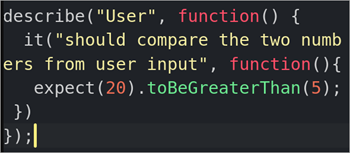
Step #1: Let’s write our Jasmine unit test.
Test Suite (Jasmine)
describe("User", function() {
  it("should compare the two numbers from user input", function(){
   expect(20).toBeGreaterThan(5);
 })
});
Step #2: Write the original code.
Original code (Javascript)
const user_info = () => {
   mother_age = parseInt(prompt("Enter mother's age"))
   daughter_age = parseInt(prompt("Enter daughter's age"))

   if (mother_age > daughter_age) {
   	alert(`Daughter's age is ${daughter_age}. Mother's age is
   	${mother_age}. Welcome to the Mother-Daughter program`)

   } else {
   	alert(`Daughter's age: ${daughter_age}, is more than mother's age: ${mother_age}.
   	Please enter correct ages`)
   }
}
user_info();

Step #3: We will then run the test through the original code to ensure that we don’t have failed tests from the get-go. We should have some output that communicates that we have indeed written a test with zero failures.
For example:

finished in 0.019s 1 spec, 0 failures, randomized with seed 31435
Original code results:
Daughter's age is 5. Mother's age is 20. Welcome to the Mother-Daughter program
Step #4: Introduce the mutant. In this case, we change the greater-than operator (mother_age > daughter_age) to a lesser than operator (mother_age < daughter_age)
Mutant code (Javascript)
const user_info = () =&amp;amp;amp;gt;{
mother_age = parseInt(prompt(&quot;Enter mother's age&quot;))
daughter_age = parseInt(prompt(&quot;Enter daughter's age&quot;))
if (mother_age &amp;amp;amp;lt; daughter_age) {
alert(`Daughter's age is ${daughter_age}. Mother's age is
${mother_age}. Welcome to the Mother-Daughter program`)
} else {
alert(`Daughter's age: ${daughter_age}, is more than mother's age: ${mother_age}.
Please enter correct ages`)
}
}
user_info();
Step #5: We then run the test through the mutant code.
Here are the test results:

finished in 0.017s 1 spec, 0 failures, randomized with seed 89555
Mutant code results:
Daughter's age: 5, is more than mother's age: 20. Please enter correct ages
Step #6: Compare the results from the original version and the mutant version. In this case, they are different, even if the same test suite was used. We have therefore killed our mutant. Our test suite is therefore good to go.
Mutation Testing types
There are several types of mutations. We have explained them below.
#1) Value Mutation
Here, we introduce a mutation by changing the parameter and/or constant values, usually by +/- 1.
Example: Original code (Javascript)
let arr = [2,3,4,5]
for(let i=0; i&amp;amp;amp;lt;arr.length; i++){
if(i%2===0){
console.log(i*2)
}
}

If the above code was meant to multiply the even numbers where i<4, then value mutation would mean changing the initialization to let i=1.
Example: Mutant code (Javascript)
let arr = [2,3,4,5]
for(let i=1; i&amp;amp;amp;lt;arr.length; i++){
if(i%2===0){
console.log(i*2)
}
}

#2) Statement Mutation
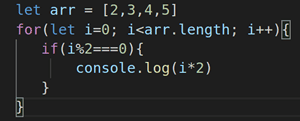
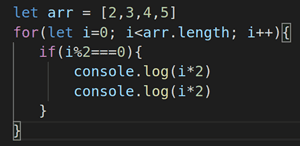
Here, we delete or duplicate a statement in a code block. We can also rearrange the statements in the code block.
In an if-else block, for example, we could delete the other part or even the entire if-else block.
Example: Original code (Javascript)
let arr = [2,3,4,5]
for(let i=0; i&amp;amp;amp;lt;arr.length; i++){
if(i%2===0){
console.log(i*2)
}
}
Example: Mutant code (Javascript)
let arr = [2,3,4,5]
for(let i=0; i&amp;amp;amp;lt;arr.length; i++){
if(i%2===0){
console.log(i*2)
console.log(i*2)
}
}
#3) Decision Mutation
The target here is the code that makes decisions, for example, value comparisons. We can change > to < as in our Mother-Daughter program example.
Other operators that we can switch to include the following:
| Original operator | Mutant operator | |
|---|---|---|
| 1 | <= | >= |
| 2 | >= | == |
| 3 | === | == |
| 4 | and | or |
| 5 | || | && |
Advantages of Mutation Testing (MT) include the following:
- MT covers a large part of the code’s logic.
- We get to test specific parts of the code, and not just paths, branches, or statements.
- With MT, we can even catch errors that are easy to bypass.
- This will help us evaluate the quality of our test suite and adjust accordingly.
Disadvantages of Mutation Testing (MT) are given below:
- It is resource-intensive as there is a huge number of mutants that are usually generated for every code block.
- We need to counter check the survival mutants, as some are invalid.
Mutation Testing Tools
Tools come in handy to speed up the process of mutant generation. Here are some tools that we can use in MT: Stryker, Jumble, PIT, and Insure++.
More on Mutation Testing
Let’s learn from an example:
Say, there is a hospital site that lets new users register. It reads the Date of birth or age of the patient. If it is greater than 14, assign a general physician as their main doctor. In doing so, it invokes the general physician function of finding the available doctor.
Now, there might be other functionality. I think patients below 13 get assigned to a paediatrician and so on. But we will only take the age-over-14 case.
Here’s what the code might look like:
1) Read Age
2) If age>14
3) Doctor= General Physician()
4) End if
Please note that the above lines of code are not specific to any programming language and won’t run. It is just hypothetical.
As a tester, if my data-set is 14, 15, 0, 13 – some random numbers.
The goal is to check if the data-set of the 4 values (14, 15, 0, and 3) is adequate to identify all possible problems with this code.
Also read => Tips to design test data before executing your test cases.
How does Mutation Testing achieve this?
First and foremost, you create mutants- variations of the program. A mutant is nothing but a program that is written as a deviation. It contained a self-seeded fault.
Examples are:
- Arithmetic Operator Replacement
- Logical connector replacement
- Statement removal
- Relational Operator Replacement
- Absolute value insertion, etc.
These replacements are also called “Mutation Operators.”
Let me show you some examples:
Mutant #1: Relational operator replacement
1) Read Age
2) If age<14 ‘Changing the > with <’
3) Doctor= General Physician()
4) End if
Mutant #2:
1) Read Age
2) If age=14 ‘Changing the > with =’
3) Doctor= General Physician()
4) End if
Mutant #3:
1) Read Age
2) If age>=14 ‘Changing the > with >=’
3) Doctor= General Physician()
4) End if
Mutant #4:
1) Read Age
2) If age<=14 ‘Changing the > with <=’
3) Doctor= General Physician()
4) End if
Mutant #5: Statement Removal
1) Read Age
2) If age=14
3) “remove the doctor assignment statement.”
4) End if
Mutant #6: Absolute Value Insertion
1) Read Age
2) If age>14
3) Doctor= Mr.X (Absolute value insertion- let’s say X is a paediatrician)
4) End if
Mutant #7: Incorrect syntax
1) Read Age
2) If age%%14 (incorrect syntax)
3) Doctor=General Physician()
4) End if
Mutant #8: Does the same thing as the original test
1) Read Age
2) If age> 14 & age>14 ‘means the same thing as age>14’
3) Doctor= General Physician()
4) End if
Once all the mutants are created. They are subjected to the test data-set. Our set is 14, 15, 0 and 13. Which of these mutants will our data-set find?
Find it in the table below:
(Click on the image for an enlarged view)

As you can see, our data value 14 finds failures when it runs against, Mutant 2, 3 and 4. Or, 14 kills mutants 2, 3 & 4. But it is ineffective against, 1, 6 and 8.
If your data-set kills all mutants, it is effective. Otherwise, include more or better test data. It is not necessary for each value in the data-set to kill all mutants. But together, they should all kill. For example: 14 kills 2, 3 and 4. 15 kills 1, 2 and 4. And, so on.
What about 5, 7, and 8?
Mutant #5 – is the program instance that will fail irrespective of any data value you give. This is because it will not do any programming for both valid and invalid values.
Mutant #7 – will be a compile error. Or in the case of scripting language an error that will prevent execution.
Mutant #8 – is the same thing as the main program.
As you can see, the above mutants are not useful at all.
Therefore, the mutants to avoid are:
- Syntactically incorrect/‘Still-Born’ mutants. : You need syntactically correct mutants ONLY. Example: Mutant 7
- Equivalent Mutants: The ones that do the exact same thing as the original program. Example: Mutant 8.
- Trivial Mutant: Can be killed by any data-set. Example: Mutant 5
Points To Note
- The number of mutants, even for a small program, can be many. It is a finite number, but still very large. Due to this, a subset of mutants is usually used. It is common to choose mutants randomly.
- The mutation operators listed above are not exhaustive. There can be many other variations. I have oversimplified the concept for easy understanding.
- The mutation operators also differ with programming languages, design, and specifications of the application.
- If there are any mutants alive at the end of the test. This means either it is an invalid mutant (like 5, 7, and 8) or the data-set is inadequate. If it is a later one, go back and change it.
- Mutation Test is a structural, white-box, and unit testing method. It uses fault-injection or fault-seeding to generate its mutants.
- There are many unit testing frameworks and tools that aid in automatic mutation testing. Some of them are:
- Jester for JUnit.
- Pester for Python
- MuClipse for Eclipse, etc.
Do you think, if it takes this much effort, what is going to happen when I have to test large samples of code?
Mutation testing relies on two things:
- Competent Programmer Assumption: If a programmer is competent enough to write and test a small piece of code, he will be good at writing larger programs too.
- Coupling effect Assumption: If 2 units are combined to form a program and each one is good in itself, then the combination is going to be good too.
So, it focuses on the smallest unit of code and places its faith in the programmer’s skill to scale mutation testing to larger programs.
Conclusion
This tutorial covers detailed mutation testing definitions, types, and steps to perform this testing in detail with examples. We hope you have enjoyed reading and learning about this interesting testing technique – Mutation Testing.
About the author: This article was written by STH team member Swati S.
Please share your feedback, questions, and thoughts in the comments section below. We would love to hear from you.
Was this helpful?
Recommended Reading
-

This comprehensive Structural Testing Tutorial explains what is Structural Testing, its types, what is Control Flow Testing and Control Flow Graph, Coverage Levels, etc.: A quick Google search of some of the most expensive software bugs left my mind reeling - $500 billion. Yes, that’s how costly a bug can…
-

Overview of Volume Testing: Does the below picture correlate with our apps in some way or the other? Yes, this is what exactly happens when we overload our servers, databases, web services, etc. All of us must be aware of functional and non-functional testing, but are you mindful of the…
-

Know the Difference Between Functional Testing Vs Non-Functional Testing with Examples: Software Testing is broadly categorized into Functional and Non- Functional Testing. Let us discuss in detail about these testing types along with the exact differences between both functional and non-functional tests. What is Functional Testing? Functional testing is testing the…
-
In this article, we will see what Pairwise Testing is and how it is an Effective Test Design Technique for Finding Defects. Let's get started. Today, we are going to learn about a "Combinatorial Testing" technique called "Pairwise Testing". It is also known as "All-Pairs Testing". Smart testing is the need…


This is instructive.
Good one
Very new info, Thanks 🙂
very thanks i have enjoy it
@all: Thank you!
thank u .i got the idea about MT
Good explanation about MT
You’ve left no stone upturned. Rich explanation. Thanks.
Good Explanation about this Testing technique. keep it on.
Very useful as well as better Knowledge. 🙂
I want some algo to make more efficient
i would like to know that how ur justify success and fail please let me know