A comprehensive overview of PGSharp APK, encompassing its features, pricing structure, advantages, and a detailed installation guide, along with a list of PGSharp iOS Alternatives:
Certain games require you to be at specific locations to enjoy certain features. For example, in Pokémon Go, you can get more Pokémon by going to different locations. Different rewards are placed at different places, and many similar games offer other features at different locations. So, here, location spoofing apps like PGSharp come in handy.
Location spoofing enables you to change your current location online to get the best features or to hide your location. There are various applications for the same, like PGSharp, iPogo, locachange.com, iSpoofer, Pokego++, and many more.
Table of Contents:
PGSharp Latest Version: Is PGSharp Safe?

In the article, we covered the whole PGSharp, including its features, pricing, its benefits, installation process, and so on. So if you need to know about PGSharp and how to use it for playing Pokémon Go, then you are at the right place. You can go through the article and master the game.
What is PGSharp

PGSharp is one of the most amazing feature-rich spoofing applications that enables you to change your GPS location to play Pokemon Go and fake the location freely around the world. It comes with various other features like auto-walk using routes, walking speed, hide trainer name, enhanced throw and so much more.
Suggested Read => Top Pokemon Go Joystick Hacks
PGSharp APK Features: What PGSharp Can Do
Apart from location spoofing, there are a lot of amazing features it offers. Some of them are as follows:
- Shortcuts: It allows you to set your preferred options under the drop-down menu.
- Custom speed: You can choose the speed of the player as slow or fast as you want in km/hr with a slider or by just typing the number.
- Turn On/Off location: It provides a simple toggle to turn On or Off the location spoofing feature. You can easily turn it off when you want to play at your current location.
- Hide: It enables you to hide all the app UI that can be visible at the time of taking screenshots.
- Caught preview: By enabling this feature, you would be notified if the Pokémon was caught or escaped.
- Enhanced throw under this feature, you are allowed to choose the type of throw you want, including nice, great, excellent, curveball, AR+, 100% hit, etc.
- Map: With the help of its map, you can search for places with more or rarer Pokémon, view Pokestops or gyms from around the world.
- Nearby Radar: You can choose all the Pokémon that you want to encounter by just selecting them from the list.
How Much Does PGSharp Cost
It comes with two pricing plans: the free version and the standard edition. Under the free version, you would get all the basic functionalities like teleport, enhanced throw, caught preview, custom GPX, and so on. Under the standard edition, you have some premium features like spawn booster, quick catch, buddy assistant, auto incubator, and much more.
- Free version: $0
- Standard edition: $5 per month
Website: https://www.pgsharp.com/
Benefits of Using PGSharp APK
- It enables the players to move forward, right, left, and backward easily by using its joystick option.
- It allows you to adjust the walking speed of the player in the game. It can be slow or fast as per your convenience.
- You can move virtually from one place to another around the world without actual movement or any physical movement.
- With the help of coordinates provided in the app, you can catch any character smoothly by moving to its place.
- You can go to the pokeshops automatically to buy items that will help you further in collecting Pokémon.
- Helps in increasing your XP points.
- Enables you to save your last location on the Android map so that you can start from there.
PGSharp APK Download: How to Use on Android
Here is a video tutorial for your reference:
Follow the given steps:
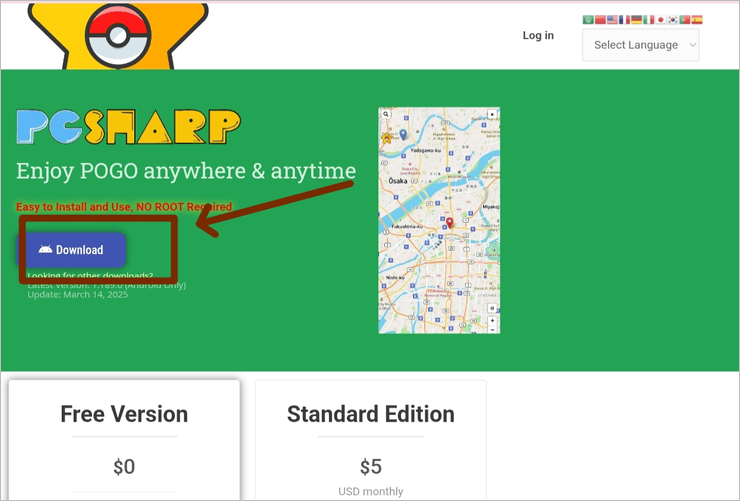
Step #1: Go to the PGSharp official website. Once it has opened, tap on download.
Step #2: Install Pokémon. Go on your phone.

Step #3: Here you go. The game will be opened, and you can use the PGSharp exclusive features.
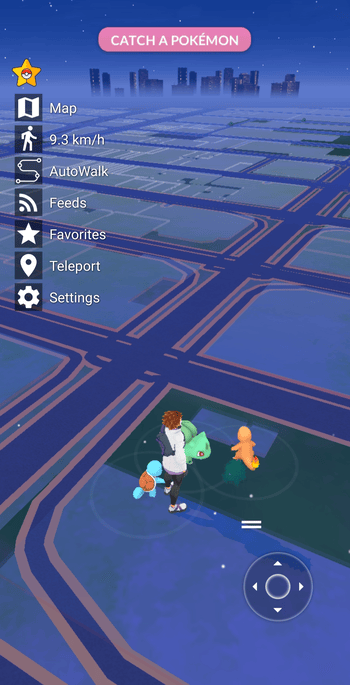
Step #4: Here, you can drag the joystick to other corners as per your convenience. And use the given features. PGSharp map, Speed, Auto-walk, feeds, favorites, teleport, and settings.

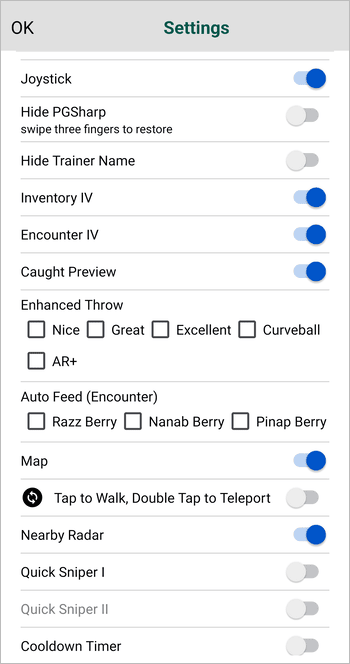
Step #5: You can go to the settings and check some specific functions like caught preview, tap to walk, and double tap to teleport, nearby radar, and so on.
How to Use PGSharp iOS
Here is a video tutorial for your reference:
You can use PGSharp on your iOS devices also, but you can not download it from its official website, as per the latest version, it is not been given there. To download the PGSharp iOS, you can follow the given steps:
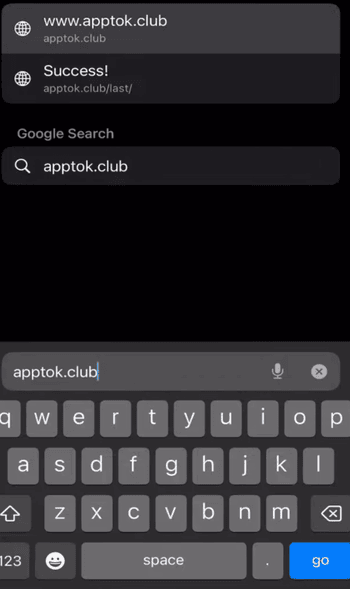
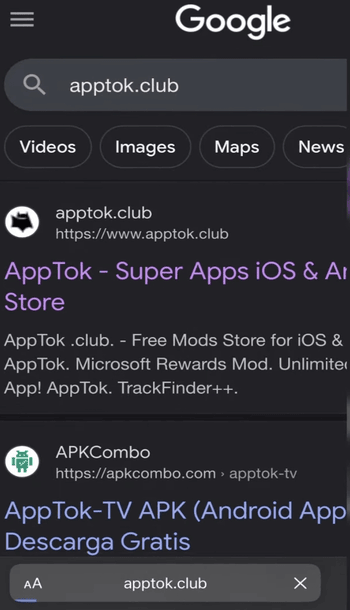
Step #1: First, you need to go to the safari search bar and type in apptok.club.
Step #2: Open the AppTok website.
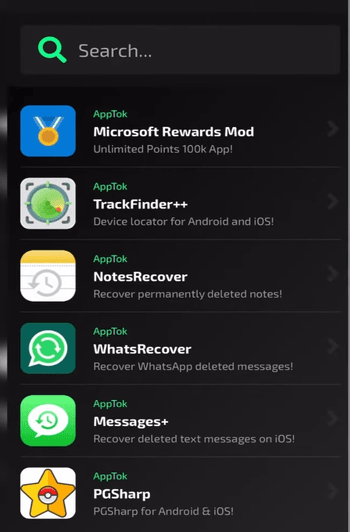
Step #3: Search for the PGSharp application from the given list.
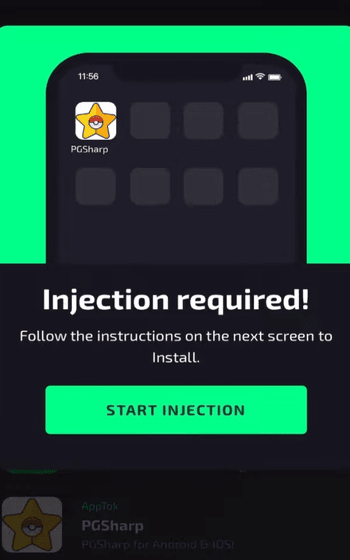
Step #4: You can install it from here. You would be asked to inject it for installation.
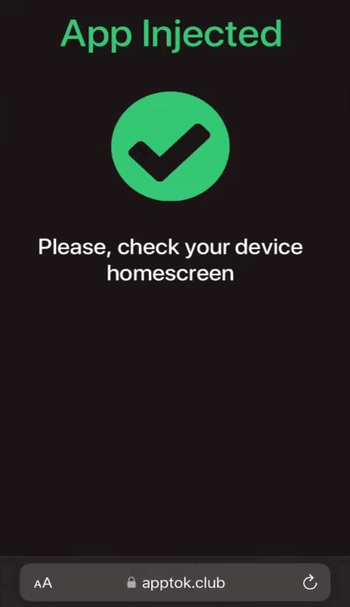
Step #5: After allowing the installation, it will be downloaded and installed on your iOS device and will be shown on the homescreen.
Step #6: After installation, you can play Pokémon Go with PGSharp functionality.
PGSharp iOS Alternatives
Many other applications, like PGSharp, offer more or less the same features.
Some of them are:
#1) LocaChange
LocaChange is compatible with both Android and iOS devices. With this app, you can spoof your location and play from anywhere around the world. It also supports all location-based apps as compared to PGSharp, which only supports Pokémon Go. You can also save your favorite places and check the history.
Website: https://www.locachange.com/
#2) PoGoskill
It is another good alternative to PGSharp that gives you the option to spoof your GPS location and to adjust the travel speed of the player. It also enables you to set up customized routes to follow.
Website: https://www.pogoskill.com/
#3) Tenorshare iAnyGo
It is a PGSharp iOS alternative and supports iOS devices, as compared to PGSharp, which does not support iOS devices from its official website. It provides a safe and secure location spoofing connection that enables its users to play from anywhere in the world. You can set the speed of the player upto 72 kilometres per hour.
Website: https://www.ianygo.com/
Suggested Read => Spoof iPhone Location using Wondershare Dr. Fone Virtual Location
Here is the video that tells you 5 tricks to catch Pokémon in Pokémon Go
FAQs on PGSharp Download
1. Is PGSharp safe to use?
Yes, PGSharp is safe and convenient to use. It is just that you have a risk of a Pokémon Go soft ban when you change your location more frequently. So it is advisable to spoof when only needed.
2. Where can I get PGSharp APK?
You can get the PGSharp APK download from its official website. You can directly download it from there, or you can find it on the Google Play Store.
3. Is PGSharp safe?
Yes, PGSharp has a free version where you would get all the basic functionalities. To avail premium features, subscribe to its paid version, which starts from $5 per month.
4. How to install PGSharp on iOS?
As it can not be downloaded from its official website on iOS devices, the PGSharp download can be found on some websites like applibero.com, apptok. club, and more.
5. Why can’t I catch Pokémon in PGSharp?
There are several reasons that you can check to resolve the issue:
You may have moved your location more frequently and have been imposed a Soft ban.
You may have crossed the cooldown rules
Maybe you are teleporting quickly.
You may have been detected by using a spoofing application or triggered Niantic’s detection systems.
6. How to troubleshoot PGSharp?
If you have a question about how to fix PGSharp not working, then you can try these solutions:
1. Update your PGSharp application.
2. Reinstall the application.
3. Wait till the soft ban has been removed.
4. Reduce the spoofing activities not to get noticed.
Conclusion
PGSarp is an amazing application that enables the players of Pokémon Go to spoof their locations and to play from all around the world without being present there. It, along with location spoofing, provides so many amazing functionalities like teleport, enhanced throw, caught preview, custom GPX, spawn boost, quick to catch, buddy assistant, auto incubator, and so much more.
If you are a Pokémon Go lover, you can use PGSharp freely and enjoy its additional functionalities. It is safe and secure to use.
Was this helpful?
Recommended Reading
-

Get ready to Master Pokemon Go with expert strategies. Discover the top Pokemon Go Joystick Hacks that are guaranteed to improve your Pokemon Go experience without violating their community guidelines: When Pokemon Go launched in 2016, I couldn’t get enough of this AR mobile game. The idea of physically exploring…
-
Want to play PlayStation games on PC? Read our review of the top PS3 & PS4 emulators and compare their features, etc. to identify the best PS4 Emulator: PlayStation is a home video game console developed by Sony Entertainment Network. It is the eighth generation console that supports single-play and…
-

Deeply explore a wide selection of the most engaging online io games. Play these browser-based io games online with players from any part of the world to enjoy unlimited fun and entertainment: .io games are free multiplayer browser games with interesting graphics and simple gameplay. You can play these games…
-
Want to know about the hottest games for Android devices? Check out this detailed review of the Best Android Games to help you in the selection process: The video game industry has come a long way since such games were first developed for home consoles in the early 1970s. Today,…