Discover the top-rated Discord Timestamp Generator to convert date/time as per your timezone. Pick the right Discord Timestamp Maker to create timestamps instantly in all Discord styles:
Discord is one of the most popular social media platforms, designed for gamers to communicate with each other in real-time while playing.
It is used as a virtual club that includes free voice, video, and chat that everyone can enjoy, including different study groups, businesses, etc. It includes servers that are run by different communities globally to discuss the related concerns.
Table of Contents:
Discord Timestamp Converters: Top Auto-Timezone Formatting Tools
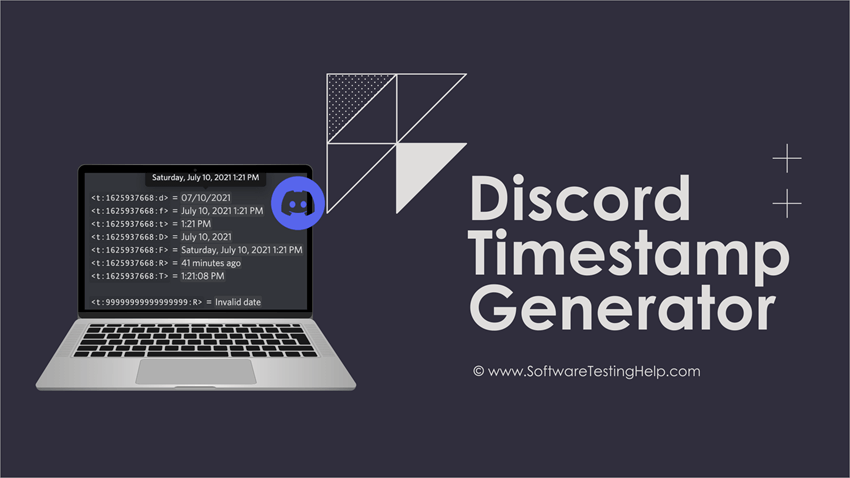
As it connects people from all around the world, it is necessary for everyone sitting at different places to see the timestamps according to their time zone. Discord offers a feature that allows you to manually set timestamps and also integrates with any Discord timestamp converter, enabling you to adjust to each viewer’s local time.
The timestamp generator enables you to easily generate and embed timestamps in Discord messages.
This article would be helpful for those who need to know the Discord timestamp generators. They would get to know the use of various time formats and commands, and how to embed one into the message. The article will cover everything related to Discord timestamps.
Here is the video on how to create a dynamic Discord Timestamp:
What is Discord Timestamp
It is a date and timestamp that is embedded in the Discord messages. It can be adjusted to each user’s local time zone. It uses the Unix epoch as a base for setting the timestamp.
Check the video below on Unix Epoch:
It is a time representation system that counts each second from a specific date and time, i.e., Thursday, January 1, 1970, at 00:00:00 UTC, to create a timestamp.
The timestamp has three parts: timestamp determinant, Unix time code, and the style.
<t:unix_time:style>
Here ‘t’ is the timestamp determinant; then is the Unix time code that sets the timestamp’s date and time, and lastly, the character is for the style of the timestamp; it could be f, R, T, t, etc.
Further Reading => Top Discord Servers to Make Friends
Timestamp Determinant: It is the character that decides the format in Discord. Like for animated emojis, we use ‘a’. Likewise, for timestamps, we use ‘t’ at the beginning of the format.
Unix Time Code: It is the code that sets the time and date in a timestamp. It is the number of seconds counted from January 1, 1970, at midnight UTC.
Timestamp Styles:
There are seven styles in Discord, as mentioned below:
- Short time: It is represented as 13:00 and can be embedded by using a small ‘t’ at the end of the timestamp format.
- Long time: It is represented as 13:20:00 and can be embedded by using a capital ‘T’ at the end of the timestamp format.
- Short date: To embed short dates like 01/04/2026, you can add a small ‘d’ at the end of the timestamp format.
- Long date: You need to add a capital ‘D’ at the end of the timestamp format to set a long date like 3 April 2026.
- Short date and time: For short date and time, we need to add a small ‘f’ at the end of the timestamp format. It would look like- 3 April 2026 13:00.
- Long date and time: For a long date and time format, you need to put a capital ‘F’, and it would be embedded as Wednesday, 9 July 2026 8:54
- Relative time: For a relative time that would be relative to the current time, like 30 days ago, 5 minutes ago, etc, you need to add a capital ‘R’ at the end of the timestamp format.
The table provides the following information.
| Style | Input | Output |
| Short time | t | 13:00 |
| Long time | T | 13:20:30 |
| Short date | d | 09/07/2026 |
| Long date | D | 9 July 2026 |
| Short date and time | f | 9 July 2026 13:00 |
| Long date and time | F | Wednesday, 9 July 2026 8:59 |
| Relative time | R | 30 days ago |
Implications of Discord Timestamp
Discord timestamp is of great use. By using it, you can avoid errors, confusion, and wasted time efficiently by creating countdowns and mentioning the time in messages, which gets automatically adjusted to each viewer’s local time zone.
There are many uses of Discord Timestamp as given below:
- Server Event Scheduling: You can use timestamps at the time of event planning or scheduling and mention them in your message; it will automatically adjust to each user’s time zone.
- Tracking Message Time: By mentioning the timestamp with essential messages, users may easily keep track of essential information and know when the message was sent. In Discord, it does not show when the message was sent in itself; you have to use a Timestamp for the same.
- Coordinating Community: Timestamps would be of great use in coordinating all members of a specific server of the community. At the time of scheduling an event, it keeps everyone on the same page by showing the correct time in each viewer’s local format.
- Cross-platform Integration: It would be of great use if you integrate it with other systems like Calendar, Trello, bots, etc. You can convert real-time into a timestamp in Discord, and it auto-updates announcements when the time changes.
- Countdown Timers for Releases/Launches: You can create a countdown timer for releases or launches for the hype by using its relative format <t:code:R>.
- Recurring Event Timestamps: It is used in showing timestamps for recurring events, which also shows full date and time with countdowns by using combined formats like <t:1754397000:F> (**<t:1754397000:R>**).
Further Reading => How to Fix Discord not Opening Error
Troubleshooting Common Timestamp Issues
There are certain common issues that users may face while using timestamps in Discord.
These are:
- Timestamp not Displaying Correctly: Sometimes you type in the code, and it just shows the plain text like <t:1754397000: F> in the message. This happens if you have put any extra space or backticks, or something, along with the code.
- Timezone Detection Problems: Sometimes the timestamp generators detect the timezone incorrectly. To avoid this issue, you should check your device clock and time zone. It may be incorrect.
- Format Compatibility Issues: Sometimes you use an incompatible format like <t:1754397000:X>. This is not compatible with Discord Timestamp. The Discord Timestamp supports only codes including t, T, d, D, f, F, and R.
- Wrong Timestamp Unit: Take only seconds in the timestamp format, not the milliseconds, as timestamps only support the seconds format, not the milliseconds. If you created code via milliseconds, then you need to convert it into seconds and then format it as required.
- Copy-paste Errors: Sometimes, users may face problems when they incorrectly paste the timestamp code. You should check if you have pasted the exact code or if it is slightly different. To avoid this issue, you should just copy the code from the Timestamp generator and paste it as it is into the message.
- Countdown not Updating. In case your relative time is not updating, you need to open the channel and refresh it, then it will get updated.
Suggested Read=> Compare Best Discord Voice Changer
How to Create Discord Timestamp
#1) Manual Timestamp: We can manually create a timestamp by giving commands and using Unix time codes or Unix Epoch Time. It is the way to track time as a running total of seconds counted since Thursday, January 1, 1970, at Midnight (UTC).
The format would be, or we can take help from
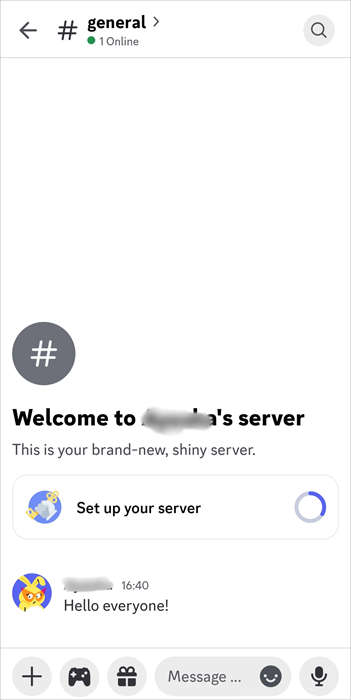
Step 1: Open the Discord mobile app and go to the server.
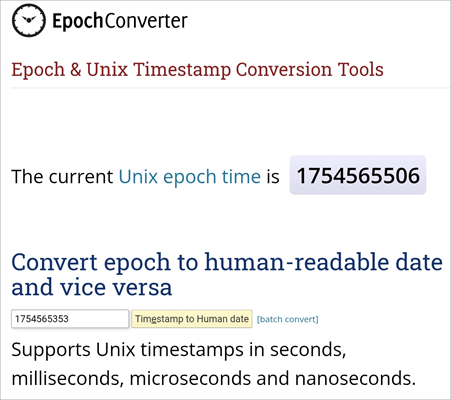
Step 2: Now, go to any Timestamp conversation site and create the Unix Epoch Time code of your current timezone, as shown in the picture below.
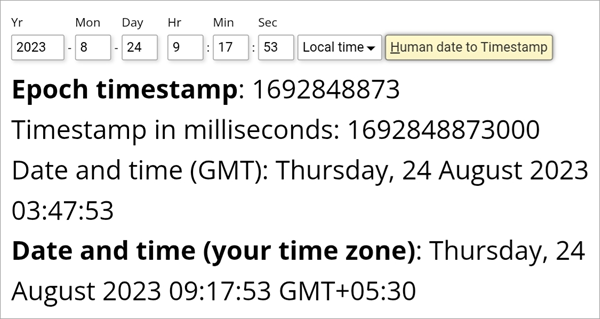
Step 3: You can also create a timestamp as per your required time by filling in all details like year, day, minute, second, hour, etc, as shown in the picture below.
Step 4: Now format the Epoch time created earlier as per your required style. Here we are taking a short date and time style. So the code would be

Step 5: Now press enter, the Timestamp would be created as shown in the picture given below.
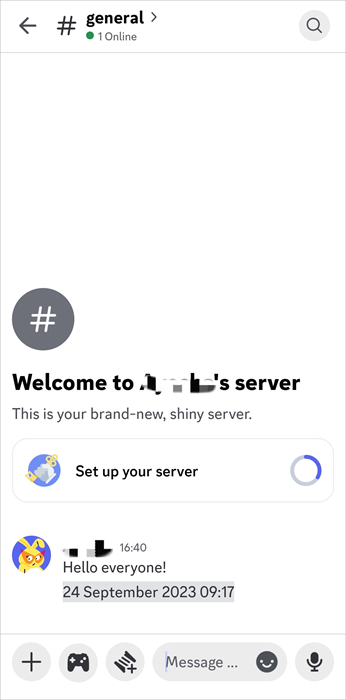
#2) Automated Timestamp: It is the easiest way to create timestamps in Discord. For an automated timestamp, we need a timestamp generator like Maven, HammerTime, etc. From there, we just need to copy the code from multiple timestamp formats and paste it into the message for the desired timestamp.
#3) Discord Bots: The Discord bots are meant for different actions like timestamps, adding/removing roles, timing out/muting, etc., and they work by giving specific commands in the message box.
There are thousands of bots available in the app directory, each with different features and functionalities. Some of them are: Timely, Friend Time, Time Zone, HammerTime, etc.
The General Bot Commands are:
- /at: With this command, you can customize 11 different parameters, including year, month, day, hour, minute, second, timezone, etc.
- /ago: As the name suggests, you can get the timestamp as per your requirement if you need to deduct some from your current time. Like if your current time is 8:30 p.m. and you want it to be 7:30, then you can use this command.
- /in: If you want to alter your current time and need to show it at a later time, then it will add to your current time.
Many timestamp generators simplify the timestamp process. They can easily convert local time to Discord timestamps and can automatically create timestamps in the required format for Discord.
They ensure high-precision time tracking through Unix timestamps and can also generate relative, absolute, and countdown timestamps.
Suggested Reading => Quickly Learn How to Bold Text in Discord
List of the Best Discord Timestamp Generators

#1) Maven
Maven is a dynamic Discord timestamp maker that enables you to easily create a timestamp to use in Discord messages that improves message clarity and professionalism, as well as avoids timezone confusion in global communities.
It allows you to pick a date and time and simply converts it to a timestamp. You can copy the timestamps format directly from there to use it in the messages in Discord.
How to generate timestamps on a computer:
It is simple to generate Timestamps via Maven. You just need to follow the given steps:
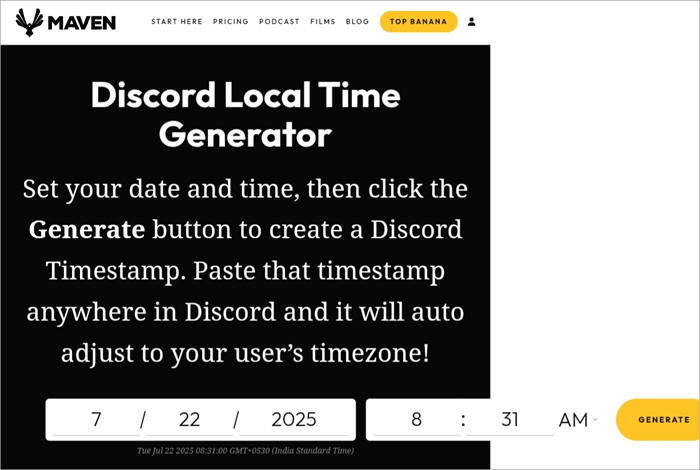
Step 1: Go to the Maven website and type in the date and time in the middle of the page. Your local time zone would be automatically detected.
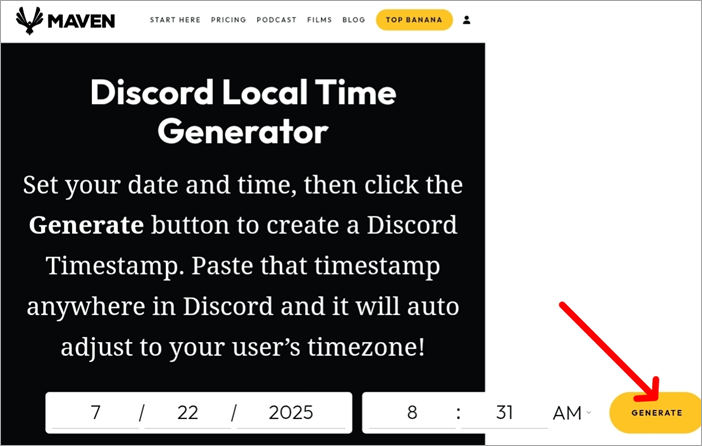
Step 2: Now, press the generate option for the timestamp format.
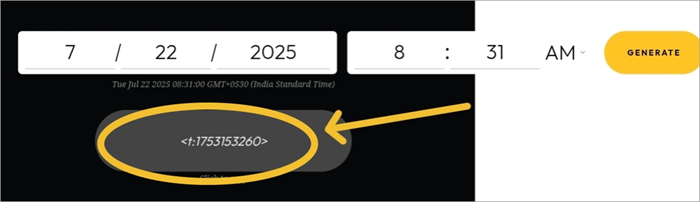
Step 3: The format would be generated as shown in the picture below. You need to copy the format and paste it into the message in Discord to add a timestamp.
Website: https://whatismaven.com/tools/discord/
#2) HammerTime
HammerTime is a free Discord timestamp creator that enables you to generate copy-ready timestamp codes for Discord.
It supports multiple date and time formats, including Full date/time (F), Relative (R), Short time, date only, etc. It is a web-based timestamp generator that does not need app installation; you can directly work on it in your browser.
How to generate Timestamps:
Step 1: Open the HammerTime website and enter a specific date and time as per your requirement. It shows a default time and date as per your local time zone.
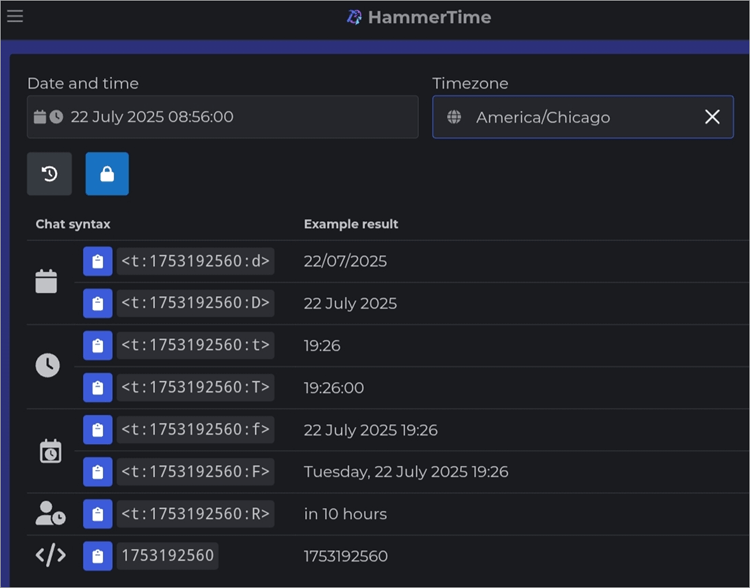
Step 2: Now, copy the code of the format you want, as shown in the picture below, and paste it in Discord.
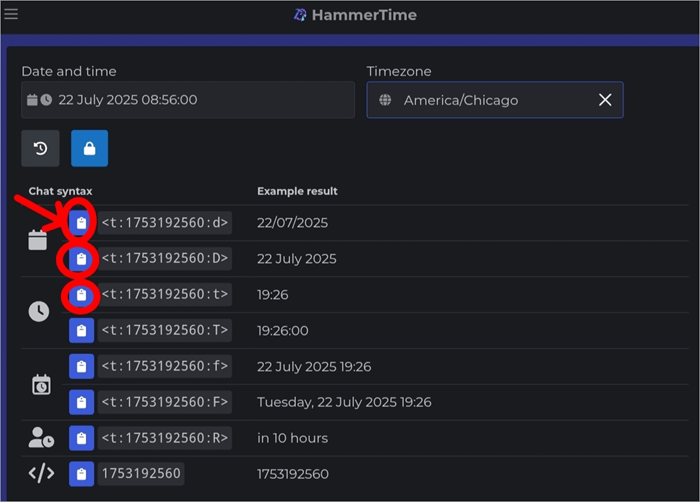
Website: https://hammertime.cyou/
#3) Discord Date Picker
Discord Date Picker is a simple timestamp tool that instantly generates copy-ready codes for dates, times. and countdowns for Discord messages. It helps avoid error, confusion, or wasted time while communicating with an international community by adjusting the timestamp to each viewer’s local time.
How to generate a timestamp:
Also Read => How to Fix the Discord Fatal Javascript Error
Step 1: Select a specific date and time.
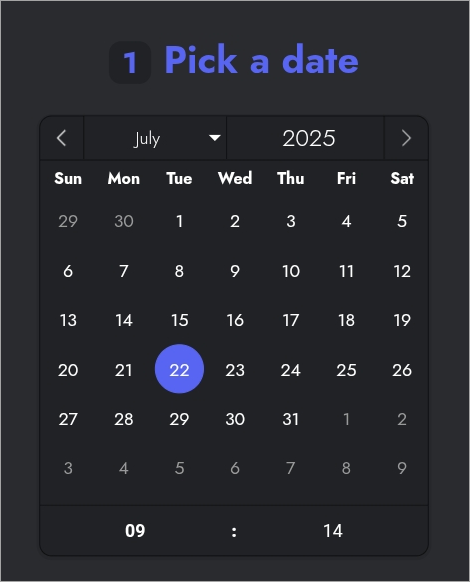
Step 2: Copy the desired code from the given formats and paste it into the Discord messages.
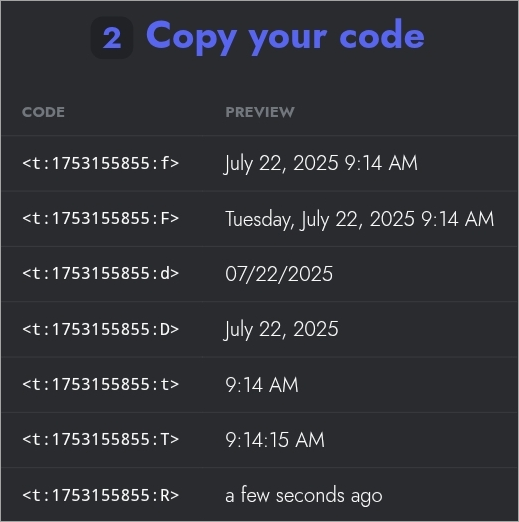
Website: https://discord-date.shyked.fr/
#4) Discord Timestamp Maker
Discord Timestamp Maker is a web-based Discord time generator that enables you to easily create a timestamp for your Discord messages. You just need to command a specific date and time, and your code will be generated in your preferred format (full, short, relative, etc.).
Website: https://pokemonworkshop.neocities.org/timestamp/
#5) Unix Time Stamp
Unix Timestamp is a free online timestamp generator that enables you to create Unix timestamps to use them in Discord messages.
You just need to fill in the options, including year, month, day, hours, minutes, and seconds, and press Convert to Timestamp to generate a Timestamp code.
Website: https://www.unixtimestamp.com/
#6) Timestamps
Timestamps is an online timestamp-generating tool that helps in creating timestamps for Discord and other apps that support the timestamp format. Timestamps are generally used to avoid confusion, errors, and delays.
To create a timestamp here, you just need to command a specific date and time and copy the code format you want to paste on the Discord app.
Website: https://www.timestamps.app/
Further Reading => How to Italicize Text in Discord
FAQ’s on Discord Timestamp Maker
1. How to do the time trick on Discord?
We can easily get the timestamp on Discord by using any Discord Unix timestamp generator like Maven, HammerTime, etc.
These Timestamp generators ask you to put the required date and time to convert them into the Unix code, and then paste it into the Discord messages. When we paste the code in a message, it gets converted into a date and time.
2. How to make a universal time stamp on Discord?
We can easily make a universal time stamp on Discord by inserting a Unix Timestamp which is calculated by Epoch or counting seconds since the epoch and using a specific format like <t:TIMESTAMP:R> (this will show the relative universal time like 2 minutes ago or in 5 days), <t:TIMESTAMP:t>, <t:TIMESTAMP:f> and so on.
3. How to make auto time in Discord?
To make auto time in Discord, you just need to generate a Timestamp from any Timestamp generator and paste it in the Discord time zone. It will automatically adjust to the user’s timezone.
4. How to make Discord use a 24-hour clock?
To change the time format from 12-hour to 24-hour or the date format from DD/MM/YYYY to MM/DD/YYYY, you need to change the language. To change language, you need to go to Discord and open the user settings, click on the language settings, and select your preferred language.
5. Can I make a timer on Discord?
Yes, we can make a timer on Discord by using a relative format, which is denoted by capital R and would be placed at the end of the Unix code like <t:TIMESTAMP:R>. In this way, we will get a timer like 5 minutes or 10 hours, etc.
6. What is the Discord bot that converts time?
Discord time bot is a program that converts time according to each viewer’s local time zone by using certain manual inputs like backticks, brackets, etc.
8. What is hammer time in Discord?
Hammer time is a dynamic time stamp generator that enables you to generate copy-ready timestamp codes for Discord.
It supports multiple date and time formats, including Full date/time (F), Relative (R), Short time, date only, etc. It is a web-based timestamp generator that does not need app installation; you can directly work on it in your browser.
9. How do Discord Unix timestamps work?
Discord Unix timestamps are used to mention the time and date in messages, which gets automatically adjusted to each viewer’s local time zone.
This can be done via Discord bots, timestamp generators, or manually. You just need to put the correct code in the message, and it will appear as the required date and time when you press enter, and it will automatically adjust to each viewer’s local time zone.
Conclusion
In this article, we learned the concept of Unix epoch and how to use it in embedding timestamps in Discord messages. There are two ways of creating the Timestamp.
First, manually by counting the seconds from the Unix epoch base, which is Thursday, January 1, 1970, at Midnight (UTC), and second, by using a Timestamp generator that automatically generates one.
Various timestamp generators that Discord users can use to create timestamps of different formats. There are various formatting styles in the Timestamps, including short date, short time, long date, long time, and so on.
The process of embedding Timestamps in Discord messages is simple, straightforward, and user-friendly, which enables you to enhance the content of messages to their fullest and improves the clarity and coordination of your messages. You can keep your friends and pupils well-informed with perfectly timed messages.
Was this helpful?
Recommended Reading
-

In this tutorial, we review the online platform called Discord and will understand various ways to resolve the Discord Not Opening Error: The world comprises people with different tastes and habits, everyone tries to find out someone who matches their energy and holds the same interest. The social media platform…
-

Learn the simplest way to make your text stand out in Discord chats. Discover the quick discord text formatting tricks to explore how to bold in Discord quickly and emphasize important messages: Discord is a gaming and communication application that acts as a social media platform where users can connect…
-
Read this review with features to compare and select the best Discord Emoji Maker to create unique emojis as your requirement: Text conversations can be boring and sometimes confusing without expressions. Emoticons, emojis, and Gifs are there to resolve that problem. Emojis add a lot of vibrancy and meaning to…
-
This tutorial explores and compares the best Discord Voice Changer software with pricing. Select a professional or free voice changer for Discord from this list: Nothing can match the popularity of Discord Voice Changers today. The idea of being able to distort your voice to the point of it becoming…