


In the previous tutorial, we started with the representation of the sample project hierarchy and various framework components. We also discussed the data source – “excels” used to store the test data and their Excel manipulations. We also discussed the new strategies and resources to mature our framework.
Now we are moving ahead with advanced topics in this Selenium Training Series. In this session, we will discuss two important concepts that are important in maturing the framework. We would discuss the concept of Generics and reusability aspects. We would also discuss the creation and significance of the Test suite.
Generics and Testsuites Creation

We would accompany the concepts with adequate examples and sample code for better understanding.
Generics
By the literal notion, a generic can act as a descriptive of an entire group or class.
While automating applications, we come across various end-to-end scenarios. An end-to-end scenario may consist of several trivial functionalities. Thus, many of this functionality can act as common functionality to more than one test script with slight or almost no modifications.
Hence, it is advisable to create a generic class comprising methods that can be claimed as common and can be shared among multiple test scripts instead of implementing the same code again and again for multiple test scripts.
Take note that generics also introduce the power of reusability in our framework. Reusability reduces the time taken for code, errors, bugs, maintenance, etc. exceptionally.
Type of Generics
#1) Application Specific
The meagre functionality belonging to an application under test can become a part of the Application Specific generics. Take the Login Functionality, for instance. Login is one such functionality that can be a fragment of almost all the test scripts. Thus, instead of writing the login code all over again in the test scripts, we would create a common method in the generic class and call it wherever needed.
#2) Framework Specific
Aside from Application-specific generics, we may have common methods that do not directly relate to the application under test but are part of the chosen framework. Consider an Excel reading functionality when we have employed Test Data Driven Framework.
It would make no sense if we would write the code for reading Excel again and again in all the test scripts. Therefore, we induce the code once in the generic class and make a call to it whenever required.
Creation of Generic Class
The user is leveraged to create as many generic classes as he/she desires based on the modularity infused.
Let us understand the concept of generic by creating one.
Step #1: Create a new java class “CommonMethods.java” that would act as a generic class consisting of common methods preferably in the package other than where test scripts reside.
Step #2: The next step is to copy and paste the below code into the “CommonMethods.java” generic class. Several common methods can be implemented inside the periphery of this class.
Below is the code snippet for login functionality.
/**
* Login the Test application
*
* @param username
* @param password
*/
public void login(String username, String password) {
try {
// Enter User Name
WebElement userName = driver.findElement(By.id("loginID"));
userName.clear();
userName.sendKeys(username);
// Enter Password
WebElement passWord = driver.findElement(By.id("Password"));
passWord.clear();
passWord.sendKeys(password);
// Click on the Sign In Button
WebElement signin = driver.findElement(By.id("SignIn_button"));
signin.click();
driver.manage().window().maximize();
} catch (Exception e) {
e.printStackTrace();
}
}
Take note that the aforementioned method is a parameterized method. Thus, the same method can test the login functionality with different test data.
Step #3: The next step is to call the common method within the test script. The process is a two-step process. First, we create the instance of the generic class within the test class and then we call the common method in the created instance by passing the required arguments.
In the code fragment below, we created an instance of the “TestScript1.java” class and called the login () method to log in to the application.
// Create Object of the generic class
toolsObj = new Tools();
// Login the test application by calling the common method
preTestObj.login(“username”, “password”);
Take a mention that the above code can be placed anywhere inside the test class. The user can place the code in the setup () method or in the test () method.
Testsuite
The test suite is an assortment of more than one test script grouped for execution purposes. Thus, the test suite executes the number of specified test scripts unattended. The test suite can cite the test scripts to be executed automatically; all that is required from the user is to mark an entry each for the individual test script within the test suite.
The entry is supposed to be the “class name” of the test script with the “.class” extension or simply the compiled form of our Java class.
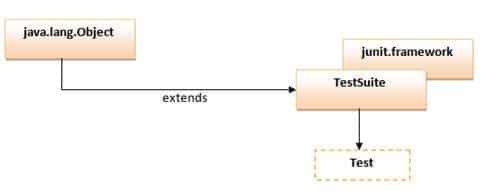
Below is the sample Test suite created in Java. Take note that the Test suite is a Java-based class that belongs to the family of JUnit. Thus, you may encounter several JUnit annotations in the code.
Code Snippet
package com.axway.webliv.tests;
import org.junit.AfterClass;
import org.junit.BeforeClass;
import org.junit.runner.JUnitCore;
import org.junit.runner.Result;
import org.junit.runner.RunWith;
import org.junit.runner.notification.Failure;
import org.junit.runners.Suite;
import com.axway.webliv.tests.MetaData.*;

@RunWith(Suite.class)
@Suite.SuiteClasses({

       ChangeStatusBinarySphereTest.class,
       ChangeStatusRestrictionTest.class,
       ChangeStatusDocSphereTest.class,
      })

public class TestSuite {
       /**
        * Setup method to set system properties
        */
       @BeforeClass
       public static void Setup() {
       }
       /**
        * @param args
        */
       public static void main(String[] args) {
              Result result = JUnitCore.runClasses(TestSuite.class);
              System.out.println("TEST CASES RUN: " + result.getRunCount());
              System.out.println("TEST CASES FAILED: " + result.getFailureCount());
              for (Failure failure : result.getFailures()) {
                     System.out.println("\nTEST NAME: " + failure.getTestHeader());
                     System.out.println("\nERROR: " + failure.getMessage() + "\n");
                     System.out.println(failure.getTrace());
                     System.exit(1);
              }
       }
       /**
        * Report test results
        */
       @AfterClass
       public static void TearDown() {
       }
}
Code Walk-Through
A test suite is none other than a simple JUnit class having setup() and teardown() methods; the ones we discussed at length in our preceding tutorials. The only remarkable difference lies in its competence to execute more than one test script in a single go.
Import Statements
import org.junit.AfterClass;
import org.junit.BeforeClass;
import org.junit.runner.JUnitCore;
import org.junit.runner.Result;
import org.junit.runner.RunWith;
import org.junit.runner.notification.Failure;
import org.junit.runners.Suite;
The above import statements are embedded in the class to be able to use various annotations provided by the JUnit.
import org.junit.runner.JUnitCore;
import org.junit.runner.RunWith;
import org.junit.runners.Suite;
The above statements possess the underlying architecture to execute the test suite consisting of multiple test classes.
import org.junit.runner.Result;
The import statement allows the user to store the test execution statuses and their manipulations.
import org.junit.AfterClass;
import org.junit.BeforeClass;
These import statements are used to identify and annotate setup() and teardown() methods. The setup() method annotated with BeforeClass instructs the program control to execute the method before each of the test script executions. Like setup(), teardown() method annotated with AfterClass tells the program control to execute the method after each of the test script executions.
Class Entry
@RunWith(Suite.<strong>class</strong>)
@Suite.SuiteClasses({
       ChangeStatusBinarySphereTest.<strong>class</strong>,
       ChangeStatusRestrictionTest.<strong>class</strong>,
       ChangeStatusDocSphereTest.<strong>class</strong>,
       })
This section of the class allows the user to mark the entries of the test script to be executed in the next run. Remember the entries are marked with the “.class” extension, i.e. in their compiled formats.
Execution – main ()
public static void main(String[] args) {
Result result = JUnitCore.runClasses(TestSuite.class);
System.out.println("TEST CASES RUN: " + result.getRunCount());
System.out.println("TEST CASES FAILED: " + result.getFailureCount());
for (Failure failure : result.getFailures()) {
System.out.println("\nTEST NAME: " + failure.getTestHeader());
System.out.println("\nERROR: " + failure.getMessage() + "\n");
System.out.println(failure.getTrace());
System.exit(1);
}
}
This part of the code deals with the execution. The program execution always initiates from the main().
The runClasses method of the JUnitCore class is used to execute the test suite. The “Result class” and its methods are used to determine the execution status in terms of Passed and Failed test cases.
Thus, the user is leveraged to experiment with the test suite class to suffice his/her requirements.
Conclusion
In this tutorial, we tried to make you acquainted with the concept of generics and common methods. We also discussed the benefits we get out of generics like reusability. We also shared the practical approaches towards the creation of generics and their accessibility.
Here are the cruxes of this article:
- Generic is something that can act as a description of an entire group or class. Generic in our framework is a class that solely consists of methods that can be shared across multiple test classes.
- Generics can be classified into two categories:
- Application Specific
- Framework Specific
- A simple Java class can be created to act as a Generic. Inside the generic class, you can implement several common methods. These methods can be parameterized methods.
- The common methods can be accessed by calling them on the instance of a generic class within the test scripts.
- The test suite is an assortment of more than one test script grouped for execution purposes. Thus, the test suite executes the number of specified test scripts unattended.
- A test suite is none other than a simple JUnit class having setup() and teardown() methods; the ones we discussed at length in our preceding tutorials. The only remarkable difference lies in its competence to execute more than one test script in a single go.
Next Tutorial #23: Going forward in the next tutorial we will study yet another tool for automating the entire build process. Thus, we will discuss “Ant” in the next tutorial at length. We would discuss the need for an hour to use a build tool in Test Automation. We would slide down to the deeper sections where we would define the project dependencies and create the build.xml file.
Note for the Readers – As we have already covered the major part of the framework in this and the previous few tutorials, readers can start exercising these concepts and can come up with their own customized framework.
Was this helpful?
Recommended Reading
-

This Tutorial explains Uses, Examples & Functionalities of Robot Class In Java and its Integration with Selenium Framework: Robot Java is a Robot class in the Java AWT package. It is generally used to simulate real-time keyboard and mouse operations which we do manually. The main purpose of the Robot Class in…
-

In the previous tutorial, we learned how to create automated test scripts using Selenium IDE and its recording feature. We also flipped through the populous features of Selenium IDE. We aimed at harbingering the reader with the most vital features and commands of Selenium IDE. Just a reminder - this…
-
This tutorial will give an insight into JUnit and its usage in selenium script. This is tutorial #11 in our comprehensive Selenium tutorials series. JUnit is an open-source unit testing tool used to test small/large units of code. To run the JUnit test, you don’t have to create a class…
-
Overview: Hi Testers!! In this tutorial, you will learn a very interesting topic i.e. integrating your selenium scripts with JMeter and measuring the performance. Below are the topics covered in this session: Integrating Selenium with JMeter. Using WebDriver Sampler Plugin. => Click here for The Complete Free Training On JMeter…


Thanks for this. But last 3 tutorials 20/21/22 i am not satisfied with the way these tutorials are covered in a small length.
Its a request if you can cover these topics at length as they are the way things are being used in project.
Once we achieve this, we may learn other things. please elaborate these tutorials
can we create test suite in Selenium IDE?
If we create a java method and write down whole code inside the method, then can we called this method as test suit ?
Not satisfied with this tutorial.. need more explanation.. the first 15 tutorials are great.. but after that, it is not good.. please provide the full detailed tutorial
Thanks for this tutorial. It really helped me a lot.
Got one question while trying to build the framework and the test scripts.
How can we pass the driver instance in the test script (created in Setup() method) to the application method (say login) in CommonMethods class. Should we include a third parameter to the login method containing driver? What would be the best way to do this?
thanks.
i need to report in multiply java method result
For Example : we have 1000+ testcases to do aumoted so we have to write 1000++ times drier.findelement now I want to make one general method so whenever it require to write driver.findelement we can ingnor it y writing just that general method name
Can you suggest me how to do it ??
@Rohit
Yes, we can create testsuite in Selenium IDE.
Please refer the Selenium IDE tutorial for the same.
Do you have any tutorial or suggestion on my query like if the test report has been generated than i require how many test case being pass/fail count and total test case count in a summary so that same summary is visible in email body. How i can acheive this?.