


Create eye-catching YouTube Intros in minutes with the top YouTube Intro Maker. Learn how to make a intro for YouTube like a professional from this step-by-step intro maker guide:
In the present-day era, YouTube is considered to be the digital ecosystem of storytellers, content creators, gamers, and also brands; it’s considered more than just a simple platform.
Every second, over 100 hours of video content are being uploaded to YouTube. In this ocean of countless content, how will you grab the viewer’s exact attention in the initial seconds?
The answer lies in one of the extremely strong elements: a compelling YouTube intro.
Table of Contents:
Create Stunning YouTube Intros Like a Pro
The very first thing viewers see and hear sets the tone, pace, and style of everything that follows. The reason for how to make a intro for YouTube is now one of the most frequently searched phrases by content creators, both new and experienced.
If you’re a vlogger sharing all your daily routines and adventures, an educator explaining complex topics, or a tech expert reviewing the latest gadgets, your intro is your digital grasp.
A YouTube intro is considered to be more than spinning a logo or even an animation that is quite flashy. It’s actually a branding moment, an anchor, and a preview of your channel’s identity – all compiled into a clip of 5–7 seconds.
When done perfectly, it forms a professional vibe, builds trust, and also raises your chances of converting viewers into subscribers.
Further Reading => Best YouTube Video Editors
The great news is that you don’t need to be a video editing expert or even hire a genuine designer to create a perfect intro.
Although it is very crucial for ensuring your Intro meets the basic and important requirements of YouTube, utilizing licensed or royalty-free music, exporting it in MP4 format (1080p or 4K), and also following the content policies of YouTube for avoiding the issues related to copyright or even formatting.
With modern tools like YouTube intro maker platforms or smart apps like Intro Maker, creating high-quality intros has become incredibly easy.
The State of YouTube Video Intros – What’s Working Now
Thanks to the rise of multiple online tools like YouTube intro maker platforms, as well as automated apps like Intro Maker, anyone can create stunning intro videos easily.
These types of tools actually offer templates that are completely ready-made, user-friendly, and customization options, along with royalty-free music is also available.
You can simply pick any style, insert your logo along with the appropriate tagline, select your color preference from the palette with the audio, and export it in high definition. It’s never been easier to make a YouTube intro that reflects you and the personality of your brand.
We’ll cover everything you need to know in this comprehensive tutorial, from appreciating the value of intros, starting from the selection of the best resources, tailoring your material, along integrating your intro into your films easily.
The best and perfect platforms, including Renderforest, Canva, and InVideo AI, will also be revised; every section will offer a different approach for realizing your concept as an intro.
This blog is going to be your one-stop solution for anything from “how to make an intro” to the best YouTube intro creator.
Let’s explore the world of YouTube intros if you’re prepared to improve your content, build the brand value of your channel, and make those important opening seconds memorable.
What is YouTube Intro?
Your YouTube intro is your first chance to leave a lasting impression in a world where all your viewers evaluate the videos based on their first five seconds.
A YouTube intro is a brief video clip that plays at the start of your YouTube content, that mainly lasts five to fifteen seconds. It also serves as a branded signature by introducing your identity along with your channel via the utilization of multiple texts, animation, sound, and images.
It’s important to initiate the inclusive why this short video segment is so significant, whether you’re a content creator looking for tips on how to create a YouTube intro or investigating the top YouTube intro builder solutions.
Suggested Reading => Best YouTube Video Downloaders
A YouTube intro mainly serves as a miniature narrative tool in addition to being an artistic flourish. It may consist of:
- The name of your channel
- Your brand icon or logo
- A catchy tagline or central idea
- A striking background music or jingle
- Visual effects, motion graphics, or transitions
Considering it is similar to the opening scene of a film or a television program’s title sequence. The depth of the tone of your brand must be professional, assertive, elegant, or minimalist, which will be conveyed to the viewers via the intro.
It also establishes clear expectations, mainly for your viewers, when it is appropriately prepared utilizing any contemporary intro creator.
For instance, glitch transitions, neon writing, and bass-heavy music may be used in the opening of a high-energy gaming channel. A channel that mainly focuses on educational videos or even any tutorials may represent the authority by implementing some soothing music, gentle hues, and gradual fades.
Suggested Reading => How to Cite a YouTube Video
Why a YouTube Intro Really Matters
You might think, “People skip intros anyway?” But that’s not the truth. When done right, a perfect intro isn’t just tolerated – it becomes a treasured part of your channel’s visual identity.
Here are the top reasons creating a YouTube intro – especially if you want to make a YouTube intro using a free or premium, is an investment worth making:
#1) Establishing the identity of your brand
Your YouTube intro is a visual and auditory stamp of your brand. If someone were to watch several different videos from your channel, the intro is what ties them together into a coherent brand experience. It helps people:
- Remembering the name of the channel
- Recognizing your brand’s color palette and style
- Trusting your content as polished and consistent

For channels with long-term goals – like building a community, selling a course, or partnering with sponsors – this consistency of branding is vital.
Also Read => How to Download YouTube Videos
#2) Increases audience engagement and retention
Studies by platforms like Backlinko and Vyrill have revealed that the first 5–10 seconds of any video mainly determine whether a viewer will continuously watch or just click away. A catchy, stunning, professional-looking intro makes viewers stay longer and focuses on the quality content, which is the way.
If you were walking into a store, the intro is your storefront. If it’s sleek, elegant, clean, and welcoming, you’re more likely to browse. The same psychological feature applies to your YouTube channel.
Using a reliable intro maker allows you to add:
- Music synced to visual cues
- Motion graphics that grab attention
- A sense of rhythm and energy that hooks viewers
#3) Helps in Improving Professionalism & Credibility
An irregular or uneven introduction might give the impression that your material is unprofessional, even if it is superb. A seamless introduction created using Canva, Renderforest, or InVideo AI may let viewers know that your work has been carefully planned.
This view is important because:
- Increasing the number of subscribers
- Bringing in sponsors and partners
- Increasing your niche’s authority
After a few months, a lot of YouTubers who don’t have an introduction eventually add one because they find it gives their videos the polished look they need.
#4) Builds Familiarity and Emotional Bonds
Have you ever been thrilled merely by listening to your favorite YouTuber or show’s opening jingle? That is familiarity’s power. A strong introduction encourages recognition and engagement, particularly when combined with distinctive sounds or visuals.
The introduction becomes a reassuring routine if people come back to your material week after week. It’s a subtle but significant indication that you’re back. Let’s get started.
#5) Facilitates Branding and Monetization Possibilities
Your introduction can also serve as a place for subtly placed promotional or monetization messaging as your channel expands.
You could:
- Include your value proposition or motto.
- Put a succinct call to action in there (“Subscribe now!” or “New videos every week”).
- Tease your newsletter, merchandise, or website.
The top intro creators enable you to swiftly update and modify key components, allowing you to progress without having to start again.
Still wondering if you need one?
If you’re still thinking, “Do I really need to make a YouTube intro?” – here’s the simplest answer:
If you want to grow, get noticed, and be remembered – yes, you do.
Whether you’re just starting or looking to refresh your brand, having a short, well-designed intro can be the bridge between being another creator and being a recognizable name in your niche.
How to Make a Intro for YouTube in 5 Steps
You are not alone if you are unsure and not confident of how to create a YouTube intro that actually captures the attention of your audience right away, as well as represents your business accurately.
First impressions are very much crucial, as evidenced by the logic that several content creators search for phrases like “make a YouTube intro” or “YouTube intro maker” each month.
Even for the newbies, creating an intro can be creative as well as enjoyable if the proper process, along with the authentic resources, is being utilized. These five easy steps will help you create a beautiful and perfect YouTube intro that is both professional and distinctively you, whether you’re starting your first channel or updating your existing one.
Step #1: Defining Your Brand Identity
Before you opt for any designing tool or select a template, it’s quite essential to understand your brand perfectly. Your YouTube intro is actually a reflection of your soul that is being showcased on your channel. It must visually and sonically align with your tone, niche, and target audience.
You need to ask yourself a few things like:
- What is the reason for my channel? (e.g., gaming, beauty, education, vlogging)
- What emotion do I want to create? (Fun, trust, excitement, curiosity)
- What kind of content do I produce consistently?
- Who is my target audience? (Gen Z, tech geeks, parents, professionals)
Elements of your brand Identity to define:
- Colors: Select a color scheme that expresses your feelings (neutral for learning, pastel for beauty, and strong for gaming).
- Typefaces: Use legible and fashionable typefaces (e.g., serif for classic, sans-serif for current vibes).
- Logo: Verify that your logo is in PNG format, which has a transparent backdrop.
Is the voice tone informal, official, amusing, or motivational? - Advice: Look at how your favorite networks’ intros visually convey their brand to get ideas.
Step #2: Choose the Right YouTube Intro Maker Tool
It’s time to choose a tool to create your introduction after your branding is set. Fortunately, there are many YouTube intro creation tools available today, many of which don’t require any prior editing knowledge.
These are a few well-regarded tools:
- With hundreds of layouts, Canva offers the best drag-and-drop functionality.
- Renderforest: Perfect for 3D and cinematic logo introductions
- For quick, AI-powered, pre-made intro creation, InVideo AI is ideal.
Every tool provides:
YouTube-specific templates
Music libraries containing tracks without royalties
Presets for animation
Upload options for text and logos
HD export (often 4K or 1080p)
In case you need any help in deciding? You’re just starting, use Canva or InVideo. If you want 3D graphics, Renderforest is ideal.
Also Read => Make your own Custom Instagram Highlight Covers
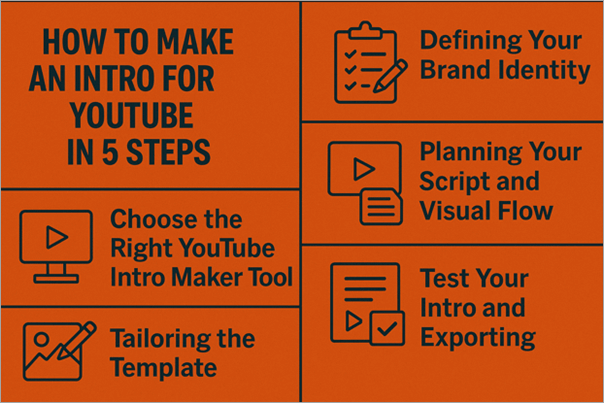
Step #3: Planning Your Script along with the Visual Flow
Even though your intro will only be a few seconds long, pre-planning the structure of the content will make your editing smoother, and your outcome will be more engaging.
Here’s what you should plan. What exactly do you need to include in the intro:
- Channel Name: Make it prominent and stylish
- Tagline or Slogan: A short, catchy line that describes your mission or vibe
- Logo Animation: Let your logo appear with a transition or sound cue
- Visual Effects: Motion graphics, fades, glows, etc.
- Soundtrack or Jingle: Choose background music that fits your content style
Example:
- Flow for a 7–10 Second Intro
- 0:00–0:02 – Starting of the background animation
- 0:02–0:05 – Logo may fade in with the music
- 0:05–0:07 –A light transition of the tagline
- 0:07–0:10 – Settling down the channel name, music fades out
- Need to keep the text minimal, and let visuals speak for your brand.
Step #4: Tailoring the Template
This is where your actual creativity comes to life. Utilizing your selected intro maker, start with a pre-set template that fits your theme. Then customize every element to align with your brand.
What to Customize:
- Blend the colour with your brand palette
- Utilizing your selected tagline, channel name, or even a brief call-to-action like “Subscribe now!”
- Select an audio library or upload your own royalty-free track from the platform
- Adjusting the speed and sync transitions with beats in the music with animation
- Upload your brand assets, like logo and any other illustrations
Most tools like Canva and InVideo allow:
- Drag-and-drop functionality
- Timeline editing
- Real-time previews
- Export in HD with or without a watermark (depending on free or paid plan)
Pro Tip: Always preview your video multiple times before exporting. Make sure the text is readable and the audio syncs well with the animation.
Step #5: Test Your Intro and Exporting
Once you’re satisfied with the visuals and sound, it’s time to export and evaluate.
Export Settings:
- Resolution: Always choose 1080p or 4K
- File Format: MP4 is ideal for compatibility across editing software
- Duration: Keep it short – between 5 to 10 seconds works best
- Aspect Ratio: Standard 16:9 (for long-form), or 9:16 if planning for Shorts or Reels
How to Test It:
- Adding the intro to a test video using basic editing tools like iMovie, CapCut, or Premiere Pro
- Uploading as unlisted to YouTube
- Watching it on both desktop and mobile to ensure visual clarity
- Ask your friends or subscribers for feedback
- Use YouTube’s Audience Retention Graph to analyze drop-off points
Remember: If your intro causes any significant inclination in the retention of the viewer, it may be too long or visually overwhelming. Do trim and simplify it accordingly.
Creating a YouTube intro isn’t just about pretty visuals – it’s about conveying your channel’s voice in just a few seconds. Whether you use Canva’s templates, Renderforest’s 3D animations, or let InVideo AI do the heavy lifting, these five steps will help you make a YouTube intro that resonates with your viewers.
In the next section, we’ll explore individual tools in depth to help you choose the best intro maker for your specific needs.
Best YouTube Intro Makers Reviewed
It’s great that in this era, you don’t require a costly tool or any video editing software for creating a good YouTube intro. Today, developers of all skill levels may easily create excellent intros in just a matter of minutes; all credit goes to several user-friendly tools.
There is a solution that suits your theme, brand, and, of course, the budget, whether you’re looking for a simple and minimalist lesson start, a dynamic game opener, or a stylish logo animator.
Four of the most well-liked and user-friendly YouTube intro creation tools are listed here. You may select the tool that best suits your technical comfort level and content style because each one has a unique collection of features, advantages, and perfect use cases.
#1) Canva
One of the easiest-to-use tools available for beginners is Canva’s YouTube intro creator. Canva is well-known for its user-friendly drag-and-drop interface, which enables users to make intros in just a few minutes without the need for any prior design or video editing knowledge.
It provides royalty-free audio, a vast media collection, adjustable text effects, and hundreds of animated layouts. To give your intro a polished, professional-like appearance, you may include your logo, use your brand colors, and even animation transitions.
Steps for Creating a YouTube Intro Video using Canva
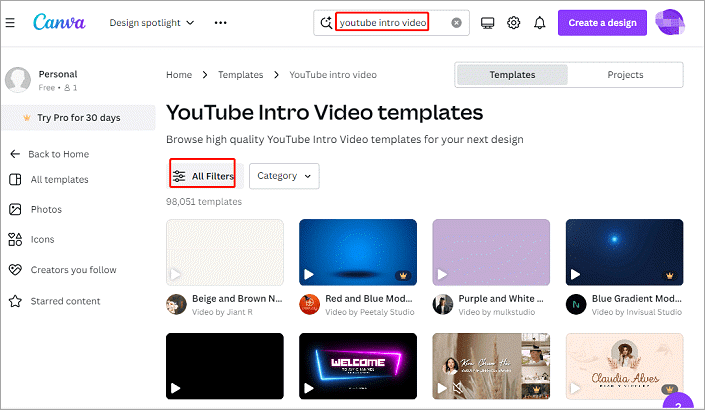
Step #1: Choose the YouTube Intro Design Option
- Navigate to the Canva dashboard.
- Search for “YouTube Intro” in the search bar.
- Select from hundreds of available templates.
Step #2: Customize Your Template
- Add text, logo, and change colors to match your brand.
- Modify filters, drag-and-drop images or video clips.
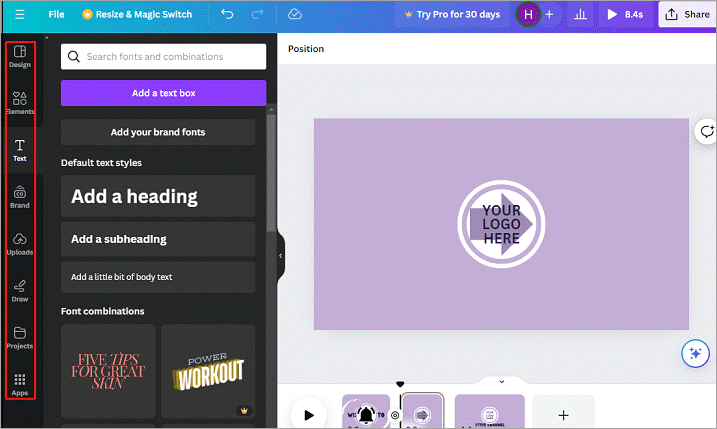
Step #3: Add Music
- Choose from the preset royalty-free music or upload your own.
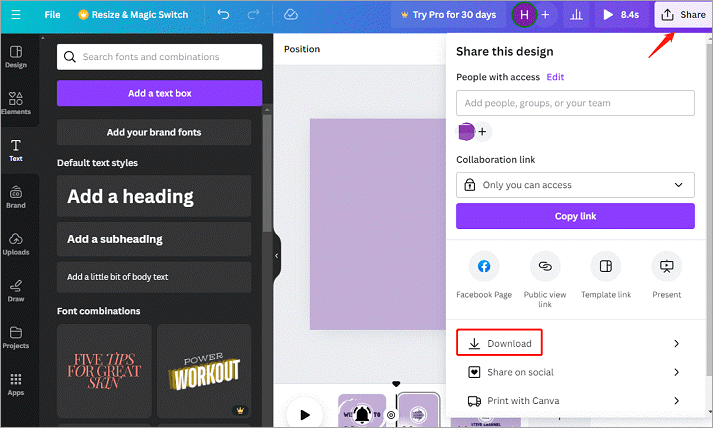
Step #4: Download Your Video
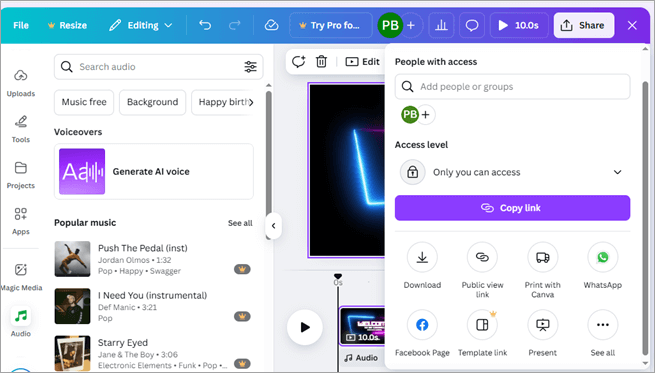
- Click the ‘Share’ option -> Select MP4 format -> Download.
Download from Share
Save as MP4
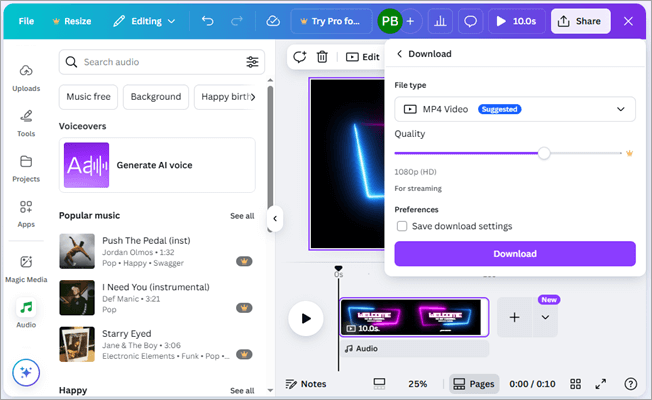
- File Format: MP4 (video), GIF (optional for short animated segments)
- Resolution: Up to 1080p HD (free and Pro), no 4K support as of now
- Pros: Incredibly easy to use, cloud-based, generous free plan, access to stock music and animations
- Cons: Limited motion graphics and complex animations in the free version
- Best For: Vloggers, educators, lifestyle influencers, small businesses
#2) Renderforest
Renderforest is a robust cloud-based intro creator designed for those who wish to create beautiful, high-quality intros without having to learn complex software. It provides a collection of realistic motion effects, 3D animations, and cinematic templates.
Depending on your business (gaming, IT, fitness, etc.), you may select a template and then alter the scenes by adding your text, music, and logo. It is ideal for artists who wish to brand both audio and video simultaneously because it also allows AI voiceovers.
Steps for creating a YouTube Intro Video using Renderforest
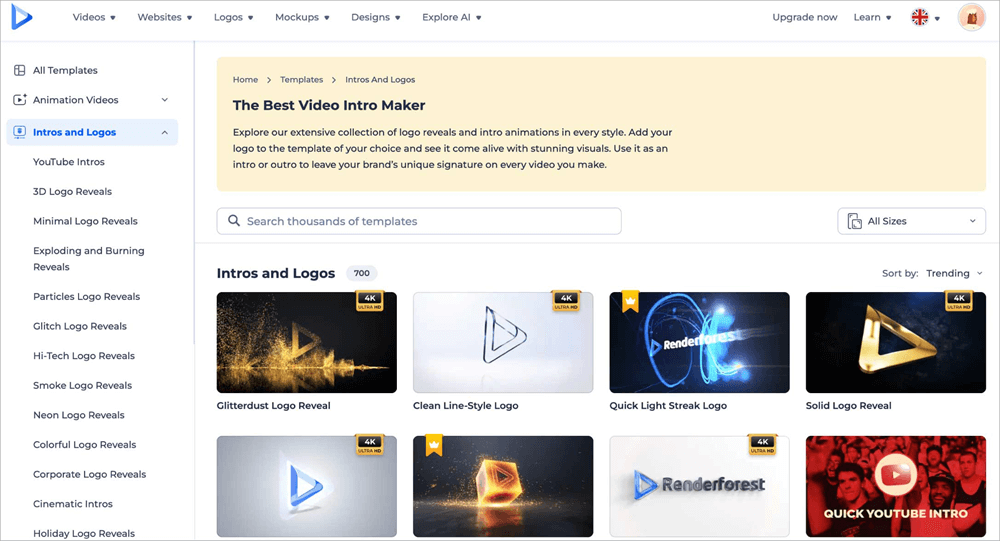
Step #1: Select a Template
Go to Renderforest -> Click on “Create Video” -> Choose “YouTube Intro.”
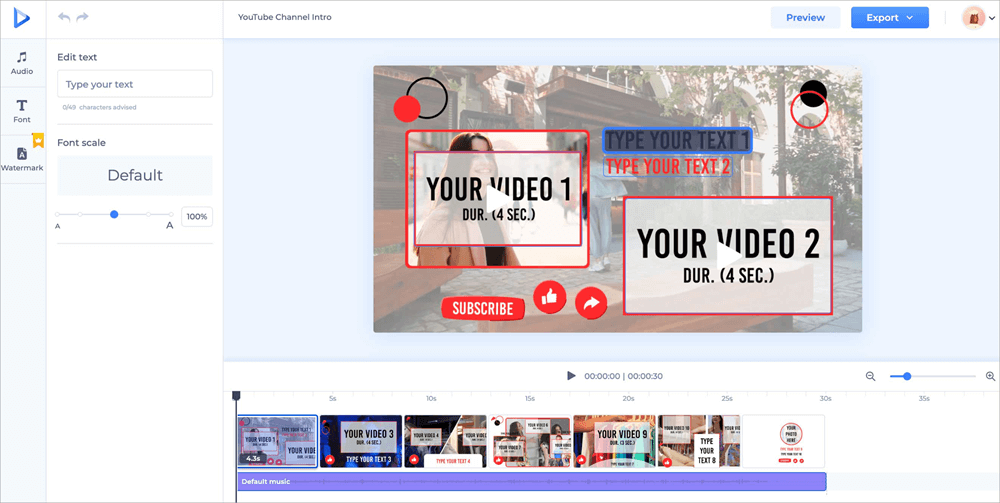
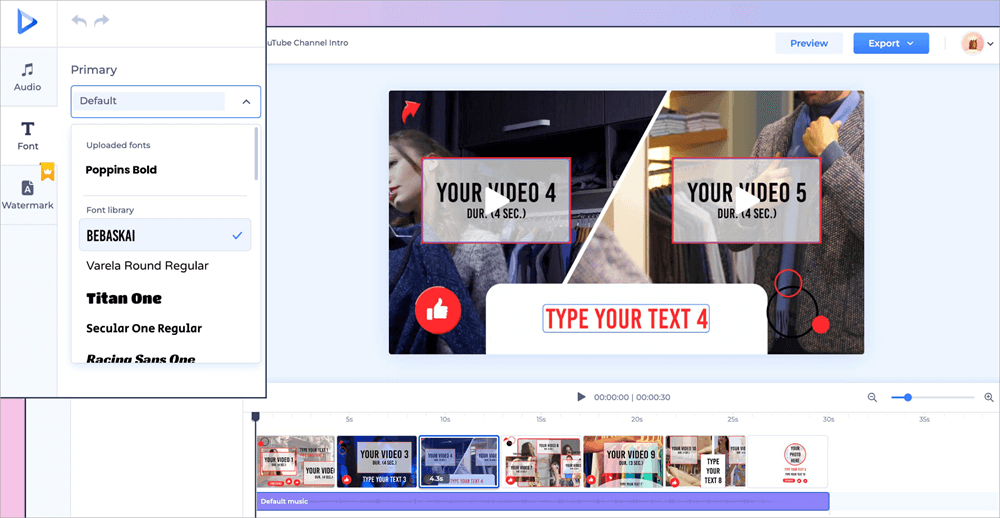
Step #2: Customize Text and Font
Add your channel name, slogan, and modify font styles.
Adding Text
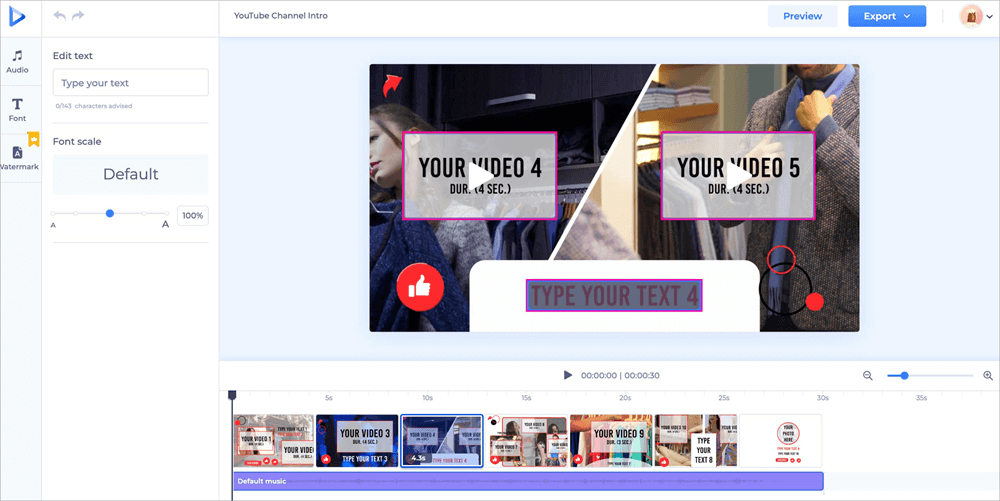
Step #3: Add Music or Voiceover
Pick from Renderforest’s royalty-free tracks or upload your own.
Changing Text Font
Step #4: Preview and Export
- Free plan: exports in 360p with watermark
- Paid plan: up to 1080p or 4K without watermark
- File Format: MP4
- Resolution: Free Plan: 360p (with watermark)
- Pros: High-end visual quality, broad template selection, AI-powered voiceover support
- Cons: Watermarks on free version exports, occasional load times with heavier templates
- Best For: Gamers, tech channels, product reviewers, business intros.
#3) InVideo AI
By incorporating artificial intelligence, InVideo AI is a cutting-edge video editor that elevates content production. With this tool, consumers need to provide their brand name, script, or video concept; the platform will take care of the rest.
It creates an introduction (and even a whole film) according to your preferences, complete with text animations, logo effects, music, and images. It’s perfect for time-constrained filmmakers who need to swiftly and effectively create a YouTube introduction without sacrificing quality.
Steps for creating a YouTube Intro Video using InVideo AI
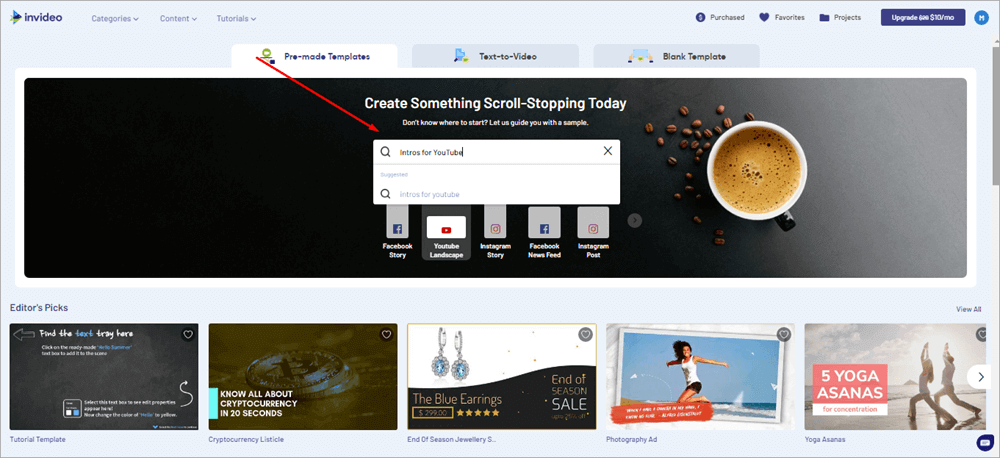
Step #1: Choose a Template or Let AI Generate One
Go to InVideo AI -> Choose a YouTube Intro Template or describe your video idea.
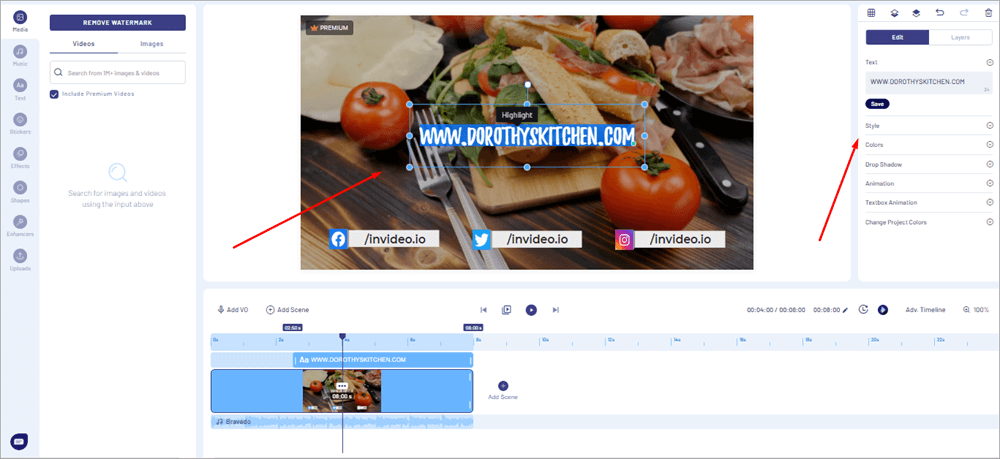
Step #2: Customize Text and Visual Elements
Edit the name, tagline, and positioning.
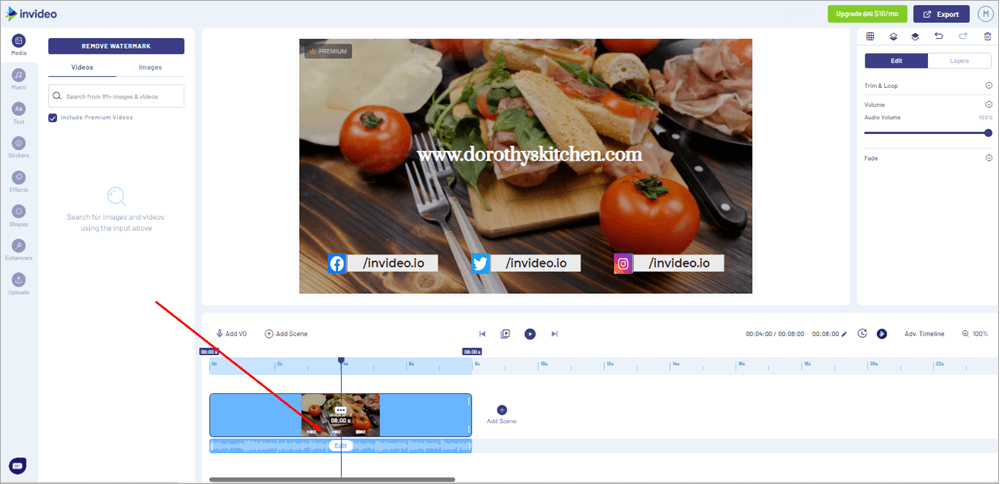
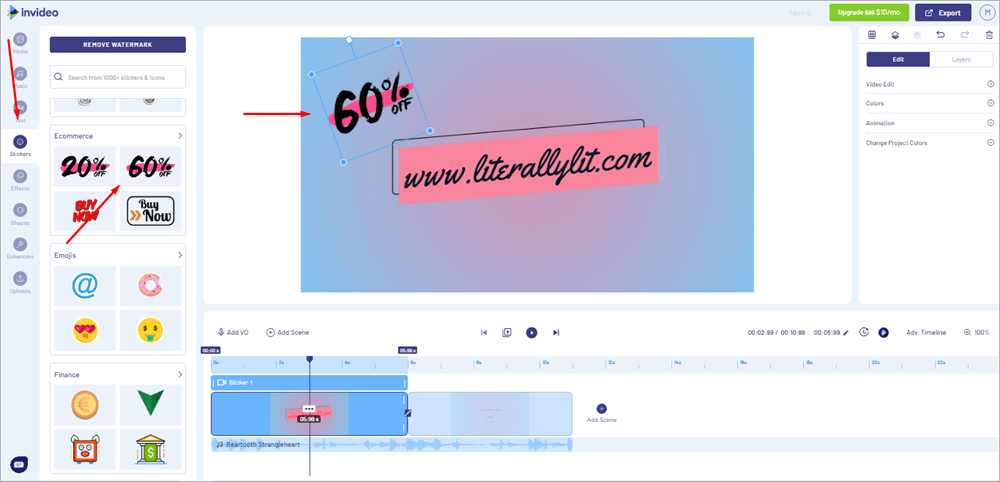
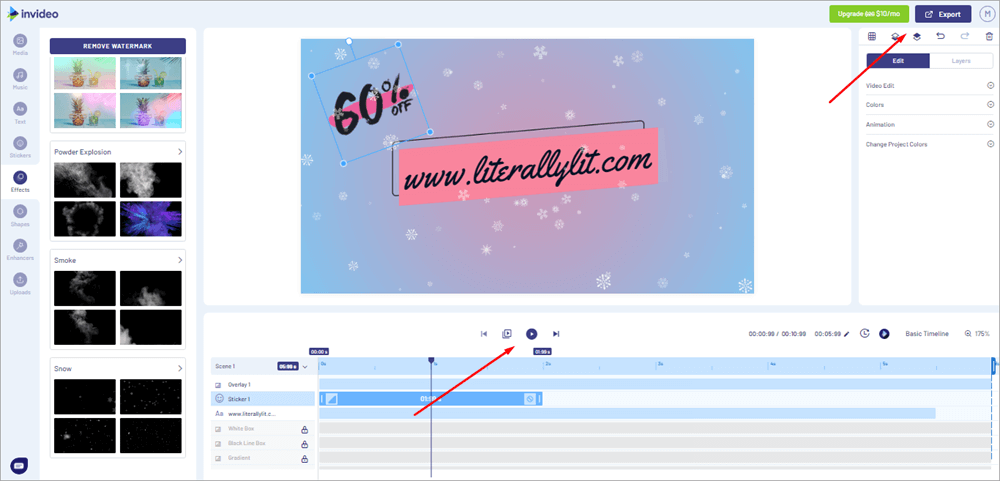
Step #3: Add Music, Stickers, Effects
- Use audio tools to add music
- Add dynamic effects and animated stickers.
Music Tools
Stickers
Special Effects
Step #4: Export Your Intro
- Save as MP4
- Free plan: 720p with watermark
- Paid plan: 1080p+ with no watermark
- Pros: AI-powered automation, great for fast content creation, beginner-friendly, and mobile-friendly.
- File Format: MP4
- Resolution: Free Plan: 720p with watermark
- Cons: Internet-dependent, limited granular control over animations
- Best For: Coaches, marketers, educators, busy entrepreneurs
Suggested Read => HitPaw Watermark Remover tool
#4) Adobe Express
Adobe Express is a streamlined solution made for multimedia producers that need quality without complication. Adobe is the company behind Premiere Pro and After Effects. It enables you to create elegant, cinematic-looking intros with pre-made themes and motion graphics.
Because of the platform’s smooth integration with Adobe Creative Cloud, you can keep your brand assets visually consistent even if you’re currently using programs like Photoshop or Illustrator. Express also lets you use brand kits, which makes it easy to keep your intros consistent.
Further Reading => YouTube to MP4 Converter
- File Format: MP4
- Resolution: Up to 1080p (HD) across all plans
- Pros: Part of the Adobe ecosystem, powerful design customization, excellent asset control
- Cons: Slightly steeper learning curve than Canva or InVideo, fewer templates than Renderforest
- Best For: Designers, YouTube professionals, creators with existing Adobe workflows
How to Add Your Intro to YouTube Videos
Once you’ve created your YouTube intro using tools like Canva, Renderforest, or InVideo AI, the next step is to integrate it into your main content. Fortunately, you don’t need any type of advanced software – just a basic video editor and a few minutes.
Here’s a simple step-by-step guide to help you add your intro to your YouTube videos like a pro.
Step #1: Download Your Intro
After creating your intro:
- Select MP4 as your file format
- Make sure the resolution is at least 1080p to maintain a high quality
- Save the file name by adding a dot (.) mp4
Step #2: Open Your Video Editor
You can opt for any editing tool depending on your comfort and budget:
- Free tools are also available, like iMovie (Mac), Windows Video Editor, Shotcut, DaVinci Resolve
- Editing tools like Canva Video Editor, Clipchamp, Kapwing
- You can even opt for paid version tools like Adobe Premiere Pro, Final Cut Pro, Filmora
Open your chosen software and import both your main video file and your new intro clip.
Step #3: Insert the Intro at the Start of your video Timeline
Once both video clips are imported:
- Drag your intro clip to the beginning of the video timeline.
- Follow it with your main video content.
- You may add a smooth transition between the intro and your main content for a professional touch.
- Do keep your intro of your YouTube video between 5–10 seconds
Step #4: Adjust the Audio
Make sure all the audio levels between your intro and the main video are completely balanced:
- If the intro music is too loud, lower the volume using your editor’s audio controls.
- If you’re using voiceover or speech right after the intro, consider adding a slight fade-out to the intro music.
- You can also mute the background music in the last second of your intro for a smooth transition.
Step #5: Export the Final Video
After the editing:
- Preview the full video at least three times to check the timing, transitions, and sound consistency.
- Export your video in MP4 format with 1080p or 4K resolution.
- Save your final video file, which is already ready for upload.
Step #6: Upload to YouTube
Now that your video is complete:
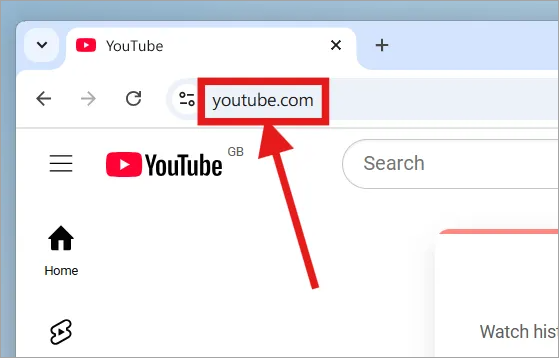
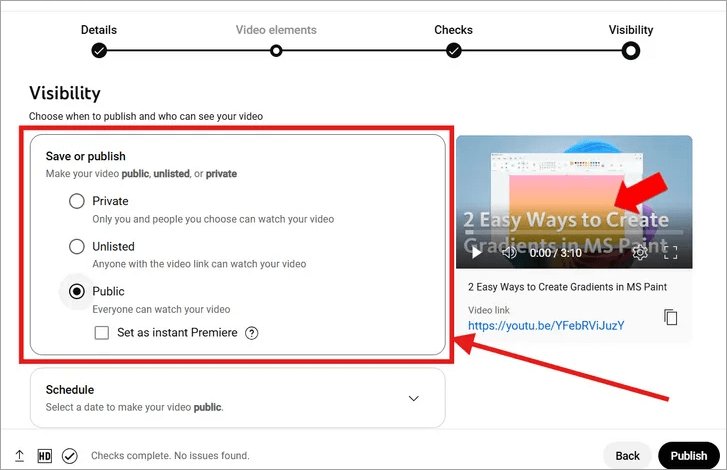
1. Go to YouTube Studio
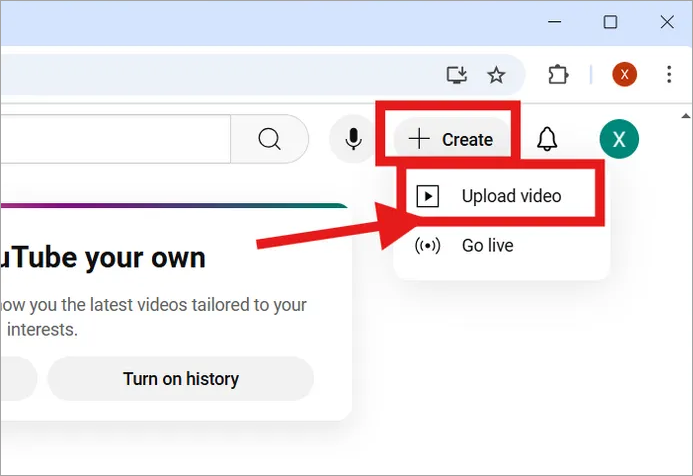
2. Click “Create” > “Upload Videos”
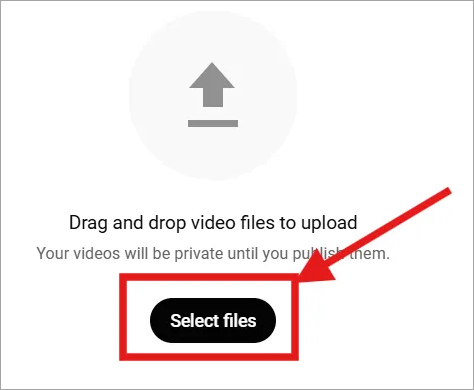
3. Add your video file, title, description, tags, and thumbnail.
4. Hit “Publish” once everything looks good.
Frequently Asked Questions
1. How long should a YouTube intro be?
Short intros grab the viewers’ attention without losing their retention; thus, always try to keep it between 5 and 10 seconds.
2. Do I need any editing skills to create a YouTube intro?
No, nothing like that. Tools like Canva, InVideo AI, and other YouTube intro maker platforms will allow you to create YouTube intros easily with their pre-designed templates.
3. Which format should I export my YouTube intro in?
For exporting a YouTube intro video, you need to export in MP4 with at least 1080p resolution, mainly for the best quality and compatibility.
4. What do YouTubers use to make their intros?
Most YouTubers prefer to use tools like Canva, Renderforest, InVideo AI, or other YouTube intro maker platforms for creating professional intros quickly.
5. How long should a YouTube video intro be?
A good YouTube intro should be 5 to 10 seconds long, maximum to maintain proper engagement of the viewer.
6. How do YouTubers start their videos?
YouTubers typically begin with a brief hook, followed by their intro animation, and then dive into the content.
7. What is a good introduction example?
A good intro mainly includes your channel name, the animated logo, a catchy tagline, and soothing music that reflects your brand.
8. Which YouTuber has the best intro?
YouTube creators like Marques Brownlee (MKBHD) and MrBeast are widely admired for their memorable and engaging intros.
Conclusion
Your YouTube intro serves as your channel’s handshake in the digital age, where viewers’ attention spans are shorter than ever. It is brief, memorable, and powerful.
Presenting yourself in a few seconds is more important than having eye-catching visuals or appealing music. A strong opening sets the tone for everything that comes after, whether you’re pushing a product, developing your own brand, or just amusing.
From creating your brand identity to selecting the tools, organizing your images, personalizing templates, and adding your intro to your videos, this article has taken you step-by-step through the whole process of creating a YouTube intro.
Even novices can now create a YouTube intro that looks clean and professional without a design degree or a large budget, thanks to strong and easily available tools like Canva, Renderforest, and InVideo AI.
Spending a little time on your introduction will do more than add a visual aspect; it will also increase viewer trust, boost engagement, and establish a powerful brand presence that will entice subscribers to return for more.
Several options are being discussed in this blog that will give you the confidence you need to look for a YouTube intro creator that complements your objectives and artistic vision. It’s your chance now, so choose a tool, let your imagination go wild, and begin creating introductions that enhance your content and make an impact.
Make your introduction memorable since it’s your identity on YouTube.
Was this helpful?
Recommended Reading
-

Review of Top YouTube Video Downloader Apps with Features, Pricing & Comparison. Select the Best Free Online YouTube Ripper for PCs to Download YouTube Videos: YouTube is the most-watched video streaming website. Launched in 2005, the online video platform features a wide variety of content, including TV clips, educational videos,…
-

Select the best YouTube Subtitle Downloader per your requirements to download Subtitles from YouTube from the tools reviewed here: Multimedia has made things easier as now you can easily find a visual explanation for your questions and queries in an instant. Suppose, if any of your assignments or homework is…
-
Read this review to compare and select the best YouTube Ad Blocker for Android, iOS, Windows, Mac, and various web browsers: YouTube is an amazing video streaming site where you will find endless good quality videos on almost any topic on earth. But Ads are its vice. You can take…
-
This hands-on tutorial explains 5 methods to fix the 'YouTube Audio Renderer Error. Please Restart Your Computer' error: Yes, indeed it would be annoying when sometimes you are trying to open a YouTube video and all you get is an Audio renderer error message displayed on the screen. Do not…


