


In the last few Selenium tutorials, we discussed various commonly and popularly used commands in WebDriver, handling web elements like Web Tables, Frames and handling exceptions in Selenium scripts.
We discussed each of these commands with sample code snippets and examples to make you capable of using these commands effectively whenever you encounter similar situations. Amongst the commands we discussed in the previous tutorial, a few of them owe utmost importance.
As we move ahead in the Selenium series, we will concentrate our focus on Automation Framework creation in the next few upcoming tutorials. We will provide insights into different aspects of an Automation framework, various types of frameworks, the benefits of using a framework, and the fundamental components that make up a framework.
What is Framework
A framework is considered to be a combination of set protocols, rules, standards, and guidelines that can be incorporated or followed as a whole to leverage the benefits of the scaffolding provided by the Framework.
Let us consider a real-life scenario.
We very often use lifts or elevators. There are a few guidelines that are mentioned within the elevator to be followed and taken care of to leverage the maximum benefit and prolonged service from the system.
Thus, the users might have noticed the following guidelines:
- Keep a check on the maximum capacity of the elevator and do not get onto an elevator if the maximum capacity has reached.
- Press the alarm button in case of an emergency or trouble.
- Allow the passenger to get off the elevator before entering the elevator and stand clear of the doors.
- In case of fire in the building or if there is any haphazard situation, avoid the use of the elevator.
- Do not play or jump in the elevator.
- Do not smoke inside the elevator.
- Call for help/assistance if the door doesn’t open or if the elevator doesn’t work at all. Do not open the doors forcefully.
There can be many more rules or sets of guidelines. Thus, these guidelines, if followed, make the system more beneficial, accessible, scalable, and less troubled for the users.
Now, as we are talking about “Test Automation Frameworks”, let us move our focus towards them.
Test Automation Framework
A “Test Automation Framework” is scaffolding that is laid to provide an execution environment for the automation test scripts. The framework provides the user with various benefits that help them develop, execute and report the automation test scripts efficiently. It is more like a system that has created specifically to automate our tests.
In a very simple language, we can say that a framework is a constructive blend of various guidelines, coding standards, concepts, processes, practices, project hierarchies, modularity, reporting mechanism, test data injections, etc. to pillar automation testing. Thus, the user can follow these guidelines while automating application to take advantages of various productive results.
The advantages can be in different forms, like the ease of scripting, scalability, modularity, understandability, process definition, re-usability, cost, maintenance, etc. Thus, to grab these benefits, developers are advised to use one or more of the Test Automation Framework.
The need for a single and standard Test Automation Framework arises when you have a bunch of developers working on the different modules of the same application and when we want to avoid situations where each of the developers implements his/her approach towards automation.
Note: Take a note that a testing framework is always application independent, that is it can be used with any application irrespective of the complications (like technology stack, architecture etc.) of the application under test. The framework should be scalable and maintainable.
Advantage of Test Automation Framework:
- Reusability of code
- Maximum coverage
- Recovery scenario
- Low-cost maintenance
- Minimal manual intervention
- Easy Reporting
Types of Test Automation Framework
Now that we have a basic idea of what is an Automation Framework, in this section we would harbinger you with the various types of Test Automation Frameworks those are available in the marketplace. We will also attempt to clarify their advantages and disadvantages, along with recommendations for usability.
There is a divergent range of Automation Frameworks available nowadays. These frameworks may differ from each other based on their support of different key factors to do automation like reusability, ease of maintenance etc.
Let us discuss the few most popularly used Test Automation Frameworks:
- Module Based Testing Framework
- Library Architecture Testing Framework
- Data Driven Testing Framework
- Keyword Driven Testing Framework
- Hybrid Testing Framework
- Behavior Driven Development Framework
(click on image to view enlarged)

Let us discuss each of them.
But before that, I would also like to mention that despite having this framework, the user is always leveraged to build and design his framework, which is best suitable to his/her project needs.
#1) Module Based Testing Framework
Module based Testing Framework is based on one of the popularly known OOPs concept – Abstraction. The framework divides the entire “Application Under Test” into several logical and isolated modules. For each module, we create a separate and independent test script. Thus, when these test scripts took together builds a larger test script representing more than one modules.
An abstraction layer separates these modules in such a way that the changes made in the sections of the application doesn’t yield affects on this module.


Pros:
- The framework introduces a high level of modularization, which leads to easier and cost-efficient maintenance.
- The framework is pretty much scalable
- If one implements the changes in one part of the application, one only needs to fix the test script representing that part of the application to leave all the other parts untouched.
Cons:
- While implementing test scripts for each module separately, we embed the test data (Data with which we are supposed to perform testing) into the test scripts. Thus, whenever we are supposed to test with a different set of test data, it requires the manipulations to be made in the test scripts.
#2) Library Architecture Testing Framework
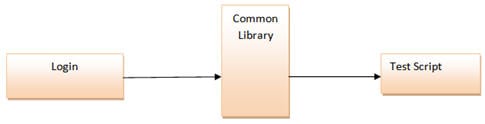
The Library Architecture Testing Framework is fundamentally and foundationally built on Module Based Testing Framework, with some additional advantages. Instead of dividing the application under test into test scripts, we segregate the application into functions, or rather common functions can be used by the other parts of the application as well.
Thus, we create a common library constituting common functions for the application under test. Therefore, these libraries can be called to the test scripts whenever required.
The basic fundamental behind the framework is to determine the common steps and group them into functions under a library and call those functions in the test scripts whenever required.
Example: The login steps can be combined into a function and kept into a library. Thus all the test scripts those require to login the application can call that function instead of writing the code all over again.
Pros:
- Like Module Based Framework, this framework also introduces a high level of modularization, which leads to easier and cost-efficient maintenance and scalability.
- We create common functions that the various test scripts can efficiently use across the Framework. Thus, the framework introduces a great degree of re-usability.
Cons:
- Like Module Based Framework, the test data is lodged into the test scripts, thus any change in the test data would require changes in the test script as well.
- With the introduction of libraries, the framework becomes a little complicated.
#3) Data Driven Testing Framework
While automating or testing any application, at times it may be required to test the same functionality multiple times with different set of input data. Thus, in such cases, we can’t let the test data embedded in the test script. Hence it is advised to retain test data in some external database outside the test scripts.
Data Driven Testing Framework helps the user segregate the test script logic and the test data from each other. It lets the user store the test data into an external database. The external databases can be property files, XML files, excel files, text files, CSV files, ODBC repositories, etc.
The data is conventionally stored in “Key-Value” pairs. Thus, the key can be used to access and populate the data within the test scripts.
Note: The test data stored in an external file can belong to the matrix of expected values and the matrix of input values.

Example:
Let us understand the above mechanism with the help of an example. Let us consider the “Gmail – Login” functionality.
Step #1: The first step is to create an external file that stores the test data (Input data and Expected Data). Let us consider an Excel sheet, for instance.
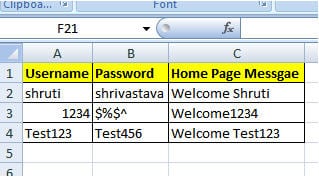
Step #2: The next step is to populate the test data into Automation test Script. For this purpose, several API’s can read the test data.
public void readTD(String TestData, String testcase) throws Exception {
                   TestData=readConfigData(configFileName,"TestData",driver);
                   testcase=readConfigData(configFileName,"testcase",driver);
                                FileInputStream td_filepath = new FileInputStream(TestData);
                                Workbook td_work =Workbook.getWorkbook(td_filepath);
                                Sheet td_sheet = td_work.getSheet(0);
                                if(counter==0)
                                {
                for (int i = 1,j = 1; i <= td_sheet.getRows()-1; i++){
                                if(td_sheet.getCell(0,i).getContents().equalsIgnoreCase(testcase)){
                   startrow = i;
                                   arrayList.add(td_sheet.getCell(j,i).getContents());
                                   testdata_value.add(td_sheet.getCell(j+1,i).getContents());}}
                for (int j = 0, k = startrow +1; k <= td_sheet.getRows()-1; k++){
                                if (td_sheet.getCell(j,k).getContents()==""){
                                                arrayList.add(td_sheet.getCell(j+1,k).getContents());
                                                testdata_value.add(td_sheet.getCell(j+2,k).getContents());}}
                                }
                                counter++;
}
The above method helps to read the test data and the below test step helps the user to type in the test data on the GUI.
element.sendKeys(obj_value.get(obj_index));
Pros:
- The most important feature of this framework is that it considerably reduces the total number of scripts required to cover all the combinations of test scenarios. Thus lesser amount of code is required to test a complete set of scenarios.
- Any change in the test data matrix would not hamper the test script code.
- Increases flexibility and maintainability
- Executing a single test scenario allows for the alteration of the test data values.
Cons:
- The process is complex and requires an extra effort to come up with the test data sources and reading mechanisms.
- Requires proficiency in a programming language that is being used to develop test scripts.
#4) Keyword Driven Testing Framework
The Keyword driven testing framework is an extension to Data driven Testing Framework in a sense that it not only segregates the test data from the scripts, it also keeps the certain set of code belonging to the test script in an external data file.
These sets of code are known as Keywords and hence the framework is so named. Keywords are self-guiding as to what actions need to be performed on the application.
The keywords and the test data are stored in a tabular-like structure and thus it is also popularly regarded as Table driven Framework. Take notice that keywords and test data are entities independent of the automation tool being used.

Example: Test case of Keyword Driven Test Framework
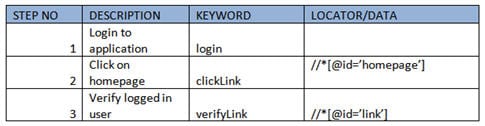
In the above example, keywords like login, clicking, and verify Link are defined within the code.
Depending upon the application, keywords can be derived. You can reuse all the keywords multiple times in a single test case. The locator column contains the locator value that is used to identify the web elements on the screen or the test data that needs to be supplied.
All the required keywords are designed and placed in the base code of the framework.
Pros:
- Besides the advantages provided by data-driven testing, the Keyword-driven framework doesn’t require the user to possess scripting knowledge, unlike Data-driven testing.
- Multiple test scripts can use a single keyword.
Cons:
- The user should have a thorough understanding of the Keyword creation mechanism in order to effectively utilize the benefits offered by the framework.
- The framework becomes complicated gradually as it grows and several new keywords are introduced.
#5) Hybrid Testing Framework
As the name suggests, the Hybrid Testing Framework is a combination of more than one of the above-mentioned frameworks. The best thing about such a setup is that it leverages the benefits of all kinds of associated frameworks.

Example of Hybrid Framework:
Test sheet would contain both the keywords and the Data.
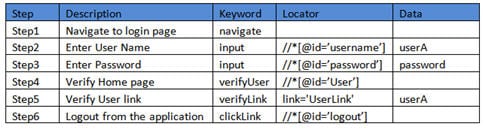
In the above example, the keyword column contains all the required keywords used in the particular test case and the data column drives all the data required in the test scenario. If any step does not need any input, then it can be left empty.
#6) Behavior Driven Development Framework
The behavior-driven development framework allows the automation of functional validations in an easily readable and understandable format to Business Analysts, Developers, Testers, etc. Such frameworks do not require the user to be acquainted with the programming language.
There are different tools available for BDD like Cucumber, Jbehave, etc. Details of the BDD framework are discussed later in the Cucumber tutorial. We have also discussed details on the Gherkin language to write test cases in Cucumber.
Components of Automation Testing Framework:

Though the above pictorial representation of a framework is self-explanatory, we would still highlight a few points.
- Object Repository: Object Repository acronym as OR is constituted of the set of locator types associated with web elements.
- Test Data: The input data with which the scenario would be tested and it can be the expected values with which the actual results would be compared.
- Configuration File/Constants/ Environment Settings: The file stores the information regarding the application URL, browser-specific information, etc. It is the information that remains static throughout the framework.
- Generics/ Program logics/ Readers: These are the classes that store the functions that can be commonly used across the entire framework.
- Build tools and Continuous Integration: These are the tools that aids to the capabilities of the framework to generate test reports, email notifications, and logging information.
Conclusion
The frameworks illustrated above are the most popular frameworks used by the testing fraternity. There are various other frameworks also in the place. For all the further tutorials, we would base on the Data Driven Testing Framework.
In this tutorial, we discussed the basics of an Automation Framework. We also discussed the types of frameworks available in the market.
Next Tutorial #21: In the next tutorial, we would briefly introduce you to the sample framework, the MS Excel which would store the test data, excel manipulations, etc.
Till then feel free to ask your queries about automation frameworks.
Was this helpful?
Recommended Reading
-

Introduction to VBScript Excel Objects: Tutorial #11 In my previous tutorial, I explained ‘Events’ in the VBScript. In this tutorial, I will be discussing Excel Objects that are used in the VBScript. Please note that this is the 11th tutorial in our 'Learn VBScripting' series. VBScript supports different types of…
-
This Comprehensive Tutorial on Keyword Driven Framework Explains Various Components of the Framework & How to Create One in Selenium: In general, Framework is a set of guidelines, which when followed will give beneficial results. The Keyword-Driven framework is a technique to externalize keywords/actions that are used in the script…
-

In this article, we will learn how to develop test scripts using the top 5 most popular test automation frameworks. Let's get started. When you learn about test automation, you come across the term “test automation framework”. Maybe some of you get uncomfortable with this term and feel that it…
-
Q1 A deviation from the specified or expected behavior that is visible to end-users is called: a) an errorb) a faultc) a failured) a defect Q2 Regression testing should be performed: v) every weekw) after the software has changedx) as often as possibley) when the environment has changedz) when the…


very helpful…
Can any one suggest a best free too to test the keywords in our website for SEO purpose.
Thank you so much! very good work.
Hi! You and I chatted very briefly some time back. I’ve written some of the stuff I was planning to about framework design, but I’ve also had kind of a breakthrough in my understanding of framework design. I’d be inclined to chat with you about it, if you’d care to ping me at akienm@gmail.com
This is a good overview of existing test frameworks. I would like to see. Is there a matrix showing best of breed tools for each fram work?
Precise and nice explanation.
Thanks.
Thank a lot 🙂
It’s the when you have to use framework for the some of the stuff even testing purpose. There’s a lot of stuff that the “good” frameworks will do well and you won’t. Except maybe if you have the luxury to work on your own framework for a couple of years. If you have to develop a big enterprise website, you can’t just tell your boss that you’re not going to use a framework because it’s not fun. And, anyway, the enterprise will probably have their own framework of choice anyway.
what about TestNG frame work
how cal the excel file for multiple test cases in testng frame plz give the solution
Awesome Blog, very interesting content, Thanks for sharing.
Hey Shruti, very well written article. I would suggest adding TDD as well since you have added BDD. TDD is gaining a lot of steam now.
Helpful…!!!
Keep up the good work.
Good pros and cons explanation.
This should be aware as a automation tester.
For Example : we have 1000+ testcases to do aumoted so we have to write 1000++ times drier.findelement now I want to make one general method so whenever it require to write driver.findelement we can ingnor it y writing just that general method name
Can you suggest me how to do it ??
Wonderful explanations,and able to get good resources. thank you !!!
And also thank you Ellen, I was thinking that Selenium is the best and popular than all Automation Tools.
A very good explanation with Simple & Generic examples….
can you please explain the hybrid framework structure
Very Informative..Thank you so much..I was looking for this kind of elabroted info from long tym.
Simple and Elegant for a beginner with no idea on What Testing Framework is?
Good Work, keep up doing this stuff for community
Very informative..
Can you please mention the example(framework name) of each type.
what comment should i write before studying your theory
i need solution of below questions.
1>if a similar function is taken across all the modules and tested .it is called ?
a)horizontal first testing
b)vertical first testing
c)sandwitch testing
d)critical path testing
2>which of the following testing confirm syntax,convention,format,style abbreviation
a)security testing
b)performance testing
c)usebility testing
d)stress testing
3>windows resizes option suit contains which button /buttons according to windows standard ?
a)minimize button
b)maximize button
c)close button
d)all of the above
Such a good explanation all at one place. Thankyou so much.
For what it covers, this is a decent summary. From my point of view, this is a very narrow definition of framework. My own definition also includes testing resource management, artifact management, onboarding training for new resources, lab resource management, coding standards, crisis management, prioritization policies, documentation procedures, test data management, and just so much more. I think you’ve inspired me to write my own article. Thanks! I will probably link back to you.
One of best article I have come across. Superb !!
Thank you
Nice Article !!
very useful content … many thanks.
Superb explanation please keep posting all about automation framework
Thanks & regards
Jyoti
Superb, very very helpful
Hi thanks for sharing this, iT was really good to know about something which we already know but dont know the definiton of it.
whenever you are giving a code please give it end to end. as you have shared code for reading from configuration file, but we are not able to implement it as we don’t have any instructions,etc to user that code which is written under the topic data driven testing
I need a sample framework for Automating D365[AX] operation or some details on this or any details on Automation of D365
good explanation
beginners easy to understand.
very informative and helpful
awesome article. Thank you.
must read tutorials. thanks for sharing
Great work. Thanks.
Could you/ anyone please suggest which would be best type of framework to automate Insurance domain project.
BDD is the best framework to automate any domain. As u can see the test data in the feature file and can easily able to write the scripts to automate.
which framework is best for loan application to start from scratch
Nice explanation, really useful stuff
Thanks
I have followed most of your selenium series. You have obviously put in a lot of effort.
The only suggestion I can offer is that the content can be further improved through a bit of editing, such as choice of words and sentence structure.
Keep up the good work!
Now I know all testing frameworks at one place with comparison. good work.
Hello,
I need a sample framework for Automating D365[AX] operation or some details on this
Great Work. Easy to Understand.
Thank you.
Very helpful for the beginners of test automation.
Is there any post regarding test automation frame work which completely deals with scripting languages like python.
Thanks so much.
insightful and helpful
Good Work, Keep Doing.
I’ve a question, I fwe want to secure our Framework scripts from being disclosed by any another party, is this possible?
I’m using UFT and Vbs script files.
Thanks.
Abdelghany
@Henk @Ummer
Thank you for the appreciative words.
Keep Learning.
Awesome explaination…
sads
in days work, you should compose multiple of those so-called framworks to design and implement your test automation.
Very knowledgable article. I will suggest my ideas here.
Selenium is used in Test Automation, however its just testing the Web UI and Functionalities. Selenium doesn’t have any inbuilt reporting mechanism also, Selenium does not have any control on the execution order OR execution customization.
TestNG is used to empower Selenium for these basic essence of Reporting and Execution Customization. TestNG is used to control the execution flow, data provided in Function , execution priorities, execution control (incase we want to execute a limited set of functionalities.)
TestNG creates an XML file which control the exection and test can be executed with the testng.xml file directly.
All you need to install TestNG into your IDE and import this Library in your project.
Selenium IDE does the same thing without importing a library in your project. NuGet it and you’re all good.
I don’t believe Selenium IDE answers any of Ellen’s points. Selenium IDE is a dumbed down version of Selenium… it’s a simple recorder with very basic logic options. many times I write my own automation software tools, especially if it’s for a non web oriented task… however for web automation, I tend to use Python’s Golem, mainly for the reporting. It keeps a historical record showing the changes in each test run, graphically. The graphs are clickable to dig into the exact error state changes. Golem also allows for data driven tests built into it… so no need to do messy excel imports. It lacks in not having a BDD system (i.e. Cucumber)… but for simple multi-browser web automation with data driven tests and advanced reporting… I think it’s really a great open source option.
Hi Shruti
Excellent Material covering the concepts with basic understanding.Can you please help me in getting the components for a hybrid framework.
Can any one add the best practises of this framework and the recommended this days in brief ?
Thanks a lot for clear n crystal explanation
I got rejected once for not explained well…
now its clear….. Thanks one again…..best luck
I see one important item missing here and that is the applications database. You need to be able to have a known starting point with the application database. You should always be able to backup and restore the application database before starting automation test scenarios. This is a best case scenario but should be a high priority goal.
hi, i have write code in a franmework, where i have made configure file, read class, driver initialize class, objects class, function class and 4 testNG class. and run these 4 class using xml file. what kind of framework it is? TDD? BDD? pls reply soon
Thanks for the article. QAwerk, the company I hired for QA testing, used Selenium and you helped me to understand the way they did a lot. Thanks, again!
Great job buddy !
They missed one, Model Based Testing framework. But otherwise a very good list of items and information. Definitely recommend using this as a reference to explain automation and frameworks to management and other non-technical people.
nice description of all the framework types