Learn how to Half Swipe on Snapchat without notifying the senders from our quick guide. Unveil the simple trick to preview chats secretly on Snapchat without sending read receipts:
Snapchat is my poison of choice when it comes to social media. There are days when I spend hours on the platform. I also receive a ton of messages from my friends there, and I am not always keen on responding to them.
Since Snapchat notifies the sender with a read receipt, I want to avoid any awkwardness that could stem from ignoring these messages. It’s 2026 after all, and I truly believe that the best way to ruin or sour a relationship today is to leave someone on “read”.
Snapchat Half Swipe Tricks: Clearly Explained

If only there were a way to open a Snapchat message without notifying the sender. Turns out Snapchat already has such a feature, something I didn’t realize until recently.
It entails instigating a half-swipe on Snapchat’s interface. Confused? Well, don’t be. In this article, I’ll explain exactly how to half-swipe on Snapchat to preview a message without fully opening it.
So, without much further ado, let’s get started.
Here is the video guide on how to Half Swipe on Snapchat:
What is Half Swipe on Snapchat?
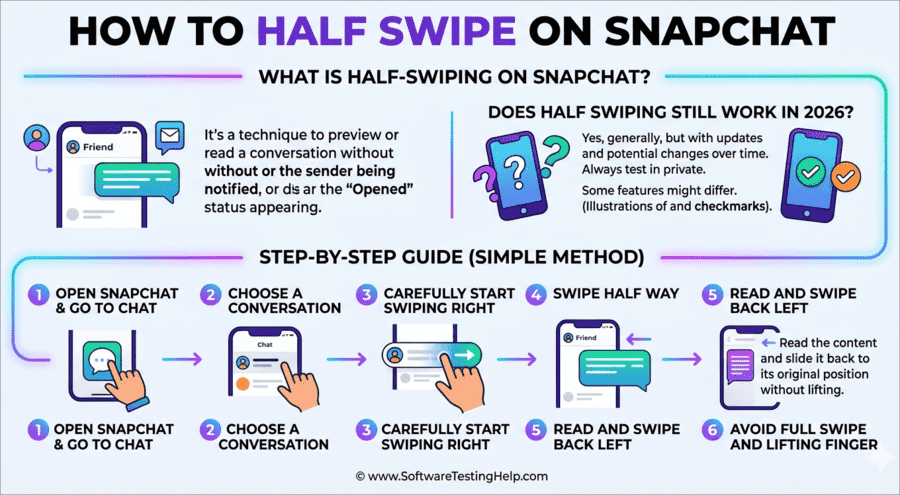
Half-Swiping on Snapchat is an action that lets you preview a message without fully opening it. It is a convenient way for you to read a chat without triggering a notification that alerts the sender.
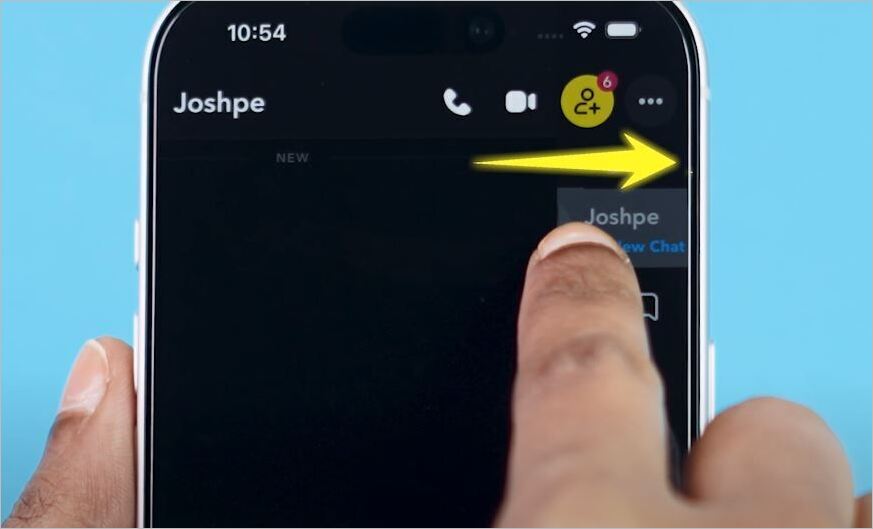
[via Tech Simplify]
As Half-Swiping is a mobile-only gesture, this trick only works on the Snapchat iOS and Android apps. It also does not work for snaps (photos or videos) and is only meant for text-based messages.
Does Half Swiping Still Work on Snapchat in 2026
To those wondering how to half-swipe on Snapchat with the new update, know that the trick still works the same way as it always has. There is always a risk of certain features being wiped out in favor of new ones when apps get new updates.
Although Snapchat has received significant updates in recent years, the half-swiping trick works just as effectively in 2026. Things might change as the app receives another update. For now, you don’t have to worry about this feature being taken out by Snapchat’s developers.
How to Half Swipe Someone on Snapchat
You can easily half-swipe someone on Snapchat to read their chat secretly. I did come across some forums online where people were asking how to half-swipe someone on the Snapchat web. I must clarify any misconceptions surrounding this trick before I show you how to perform it.
Half-swiping required a mobile-only touch gesture. As such, you cannot use this trick to read a chat discreetly on the web or desktop app version of Snapchat.
With that out of the way, allow me to show you how to half-swipe on Snapchat Android and iPhone.
1. First, open the Snapchat app on your iPhone or Android device.
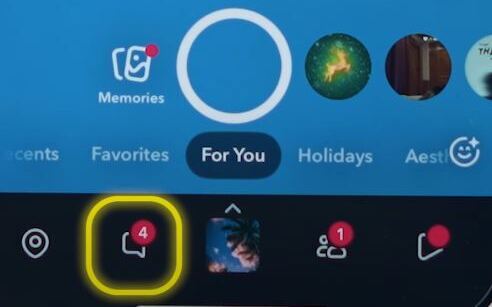
2. Tap the chat icon, displayed in the bottom left corner of your screen as shown below.
3. From the conversation list that just opened, find the person or chat whose message you wish to preview.
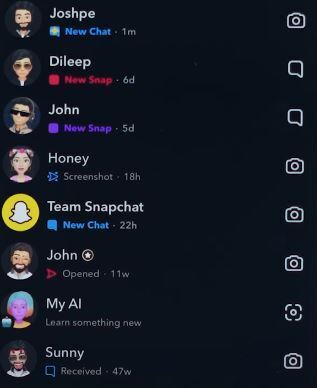
4. Lightly press their bitmoji or profile icon, and while holding, drag your finger gently to the right.
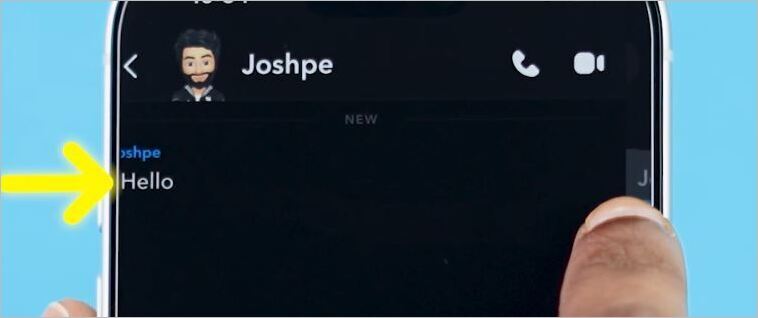
5. The chat preview will now appear. Keep holding. Do not lift your finger.
6. Read the message and slowly slide your finger back to the left to close the preview.
7. You can now release your hold.
You need to be very careful when half-swiping. Be gentle when swiping and do not release your finger, as this will only result in the chat window opening, which will trigger the “open” notification.
Hopefully, you now know how simple the Snapchat Half-Swipe on Android and iPhone is.
Limitations of Half Swipe on Snapchat
Although half-swiping works, it isn’t without its faults.
#1) Slippery Fingers
For starters, there is always a risk of slip-ups. Hold your finger on the screen until you’ve read a chat. Releasing your finger too early could alert the sender. I think this trick works well when the message is short. It is a completely different story when the chat is long.
#2) Swiping Too Fast
Besides holding your finger, you also need to be very careful with how you pace the swipe. You need to gradually slide your finger to the right, then back to the left. The entire process can be anxiety-inducing. Swipe too fast, and you could just end up opening the chat entirely, thus defeating the purpose of half-swiping in the first place.
#3) This Feature May Not Exist in Future
There is chatter online that indicates that Snapchat might revamp its interface entirely, which could render this feature obsolete. The rumors aren’t confirmed, but it is a possibility that a new update could just erase this feature from Snapchat any day now.
#4) Doesn’t Work if the Sender has Snapchat+
Snapchat+ is a premium subscription that basically alerts a user if someone half-swipes on their direct or group chat. This means that half-swiping would not work if the sender whose chat you wish to read secretly has a Snapchat+ account. In fact, half-swiping here would only make things even more awkward, as the sender knows what you are trying to do.
Just consider the above limitation for a smooth Snapchat half-swipe on iPhone and Android.
Alternatives to Half Swipe on Snapchat
Considering the above limitations, half-swiping might not always be an effective trick. However, there are other things you can do to preview a chat on Snapchat.
#1) Notification Previews
This trick involves reading your Snapchat messages via your phone’s locked screen.
Here’s how you do it:
i) On iPhone
- Open Settings
- Navigate to Notifications > Snapchat
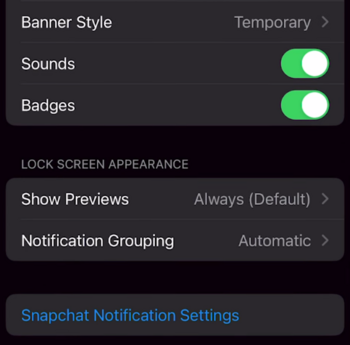
- Enable “Show Previews” and “Lock Screen” alerts.
ii) On Android
- Open Settings
- Navigate to Notifications > Snapchat
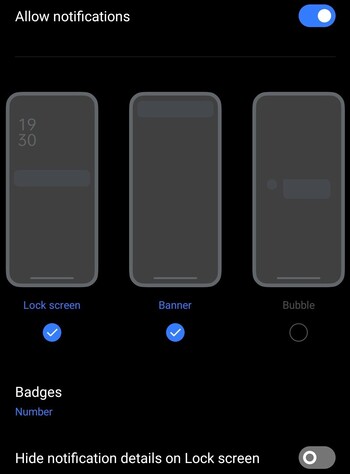
- Enable lock screen and messaging previews.
You’ll now be able to see most messages you receive on Snapchat via your phone’s lock screen.
#2) Airplane Mode
Notification previews work best for reading text-based messages. If you want to preview snaps, switching your phone to “Airplane Mode” could help.
- Open Snapchat and let all the messages you’ve received load. Do not open the chat you wish to read just yet. With all messages loaded, turn on Airplane mode.

- Now open the chat you wish to preview. Once you’ve read the messages or previewed the snaps, go to settings and clear app cache.
- Log out of your Snapchat account before disabling Airplane mode.
This will trick Snapchat into not alerting the sender.
Snapchat+ Peek a Peek Feature
Those wondering about how to half-swipe Snapchat+ should know about this premium feature. Peek a Peek features a Snapchat + feature that essentially renders the half-swipe feature useless.
A Snapchat + subscriber will be notified anytime one of their friends tries to peek into their shared one-on-one or group chat.
They’ll see the eyes emoji right next to the conversation within the shared chat window. If they are in the chat window while you are trying to peek into it, they’ll see your Bitmoji on the side of their screen.
So, before you decide to half-swipe, make sure the sender isn’t a Snapchat+ subscriber. This will save you from an awkward encounter with the sender.
Half-Swipe Not Working: Troubleshooting Tips
I suggest you do the following if half-swipe isn’t working as it should:
- Update the App: An outdated app is bound to cause trouble, including your half-swipe failing. Make sure your Snapchat app has the latest update.
- Restart the App: An old, common trick that can fix just about any issue. Simply shut down your Snapchat app and restart it. This could fix any temporary glitch affecting the half-swipe.
- Clear Cache: Go to your phone’s settings and clear Snapchat’s cache. Once cleared, open your Snapchat again and try half-swiping to check whether the issue was resolved.
- Check for Screen Sensitivity: Your phone’s screen can become sensitive over time with repeated use. As half-swiping requires a gentle touch gesture, a sensitive touch screen will interfere with the feature. I suggest you check your screen for sensitivity to touch, replace the screen guard, or take the phone to a shop.
- Practice the Half-Swiping Technique: I’ve said this before, you need to practice your half-swiping to make sure you don’t accidentally open your chat. Simply press on your friend’s bitmoji, swipe right slowly, and do not lift that finger until you’ve gently dragged your finger back to the left.
What to do if You Accidentally Open Snapchat Messages Window
Well, this means the sender can now see that you’ve read their message. You can’t undo a Snapchat read receipt from the sender’s side. What you can do, and what I highly recommend you do, is reply to the message promptly to avoid any awkwardness later on.
If you accidentally opened a message that was sent to you a while ago, explain why you were late in responding to it. This should help you avoid any embarrassment. Just make sure you half-swipe with the utmost care next time.
Check the video below for 5 hidden Snapchat tricks:
Frequently Asked Questions
1. Can you still half swipe on Snapchat?
Yes, you can still half-swipe on Snapchat in 2026. Things may change with a new update. However, this feature still exists, and you can exploit it to discreetly read a chat.
2. Does half-swipe work on group chats?
Yes, you can half-swipe on group chats to preview recently sent messages. The group half-swipe process is the same as half-swiping to open a direct one-on-one chat window.
3. How to see if someone half-swiped on Snapchat?
Snapchat does let you know if a friend half-swiped a one-on-one or group chat if you are a Snapchat+ user. When someone half-swipes, a Snapchat+ user will see a pair of eyes “👀” emoji appear next to their name in the chat window in real-time. This means that this particular user peeked at your message without completely opening it.
Snapchat+ costs money. So, this feature isn’t free. Plus, the eyes emoji will only last on the chat window for 24 hours. The feature works best when both the Snapchat+ user and the person trying to peek into a chat are active on the platform at the same time.
4. Is there a downside to half-swiping?
Half-swiping can result in your opening a message instead of previewing, if not done right. There is always a risk of you releasing your finger too early or swiping too fast, which could end up alerting the sender. Plus, half-swiping will not only work but also put you in an awkward situation if the sender is a Snapchat+ subscriber.
5. Can you view snaps anonymously?
You can half-swipe to view snaps anonymously, as that trick only works for text-based messages. However, you could try using “Airplane mode”. The process is simple. All you need to do is follow the instructions I’ve laid out step-by-step in my guide above.
6. Can you half swipe on Snapchat web?
No, you cannot half swipe on Snapchat web. This is a mobile-app exclusive feature that, by its very nature, can only work on a smartphone with a touch screen.
7. Is Half-swiping against Snapchat rules?
No, half-swiping isn’t against Snapchat rules. Rest assured, your Snapchat account won’t be banned or penalized just because you decided to half-swipe on somebody’s chat.
8. Does Half-swiping work on photos/videos?
Yes, half-swiping works just fine if you wish to preview a photo or video that was sent to you. Simply hold a chat and slide gently to the right without lifting your finger to preview the video or photo that was sent to you. Once done, just slide the chat window back to the left. This will close the window without opening it.
Conclusion
You could have many legitimate reasons to half-swipe on Snapchat. There are days when you just don’t feel like chatting with your friends. Perhaps you are trying to avoid someone without completely blocking them. Maybe you just want to monitor a group chat discreetly without getting involved.
Whatever your reasons, know that half-swiping is something you can do to preview a message without alerting a sender. It might not be the best trick up your sleeve, especially if the person on the other side has a Snapchat+ subscription.
It is still the best option you’ve got on Snapchat, at least until a new feature is released to replace half-swiping.
For more Snapchat-related guides, you can explore our range of tutorials below:
- What is Snapchat Planets? Solar System Order Explained
- How to Deactivate or Delete Your Snapchat Account Quickly
- How to Send a Snap with the Cartoon Face Lens on Snapchat
- How to Recover and Restore Your Snapchat Streak Without Paying
- How To Get Someone Off Your Best Friends List On Snapchat
- How To Get Snapchat On Windows
- Top Apps to Hack into Someone’s Snapchat
- How to Turn ON Snapchat Dark Mode on iPhone and Android
Was this helpful?
Recommended Reading
-

This tutorial will quickly educate you on how to deactivate Snapchat and delete your account across various platforms and devices with step-by-step screenshots of Snapchat deactivation: Snapchat has been a very popular social media app since its launch in 2011. For over a decade, there has been a sanctum of…
-
Through this tutorial, get to know the best possible ways to address your query: How to Get Snapchat on Windows 10: Three former students developed Snapchat, a communication app at Stanford University. It is only used on mobile devices. But can you get Snapchat on a computer? Yes, there are…
-
In this guide, we shall provide you with legal working methods that can be used to track your child’s Snapchat activities through snipping into the Snapchat account. If you are a worried parent or trying to retrieve your lost data from Snapchat, it is important that you know how to…
-
Are you unable to see someone's Snapchat story? This step-by-step guide explains the proven ways to know if someone blocked you on Snapchat and ways to deal with it. Are you looking for ways to find out if someone has blocked you on Snapchat, or Not Sure why you can’t…