Do you want to know how to unfollow, unfriend or unadd someone on Snapchat? In this guide, you’ll learn how to unfollow, unfriend, or reduce interactions on Snapchat so someone no longer appears in your Best Friends without unfriending them completely.
Are you wondering how to get someone off your Snapchat Best Friends list without unfriending them? Whether you want more privacy or just need to reset your chat habits, there are simple ways to unfollow, unfriend, or quietly remove someone from your Best Friends list.
This guide walks you through easy, proven methods to do it without awkward situations.
How to Unadd Someone on Snapchat: Step-by-Step Guide
One feature that I admire a lot is the “Best Friends” list. It is a list created by Snapchat’s intelligent algorithm, highlighting the people you interact with the most on the platform. This feature makes Snapchat way more exciting than it already is.
Here is a video to understand how Snapchat determines your Best Friends:
That said, this list can also create some unwanted awkwardness if you’ve fallen out with a friend on it. The only thing you can think of doing in this situation is to take that individual off your best-friends list.
This is easier said than done, as Snapchat doesn’t let you erase contacts from a “Best Friends” list. Although tricky, it isn’t exactly impossible to remove someone from a “Best Friends” list.
So, consider this article as your comprehensive guide to the “Best Friends” list. You’ll learn how to get someone off your best-friends list, and also how this list works.
How Snapchat’s Best Friends Algorithm Works
Before you learn how to get someone off your best friend’s list on Snapchat, you must understand how this algorithm works.
Now, it isn’t like Snapchat is open with its users about its algorithm. That said, you can still guess the elements Snapchat takes into consideration when creating the “Best Friends” list.
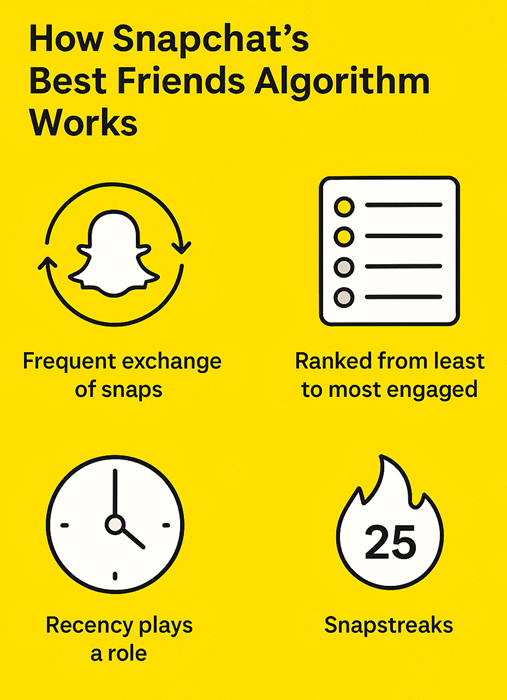
The frequent exchange of snaps is perhaps most instrumental in creating a “Best Friends” list. Users on Snapchat with whom you interact daily, through chats or snaps, will most likely end up on this list. Your friends on this list will be ranked from the least engaged users to the most engaged users.
You can have up to 8 best friends on this list at a time. The list updates frequently, with users being added and removed automatically based on your interaction with them.
Recency also plays a significant role in creating this list. Snapchat will consider the most recent interactions you’ve had with other users on the platform when formulating its list.
Snapstreaks can also serve as good enough parameters for Snapchat. If you have a long-running streak with someone on the platform, they have a higher chance of being included in your Best Friends list.
Friendship Emojis on Snapchat
Snapchat uses emojis to indicate the kind of relationship you share with another user on its platform. These emojis would appear right next to the username of your friend on Snapchat. Read through our detailed guide on how to get Emojis on a Computer to gain more knowledge.
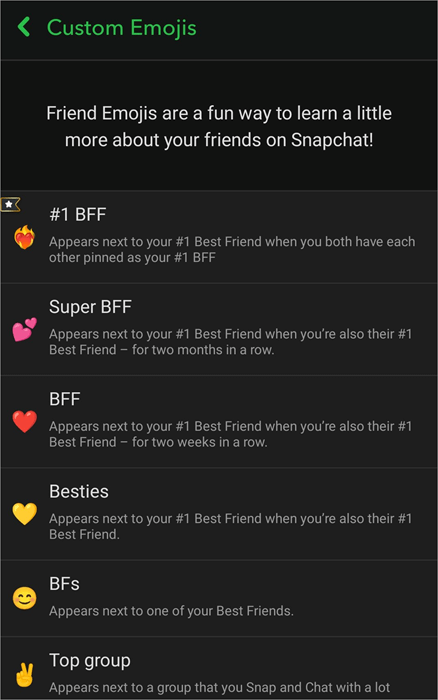
Depending on the type of emoji highlighted, it could mean any of the following:
- ♥️ – This red heart emoji indicates that you’ve been #1 friends with the other user for two weeks in a row.
- 💛 – This yellow heart emoji indicates that you’ve been #1 friends with the other user for a while. It also means you frequently exchange snaps with each other.
- 😊 – This emoji means that the other person is one of your friends on the platform, not necessarily your best friend.
- 😬 – This emoji next to a username means this person is the #1 best friend of a person you are already #1 best friends with.
- 😎 – This sunglass-wearing emoji shows you share a best friend with this particular snapchatter.
How to Get Someone Off Your Best Friends List
Now that you know what a “Best Friends” list means and how it works, let’s focus our attention on what needs to be done to get someone off this list.
#1) Cease All Forms of Interaction on Snapchat
Remember what I said about Snapchat’s algorithm and how it decides who ends up on your best friends list. Snapchat makes sure that the people you interact with the most make it to your Best Friends list.
So, it would make sense to stop all forms of interaction with the other users if you want them to be naturally taken off your list.
This means no more exchanging snaps or chats. If you don’t want to stop interactions suddenly, you could also try reducing your conversations with them on the platform. Delaying replies or taking two-to-three-day breaks from sending snaps to the other person will increase the chances of them being removed from your “Best Friends” list.
As you pause or reduce your interaction with the person you want off your “Best Friends” list, you could try increasing your exchanges with other users. This will result in new people making it to your list, thus effectively pushing out the person who was already there.
By doing what I’ve suggested above, you are essentially tricking Snapchat’s algorithm into removing someone from your list.
#2) Remove or Block a Friend
This is yet another very effective, albeit a little extreme, measure to take someone off your best friends list. Removing or blocking someone means you intend to end all forms of interaction with that person on the platform.
This will naturally end any streak you had going with them, and thus, Snapchat will take them off your best friend’s list immediately. Removing a friend on Snapchat is the same as unadding or unfriending someone.
Here’s how to unadd someone on Snapchat:
1. First, tap on the chat icon at the bottom of your screen, as shown below to open your Friends list.

2. Tap and hold on the username of the friend you wish to unadd.
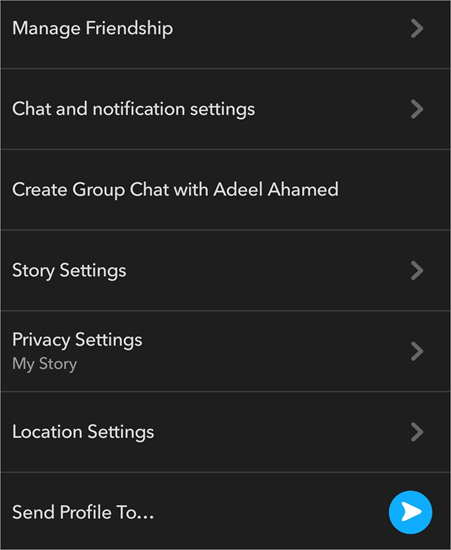
3. From the resulting menu, tap “Manage Friendship” as in the below image.
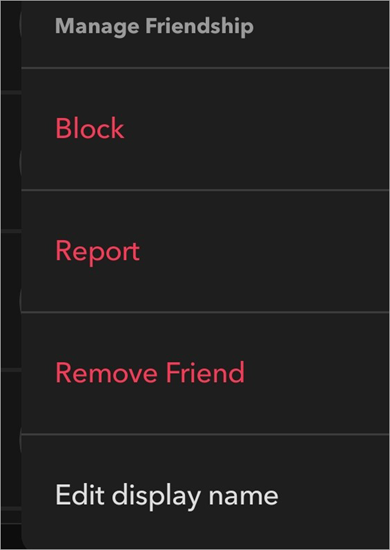
4. Tap on “Remove Friend”.
As you can see, it is easy to learn how to unfriend someone on Snapchat. That said, you may have a question like, “If you remove a friend on Snapchat, what happens?” Well, the answer is simple. The person you’ve unfriended won’t see anything you post on their feed. They are not notified that you’ve removed them as a friend.
It is a temporary measure. You can always add them back as your friend, or they could send you a request again. If you want to shut them off completely, there is a more extreme measure at your disposal.
How to Block Someone on Snapchat
If you want to learn how to delete someone on Snapchat, this is what you need to do:
1. First, tap and open the profile of the person you wish to block.
2. Navigate to the top-right corner of your screen and tap on the three dots.
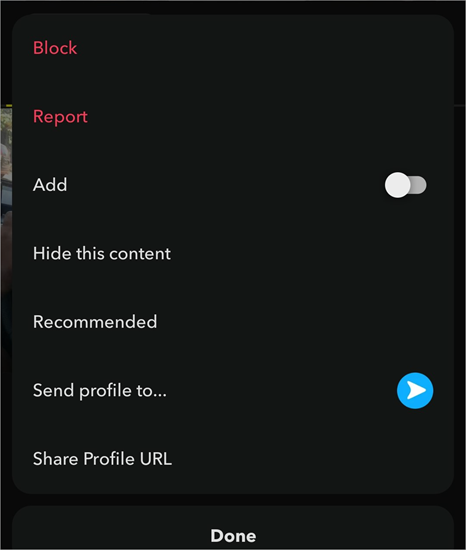
3. On the resulting menu, tap on Block.
Further Reading => How to Block People on TikTok: Simple Steps
You don’t need to block someone permanently to remove someone from a best friends list. The block can be temporary if your goal is to only get someone off the best friends list instead of cutting all contact.
Blocking someone, waiting a few minutes, and then unblocking them will reset Snapchat’s algorithm. This will naturally result in the temporarily blocked person finding themselves off your best friends list.
By doing so, you basically stop all forms of interaction with them. The blocked person won’t see or be able to find your profile or any of your stories and posts. As such, the person will immediately be taken off your “Best Friends” list.
#3) Adjust Snapchat’s Privacy Settings
Perhaps you want to remove someone from your “Best Friends” list without unfriending them. Doing this is possible if you follow the steps below.
How to remove someone from your best friends list without unfriending them:
1. Open Settings on Snapchat.
2. In the Settings menu, scroll to “Privacy Control” as depicted in the image below.
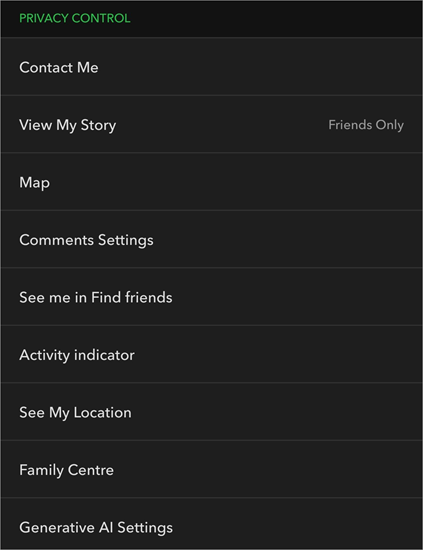
3. Here, you can choose to disable “Activity Indicator”. This way, your friends won’t know when you were last active on the platform, and maybe stop sending you snaps.
Another thing you can do is change the privacy settings of your story. Under “Privacy Control”. You’ll also find an option called “View My Story”. Tap on it, and then tap on “Custom”. Then, you can add the username of the person you don’t want watching your Stories.
With your content’s visibility restricted, they’ll have nothing to respond to or comment on, thus effectively ending all engagements.
#4) Disguising a Best Friend Via Emoji
This is a more superficial way of taking someone off your Best Friends list. I’ve already mentioned how you can tell who your Best Friends are via the emojis displayed next to their profile’s username. Hide the fact that a particular person is on your best friends list from others, rather than actually removing them.
This can be achieved by customizing the friend emojis displayed next to your username.
Here’s how you do it:
1. Open your profile page and tap on Settings.
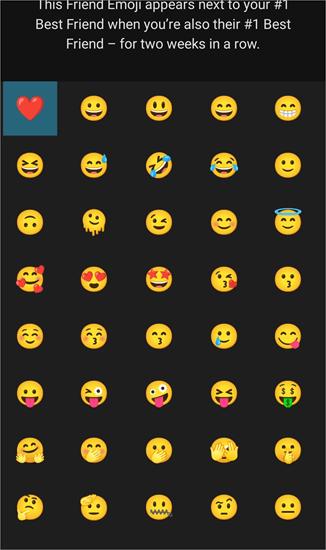
2. Scroll all the way down the menu and tap on “Customize Emojis” as shown below.
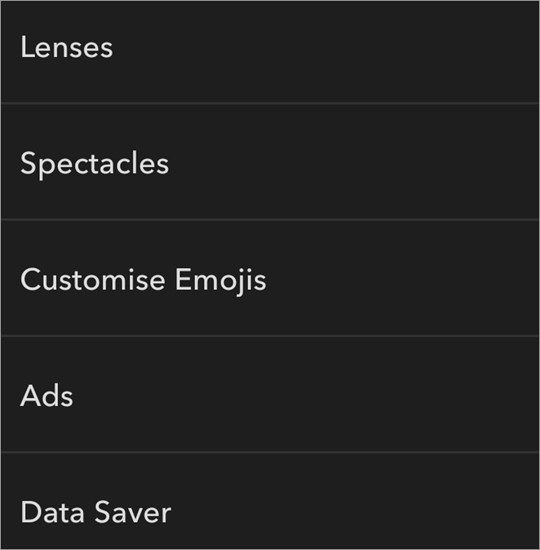
3. Here, simply tap on the emoji you want to appear next to your best friend on the list.
This will effectively hide your best friend on the list.
#5) Mute Notifications
We’ve learned how to unadd someone on Snapchat fast, among various other methods to take someone off your Best Friends list. Well, here’s another very effective way that might help you with the cause. All you need to do here is mute all notifications from that particular user.
Here’s how you do it:
1. Tap the Chat icon at the bottom of the menu.
2. Tap on Chat and Notification settings > Notification Settings as in the image below.
3. Now, switch the toggle against the Mute Chats option as shown below.
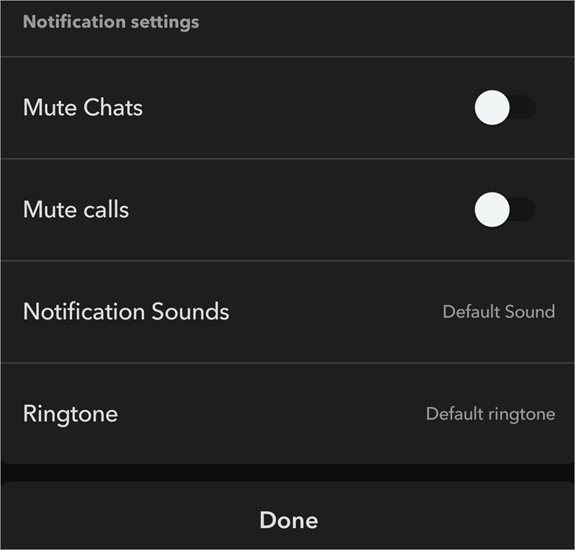
This will limit your interaction with the user and thus take them off your best friends list.
Things to Consider Before Removing Someone From Your Best Friends List
1. Deliberate Carefully on Your Decision
As you can see, you have multiple options at your disposal. Choose carefully how you wish to approach your problem. You can subtly take someone off your list by changing your privacy settings or simply limiting your interactions with them.
You can take a more extreme approach by straight-up unfriending or blocking the other person. The other person is never notified, no matter what measures you take. So, decide accordingly.
2. The Results May Take Time
Snapchat’s algorithm doesn’t really work as you want it to. So, it may take days before someone gets taken off your Best Friends list. Give the algorithm the time it needs to assess your situation once you’ve stopped interactions with a user. The only thing you can do is wait and exercise patience.
3. Be Prepared with Your Response
Although Snapchat does not notify the other user, they might guess what you’ve been up to on their own. If that happens, they might confront you. So, be prepared. If they confront you, I would suggest responding politely. It would be in your best interest to prepare a response beforehand in case they do end up confronting you with questions.
Top Reasons to Remove Someone From Their Best Friends List
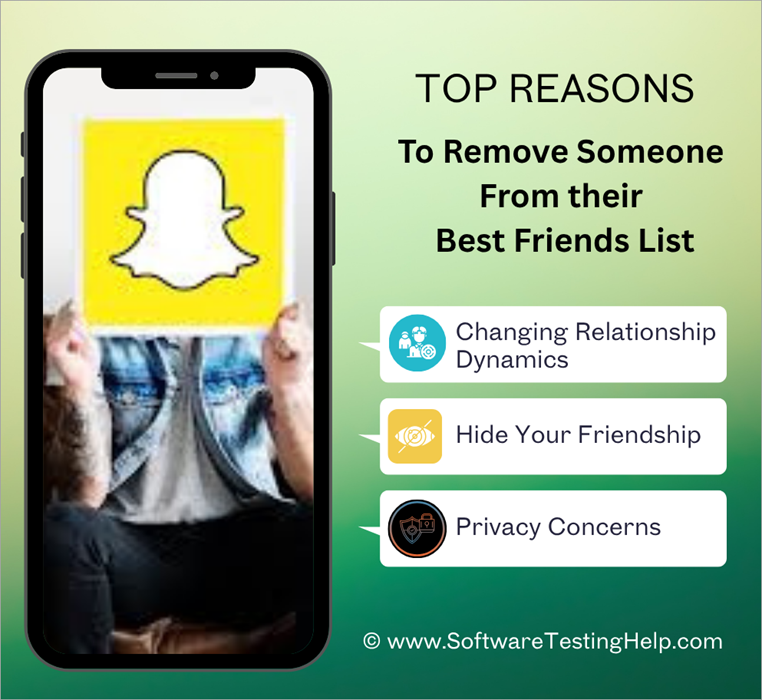
I believe one can have multiple legitimate reasons to take measures into their own hands and trick Snapchat’s algorithm.
Some of the most prominent reasons that I can think of to remove someone from their friends list are:
1. Changing Relationship Dynamics
Maybe you were good friends with someone on Snapchat, but that is not the case anymore. Perhaps the number one best friend on your list was an ex that you wish to avoid at all costs. Relationships change over time. To avoid any kind of awkwardness later on, it is understandable that you’d want to take them off your “Best Friends” list.
2. Hide Your Friendship
If you hang out in a group, you may consider it wise not to show your bias to one particular member over others. That is exactly what’s going to happen if someone in your group finds out that you interact with a certain member on Snapchat a lot more than you do with others. To hide this fact, you’d want to remove that person from your Best Friends list.
3. Privacy Concerns
Maybe you are a private person who wishes to conceal your social circle. If you are like me, you don’t want others guessing and having opinions about your close contacts. As such, it would only make sense to remove someone from your best friends list or at least disguise their emojis.
Frequently Asked Questions
1. What are Snapchat’s best friends?
Snapchat best friends is a feature wherein the platform highlights a list of people with whom you interact the most. These people are specifically pointed out with an emoji placed beside their username.
Note that Snapchat best friends don’t necessarily mean the people you are actually close to. It is a list made by Snapchat’s algorithm automatically, without any input from you.
2. Who can see your Snapchat best friends?
Your Snapchat best friends are only visible to you and nobody else unless you show your screen to others. In previous versions, others could see who your best friends were. This recent update is being welcomed by people who appreciate more privacy on social media platforms.
3. How many friends can one have on Snapchat?
The Snapchat best friends list is automatically created after the platform’s algorithm considers your recent interactions. The list will feature up to 8 friends at a time and is updated regularly as your engagement and activity on the platform change.
4. How to mass unadd on Snapchat?
I’ve been asked many times if it is possible to learn how to remove multiple friends on Snapchat at once. Well, Snapchat itself doesn’t offer any such built-in privileges. You’ll need to remove your friends one by one.
5. How long does it take for someone to get off your best friends list on Snapchat?
I can’t answer this definitively as the situation varies from person to person. Snapchat’s algorithm can take its sweet time to pick up on any changes in your activity.
So, it may take Snapchat days to notice that you’ve stopped exchanging snaps with someone to remove them from your best friends list.
6. Does Snapchat notify when removed from the best friends list?
No, Snapchat does not notify the other user if you’ve made attempts to remove them from your best friends list. However, the other user can figure it out for themselves through some hints and signs on the platform.
7. How to remove someone without them knowing?
The best way to remove someone from your best friends list without them finding out is:
Limit your interactions with them on Snapchat
Temporarily block them on Snapchat.
Configure your Snapchat privacy settings. Specifically disable “Activity Indicator.”
Mute chats with the other user.
8. Can you see who removed you from Best Friends?
No, you cannot know for sure if someone removed you from their Best Friends list. Snapchat does not notify users in the event that they are blocked, muted, or unadded by one of their users.
This means there is no way of knowing with absolute certainty if someone has attempted to remove you from their best friends list.
9. How long does it take for the Best Friends list to update?
Snapchat is an app that receives updates regularly. This means you can expect its Best Friends algorithm to receive updates regularly as well. In my experience, updates to the Best Friends list are frequent, roughly every hour, to make sure you have an accurate list every time.
Conclusion
I believe that a feature like “best friends” gives Snapchat its own distinct identity, one that is more playful and exciting. It can serve as a tool that motivates you to boost your engagement on the platform. That said, it can also be a cause of awkwardness, especially if you have someone on the list who isn’t friendly.
While Snapchat itself doesn’t let you take someone off this list, you can adopt a few tricks to get the result you want anyway. Depending on what your end goal is, I suggest using any of the methods I’ve laid out above.
Hopefully, you won’t have to break a sweat and will have an easier time removing someone from your best friends list.
Research Process:
The total time involved to complete and publish this article is approximately 36 hours. This content was created through a structured research approach to ensure accuracy and reliability.
For more quick Snapchat-related guides, you can explore our range of tutorials below:
- How to Deactivate Snapchat – Simple Steps
- How to Get Snapchat On Windows
- How to Get Snapchat Unblocked from Anywhere
- All That You Need to Know About Snapchat Planet Order
- Top Apps to Hack into Someone’s Snapchat
- How to Recover and Restore Your Snapchat Streak Without Paying
- How to Turn ON Snapchat Dark Mode on iPhone and Android
Was this helpful?
Recommended Reading
-

This tutorial will quickly educate you on how to deactivate Snapchat and delete your account across various platforms and devices with step-by-step screenshots of Snapchat deactivation: Snapchat has been a very popular social media app since its launch in 2011. For over a decade, there has been a sanctum of…
-
Looking for ways to unpin a chat on Snapchat? Learn how to unpin someone on Snapchat, along with expert tips from this easy guide, and manage your Snapchat chats efficiently: When someone “pins” a chat on Snapchat, it is done to have it appear at the very top of your…
-
Are you unable to see someone's Snapchat story? This step-by-step guide explains the proven ways to know if someone blocked you on Snapchat and ways to deal with it. Are you looking for ways to find out if someone has blocked you on Snapchat, or Not Sure why you can’t…
-
Through this tutorial, get to know the best possible ways to address your query: How to Get Snapchat on Windows 10: Three former students developed Snapchat, a communication app at Stanford University. It is only used on mobile devices. But can you get Snapchat on a computer? Yes, there are…