


This guide includes prewritten templates for software test cases, actual examples, and document samples that can be downloaded to suit your QA tasks.
Every day, I get several requests for a Test Case Template. I’m surprised to see that many testers still document test cases with Word docs or Excel files. But I’m sure that as the volume of your tests goes on increasing, you will find it extremely difficult to manage. No matter whether you are a beginner QA professional or a seasoned software tester.
The templates that I have provided in the following section are going to help you write better test cases, increase your test coverage, minimize your errors, and overall optimize your QA process.
If you are not using any test case management tool, then I would strongly recommend, based on my 20 years of testing experience, that you use an open-source tool to manage and execute your test cases.

What is a Test Case? (Beginner Clarity Section)
Test Case consists of several variables, preconditions, and actions that are used to test whether a particular function or a set of functions performs correctly. It could be compared to an experiment in science where we know what we have, what we do, and what we expect.
In case the actual outcome does not coincide with the expected one, the test case fails.
Test Case vs. Test Scenario
These phrases are typically considered synonyms; however, in a professional QA process, they denote varying degrees of detail.
- Test Scenario: The broad categorization of what should be tested. It is normally described by a single line (for example, “Test the Login Functionality”).
- Test Case: The fine-grained information related to that test scenario. There may be tens of test cases for each scenario (such as “Test login using valid credentials,” “Test login with an expired password,” etc.).
Why Test Cases Matter in QA?
Test cases are an essential part of an advanced Software Testing Life Cycle (STLC). Test cases include:
- Consistency: Test cases make sure that regardless of who runs the test (even an AI bot), he does it in the same manner, without any personal bias.
- Regression Testing: Whenever additional code gets introduced into the system, previous test cases make sure that nothing has been damaged by the new code.
- Compliance: For regulated sectors like Fintech or Healthcare, documented test cases act as the proof that the application was thoroughly tested.
- Training and Reference: They become the “manual” of your application. A newly hired Quality Assurance Engineer could look through your test cases and get acquainted with complex logic of the app.
Test case templates and practical test cases serve an important role in creating an efficient testing process within QA. Rather than having to rely on imprecise or ambiguous documentation, testers can follow structured approaches that guarantee the accurate testing of all product features.
Test case formats may vary from one organization to another. However, using a standard test case format for writing test cases is one step closer to setting up a testing process for your project.
It also minimizes Ad-hoc testing that is done without proper test case documentation. But even if you use standard templates, you need to set up test case writing, review & approve, test execution, and most importantly, the test report preparation process, etc., by using manual methods.
Free Test Case Template Downloads
Here is how to make the manual test case management process a bit easier with the help of simple testing templates.
Format #1: Download Test Case Template with Example
You can directly download the word and Excel test case template from below links:
– Test case DOC file template and
– Test case Excel file template

Also, here you can refer to a few more articles on writing effective test cases. Use these test writing guidelines and the above template to write and manage the test cases effectively on your project.
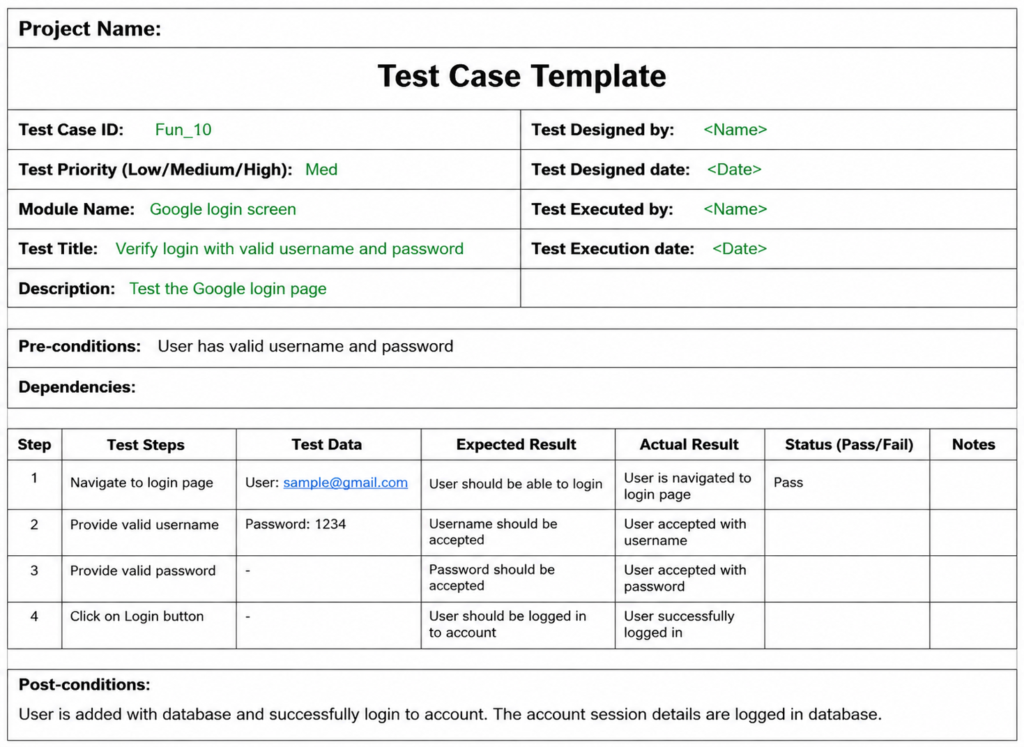
Format #2: Download Test Case Template with Example
Undoubtedly, the test cases will differ depending on the functionality of the software for which it is intended. However, given below is a template that you can always use to document the test cases without bothering about what your application is doing.

Sample Test Cases
Based on the above template, below is an example that showcases the concept in a much more understandable way.
Let’s assume that you are testing the login functionality of any web application, say Facebook.
Below are the Test Cases for the same:


=> Download the above Test case format with example data
Standard Fields for a Sample Test Case Template
There are certain standard fields that need to be considered while preparing a Test case template.
Required Test Case Fields
Test case ID: Unique ID is required for each test case. Follow some conventions to indicate the types of the test. For Example, ‘TC_UI_1’ indicates ‘user interface test case #1’.
Test priority (Low/Medium/High): This is very useful during test execution. Test priorities for business rules and functional test cases can be medium or higher, whereas minor user interface cases can be of a low priority. Testing priorities should always be set by the reviewer.
Module Name: Mention the name of the main module or the sub-module.
Test Designed By Name of the Tester.
Test Designed Date: Date when it was written.
Test Executed By Name of the Tester who executed this test. To be filled only after test execution.
Test Execution Date: Date when the test was executed.
Test Title/Name: Test case title. For example, verify the login page with a valid username and password.
Test Summary/Description: Describe the test objective in brief.
Pre-conditions: Any prerequisite that must be fulfilled before the execution of this test case. List all the preconditions to execute this test case successfully.
Dependencies: Mention any dependencies on other test cases or test requirements.
Test Steps: List all the test execution steps in detail. Write test steps in the order in which they should be executed. Make sure to provide as many details as you can.
Test Data: Use test data as an input for this test case. You can provide different data sets with exact values to be used as an input.
Expected Result: What should be the system output after test execution? Describe the expected result in detail, including the message/error that should be displayed on the screen.
Post-condition: What should be the state of the system after executing this test case?
Actual result: The actual test result should be filled after test execution. Describe the system behavior after test execution.
Status (Pass/Fail): If the actual result is not as per the expected result, then mark this test as failed. Otherwise, update it as passed.
Notes/Comments/Questions: If there are any special conditions to support the above fields that can’t be described above, or if there are any questions related to expected or actual results, then mention them here.
Optional Test Case Fields
Defect ID/Link: If the test status fails, then include the link to the defect log or mention the defect number.
Test Type/Keywords: This field can classify tests based on test types. For Example, functional, usability, business rules, etc.
Requirements: Requirements for which this test case is being written. Preferably the precise section number in the requirements document.
Attachments/References: This field is useful for complex test scenarios in order to explain the test steps or expected results using a Visio diagram as a reference. Provide a link or location to the actual path of the diagram or document.
Automation? (Yes/No): Whether this test case is automated or not. It is useful to track automation status when test cases are automated.
Sample Test Case Template (Read to use) for Different Testing Types
180+ Sample Test Cases for Web and Desktop Applications
Test Case Example for Manual Testing
Below is an example of a live project that demonstrates how all the above-listed tips and tricks are implemented.
[Note: Click on any image for an enlarged view]


Test Case Examples (Real-World)
To get away from theoretical discussion, let us consider the way QA professionals design the documentation for scenarios for some basic functionalities of websites. Below are test case examples for two different types of scenarios, “Happy Path,” and “Edge Case.”
Login Page Test Case Example
The login page is the entry point into your application. It should be tested for its security and functionality.
| Test Case ID | Test Scenario | Steps | Expected Result |
|---|---|---|---|
| TC_L_01 | Valid Login | Enter valid email/pass, click Login. | Dashboard page should load. |
| TC_L_02 | Invalid Password | Enter valid email + wrong password. | Error: "Invalid credentials" appears. |
| TC_L_03 | Masked Password | Type into the password field. | Characters should be dots or asterisks. |
| TC_L_04 | Account Lockout | Enter wrong password 5 times. | Account should temporarily lock for security. |
E-commerce Checkout Test Cases
The checkout flow is complicated due to the need for managing inventory, sessions, and pricing.
- TC_CH_01: Verify that “Add to Cart” shows the right number of items in the header.
- TC_CH_02: Verify that the removal of an item from the cart causes the immediate recalculating of the total price.
- TC_CH_03: Verify that users cannot checkout when their shopping cart is empty.
- TC_CH_04: Verify that the checkout procedure works for guests who have no account.
Payment Gateway Test Cases
This is the most critical part of an e-commerce site. Reliability and security are the top priorities here.
| Feature | Test Case Scenario | Expected Result |
|---|---|---|
| Credit Card | Submit expired card details. | Transaction declined with "Card Expired" error. |
| CVV Security | Enter 2 digits instead of 3 for CVV. | Field should show validation error. |
| Currency | Verify total matches the selected currency. | Conversion rate is applied correctly. |
| Interrupt | Close browser during "Processing." | Transaction should fail or hold; no double charge. |
Form Validation Test Cases
Validation checks guarantee that the data inserted in your database are clean and in proper format. This is where bugs will usually be located when manually tested.
- Mandatory Fields: Insert no value in the required field such as “Email” and try to submit the form. The field will then become highlighted in red.
- Character Limits: Type more than 50 characters on a “First Name” field which is limited to 50 characters. There should be character truncation.
- Data Format: Insert a wrong format, such as “test.com,” which is missing the “@.” You will get an error message stating “Enter valid email address.”
- Numeric Fields: Input alphabetic characters in a “Phone Number” or “Zip Code” field.
How to Write Test Cases (Step-by-Step)
Creating a test case is both an art and a science. It calls for profound knowledge of the application and thoroughness in writing documents. Below are four important principles for creating quality test cases.
Step 1: Understand Requirements
Before you even start writing test cases, you have to comprehend what the application should do. Use such documents as the Business Requirement Document (BRD) or Software Requirement Specification (SRS).
- The Target: Specify “Success Criteria” for the feature.
- Traceability: Relate each test case to the corresponding requirement through RTM (Requirements Traceability Matrix). It will ensure 100% coverage by tests and prove to the stakeholders that all features were tested.
Step 2: Define Test Data
Input data quality determines test case success. Identify the type of inputs needed to run your test cases.
- Valid Input Data: Regular inputs that will normally work (for example, a regular 10 digit telephone number input).
- Invalid Input Data: Inputs intended to “crash” the system (for example, entering symbols for a field designated for a name input).
- Boundary Input Data: Testing the boundaries of an input (for example, testing exactly 8 digits of password if it ranges from 8 to 16 digits).
Step 3: Write Clear Steps
Execution steps need to be unambiguous enough that even a first-time user without prior experience using the software is able to understand them.
- Be Precise: Replace “Access the website” with “Go to [https://example.com](https://example.com)”
- Stay Atomic: Ensure that each individual step is a single action only.
- No Ambiguity: Use verbs like Click, Enter, Select, and Verify.
- Bad Step: “Login into the application.” Good Step: “Enter admin@test.com in the email address field and Pass123 in the password field and then click Sign In button.”
Step 4: Define Expected Results
This is where success criteria for the test case come in. The success criteria define precisely what “success” means in this situation. Otherwise, the tester will not be able to determine whether they have discovered a defect or a feature.
- Be Specific: The statement “System should work” is not enough; instead say, “User will be redirected to the Dashboard screen and a welcome message will pop up.”
- State What Is No Longer There: If something gets deleted, then this state needs to be reflected in the success criteria.
How Many Steps Should a Test Case Have?
It is not possible to say how many steps a test case has. But the test case should have sufficient number of steps for its execution by other testers without any need for further clarification.
In general:
- Small test case: 3-5 steps
- Medium test case: 5-10 steps
- Complex workflow: 10+ steps but it should be better split into several test cases
For instance, login test case can be small.
| Step | Test Step | Expected Result |
| 1 | Open the login page | Login page is displayed |
| 2 | Enter a valid username | Username is accepted |
| 3 | Enter a valid password | Password is accepted |
| 4 | Click Login | User is redirected to the dashboard |
Keep Test Cases Short and Focused
It would be wrong to include an entire workflow in one test case just because it is technically feasible. If there are too many steps in a test case, then it becomes more difficult to:
- Execute and maintain
- Identify the step where the failure occurs
- Reuse particular scenario
- Update in accordance with new changes of the application
- Automate test case in future
The right approach is to break a big workflow into several independent scenarios.
General rule: If it is hard to understand or to maintain a test case, it should be split into smaller test cases.
Common Mistakes in Test Case Writing
Even seasoned QA engineers make mistakes related to documentation, which cause the discovery of bugs to fail and result in “flaky” testing sessions. In case your team often asks you questions regarding your bug reports, you probably commit any of these crucial mistakes.
Too Generic Steps (The “Guesswork” Trap)
The biggest mistake people make is that they believe their knowledge equals the tester’s knowledge. For instance, “Log in and open the profile” is not a step by step guide.
- The Risk: Different testers perform different tests, leading to inconsistent results.
- The Fix: Provide precise instructions. Specify what buttons should be clicked and what navigation options should be used.
- Instead of: “Open the settings.”
- Use: “Click on the ‘Gear’ icon in the top-right corner of the Dashboard.”
Missing Edge Cases (The “Happy Path” Bias)
Testers usually create test cases to verify the proper working of the application (Positive Testing) and totally neglect the scenario of incorrect information (Negative Testing).
- What’s the risk? 80% of critical data integrity/security defects reside in the edge cases.
- How to solve it? Use methods like Boundary Value Analysis and Equivalence Partitioning.
- Check for: Blank fields, special characters, maximum file sizes, and quick double clicks on submission buttons.
- No Expected Result Clarity: A test scenario lacking an explicit “Expected Result” is nothing but a sequence of steps; it is not a test at all. Never use a general statement such as “The system must operate properly.”
- The Risk: The tester may spot an error message and regard it as a “functionality” since there was no mention of how the user interface would react to a particular issue in the documentation.
- The Fix: Specify exactly what UI change, message, or data alteration is expected..
- Example: ” “The system should present the following validation error in red color: ‘Invalid email format.’ The submit button will be disabled.”
Recommended Test Case Writing Tool
Before continuing with the Test case writing process, we recommend downloading this test case management tool. This will ease your test plan and test case writing process, as mentioned in this tutorial.
1) Testiny

Testiny – a new, straightforward test management tool. It is a fast-growing web application built on the latest technologies and aims to make manual testing and QA management as seamless as possible.
Its design is extremely intuitive, making writing and maintaining test cases easy, and it helps testers perform tests without adding bulky overhead to the testing process.
Don’t just take our word for it; take a look at Testiny yourself.
Testiny is perfect for small to mid-sized QA teams looking to integrate manual and automated testing into their development process.
Features:
- User-Friendly Interface: Intuitive and simple out of the box
- Flexible Test Case Creation: Write test cases using a rich-text editor, copy & paste screenshots, drag & drop to move items
- Customizable Templates: Choose between different test case templates; add your own custom fields to fit them to your needs
- Structured Test Organization: Organize tests in a tree structure for better maintenance; easily search and filter for tests
- Test Planning and Execution: Manage test cases in test plans and test runs
- Tool Integrations: Powerful integrations (e.g. Jira, GitLab, Azure DevOps) for linking requirements and defects
- Real-Time Collaboration: Instant updates for all browser sessions to stay in sync.
- Live Activity Tracking: Immediately see if a colleague made changes, completed a test, etc.
- Enterprise-Grade Security & Access: Powerful REST API, SSO, audit logs.
- Free for open-source projects and small teams with up to 3 people.
Pricing plans: There is a Free Plan for small teams. The former Advanced plan has been renamed to the Starter Plan (starting at $18.50/month or $15.42/month with yearly pricing). A new Business Plan (starting at $20.50/month or $17.08/month with yearly pricing) that sits right between the Starter Plan and the more advanced Enterprise Plan (starting at $30.00/month or $25.00/month with yearly pricing).
Our trial period has been extended to a generous 21 days for full, unrestricted evaluation./
The self-hosted version with Testiny Server is still an attractive option for security sensitive industries, starting at $1.500 for 5 users/year.
Frequently Asked Questions
1. What is the test case template?
Software bugs can be minimized by following well-defined testing processes, and a test case template acts as a safeguard against costly defects.
A test case template is not just a document but a foundation for: Software releases that meet deadlines. Clarity of communication between the testing and development teams.
2. What are the 7 phases of STLC?
The 7 phases of the Software Testing Life Cycle (STLC) are Requirement Analysis, Test Planning, Test Case Development, Test Environment Setup, Test Execution, Test Result Analysis/Reporting, and Test Closure. This structured, sequential process ensures high-quality software by validating requirements from start to finish
3. How to download the Test case Template online for Free
You can download the test case template online for free from the links below
Test case DOC file template
Test case Excel file template
Download the Test case format with an example
4. How to write test case examples
To write effective test cases, first understand the requirements, then use a standard template with clear, step-by-step instructions and expected results.
Focus on creating test cases from the end user’s perspective and cover both valid (positive) and invalid (negative) scenarios. The goal is clarity and repeatability, ensuring anyone can execute the test and verify the outcome.
Test cases example for a web application
Test cases for a web application cover various aspects like functionality, usability, security, and performance. Examples range from basic login validation to cross-browser compatibility and data integrity checks.
5. What are the Common Fields in a Test Case Template?
Most QA teams include the following fields in a test case format:
• Test Case ID
• Test Case Title / Description
• Module or Feature Name
• Preconditions
• Test Steps
• Test Data
• Expected Result
• Actual Result
• Status (Pass / Fail)
• Priority or Severity
• Tester Name
• Execution Date
• Comments or Notes
6. What is the Standard Test Case Format?
A simple test case format typically looks like this:
Field Description
Test Case ID- Unique identifier
Test Scenario- What functionality is tested
Preconditions- Setup required before testing
Test Steps- Step-by-step actions
Test Data- Input data used
Expected Result- Expected system behavior
Actual Result- Observed system behavior
Status- Pass / Fail
Comments- Additional information
7. What is a test case example?
Example: Login Functionality Test
Test Case ID: TC-001
Test Scenario: Verify login with valid credentials
Preconditions
User account exists
Test Steps
• Open the login page
• Enter a valid username and password
• Click “Login”
Expected Result
User should be redirected to the dashboard.
Status
Pass / Fail depending on the result.
8. What is the standard test case template for 2026?
Modern templates have moved beyond just “Steps” and “Expected Results.”
A comprehensive 2026 template now includes:
Test Case ID: A unique alphanumeric identifier (e.g., TC_LOGIN_001).
Traceability Mapping: Linking the test directly to a Requirement ID or User Story.
Pre-conditions: Detailed environmental setup (e.g., “User must be logged out,” “Database must have 100+ records”).
Test Data: Specific inputs (e.g., testuser@domain.com).
Priority/Severity: Categorization based on business risk.
Automation Status: Whether the test is manual, automated, or a candidate for AI execution.
9. Can I use Excel for test case templates, or do I need a tool?
While Excel/Google Sheets are still popular for small projects, 2026 search trends show a massive shift toward Test Management Tools (like Jira with Xray/Zephyr, TestRail, or monday.com) because they allow for real-time collaboration and AI-generated insights.
10. How is AI changing test case formats?
Teams are now adding a field for “AI Prompt/Context” in their templates. This allows Large Language Models (LLMs) to ingest the manual test case and automatically generate an automation script (like Playwright or Selenium) based on the provided format.
Conclusion
Personally, I prefer to use a Test Case Management tool. You can start with an open-source tool. It will be a good addition to your efforts to set up the testing process, and meanwhile, it will also save a lot of time instead of manually maintaining these documents.
We have also seen test case templates and a few examples using very good quality documentation. I hope this article was helpful to you.
Research Process:
Total Time taken for research and publishing this guide: 40 Hours (approx).
This guide is based on real testing practices used by QA professionals. We reviewed commonly used test case templates, examined how teams document test cases in day-to-day projects, and created examples that reflect practical testing scenarios. The templates were refined to ensure they’re easy to use, adaptable, and suitable for both manual and tool-based testing workflows.
We would be glad to know your thoughts, comments/suggestions about this article.
For more Test Case Templates-related guides, you can explore our range of tutorials below:
- Test Plan Template with Format and Contents
- Test Execution Report Template
- Ready To Use Free And Paid Standard Testing Templates
- ERP Test Plan and Test Cases with Template and Example
- Premium Software Testing Templates
Was this helpful?
Recommended Reading
-

Writing Test Cases from SRS Document (Download Live Project Sample Test Cases) - Software Testing QA Training Day 4 Just to rehash what we have been doing so far - we are working our way through the Software Testing Training mini-course on a live project OrangeHRM. In this free online…
-

Learn To Write Test Strategy Document Efficiently A strategy plan for defining the testing approach, what you want to accomplish, and how you are going to achieve it. This document removes all uncertainty or vague requirement statements with a clear plan of approach for achieving the test objectives. Test Strategy…
-
Learn how to write an effective test summary report using this simple 2-step guide and Sample Test Summary Report Template: Several documents and reports are being prepared as part of the testing. Some are Test Strategy Docs, Test Plan docs, Risk Management Plans, Configuration Management Plans, etc. Among these Test…
-
Software Testing Status Reporting “The agreement that a certain information, in a certain format, will be sent by a certain team/individual, at certain intervals of time, to certain members – is like a handshake- an acknowledgment that no matter what the outcome of a task at hand, you would be…


Very useful template for all startup testers
can u plzz give the comments for writing step by step manner test cases i am going for testing interview i am not able to write the test cases in crct step by step process. i am not able to deliver the test cases in the interviews
Hello sir……….
MY query is …I’m asked “write testcases for train ticket reservation system” .Should i use the table format like test case template or test scenario ……or just 1.Description and Expected result alone ?please reply as soon as possible…
hi,
can u plz send me any test case sample template..i am fresher and i am joined in content QA job.so plz help me frds
thanks for sharing. we will add some of these fields in our template
Hi.. this is very useful to me thanks..
how to write testcases for blank homepage in mobile app.??????
in mobile app where giving the login details it will going to home page without causing any error..but after open home page where it will be blank…..so user will face what are errors and how to write testcase…..can you explain me plz…..
Thanks for detailed information.
Hi,
I just started learning QA, please help me out how to write a test case on “Home Address”. I know it’s a combination of alphanumeric. I would like to know should i write separate valid and invalid test cases?? what should i do and what should i write?
its v.usefull but i am trainee…so plz help me out that i had to be best in testing…
nice i need hospital management system test case
Excellent article. KeeP it up
Very nice, its helpful.
Thank you
can u please introduce opensource tool
i want to write atest case for home age of any application and main functionality page
Thanks for this article. It is very useful for me. Since a long time i am searching for this.
I need software testing sample project with templates
PLEASE GIVE ME ALL the scenarios of Client and Manager LOGIN page………………………………………………………..
How we can calculate the Radio/ TV Channel programs total customers ?
How we will get the total users of a particular channel ?
How we will get the total users of a particular channel programs ?
How we can trace the application Users ?
can we use the selenium with FF ? please give me a answer ? thanking you
Hello Sir, please tell how to write test cases of prescription templete.
thanks for sharing. we will add some of these fields in our template
I need system test template on journal Entries
Thanks a lot. This website is REALLY NICE and USEFUL.
Con you please help me for installing bugzila tracking tool on my local windows copy.
Very nice Article….Thank You
my confusions are cleard.thanks for this information.
Very useful article.
Thanks a lot for sharing these.
I like the template you provided. Can you complete the template with a real live example so I know how interpret and enter the information in the template. I am new to this and need lots of help. If you could use an example of logging into a system to test querying an individual’s contact information. Thanks.
This is a great resource. God bless you VJay and all.
Can i have test cases for a real estate website?
like for
about us
sell your house
buyer home search
and so on…
MY query is …I’m asked “write testcase for bottle” .Should i use the table format like test case template or test scenario ……or just 1.Description and Expected result alone ?please reply ASAP
Very informative and suites my requirement, I will use many of the fields from this template.
It is a helpful document to understand test cases and how to write it.
if they asked u to write test case template then u need to write in test case template itself only.
Can you please post API testing test cases
Can u please tell test scenarios of each requirements for xerox machine and pick the smoke test scenarios
The Xerox machine should be able to print documents from a connected computer.
Test scenario: Attempt to print a document from a connected computer and verify that the document is printed correctly.
The Xerox machine should be able to scan documents and save them to a connected computer or cloud storage.
Test scenario: Scan a document and verify that the scanned image is saved correctly to the specified location.
The Xerox machine should be able to make copies of documents.
Test scenario: Place a document in the Xerox machine and make a copy of it, verifying that the copy is of good quality and accurate.
The Xerox machine should be able to print in color.
Test scenario: Print a document with color graphics or text and verify that the colors are printed accurately.
The Xerox machine should be able to print on both sides of the page (duplex printing).
Test scenario: Print a document with duplex printing enabled and verify that the document is printed on both sides of the page as expected.
As for smoke testing, a smoke test is a type of test that is designed to quickly verify that the basic functionality of a system is working correctly. Some potential smoke test scenarios for a Xerox machine might include:
Test scenario: Turn on the Xerox machine and verify that it powers up as expected.
Test scenario: Print a simple document (e.g. a one-page text document) and verify that it is printed correctly.
Test scenario: Make a copy of a document and verify that the copy is of good quality and accurate.
Test scenario: Scan a document and verify that the scanned image is saved correctly to the specified location.
Very very useful site….As a newbie in the field of software testing…this site helps me a lot…..great job….God bless u
Hi. Im following the STD(software test description) template given by IEEE. Im confused on what to write in the section where you have to specify a unique identifier. Please help me, thanks.
good information
Hi guys
I am getting one issue that is like “” Recurring 3D Secure order is not allowed “‘ while adding cards i am getting this issue so please anyone suggest me
Thanks
viresh
8553755806
Thanks for this article. It is very useful for me…..
Good work.. will be helpful..!
Hi Vijay,
When ever I need any help on testing and automation I visit your site and leave your website happy and contended. Reading anything be it a single paragraph has always enhanced my knowledge. Thanks for sharing your knowledge and experience with us.
Hi sir,
Can you please tell me if I want to check any E-Commerce website early then how many types of testing is required?
thanks allot for this ,this is realy awesome for us
you can use test link
very useful
word doc check spelling, line space, format cheking tools i want
Hi,
I am a graduate. I am searching for job in software testing. can you guide me to get job.
Thanks in advance,
Rajesh. Modi
9742773880
Hello sir,
can u please tell me the test cases for ambulance dispatch system
good very helpful..!!!!!!!!!!!
Can u please tell test cases for the Med-Scheduler registering
nice
I want to add one more field before Test Steps as “Description”. We can describe here that what we are testing Like: Testing the functionality of …… Page.
Can u please tell test scenarios of each requirements for xerox machine
@ Muzaffar – Here is a list of some good open source test management tools. Remember when it’s open source there are very few choices and many tools have limitations for advance use. You can’t find every solution in one tool.
Use these tools and find which is best for your needs. I find TestLink good for small projects. Features – manage test cases, keywords, requirements, test plan, test case assignments, builds and many more good features.
TestLink (http://www.teamst.org/) – It’s a web based tool to manage test cases and requirements.
Bugzilla Testopia (http://www.mozilla.org/projects/testopia/) – It’s and extension to Bugzilla defect tracking tool.
TestCube – web based test case management
RTH-turbo (http://requirementsandtestinghub.wordpress.com/faq/) – One more web based test management tool
Testitool (http://www.majordojo.com//testitool/) – manage test plan and test cases
This should be enough for you to get started. I’ll cover more recommendations with details for both open source and commercial test case management tools in a separate post.
Very Useful site..Thanks for all your help…:) Keep it up…!!
Hello Sir,
this is very usefel …really a great man .. thank and regards
Thank you for help..
stay with me…sayang sayang sayang…meowww say with me sayang sayang sayang
GOOd example for test case
This is very useful article and nice one
please give the full document report which you have tested in the Excel sheet document.and send to mailid please
Can you show us how to write testcases on jira?
mokka
Thanks for sharing the info friend. It’s really useful.
Nice article Vijay..
Here you can get a most popular free and paid Testing Tools list used in the testing of the software application:
http://www.softwaretestingclass.com/software-testing-tools-list/
the test case example is not accurate.
very good test case template. Anyone wanting to take Software Testing to another level can buy exam papers @ ISEB-sofwaretesting.weebly.com
nice
Nice Article
Hi,This description is very much useful for testers like us.Thanks a lot.
Hi, you said that Excel could be a bad solution for the long term. Which alternative you consider better?
Thank you very much.
Thank you for sharing this information. It will be useful to our testers at RentTesters and SQA Solution.
Iam diva living la vida, come to me….. sayang sayang sayang . muah :* mioww
Hi,
This is really very much useful. But I am still not clear regarding the difference between “precondition” and “dependencies”. Can you explain it in more details with example?
Thanks in advance
Hello sir..
I have one doubt can i write test cases for any application in the form of like testcase id, testcase discription and actual and expectd result these 4 cases is enough for any test cases..
Hello Sir,
Can you please tell me, how i will write the testcases of clinic management web application
Hi Team,
It good to see with example, but you have to give test case which is fail and what to do next step if it will be helfull to beginer.
sir in test case test scenario column will be there or not
hello,
Could anyone please help to write a test case for the DTC(Daily Themed Crossword Puzzle) game application?
IS there possible to write same test cases for IOT devices vulnerabilities ???
Very usefull article.
Thanks a lot for sharing these.
Hello Everyone ,
I want to write test cases for movers and packers as per business/ functional features for settings like change in branding , font size and colour in azure devops so what test cases sample should i used ?
Thanx in advance
Its a very detailed document mentioning each and every thing. I use to keep my test cases as simple as i can but really i love this format as well.Definitely i will include some of them to my test case document.
very nice artical
This is very useful to me and every one will like this thank u
This is very useful to me and every one will like this thank u
I’m going to have to try this out, I only just found out about it. Hopefully I can get it working properly.
merci bcp pour vos coneils
send me the test case based on functional testing for product detail page of online shopping like amazon,flipkart etc
i want testing answer for online course reservation system
super example,………..woooowwwwww
very useful n valuable
can anyone help me to configure bugzilla on windows 8 64-bit OS.
can anyone help me to configure bugzilla on windows 8 64-bit OS.
sir i need sample of professional test case of a web site
good1..
very useful site …. good
I am very much interested in software testing jobs, I have completed a course, I understand well but I am not sure if I can check for jobs because I am 38 now, is there any age bar for that?
Thanks, it’s good to read specific knowledge in depth by you.
Thanks again!
which testing perform first either retest and regression test after bug fixing.
send answer on lokesh22sharma@gmail.com
Can Anybody send me User Acceptance Test Cases for any VOIP application ?
Hi i connected to your site, its helpful for me thanks…
Hi, this test case is useful and help us a lot. Thanks.
Can you please share some good open source test management tools as well?
very useful article and nice one.
Yes. This article is very USEFUL.
please send bug-template