


Here we will explain the five easy methods with steps and screenshots to guide you in understanding How To Open a .Pages File:
What is a .pages file?
The .pages file extension is created by Apple’s “Pages” application. Pages files are Apple’s proprietary word processing documents and are simpler to create and edit as compared to MS Word. They are not ordinarily found in every device.
Although they are very similar to Microsoft Word, you can’t open them directly on a Windows device. But there are methods you can use to open it. In this article, we have explained 5 ways to open the .pages extension.
Table of Contents:
How To Open .Pages File

Even if you are not a Mac user, you can still open .pages files without the Pages application. Here are a few ways to do that effectively.
Top Methods To Open .pages Extension
#1) iCloud
Website: iCloud
Price: Free
iCloud is Apple’s cloud computing and storage service. You can use the web-only access to iCloud even if you don’t have an Apple device and access the Drive, Pages, Keynotes, Notes, Contacts, etc.
Here are the steps:
- Launch a browser.
- Go to the iCloud website.
- Log in to your Apple ID.
- If you don’t have any, create one.
- Click on the Pages icon.

- Go to Settings.
- Click on Upload Document.
Once the .pages document is uploaded, you can open and edit it on your device.
#2) PDF Reader
Pages files are essentially Zip files. Along with containing .pages document information, it also carries a JPG file. You will also find an optional PDF file you can use to preview the document. Thus, you can change the extension of the .page file to ,zip and open it with a PDF reader.
Here are the steps to follow:
- Find the file with .pages format on your system.
- Right-click on the file.
- Go to Rename from the drop-down menu.
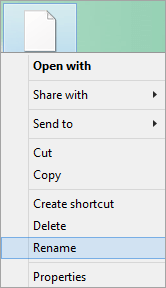
- Delete the .pages extension.

- Replace it with .zip.
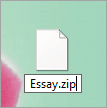
- Hit enter.
- When asked for confirmation, click Yes.
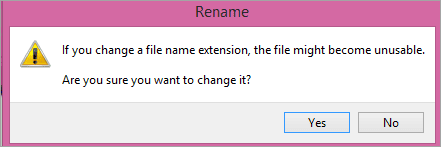
- Double-click on it to open it with WinZip or WinRar.
- Go to the Quicklook folder.
- Click on Preview to open it with an appropriate app.
#3) Zamzar
Website: Zamzar
Price: Free
Zamzar is an online file converter that can convert over 1200 file formats. You can use this website to convert .pages format to Word and then you can use MS Word to open the converted file.
Follow these steps:
- Go to the website.
- Go to Document Converters.
- Select Pages Converter.

- Click on Add Files.
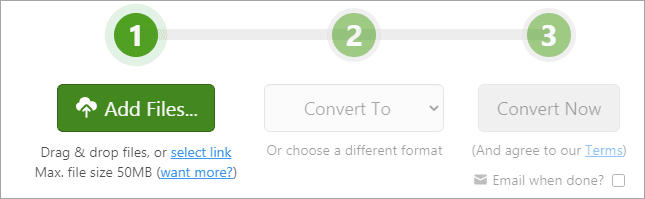
- Go to the .pages file you want to open.
- Click on it.
- Click on Open.
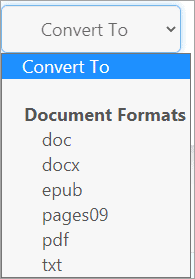
- Select doc or docx in Convert To drop-down menu.
- Click Convert Now.
- Select Download to save and open the converted file.
You can also convert .pages to txt, epub, or PDF to open it on your device with the appropriate application.
#4) FreeConvert
Website: FreeConvert
Price: Free
This is yet another online conversion tool that you can use to open .pages file on your non-Apple device. It uploads the file securely via HTTPs protocol and allows you to convert your file to any other preferred format easily and quickly.
Follow these steps:
- Go to the website.
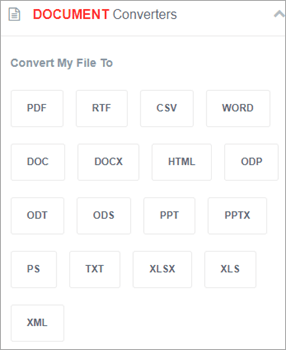
- Go to Document Converters.
- Select Doc or Docx under the Convert My File To option.
- Click on Choose Files.

- Navigate to the .pages file you want to convert.
- Select the file.
- Click Open.
- Select Convert to Docx.
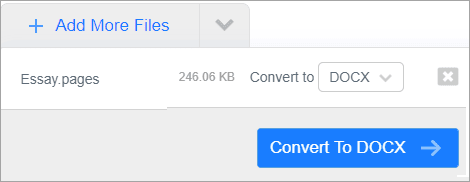
- When the conversion is complete, click on Download Docx.
- Double click on the file to open it in MS Word.
You can convert multiple .pages files to any format you want easily and quickly.
#5) Cloud Convert
Website: Cloud Convert
Price: Free
You can easily open .pages files by converting them into DOC or DOCX file format using CloudConvert. It keeps the quality of Apple’s iWork suite. You can use it to convert many file formats into different ones quickly and with ease.
Here are the steps:
- Go to the website.
- Click on the arrow in the box beside the option Convert.
- In the dropdown menu, go to Documents.
- Select Pages.

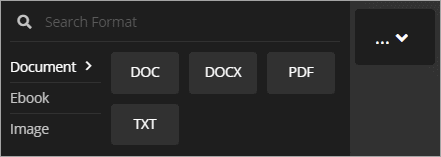
- In the box beside To option, go to Documents.
- Select Doc or Docx.
- Click on Select File.

- Go to the .pages file you want to open.
- Select it by clicking on it.
- Click Open.
- Click on Convert.
- When the file is processed, select Download to save the file on your device.
- Double-click on the file to open it on your device.
You can also convert your .pages file to PDF and TXT file format.
Frequently Asked Questions
Q #1) How do I open a .pages document?
Answer: The easiest way is to use an online document converter, convert the .pages format to a supported file format like Docx, or PDF, download the converted file to your device and double-click on it.
Or, you can rename the file, delete .pages extension and insert .zip extension instead. Hit enter. Now double-click on it to open it with WinRAR or WinZip and open the file names Preview with supported extensions.
Q #2) How do I convert .pages document to Word?
Answer: You can use any file converter to convert .pages document to Word. Go to CloudConvert, select the Convert format to Pages, and To format to Doc or Docx and click on Convert. When the conversion is done, download the file and double-click on it to open it with MS Word.
Suggested Reading =>> PDF to Word Converter tools
Q #3) How do I open .pages file in Chrome?
Answer: Log in to your Google account and navigate to Google Drive. Click on New and select File Upload. Go to the Pages file you want to open, select it. Click on Open with and select Google Doc. You should be able to view your Pages file.
Q #4) How do I open .pages file in Windows 10?
Answer: You can rename the file from .pages to .zip and double click on it to open it in WinZip or WinRAR. Find the .pdf or .jpg file extension after extracting the files. Double-click on them to open it.
Q #5) How do I convert .Pages document to PDF?
Answer: Go to Zamzar website and upload your .Pages file. In the Convert To option, select PDF and click on Convert Now. Your file will be converted to PDF in no time.
Conclusion
Knowing what is a pages file will help you understand why you can’t open it directly on any device other than Apple’s. But there are workarounds to open it on other devices.
Also Read =>> List of best PNG to PDF Converter tools
The easiest way is to convert .pages format to other compatible formats like .doc, .docx. .pdf, .txt, etc. You can also use your iCloud account, if you have one, through your browser on a Windows device and access the Pages documents easily.
Was this helpful?
Recommended Reading
-

Here we will explore step-by-step instructions to make PDF fillable using multiple tools that are used to Convert PDF to Fillable Form: Do you remember the time when you had to print out the PDF form, fill it, and scan it to mail it back? It was such a hassle.…
-
List and comparison of the BEST PDF to Word Converter tools. Select an online, free, or commercial tool to convert PDF to Word document: Portable Document Format, commonly known as 0PDF, was invented with the intention of making the sharing of documents and files across multiple devices easier. The idea…
-
A step-by-step guide to various EPUB to PDF Converter tools and apps available online, offline, Android, and iOS platforms: Electronic Publication or EPUB is the most popular file format for ebooks. A wide range of devices supports the .epub extension allowing you to easily download and view these files. However,…
-
Here we are providing easy and simple steps to Convert Kindle to PDF: Kindle is one of the most popular ebook readers today and it uses MOBI and AZW file formats, but these formats are not compatible with most devices. So, if you want to open it on your smartphone…
-
Here we will explain the five easy ways to Convert PDF To Kindle. Learn how to upload and add PDF to Kindle: Kindle, or Kindle app, they both not only support ebooks but also PDFs. However, reading a PDF on Kindle or even your smartphone can strain your eyes because…
-

This iText Tutorial Discusses How to Manipulate Bulk Data into a Secure, Single PDF Report using Java and iText Library: iText is a tool to generate a consolidated report where we can manipulate bulk data into a single form of entity that holds meaningful information. iText is a Java PDF…
-
Explore the best JPG To PDF Converter Apps available for Web, Windows, Android, iOS, and Mac. Also learn the steps to change JPG to PDF: PDF and JPG are commonly used formats and sometimes you might need to convert JPG into PDF for various reasons. This article brings you various…


