Do you want to block users on TikTok without letting them know about it? Just check out our simple guide below on how to do it on both mobile phones and desktop browsers.
There are many users who wish to know the process of blocking someone on TikTok. It is done instantly and the user will be unable to view your profile or interact with your content.
Our guide below will give you all instructions to block users on different platforms, such as Android, iPhone, and web browser.
How Do You Block Someone on TikTok?
If you want to block a TikTok user, all you have to do is go to their profile, click on the Share (arrow) or three dots icon on the top right corner of the page, select Block, and click OK. Once that person is blocked, he or she will not be able to see your videos, message you, or follow you anymore.
How to Block Someone on TikTok (Android, iPhone & Web)
Blocking someone on TikTok is easy and discreet. Blocking someone will restrict them from accessing your content or interacting with you in any way. Plus, they won’t even know that you’ve blocked them.
I am writing this article to convince TikTokers to block their harassers instead of fleeing the platform.
So without much further ado, let’s understand how to block on TikTok.
How Do You Block Someone on TikTok: Step-By-Step
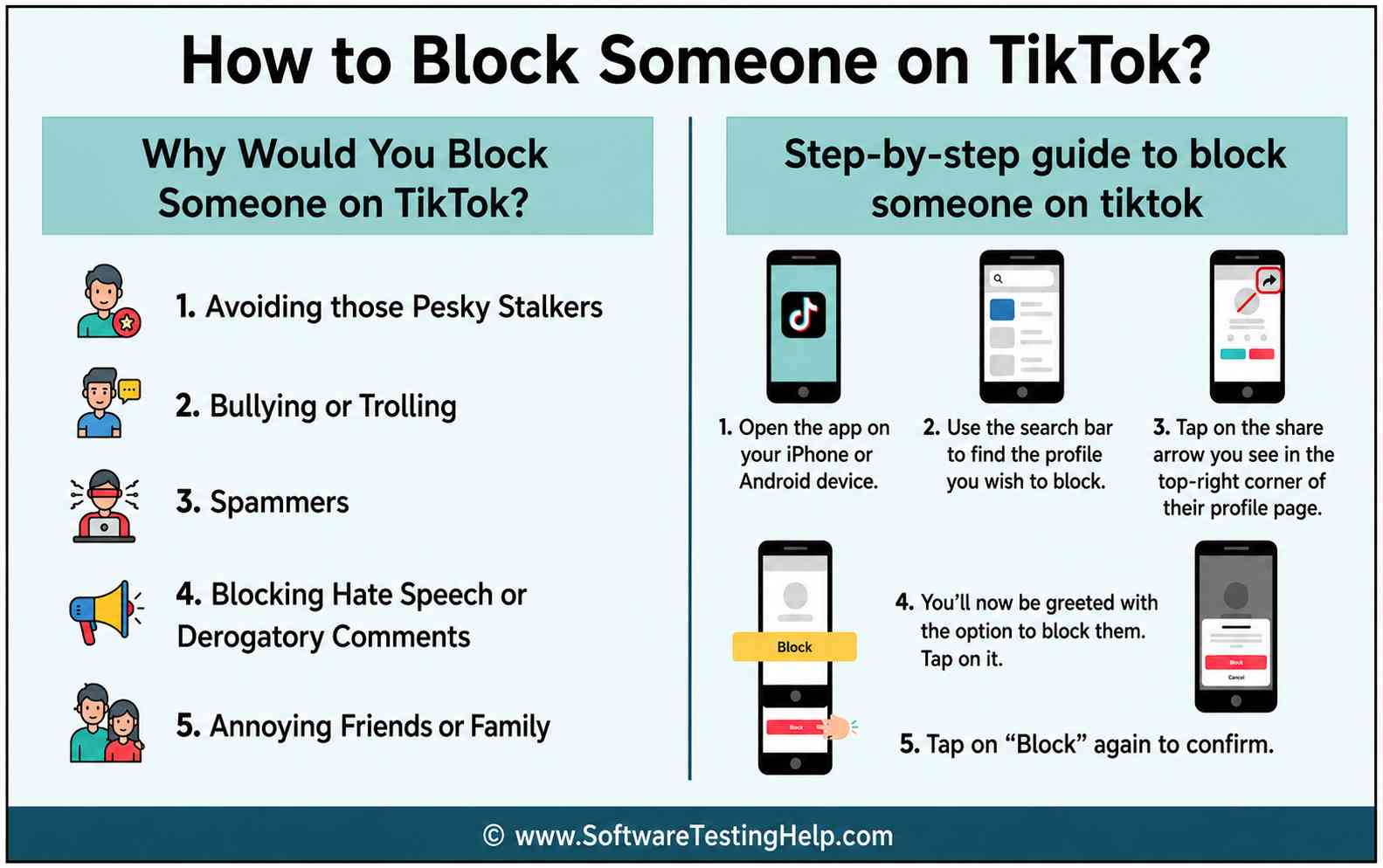
Now that you are clear on the reasons, let’s understand how to block people on TikTok. TikTok has made it very simple for users to block anyone they don’t want to interact with in any capacity.
On Android & iPhone
Here’s the method to block someone on TikTok via mobile.
1. Open the app on your iPhone or Android device.
2. Use the search bar to find the profile you wish to block.
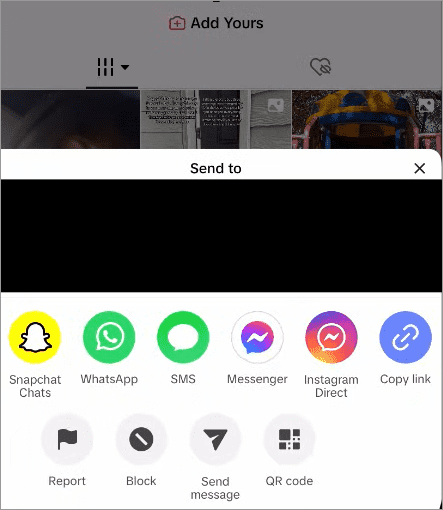
3. Tap on the share arrow you see in the top-right corner of their profile page.
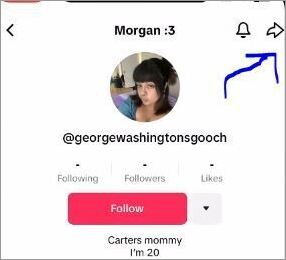
[via GuideRealm]
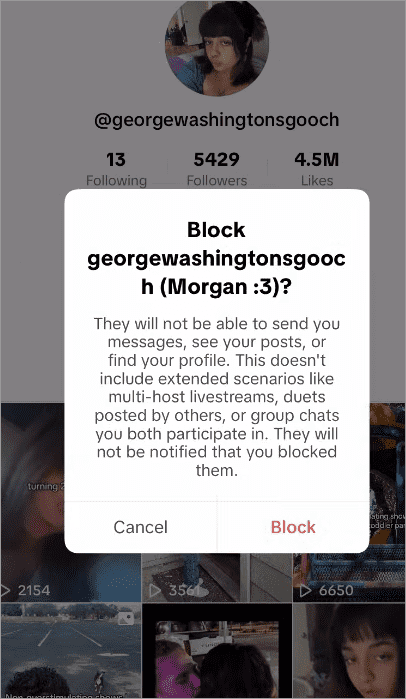
4. You’ll now be greeted with the option to block them. Tap on it.
5. Tap on “Block” again to confirm.
On TikTok Web (Desktop)
How to Block Someone on TikTok on Desktop
On the TikTok website that you’ll open via your desktop browser, blocking will be a bit different but simple nonetheless.
Here’s how you do it:
1. Open the TikTok website on your browser.
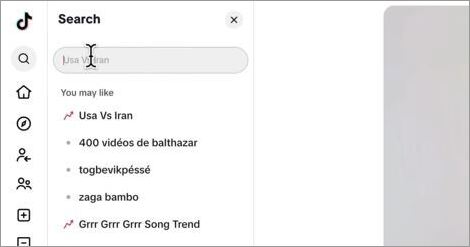
2. Use the search bar to find the profile you wish to block.
[via Bit9 Tutorials]
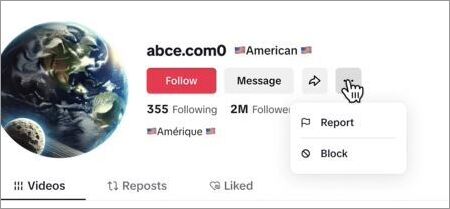
3. Click on the three dots that appear under their name.

4. From the menu that appears, click on Block.
5. Click on Block again to confirm.
If you ever wanted to know how to block someone on TikTok from their profile, this is it.
Why Would You Block People on TikTok?
Can you block someone on TikTok? Yes, that is possible. Should you block someone on TikTok, though?
As fun as TikTok can be, sometimes the platform itself can become unfathomable because of the actions of a few bad characters. It is not uncommon to find trolls, spammers, and cyber-stalkers on the platform who may decide to target or bully you for no good reason.
There isn’t a creator on TikTok who hasn’t received a mean comment on their post or had their DMs flooded by spam. The only permanent solution to this level of harassment is blocking.
Here are just a few good reasons to block someone on TikTok from comments, DMs, etc.
#1) Avoiding Pesky Stalkers
Ask any female TikToker if they’ve been stalked online, and most will nod their heads. If you are famous or gaining some popularity on the platform, you are bound to attract some unwanted attention. Nobody needs to put up with such creeps. The “Block” feature on TikTok was made to avoid cyberstalkers.
#2) Bullying or Trolling
It is also typical for creators to experience trolling from those who view their videos. Some of these trolls can be pretty vicious with their comments. You are obligated to tolerate such behaviour and thus should block every single troll from ever viewing your posts.
Similarly, bullying should also not be tolerated. It is easier for mean-spirited individuals to hide behind the privilege of anonymity to bully folks. Such people don’t deserve your time and attention.
Blocking them would give you some much-needed peace of mind. So, waste no time and block a TikTok user from DMs, especially those who occasionally send you offensive messages.
#3) Spammers
TikTok is mostly home to legitimate accounts. That said, it isn’t immune to fake accounts that exist for no other purpose than to spam your DMs. These accounts often lure people with fake giveaways and the promise of gifts. Instances of quishing, phishing, and catfishing are common on social media, and TikTok isn’t an exception.
There are many spam accounts on the platform that impersonate famous brands and celebrities. Be extra wary of such accounts and instantly block them if you notice their presence.
#4) Blocking Hate Speech or Derogatory Comments
We just talked about the privilege of anonymity and the power it grants people to abuse others online. There are countless examples of TikTok accounts that solely exist to sow discord by posting derogatory posts or objectionable content. Some people even abuse particular sections of a community.
Blocking them would make an upstanding citizen who stands up against hate speech and advocates for harmony online.
#5) Annoying Friends or Family
I am one of those who don’t want anyone in my immediate family to know what I post or like on TikTok. As such, I’ve blocked all of my siblings and both of my parents on TikTok. Sometimes people want space from the people they are familiar with.
You have every right to block a friend who you think is way too nosy or a family member who you don’t want checking out your social media activity.
Steps to Bulk Block on TikTok
Know that TikTok does allow you to block up to 100 accounts at once. However, this feature only works for accounts that have commented on your TikTok posts.
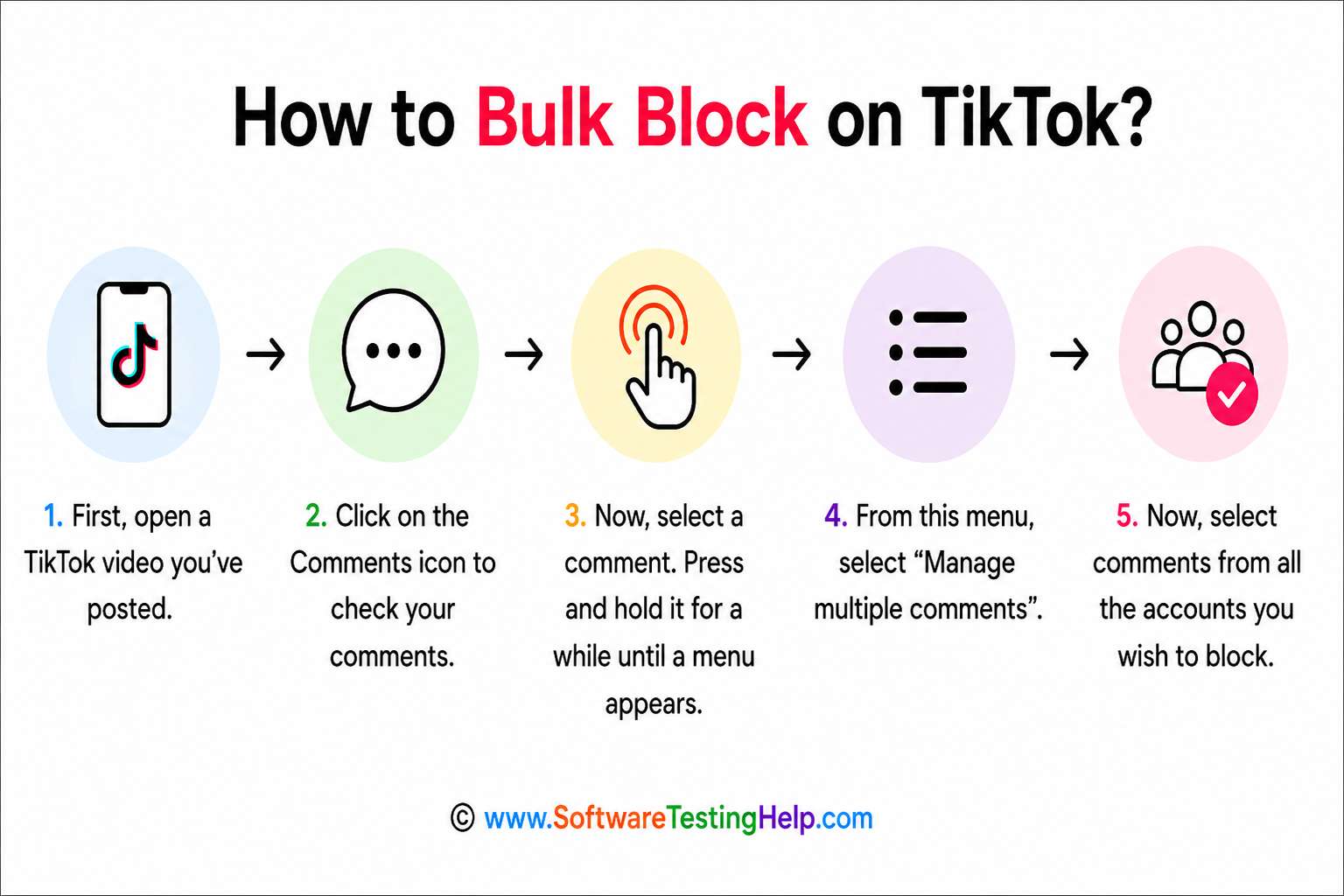
So, here’s how to block someone on TikTok from a comment.
- First, open a TikTok video you’ve posted.
- Click on the Comments icon to check your comments.
- Now, select a comment. Press and hold it for a while until a menu appears.
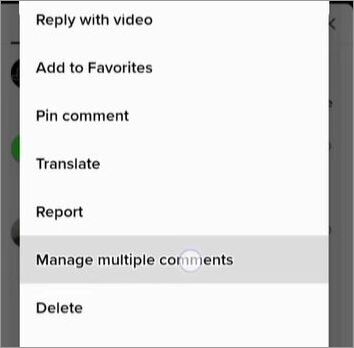
- From this menu, select “Manage multiple comments”.
- Now, select comments from all the accounts you wish to block.
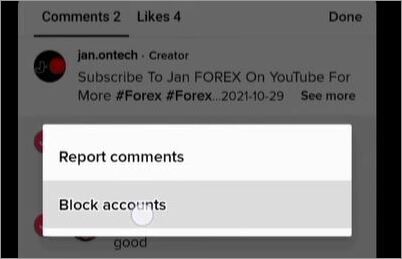
- Click “Block Accounts”.
- Click on Block again to confirm.
This is a great way to prevent exposing your account to haters and trolls on TikTok, thus keeping your comments section free from abuse.
How to Block Someone on TikTok from a DM
Similar to comments, you can also block someone on TikTok from a DM.
- Simply open your inbox on TikTok.
- Tap on the chat you wish to block.
- Now, tap on the three dots that appear in the top-right corner.
- Tap on the Block option
- Tap on Block again to confirm.
What Happens When You Block Someone on TikTok
Once you’ve blocked someone on TikTok, you basically restrict their access to your account completely. They won’t be able to view or find your profile ever again unless you choose to unblock.
They can no longer interact with you through DMs or comments. If an account were following you, they’ll be removed from your followers list.
Blocking on TikTok is discreet. You can block someone on the platform without immediately notifying them of your actions.
How to Unblock Someone on TikTok
You can easily unblock someone on TikTok. The most common tactic to unblock someone on the platform is as follows:
- Open Settings
- Go to Privacy > Blocked Accounts
- Unblock a blocked user from the Blocked list.
Another way to unblock someone entails visiting their profile page, clicking on the three dots or share arrow icon, and clicking on the Unblock option.
Check the following video for a detailed demonstration on how to unblock someone on TikTok.
Comparing: Block vs. Mute vs. Restricting Feature on TikTok
| Factor | Block | Mute | Restrict |
|---|---|---|---|
| Are Users Notified | No | No | No |
| Can they send DMs | No | No | No |
| Can you see their posts | No | Yes | Yes |
| Can they view your posts | No | Yes | Yes |
| Can they leave comments | No | No | Hidden |
| Past comments/interactions are erased | Yes | No | No |
Privacy Tips to Stay Safe on TikTok
TikTok lets you keep an account private or open to the public. If privacy is a concern, I suggest keeping your account private. This way, your account and anything you post on it will only be visible to your followers. Anyone who wishes to follow you will first need your approval.
A private account is perhaps the best way to keep your TikTok account safe from trolls, spammers, and stalkers. That said, if you wish to become a popular creator on the platform, you’ll have to keep the account open to the public.
A post from a public account can be viewed and shared on the platform, regardless of whether or not they are following you.
If you receive abusive or offensive comments or DMs from someone on TikTok, do not let them off. Report them to TikTok instead, and let them take action. Reporting harmful, offensive comments and instances of hate speech will help keep TikTok safe, not just for you but for everyone else.
Can Someone Tell If You Blocked Them on TikTok?
No, TikTok does not give any alert about being blocked by a particular user. But the user can come to know about this from the changes that occur after blocking them.
Some Signs That Might Tell Them They’ve Been Blocked
- The user is unable to see your profile in the search tab on TikTok.
- The user cannot see your posts and profile anymore.
- The user cannot follow or message you.
- Any previous interactions on your post may be invisible to them.
Frequently Asked Questions
1. How to block someone on TikTok without them knowing?
You don’t have to do anything to make sure the person on the other side knows you’ve blocked them. TikTok doesn’t notify users when they’ve been blocked. So, you can block anyone without worrying about them finding out.
2. How to block someone on TikTok without viewing their profile?
The best way to block someone on TikTok without viewing their profile is by finding their comment on one of your videos. All you have to do is press and hold this comment, select “Manage Multiple Comments”, and then tap on “Block Account”.
3. Why can’t I block someone on TikTok?
Well, this is likely because of an app glitch. I suggest restarting the app or updating it before using it again. Another reason you probably can’t block someone on TikTok is that they’ve already blocked you. Just follow the process as I’ve dictated above step-by-step.
It is also important to note that TikTok only allows you to block up to 10,000 accounts. So, your block button won’t work if you’ve exceeded this limit. If you still can’t block anyone on TikTok, having considered the above possibilities, I suggest reaching out to TikTok support.
4. Can you block a non-follower on TikTok?
Yes, you can absolutely block a non-follower on TikTok. Simply search for their profile name and follow the process as I’ve dictated above.
5. Can you block multiple people on TikTok?
Yes, you can block up to 100 people at once on TikTok. However, this feature is restricted only to users who have commented on one of your posts. You cannot bulk block people who have not commented on your videos.
Conclusion
So, there you have it: how to block someone on TikTok with ease. TikTok is a fun place, and that’s how it should be. Sometimes things take a turn for the worse, and the place becomes infested with spammers, trolls, and stalkers who can make your life on the platform a living hell.
While some leave the platform owing to these undesirable circumstances, I believe the best solution is to block those in the wrong. Why should you be deprived of TikTok’s privileges because of the actions of a few? So, follow the steps I’ve outlined above for the TikTok app and website to block anyone you wish to stop interacting with.
Research Process: The total time involved to complete and publish this article is approximately 38 hours. This content was created through a structured research approach to ensure accuracy and reliability.
For more TikTok-related guides, you can explore our range of tutorials below:
- How To Go Live On TikTok: Common Mistakes To Avoid
- How to Buy Cheap TikTok Coins and Save Money
- Top 10 Apps Like TikTok: Best TikTok Alternatives
- Is TikTok Shop Safe and Legit to Buy
- SSSTikTok TikTok Downloader Without Watermark
- When is the Best Time to Post on TikTok? (Ultimate Guide)
- BEST TikTok Video Downloader
- TikTok to MP3 Converter to Download TikTok Music
- Best TikTok Online Viewer Anonymous Apps
Was this helpful?
Recommended Reading
-

This tutorial reviews the top TikTok Video Downloader with comparison to help you download your favorite TikTok videos for watching offline: TikTok has become a sensation within a very little span of time. It was founded in China in the year 2016, with the name 'Douyin'. In 2017, the Chinese…
-
Are you looking for legal and safe ways to buy TikTok coins at a low price? Read our exclusive financial guide to know the best way to buy cheap TikTok coins and save more money: TikTok Coins are an in-app virtual currency, in which people can purchase real money to…
-
Quickly learn How to Go Live on TikTok on iPhone, Android, or Tablet along with a list of useful tips from social media experts to avoid some of the common mistakes made in 2026: TikTok has become one of the fastest-growing platforms on social media. It has given many artists…
-
Learn how to find, view or see TikTok watch history from our step-by-step guide and recover or revisit videos anytime on iOS and Android devices. Ever watched a TikTok video and forgot to like, save, or follow the creator—then spent hours trying to find it again? You’re not alone. Many…