


List of the Best Free Online Website Broken Link Checker Tools with Detailed Comparison:
Broken links are those links which show a 404 error message.
It occurs when the website owners make some modifications or remove a page from the website. These links are also called dead links and are not good for SEO and the person who visits the website.
When broken links are available on a website, then it is not good for the site, therefore you must resolve such links and point them to correct the URL.
What are Broken Links
Broken Links are links or hyperlinks that are linked to external web pages no longer exist on the websites.
When you click on those hyperlinks, then it will display an error message. Broken links reduce the performance and visitors of any website.
How to Find Broken Links
Broken links can be understood if,
- A website site is continuously inaccessible.
- The web page is out-of-date.
- It transfers to a new domain.
- It has been deleted.
Why does the Problem of Broken Links Arise
Broken Links arise because of a few communal reasons.
They are,
- Reformation of the websites.
- When changed to another ISP.
- Dynamic assemblies in Colleges and Universities.
- Spelling error in the link.
- Grammatical mistakes in the link.
How to Fix Broken Links
Broken Links can be fixed from the tools that we have discussed in this article. By using these tools, your site will get more visitors and the Google ranking of your website will also improve. Broken Links can be fixed without losing any info from the websites.
According to sources, Large Enterprises like Apple, IBM, and Microsoft also have several broken links on their websites. The statistics below show the approx. percentage of large enterprises.

[image source]
Recommended reading =>> What is URI: Uniform Resource Identifier In World Wide Web
These approximate stats of the Large Enterprises have been taken from the above-mentioned URL and it shows the approx. value of broken links after our research.
Here, in this article, we have discussed the tools that support SEO and users to discover the broken links for their Websites and remove such links. These are the top most used tools and some of them are free of cost also.
Top Broken Link Checker Tools Reviews
Enlisted below are the most commonly used dead link checker tools that are available in the market.
Comparing Best Dead Link Checker Tools
| Tools | Ratings | Price | Free Version | Cool Features | Type |
|---|---|---|---|---|---|
| Semrush | 5/5 | Pro: $129.95/ month, Guru: $249.95/ month, Business: $499.95/month. | No | Performs deep link analysis, can check backlink types, links’ geolocation, etc. | Online Tool |
| Ranktracker | 4.5/5 | Starter: $16.20/month, Double Data: $53.10/month, Quad Data: $98.10/month, Hex Data: $188.10/month | Can open free account | Website auditing, Backlink analysis, Doman and URL Rating insight | Online Tool |
| Link Assistant by SEO Powersuite | 4.5/5 | Professional Plan: $99/year, Enterprise Plan: $199/year | Yes | Custom link builder report, Automated backlinks tracking, Send bulk automated email. | Online Tool |
| Screaming Frog | 4.7/5 | From 149.00 EUR/year | Yes (Till 500 links) | Custom Search and Custom extraction with support of Robots.txt to check performance. | Desktop Application |
| Google Webmaster | 4.5/5 | Contact Google for Pricing. | Yes | SEO Optimization for Most Hunted Websites on Google | Online Tool |
| Dead Link Checker | 4.2/5 | From $9.95/month | Yes | Feature of Site Check, Multi Check and Auto Check. | Online Tool |
| Xenu’s link Sleuth | 3.5/5 | Free available without any subscription plans. | Yes | Good for Temporary network issue and supports SSL certificates and Site map. | Desktop Application |
| Ahrefs Broken Link Checker | 3.5/5 | From $99/month(Trial for $7 for 7 days) | No | Notice backlinks of competitor’s contents and display picture of Do-follow and No-Follow links. | Online Tool |
| Serpple | 4.5/5 | Starts at $19/month | 14 days free trial | SERP tracking, Content auditing, keyword research | Online Tool |
Let’s Explore!!
#1) Semrush

Semrush is a great website backlink checker that displays all the links directing to your domain. It provides the functionalities to find everything about your and your competitor’s backlinks.
Semrush helps to check a website by executing a deep link study by inspecting the incoming links, and anchor texts, and understanding the external links of the linking websites. It also proposes geo-distribution assets like graphs, pie charts, and a world map.
Features:
- Semrush can conduct a deep link analysis.
- It has features to check the backlink type that will let you know the source of your competitor’s follow links, relevant industry web sources, and websites that are interested in referring to your content.
- It provides geo-distribution widgets such as graphs and pie charts for finding the answers.
- It has features that will let you see the unique IP of the referring domains, IP distributions by countries, etc.
Cons
- It is expensive as compared to others.
#2) Ranktracker
Backlink Checker by Rank Tracker allows you to check your competitor’s entire website to ferret out broken links. You’ll get a clear insight into what backlinks your competitor is using so you can create content that gives you a competitive advantage.
Enter any URL and you’ll get information about its domain rating, URL rating, the number of backlinks it harbors, and much more. This way you can assess each backlink’s quality separately.
Features:
- Instant Backlink Analysis for All types of Domain
- Save Best Backlinks in Favorite List
- View New and Lost Links
- Get info on Domain and URL Rating
Cons
- Documentation could be better
#3) Link Assistant by SEO Powersuite
Link Assistant is software that you can rely on to get a ton of relevant link-building suggestions. The software takes care of the link-building process on your behalf. Link Assistant will discover fruitful link-building opportunities, scour the internet to get contact email addresses, and send automated pitches.
The software also arms you with the tools necessary to assess whether your link-building campaign was successful. You can also use Link Assistant to find websites relevant to your niche that may possess a broken link.
Features:
- Get high-quality link suggestions
- Automated backlinks tracking
- Custom link builder reports
- Shoot personalized email campaigns
- Find relevant sites that have broken links
Cons:
- The annual subscription can be expensive
#4) W3C Link Checker

W3C Link Checker gives you choices while inspecting the broken links of your websites like display only summary, hide redirects, check only documents, heading, etc.
In the results, it delivers the status of the link and lists the issues found by checking those broken links. This free bad link checker is a part of Quality Web Tool and W3C’s Validators.
Features:
- It inspects the issues in the links, anchors, and referenced things in the entire website.
- Restriction can be established on how deep the tool goes.
- This tool can also be downloaded and installed on your system.
- It uses HTML and CSS to get the best results of scanning.
Cons:
- This tool is a little bit slow.
- Error messages come in lengthy words than it is desired.
URL: https://validator.w3.org/checklink
#5) Online Broken Link Checker

Online Broken Link is a free online website validator tool that checks your web pages for broken links, authorizes, discovers, and accounts for bad hyperlinks if any originate. It can scan an unlimited number of web pages. It works for both external and internal links.
This tool runs on Windows, iOS, Linux, and Mac OS.
Features:
- It can scan unlimited pages for both external and internal URLs.
- It specifies the bad link’s position in the HTML code.
- It notices linkrot and other issues of the website integrity.
- It supports sub-domains.
Cons:
- Not entirely a free tool.
- The free version has restrictions of 3,000 pages.
- The amount of the tool will depend on your website.
URL: https://www.brokenlinkcheck.com/
#6) Dead Link Checker

Dead Link Checker crawls your website systematically and detects all the dead links that disturb your website.
It can create an HTML output for an informal inspection of the results and can develop a link cache file to speed up multiple requirements. Dead Link checker can notice broken links like Page not found, Timeout, Server error, and any other error that causes the webpage not to be shown.
Further Reading => How to Find Broken Links Using Selenium
Features:
- Dead link has three methods of process i.e. Site Check, Multi Check, Auto Check.
- It filters the URL keyword with wildcards.
- It can Pause and Resume at any period.
- It scans several links simultaneously.
Cons:
- Limitation in the scanning of the pages.
- Modification in the subdomains is seen as a changed website and hence links on those domains will not be checked.
URL: https://www.deadlinkchecker.com/website-dead-link-checker.asp
#7) Dr. Link Check .com

Dr. Link Checker inspects all links that contain internal and external links to another website. It can also check links to images, style sheets, and other files.
It inspects all HTML and CSS code records and scans your whole website. Each link originated by Dr. Link Checker passes through several checks to confirm that no threats should be left that can harm your websites.
Features:
- It scans a website for 1000 links for free.
- It gives summarized reports of internal, external, and broken links.
- Multiple scans per link.
- You can plan checks to run automatically as per your requirements.
Cons:
- Limited pages can only be scanned.
- Not completely free.
- Even with the basic plan, the system only scans 2000 links per month.
URL: https://www.drlinkcheck.com/
Further Reading => TOP Most URL Shorteners For Custom Links
#8) Xenu’s Link Sleuth

It is a free open-source tool to check the broken links for a website.
It automatically links to your website and starts crawling the website. It is very easy and user-friendly. For crawling, paste your website URL and it will start checking the broken links. Link confirmation is done on images, borders, plug-ins, backgrounds, style sheets, scripts, and Java applets.
You can create a report at any time.
Features:
- It is beneficial for temporary network glitches.
- It can execute files less than 1 MB.
- It supports SSL websites and sitemap.
- Limited testing of FTP, gopher, and mail URLs.
Cons:
- Not companionable with Windows 32 system.
- Does not have the graphics capabilities of WebAnalayzer 2.0.
- The methods of scanning gopher sites are undependable.
URL: http://home.snafu.de/tilman/xenulink.html
#9) Integrity Link Checker

Integrity Checker is a free Mac desktop application.
Depending on the extent of your Website, this tool might take periods to complete the report. It has numerous choices to sort the results, and it can only check corrupted links, by choosing the option on the report page.
It benefits to inject the broken links from the comment forms as well. Options like transferring the data, verification, handling multiple sites, sitemap generation, and spelling checks are all available in two connected apps i.e. Integrity Plus and Scrutiny.
Features:
- Works flawlessly with large websites, without any slowness.
- It also checks for broken images.
- Check for internal and external links.
- It exports reports in .pdf format.
Cons:
- It is for Mac users only.
- It takes time to complete the report after inspecting the broken links.
- For using Integrity Plus Checker, it is not available for free for users.
URL: https://peacockmedia.software/mac/integrity/free.html
#10) Google Webmaster

Google Webmaster is a freely available tool that maintains your website’s performance in search results. It authenticates that Google can access the content on your website.
Google Webmaster makes it possible to create new pages and posts for Google to crawl and eliminate the content that you don’t want the search engine handlers to learn. Google Webmaster can preserve your website without understanding its presence in the search results.
Features:
- It helps you to optimize your website by keyword SEO by knowing the most hunted sites.
- Access information that will be appropriate for advertising campaigns.
- Find better visions regarding indexing and crawling actions made by the search engine procedure to your website.
- Improve your link by campaigning with systematic data about the external and internal links to your web pages.
Cons:
- Anomalies in data updating.
- For link removal from Google, you can only request to Google.
- Rank Monitoring is affected if your website lands out there from the first four or five result pages.
URL: https://search.google.com/search-console/welcome
#11) WP Broken Link Status Checker

It is a WordPress broken link checker tool that authenticates the HTTP status response codes of all your content links and images.
It works by crawling your content, removing links and images, and observing for broken links, redirections, no-follow links, etc. It scans websites with multiple checks and configures their own results.
Features:
- It runs the crawler in the background without any sessions.
- It has cutting-edge filters and searches by URL or anchor script.
- Helps in editing the content straight from crawler reports without pasting in the post editor.
- It has additional URL tools to perform huge changes if any similar post URLs are present.
Cons:
- Do not check the complete HTML Page, rather just extract the links and images.
- Need to disable the Firewall before using this Plugin.
- Need to disable the WP Secure plugin to run a complete scan appropriately.
URL: https://wordpress.org/plugins/wp-link-status/
#12) Screaming Frog

Screaming Frog SEO Spider helps in quickly crawling and evaluating your website.
It can be used to crawl both small and large websites. It helps to view, study, and filter the crawl data as it is collected.
SEO Spider lets you transfer elements like URLs, page titles, meta explanations, captions, etc. to Excel so that it can simply be used as a base for SEO references.
Features:
- Examine backlinks and internal and external links of the websites to improve your website’s performance.
- Custom searches and Custom Extraction are available to discover a certain choice of text.
- It generates XML Sitemaps.
- Robots.txt support to check and show the complete performance of the site.
Cons:
- Speed is slow if the websites are very large.
- Need the training to use all the resources.
- The free version can scan only 500 pages.
URL: https://www.screamingfrog.co.uk/
#13) Ahrefs Broken Link Checker

Ahrefs Link Checker tool delivers a detailed report related to all the backlinks to your site.
It can understand by what means of your site, the links are growing or falling. It is backed up by the largest database of live backlinks and the great crawling speed of AhrefsBot. It is a good tool for knowing info about broken backlinks across the network in one place.
Features:
- Notice backlinks to your competitor’s misplaced content pages.
- Discover broken external links on related websites through exporting links.
- Filter and categorize backlinks.
- Display the whole image of do-follow and no-follow links for any URL.
Cons:
- Can’t export graphs from the pages.
- No complete SEO outcomes exist.
- Expensive for small start-ups.
- Not free for the users.
URL: https://ahrefs.com/backlink-checker
#14) SE Ranking
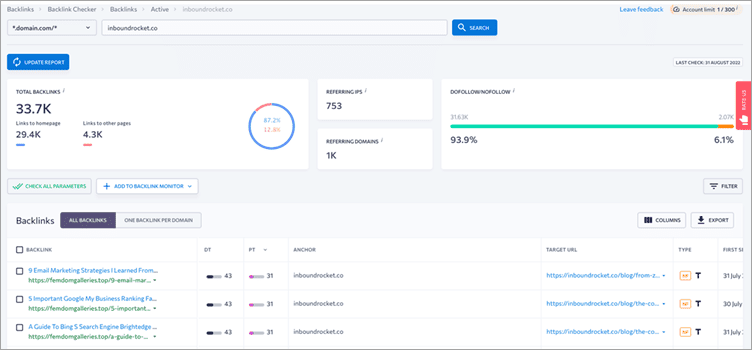
Creating a link-building strategy requires a lot of data. Getting the data can be as easy as inserting the name of the domain into a field and clicking on the check button.
SE Ranking offers that and even more. With one click, you get information about Domain and Page Trust, proprietary parameters created by the provider. Over time, you will see all the referring domains and backlinks from those domains, both new and lost.
On the dashboard, you can also see visualized data about the dofollow to nofollow ratio of your backlink profile, information about anchors, and the locations of the IPs and subnets you receive links.
Features:
- Proprietary Domain and Page Trust
- New and lost backlinks and referring domains.
- Dofollow/nofollow ratio available
- Anchor and source data (text or image)
- Alexa Rank is available
- Location by IPs and subnets is visualized.
Cons:
- API is only available with the most expensive plan.
#15) Sitechecker

Sitechecker – Making website technical health perfect is enough a hard thing, but a must.
Sitechecker website crawler checks your website for broken links and provides complete information about how to correct them. You can research the anchors of 404 error pages and fix them immediately.
It is a web tool, so any operating system can run it. Also, the website on any CMS can be crawled.
Features:
- It scans 300 web pages for free.
- It gives a comprehensive report of website technical health: broken links, redirect chains, orphan links, and indexation errors.
- It provides an SEO audit of the exact page (free option) and the whole website (monthly/annual subscription).
- It shows content errors: meta tags issues, and thin pages.
- It creates a visual structure of the website due to internal and external linking.
- It implements website monitoring after crawling: can be alerted to any corrections made on the website (paid option).
- It suggests a backlink tracker and keyword ranking checker services. (paid option)
Cons:
- You can`t export data from a free subscription.
#16) Serpple
Many know Serpple for its keyword rank-tracking capabilities. However, the tool can also monitor backlinks. The tool presents you with an easy-to-use dashboard, with the help of which you’ll be able to manage and monitor all backlinks present on your website.
The dashboard will show you which backlinks are working and which of these are broken. You can take the necessary action based on the report offered.
Features:
- Monitor SEO progress by adding a website link to Serpple.
- Analyze web page content to suggest relevant, high-impact keywords
- Uses advanced AI to monitor the SEO efforts of competitors.
- The system audits the content of each webpage to suggest SEO insights for optimization.
- Monitor backlinks on all web pages.
Cons:
- Its most affordable plan is also it’s most limited
Additional Website Link Checking Tools to Consider
#17) Internet Marketing Ninjas
Internet Marketing Ninjas is a free link checker tool that helps to check broken links, image files, and internal & external links and sends detailed reports through email.
It has a limitation of 5 site crawls per IP address. IMN also has the choice to choose 500 to 1000 pages for the first scan. Due to this, the server load will be reduced and therefore there will be a lesser chance of your server getting overloaded.
URL: https://www.internetmarketingninjas.com/broken-links-tool/
#18) Link Alarm
Link Alarm is a 14-day trial website broken link checker. It delivers detailed reports and is focused on improving your website’s performance.
This tool can check up to 100 pages automatically for broken links. Their reports aim to improve website owners’ lives by removing unnecessary information. It is helpful for web shops, universities, administrations, and anyone with a concern for caring for a site.
URL: http://www.linkalarm.com/
#19) Power Mapper SortSite Link Checker
SortSite is a great scanning tool that helps to scan all the pages with just one click and checks the complete site and finds broken links in HTML/CSS, Flash files, etc.
SortSite checks availability, broken links, browser compatibility, SEO, and other usability issues. It is available free for 30 days, followed by a plan of $49/month/user.
URL: https://www.powermapper.com/
#20) Small SEO Tool
Small SEO Tool will crawl all web pages and will exactly show the outcomes in the picture of a chart, together with the code. It is totally free and hence requires no credits, no software care, and no installation.
Small SEO Tools offers tools like Link Count Checker Tools and Link Analyzer, which can benefit you to check the internal & external links and backlinks of your web pages.
URL: https://smallseotools.com/backlink-checker/
#21) InterroBot
InterroBot is a website crawler and link analysis tool. It is powered by an advanced field search, allowing web administrators to query against status codes (Example: 404, 500, etc.), headers, body content, and more.
Once an affected page, image, or other linked asset is identified, a document graph identifies the incoming links to the trouble spot. InterroBot runs on a desktop, making access behind a firewall or on localhost a non-issue.
Features:
- No fixed limit on the number of projects or indexed pages.
- Ridiculously fast searching against site index.
- Works on localhost development and within secured networks.
- Document-level visualization allows for rapid identification of broken link references and page dependencies
Subscription-free licensing. - Free personal edition available for personal/not-for-profit use.
Cons:
- Windows 10 only.
- Lacks automated site monitoring.
Conclusion
In this article, we have discussed the Top Website Broken Link Checker tools that are available in the market.
These above-discussed tools are the most popular, and their features and pricing can be affordable as per the industry’s needs. The dead link checker tools are the quickest, easily installable, and free-of-cost tools that are available for users. You can choose any tool as per your needs.
From our research, Xenu’s Link Sleuth is the best value for Windows users, while Screaming Frog SEO Spider comes after that. For Mac Users, Integrity Tool is the best choice for all types of industries.
Was this helpful?
Recommended Reading
-
GENERAL AI > AI Tools AI -> Machine Learning Search Data Structure Job Guide
-

This is your list of top Website Link Verification Testing Tools. See which is a fit for your needs. Whether you own a professional website or just have a personal website, you wouldn’t want your sites to have broken links. To verify for broken links, site availability, we have lot of…
-

List of the Top VoIP Speed and Quality Test Tools To Know in 2026: When we think about the most remarkable invention that has changed the lives of humans, in the 21st century, then undoubtedly the Internet will come to our mind first. Approximately one-third of the world's population is…
-
List of the BEST Cloud Testing Tools with Features and Comparison. Read this detailed review of the Top Cloud-Based Software Testing Tools: Cloud Testing Tools play a prominent role in the Software Testing industry. Several Cloud-Based Software Testing tools are available for both small as well as large businesses with…


