Have you started using AI Agents for Software Testing? Our step-by-step guide unveils how utility, learning, and goal-based Agents transform QA processes to reduce bugs and deliver flawless software like never before:
The increasing usage of AI in every field is making development faster than ever before. This includes automating workflow, website building, content creation, and software development. But the system that makes this process even faster is: AI Agents.
How do AI Agents Change Software Testing: Complete Guide
Now, we must not confuse these AI agents with automation.
AI agents ≠ Automation
AI agents are systems that perform tasks by leveraging AI models (LLMs) with their environment by using tools and taking actions to achieve goals with reasoning, planning, and executing capabilities.
Given their capabilities for reasoning and planning, we can use these agents in software testing, which is called Agentic testing. As part of software testing, this agentic approach will help us adapt to the dynamic environment changes, process the large volume of data faster, and take actions by collaborating with testers.
Using an agentic approach, the testing team can generate, execute, and optimize test cases that refine the quality of software and make it more efficient. This will also help to achieve team goals for faster and continuous testing processes.
Combining the power of AI agents in software testing produces more edge cases, less hassle for re-testing in a changing environment, and can assist testers in the process of testing.
So let’s dive deeper.
What are AI Agents?
Just like human agents assisting in their field, AI agents are systems that perform the task given by the user with the help of LLM models. These agents are adaptable as they can work well in their environment. AI agents use tools to achieve their goals with reasoning, planning, and executing capabilities.
Check the video below to get a deep insight into what AI Agents are:
We can think of them as a sort of ‘digital co-workers’ assisting in the testing process, rather than predefined rules-based automation.
Components of AI Agents:
AI model: Doing reasoning and planning serves as the brain for AI agents
Tool: What agents are equipped with, like an agent having access to an API for real-time stock market prices (functions given to LLMs).
Action: Operations executed by agents (like assisting the teacher in taking attendance, checking papers, and giving assignments to students)
AI Agent in Software Testing
In terms of software testing, AI agents refer to intelligent systems that perform testing tasks like generating test cases, executing these tests autonomously, and analyzing & optimizing strategies by utilizing AI models, NLP, and ML algorithms.
By applying agentic abilities, we can use these agents to assist human testers or automate operations based on task requirements. As humans are prone to error, AI agents can carry out dynamic test cases (in case the tester missed any), which adapt according to changing scenarios with self-learning capabilities.
Let’s see what these capabilities are!
#1) Generating Test Cases: Tester needs to provide a prompt, including things like previous data, bug reports, software requirements, platform architecture, code analysis, and failure points needed to be tested.
Afterwards, with the help of LLM models and given instructions, an AI agent can generate test cases and even do that in real-time, changing scenarios. This will cover the maximum edge cases for testing.
#2) Execute Test Autonomously: Now, execution comes next, but is done autonomously. The advantage of automated execution is that it constantly monitors behavior. Though this team does not require manual script updation.
#3) Optimize Testing Strategies: Automation is not a solution but an approach to do things faster, leaving room for optimization. One of the best abilities of AI agents is that they can improve accuracy by optimizing different test cases from previous data. This will help us build more powerful QA strategies, ensuring software quality.
#4) Self-learning: Just like humans learning from experience, AI agents can also reduce issues and enhance the testing process by learning from past data and anomaly detection.
Types of AI Agents for Software Testing
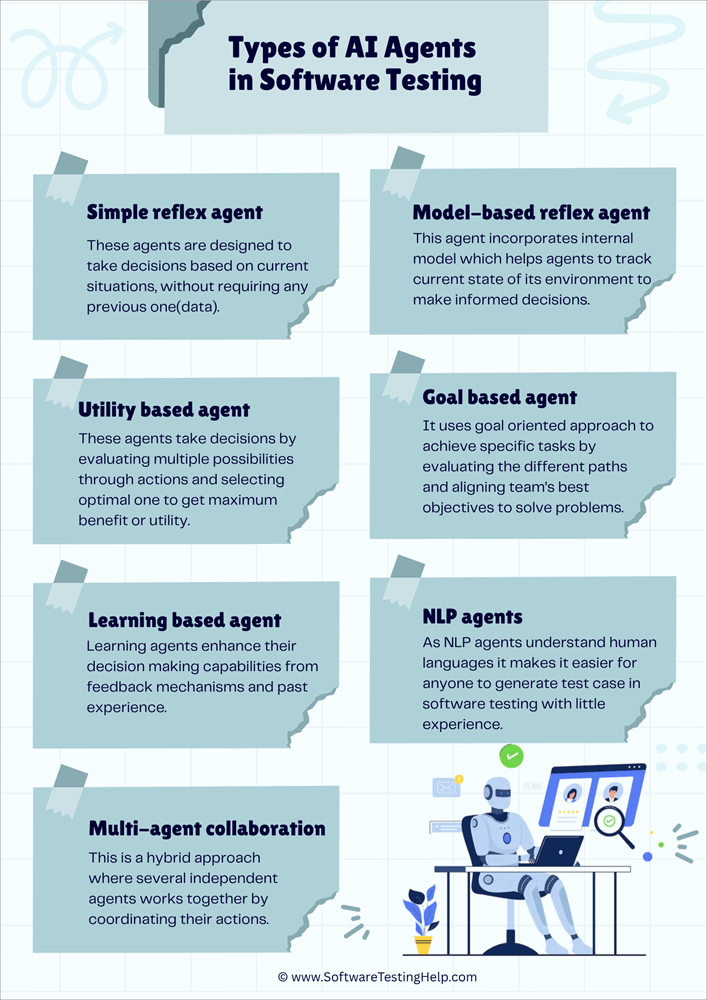
Here is a list of the different types of AI Agents for Software Testing:
- Simple Reflex Agent
- Model-based Reflex Agent
- Utility-based Agent
- Goal-based Agent
- Learning Agents
- NLP Agents
- Multi-Agent Collaboration
Well, there’s a whole market for different types of agents provided by industries and organizations, but I’ll cover the main ones here for the sake of simplicity.
#1) Simple Reflex Agent
A simple reflex agent is simple! – A basic type of AI agent.
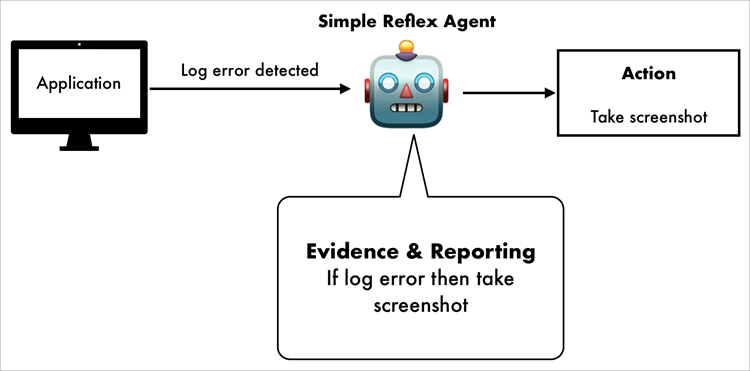
These agents make decisions based on current situations, without requiring any previous data. They react with predefined values and rules.
But it does not mean we cannot change anything. We can use a reflex agent by setting perceptions of the environment using sensors based on our predefined set of rules.
Simple reflex agents work well with a fixed set of rules in a predictable environment. But as they work on predefined rules and do not store any data, they are not useful for handling unpredictable and new situations. Use these agents only when scenarios are clearly defined and do not have any uncertainty.
Estimated cost: $2,000–$10,000 (as per review)
Ex: To detect a missing element and take a screenshot of it when the agent detects the log error.
#2) Model-based Reflex Agent
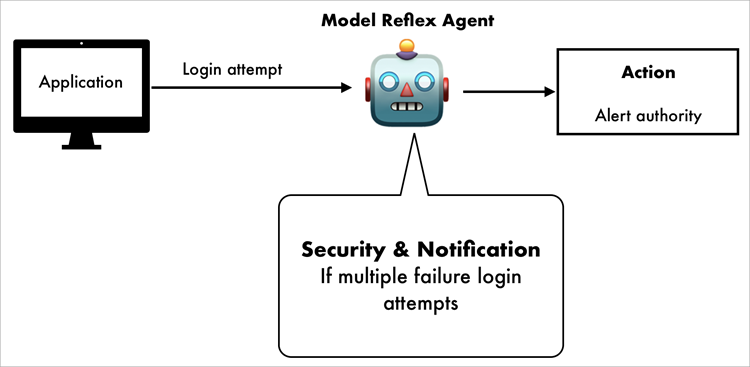
It is the same as a simple reflex agent, but with updation. It decides based on the current situation plus previous data. This agent incorporates an internal model, which helps agents track the current state of their environment to make informed decisions.
Remembering things is a valuable ability for a system. And having this ability to remember past data makes them useful to handle situations where future decisions are based on past data.
But they still lack the learning capabilities and reasoning ability, and therefore perform poorly in dynamic environments.
Estimated cost: $8,000-$25,000 (as per review)
Ex: Tester can use it to remember past login when the user makes multiple failed attempts to alert the authority or account activity.
#3) Utility-based Agent
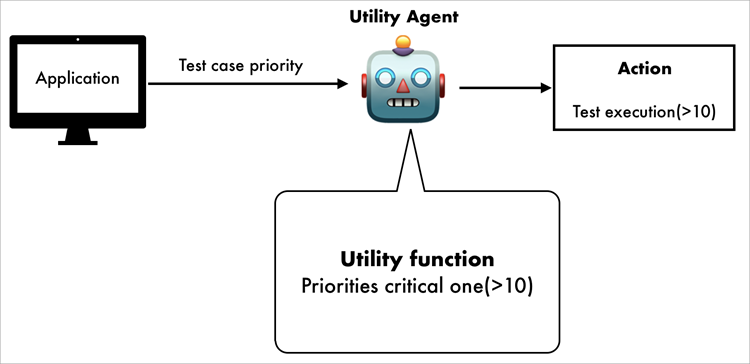
As its name says, these agents decide by evaluating multiple possibilities through actions and selecting the optimal one to get maximum benefit or utility.
Covering the wide range of possibilities, agents assign value to each one through a course of action to get the most optimal one.
We can use a utility-based agent when we want to achieve multiple goals or more nuanced decision-making in a dynamic environment. Of course, our best interest is to achieve optimization in changing conditions to get flexible and intelligent behavior.
Estimated cost: $25,000–$70,000 (As per review)
Ex: Facing high-priority issues, the team can rate (setting priority) test cases based on utility functions to skip some simple ones to find critical ones in high priority.
Despite their strength, creating utility functions needs care, requiring us to consider all factors and their outcomes before use.
#4) Goal-based Agent
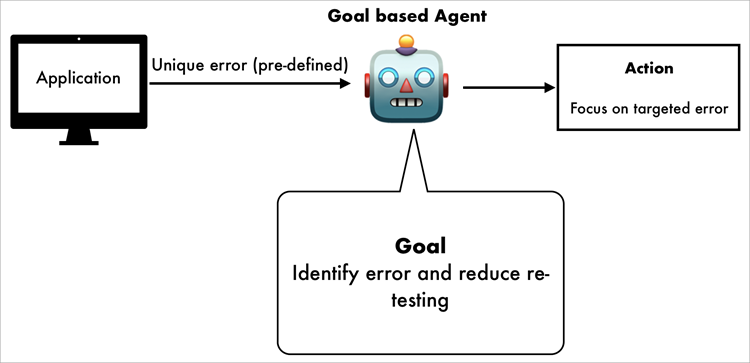
High software quality is a goal that needs to be achieved. That’s precisely what a goal-based agent is for. It uses a goal-oriented approach to achieve specific tasks by evaluating the different paths, aligning the team’s best objectives to solve problems.
Goal-based agents use planning and reasoning for actions to perform. These reasoning abilities will help developers to get broader foresight for future states.
As goal-based agents rely on decision trees and programmed strategies, they are relatively limited in complexity. Autonomous vehicles and robotics widely use these agents, where real-time decision-making is necessary.
Estimated cost: $15,000–$50,000 (As per review)
Ex: If a developer wants to find unique errors with a pre-defined test script, use a goal-based agent to identify those errors only to decrease re-testing efforts.
#5) Learning Agents
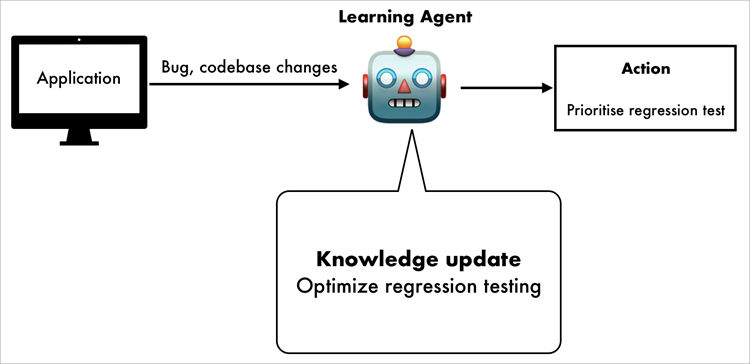
Learning is a part of growth, and this is also true for development. From experience, testers can enhance their knowledge and make more robust decisions. In the same way, learning agents enhance their decision-making capabilities through feedback mechanisms and experience. If uncertain situations occur, they can handle them.
It has 4 major components:
- Performance Element: Use the knowledge base to make decisions
- Learning Element: Uses feedback mechanisms to improve knowledge
- Critic: Uses rewards and penalties to evaluate an agent’s actions
- Problem Generator: Discover new strategies with exploratory actions to enhance its learning
In dynamic environments, they are widely used for behavior prediction to analyze recommendation content in social media.
Estimated cost: $40,000–$150,000 (As per review)
Ex: QA teams can use learning agents if there’s a need to optimize regression testing to self-learn from previous bug reports & codebase changes.
#6) NLP Agents
If a member lacks the technical knowledge or does not know the how-tos of testing, they can use natural human language with NLP agents. As NLP agents understand human languages (by utilizing linguistic algorithms), it makes it easier for anyone to generate test cases in software testing with little experience.
Steps:
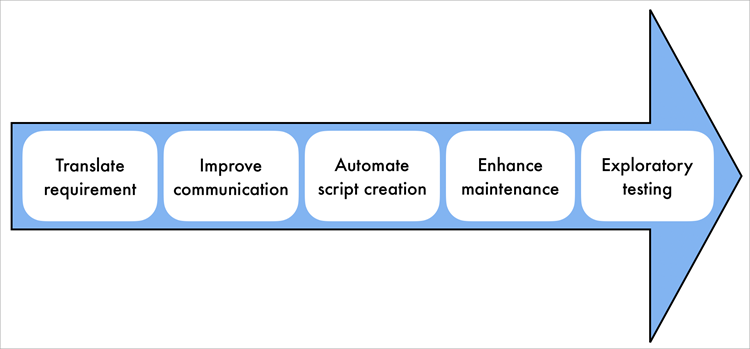
- Generate Test Cases from Natural Language: A tester or team member can autogenerate the test cases written in natural language by analyzing software requirements.
- Automate the Creation of Test Scripts: To reduce the technical overhead of writing manual test scripts, we can execute the test scenarios from the problem description.
- Automate the Updates: Again, staying updated with the latest software specifications is a must. NLP agents can update previous test cases according to the latest software specifications and current requirements. This will ensure fast-paced production requirements with minimal overhead.
- Exploratory Testing: Covering all aspects of previous data and feedback to suggest testing scenarios to enhance software quality.
#7) Multi-Agent Collaboration
Hey, what if I want to use both learning and a utility agent?
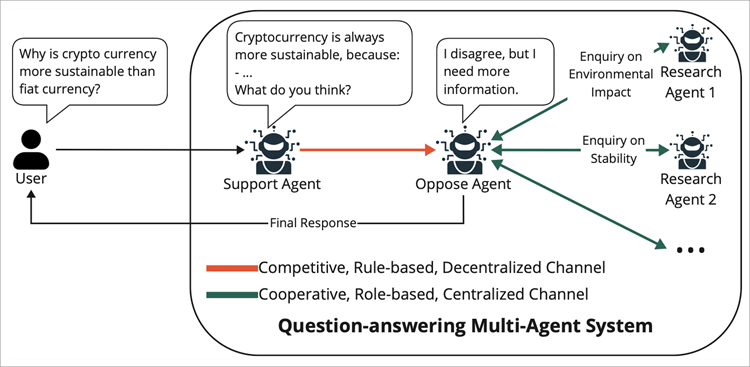
Well, the good news is you can! Multi-agent collaboration, a hybrid approach where several independent agents work together by coordinating their actions. These agents communicate and exchange state information, local knowledge, resource distribution, and planning.
This collaboration comprises:
- Foundation models for reasoning and generating answers
- The objective that the goal agents need to achieve
- An environment that involves shared memory, APIs, and tools
- Input perception information is given to the agents.
- Action response that agents take
With these come collective intelligence, through which we can use these approaches to solve very complex and multi-dimensional problems by decomposing tasks with agents.
Ex: A testing platform with augmented agents, each responsible for different tasks like test case generation by agent A, executing by B, reporting by C, and fixing errors by D, collaborating to do testing.
How to Use AI Agents in Software Testing
Basic workflow:
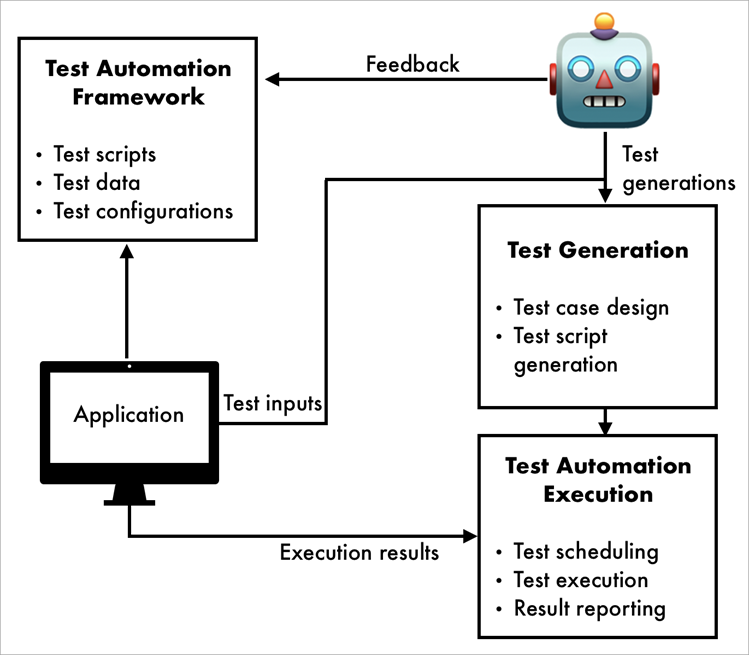
#1) Data Collection from Different Resources: The first step is always to collect data. From sources like user requirements, APIs, usage logs, previous history commands, and tools to support the test case integration.
#2) Test case Generation: Obviously, the next one is test case generation from collected data. AI agents generate tests covering all edge cases, which will be later approved by the tester (must be done). With the help of large data and LLM models, Agents can generate more unique test cases to simulate real-world data.
#3) Executing Test: Call for execution comes afterwards, running tests autonomously by simulating user interaction with UI components.
#4) Analysis and Bug Detection: It will be troublesome if the tester misses a bug; AI agents detect anomalies and errors to predict bugs and reports automatically.
#5) Monitoring and Feedback: Despite the work of AI agents, the team should review and assist in every phase of testing through continuous monitoring and feedback to ensure software quality.
Best Tools/Platform for AI Agent Testing
Knowing the tools for agentic testing will enhance our skills and thus decision-making.
Here are some of the top tools:
- KaneAI
- TestRigor
- TestSprite
- TestSigma
- Virtouoso QA
So let’s explore these tools!!
#1) KaneAI
Best for generating end-to-end test flow with natural language across web and mobile.
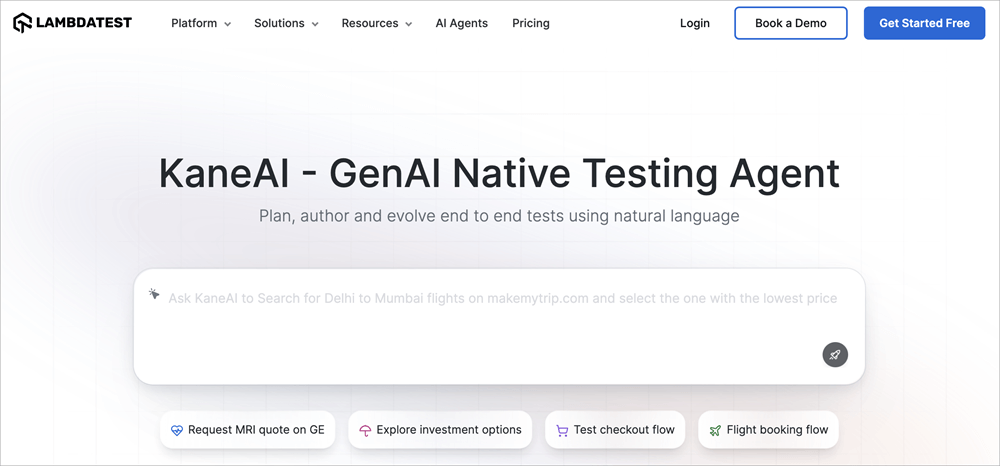
KaneAI (by LambdaTest) is a GenAI‑native testing agent that allows you to plan, author, and evolve tests via plain language instructions. They can handle UI, API, database, and accessibility testing within one unified flow.
The best part is that they support multi‑language code export, CI/CD pipeline integrations, and reduce test maintenance to enhance speed.
Features:
- Plain language/natural language support for tests
- Multi-layer testing support
- Automated debugging and self-healing of scripts
- Multi-language code export with framework support (Selenium, Playwright, Appium)
- Extensive device coverage
Platform Recommendations: Small teams/Start-ups to speed up test coverage without heavy scripting overhead.
Pricing: Live $15/month, Real Device $25/month (billed annually), and enterprise‑custom pricing
Website: https://www.lambdatest.com/kane-ai
#2) TestRigor
Best for low-code automation in plain English.
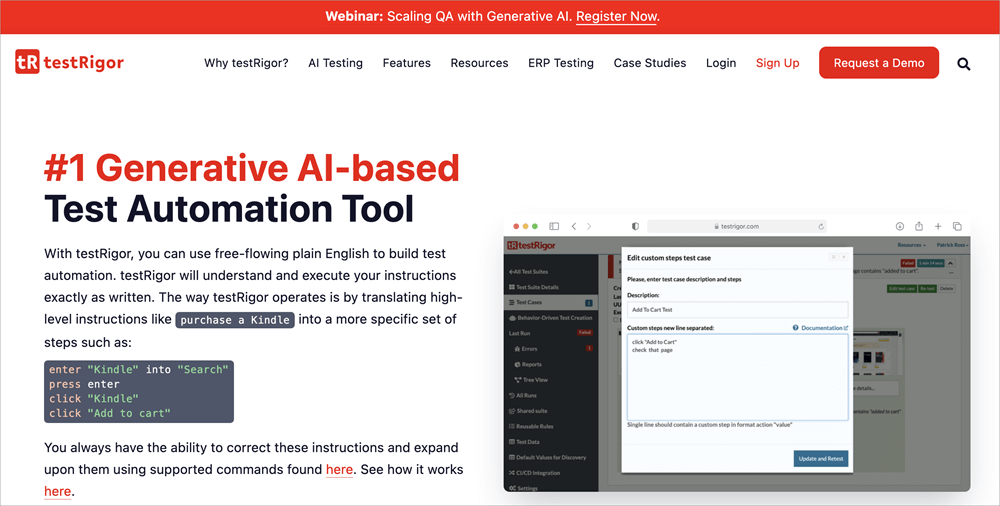
TestRigor offers GenAI-powered test automation written in plain English rather than code, thus reducing the need for scripting skills. They support web, mobile, API, desktop, email/SMS/2FA flows, and can be integrated with CI/CD and other management tools. They aim to increase coverage and reduce maintenance overhead.
Features:
- Adaptive regressive testing
- Reusable rules
- Cross-platform support
- Minimal maintenance
- Autonomous test generation and AI-powered editing
Platform Recommendations: Ideal for small to medium size team who needs cross-platforms coverage.
Pricing:
- Free Tier: One user, unlimited test cases
- Basic Private Tier: One user, 1,000 test cases, starting ~$99/month
- Mid Private Tier: Unlimited users/test cases, starts ~$900/month
- Enterprise: Custom pricing
(* As per customer review)
Website: https://testrigor.com/
#3) TestSprite
Best for AI-powered test automation at a low cost.
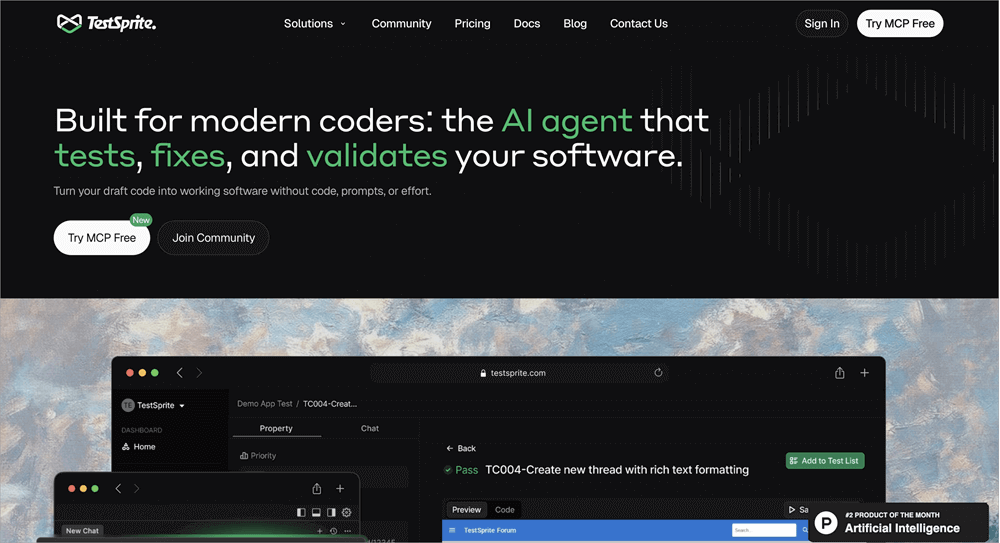
TestSprite is an AI‑driven end‑to‑end testing tool that offers plans based on a “credits” system (execution, time, usage). They help teams get started with automated testing using LLM models and AI capabilities.
Features:
- No code testing
- Cloud-based execution
- Real-time test preview and actionable report
- MCP server integration
- SOC 2 certification
- Supports UI and API (frontend and backend) testing
Platform Recommendations: Small teams and start-ups that want to implement AI testing with a support system.
Pricing:
- Free tier (150 credits/month)
- Starter: $19/month from the second month
- Standard: $69/month (1,600 credits)
- Enterprise: Custom quoting
Website: https://www.testsprite.com/
#4) TestSigma
Best for integrating with low-code automation within a CI/CD workflow with web & mobile support.
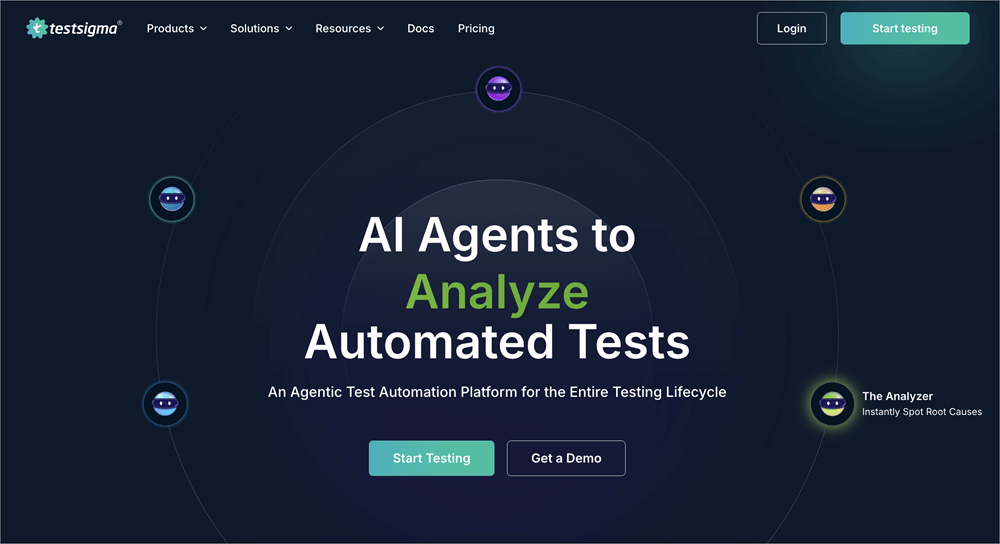
Testsigma is a cloud‑based no‑code test automation platform that enables QA teams to write test cases in natural English. Our services include mobile and web apps, device/browser combinations, API testing, and analytical support. This is an idea for teams looking for faster coverage with fewer maintenance efforts.
Features:
- Codeless test automation
- Cross-platform & cross-browser support
- API testing and parallel execution
- Self-healing tests and visual tests
- Scheduling, Debugging & Reporting
Platform Recommendations: Mid-size to large enterprises seeking faster release with multiple device support.
Pricing:
- Free Plan: 200 automated minutes/month.
- Start-up: $99/month
- Basic: $299/month (25 projects/users) (* As per customer review)
Website: https://testsigma.com/
#5) Virtouoso QA
Best for strategic AI-powered test automation with advanced features.
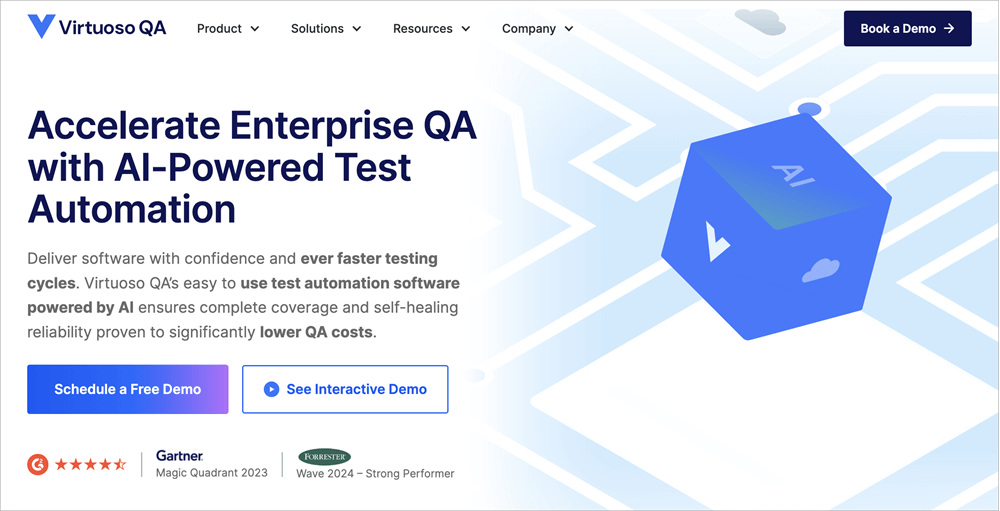
Virtuoso QA is best used as a strategic, value‑driven test automation tool, built for enterprise scale. They emphasize codeless automation, broad test execution, and partner enablement for digital transformation.
Features:
- AI-powered test automation
- Self-healing test
- Live authoring
- Intelligent Object Detection
- Comprehensive reporting
- Root cause analysis
- CI/CD integration
Platform Recommendations: Large enterprise with advanced features and vendor partnership
Pricing:
- Growth Plan: US$249/month for 5 authoring users, up to ~30,000 executions/year.
- Business Plan: US$499/month for 7 authoring users, up to ~60,000 executions/year.
- Enterprise Plan: Up to 15 authoring users, ~120,000 executions/year, custom pricing.
(*As per customer review)
Website: https://www.virtuosoqa.com/
AI Agent Testing Metrics
Now you might think, how will we know what tool to use, and what are the things that need to be considered? Worry not; metrics are here just for that.
1. Defect Detection Rate:
The interesting thing here is that we can get the percentage of actual defects that the AI testing agent identifies. This tells us how good our AI agent is at caching defects (bugs).
Formula:

Example:
Suppose a test has 100 failed test cases, and from them, our AI agent detects 85 failed test cases, then we have 85% DDR.
2. Time-to-market Improvements:
This is a very important metric to consider, as, through time-to-market estimation, we can calculate the time taken to release a product compared to the traditional approach.
How to measure: Compare the project timelines with and without AI agents.
Formula:

Example:
With the traditional approach (regression testing: 5 days, release time: 8 days, other: 3 days) = 16 days
After integrating the AI agent (regression testing: 1 day, release time: 4 days, other: 2 days) = 7 days
So we saved 9 days for testing release.
3. Cost per Test case:
Big systems are made of small modules. We can estimate the overall ROI (return on investment) testing cost from the per-test-case cost. With factors like maintenance cost, infrastructure, license, and labor cost.
Formula:

Example:
Consider a test suite that runs 10,000 test cases per release.
Total cost [license($2000), infrastructure($5000), labor($1000)] = $8000
Cost per test case [8000/10,000] = $0.8
4. False Positive Rate (FPR):
Agent detects an issue that is not real, i.e., a well-executed test case(green) is detected as failed(red). So, a high FPR rate shows that the agent wastes time as it detects a good (green) test case as a failed (red) one.

5. False Negative Rate (FNR):
Agent fails to detect a real failed test case; i.e., a failed test case (red) is not detected by the agent. So we can say a high FNR rate indicates poor performance of the AI agent in detecting failed(red) test cases.

Agent Performance Dashboards
Monitoring is essential for the system. Through the agent performance dashboard, we can monitor the real-time performance of AI agents.
This helps our QA team get continuous updates and alerts on testing performance. The performance dashboard covers test execution speed, FPR, FNR, regression trends, DDR, test coverage, and uptime of agents.
Best Practices for Leveraging AI Agents in Software Testing
Some of the best practices for leveraging AI Agents in Software Testing are listed below:
- We need to understand the company’s infrastructure and system we are already using, and what type of testing is required for the product.
- Our testing team should understand the AI testing workflow and how to work with it, not by it.
- Defining clear goals for areas where we want to implement testing through AI agents, aligning with business requirements, timeline, and budget for the product. This will help us select the right tool for feasible implementation.
- Research thoroughly to determine whether you can integrate AI agents with the existing system during the initial stage of testing.
- Choose the right tool that meets the software requirements and can work well with the existing system by considering edge cases, scalability, integration, configurations, and support.
- Provide training to team members on how to use AI agents more effectively to enhance software testing.
- With continuous performance evaluation through AI agents, we can adjust the strategies in real-time based on testing outcomes for better results.
- Always remember to verify the test cases and outcomes generated by AI agents with team members or testers to foster effective collaboration for improved testing strategies.
- Start small in the initial stage with a pilot project to understand the whole process and to know how it will perform on our platform.
- With evolving development in technology, we must keep abreast of the latest tools and releases in relevant fields to enhance our learning in designing a testing strategy.
- We also need to be mindful of any ethical concerns, such as user privacy, data leakage, personal or sensitive information, and security threats, to maintain the integrity and trust of users.
- Always look out for better improvement through a feedback mechanism and a learning attitude for successful product release.
Security and Compliance Considerations
In the midst of all this, we also have to think about security concerns cause having access to all this data, if we do not manage it properly, we can become an easy target for a cyber-attack.
As per the report, 97% of organizations reported security incidents related to AI in the past year. Therefore, following these security regulations is not a choice but a necessity.
Let’s see what these regulations are:
Data Privacy Regulations (GDPR, CCPA Compliance)
- GDPR (General Data Protection Regulation): GDPR is an EU law that establishes a framework to protect personal data like name, email, location, phone no, and card details of citizens, granting individuals rights over their data to access, edit, or delete.
- CCPA (California Consumer Privacy Act): According to the CCPA Act, residents of California have the right to know what data is collected, how it is used, and can opt out of it by making a data deletion request.
- HIPAA (Health Insurance Portability and Accountability): HIPAA sets rules to safeguard and secure patient-sensitive data used by U.S. healthcare providers, insurance, and businesses.
- DPDP Act (Digital Personal Data Protection): The DPDP Act requires consent of Indian citizens on their data usage collected by organizations and businesses, with the right to access and deletion of their data.
Secure Handling of Test Data: Just implementing regulations does not secure data; we also have to be careful while testing this data by using different methodologies, like encrypting, anonymizing, or using synthetic data rather than user data.
Access Control and Authentication: Only authorized persons can access and modify test data. We can ensure this by implementing access control rights and multi-factor login authentication. Also not forget access log monitoring for any unauthorized usage and review granting permission to a legal person.
Audit Trails and Compliance Reporting: Audit trails are the best way to ensure transparency and accountability because they have all the records of system data, like who accessed what data with a timeline. These logs help us to detect any unauthorized behavior with alerts in real time to prevent any further security issues.
A compliance report is a way to ensure that companies have followed and implemented security laws and standard practices. These will also help us build user trust and work as proof in case of any legal obligations.
AI Model Security: It is easy to trick the model by providing misleading or falsifying information to access inside data with an adversarial attack. But we can control these types of inputs with a validating rule and anomaly detection.
Comparison: Traditional Approach vs Agentic Approach
| Feature | Traditional approach | Agentic approach |
| Test Case Creation | Tester writes the tests manually based on requirements | Dynamically generates test cases using past data and algorithms |
| Test Execution | Requires human intervention to testing | Fully autonomous execution |
| Self-Learning Capability | Based on the tester’s expertise | Agent learns from past executions and improves over time |
| Maintenance Effort | High maintenance due to frequent script updates | Low maintenance as AI updates test scripts dynamically |
| Coverage & Accuracy | Limited by human ability and time constraints | Higher test coverage with intelligent defect detection |
| Scalability | Due to resource limitations, it is difficult to scale | Easily scalable across multiple applications and environments |
| Adaptability | Need manual updates when the software changes | Adapts to changes in real-time with self-healing automation |
| Speed & Efficiency | Slower due to manual effort | Faster execution with parallel and continuous testing |
| Cost Efficiency | Higher costs | Cost-effective by reducing manual effort and increasing automation |
| Integration with DevOps | Limited due to slower execution cycles | Seamlessly integrates into CI/CD pipelines for continuous testing |
When to Use Agentic AI vs Traditional AI
First, we need to understand that it isn’t about trends or automation – it is more about taking the right approach to define a solution that can enhance the overall quality of software testing.
Use a Traditional Approach:
- Does not require much interaction in the testing process
- Have a pre-defined goal and a set of rules to follow
- Requirements are fixed and do not have any dynamic factors affecting the process in real time
- Ex: Spam classification, Product recommendation, Knowledge-based QA
Use AI Agents:
- Requires multiple factors to consider and have needed dynamic testing environment
- Has a lack of team members
- Needs automation with real-time feedback and multi-step execution
- Ex: Automating DevOps response, cross-channel marketing campaign for sales
Benefits of AI Agents in Testing
Enlisted below are some of the benefits of AI agents in Software Testing:
- Makes Test Execution Faster: A fast-paced environment needs a faster process. By utilizing autonomous agents, we can integrate continuous CI/CD pipelines in real-time to accelerate software releases and receive quick feedback from the production team.
- Reduce the Cost: One of the primary benefits of AI agents is their self-healing property, which enables them to learn and adapt from experience, thereby reducing the need for manual updates. This will minimize failures and reduce the maintenance cost.
- Lower the Risk by Identifying Vulnerabilities: By monitoring a continuous intelligent system, we can ensure software security to strengthen it against any cyberattacks.
- Improve the Quality and Reliability of Software: Delivering high-quality products is the key thing. AI agents can increase testing coverage, detect vulnerabilities, minimize human errors, and reduce post-release issues.
Challenges and Limitations of AI Agents for Software Testing
Nothing is perfect, not even AI agents. They are good at achieving end goals and tasks, but they also have limitations. What could these limitations be? Is it manageable?
Let’s see:
- Technical Limitations: Foremost, the thing is that AI agents rely heavily on data, including datasets, reports, user behavior, system information, outputs, and more. Now, imagine this data having blind spots like biased outputs, overlooked bugs, and incorrect test results. Without a proper understanding of user context, decision-making issues as they lack explanation for the actions they perform. This calls for expert advisors to avoid vulnerability failure issues and maintenance. Human assistance is necessary in case of critical edge cases.
- Organizational Challenges: Adopting new things is not easy. Even in the workforce, employees with different skills and experience require upskilling, understanding prompts, AI, analyzing agent output, and workflow, etc. Resistance comes first due to fear of job displacement or lack of proper knowledge about the system. Fostering collaboration with the team and trust building is a real challenge while integrating new adaptations with AI agents. Proper knowledge and education are needed to adapt and integrate changes.
- Cost Considerations: Budget is a crucial aspect in any new tool integration. Considering the company’s ROI, clear goals and proper strategies are needed. Initial agent-driven testing requires quality data collection, purchasing new tools, training employees, and system configurations, costing a high upfront cost for a smaller company. But considering long-term savings, once these AI agents are trained and integrated on the platform, they reduce overall testing time with self-learning patterns and enhance the release cycles.
Here, long-term vision and the company’s budget should be addressed.
When AI Agents Might NOT be Suitable
Can we use a pen for cutting? No, right. There are areas where AI cannot replace humans (in creativity, thinking, sensing, and decision-making).
AI agent testing is not suitable when data is limited and changes rapidly, infrastructure is small and unstable, higher risk associative systems with accountability and accuracy are a must(ex, healthcare, defence).
Common Pitfalls and How to Avoid Them
Here are some of the common Pitfalls along with the ways to overcome them:
- Ignoring the Quality of data: Data needs to be cleaned and properly formatted for training
- Overreliance on AI: Human expertise and collaboration are needed
- Vendor lock-in: Choose the solution that is suitable for your business requirements and platform needs
- No Clear Budget Planning: Properly test and measure KPIs before AI integration
- Lack of Monitoring: Continuous monitoring is mandatory
Future of AI Agents in Testing
With rapid evolution in AI comes the future with Digital Co-workers.
Applitools implemented advanced AI for end-to-end testing suites that incorporate multimodal data (video and user sessions), fostering “AI Fridays” for team innovation to boost coverage and speed.
Salesforce rolls out AI copilots for end-to-end testing workflows, targeting a 50% reduction in test maintenance time and broader adoption of predictive defect analytics enterprise-wide by next year.
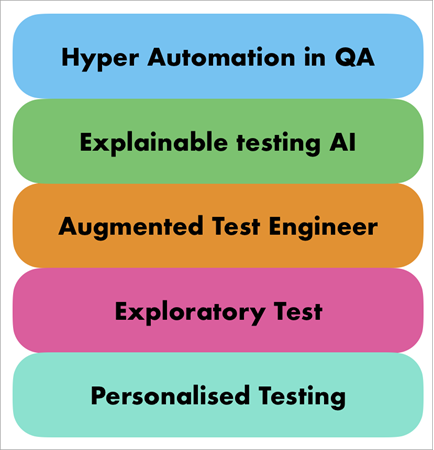
#1) Hyper Automation in QA: Combining machine learning algorithms and agentic process automation will develop the future of fully autonomous testing. This will minimize the human interaction in the time-consuming process and execute faster testing.
#2) Explainable Testing Through AI: With greater emphasis on explainable AI, we can enhance the transparency and build trust in AI-integrated test systems. It makes AI-generated test cases explainable to the team.
#3) Augmented Test Engineers: Augmentation is not far away. Agentic AI will augment human testers, collaborating with AI agents to build and optimize testing strategies.
#4) Assisting in Exploratory Testing: Having exposure to large databases, AI agents can suggest testing scenarios from previous issues, failure reports, and edge cases that were not covered in existing tests. This will broaden aspects of testing.
#5) Personalized Testing: Everything is personalized now, so why not testing! We can personalize our testing strategies based on user requirements, performance matrices, and usage patterns to enhance the overall user experience.
Frequently Asked Questions
1. How much does AI agent testing cost?
The basic implementation cost ranges from $30 and more, depending on features, team size, tools, and requirements.
2. Can AI agents replace human testers?
No, although AI agents augment human testers but cannot replace them. AI agents can make mistakes, and a human tester is needed for verification and critical thinking for decision-making.
3. What’s the learning curve for AI testing tools?
Depending on individual or team skills, AI testing tools can be integrated in a few minutes to days with natural language and no-code feature support.
4. How do I choose between different AI testing platforms?
Choose the one that fits the company’s budget, requirements, team skills, platform support, scalability, and usage.
5. How to choose AI testing tools for small teams?
For a small team, consider one with a low-code/no-code setup, minimum pricing, fast integration, and onboarding support with minimal maintenance.
6. What are the minimum requirements to implement AI agents?
No heavy infrastructure, basic integration knowledge, testing environment, access credentials, or QA ownership.
Conclusion
Lastly, concluding this article, which describes AI agents, their enormous capacity to handle large data and amazing ability to learn & adapt to their environment is just mind-blowing! These agents assist testers at every stage of testing, from data collection to bug reporting, and handle critical situations in real time through their self-learning capabilities.
Also, let’s remember our team’s work on delivering high-quality products through test case generation, execution, and AI agent-driven automation to boost the testing process.
I hope you enjoy this article on the future Digital Co-worker called AI agents.
Research Process: The total time involved to complete and publish this article is approximately 38 hours. This content was created through a structured research approach to ensure accuracy and reliability.
For more AI in software testing-related guides, you can explore our range of tutorials below:
- Top AI Agent Development Service Company
- Top AI Development Services
- Top 7 Best Generative AI (GenAI) Security Solutions & Platforms
- Latest AI-Based Test Management Tools and Platforms
- The Top 10 Artificial Intelligence Software
- Top AI Testing Tools for Your AI-Powered Testing
- Top 10 Competitive Intelligence Tools To Beat The Competition
- The 15 Best Personal Robot Assistant (AI-Enabled)
Was this helpful?
Recommended Reading
-

List of the Best Artificial Intelligence AI Software With Reviews And Comparison. What is AI Software? Artificial Intelligence (AI) Software is a computer program which mimics human behavior by learning various data patterns and insights. Top features of AI software include Machine Learning, Speech & Voice Recognition, Virtual Assistant etc.…
-
Rapidly build intelligent automation solutions with the best AI Agent Development Service Companies in the market. Pick the right custom AI Agent to streamline your business operations and boost productivity: The AI Agent definition can be stated as: An AI Agent is basically a software that takes control of business…
-
Transform your business vision into reality with expert AI development services. Pick the best Artificial Intelligence development services that offer end-to-end custom solutions to streamline your corporate operations: Thanks to the rapid development of AI in recent years, we are truly living in a world of endless possibilities. The AI…
-
Streamline your QA process and boost your test automation efficiency with these top AI Testing tools. Pick the best AI tool to revolutionize Software testing and transform your workflow drastically: Today, machine learning and AI-powered software testing tools have massively improved. Companies across various sectors are incorporating ML (Machine Learning)…